http://dubadosolutions.com/wp-content/uploads/2017/05/dubado-logo-1.png00http://dubadosolutions.com/wp-content/uploads/2017/05/dubado-logo-1.png2025-12-01 17:26:132025-12-01 17:26:13GEO vs. AEO vs. AI SEO vs. LLMO: What These Terms Actually Mean
http://dubadosolutions.com/wp-content/uploads/2017/05/dubado-logo-1.png00http://dubadosolutions.com/wp-content/uploads/2017/05/dubado-logo-1.png2025-12-01 17:19:122025-12-01 17:19:12Best AI Search Strategies for SaaS Companies in 2025: 9 Proven Approaches
http://dubadosolutions.com/wp-content/uploads/2017/05/dubado-logo-1.png00http://dubadosolutions.com/wp-content/uploads/2017/05/dubado-logo-1.png2025-12-01 16:57:092025-12-01 16:57:09How ChatGPT Decides Which Brands to Recommend
http://dubadosolutions.com/wp-content/uploads/2017/05/dubado-logo-1.png00http://dubadosolutions.com/wp-content/uploads/2017/05/dubado-logo-1.png2025-12-01 16:48:502025-12-01 16:48:50Why Traditional Keyword Research Fails in AI Search
AI search is reshaping how ecommerce brands get discovered.
One week, your products show up in ChatGPT. The next week, they’re replaced by competitors.
For many brands, this uncertainty can feel overwhelming.
Organic visibility now depends less on rankings and keywords, and more on how LLMs gather information, which platforms they rely on, and what signals help them highlight your brand.
In this guide, I’ll explain this crucial shift in detail.
I’ll unpack:
What actually shapes visibility inside AI answers
The business impact of compressed buyer journeys and broken attribution
How you can build lasting relevance in this new search ecosystem
The 3 Types of AI Visibility for Ecommerce Brands
If you’re familiar with SEO, getting AI visibility is similar. It starts with how search systems decide what to display.
But for years, ecommerce SEO was a linear equation: rank = visibility = traffic (and then conversions).
AI search is changing that.
LLMs summarize, compare, and recommend products, all in one place.
In short: Shoppers can discover your products, check alternatives, and make buying decisions within AI chats.
In this new setup, brands compete across three different discovery models.
Type 1: Brand Mentions
Mentions drive product discovery and build top-of-funnel LLM visibility for your brand.
This is where your brand gets featured in AI-generated answers, often without a link to your site.
Mentions often come from reputation signals like:
Reddit posts
Media coverage
User reviews
Social discussions
Put simply, you become part of the conversation.
For new or emerging brands, this is often the first touchpoint to reach shoppers through AI.
Type 2: Citations
Citations are linked references within AI-generated results, like a footnote in an essay.
With citations, LLMs attribute specific information, claims, or data points to your pages.
Your brand becomes a source of truth in AI responses and gains credibility.
How?
When an AI tool cites your brand, it signals to shoppers that you’re an authoritative voice.
Plus, citations can support your positioning. The AI tools can pull your framing and product narrative into their response. Not someone else’s.
Type 3: Product Recommendations
AI platforms actively recommend products for a shopper’s specific needs and concerns.
This is the most impactful layer for ecommerce brands.
Your products can show up with pricing, ratings, and other details.
This type of visibility effectively merges discovery and purchase in one place.
This happens when the LLM reviews the query, compares options, and picks your product as the best fit.
Showing up in the list of recommended products makes your brand a part of the decision interface.
Shoppers can compare specs, prices, and reviews — or even purchase — right in the AI chatbot or search tool itself.
How AI Models Choose Which Ecommerce Brands to Surface
AI visibility as a discipline is still evolving rapidly. But there are clear patterns to which ecommerce brands get seen and which get sidelined.
Two driving forces at play are: consensus and consistency.
Consensus
With traditional search, ecommerce brands could build domain authority through activities like link building and digital PR. Strong pages from an authority perspective tended to perform well in search results.
In AI search, LLMs don’t evaluate your website and product pages in isolation. Authority is built from a consensus across sources.
LLMs ask: “What do credible sources agree on about this product?”
To decide which brands and products deserve visibility, LLMs cross-reference multiple sources, like:
Reddit threads
YouTube videos
Industry reports
Customer reviews
Trusted publishers
Community discussions
So, a glowing review on your PDP might mean little if customers on Amazon consistently leave 1-star ratings.
And a publisher’s feature loses impact if Reddit users repeatedly recommend your competitors instead.
In other words: No single source determines your likelihood of being mentioned or cited. It’s the pattern of consensus across multiple platforms that does this.
For example:
Keychron frequently shows up when you use AI search tools to find mechanical keyboards.
This happens because the brand has earned trust through various sources:
Review sites like PCMag and Tom’s Guide rank Keychron in their top recommendations
Keychron’s Amazon pages are detailed with positive reviews and an average rating of 4.4 stars
Multiple Reddit threads in subreddits like r/MechanicalKeyboards and r/macbook recommend the brand
Several YouTube videos feature Keychron in their roundup of mechanical keyboards
Each trust signal on its own is valuable.
But when taken together, LLMs see a pattern of independent sources validating the same brand/product for a specific use case.
Consistency
LLMs don’t crawl and rank pages the way traditional search engines do.
Instead, when answering a product-related query, an AI model might pull:
Your product name from your Shopify store
Pricing from Google Merchant Center
Key specs from Amazon
Opinions from users on Reddit
If your product title is “stainless steel” on Amazon but “brushed metal” on Walmart, the LLM can’t decide which is correct. This inconsistency could make the AI tool less likely to include any information about your product. Or it could include the wrong information.
This is why data hygiene is crucial for building AI visibility.
You need to maintain a clean, synchronized identity for every product across every channel.
Your product attributes should follow the same pattern across your site, marketplaces, and feeds:
Model numbers
Dimensions
Materials
Weights
Prices
LLMs use these data points to match your products to queries and validate claims across sources.
Your Amazon listing, your Shopify store, your Google Merchant feed — all sources need to tell the same story with the same data.
So, the same SKU name, image, and product description should appear everywhere your product appears.
Finally, outdated data signals decay, and models may deprioritize products with outdated info.
When you change a price or update a key spec, that change should be visible everywhere. Stock availability, pricing, and features should always be up to date.
Types of Content That Dominate Ecommerce AI Search
We’re seeing clear patterns in what gets cited, mentioned, or ignored in AI search for ecommerce.
Understanding these patterns can be the difference between hoping you show up and knowing how to position your brand so that you do show up.
Here’s what’s currently doing well in AI search for ecommerce:
Top Cited Sources
I wanted to see which brands are cited most frequently in LLM responses for ecommerce queries — so I tested it.
I picked nine popular ecommerce niches and searched category-specific queries across ChatGPT, Claude, Perplexity, and AI Mode.
Based on the responses, I made a list of five popular brands showing up frequently for each vertical.
Then, I jumped to the “Competitor Research” tab in Semrush’s AI Visibility Toolkit to run a gap analysis for these five brands in each category.
The “Sources” tab showed which domains LLMs cite most frequently, like this for the “outdoor travel & gear” niche:
This data reveals where LLMs pull product information, and which platforms matter most in your vertical.
Here’s what this data tells you:
Reddit: Reddit is a top-cited source for nearly every industry. If people aren’t discussing your brand in relevant subreddits, invest in Reddit marketing.
YouTube: It’s another universal citation source. Video content from creators and users feeds into AI answers. That means having a YouTube presence can be a huge visibility lever for most ecommerce verticals.
Category-specific platforms: Generic sources like Amazon appear everywhere. But niche platforms (like Petco, Barbend, Sephora) carry weight in their verticals.
Wikipedia: It’s a top source for categories like outdoor gear, healthy drinks, and gadgets. This is where product context and category education matter a lot alongside the likes of specs and pricing.
Going beyond these top-cited platforms, here are the kinds of content LLMs link to most frequently for ecommerce queries:
Publisher Listicles
These are product roundups, buying guides, and comparison posts from established media outlets.
For example, I asked ChatGPT for the best Bluetooth speaker recommendations.
It cites publishers like TechRadar, Rtings.com, and Stereo Guide for this response.
Getting featured in these listicles means you’re part of the source material LLMs use to compile information.
AI models use publisher listicles as sources because they:
Compare multiple products in one place
Refresh their recommendations periodically, providing recency signals
Include specific, comparable details like price ranges, key specs, and pros/cons lists
Fulfill high editorial standards and so may appear more trustworthy than user-generated content
Retailer Product Pages
Retailers like Amazon, Walmart, and Target are among the most frequently cited sources for product queries.
When I asked Perplexity about the NutriBullet Turbo, it cited the product pages from the likes of Walmart and Macy’s.
These PDPs provide structured data points like ratings, pricing, and key specs.
AI models often rely on these product pages because they:
Include structured, machine-readable product data like specs, dimensions, materials, and pricing
Aggregate hundreds or thousands of customer reviews as social proof
Show real-time availability and pricing
Lab Tests and Expert Reviews
In-depth product testing content from experts is another important source for citations.
These websites test products systematically and publish detailed findings.
LLMs can then use this empirical data as the basis for their responses.
For example, I asked Claude to find the best mattress for side sleepers.
The tool references sites like NapLab, Consumer Reports, and Sleep Foundation for data-backed recommendations.
AI models consider lab test or expert review content for citations because they:
Compare products against consistent criteria and benchmarks
Show credibility with independent, systematic evaluation processes
Include measurable data to explain their top-ranked recommendations
Periodically update their recommendations to offer fresh, authoritative data
Reddit Threads and Community Discussions
Conversations on Reddit, Facebook groups, and YouTube comments frequently appear in AI responses.
This is especially true for subjective queries like “Is X worth it?” or “What do people actually think about Y?”
I tested this myself by asking Perplexity whether the Instant Pot Duo is worth buying.
It pulled insights from multiple Reddit threads, a Facebook group, and a YouTube video to respond based on real user input.
Brands that get mentioned positively across multiple Reddit threads build “cultural proof.”
And those organic discussions about your brand feed directly into AI training data and real-time search results.
AI models pull from these communities because they:
Present an aggregated sentiment from community discussions
Contain contrasting opinions and insights to objectively review products
Show different use cases and pain points that a product can tackle
Highlight a product’s pros and cons based on firsthand experience
Comparison Posts
Content that compares two or more products can also help LLMs find the right brands to mention in their response.
When I ask AI Mode for alternatives to the supplement brand Athletic Greens, it mentions five options.
The sources include several comparison articles (alongside some roundups).
Being included in this type of content (even if you’re not the winner) can help build your visibility.
This could be Brand A vs. Brand B blog posts, YouTube videos, review sites, and social media discussions.
AI models refer to these resources because they:
Answer buyers’ questions by comparing two or more products
Focus on decision-making criteria and help people make informed decisions
Let’s now consider the business impact of this AI search setup for your ecommerce brand.
The Compressed Buyer Journey
The traditional ecommerce funnel was built on multiple touchpoints.
A shopper might:
Google a product category
Read reviews on multiple different sites
Check Reddit and YouTube
Visit brand websites to compare prices
Return days later to buy
Each step was an opportunity for your brand to show up, make an impression, and win their trust.
For a lot of purchase decisions, AI search collapses this entire journey into a single interaction.
The same shoppers can now go to AI tools and ask, “What’s the best air fryer for a small kitchen?”
They get a single response with buying criteria, product recommendations, pricing, ratings, and more.
Now, clearly this isn’t going to happen for every purchase decision. These tools are still new for one thing, and it takes a lot to majorly shift buyer behavior. (And of course, SEO is not dead.)
But discovery, evaluation, and consideration CAN all happen in one response now. The AI agent performs the research labor.
That means you have fewer chances to influence buyers.
In the past, if a shopper didn’t discover you in organic search, they might find you through a review site, a Reddit thread, or a retargeting ad.
In other words: You could lose the first touchpoint and still win the sale three touchpoints later.
With AI search, you might only get one shot: the initial response.
For many ecommerce queries, AI tools give you a curated list of options. If you’re not in that initial answer, you don’t exist in the decision process.
Take action: Build an AI search strategy using our Seen & Trusted Brand Framework to increase the probability of your brand getting featured in AI responses.
The Visibility Paradox
Your brand might frequently show up in AI search. But your analytics show flat traffic and zero conversions traced back to AI tools.
Here’s why:
Not all AI visibility is created equal.
Your brand can appear in 10 different AI responses and drive 10 completely different business outcomes.
It all depends on how you’re presented.
Here’s what the visibility spectrum actually looks like for ecommerce brands:
Visibility Type
Example
Business Outcome
Mentioned without context
“Popular air fryer brands include Ninja, Cosori, Instant Pot, and Philips.”
Value: Brand awareness Purchase Likelihood: Low
Mentioned with attributes
“Cosori is known for its large capacity and intuitive controls.”
“The Cosori 5.8-quart model includes 11 presets, uses 85% less oil than deep frying, fits a 3-pound chicken, and costs around $120.”
Value: Active consideration and purchase Purchase Likelihood: High
That means getting mentioned is table stakes, not the end goal.
Building brand awareness without differentiation just makes you a part of the crowd.
To drive real sales, you need to earn citations and product recommendations.
The brands winning in AI search are:
Cited as trustworthy sources
Recommended for specific use cases
Attribution Gets Murky
When shoppers find products through AI but buy elsewhere, analytics tools can’t track the whole journey.
This creates two problems:
You can’t prove the ROI of AI search: Even if AI mentions are driving consideration, you’ll get zero or limited data on that. You won’t see the prompt the user asked or the response from the tool.
You can’t optimize what you can’t measure: When you don’t know how people are discovering you in AI answers, you can’t A/B test your way to better visibility. The feedback loop is broken.
Tools like Semrush’s AI SEO Toolkit are closing this gap by showing how your brand and competitors appear in AI search.
I used the tool to check the AI visibility and search performance for Vuori, an athleisure brand.
The brand has a score of 76 against the industry average of 82, and is frequently mentioned AND cited in AI responses.
The toolkit also identifies specific prompts where your brand is mentioned or missing.
This makes it easy to spot exactly which type of queries are driving visibility and which represent missed opportunities.
For example, here’s a list of prompts where LLMs don’t feature Vuori, but do mention its competitors.
Go to the “Cited Sources” tab to find out the websites that LLMs most commonly refer to for your industry-related queries.
For Vuori, it’s sites like Reddit, Men’s Health, Forbes, and more.
The “Source Opportunities” tab will give you a list of key sites that mention your competitors, but not you. These are sites you should aim to get your brand included on.
Besides tracking your own AI visibility, the AI SEO Toolkit also lets you monitor your competitors’ performance on AI platforms.
The “Competitor Research” report compares you to your biggest competitors in terms of overall AI visibility.
It also highlights topics and prompts where other brands are featured, but you aren’t.
Example of a Brand That’s Winning in AI Search: Caraway
If you want to see what winning in AI search actually looks like, look at the cookware brand, Caraway.
When you ask AI about the “best bakeware set” or the “best ceramic pans,” Caraway almost always makes the shortlist.
Data from Semrush’s AI SEO Toolkit shows that Caraway also outweighs its biggest competitors in AI visibility.
Let’s break down how Caraway built this advantage.
Showing Up Where LLMs Look
Caraway is frequently featured on publishers like Taste of Home, Good Housekeeping, and Food and Wine.
These are the actual sources LLMs cite when constructing answers about cookware-related queries.
For example, here’s a paragraph from the Food and Wine article ChatGPT cited as a source, which mentions the attributes ChatGPT used in its recommendation:
Caraway also earns mentions through organic discussions on Reddit, Quora, and kitchen forums.
Retailer Evidence That AI Can Cite
Caraway’s clean Amazon Brand Store and on-site product pages also make it easily citable.
These product listings and pages give LLMs concrete signals like:
Multiple in-stock SKUs with visible sales velocity (“500+ bought in the past month”)
Product rating and volume
Rich media files
These retailer PDPs become credible sources for verifying pricing, availability, or product specs.
Strong Affiliate Presence
Caraway also runs an affiliate program, and the brand makes it frictionless for publishers to feature its products through:
Affiliate networks: Links are available through major networks like Skimlinks and Sovrn/Commerce
Amazon compatibility: Editors can also use Amazon Associates links for Caraway’s stocked SKUs
Reviewer support: The brand provides an affiliate kit, including link types, banner ads, text links, and email copy
This all makes it easy for Caraway to work with influencers and other publishers to promote its products. And these publishers can then appear as citations when AI tools make their recommendations.
For example, all the highlighted sources in the ChatGPT conversation below contain Caraway affiliate links:
Part of the Category Narrative
Many style media and mainstream outlets reference Caraway in their content.
Here’s a recent example from an Architectural Digest interview featuring the cookware set as an essential kitchen item.
This creates more authority for the brand in the cookware and kitchen category.
Make AI Work for Your Ecommerce Brand
You now know how the game works and who’s winning. It’s your turn to play it.
But there’s a lot to do.
Making your site readable by LLMs, opmtimizing your structured data, and setting up automated product feeds are just stratching the surface.
Our comprehensive Ecommerce AIO Guide gives you alll of the actionable tactics to consistently show up in AI results.
http://dubadosolutions.com/wp-content/uploads/2017/05/dubado-logo-1.png00http://dubadosolutions.com/wp-content/uploads/2017/05/dubado-logo-1.png2025-11-28 15:00:212025-11-28 15:00:21How Ecommerce Brands Actually Get Discovered In AI Search
SEO never stands still, and neither do we here at Yoast. In our November 2025 edition of the SEO Update by Yoast, our principal SEOs, Carolyn Shelby and Alex Moss, broke down the latest shifts in search, structured data, and AI. Whether you’re running an e-commerce store, managing a content-heavy site, or just keeping up with Google’s ever-changing rules, this edition highlights what actually matters.
Google updates
Google is refining its search results, phasing out certain structured data features, including FAQ snippets and COVID-19 updates. But that doesn’t mean you should strip structured data from your site. It still plays a role behind the scenes, especially for AI retrieval, and could make a comeback later.
For online stores, the message is clearer than ever: product schema is non-negotiable. Search Engine Journal’s Matt Southern explains that Google’s new AI shopping tools, such as agent-based checkout and side-by-side comparisons, require that your product data be complete, consistent, and easily visible. That means no hiding key details behind tabs or toggles. If it’s not easily crawlable, Google’s AI won’t use it.
Search Console updates
Search Console got a few useful upgrades this month. Query Groups now clusters search terms by topic instead of individual keywords, making it easier to spot content gaps and adjust your strategy. Brand Query Filters help distinguish between branded and non-branded searches, which is handy for tracking misspellings or seasonal trends.
Custom Annotations, previously only available in GA4, now allow you to log site changes directly in Search Console. This is great for connecting updates to performance shifts. E-commerce sites also get a small win with shipping and return details, which can now be added without a Merchant Center account. It’s still rolling out, so test it carefully to avoid missteps.
Google and AI
AI continues to reshape search, and Google’s AI Overviews play a significant role in this transformation. Search Engine Roundtable’s Barry Schwartz’s story on Robby Stein from Google emphasizes that these overviews draw from clear, structured content, such as headings, lists, and direct summaries. Word counts don’t matter as much as clarity and extractability.
The downside? According to Danny Goodwin, in Search Engine Land, AI Overviews have slashed organic click-through rates by 61% and paid CTR by 68%. The takeaway isn’t to chase clicks but to optimize for visibility in AI answers. If your content is easy to extract and cite, you’re in a better position.
Beyond Google
Beyond Google, ChatGPT’s new SDK enables developers to build apps within the platform, which could be particularly useful for larger companies seeking to streamline AI integrations. Meanwhile, Adobe’s acquisition of Semrush might push the tool toward enterprise users, so smaller teams should watch for pricing changes.
The next SEO Update by Yoast is scheduled for December 15, 2025, at 4:00 PM CET. Until then, the focus remains on structured data, clear content, and adapting to AI-driven search. For e-commerce sites, this means ensuring that product data is accurate and up-to-date. For content creators, it’s about writing for extractability. And for everyone? Keeping an eye on Search Console’s new tools to stay ahead.
http://dubadosolutions.com/wp-content/uploads/2017/05/dubado-logo-1.png00http://dubadosolutions.com/wp-content/uploads/2017/05/dubado-logo-1.png2025-11-27 16:35:302025-11-27 16:35:30SEO Update by Yoast November 2025 edition recap
If you’re serious about visibility in search, you need to start using schema markup. This structured data tells search engines exactly what your content means, not just what it says, so they can display richer, more accurate results.
Schema isn’t just about getting a fancy result in Google’s SERPs anymore. It also increases your chances of being cited in AI-generated summaries Search engines are moving toward generative results, and structured data is now a key signal of authority and clarity.
Key Takeaways
Schema markup is a type of structured data that helps search engines understand the meaning behind your content, not just the text itself.
Sites using SEO schema markup often see improved click-through rates. Users get more context directly in the results, which drives more clicks.
Generative AI search tools now use structured data, which makes schema markup even more valuable for visibility.
Many websites still don’t fully implement schema, so using it correctly gives you an advantage over less-optimized competitors.
What is Schema Markup?
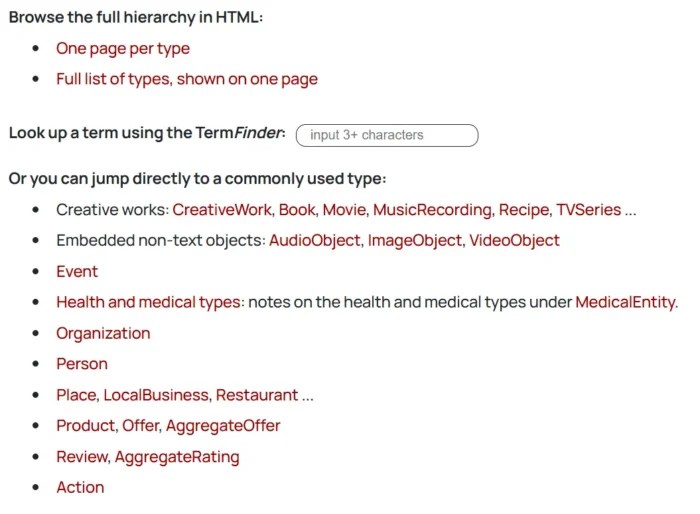
Schema markup is a form of structured data that tells search engines what your content means, not just what it says. It uses a standardized vocabulary from schema.org to label specific pieces of information, like an article’s author, a product’s price, or a recipe’s cooking time.
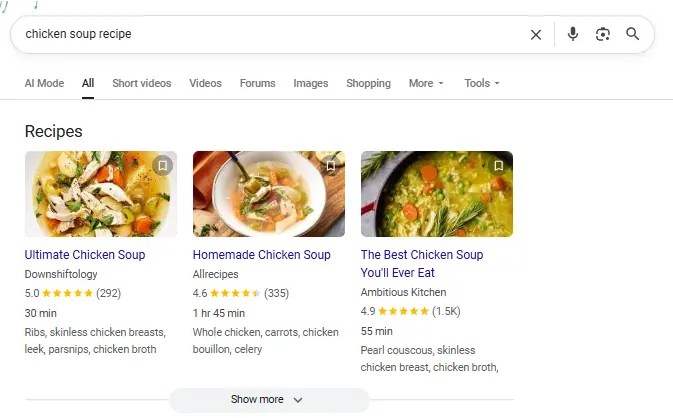
Here’s an example of the end result of some schema in action, showcasing added details for a recipe:
When you add schema to your HTML, it doesn’t change how your page looks to users, but it helps search engines interpret your content more accurately. That’s how you get things like star ratings, event dates, or FAQ dropdowns in SERPs.
Schema improves categorization by giving structure to information that would otherwise be unstructured or ambiguous. That extra clarity supports more precise indexing and increases your chances of appearing with rich results.
Most content online is considered unstructured data, which means it’s readable by humans but harder for machines to interpret. Schema adds structure that makes meaning explicit, bridging the gap between your content and how search engines understand it.
Types of Schema Markup
There are dozens of schema types, but only a handful consistently drive SEO value. The key is knowing which formats align with your goals and content structure. Here are the high-impact schema types you should focus on:
Commonly Used and SEO-Driven
Article: Use this for blog posts, news, or editorial content. It supports elements like headlines, bylines, and publication dates, helping your content stand out in organic results.
FAQ: Can make your page eligible for expandable Q&A boxes beneath your page title. A strong option for capturing more SERP space. FAQ schema works especially well on service or solution pages.
Product and Review: Must-haves for e-commerce. These display key details like price, availability, and customer ratings.
Local Business: Ideal for brick-and-mortar locations or service areas. It includes address, hours, contact info, and geo coordinates. Event: Showcases information for webinars, conferences, or in-person events like date, time, location, and ticket availability.
Breadcrumb: Enhances your site’s navigational trail in search results. It also helps search engines better understand your site’s structure.
Underutilized but High-Impact Schema Types
Video: Helps search engines surface and display videos with rich details like thumbnails, duration, and key moments.
Course: Designed for online education content. Includes fields for course name, description, provider, and learning outcomes.
Job Posting: If you’re listing open roles on your website, this schema can push them into Google Jobs with structured info like salary, qualifications, and deadlines.
Software Application: Highlights app features, pricing, platform compatibility, and reviews. Ideal for SaaS companies or digital products.
There are also industry-specific schema types for recipes, medical conditions, real estate listings, and more, each designed to help content stand out in competitive niches.
While most websites stick to just one or two schema types, combining them across relevant pages gives Google a clearer picture of your site and can increase eligibility for multiple rich result formats.
Why is Schema Markup Important For SEO?
Schema markup doesn’t directly impact rankings, but it can improve how your pages appear in search by making your content easier for search engines to understand. When used correctly, it clarifies the structure and intent behind your content, which improves how your pages appear in search results.
With SEO schema markup, your listings can include extra context like star ratings, pricing, or FAQs, making them more informative and more likely to be clicked when rich results appear. These enhanced listings improve visibility and help searchers understand your content before visiting your site, which supports better engagement and user satisfaction.
Structured data also improves the user experience by giving searchers helpful, structured details before they even land on your site. This kind of clarity reduces bounce rates and increases engagement, which are both positive behavioral signals.
To be clear, Google has stated that structured data is not a direct ranking factor. But it can improve how your content is understood and discovered in search.
“Structured data is not used for ranking purposes, but it can enable search result enhancements and content discovery.” — Google Search Central
If you’re not using schema markup yet, you’re likely leaving visibility and traffic on the table, especially in crowded search spaces.
Schema Markup And AI
As search shifts toward generative results, schema markup becomes increasingly valuable, not as a ranking signal, but as structured clarity that helps machines interpret content consistently at scale. Tools like Google’s AI overviews, ChatGPT, and other large language models increasingly reference or infer structured relationships in your content. While schema markup isn’t directly parsed by every AI tool, it provides a framework that reinforces meaning, credibility, and context.
In Google’s case, schema can increase the chances of being featured or cited in AI-generated summaries by making your content more machine-readable. Clear, structured data helps Google understand which parts of your content are most relevant to a query, and that’s exactly what fuels AI-powered result boxes.
It also supports consistency across platforms, ensuring that search engines, crawlers, and third-party tools are all interpreting your information the same way. That’s critical in a landscape where content can be surfaced in snippets, carousels, voice results, and generative interfaces.
As AI continues to reshape search behavior, structured data plays a critical role in making your content visible and machine-readable across evolving search experiences.
How to Create Schema Markup for SEO
There’s no single way to implement SEO schema markup. The right method depends on your setup, your tools, and how much control you want over the code.
Schema Markup Generators
Schema generators are great to help create your schema type so you don’t have to do it manually. They offer flexibility and control, especially if you want to create cleaner SEO schema markup using JSON-LD.
One great option is Dentsu’s Schema Markup Generator. It supports a wide range of schema types and gives you real-time previews of the structured data output.
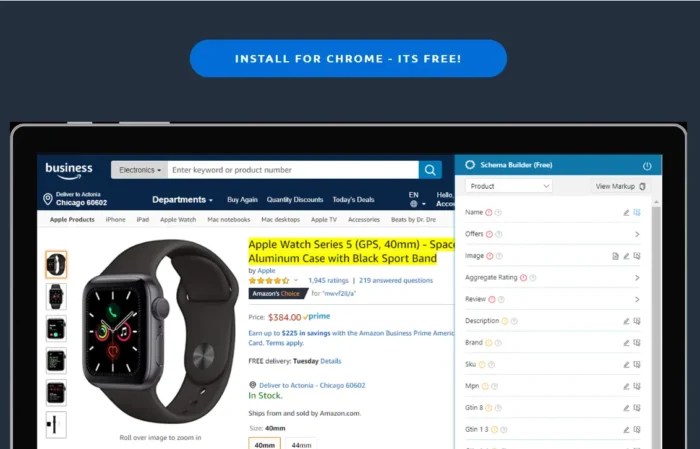
Another user-friendly pick is Schema.dev, which offers a visual editor for common schema types like Article, Product, Event, and more. It’s great for marketers who want more polish without touching raw code.
If you’re working on technical SEO at scale, tools like RankRanger’s generator or the Hall Analysis tool can help automate more advanced schema needs.
Most of these tools will output JSON-LD code, which you can copy and paste directly into your website’s head tag or through a CMS plugin.
Build Schema Manually
For developers or SEOs who want full control, manually writing SEO schema markup in JSON-LD is the most flexible option. This approach is ideal when you need to nest data types, customize beyond what’s available in generators, or integrate schema into a templated CMS or headless setup.
The most common format for manual schema is JSON-LD, a lightweight data format that can be placed inside a <script type=”application/ld+json”> tag in your HTML.
Schema.org provides documentation and examples for hundreds of item types, including complex combinations like a Product with reviews, availability, and brand info.
While this method takes more effort, it allows you to fine-tune every field and ensure the markup perfectly matches your content structure.
If you’re confident in your technical skills or already working with structured templates, hand-coding schema can unlock the most advanced use cases.
Use WordPress Plugins
If your site runs on WordPress, adding SEO schema markup is straightforward with the right plugin, with no coding required.
Yoast SEO adds basic structured data out of the box, like Article, WebPage, and Organization schema. You can also set defaults for different post types or override schema per page.
Rank Math offers more flexibility with its built-in Schema Generator. It supports custom fields, nested schema, and additional types like Product, FAQ, and Course. You can add schema site-wide or build it block-by-block using their visual editor.
Another option is the Schema & Structured Data for WP plugin, which offers advanced rule-based schema placement, support for over 30 types, and WooCommerce integration.
Most plugins handle the technical output for you, just select the schema type, fill out the fields, and publish.
Use ChatGPT
ChatGPT is a quick way to generate SEO schema markup without relying on a plugin or tool. It’s especially useful when you want structured data for a specific content type but don’t want to hand-code it from scratch.
To get started, just ask ChatGPT for the schema you need. For example:
“Create JSON-LD schema markup for a Product with name, price, rating, and availability.”
You can also refine the output by adding more context. Want to include an author bio? Just ask. Need multiple FAQs? List them out, and ChatGPT can format them for you.
The results are typically in valid JSON-LD format and can be copied into your site’s HTML or CMS.
It’s not a replacement for technical SEO tools, but it’s a powerful shortcut when used with the right prompts.
Add Schema Markup to Your Site
Once you’ve created your SEO schema markup, you need to place it on your site where search engines can find it. The most common format is JSON-LD, which should be embedded inside a <script type=”application/ld+json”> tag.
If you’re working directly with code, add the schema to the <head> section of your page, or just before the closing </body> tag. This helps ensure it gets picked up by search crawlers.
If you’re using a CMS like WordPress, Shopify, or Wix, many themes or SEO plugins include fields where you can paste your structured data directly. Just copy your JSON-LD and drop it into the appropriate field.
As we mentioned before, plugin-based setups, tools like Rank Math or Yoast will often insert schema automatically based on your settings, with no manual copy-paste needed.
No matter the method, the goal is the same: get valid, clean schema markup live on your site.
Validate Your Schema
Before you publish any SEO schema markup, you need to validate it. Even small formatting issues can break how search engines read your structured data.
You can either paste in your raw JSON-LD code or enter the URL of a published page. The tool will scan your markup and return any errors, warnings, or unsupported types.
Look for a “Valid” result nd ensure the schema type you used is recognized and correctly implemented. If there are issues, revise your code and re-test until everything passes.
You can also use Google’s Rich Results Test to see if your schema is eligible for enhanced SERP features.
Validation is a small step that ensures your markup actually works and gets you the visibility you’re aiming for.
Best Practices For SEO Schema Markup
To get the most out of your SEO schema markup, you need more than valid code. These best practices help ensure your structured data drives real visibility while staying within Google’s guidelines.
Only mark up visible, relevant content:
Don’t tag hidden elements, placeholder content, or anything users can’t actually see.
Schema should reflect what’s on the page. Misleading or hidden markup can get ignored or flagged.
Use the most specific schema type available:
Avoid generic markup. If your content is a recipe, use Recipe schema. If it’s a course, use Course schema. The more specific and accurate, the better.
Keep your structured data up to date:
Prices, dates, product availability, and other time-sensitive data should reflect the live content. Inaccurate schema can confuse search engines and users.
Avoid over-marking or spamming schema types:
Just because a schema exists doesn’t mean it belongs on your page. Only mark up what’s directly relevant and helpful to the user.
Accurate, helpful schema increases your chances of showing up in enhanced results. Misused or sloppy markup reduces trust and visibility.nd not content in hidden div’s or other hidden page elements.”
FAQs
What is schema markup?
Schema markup is a type of structured data that helps search engines understand the meaning of your content. It uses a shared vocabulary defined by schema.org to label key details like titles, authors, ratings, and more. When implemented correctly, it makes your content eligible for rich results, enhanced listings that display extra information directly in search.
What is schema markup SEO?
Schema markup SEO refers to the use of structured data as part of your overall search optimization strategy. While it doesn’t directly impact rankings, schema enhances how your pages appear in the SERPs. By making content easier to interpret and display, it supports better visibility, higher click-through rates, and alignment with user intent.
Does schema markup help SEO?
Yes, but not in the way most people expect. Schema doesn’t give you a direct ranking boost, but it improves how your pages are presented in search. Rich results stand out more, offer better context to users, and tend to earn more clicks. Schema can improve visibility and click-through rates, which can help your content attract more traffic over time.
Conclusion
Schema markup is one of those SEO techniques that helps to improve how your content appears in search results, yet it’s still underused. It helps search engines understand your pages more clearly, which leads to richer results, better visibility, and more clicks.
Whether you’re optimizing blog content, product listings, or service pages, structured data gives your site a clearer presence in search, and that matters in competitive markets.?
User Experience (UX) optimization isn’t just a design choice. It’s a conversion strategy. If your site is confusing, slow, or frustrating to use, people bounce. They won’t dig for what they need. They’ll leave.
And most won’t come back. According to the Baymard Institute, 88% of online consumers are less likely to return to a site after a bad user experience.
Good UX removes friction. It helps users find what they need faster, trust your content, and stay long enough to convert. It also signals to Google that your site is useful, which improves rankings, engagement, and retention.
This guide breaks down the UX best practices that actually move the needle. No theory. Just clear, actionable ways to make your site easier to use and more effective at turning visitors into customers.
Key Takeaways
Effective user experience (UX) optimization starts with understanding your audience. Use data, heatmaps, and behavioral insights to design around real user needs, not assumptions.
Simplicity wins. Clean layouts, clear navigation, and fast-loading pages make it easy for visitors to engage and convert.
Mobile-first design is essential. With most users browsing on phones, responsive layouts and touch-friendly interfaces are critical to user satisfaction and search visibility.
Great UX directly improves conversions. Every element, from your CTA to your checkout, should guide visitors smoothly toward a goal without friction.
Testing never stops. Continuous A/B testing, analytics tracking, and user feedback loops keep your UX aligned with evolving expectations and business results.
Why User Experience Matters
User Experience (UX) optimization improves more than just aesthetics, directly affecting how well your website performs. A frustrating layout, slow load time, or confusing interface can increase bounce rates, reduce conversions, and damage brand credibility.
When visitors arrive, they’re deciding whether to stay or leave within seconds. If key elements are hard to find or the mobile experience falls short, you lose them.
Clear, intuitive design helps users find what they’re looking for and take the next step. That might mean reading more, subscribing, or completing a purchase. It’s also a core part of conversion rate optimization, where even small UX changes can lead to measurable gains. CRO and UX are areas that more and more marketers are devoting increased budgets to.
User experience also plays a role in how search engines evaluate your content. Signals like mobile usability, site structure, and page performance can influence your visibility, even if UX itself isn’t a ranking factor.
When you improve the way people experience your site, you improve nearly every performance metric that matters.
How UX Supports SEO
User experience and SEO share the same goal: helping people find what they need quickly and easily. SEO drives traffic, while UX keeps visitors engaged once they arrive.
Search engines now factor experience quality into rankings. Google’s Core Web Vitals evaluate how fast a page loads, how smoothly it responds, and how stable the layout feels as it renders. When pages perform well, users stay longer and bounce less, which signals quality to search engines.
Mobile usability plays a major role too. With mobile-first indexing, Google often ranks sites based on their mobile experience. A responsive design that works across all devices improves both accessibility and visibility.
Strong UX optimization helps your SEO work harder. The better your experience, the easier it is for users to explore, trust, and convert.
Next, we’ll break down the UX best practices that make those results possible.
UX Best Practices
The following UX best practices will help you design faster, simpler, and more effective experiences that keep users engaged from their first click to conversion.
Know Your Target Audience
Effective UX optimization starts with understanding who your users are and what they expect from your site. When you base design decisions on real data instead of assumptions, you can create experiences that feel natural, relevant, and easy to use.
Collect audience insights through analytics, user surveys, and behavior tracking. Build personas that capture motivations, preferences, and pain points. These details help you personalize the experience, from navigation to recommendations, in ways that feel helpful, not forced.
Personalization is a proven factor in increasing conversions, so it makes a good starting point for your UX improvements:
Thrive Market is a strong example of user understanding in action. The healthy food retailer tailors its shopping experience through an onboarding quiz that asks about dietary needs and personal goals. Shoppers receive customized product recommendations and grocery lists that match their answers, which removes friction and builds trust from the first visit.
When you design around what your audience values most, engagement becomes effortless. The next step is to make that experience as simple as possible.
Keep Things Simple
Simplicity is one of the most powerful UX best practices. Users form an opinion about your site in seconds. Cluttered layouts and confusing navigation create friction. A clean, structured interface helps visitors find what they need quickly and trust what they see.
Research shows that 88 percent of users are less likely to return after a bad experience. Simplicity isn’t just a design preference. It’s how you keep people on your site and build trust with every interaction.
Apple’s website remains one of the clearest examples of simple, effective design. The layout uses generous white space, clean typography, and bold product visuals that highlight what matters most. Each page features short, direct copy and clear calls to action such as “Learn more” or “Buy.” This approach keeps attention focused and makes navigation effortless.
Simple design improves accessibility and reduces cognitive load. It helps users stay oriented and confident as they explore. Once your site feels easy to use, the next step is making sure it performs the same way on every device.
Build Around Mobile
Mobile traffic now dominates the web, and most users expect sites to work perfectly ontheir phones. If your layout isn’t responsive, you’re losing potential customers before they ever see your content.
Mobile UX design focuses on speed, clarity, and easy navigation. Pages should load fast, text should be readable without zooming, and buttons should be large enough to tap comfortably. A smooth mobile experience keeps users engaged and signals quality to search engines under Google’s mobile-first indexing. It also helps with cart abandonment.
Starbucks offers a strong example of mobile-friendly UX in action. Its responsive design adapts across screens, and the app’s ordering system is simple enough to use one-handed. Customers can browse, order, and pay in seconds, which builds loyalty through convenience.
Mobile UX optimization improves both experience and performance. When users can navigate easily, they stay longer and convert more often. Next, we’ll look at how to guide those users toward the actions that matter most.
Set Goals and Guide Users There
Every great UX design starts with a clear goal. Users should always know what to do next, and every part of your layout should make that path obvious. When visitors understand your purpose, they’re more likely to take action and complete the journey you’ve built for them.
Strong UX optimization is goal-driven. Each page should serve a specific purpose, whether it’s capturing a lead, driving a purchase, or encouraging engagement through smaller actions such as watching a video or subscribing to a newsletter. These soft goals build trust and move users closer to conversion.
Dropbox demonstrates this principle with focus and simplicity. Its homepage centers around a bold, high-contrast “Try Dropbox Free” call to action button that stands out from surrounding content. The message is clear, the design uncluttered, and the action frictionless. This clarity of direction keeps users moving toward sign-up without confusion or distraction.
When your site guides users naturally, you reduce hesitation and increase conversions. The next step is to make sure that experience loads fast enough to keep them there.
Focus on Loading Speed
Speed is one of the simplest ways to improve UX optimization. A slow site frustrates users, hurts engagement, and damages your search visibility.
Fast-loading pages make your entire experience feel smoother and more trustworthy. They also reduce bounce rates and improve rankings because search engines use page performance as a quality signal.
There are practical ways to keep your site fast. Compress images, enable browser caching, and minimize heavy scripts or animations. Consider using a content delivery network (CDN) to distribute resources more efficiently.
When users can access your site instantly, they’re more likely to explore and convert. The next step is making sure that navigation keeps those visitors moving in the right direction.
Use Clear Navigation
Navigation is one of the simplest ways to improve UX. Visitors should be able to find what they need without stopping to think about where to click next. When users can move through your site effortlessly, they stay longer and engage more.
A common rule of thumb is that users should reach any key content within three clicks. While it’s not a strict requirement, the idea still holds: fewer steps mean less frustration and more conversions.
Best Buy demonstrates this principle with effective breadcrumb navigation and well-structured menus. Each category flows naturally into the next, making it easy for shoppers to explore products without getting lost. Clear labels, consistent placement, and visible CTAs reduce confusion and build confidence as users browse.
Good navigation creates momentum. It guides users from curiosity to action and supports the next layer of UX design, establishing a strong visual hierarchy.
Design Hierarchy
Design hierarchy gives structure to your website and helps users focus on what matters most. It’s the principle of using layout, size, color, and placement to show importance and guide attention. When your visual elements follow a clear order, users can navigate your content naturally and confidently.
People don’t read web pages from top to bottom. They scan. Good design aligns with that behavior using visual cues to lead the eye in a predictable flow. Larger fonts, contrasting colors, and prominent placement signal priority and make it easier for visitors to decide what to do next.
Netflix provides a great example of design hierarchy done right. The homepage features bold hero images, clear typography, and obvious CTAs like “Play” and “More Info.” Each element has a specific purpose, guiding users from interest to action without confusion.
Strong hierarchy keeps your design accessible, clear, and easy to use. The next step is to make sure every user can experience it the same way.
Make it Accessible
Accessibility is a core part of UX optimization. Every visitor should be able to navigate, understand, and interact with your site, no matter their abilities or the device they use. When your design works for everyone, you build trust and expand your audience.
Good accessibility starts with simple design choices. Use high-contrast colors for readability, add alt text to images, and make sure every function on your site can be accessed by keyboard. Provide captions for videos and use clear, descriptive link text so screen readers can interpret your content accurately.
Accessibility also includes transparency. Make privacy settings and cookie preferences easy to find and understand. When users know how their data is handled, they feel safer engaging with your content.
Collective Thoughts provides a strong example of accessibility done right. Each article includes an easy-to-find audio version, giving users multiple ways to engage with the same content.
For official standards, review the Web Content Accessibility Guidelines (WCAG). Accessible design benefits every visitor and keeps your site usable across devices, which is especially important for complex actions like forms and checkouts.
Streamline Forms and Checkouts
Checkout friction is one of the biggest UX killers in e-commerce. Every extra click, field, or delay gives users a reason to leave. According to the Baymard Institute, the average cart abandonment rate is nearly 70 percent.
Simple, efficient forms create a faster path to conversion. Ask only for essential information, and make sure labels are clear. Use autofill and progress indicators so users always know where they are in the process. Guest checkout options and flexible payment methods such as PayPal, Apple Pay, and Google Pay remove unnecessary steps that slow people down.
Amazon set the standard for streamlined checkout. Returning users can buy instantly using saved details, skipping the typical multi-step process. That speed and convenience are why the feature became a benchmark for great UX optimization.
When the path to purchase feels effortless, conversion rates rise. The same principle applies to browsing, users should be able to find what they want just as easily.
Use Product Filters and Site Search
Filters and search tools are essential to strong UX optimization. When users can find what they need quickly, they’re more likely to stay, explore, and buy. On large e-commerce sites, well-designed filters reduce decision fatigue and keep the experience organized.
Zappos is a standout example. Its product pages let shoppers filter by size, color, price range, and brand, all from a clean, intuitive sidebar. The site also uses smart search that suggests relevant products as you type, saving time and minimizing frustration. Every interaction feels smooth because the structure matches the way people actually shop.
Good UX best practices make discovery easy. Use predictive search, logical categories, and visual cues like color swatches to help users narrow results faster. When navigation feels effortless, users feel in control, and that control leads to more confident conversions.
The next step is communicating what happens after each click so users always know what to expect.
Test, Test, and Test Again
UX optimization is never finished. Designs that work today can feel outdated or confusing tomorrow. Regular testing keeps your experience aligned with real user behavior instead of assumptions.
Start by using analytics to identify where users drop off or hesitate. Tools like Google Analytics and ContentSquare reveal how people scroll, click, and move through your site. Session recordings and heatmaps show which elements attract attention and which ones get ignored.
A/B testing takes it further. Platforms such as Optimizely or VWO let you compare two versions of a page to see which performs better. Even small adjustments to headlines, layouts, or CTAs can have measurable impact.
The goal is consistent improvement. By testing, analyzing, and iterating regularly, you build a user experience that gets stronger with every insight. Next, we’ll look at how to measure that progress through key UX metrics.
Track Key Metrics for UX Success
Great UX is measurable. Tracking the right data shows whether your optimizations are actually improving the experience. Without clear metrics, you’re just guessing at what works.
Start with the fundamentals. Bounce rate tells you if visitors find your content relevant. Engagement rate shows how long they stay and how deeply they interact. Conversion rate reveals how effectively your UX supports business goals. Together, these numbers tell the story of your site’s performance.
Core Web Vitals are equally important. They measure loading speed, interactivity, and visual stability, the technical foundations of user experience. Improving these signals helps both users and search engines trust your site.
Be sure to monitor these metrics regularly. When you track, analyze, and act on the data, your UX gets sharper and more effective over time. That ongoing improvement is what separates good experiences from great ones.
FAQs
What is user experience?
User experience (UX) is how someone feels when interacting with your website, app, or product. It includes everything from design and navigation to speed and usability. Good UX helps people find what they need quickly and enjoy the process, which builds trust and increases conversions.
What is UX optimization?
UX optimization means improving your site’s design, structure, and performance to make it easier and more enjoyable to use. It focuses on removing friction, improving speed, and guiding users toward clear goals. The result is higher engagement and stronger business results.
What are UX best practices?
UX best practices are proven methods for creating a smooth, intuitive digital experience. They include understanding your audience, simplifying design, using clear navigation, optimizing for mobile, improving accessibility, and testing regularly. These principles make your site more usable and trustworthy.
How do UX best practices impact SEO?
UX best practices directly affect SEO performance. Search engines reward sites that load quickly, work well on mobile, and provide a smooth, intuitive experience. While metrics like time on page or bounce rate aren’t direct ranking factors, strong UX helps users find what they need, stay engaged and complete tasks, which all contribute to better overall performance.
How can I improve website UX?
Start by analyzing how users interact with your site. Simplify your layout, improve page speed, and test your navigation flow. Use clear CTAs and make sure your content is accessible and easy to read.
What tools can I use to test my UX design?
Tools like Google Analytics and ContentSquare help you see where users click, scroll, and drop off. You can also run A/B tests with Optimizely or VWO to compare layouts and features. User feedback platforms such as UserTesting provide direct insights from real visitors.
What is mobile UX design?
Mobile UX design ensures your website works seamlessly on phones and tablets. It includes responsive layouts, readable text, quick load times, and tap-friendly buttons. Strong mobile UX improves accessibility, reduces bounce rates, and helps your site perform better in mobile search results.
Conclusion
Implementing these UX best practices can dramatically improve the user’s journey across your site, increase conversions, and elevate your brand reputation.
Remember, understanding your audience is extremely important. Everything you design should be with your users in mind. Keep things simple, prioritize accessibility, don’t forget about mobile, and never stop testing and refining.
Get started today by examining your site’s user experience and identifying areas for improvement. It may be time to revisit your mobile optimization. Or do your forms need streamlining for a smoother checkout process?
Every change you make can potentially improve your users’ experience and, by extension, your bottom line.
http://dubadosolutions.com/wp-content/uploads/2017/05/dubado-logo-1.png00http://dubadosolutions.com/wp-content/uploads/2017/05/dubado-logo-1.png2025-11-26 20:00:002025-11-26 20:00:00UX Optimization Best Practices to Improve User Experience
You found a digital marketing agency that feels like the one.
The pitch was perfect. They “get” your goals. Their case studies are impressive.
But a few weeks later, reality starts to set in: slow responses, recycled strategies, and reports that don’t show any tangible results.
This scenario is painfully common, but it’s not inevitable.
Choosing an agency that performs as well as they sell is possible — if you know what to look for.
In this guide, I’ll cover:
Red flags that signal an agency might overpromise and underdeliver
Green flags that separate the great partners from the mediocre ones
Must-ask questions to help you spot these flags before you sign the contract
You’ll also get real-world advice from experienced marketing leaders who’ve seen both dream partnerships and nightmare contracts.
By the end, you’ll know exactly how to choose a digital marketing agency in 2026. One that drives results instead of draining your budget.
First up: Vital questions to ask before jumping into a partnership.
Before You Hire a Digital Marketing Agency, Ask These Questions
Finding the right agency starts with understanding what you need and why.
Do You Have Product-Market Fit and a Clear Target Audience?
Even the best agency can’t sell a product that doesn’t solve a real problem for a defined audience.
If product-market fit isn’t there, your results will stall.
Ask yourself:
What pain points do we solve?
Who’s willing to pay for this?
Who else is competing for this audience?
Use a market analysis tool like Semrush’s Market Overview to confirm there’s real, sustainable demand.
For example, a quick search for Purina pet food shows strong growth and evenly distributed traffic — a clear sign of opportunity.
That’s the kind of demand signal you want before investing in outside help.
Do You Have a Clear Goal for Your Marketing Strategy?
A marketing agency can help you refine your goals.
But you’ll get better results when you already know what success looks like.
Vague goals like “increase website traffic” sound good, but they’re too broad to measure. Instead, set SMART goals — specific, measurable, achievable, relevant, and time-bound.
Here’s what a SMART goal looks like in action:
“Generate 120 qualified demo requests per month within four months by improving landing page copy and optimizing Google Ads.”
Clear goals like this help you find the right agency. And give them a focus to rally around and drive results.
Do You Have the Bandwidth to Manage an Agency?
Working with an agency isn’t a set-it-and-forget-it kind of task.
Regular, consistent communication with your agency is part of this process.
Sure, the level of autonomy will depend on the agency and the work.
But generally, the best agencies keep the door to conversation open.
Here’s what you can expect:
Provide materials and align on strategy and deliverables up front
Join weekly or biweekly check-ins (typically about an hour)
Review work and share feedback monthly
Pro tip: Assign one internal “agency owner.” Their job will be to keep decisions moving, share context fast, and unblock workflows.
Do You Know What Marketing Services You Need?
“Full-service marketing” sounds great. Until you realize you’re paying for tactics that get you nowhere.
There are many types of digital marketing agencies:
SEO and content: Drive organic growth through optimized content
Branding and design: Shape your visual identity and messaging
Video: Create video content that converts
Consultant: Help define priorities before execution
But before you pick one, identify what’s already working (and what’s not).
The more specific you are about your needs, the easier it is to find a partner whose strengths align with your goals.
Start by looking at your top-performing channels, campaigns, and content in analytics tools.
If content and partnerships drive results for you, that’s a hint about where to invest.
Next, check what’s working for your competitors.
For example, Semrush’s Organic Social tool reveals how your competitors generate traffic from social media.
And tells you exactly which platforms send the most traffic to their websites.
If others in your space are thriving on social while you’re not, that’s a clue to where you could expand.
Pro Tip: Before looking for an agency, ask yourself: Do I need strategy, execution, or both?
Is Your Internal Team Aligned on What You Need?
Clear goals mean nothing if your team isn’t aligned.
Without internal buy-in, even the best agency partnership can derail fast.
Marketing leader Eric Doty learned this the hard way.
After hiring an agency for a logo redesign (and spending weeks on revisions), leadership revealed they wanted to keep the full company name.
“In the end, we wasted around $15,000 on these iterations when all the company really wanted was to change the font.”
Avoid this by:
Defining who owns the agency relationship
Deciding who signs off on deliverables
Getting stakeholder input before work gets started
Once you’re aligned internally, you’re ready to align externally with your agency.
6 Red Flags That a Marketing Agency Will Waste Your Time (and Budget)
The sales call sounds great.
But how do you know whether the relationship will work long-term?
Don’t go in blind. Here are six warning signs and how to spot them.
1. They’re Not Willing to Invest Time in You
This isn’t something an agency will just come out and say directly. But there may be indications that they’ve currently got too much on their plate.
(And you’re about to be thrown onto the back burner.)
For one, look for a high amount of employee turnover. Employees leave when stress is high.
Check LinkedIn to learn about their employees and watch for downward growth trends.
You’ll also want to pay close attention to the discovery call.
If it’s all about them and nothing about you, that’s a sign they’re not taking the time to understand your business.
An agency that “yeses” you to death without adding ideas or offering pushback is another red flag.
They’re likely more focused on producing work as fast as possible than on providing a sustainable strategy.
Pro tip: Ask for a sample strategic recommendation on the call. Something lightweight like: “How would you improve our blog content?” The right agency will share high-level insights — not just a sales script.
And it’s never a good sign if they get defensive when you ask questions.
This can be an indicator that they’re not willing to invest time in the relationship.
I once hired an agency to help run paid social ads, and they did the absolute bare minimum. I had to point this out to get any attention, and by then, our three-month trial engagement was practically over, and we saw no results. While I don’t know for a fact it’s because we were on the lower end of their engagement value, it seems likely.
Looking at recent testimonials or mentions of the agency can help.
But sometimes, asking pointed questions is the best way to get an answer.
For example:
What’s your typical engagement type?
How long are your typical engagements?
How many clients does your team normally work with at once?
By asking these questions, you’ll get a better sense of the agency’s bandwidth.
2. Their Offerings Haven’t Evolved (or Have Evolved Too Much)
It’s no secret that marketing has evolved over the past few years.
And AI has only accelerated those changes.
So, if an agency hasn’t evolved its strategy to match the industry, it’s a sign they’re coasting on an outdated approach.
Want to find this out before the discovery call?
First, check the age of their case studies. Older case studies indicate a strategy that hasn’t changed.
Next, look at the wording on their services page.
If it sounds generic or dated, that’s a red flag.
In the example below, wording like “Taking over Google” is no longer fully relevant.
Plus, there’s no mention of local search or AI results.
(Which is odd, since they target local businesses.)
Pro tip: Trend chasing is another huge red flag. If you see a digital marketing agency that’s majorly pivoted without the data or case studies to back up those decisions, then you may want to steer clear.
Make sure they’re thinking ahead — not clinging to old playbooks — by asking:
How have your offerings changed in the past year?
How has your process changed since AI came on the scene?
How much does your team use AI when creating deliverables?
What’s your perspective on marketing in the AI era?
But you don’t want to get stuck in a relationship that’s not working.
Shorter contracts may not have an out clause. But if you’re getting ready to sign a contract for a year or more, and there’s no way out of that relationship, that could be a red flag.
For longer contracts, a 30-day out clause is typical. That means you both can leave the contract if things aren’t working out.
If you ask for this clause and the agency is pushing back hard, that’s a warning sign.
Amanda agrees:
No failsafe means the agency knows retention is a problem. And they may be more focused on cash flow than results.
Again, communicating clearly is important here.
When in doubt, ask the digital marketing agency these questions:
How have you handled failed campaigns in the past? Did you course-correct mid-campaign, or offer free revisions?
What barriers to success do you see with our engagement?
What’s your policy for a 30-day out in the contract?
4. Communication Isn’t Clear or Easy
The way your agency communicates during the discovery phase is a key indicator of how they’ll communicate once that contract is signed.
Here are some key warning signs you could see early in the process:
You have to chase them for updates or next steps: If getting in contact with the agency is hard before you sign the contract, don’t expect it to improve later on.
You can’t get clear answers to your questions: Asking about timeline, resources, and processes is normal. If they can’t give you straight answers to basic questions, beware.
You have no idea who you’ll be working with: It’s typical to talk to a salesperson or account manager in the early stages. But if you get pushback when asking to speak to the people you’ll be working with, that’s a red flag.
Chelsea Castle, head of brand and content at Close, experienced this firsthand.
Here’s her agency horror story:
One of my biggest career mistakes was not speaking up sooner and louder about yellow flags with an agency. From the initial meeting, something felt off in our communication. There were bumps and issues throughout the entire nine-month engagement. We didn’t love the output, and they weren’t doing things we suspected they should be doing.
Collaboration and communication were messy. We ended up firing this agency and losing the five figures spent on them, which left us with no completed work. Talk about a challenging conversation with your CEO!
To know more about communication before signing the contract, ask questions like:
Who’s my main point of contact with your agency?
Who’s going to be working on the project with me?
Who will be included in the check-in meetings?
At what points in the process do you track metrics to assess if we’re on the right track?
5. They Promise More Than They Can Reasonably Deliver
Overselling can lead to disaster down the road. But, how do you know if an agency is selling something they can’t deliver?
First, look at the language they use to describe their services or results.
If they make exaggerated claims or promises, it’s worth pausing.
For example, this agency’s website has red flags written all over it:
(I wish this were a made-up website, but it’s not.)
Claims like this sound great, but it’s important to take a step back and look at the facts.
Can they actually back up their claims with real examples?
Can they reasonably guarantee results without knowing anything about the potential client?
Danni Roseman, a brand manager at a SaaS company, hired an agency that promised the world but didn’t live up to expectations.
I assumed a team would handle our project. We later found out that only one person had the expertise we needed. It wasn’t enough. Deadlines slipped, quality dropped, and “edits” turned into full rewrites on our end. Hand-holding your agency isn’t part of the deal.
An agency that’s focused on revenue may sell more than the team is capable of doing, and you’re left with the aftermath.
Another side to this is whether the team has experience using or integrating with your tech stack.
Eric once worked with an email marketing agency that promised big things.
But ended up having no experience integrating with Microsoft Teams (a must-have for his company).
They decided to lead a procurement process for us to find a tool that integrated with Teams. This turned into a massively bloated project, when, really, they should’ve just told me from the get-go that they had no experience with this tool.
So, how do you make sure that what the sales team is offering can actually be delivered down the road?
First, ask pointed questions like:
Who on your team has experience working with the tools in our tech stack?
How much experience does your team have with these tools?
How many years of experience does the team have in this type of project?
What’s the project (within the type of service you’re looking for) that you enjoyed working on the most?
Can you give me some names of people I can talk to about your work?
Lastly, get references.
The sales team is going to say everything right. You need something solid to back up those claims.
Most agency websites say some version of “We do X for Y.” But can they explain how?
This is something you can check for on their website.
For example, what do their case studies look like? Are they just screenshots, or do they explain the process behind the work?
Here’s an example:
What looks impressive at first glance melts away when you realize these are just screenshots.
No discussion of the work, no explanation.
Here are some other warning signs to look out for:
Their process isn’t up for discussion: If an agency tells you anything along the lines of, “Trust us, we’ll handle it,” beware
They’re using the same templated strategies for every client: On the discovery call, are they bringing ideas to the table? Do they take your unique situation into account?
Their reporting is focused on big-number vanity metrics: Case studies with numbers are great. But do those numbers tell you a story of real impact?
They can’t explain why something worked: This could mean the team has little understanding of the mechanics behind the results
If you’re not sure about their process, ask questions like:
How do you approach new engagements?
How much time do you spend determining strategy?
How is the strategy adjusted as time goes on?
How often will we meet for check-ins?
Can you tell me about a project you worked on (in this vertical/type) that didn’t go well? How did your team handle that situation?
When you’re evaluating an agency, Chelsea’s advice rings true:
Ultimately, I think the biggest flag cannot be said; it can only be felt. Intuition and how you connect with someone are crucial in selecting and building long-lasting external relationships.
6 Green Flags You’ve Found a High-Performing Marketing Agency
Despite the horror stories we’ve discussed, great agencies do exist.
Here are the most common green flags — and tips for choosing a digital marketing agency that will actually deliver on its promises.
1. They Start with Questions, Not Tactics
The right agency feels like a partner.
They’re curious about your business and invested in your success.
On the discovery call, look for all of these green flags:
They start by asking deep questions about your business model, ICP, positioning, and goals
They’re comfortable pushing back respectfully if a strategy doesn’t align with best practices
They focus on how their work ties to your business outcomes, not vanity metrics
For example, KlientBoost, a PPC agency, doesn’t just offer standard strategy packages.
They ask questions about what the client needs, their goals, and their situation.
This information lets them tailor quotes to each client’s needs.
2. You Get Good Feedback From Third Parties
Good feedback, testimonials, and reviews are always a green flag.
First, check vetted, third-party review sites like Clutch.
Look for reviews that mention:
Quality of the digital marketing agency’s work
Communication style
Costs
Timing
Some reviews even include specific numbers and results.
Another way to get feedback is to ask your network.
Ask around in your favorite Slack communities and check on Reddit or LinkedIn.
You’ll learn who’s worked with this agency and what their impressions are.
Chelsea swears by using your network to find good agencies.
The best hires for me have almost always come through network referrals. When a trusted friend or colleague makes a recommendation, they’re risking their reputation to vouch for them. So you can be confident they’re worth your time.
What should you do if you don’t have any network recommendations?
Check out industry award winners, says Chelsea:
When I needed to hire a web design agency, I looked at Webflow’s Webby winners. While many great agencies don’t get awards like this, it was a sure bet to start my search by looking at those recognized in this credible, trustworthy way. I ended up finding a fantastic partner who was great to work with.
Within awards like Webby, you’ll find some incredible projects (and the agencies that made them happen).
3. The Full Team Will Be Involved in Communication
Knowing who’s involved in your project can help you have more confidence in the work being done.
Plus, if it’s easy to talk to the team before the project gets started, it’s a good sign that communication will be top-notch after the contract is signed as well.
Ask early on who will be on calls with your team.
If you find out it’s more than just one account manager, that means multiple people are invested in your engagement.
For example, check out this about page from content agency Beam:
You see the founders of this team.
But you also see the content producers and their social profiles. This level of transparency is a green flag.
4. They’re Transparent About Scope, Pricing, Timing, and How Work Gets Done
Your agency should be very clear about vital details upfront.
This includes:
The scope of the projects they do
Timing they can commit to
Any processes they use
For example, KlientBoost creates marketing plans for clients.
But even before you give them any information or sign up for a call, they show you a sneak peek of what a marketing plan looks like for their clients.
Another aspect of transparency is pricing.
Knowing what you’ll pay (and exactly what that cost includes) is essential to the project’s success.
That’s why some agencies, like A2Media, show their pricing right on their homepage:
Of course, not every agency lists its pricing publicly.
And there are plenty of different pricing structures, each with its pros and cons.
When talking about rates, ask the agency why they take the approach they do.
Get estimates for what each type of project entails.
If you’re comfortable with those ranges and estimates, include those in the contract.
When you can get clear answers to these questions, it’s a good sign they’ll live up to their promises.
When you find an agency you like, check out their marketing.
Most of the time, it’s a good indicator of the quality of their work.
In the past year, I’ve had two fantastic experiences with marketing agencies.
And both of them had one key aspect that was a huge green flag for me: their brand marketing was on point.
Take A2Media, for example.
The founder, Ademola, regularly produces video content on LinkedIn that generates strong engagement with his niche audience.
Another example is Beam.
They offer great content services to clients.
But they also produce fantastic content on their own website that’s both interesting and fun to read.
This pattern repeats itself over and over again.
KlientBoost’s LinkedIn video ads aren’t only hilarious but also deeply relatable.
Juice, a brand and web agency, has an incredibly stylish and fun website.
If they do great work for themselves, it’s a positive sign they’ll do great work for you.
6. Your Personalities Match
Yes, personality is subjective. And judging a marketing agency on “vibes” might sound a bit woo-woo.
But remember, this is a relationship. Hopefully, a long-term one.
So, the right agency should also match your style and get your vision.
Here are some green flags when it comes to personality match:
Their team seems genuinely excited about your product and mission
They treat your team members with respect, regardless of title
Their company culture aligns with yours
You enjoy working with them
They make collaboration energizing, not draining
Chelsea saw a personality match early on with a video agency, which gave her the confidence to move forward.
From the very first call, it just felt right. The agency owner and I instantly clicked and saw eye to eye on many things. He asked thoughtful, intentional questions that signaled respect, expertise, and a desire to find the best way to work together that prioritized me and my team. We’ve been working with this partner for more than a year, and have every intention of holding onto them for as long as we can.
Bonus: They Have Proven Expertise in Your Vertical
We’ve covered the most vital factors to evaluate when choosing a marketing agency partner.
But niche experience is worth considering, too.
While it’s not a necessity, it can be a really great bonus when combined with what we’ve discussed above.
For example, this agency focuses on dental practices:
While this agency focuses on marketing for law firms:
From just those two websites, it’s clear that their approach, strategy, and personality are very different.
And they’re each uniquely qualified to help clients in their chosen industry.
Other agencies may not have experience in your specific vertical. But they can demonstrate proven experience in the services you need.
For example, let’s say you want an agency that can help you show up in AI responses.
Then, you come across a case study like this:
Obviously, this agency has adapted its services to include AI search.
And has proven expertise in exactly what you need.
Ready to Choose a Digital Marketing Agency? Trust the Patterns (and Your Gut)
Choosing the right marketing agency comes down to spotting patterns.
Red flags: Overpromising, poor communication, and teams that won’t invest time in your success
Green flags: Thoughtful questions, killer third-party reviews, and teams that practice what they preach
But don’t forget the value of your gut reaction.
If something feels off during discovery, it won’t magically disappear once the contract is signed.
The best agency relationships start with a genuine connection.
As Chelsea says, “In any kind of creative work, sometimes you really do just have to go off vibes.”
When you find a team that gets your vision, respects your goals, and makes collaboration energizing, that’s your signal to move forward.
Understanding what’s happening in SEO will help you ask better questions. And spot whether agencies are using outdated tactics or staying ahead of the curve.
http://dubadosolutions.com/wp-content/uploads/2017/05/dubado-logo-1.png00http://dubadosolutions.com/wp-content/uploads/2017/05/dubado-logo-1.png2025-11-26 16:01:522025-11-26 16:01:52How to Choose a Digital Marketing Agency That Actually Delivers