If your marketing still treats everyone the same, you’re falling behind.
Audience segmentation is what turns generic campaigns into personalized, high-performing ones. Segmented email campaigns can generate a 760 percent increase in revenue compared to non-segmented ones.
That same principle applies across paid ads, social content, product messaging, and just about any other marketing channel you can think of.
Without segmentation, you’re guessing what your audience wants. That leads to wasted ad spend, and low engagement.
Segmentation gives you an edge. It helps you deliver the right message, to the right people, at the right time.
In this guide, you’ll learn what audience segmentation is, how the different types work, and how to apply them to drive better results across your funnel.
Key Takeaways
Audience segmentation is the process of dividing your broader audience into smaller, more specific groups.
Segmentation helps improve engagement, click-through rates, and conversions across every channel.
There are five core types: demographic, geographic, psychographic, behavioral, and firmographic (which is specifically for B2B).
Good segmentation starts with real data, not assumptions, and improves over time.
The most effective marketing strategies use segmentation to deliver more personalized and relevant messaging.
What Is Audience Segmentation?
Audience segmentation is the process of dividing your broader audience into smaller, more specific groups based on shared characteristics. These characteristics can be demographic, geographic, behavioral, or even psychographic.
The goal is simple: understand your audience better so you can speak to them more effectively.
Think of it like this: you wouldn’t send the same message to a first-time visitor and a loyal customer. And you wouldn’t talk to a 23-year-old in the same way you’d market to a 65-year-old. Segmentation helps you avoid that one-size-fits-none approach.
This isn’t just a tactic for email marketers, either. It’s a core part of building relevant campaigns across paid ads, landing pages, SMS, product marketing, and more.
Here’s what segmentation unlocks:
More personalized content and offers
Smarter ad targeting
Higher engagement rates
Better alignment across your marketing funnel
Audience segmentation often gets confused with defining your target audience. But while defining a target audience helps you understand who you’re going after at a high level, segmentation helps you break that audience down into actionable groups for more precise messaging.
Most marketers aren’t struggling with a lack of data. The challenge is turning that data into action.
That’s where customer and audience segmentation creates real value. When you group your audience based on shared traits or behaviors, you can tailor your messaging, timing, and channels to what actually resonates.
Brands that use segmentation typically see:
Higher open and click-through rates
Increased customer lifetime value
Lower cost per acquisition (CPA)
More efficient use of ad budgets
65 percent of consumers expect personalization in their customer experience. And it’s not limited to email. Whether you’re running Google Ads, building a product launch campaign, or personalizing a homepage—segmentation improves performance across the board.
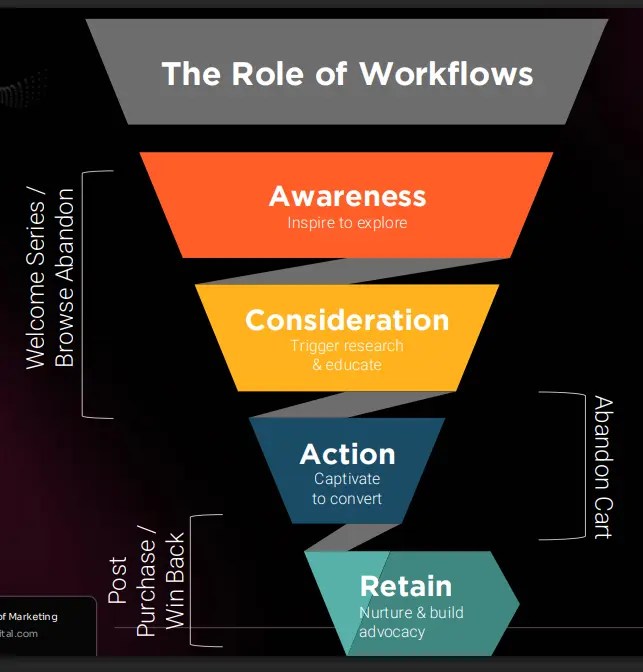
It also allows you to meet customers where they are in their journey. Someone new to your brand might need education. A returning customer may be ready for an upsell. With segmentation, you can deliver the right message at the right moment.
Types of Audience Segmentation
There are several ways to segment your audience. Each type gives you a different lens into what drives your customers’ behavior. The best strategies use a mix of these, depending on your goals, product, and data.
Here are the five most common types of audience segmentation:
Demographic Segmentation
This is the most straightforward method. You segment based on traits like:
Age
Gender
Income level
Education
Marital status
Example: A clothing brand might promote its premium line to high-income professionals while marketing basics to students or entry-level workers.
Geographic Segmentation
Here, you group users by physical location:
Country or region
Climate
City size
Urban vs. rural
Example: A food delivery app might market lunch deals to users in busy cities while promoting family meals in suburban areas.
Psychographic Segmentation
This method looks at the “why” behind your customer’s actions:
Personality traits
Interests and hobbies
Lifestyle choices
Core values
Example: A fitness brand might market high-performance gear to athletes and eco-friendly materials to sustainability-minded shoppers.
Behavioral Segmentation
Segment based on how people interact with your brand:
Purchase history
Engagement level
Brand loyalty
Product usage
Example: A SaaS company might send upgrade offers to heavy users and reactivation emails to inactive accounts.
Firmographic Segmentation (B2B Only)
This is the B2B version of demographic segmentation:
Company size
Industry
Revenue
Location
Decision-maker role
Example: A software vendor might offer enterprise features to large corporations and budget-friendly plans to startups.
Real-World Segmentation Examples Across Channels
Segmentation works across every channel you’re using. The tactics change, but the principle stays the same: send the right message to the right person.
Email Marketing: New subscribers get your welcome series. Inactive customers (90+ days) get a win-back offer with a discount. Same list, different messages based on engagement level.
Paid Advertising:Cart abandoners see retargeting ads featuring the exact product they left behind. Cold audiences see brand awareness content and educational posts. Match the ad creative to where they are in the funnel.
Content Personalization: SaaS visitors see automation guides and workflow content. E-commerce brands see conversion optimization and retention posts. Your CMS can handle this with simple behavioral tags based on past visits.
Product Rollouts: Power users get early beta access to new features. Light users get the stable release later with more documentation. This reduces your support burden and makes heavy users feel valued.
SMS Marketing: Previous buyers in specific zip codes get flash sale alerts for local stores. First-time visitors get a welcome discount. High intent plus geographic relevance equals higher conversion rates.
The channel doesn’t matter. What matters is matching the message to the person and where they are in their journey.
How To Segment Your Audience, Step-By-Step
Getting started with segmentation doesn’t have to be complex. Here’s a simple process you can use to organize your audience into actionable groups.
1. Start With Data You Already Have
Look at what’s in your CRM, email platform, or analytics tool. Useful data often includes location, purchase history, on-site behavior, and sign-up source.
2. Define Your Most Important Attributes
Based on your goals, decide which traits matter most. For an e-commerce brand, it could be past purchase behavior. For a SaaS company, it might be usage level or company size.
3. Build Initial Segments
Group your audience using filters like:
“Has purchased in last 30 days”
“Visited pricing page but didn’t convert”
“Signed up from Facebook campaign”
Start simple. You can get more granular later.
4. Map Each Segment to the Customer Journey
Think about where each group is in their decision-making process. Someone early in the funnel needs education. A returning visitor might need an incentive.
If you haven’t done this yet, use customer journey mapping to connect segments to meaningful actions.
5. Test, Learn, and Refine
Segmentation isn’t one-and-done. Use A/B testing to refine your messaging, offers, and timing by segment. Drop what doesn’t work. Scale what does.
Best Practices for Audience Segmentation (That Actually Work)
Anyone can slice up an email list but effective segmentation goes beyond basic filters. Here are a few proven tips to get better results without overcomplicating your strategy.
Use Real Data, Not Assumptions
Avoid guessing what people care about. Use actual behavior, survey responses, or analytics to guide how you group your audience.
Keep Segments Useful, Not Just Accurate
A perfect audience profile is useless if it’s too small to act on. Prioritize segments that tie directly to your business goals—like conversions, upsells, or retention.
Don’t Over-Personalize
Over-segmentation can create unnecessary complexity. You don’t need 30 different versions of the same email. Focus on meaningful variations that actually move metrics.
Update Your Segments Regularly
Customer behavior changes. Segments should too. Review and refresh your data often to avoid targeting stale or irrelevant groups.
Align Segments With Personas
Your audience groups should reflect the same needs and motivations as your core buyer personas. If you don’t have a clear set, start with this guide to building an accurate customer persona.
I see the same mistakes over and over. Avoid these pitfalls to get better results from your segmentation strategy.
Segmenting too early. You need data before you can segment effectively. If you’re working with a brand-new list or product, focus on collecting behavioral data first. Premature segmentation based on assumptions will waste time and money.
Creating too many micro-segments. A segment with 47 people isn’t actionable. Keep your segments large enough to matter. If a group is too small to justify custom creative or messaging, fold it into a larger segment.
Using outdated data. Someone who bought six months ago isn’t in the same segment as someone who bought yesterday. Refresh your segments quarterly at minimum. Monthly is better for fast-moving businesses.
Segmenting but not personalizing. Building segments means nothing if you send the same message to everyone. Each segment should get tailored copy, offers, or creative. Otherwise, you’re just organizing your list for no reason.
Ignoring overlap between segments. People can belong to multiple groups. A high-value customer might also be geographically close to your store. Think about how segments intersect and prioritize which message matters most.
Not testing segment performance. Track metrics by segment. If one group consistently underperforms, either refine the segment definition or adjust your messaging. Segmentation without measurement is guesswork.
FAQs
What is audience segmentation?
Audience segmentation is the process of dividing your broader audience into smaller groups based on traits like behavior, interests, demographics, or location. It helps you deliver more targeted and relevant marketing.
What are the types of audience segmentation?
The most common types include demographic, geographic, psychographic, behavioral, and firmographic segmentation. Each one gives you a different way to understand and connect with your audience.
How do you segment your audience effectively?
Start with data you already have—like purchase history or engagement. Then group users based on shared traits, align segments to the customer journey, and continuously refine based on performance.
Conclusion
Audience segmentation isn’t a tactic you add later. It’s where effective marketing starts.
By breaking your audience into meaningful groups, you gain the ability to tailor messages, prioritize the right channels, and improve your results across the board. Whether you’re building email campaigns, running paid ads, or planning content, segmentation keeps your strategy focused and relevant.
Start with the data you already have. Pick one or two segments that align with your goals. Then test, learn, and scale.
The more precise your segmentation, the more personal your marketing will feel and the better it will perform.
Need help building a segmentation strategy that actually drives results? Check out my consulting services for hands-on support.
The holiday season is one of the most lucrative and competitive times of the year for app marketers. With users in the mood to browse, buy, travel, and celebrate, it’s a golden window to capture attention, drive installs, and boost engagement.
As shoppers embrace gifting, experiences, self-improvement, and more, the period presents the perfect opportunity to connect your app with seasonal behaviors – but success depends on how effectively you plan and execute.
By developing tailored mobile user acquisition strategies and creative campaigns that resonate with the festive mindset, you can strengthen visibility, fuel app installs, and turn short-term peaks into long-term growth.
In this blog, we’ll explore how to craft high-performing seasonal campaigns that resonate with the festive mindset and keep your app top of mind during the busiest shopping season of the year.
Key Takeaways
Adapt creatives and messaging to align with seasonal moods and trends.
Use limited-time offers to drive urgency and engagement.
Upweight marketing budgets to capitalize on peak seasonal activity.
Leverage user-generated content (UGC) to boost authenticity and reach.
Optimize Apple Search Ads and Custom Product Pages to maximize visibility.
Upgrade your Creatives to Match the Season
To stay competitive and maximize results, your creative approach must reflect the holiday spirit. Users are actively searching for seasonal inspiration, so aligning your visuals, copy, and value proposition with this period can dramatically increase engagement.
1. Seasonal Visuals
Incorporating festive design elements such as colors, typography, and imagery helps your app feel relevant and timely. Use holiday cues that create an emotional connection, ensuring to stay on brand and balanced.
Pair this with seasonal messaging that captures attention, whether that’s highlighting limited-time features, discounts, or ways your app enhances the holidays. Done well, these creatives signal that your app is current, relatable, and part of the seasonal excitement.
2. Themed Messaging
Adapt your tone and messaging to reflect the joy and energy of the season. Phrases like “Get in the Holiday spirit” or “Make gifting easier this year” can help your campaign feel conversational and relevant. If you’ve added new features or updated your app for the holidays, make sure they are clearly showcased in your ad copy and store listing. This is a great way to let users (new and returning) know that you have fresh and relevant content, products, and deals for the season.
3. Create Value for Users
Ask yourself how your app adds value during the holidays. Whether it helps users manage gift lists, discover deals, or stay organized, communicate that benefit clearly. The goal is to position your app as useful, not just festive.
4. Limited-Time Offers
Exclusive promotions and time-sensitive deals are powerful conversion drivers. Use clear CTAs like “Limited-time offer” or “Ends soon” to build urgency. In your visuals, spotlight these offers alongside seasonal products or app features.
For instance, Mixbook – an online photo book and personalized gift creation platform – ran a paid acquisition campaign offering 50% off during the holiday season. The combination of festive imagery and a compelling offer helped the brand capture high-intent users when purchase intent was at its peak.
Source: Mixbook Facebook Ads
Upweight Your Budgets for Seasonal Campaigns
The holidays aren’t the time for evenly distributed spend. Competition is higher, but so is opportunity, meaning strategic budget allocation is key.
Focus your spend where you can achieve the greatest impact and concentrate on high-performing channels and audiences rather than spreading budgets thinly. A good approach can be to prioritize one or two paid acquisition channels that align closely with your highest-performing segments, to ensure you’re investing where impact will be the greatest.
For example:
Travel apps often see surges in December and again in January, when users plan trips for the new year. Increasing budgets during these moments ensures you capture high-intent users when they’re most likely to convert.
Shopping apps should front-load investment in November and early December to align with Black Friday, Cyber Monday, and Christmas activity. Visibility during these periods delivers stronger ROI than a steady year-round spend.
By investing more heavily during high-intent windows, you’re positioning your app to be seen when users are most motivated to act.
Source: Jet2holidays Christmas Screenshots
Leverage User-Generated Content (UGC) to Drive Engagement
Seasonal campaigns don’t have to rely solely on paid creatives. User-generated content adds authenticity, builds trust, and stretches your budget further.
UGC allows users to share real experiences, and during the holidays, these organic stories resonate more than any brand-produced ad.
Some ways you can harness user-generated content effectively:
Showcase genuine testimonials: Feature authentic reviews in your app store listings and ads. For example, a productivity app could highlight how users managed their holiday planning with ease.
Run holiday-themed contests: Encourage users to share festive photos or stories connected to your app, such as “Best Holiday Recipe” or “Gift Guide Challenge.”.
Create a holiday hashtag campaign: Build a seasonal hashtag to increase visibility and encourage sharing.
Feature user success stories: Share real examples of how users benefited from your app during past holiday seasons to demonstrate real-world value.
Incorporate UGC in Ads: Ads featuring real users often outperform studio-produced creative in engagement and CTR.
Benefits of UGC:
Wider reach: User posts expose your app to their personal networks.
Increased trust: Audiences are more likely to believe peer recommendations over branded messages.
Cost-effectiveness: Repurposing authentic content reduces production costs.
Higher engagement: UGC blends naturally into social feeds and typically generates higher engagement on social media.
Use Apple Search Ads to Accelerate Your Seasonal Growth
Apple Search Ads (ASA) are one of the most effective ways to reach high-intent users, people already searching for apps like yours. During the holidays, when search behavior shifts and competition increases, optimising your ASA strategy is essential.
Seasonal keyword research: Identify seasonal search terms and trends using ASO tools. Keywords like “holiday planner,” “gift ideas,” or “Christmas shopping” can unlock new audiences during this period.
Seasonal Custom Product Pages (CPP): Custom Product Pages allow you to tailor visuals and messaging for specific keywords or campaigns. Update your CPPs with festive creatives, special offers, or limited-time product features to deliver a more relevant user experience.
Plan for Higher Competition: Expect CPCs to rise during peak seasons, so factor that into your forecasts. To maintain ROI, prioritize creative testing – visuals, messaging, and offers that can help you convert at a higher rate when competition is stronger.
Maximizing Lifetime Value of Seasonal Installers
Seasonal campaigns can generate huge bursts of installs, but the real value lies in retention. Many users acquired during holiday periods are motivated by discounts or limited-time offers – meaning they risk churning once promotions end.
To counter this, segment seasonal installers early and design retention campaigns around their behavior:
Offer exclusive post-season promotions or loyalty rewards.
Send early-access invitations for future sales or events.
Reinforce values through personalized push notifications or in-app messages that highlight ongoing benefits.
By nurturing these users beyond the holiday period, you can turn one-off installs into long-term, high-value customers.
Seasonal Growth Beyond Retail
While shopping and eCommerce apps experience some of the most visible holiday peaks, seasonal user-acquisition opportunities span almost every vertical. The key is to identify the moments that matter most for your audience and align your campaign strategy around them.
Travel & Experiences: December and January are peak planning months. Apps can use “escape the cold” or “plan your next adventure” narratives to capture high-intent travelers and early-year bookings.
Fitness & Wellness: The new year is synonymous with fresh starts. Fitness, nutrition, and mindfulness apps can capitalize on this momentum with “reset” or “new routine” messaging.
Finance & Money Management: After the holiday spending rush, users often turn to budgeting and saving. Finance apps can position themselves as the go-to solution for taking control in January.
Entertainment & Streaming: With people spending more time at home, apps in entertainment, gaming, and streaming can highlight shared experiences, relaxation, or discovery.
Food & Delivery: From festive feasts to New Year get-togethers, delivery and recipe apps can tap into convenience, celebration, and seasonal indulgence.
Productivity & Learning: As goals and resolutions take shape in early Q1, these apps can drive engagement by helping users stay organized, productive, and inspired.
Conclusion
The holiday season presents a unique opportunity for app marketers to connect with users at scale, but seizing that opportunity takes strategy, timing, and creativity.
From festive creatives and limited-time offers to smart budget allocation, user-generated content, and Apple Search Ads, every element of your user acquisition strategy should work together to maximize performance.
And remember, seasonality isn’t just about the holidays, it’s about harnessing moments. By aligning your app marketing with user behaviors and mindsets throughout the year, you can build campaigns that not only drive downloads but sustain growth long after the festive season ends.
http://dubadosolutions.com/wp-content/uploads/2017/05/dubado-logo-1.png00http://dubadosolutions.com/wp-content/uploads/2017/05/dubado-logo-1.png2025-12-02 20:00:002025-12-02 20:00:00Why Running Seasonal Use Acquisition Campaigns Will Boost Your App’s Success
If you’re serious about visibility in search, you need to start using schema markup. This structured data tells search engines exactly what your content means, not just what it says, so they can display richer, more accurate results.
Schema isn’t just about getting a fancy result in Google’s SERPs anymore. It also increases your chances of being cited in AI-generated summaries Search engines are moving toward generative results, and structured data is now a key signal of authority and clarity.
Key Takeaways
Schema markup is a type of structured data that helps search engines understand the meaning behind your content, not just the text itself.
Sites using SEO schema markup often see improved click-through rates. Users get more context directly in the results, which drives more clicks.
Generative AI search tools now use structured data, which makes schema markup even more valuable for visibility.
Many websites still don’t fully implement schema, so using it correctly gives you an advantage over less-optimized competitors.
What is Schema Markup?
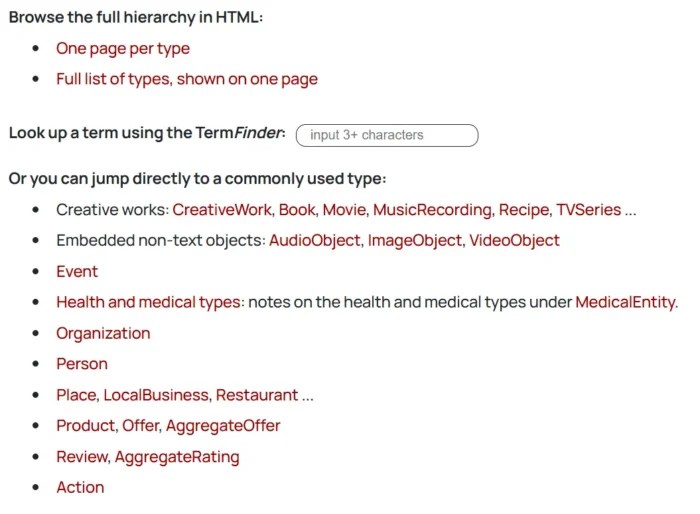
Schema markup is a form of structured data that tells search engines what your content means, not just what it says. It uses a standardized vocabulary from schema.org to label specific pieces of information, like an article’s author, a product’s price, or a recipe’s cooking time.
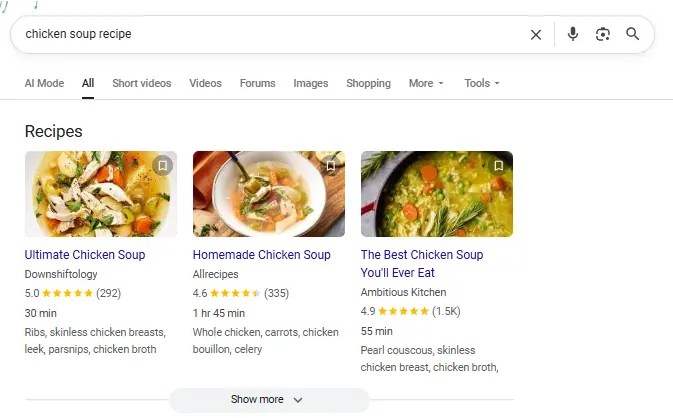
Here’s an example of the end result of some schema in action, showcasing added details for a recipe:
When you add schema to your HTML, it doesn’t change how your page looks to users, but it helps search engines interpret your content more accurately. That’s how you get things like star ratings, event dates, or FAQ dropdowns in SERPs.
Schema improves categorization by giving structure to information that would otherwise be unstructured or ambiguous. That extra clarity supports more precise indexing and increases your chances of appearing with rich results.
Most content online is considered unstructured data, which means it’s readable by humans but harder for machines to interpret. Schema adds structure that makes meaning explicit, bridging the gap between your content and how search engines understand it.
Types of Schema Markup
There are dozens of schema types, but only a handful consistently drive SEO value. The key is knowing which formats align with your goals and content structure. Here are the high-impact schema types you should focus on:
Commonly Used and SEO-Driven
Article: Use this for blog posts, news, or editorial content. It supports elements like headlines, bylines, and publication dates, helping your content stand out in organic results.
FAQ: Can make your page eligible for expandable Q&A boxes beneath your page title. A strong option for capturing more SERP space. FAQ schema works especially well on service or solution pages.
Product and Review: Must-haves for e-commerce. These display key details like price, availability, and customer ratings.
Local Business: Ideal for brick-and-mortar locations or service areas. It includes address, hours, contact info, and geo coordinates. Event: Showcases information for webinars, conferences, or in-person events like date, time, location, and ticket availability.
Breadcrumb: Enhances your site’s navigational trail in search results. It also helps search engines better understand your site’s structure.
Underutilized but High-Impact Schema Types
Video: Helps search engines surface and display videos with rich details like thumbnails, duration, and key moments.
Course: Designed for online education content. Includes fields for course name, description, provider, and learning outcomes.
Job Posting: If you’re listing open roles on your website, this schema can push them into Google Jobs with structured info like salary, qualifications, and deadlines.
Software Application: Highlights app features, pricing, platform compatibility, and reviews. Ideal for SaaS companies or digital products.
There are also industry-specific schema types for recipes, medical conditions, real estate listings, and more, each designed to help content stand out in competitive niches.
While most websites stick to just one or two schema types, combining them across relevant pages gives Google a clearer picture of your site and can increase eligibility for multiple rich result formats.
Why is Schema Markup Important For SEO?
Schema markup doesn’t directly impact rankings, but it can improve how your pages appear in search by making your content easier for search engines to understand. When used correctly, it clarifies the structure and intent behind your content, which improves how your pages appear in search results.
With SEO schema markup, your listings can include extra context like star ratings, pricing, or FAQs, making them more informative and more likely to be clicked when rich results appear. These enhanced listings improve visibility and help searchers understand your content before visiting your site, which supports better engagement and user satisfaction.
Structured data also improves the user experience by giving searchers helpful, structured details before they even land on your site. This kind of clarity reduces bounce rates and increases engagement, which are both positive behavioral signals.
To be clear, Google has stated that structured data is not a direct ranking factor. But it can improve how your content is understood and discovered in search.
“Structured data is not used for ranking purposes, but it can enable search result enhancements and content discovery.” — Google Search Central
If you’re not using schema markup yet, you’re likely leaving visibility and traffic on the table, especially in crowded search spaces.
Schema Markup And AI
As search shifts toward generative results, schema markup becomes increasingly valuable, not as a ranking signal, but as structured clarity that helps machines interpret content consistently at scale. Tools like Google’s AI overviews, ChatGPT, and other large language models increasingly reference or infer structured relationships in your content. While schema markup isn’t directly parsed by every AI tool, it provides a framework that reinforces meaning, credibility, and context.
In Google’s case, schema can increase the chances of being featured or cited in AI-generated summaries by making your content more machine-readable. Clear, structured data helps Google understand which parts of your content are most relevant to a query, and that’s exactly what fuels AI-powered result boxes.
It also supports consistency across platforms, ensuring that search engines, crawlers, and third-party tools are all interpreting your information the same way. That’s critical in a landscape where content can be surfaced in snippets, carousels, voice results, and generative interfaces.
As AI continues to reshape search behavior, structured data plays a critical role in making your content visible and machine-readable across evolving search experiences.
How to Create Schema Markup for SEO
There’s no single way to implement SEO schema markup. The right method depends on your setup, your tools, and how much control you want over the code.
Schema Markup Generators
Schema generators are great to help create your schema type so you don’t have to do it manually. They offer flexibility and control, especially if you want to create cleaner SEO schema markup using JSON-LD.
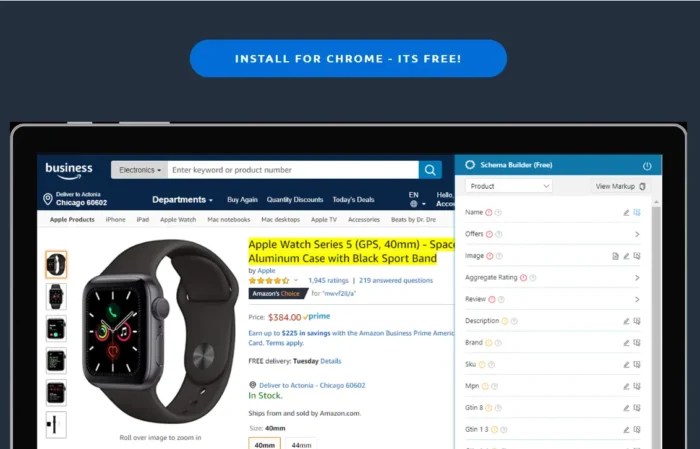
One great option is Dentsu’s Schema Markup Generator. It supports a wide range of schema types and gives you real-time previews of the structured data output.
Another user-friendly pick is Schema.dev, which offers a visual editor for common schema types like Article, Product, Event, and more. It’s great for marketers who want more polish without touching raw code.
If you’re working on technical SEO at scale, tools like RankRanger’s generator or the Hall Analysis tool can help automate more advanced schema needs.
Most of these tools will output JSON-LD code, which you can copy and paste directly into your website’s head tag or through a CMS plugin.
Build Schema Manually
For developers or SEOs who want full control, manually writing SEO schema markup in JSON-LD is the most flexible option. This approach is ideal when you need to nest data types, customize beyond what’s available in generators, or integrate schema into a templated CMS or headless setup.
The most common format for manual schema is JSON-LD, a lightweight data format that can be placed inside a <script type=”application/ld+json”> tag in your HTML.
Schema.org provides documentation and examples for hundreds of item types, including complex combinations like a Product with reviews, availability, and brand info.
While this method takes more effort, it allows you to fine-tune every field and ensure the markup perfectly matches your content structure.
If you’re confident in your technical skills or already working with structured templates, hand-coding schema can unlock the most advanced use cases.
Use WordPress Plugins
If your site runs on WordPress, adding SEO schema markup is straightforward with the right plugin, with no coding required.
Yoast SEO adds basic structured data out of the box, like Article, WebPage, and Organization schema. You can also set defaults for different post types or override schema per page.
Rank Math offers more flexibility with its built-in Schema Generator. It supports custom fields, nested schema, and additional types like Product, FAQ, and Course. You can add schema site-wide or build it block-by-block using their visual editor.
Another option is the Schema & Structured Data for WP plugin, which offers advanced rule-based schema placement, support for over 30 types, and WooCommerce integration.
Most plugins handle the technical output for you, just select the schema type, fill out the fields, and publish.
Use ChatGPT
ChatGPT is a quick way to generate SEO schema markup without relying on a plugin or tool. It’s especially useful when you want structured data for a specific content type but don’t want to hand-code it from scratch.
To get started, just ask ChatGPT for the schema you need. For example:
“Create JSON-LD schema markup for a Product with name, price, rating, and availability.”
You can also refine the output by adding more context. Want to include an author bio? Just ask. Need multiple FAQs? List them out, and ChatGPT can format them for you.
The results are typically in valid JSON-LD format and can be copied into your site’s HTML or CMS.
It’s not a replacement for technical SEO tools, but it’s a powerful shortcut when used with the right prompts.
Add Schema Markup to Your Site
Once you’ve created your SEO schema markup, you need to place it on your site where search engines can find it. The most common format is JSON-LD, which should be embedded inside a <script type=”application/ld+json”> tag.
If you’re working directly with code, add the schema to the <head> section of your page, or just before the closing </body> tag. This helps ensure it gets picked up by search crawlers.
If you’re using a CMS like WordPress, Shopify, or Wix, many themes or SEO plugins include fields where you can paste your structured data directly. Just copy your JSON-LD and drop it into the appropriate field.
As we mentioned before, plugin-based setups, tools like Rank Math or Yoast will often insert schema automatically based on your settings, with no manual copy-paste needed.
No matter the method, the goal is the same: get valid, clean schema markup live on your site.
Validate Your Schema
Before you publish any SEO schema markup, you need to validate it. Even small formatting issues can break how search engines read your structured data.
You can either paste in your raw JSON-LD code or enter the URL of a published page. The tool will scan your markup and return any errors, warnings, or unsupported types.
Look for a “Valid” result nd ensure the schema type you used is recognized and correctly implemented. If there are issues, revise your code and re-test until everything passes.
You can also use Google’s Rich Results Test to see if your schema is eligible for enhanced SERP features.
Validation is a small step that ensures your markup actually works and gets you the visibility you’re aiming for.
Best Practices For SEO Schema Markup
To get the most out of your SEO schema markup, you need more than valid code. These best practices help ensure your structured data drives real visibility while staying within Google’s guidelines.
Only mark up visible, relevant content:
Don’t tag hidden elements, placeholder content, or anything users can’t actually see.
Schema should reflect what’s on the page. Misleading or hidden markup can get ignored or flagged.
Use the most specific schema type available:
Avoid generic markup. If your content is a recipe, use Recipe schema. If it’s a course, use Course schema. The more specific and accurate, the better.
Keep your structured data up to date:
Prices, dates, product availability, and other time-sensitive data should reflect the live content. Inaccurate schema can confuse search engines and users.
Avoid over-marking or spamming schema types:
Just because a schema exists doesn’t mean it belongs on your page. Only mark up what’s directly relevant and helpful to the user.
Accurate, helpful schema increases your chances of showing up in enhanced results. Misused or sloppy markup reduces trust and visibility.nd not content in hidden div’s or other hidden page elements.”
FAQs
What is schema markup?
Schema markup is a type of structured data that helps search engines understand the meaning of your content. It uses a shared vocabulary defined by schema.org to label key details like titles, authors, ratings, and more. When implemented correctly, it makes your content eligible for rich results, enhanced listings that display extra information directly in search.
What is schema markup SEO?
Schema markup SEO refers to the use of structured data as part of your overall search optimization strategy. While it doesn’t directly impact rankings, schema enhances how your pages appear in the SERPs. By making content easier to interpret and display, it supports better visibility, higher click-through rates, and alignment with user intent.
Does schema markup help SEO?
Yes, but not in the way most people expect. Schema doesn’t give you a direct ranking boost, but it improves how your pages are presented in search. Rich results stand out more, offer better context to users, and tend to earn more clicks. Schema can improve visibility and click-through rates, which can help your content attract more traffic over time.
Conclusion
Schema markup is one of those SEO techniques that helps to improve how your content appears in search results, yet it’s still underused. It helps search engines understand your pages more clearly, which leads to richer results, better visibility, and more clicks.
Whether you’re optimizing blog content, product listings, or service pages, structured data gives your site a clearer presence in search, and that matters in competitive markets.?
User Experience (UX) optimization isn’t just a design choice. It’s a conversion strategy. If your site is confusing, slow, or frustrating to use, people bounce. They won’t dig for what they need. They’ll leave.
And most won’t come back. According to the Baymard Institute, 88% of online consumers are less likely to return to a site after a bad user experience.
Good UX removes friction. It helps users find what they need faster, trust your content, and stay long enough to convert. It also signals to Google that your site is useful, which improves rankings, engagement, and retention.
This guide breaks down the UX best practices that actually move the needle. No theory. Just clear, actionable ways to make your site easier to use and more effective at turning visitors into customers.
Key Takeaways
Effective user experience (UX) optimization starts with understanding your audience. Use data, heatmaps, and behavioral insights to design around real user needs, not assumptions.
Simplicity wins. Clean layouts, clear navigation, and fast-loading pages make it easy for visitors to engage and convert.
Mobile-first design is essential. With most users browsing on phones, responsive layouts and touch-friendly interfaces are critical to user satisfaction and search visibility.
Great UX directly improves conversions. Every element, from your CTA to your checkout, should guide visitors smoothly toward a goal without friction.
Testing never stops. Continuous A/B testing, analytics tracking, and user feedback loops keep your UX aligned with evolving expectations and business results.
Why User Experience Matters
User Experience (UX) optimization improves more than just aesthetics, directly affecting how well your website performs. A frustrating layout, slow load time, or confusing interface can increase bounce rates, reduce conversions, and damage brand credibility.
When visitors arrive, they’re deciding whether to stay or leave within seconds. If key elements are hard to find or the mobile experience falls short, you lose them.
Clear, intuitive design helps users find what they’re looking for and take the next step. That might mean reading more, subscribing, or completing a purchase. It’s also a core part of conversion rate optimization, where even small UX changes can lead to measurable gains. CRO and UX are areas that more and more marketers are devoting increased budgets to.
User experience also plays a role in how search engines evaluate your content. Signals like mobile usability, site structure, and page performance can influence your visibility, even if UX itself isn’t a ranking factor.
When you improve the way people experience your site, you improve nearly every performance metric that matters.
How UX Supports SEO
User experience and SEO share the same goal: helping people find what they need quickly and easily. SEO drives traffic, while UX keeps visitors engaged once they arrive.
Search engines now factor experience quality into rankings. Google’s Core Web Vitals evaluate how fast a page loads, how smoothly it responds, and how stable the layout feels as it renders. When pages perform well, users stay longer and bounce less, which signals quality to search engines.
Mobile usability plays a major role too. With mobile-first indexing, Google often ranks sites based on their mobile experience. A responsive design that works across all devices improves both accessibility and visibility.
Strong UX optimization helps your SEO work harder. The better your experience, the easier it is for users to explore, trust, and convert.
Next, we’ll break down the UX best practices that make those results possible.
UX Best Practices
The following UX best practices will help you design faster, simpler, and more effective experiences that keep users engaged from their first click to conversion.
Know Your Target Audience
Effective UX optimization starts with understanding who your users are and what they expect from your site. When you base design decisions on real data instead of assumptions, you can create experiences that feel natural, relevant, and easy to use.
Collect audience insights through analytics, user surveys, and behavior tracking. Build personas that capture motivations, preferences, and pain points. These details help you personalize the experience, from navigation to recommendations, in ways that feel helpful, not forced.
Personalization is a proven factor in increasing conversions, so it makes a good starting point for your UX improvements:
Thrive Market is a strong example of user understanding in action. The healthy food retailer tailors its shopping experience through an onboarding quiz that asks about dietary needs and personal goals. Shoppers receive customized product recommendations and grocery lists that match their answers, which removes friction and builds trust from the first visit.
When you design around what your audience values most, engagement becomes effortless. The next step is to make that experience as simple as possible.
Keep Things Simple
Simplicity is one of the most powerful UX best practices. Users form an opinion about your site in seconds. Cluttered layouts and confusing navigation create friction. A clean, structured interface helps visitors find what they need quickly and trust what they see.
Research shows that 88 percent of users are less likely to return after a bad experience. Simplicity isn’t just a design preference. It’s how you keep people on your site and build trust with every interaction.
Apple’s website remains one of the clearest examples of simple, effective design. The layout uses generous white space, clean typography, and bold product visuals that highlight what matters most. Each page features short, direct copy and clear calls to action such as “Learn more” or “Buy.” This approach keeps attention focused and makes navigation effortless.
Simple design improves accessibility and reduces cognitive load. It helps users stay oriented and confident as they explore. Once your site feels easy to use, the next step is making sure it performs the same way on every device.
Build Around Mobile
Mobile traffic now dominates the web, and most users expect sites to work perfectly ontheir phones. If your layout isn’t responsive, you’re losing potential customers before they ever see your content.
Mobile UX design focuses on speed, clarity, and easy navigation. Pages should load fast, text should be readable without zooming, and buttons should be large enough to tap comfortably. A smooth mobile experience keeps users engaged and signals quality to search engines under Google’s mobile-first indexing. It also helps with cart abandonment.
Starbucks offers a strong example of mobile-friendly UX in action. Its responsive design adapts across screens, and the app’s ordering system is simple enough to use one-handed. Customers can browse, order, and pay in seconds, which builds loyalty through convenience.
Mobile UX optimization improves both experience and performance. When users can navigate easily, they stay longer and convert more often. Next, we’ll look at how to guide those users toward the actions that matter most.
Set Goals and Guide Users There
Every great UX design starts with a clear goal. Users should always know what to do next, and every part of your layout should make that path obvious. When visitors understand your purpose, they’re more likely to take action and complete the journey you’ve built for them.
Strong UX optimization is goal-driven. Each page should serve a specific purpose, whether it’s capturing a lead, driving a purchase, or encouraging engagement through smaller actions such as watching a video or subscribing to a newsletter. These soft goals build trust and move users closer to conversion.
Dropbox demonstrates this principle with focus and simplicity. Its homepage centers around a bold, high-contrast “Try Dropbox Free” call to action button that stands out from surrounding content. The message is clear, the design uncluttered, and the action frictionless. This clarity of direction keeps users moving toward sign-up without confusion or distraction.
When your site guides users naturally, you reduce hesitation and increase conversions. The next step is to make sure that experience loads fast enough to keep them there.
Focus on Loading Speed
Speed is one of the simplest ways to improve UX optimization. A slow site frustrates users, hurts engagement, and damages your search visibility.
Fast-loading pages make your entire experience feel smoother and more trustworthy. They also reduce bounce rates and improve rankings because search engines use page performance as a quality signal.
There are practical ways to keep your site fast. Compress images, enable browser caching, and minimize heavy scripts or animations. Consider using a content delivery network (CDN) to distribute resources more efficiently.
When users can access your site instantly, they’re more likely to explore and convert. The next step is making sure that navigation keeps those visitors moving in the right direction.
Use Clear Navigation
Navigation is one of the simplest ways to improve UX. Visitors should be able to find what they need without stopping to think about where to click next. When users can move through your site effortlessly, they stay longer and engage more.
A common rule of thumb is that users should reach any key content within three clicks. While it’s not a strict requirement, the idea still holds: fewer steps mean less frustration and more conversions.
Best Buy demonstrates this principle with effective breadcrumb navigation and well-structured menus. Each category flows naturally into the next, making it easy for shoppers to explore products without getting lost. Clear labels, consistent placement, and visible CTAs reduce confusion and build confidence as users browse.
Good navigation creates momentum. It guides users from curiosity to action and supports the next layer of UX design, establishing a strong visual hierarchy.
Design Hierarchy
Design hierarchy gives structure to your website and helps users focus on what matters most. It’s the principle of using layout, size, color, and placement to show importance and guide attention. When your visual elements follow a clear order, users can navigate your content naturally and confidently.
People don’t read web pages from top to bottom. They scan. Good design aligns with that behavior using visual cues to lead the eye in a predictable flow. Larger fonts, contrasting colors, and prominent placement signal priority and make it easier for visitors to decide what to do next.
Netflix provides a great example of design hierarchy done right. The homepage features bold hero images, clear typography, and obvious CTAs like “Play” and “More Info.” Each element has a specific purpose, guiding users from interest to action without confusion.
Strong hierarchy keeps your design accessible, clear, and easy to use. The next step is to make sure every user can experience it the same way.
Make it Accessible
Accessibility is a core part of UX optimization. Every visitor should be able to navigate, understand, and interact with your site, no matter their abilities or the device they use. When your design works for everyone, you build trust and expand your audience.
Good accessibility starts with simple design choices. Use high-contrast colors for readability, add alt text to images, and make sure every function on your site can be accessed by keyboard. Provide captions for videos and use clear, descriptive link text so screen readers can interpret your content accurately.
Accessibility also includes transparency. Make privacy settings and cookie preferences easy to find and understand. When users know how their data is handled, they feel safer engaging with your content.
Collective Thoughts provides a strong example of accessibility done right. Each article includes an easy-to-find audio version, giving users multiple ways to engage with the same content.
For official standards, review the Web Content Accessibility Guidelines (WCAG). Accessible design benefits every visitor and keeps your site usable across devices, which is especially important for complex actions like forms and checkouts.
Streamline Forms and Checkouts
Checkout friction is one of the biggest UX killers in e-commerce. Every extra click, field, or delay gives users a reason to leave. According to the Baymard Institute, the average cart abandonment rate is nearly 70 percent.
Simple, efficient forms create a faster path to conversion. Ask only for essential information, and make sure labels are clear. Use autofill and progress indicators so users always know where they are in the process. Guest checkout options and flexible payment methods such as PayPal, Apple Pay, and Google Pay remove unnecessary steps that slow people down.
Amazon set the standard for streamlined checkout. Returning users can buy instantly using saved details, skipping the typical multi-step process. That speed and convenience are why the feature became a benchmark for great UX optimization.
When the path to purchase feels effortless, conversion rates rise. The same principle applies to browsing, users should be able to find what they want just as easily.
Use Product Filters and Site Search
Filters and search tools are essential to strong UX optimization. When users can find what they need quickly, they’re more likely to stay, explore, and buy. On large e-commerce sites, well-designed filters reduce decision fatigue and keep the experience organized.
Zappos is a standout example. Its product pages let shoppers filter by size, color, price range, and brand, all from a clean, intuitive sidebar. The site also uses smart search that suggests relevant products as you type, saving time and minimizing frustration. Every interaction feels smooth because the structure matches the way people actually shop.
Good UX best practices make discovery easy. Use predictive search, logical categories, and visual cues like color swatches to help users narrow results faster. When navigation feels effortless, users feel in control, and that control leads to more confident conversions.
The next step is communicating what happens after each click so users always know what to expect.
Test, Test, and Test Again
UX optimization is never finished. Designs that work today can feel outdated or confusing tomorrow. Regular testing keeps your experience aligned with real user behavior instead of assumptions.
Start by using analytics to identify where users drop off or hesitate. Tools like Google Analytics and ContentSquare reveal how people scroll, click, and move through your site. Session recordings and heatmaps show which elements attract attention and which ones get ignored.
A/B testing takes it further. Platforms such as Optimizely or VWO let you compare two versions of a page to see which performs better. Even small adjustments to headlines, layouts, or CTAs can have measurable impact.
The goal is consistent improvement. By testing, analyzing, and iterating regularly, you build a user experience that gets stronger with every insight. Next, we’ll look at how to measure that progress through key UX metrics.
Track Key Metrics for UX Success
Great UX is measurable. Tracking the right data shows whether your optimizations are actually improving the experience. Without clear metrics, you’re just guessing at what works.
Start with the fundamentals. Bounce rate tells you if visitors find your content relevant. Engagement rate shows how long they stay and how deeply they interact. Conversion rate reveals how effectively your UX supports business goals. Together, these numbers tell the story of your site’s performance.
Core Web Vitals are equally important. They measure loading speed, interactivity, and visual stability, the technical foundations of user experience. Improving these signals helps both users and search engines trust your site.
Be sure to monitor these metrics regularly. When you track, analyze, and act on the data, your UX gets sharper and more effective over time. That ongoing improvement is what separates good experiences from great ones.
FAQs
What is user experience?
User experience (UX) is how someone feels when interacting with your website, app, or product. It includes everything from design and navigation to speed and usability. Good UX helps people find what they need quickly and enjoy the process, which builds trust and increases conversions.
What is UX optimization?
UX optimization means improving your site’s design, structure, and performance to make it easier and more enjoyable to use. It focuses on removing friction, improving speed, and guiding users toward clear goals. The result is higher engagement and stronger business results.
What are UX best practices?
UX best practices are proven methods for creating a smooth, intuitive digital experience. They include understanding your audience, simplifying design, using clear navigation, optimizing for mobile, improving accessibility, and testing regularly. These principles make your site more usable and trustworthy.
How do UX best practices impact SEO?
UX best practices directly affect SEO performance. Search engines reward sites that load quickly, work well on mobile, and provide a smooth, intuitive experience. While metrics like time on page or bounce rate aren’t direct ranking factors, strong UX helps users find what they need, stay engaged and complete tasks, which all contribute to better overall performance.
How can I improve website UX?
Start by analyzing how users interact with your site. Simplify your layout, improve page speed, and test your navigation flow. Use clear CTAs and make sure your content is accessible and easy to read.
What tools can I use to test my UX design?
Tools like Google Analytics and ContentSquare help you see where users click, scroll, and drop off. You can also run A/B tests with Optimizely or VWO to compare layouts and features. User feedback platforms such as UserTesting provide direct insights from real visitors.
What is mobile UX design?
Mobile UX design ensures your website works seamlessly on phones and tablets. It includes responsive layouts, readable text, quick load times, and tap-friendly buttons. Strong mobile UX improves accessibility, reduces bounce rates, and helps your site perform better in mobile search results.
Conclusion
Implementing these UX best practices can dramatically improve the user’s journey across your site, increase conversions, and elevate your brand reputation.
Remember, understanding your audience is extremely important. Everything you design should be with your users in mind. Keep things simple, prioritize accessibility, don’t forget about mobile, and never stop testing and refining.
Get started today by examining your site’s user experience and identifying areas for improvement. It may be time to revisit your mobile optimization. Or do your forms need streamlining for a smoother checkout process?
Every change you make can potentially improve your users’ experience and, by extension, your bottom line.
http://dubadosolutions.com/wp-content/uploads/2017/05/dubado-logo-1.png00http://dubadosolutions.com/wp-content/uploads/2017/05/dubado-logo-1.png2025-11-26 20:00:002025-11-26 20:00:00UX Optimization Best Practices to Improve User Experience
Forty-six percent of all Google searches have local intent. That means nearly half the time someone types something into the search bar, they’re looking for something nearby, like a dentist or a plumber.
If your business isn’t showing up in those results, you’re losing easy wins. That’s where local SEO citations come in. These are the digital breadcrumbs that help search engines (and customers) find and trust your business.
Citations aren’t just for maps and directories anymore. With the rise of AI Overviews and platforms like ChatGPT and Perplexity pulling from trusted sources, having accurate, widespread citations can increase your visibility across all forms of search.
In this post, I’ll break down what local citations are, why they matter more than ever, and how to build them the right way, without wasting time on low-value directories.
Key Takeaways
Local SEO citations are online mentions of your business’s name, address, and phone number (NAP).
Citations help search engines verify your business is real and improve your visibility in local search results.
Accurate, consistent citations across trusted platforms build authority and trust for both search engines and users.
AI tools like ChatGPT and Google’s AI Overviews often surface citation sources, making them more important than ever.
The best strategy focuses on quality over quantity. Start with high-authority directories and expand into niche platforms.
Tools like BrightLocal, Whitespark, and Semrush can help automate citation building and cleanup.
What Are Local Citations?
Local SEO citations are online mentions of your business’s name, address, and phone number, commonly known as NAP. You’ll usually see these on business directories, review sites, apps, maps, and social platforms.
These citations act as digital trust signals. When they’re consistent and accurate across multiple platforms, search engines see your business as more reliable, which can improve your visibility in local search results.
As an added note, AI tools like ChatGPT, Perplexity, and even Google’s own AI Overviews increasingly rely on structured business data from trusted citation sources.
You can create citations manually or through tools (more on that soon), but either way, you need to keep them updated and consistent across all listings.
Local Citation Types
There are two broad categories of citations: general or core platforms and industry-specific directories. Both serve a purpose. The key is knowing which ones your audience actually uses.
Google Business Profile is one of the most important citation sources. Complete your profile with hours, categories, photos, and reviews. It directly feeds into Google Maps and local pack rankings, making it a must-have.
Yelp is another top-tier directory. A well-optimized listing here adds authority and may drive referral traffic.
Bing Places for Business works similarly to Google’s platform and is still worth claiming, especially if your audience includes older users or anyone in corporate environments where Bing is the default search engine.
Facebook Business Pages double as citations and engagement hubs. They show up in search and allow customer interaction.
Apple Business Connect is important because Siri and Apple Maps pulls this information.
Niche platforms like OpenTable (restaurants), Avvo (legal), Zocdoc (medical), or TripAdvisor (travel) carry extra weight in their verticals and often convert better.
Local chambers of commerce, review platforms like Trustpilot, and neighborhood networks like Nextdoor also count as valuable citations when relevant.
How Local Citations Help SEO
Local citations do more than just increase visibility. They build trust and help search engines connect the dots between your business and the communities you serve. That’s foundational for strong local search marketing.
While exact percentages tied to citation impact aren’t publicly available for 2024, multiple sources still cite NAP consistency and citation volume as foundational local ranking factors. For example, SOCi reports that 80 percent of U.S. consumers search for a local business online at least weekly, and if your listings aren’t showing up accurately, you’re not in the running.
Citations also support E-E-A-T (experience, expertise, authority, trust), all key signals Google looks for when ranking local results.
A good starting point is generally 30 to 50 accurate, high-quality citations to build a strong foundation and establish a baseline. Depending on your industry and market size, you may need more.
Even one inaccurate listing can hurt trust and confuse Google’s local algorithms.
Local Citations and LLM Presence
Platforms like Google’s AI Overviews and large language models (LLMs) like ChatGPT, and Perplexity pull data from structured, verified sources. That means your business listings on sites like Google Business Profile, Yelp, Bing Places, and TripAdvisor may be referenced automatically, if the information is accurate and consistent. See the example below from ChatGPT:
Even addresses can pop up in the results if they are online for the tools to pull.
LLMs don’t crawl the web like Googlebot, but they rely heavily on trustworthy, indexed data. A clean citation profile gives your business a better shot at showing up in AI summaries, especially for local service queries.
If your listings are messy or missing key info, you risk being ignored altogether, even if you rank well in traditional search.
This is where citation building becomes a proactive strategy, not just a foundational one.
What is Local Citation Building?
SEO citation building is the process of actively creating and maintaining listings for your business across third-party sites, like directories, maps, review platforms, and social networks.
Think of it like digital plumbing. You’re creating multiple, consistent “pipes” that point back to your business, and every new, accurate citation helps search engines and AI tools understand who you are and where you operate.
Let’s say you run a boutique gym in Chicago. Citation building would involve creating or updating your listings on Google Business Profile, Yelp, Bing Places, Apple Maps, and niche platforms like ClassPass or Mindbody.
It’s not a one-and-done task. Building citations takes ongoing effort, especially if you move locations, change your phone number, or expand services.
Most businesses use citation-building tools to scale this process and stay organized. That’s what we’ll cover next.
Local Citation Building Platforms
SEO citation building can be time-consuming if you’re doing everything manually. That’s why many marketers rely on specialized tools to create, audit, and manage citations at scale.
Here are three platforms that can help simplify the process.
BrightLocal
BrightLocal is an all-in-one platform for managing local SEO. It includes tools for citation building, auditing, and cleanup.
You can submit your business info to 100+ general and niche directories, fix inconsistent listings, and remove duplicates, all from one dashboard. It also tracks your citation status over time, so you can see what’s live, pending, or missing.
One standout feature is its ability to prioritize directories based on your industry and location, helping you focus on what actually moves the needle.
Pricing starts at $39/month, with individual citation submissions available from $2 per site.
WhiteSpark
Whitespark is best known for its Local Citation Finder, a tool that helps you discover where your competitors are listed and where your business is missing out.
You can run audits, track your existing citations, and build new ones through customized campaigns. The platform also includes tools for citation tracking, reporting, and outreach.
Whitespark offers both DIY tools and fully managed services, making it flexible depending on how hands-on you want to be.
A free version of the Citation Finder gives you basic data on one campaign. Paid plans start at $39/month, with custom citation-building services priced separately.
Semrush Listing Management
Semrush Listing Management helps you distribute and manage your business info across key directories from a single dashboard. You can update your name, address, phone number, and other details in one place, and it syncs across dozens of platforms.
The tool also flags issues like duplicate listings or inconsistent NAP data, so you can fix errors that hurt your local SEO. You can monitor your presence on Google, Yelp, Apple Maps, and other places, while tracking how visibility changes over time.
A free scan gives you a snapshot of your current listings. Full access starts at $20/month per location.
Best Practices For Local Citation Building
Citation building isn’t hard, but doing it well takes attention to detail and long-term consistency.
Start by auditing your current listings. Tools like Moz or BrightLocal can help you identify missing profiles, duplicates, or inconsistent details. Then, focus on the most visible platforms: Google Business Profile, Yelp, Bing Places, Facebook, and Apple Business Connect are great starting points.
Claim and complete your profiles. Don’t stop at NAP. Fill in everything you can, including a business description, website URL, product or service categories, attributes, hours, holiday hours, service areas, and anything else that gives customers and algorithms more context. Additionally, add high-quality photos to show customers your location, products, or services.
Be obsessive about consistency. Even small discrepancies like “St.” vs. “Street” can confuse search engines. Keep your NAP exactly the same across every platform.
If you’re managing listings at scale, look for platforms that offer API access or bulk editing tools. It’ll save hours of manual work.
Build a tracking system to regularly check and re-verify your listings. Businesses move, hours change, and platforms update their guidelines, things can fall out of sync fast.
Finally, take cues from your competitors. If they’re ranking in the map pack and listed on a directory you’re missing, that’s a signal. Focus on quality over quantity, and prioritize directories relevant to your niche.
And don’t forget to support your citation strategy with strong local link building. The two go hand-in-hand when it comes to building local authority.
FAQs
What is local citation building?
Local citation building means creating and maintaining business listings across third-party platforms like Google, Yelp, and Facebook. These listings include your name, address, phone number (NAP), and other key details. Accurate, consistent citations help search engines validate your business and improve your local SEO.
What are local SEO citations?
Local SEO citations are online references to your business’s name, address, and phone number, even if there’s no link. You’ll usually find them on directories, review sites, apps, or social platforms. When these citations are consistent and appear on trusted sites, they improve your visibility and authority in local search.
How do local citations help SEO?
Citations tell search engines that your business is real, active, and relevant to a specific location. They also reinforce your trust signals and support local ranking factors like E-E-A-T (experience, expertise, authority, trust). Inconsistent or missing citations can lower your chances of showing up in map results or AI-generated summaries.
How does citation building impact a business’s online visibility and local search rankings?
The more accurate citations you have across trusted sources, the easier it is for search engines to connect your business to relevant searches. Citation building improves your local rankings, boosts discovery in maps and directories, and increases your credibility with searchers.
How to build local citations?
Start by auditing your existing listings with a tool like BrightLocal or Semrush. Then, claim and complete your profiles on top directories like Google Business Profile, Yelp, and Bing Places. For more tips, check the best practices section above.
What is NAP consistency?
NAP stands for name, address, and phone number. NAP consistency means keeping those details exactly the same across every platform. Even small mismatches can confuse search engines and hurt your rankings. Consistent NAP is also critical for voice search, map listings, and AI-generated search summaries.
Conclusion
Citation building is still one of the simplest and most reliable ways to improve your local visibility, especially with AI and LLMs reshaping how local results are delivered.
You don’t need to be on every directory. Focus on quality platforms, stay consistent, and treat your listings as an extension of your brand. Even a small number of trusted citations can make a measurable difference in your rankings.
If you’re managing listings across multiple locations or just don’t have time to keep things updated, working with alocal SEO agency can take the heavy lifting off your plate. They’ll help you scale your strategy while avoiding common pitfalls.
http://dubadosolutions.com/wp-content/uploads/2017/05/dubado-logo-1.png00http://dubadosolutions.com/wp-content/uploads/2017/05/dubado-logo-1.png2025-11-25 20:00:002025-11-25 20:00:00Local SEO Citations: What They Are & How to Use Them
Instagram remains one of the most powerful platforms for growing a brand online.
With more than 2billion active users, Instagram marketing has long been a must if you’re in fashion, beauty, fitness, food, travel, or ecommerce. But it’s not just for visual-first industries anymore. Service businesses and B2B brands are winning here, too.
The catch? You can’t just post and hope for the best. To succeed on Instagram, you need to post the right content to stay relevant to current followers while bringing in new ones.
To grow, you need a smart content strategy and an understanding of how the algorithm works.
This guide will walk you through proven Instagram marketing tips to help you attract followers and drive engagement.
Key Takeaways
Instagram marketing works best when it’s intentional. Know your audience, post with purpose, and build content that connects rather than just fills a feed.
Consistency beats frequency. Three to five quality posts a week, backed by Reels and Stories, is often enough to stay visible and relevant.
Short-form video drives discovery. Reels and Stories remain the fastest way to reach new audiences and spark engagement.
Engagement fuels the algorithm. Comments, saves, and shares can carry more weight than likes, so encourage interaction and conversation.
Authenticity wins. From influencer partnerships to user-generated content, real voices and experiences build more trust than polished ads.
What Is Instagram Marketing?
Instagram marketing uses the platform’s creative tools and community reach to help brands build genuine connections and grow their business. At its best, it blends storytelling with strategy, with visuals to pull people in and a message that keeps them interested.
That 1-2 punch should be present in everything from organic posts and Stories to paid ads, influencer partnerships, product tagging, and more.
The payoff can be tremendous. After all, many of Instagram’s 2 billion users actually want to connect with businesses. More than 60 percent of those on Instagram use the platform to follow or research brands and products.
This makes Instagram a top channel for building brand awareness and showing off your products. It’s a platform for building real relationships with your audience.
You just need to know how to use it the right way.
Why Should Marketers Care About Instagram?
Instagram is now as much a discovery engine as it is a visual app.
Its audience spans every major demographic. Nearly 30 percent of users are 18 to 24, almost 32 percent are between 25 and 34, and engagement among users over 35 continues to grow.
In other words, your customers are already scrolling here.
And many search for products and recommendations directly in-app. That mix of scale and buyer intent makes it one of the best social platforms for brand awareness and conversions alike.
But there’s a bigger reason marketers should care: Search is changing.
AI-powered search models like Google’s AI Overviews and ChatGPT are increasingly pulling content from social platforms like Instagram to understand what’s relevant and credible. That means your brand’s Instagram presence can also strengthen your broader SEO and “search everywhere” strategy.
Even if you’re not ready to run full campaigns, Instagram gives you real-time feedback on what resonates. Watch how your audience engages, and use those insights to shape smarter content across every channel.
Unique Instagram Features for Marketing
Instagram gives marketers a full toolbox, and knowing which tool to use can make all the difference.
Posts are your foundation. They’re where your brand identity lives. Think of them as the grid that tells your story at a glance. Static images, carousels, and graphics still perform well when they’re cohesive and recognizable. Think of your feed as your brand’s first impression.
Stories add the real-time connection. They disappear after 24 hours (unless added as a highlight) but consistently drive some of the highest engagement on the platform. Brands use them for behind-the-scenes content, polls, quick updates, or product drops. These types of content feel personal and urgent.
Reels are Instagram’s growth engine. Short-form video gets prioritized in the algorithm and can extend your reach far beyond followers. Brands like Gymshark and Duolingo use Reels to blend education, entertainment, and personality into discoverable content that quickly builds awareness.
Livestreams are about interaction. They let you talk directly to your audience, host Q&As, or spotlight a new launch. The immediacy builds trust in a way that pre-edited content can’t.
Instagram Shop turns discovery into purchase. With product tags, collections, and integrated checkout, followers can go from seeing your post to buying in seconds.
Used together, these features create a seamless customer journey: discover, engage, convert.
How to Get Your Brand Started on Instagram
This may all sound great in theory, but how do you actually start marketing your brand on Instagram? We’ve got you covered.
Zero In on Your Target Audience on Instagram
Before you post anything, get crystal clear on who you want to reach with your Instagram marketing strategy (and why you’re on the platform in the first place). A more focused audience makes everything else easier, from your content strategy and captions to your hashtags and ad targeting.
Start by defining your ideal customer: age, interests, behaviors, and what kind of content grabs their attention. Then look at where your brand overlaps with that.
For example, Nike Running focuses on athletes chasing progress.
Glossier, on the other hand, speaks directly to beauty fans who love minimal, real-life aesthetics.
Both Nike and Glossier know exactly who they’re talking to, and it shows in everything they post.
When you understand your audience, you create relevance. And that’s the foundation of every successful Instagram marketing strategy.
Optimize Your Instagram Profile
Your Instagram profile is your brand’s first impression.
A complete, well-structured profile is a little like a digital business card. It helps followers (and Instagram’s algorithm) understand who you are and why you’re worth following.
Start by switching to a Business or Creator account. It unlocks analytics, contact buttons, and access to Meta’s ad tools. You’re going to need all that if you want to grow strategically.
Then, fill out every available field. Add your profile photo (ideally a recognizable logo or product image), and write a bio that clearly communicates what your brand offers and who it’s for. Short, specific, and benefit-driven wins every time.
You’ll also want to make sure to include:
Contact information: Include your physical address, email address, and phone number so followers can contact you directly. When you include this contact information, Instagram automatically builds related buttons (Call, Get Directions, Email).
Category or categories: These groupings appear as circular topics under your name and are a simple way to showcase what your brand is about. Check out our page to see how we do it.
Call-to-action buttons: You can tailor your buttons to your business offerings (like Book Now or Order Food) to allow visitors to take specific actions, like making an appointment or booking a reservation. To incorporate these buttons into your profile, select Edit profile and tap Action buttons.
Don’t skip the category tag under your name, either. It instantly tells visitors what industry you’re in. And if you have multiple offerings, use Story Highlights to organize them into quick-reference guides for new followers.
A complete profile signals professionalism, boosting the odds your content reaches the right audience.
Do Some Starter Keyword Research
You might associate keyword research mostly with Google, but it’s the foundation of visibility for Instagram marketing, too.
While the platform is built on visuals, discovery still happens through words—in captions, hashtags, and even alt text. That’s how Instagram decides what content to show in search and suggested feeds.
Start simple: Type topics related to your brand into the Instagram search bar.
The auto-suggestions you see? Those are real queries your audience is making right now. Take note of recurring terms and relevant hashtags with active engagement.
Getting a sense for the language your audience uses and weaving it naturally into your posts is how you win. You’ll show up in more searches and connect with people looking for what you offer.
Start Posting High-Quality Content
What you post (particularly how it looks) and how often you show up matter just as much as what you say.
On Instagram, your visual identity is your brand voice. Keep the colors you use, the tone of your images, and your captions consistent. Your feed is basically a digital storefront. Every post should look like it belongs there.
Color psychology still plays a major role. Specific colors trigger an emotional reaction in the viewer. When selecting a color palette for your Instagram posts, choose hues that embody your brand’s identity and message.
Drybar, for example, uses a consistent yellow-accent theme across posts, reinforcing brand identity with visual consistency.
Next, experiment with formats.
Standard image posts build brand identity, while Reels boost reach. Stories help you stay top of mind with daily updates, and carousels are great for educational or step-by-step content.
Your goal isn’t necessarily to use every format. It’s more important to focus on the ones that fit your brand’s style and message.
Then there’s timing. Consistency often beats volume. A predictable cadence (say, three to five posts per week) trains both the algorithm and your audience to expect you.
Finally, use hashtags and keywords strategically. Three to five specific, niche hashtags usually outperform generic ones.
The same goes for captions. Natural language that your audience would search for is the way to go. Don’t get too wrapped up in buzzwords.
Remember: Every post reinforces who you are and why you matter to your audience.
Engage With Followers
Everyone wants to be heard, and your Instagram followers are no different. So, ensure they know you hear and appreciate them by liking their posts and replying to their comments.
Every comment, message, and tag is an opportunity to build trust. And trust fuels growth on Instagram.
Start by responding to comments and DMs quickly. It shows your audience there’s a real person behind the brand. You can also use interactive features like polls, Q&As, and emoji sliders in Stories to invite two-way conversations.
Reply to comments on your Reels, reshare user-generated content (UGC), and tag followers or partners when it fits naturally.
Brands like Supergoop and Alo Yoga do this well. They answer questions in comments, repost community photos, and encourage followers to tag friends who’d love the product.
Today, engagement is as much about connection as it is visibility. The more you show up for your audience, the more likely they are to engage and keep you in their feed.
Track Your Analytics
Instagram has some pretty comprehensive analytics that lets you gain both a bird’s-eye view of your performance and a granular view.
Start with Instagram Insights, available for all Business and Creator accounts. You’ll see metrics like reach, impressions, profile visits, and website clicks. These tell you how far your content travels and how effectively your Instagram marketing efforts drive action.
Reach and Impressions: Show how many unique users saw your content and how often. A spike can signal that a post hit the right tone or format.
Engagement: Likes, comments, shares, saves, and Reels interactions show what truly resonates. Saves, in particular, are a sign of high-value content.
Conversions: Use UTM links or Meta Business Suite to track traffic, leads, and sales coming from your Instagram content or ads.
For deeper analysis, tools like Sprout Social, Later, or Hootsuite give you expanded reporting and trend tracking over time.
Don’t just collect data for the sake of collecting it. Put it to good use.
If a certain post drives unusually high engagement, study the caption, image style, or timing. Apply those insights to your next batch of content.
Tracking consistently turns your strategy from guesswork into a growth engine.
Top Tips for Instagram Marketing
With billions of active users, Instagram is a major platform for businesses to market their products and services. However, it can be challenging to stand out from the crowd with so many brands vying for attention.
If you need help getting started, here are our top tips for marketing on Instagram.
1. Run Competitive Research
Even if you’re not currently using Instagram marketing as a strategy, your competitors most likely are.
Start by identifying three to five brands in your niche with active accounts and solid engagement.
Look at what and how often they’re posting and which formats (Reels, carousels, Stories) get the most traction. Notice the tone of their captions, how they respond to comments, and what hashtags they consistently use.
Tools like Sprout Social, Later, or even Instagram’s built-in dashboard can help you track competitor activity and spot trends over time.
2. Post Product Teasers That Will (Gently) Urge People to Buy
What if you could sell more products by posting product teasers on Instagram?
Well, you can.
Instagram is a great place to advertise your products. And if you play your cards right, you won’t annoy or scare users off with advertisements.
The trick is subtlety.
If you’re too pushy, followers will drop like flies. However, product teaser posts are a simple way to spark curiosity without looking like you’re trying too hard.
This works in almost any industry. For example, Starbucks teases its audience by promoting seasonal drinks with sharp imagery without trying to force people to buy them.
When you tease products people are interested in and don’t push them into buying anything, they’ll be more likely to pull the trigger and buy something.
If not, they might at least engage with your post by liking it, commenting on it, or sharing it with a friend.
A good product teaser shows just enough to make people want more. Use strong visuals or behind-the-scenes clips to highlight what makes your product unique without spelling everything out.
So, don’t be afraid to show off the goods by posting product photos. Just do it gently.
3. Practice Instagram SEO to Optimize Your Posts
Instagram has quietly become a search engine of its own. Besides scrolling, people search for content, products, and creators using keywords, hashtags, and topics.
Start by weaving the keywords you found earlier into your captions, alt text, and on-screen text in Reels. Instagram now indexes these areas, which means using natural, descriptive language helps your content show up in relevant searches.
Your username, display name, and bio also play a role. Make sure they clearly reflect your brand and niche. For example, “@JessiesVeganBakery” will always outrank “@JVBakes” for a user searching “vegan bakery.”
Avoid keyword stuffing, but do post with intent. If your audience can search it, say it.
4. Create Sponsored Ads
Instagram ads give brands the reach and precision targeting to get in front of exactly the right audience, even if they don’t follow you yet.
Using Ads Manager, you can run campaigns across feed posts, Reels, and Stories, each tailored to different goals like awareness, traffic, or conversions. Reel ads in particular perform well right now, thanks to high engagement and seamless integration into organic content.
You can start small by boosting your top-performing posts to test which visuals and messages resonate most.
Once you see what works, scale those efforts with targeted campaigns using custom or lookalike audiences.
Focus on clean visuals, short captions, and strong calls to action that feel natural in the feed.
And don’t forget your analytics. Performance data from your ads is a goldmine for refining your content and organic strategy.
Reels help you get discovered. They’re Instagram’s most visible format, with strong algorithmic push and viral potential. Use them in your Instagram marketing strategy to educate, entertain, or inspire. Quick how-tos, behind-the-scenes clips, or shareable tips work especially well.
Stories keep your audience close. They disappear fast, which makes them perfect for time-sensitive content like product launches, polls, or limited-time offers.
The key to success is consistency and repurposing. A single short video can live as a Reel, a Story, a YouTube Short, and even a LinkedIn post.
Keep videos under 30 seconds, add captions for sound-off viewing, and use on-screen text or stickers to guide attention.
6. Partner With Influencers for a Wider Reach
The fastest way to reach potential customers on Instagram is through influencers who already have a large following.
Many people will buy services or products based on what they see in their feeds from the influential people they follow. They trust them.
You don’t need a celebrity or a million followers to make an impact. Nano- or micro-influencers (creators with smaller but more engaged audiences), for example, can be effective because their recommendations feel personal and real.
For instance, La Croix runs campaigns with micro-influencers who post genuine lifestyle content using their product. These smaller creators drive engaged, niche audiences.
The first step is identifying a few influencers with an audience relevant to your product or service. Look for creators who genuinely align with your brand values and audience.
Study how they engage. Are followers commenting, saving, and sharing? That’s the kind of credibility you want to borrow.
Once you’ve found a match, build a relationship, not a one-off post. Offer creative freedom so influencers can present your product in their own voice. That authenticity performs better than scripted ads.
7. Come Up With an Interactive Branded Hashtag
If you want instant engagement, interactive hashtags are a great way to get it.
Customers can then use the tag to post user-generated content. This allows users to search through all posts relating to your brand.
It also lets you easily search through images you might want to consider reposting on your page.
Creating a hashtag that your company (and other users) can search for is essentially free advertising.
Whenever someone posts a photo using the tag, they expose your company to their followers.
Campaigns like #ShotOniPhone (Apple), which has netted more than 31 million posts, show how branded hashtags can extend far beyond a single promotion.
They create recognition and give fans a sense of belonging.
8. Post at The Right Times (and Don’t Over-Post)
Posting at the right time on Instagram matters. However, over-posting is a surefire way to turn off your existing followers.
If all they see is your brand on their news feed, they will probably unfollow you as fast as possible.
However, you want to post consistently to stay in their news feed regularly. One of the best ways to do this is to only post during peak days and hours when your followers are online.
Recent studies from Later and Sprout Social all point to a similar pattern: Engagement peaks mid-morning to early afternoon, Tuesday through Thursday.
Specifically, Later’s 2025 data shows strong performance between 7–9 a.m. and 11 a.m.–1 p.m., while Sprout Social finds Tuesdays to Thursdays, 11 a.m.–6 p.m. to be the sweet spot.
That said, those are benchmarks, not rules. Use Instagram Insights to see when your followers are most active and schedule posts accordingly.
Aim for three to five posts per week, focusing on quality and rhythm. If you’ve got more to share, batch content into carousels or Stories instead of pushing out multiple posts in a row.
Consistency beats frequency every time. Post when it matters, not just because you can.
9. Use User-Generated Content
People trust people more than brands. That’s why user-generated content is one of the most powerful tools in Instagram marketing.
When customers post real photos or videos of your product, they’re giving you social proof money can’t buy. Reposting that content on your feed or Stories builds community and credibility (and helps fill your content calendar).
To encourage UGC, ask followers to share how they use your product with a branded hashtag or tag your account directly. Feature their posts regularly and give credit in captions or Stories. That recognition goes a long way.
Even smaller brands can replicate GoPro’s approach. All it takes is a clear ask and consistent engagement.
10. Build Strong Captions
A great photo or Reel grabs attention, but your caption keeps it.
Captions are where your brand voice comes through. They add context, personality, and a reason for people to engage. The best captions feel natural, not scripted.
Write like you’re talking to a friend, not broadcasting to a crowd.
Start with a strong first line. It’s what shows before the “See more” cutoff. Use it to spark emotion or action. Then add value: Tell a quick story or ask a question that invites responses.
Short captions (under 125 characters) tend to perform better for quick-scrolling users, but don’t be afraid of longer ones when you’re telling a meaningful story. Just keep the tone consistent and conversational.
End with a clear next step—a question, call-to-action, or tag—to turn engagement into connection.
On Instagram, your visuals stop the scroll, but your captions build the relationship.
11. Got Products In Your Content? Tag Them
Instagram marketing has evolved into a full shopping experience, where users can tap a tag, view pricing and details, and buy directly from your post or via your website.
That’s frictionless marketing.
Product tags help your content reach new customers through Instagram’s Shop tab, search, and recommendations, and they also make it easier to track conversions from your posts.
You can tag products in photos, carousels, Reels, and even Stories, linking them to your catalog in Commerce Manager. When paired with influencer or creator posts, product tags create a powerful, connected path from discovery to purchase.
Tagging products turns your organic content into a storefront.
At its core, the algorithm rewards relevance and interaction. It looks at how users behave—what they like, comment on, save, and share—then prioritizes similar content in their feed, Stories, and Reels tabs.
The biggest ranking signals are:
Engagement quality: Saves, shares, and comments weigh more than likes.
Consistency: Accounts that post regularly stay visible.
Relationships: Content from people or brands users interact with most appears first.
Format variety: Using Reels, Stories, and carousels helps signal an active, valuable account.
To work with the algorithm, focus on genuine engagement over volume. Encourage conversation, use relevant hashtags and keywords, and post when your audience is most active.
13. Keep Track of New Updates and Features
Instagram never stops evolving.
The biggest changes on the platform revolve around AI and personalization.
Instagram is testing AI content recommendations that surface posts based on visual themes, tone, and engagement signals, not just hashtags. That means smart captioning, keyword use, and audience insights are more important than ever.
You’ll also see new tools for creators and brands, like AI-generated captions and image editing, expanded product tagging for Reels, and enhanced analytics dashboards that show cross-platform performance.
The platform’s Creator marketplace has also expanded, making influencer partnerships easier to manage directly within Instagram. That’s a huge win for brands running multiple campaigns.
The key is to experiment early. Every new feature gives you a short-term visibility boost while competitors lag behind. Keep an eye on the Meta for Business blog or @creators account. Both regularly preview what’s coming next.
FAQs
What is Instagram marketing?
Instagram marketing is the use of the platform’s tools, features, and content formats to build awareness, connect with customers, and drive sales. It includes everything from organic content (photos, Reels, and Stories) to paid campaigns, influencer partnerships, and user-generated content.
How do I market on Instagram?
Whether you’re a global brand or a local small business, Instagram gives you space to grow your audience and drive real results. Here’s where to start:
Boost what’s working: Promote high-performing posts to reach more of your target audience.
Switch to a Business or Creator account: This unlocks analytics, ads, and call-to-action buttons.
Optimize your profile: Include a clear bio, branded visuals, and a link to your site or store.
Start posting consistently: Mix images, Reels, and Stories to see what connects best.
Engage your community: Respond to comments, run polls, and encourage user-generated content.
Is Instagram marketing effective?
Instagram marketing can be incredibly effective when done correctly. Instagram remains one of the highest-performing social platforms for engagement and return on investment (ROI). According to Sprout Social’s 2025 report, 29 percent of consumers make purchases on Instagram, and Instagram came in second at 22 percent of marketers reporting it as the highest-ROI social channel.
Conclusion
While wading into the world of social media marketing may seem overwhelming, employing these Instagram marketing tips makes your descent simple.
As you grow your following and interact with your target audience, be sure to keep an eye on your metrics. Look at what’s available from the app itself and those from external platforms like Google Analytics.
From there, double down on what works and adjust quickly when things change, because they always do. If you need help scaling, consider partnering with Instagram marketing agencies that specialize in strategy, content, and growth.
That’s a lot of eyes. And it’s why your YouTube marketing strategy matters.
Think about it. Searchers often click video first for “how to,” reviews, and comparisons. If your video answers the question clearly, you win two placements (on YouTube AND Google) with one asset.
That search role matters more now. Google results and AI Overviews are citing YouTube videos far more often. That means the right video can earn visibility on YouTube and in Google’s AI-enhanced results.
Here’s how to take advantage of YouTube’s massive reach and growing role in search.
Key Takeaways
YouTube is still a search engine first. Optimize every video like a web page. Titles, keywords, and descriptions all matter.
Short-form video drives discovery. Use Shorts to grab attention and push viewers toward your long-form content.
Consistency beats virality. One great upload won’t build your channel, but showing up weekly will.
Engagement fuels growth. Comments, likes, and watch time tell YouTube your content deserves more reach.
Cross-promotion multiplies exposure. Share clips across LinkedIn, Instagram, and email to spark early momentum and feed the algorithm.
Why Market on YouTube?
Short-form video is where attention stacks up right now.
More than 120 million people watch YouTube every day. That’s reach you can’t ignore.
It also fits how people search. Viewers type questions into the platform, often searching for product comparisons or “how-to” content. That’s the magic of YouTube marketing: Your video can rank on YouTube and, increasingly, get pulled into Google’s AI results.
The numbers are staggering. Total YouTube citations are up more than 400 percent in AI Overviews alone, per Ubersuggest data.
Shorts adds even more surface area. YouTube confirmed 200 billion daily Shorts views in 2025. That’s a firehose of discovery for quick tutorials, comparisons, and teasers that push to deeper content.
And it’s accessible. You don’t need a studio. A phone, a clear topic, and tight editing are enough to compete in most niches.
Start with one Shorts series and one weekly long-form video. Just be sure to use chapters as well as strong titles and descriptions that read like answers. Steer clear of slogans.
You’ll find everything from tech reviews and finance breakdowns to ASMR and speed cleaning. There’s even a channel about a lawyer who picks locks.
With that much competition, your YouTube marketing strategy has to start with clarity: who you’re talking to, what kind of content they actually want, and where you can add something different.
That means:
Pinpointing your target audience.
Choosing the video formats that match their attention span.
Studying competitors to see what’s working and where the gaps are.
Once you know your lane, everything else—your topics, cadence, and growth plan—gets a whole lot easier.
Figure Out Your Target Audience on YouTube
YouTube is too big to win by going broad. “Everyone” isn’t an audience. The sweet spot is finding a niche that’s specific enough to stand out but big enough to grow.
Start with who already buys from you. Look at your website analytics and social media insights to see who’s engaging most.
Age, interests, and location all help. Tools like Google Analytics and YouTube Studio can show you what your current audience searches for and watches next.
Then, build a quick buyer persona:
Who are they? (job title, interests, pain points)
What do they search on YouTube?
When and how do they watch? On desktop, mobile, or TV?
What tone or style do they respond to?
Once you define that persona, brainstorm content they’d actually click. If your viewers are marketing managers, short “how-to” clips might work better than 20-minute explainers.
You don’t need to reach everyone, just the right people often enough that YouTube’s algorithm starts recognizing your audience and recommending your videos to more like them.
See the Types of Videos Your Target Audience Likes
It’s not enough to know who your target audience is. You need to understand what kind of videos they like to watch. There are hundreds of different types of videos on YouTube:
Start by checking what’s already working in your niche. Search your main keywords on YouTube and filter by “Most Viewed.” Make note of formats that dominate the results:
How-to tutorials: Great for education-driven niches.
Explainer videos: Ideal if you sell products or software.
Case studies or success stories: Perfect for B2B audiences.
Listicles and tips videos: Work well for lifestyle and marketing content.
Shorts: YouTube’s fastest-growing format, great for quick insights, teasers, or trends.
Livestreams: Build community and drive real-time engagement.
Use YouTube Analytics to compare your own watch times, click-through rates (CTR), and retention graphs. You can also plug your top-performing videos into Ubersuggest and use the Content Ideas tool to see related topics gaining traction.
Don’t settle for just copying what’s popular. The goal is to spot patterns in what your audience values, and then make those formats your own.
People love short-form content because it’s fast, visual, and snackable. They can learn something, laugh, or get inspired in under a minute. For brands, that’s a huge opportunity to build awareness and trust without needing a big budget.
Use Shorts to highlight quick takeaways, answer common questions, or tease a longer video. Think of them as “trailers” for your main content.
Repurpose what you already have:
Cut 15- to 60-second clips from your best-performing videos.
Turn customer quotes or stats into vertical video slides.
Use one key insight per clip. Don’t cram in too much.
Shorts also travel well. You can cross-post them to Instagram Reels, TikTok, and LinkedIn to expand your reach without doubling your workload.
Start small, stay consistent, and you’ll see which ideas hook your audience fastest.
Check Up on Your Competition
You’re not creating in a vacuum. Every niche on YouTube already has leaders. Studying them is one of the fastest ways to sharpen your YouTube marketing strategy.
Start by searching your main keywords and noting who consistently ranks on the first page. Those are your real competitors.
Then use tools like vidIQ or TubeBuddy to see what’s driving their performance. Pay particular attention to metrics like average views per video, upload frequency, engagement rate, and keyword use.
Go beyond views, too:
What video formats do they use most? Tutorials, reviews, Shorts?
How do they open and end each video?
What topics or questions show up repeatedly in their comments?
Your goal isn’t to find the gaps. If competitors focus on broad topics, go deeper. If they post irregularly, show up consistently.
Learn the playbook, then rewrite it in your own voice.
Part 2: Create A Great Channel Layout and Organize Your YouTube Content
First impressions matter.
When people land on your channel, they should instantly know who you are, what you talk about, and why they should subscribe.
My value proposition and color scheme are simple and match my website. The banner says how often I publish new videos. My trailer is like an extension of the value prop.
A clean, consistent channel layout builds trust fast.
Start with a short trailer that introduces your niche and what viewers can expect from you. Use a simple banner that matches your website’s look and feel, and make sure your “About” section includes a clear description, publishing cadence, and links to your website or lead magnets.
Group your videos into playlists organized by topic or intent, by tutorials, product demos, case studies, or Shorts, for example. Playlists help with binge-watching and signal YouTube that your content fits together, which improves discoverability.
The goal is to make your channel feel like a well-organized library, not a random drop box of uploads.
Next, I’ll show you how to plan your upload schedule and design thumbnails that get clicks.
Create Regular YouTube Content With a Content Calendar
A good posting rhythm might be one long-form video per week and two to three Shorts. That balance keeps your channel active without burning you out.
A content calendar helps you make that consistency sustainable. Tools like Notion, Trello, or Google Sheets work fine for scheduling.
Plan your topics by theme (e.g., SEO tips one week, case studies the next) and map your filming and editing days so uploads never sneak up on you.
Track ideas that come from your comments or analytics. If a video starts outperforming, use it as a springboard for spinoff Shorts or deeper follow-ups.
Think of your calendar as a publishing system and pillar of your overall content marketing strategy. It keeps you accountable and makes sure every video ladders back to your larger YouTube marketing strategy.
Design the Right YouTube Thumbnails
Your thumbnail is the visual hook. It’s what earns the click.
Today’s best-performing thumbnails are simple, bold, and emotionally clear.
Avoid clutter and heavy text.
Focus on one focal point: a face, an object, or a clear action shot.
Add minimal copy (four words or fewer) that reinforces the video title rather than repeating it.
Bright, high-contrast colors still grab attention, but brand consistency matters more. Stick to the same font, color palette, and framing so viewers instantly recognize your channel.
Use visual contrast. Use a light subject and dark background (or the reverse).
Keep it honest. Don’t mislead viewers with clickbait. You’ll hurt retention and trust.
Design mobile-first.Nearly 70 percent of views happen on phones, so test how your thumbnails look small. According to NP Digital, B2C content gets nearly 60 percent of views on mobile, with just under 50 percent for B2B content.
Tools like Canva and Figma make quick testing easy. Create two to three versions, check CTR in YouTube Studio, and double down on what performs.
The good news? You can still rank high without ads if you know how to optimize your videos for search.
In this section, we’ll cover the basics, like how to research keywords, write clickable titles and descriptions, and structure your videos for discoverability.
If you want a deeper dive into the full process, check out my full guide on YouTube SEO.
Keyword Research on YouTube
Every strong YouTube SEO strategy starts with keyword research. You can’t optimize what you haven’t defined.
Look for keywords your audience is already searching for. Tools like Ubersuggest, TubeBuddy, and vidIQ can show search volume, competition level, and related keyword ideas directly from YouTube data.
So, focus on “how to,” “best,” “tutorial,” and “review” phrases. They’re gold because they match how users search when they’re ready to learn or buy.
Writing Great Descriptions
Your description is prime SEO real estate. YouTube gives you 5,000 characters to work with. Use it.
Start strong. Mention your focus keyword in the first 25 words and naturally repeat it two or three times throughout. Use short paragraphs or bullet points so it’s easy to skim.
Structure your description like this:
Hook: One or two sentences that summarize the value of the video.
Context: Expand on the topic, naturally using keywords.
Next steps: Include links to related videos, your website, or lead magnets.
Add timestamps for long-form videos and external links above the fold (before the “Show More” cutoff).
Above all, don’t keyword stuff. Write like you’re helping a person, not an algorithm. The algorithm will notice anyway.
How to Write a Great YouTube Title
This is one area you cannot ignore. Even if your content is great, it won’t matter if you can’t get people to actually click on your video in the first place.
A strong title can make or break your video’s performance. You only get about 50 to 55 visible characters on desktop, so every word counts.
Good titles combine clarity, curiosity, and keywords. For example:
“SEO for Beginners: 5 Fast Ways to Rank Higher on Google”
“I Tried YouTube Shorts for 30 Days. Here’s What Happened”
Keep it natural, and don’t force full keyword phrases if they sound robotic. Use parentheses or numbers to add clarity:
“Email Marketing Tips (That Actually Work in 2025)”
“Top 10 Tools for Video Editors”
Business Insider does a solid job of writing concise, compelling (and clickable) titles:
Avoid ALL CAPS or excessive punctuation. It reads like spam.
Pair your title with a strong thumbnail so the story connects visually. YouTube reads that combination as a signal of quality and relevance.
Add Closed Captions and Transcripts on Videos
Captions do more than make your videos accessible. They make them searchable.
When you upload closed captions or full transcripts, YouTube indexes that text. That means every word in your video becomes a keyword opportunity.
Turn on auto-captioning, but always edit the results for accuracy. If you already have a script, upload it as a transcript to save time.
Bonus: Captions help with international reach. You can upload translated subtitles for new audiences without creating new videos.
Think of captions as the hidden SEO layer that boosts both accessibility and discoverability.
Use YouTube Tags
Tags used to carry major weight in YouTube SEO; now, they play a smaller but still useful role.
Use tags to help YouTube understand your video’s context, especially if your topic has alternate spellings or similar keywords.
Start with 5 to 8 targeted tags, mixing broad and long-tail terms. For example:
“Video marketing”
“YouTube marketing strategy”
“How to grow on YouTube in 2025”
Avoid adding dozens of unrelated tags, as it can dilute your relevance score.
Drive Likes, Comments and Subscriptions
Engagement is fuel for the YouTube algorithm. When people like, comment, and subscribe, YouTube sees your content as valuable and pushes it to more viewers.
But don’t just say, “Like and subscribe.” Give people a reason. For example:
Ask a question mid-video to prompt comments.
Add a simple end-screen with a subscribe CTA.
Thank viewers for specific feedback in your next upload.
Subscriptions signal trust, comments signal community, and likes signal quality. Each tells YouTube, “This video was worth watching.”
Track engagement in YouTube Studio, and use those patterns to adjust your intros, pacing, and calls to action (CTAs).
Part 4: How to Produce a Great YouTube Video
Every strategy we’ve talked about so far leads here: the video itself. Your titles, thumbnails, and descriptions only work if the video delivers real value and keeps people watching.
Think of this section as the engine behind your YouTube marketing strategy. It’s where ideas turn into content that earns retention, watch time, and trust—the three metrics that drive long-term growth.
Let’s break down how to build better videos from script to finish: how to structure your story, hold attention, and guide viewers to take the next step.
Build Your Video Script
You don’t need a Hollywood script, but you do need a plan. Even spontaneous creators outline what they’ll say before hitting record.
A good YouTube script keeps your message tight, your pacing smooth, and your delivery confident. An outline like this is a good starting point:
Hook (0-10 seconds): Why this topic matters now.
Setup: What you’ll cover and what viewers will get from it.
Main content: Teach, demonstrate, or share insight clearly.
CTA: What to do next. That might be to watch, subscribe, or click a resource.
Write in your speaking voice. In other words, lean into short sentences and natural pauses.
The best videos feel conversational but stay focused. Always come back to why your audience should care. If a line doesn’t serve that, cut it.
Pro tip: record a test run. If your energy dips or you ramble, your audience will, too.
Create a Great Opening and Sustain Viewer Attention
So, start fast. Skip the long intro slides or slow fades. Jump straight into the payoff: the problem you’re solving or the question you’re answering.
Great openings often share three traits:
Strong hook: Lead with curiosity or a bold promise.
Visual movement: Add a quick cut, prop, or change in camera angle early.
Context: Tell them what they’ll learn and why it matters, quickly.
A good example is my video titled “How to Master Social Media in 2025.”
Here, I:
Lead with the outcome (“Master Social Media in 2025”), not just the topic.
Open with quick b-roll of trending social platforms before it cuts to me on camera; the motion and pattern change instantly catches the eye.
Establish relevancy and immediacy within the first few seconds.
In your videos, keep the momentum with pattern shifts every 15 to 20 seconds: zooms, graphics, or scene changes.
An average view duration of 50-60 percent is considered good, while anything above 70 percent is considered excellent. Hitting at least that 50 percent mark is key to YouTube continuing to push your video to new audiences.
Create Calls to Actions Through Info Cards and End Screens
A video without a next step is a dead end.
Use info cards and end screens to guide viewers while attention is still high.
Info cards: Add mid-video links to related videos or playlists. Drop them right after a key insight, not randomly.
End screens: Use the last 20 seconds to point to one next video, a playlist, or a subscribe button, but never all three.
Keep CTAs natural. Instead of “Please subscribe,” try, “If this helped, you’ll love my next video on [topic]. It’s linked right here.”
These small nudges turn casual viewers into repeat watchers and subscribers, which boosts session time. And that’s one of the biggest ranking signals in YouTube’s algorithm.
Part 5: Promoting Your YouTube Channel
YouTube’s recommendation system drives most discovery, but it’s not magic. You still have to push your videos into the world.
Cross-promotion works best when each post feels native to the platform. Don’t treat it like a copy-paste link dump.
Cross-Promote With Other Channels
Collaborations are the fastest way to borrow trust. Find channels with overlapping but not identical audiences. In other words, look for similar topics or complementary angles.
Start by searching your niche keywords and filtering by upload date to spot active creators. Tools like Social Blade can reveal engagement and audience size before you reach out.
Pitch collaborations that add value to both sides:
Co-host a live Q&A or short challenge.
Swap “guest clips” where each creator adds one insight to the other’s video.
Build a joint playlist that benefits both channels’ discovery.
When you collaborate, you tap into built-in credibility. It’s one of the most cost-effective ways to introduce your content to qualified viewers.
Consider Influencer Marketing
One of the fastest ways to grow a YouTube channel is to borrow someone else’s audience.
You don’t need to work with A-list creators to see results. In fact, micro-influencers often drive better engagement than large creators. Their audiences feel more connected, which means more real traffic for you.
Start by looking for creators in your niche who share your target audience but don’t post the same type of content.
If you teach SEO, partner with a design or copywriting channel. You’ll both reach new viewers without stepping on each other’s toes.
Collaboration videos still work great. Film a challenge, swap expert tips, or make a guest appearance on each other’s channels. Just make sure the partnership feels natural and mutually beneficial. Forced collabs turn viewers off.
As your channel grows, return the favor. Supporting smaller creators builds goodwill and can bring you some of the most loyal fans you’ll ever get.
Build a Community on YouTube By Engaging With Your Audience
Community is what turns viewers into advocates.
Reply to comments within the first hour of posting. It boosts engagement signals and shows you’re active. Use the Community tab to post polls, updates, or behind-the-scenes thoughts between uploads.
Other smart plays:
Host live streams or ask-me-anythings (AMAs) to build real-time interaction.
Shout out viewer ideas or feedback in future videos.
Ask your audience for input on new topics or titles.
Channels with active comment threads and regular audience participation tend to hold viewers longer. Engagement sends a strong signal to YouTube that your content is resonating, which helps videos appear more often in recommendations.
Your videos start the conversation that your community keeps going.
Part 6: YouTube Marketing Tools
Even great ideas fall flat without the right setup.
The good news?
You don’t need a production studio to run a professional channel. But you do need the right stack of tools.
Start with video creation and editing.
Descript lets you edit videos by editing text. It’s perfect for quick cuts, captions, and repurposing clips for Shorts or LinkedIn.
CapCut and Premiere Rush are ideal for mobile and social-first editing, simple, fast, and powerful enough for branded content.
If you’re producing tutorials, tools like Loom or ScreenPal (formerly Screencast-O-Matic) make screen recording easy.
Next, focus on optimization.
TubeBuddy and vidIQ plug directly into YouTube Studio to help with keyword suggestions, tag ideas, A/B testing for thumbnails, and SEO checklists.
Canva streamlines thumbnail design with preset YouTube templates and brand color kits.
For analytics, lean on data:
YouTube Studio gives detailed retention graphs and click-through data, but pair it with Ubersuggest or Google Analytics to see how YouTube traffic flows to your website.
Tools like Social Blade let you benchmark against competitors and spot growth trends.
Part 7: YouTube Paid Advertising
Organic reach takes time, but YouTube ads can fast-track visibility when done right. Paid campaigns let you target by audience, topic, and intent. That way, your content reaches the people most likely to act.
Let’s break down the core ad types and how to make them work.
Understand the Main YouTube Ad Formats
YouTube offers several ad options, but these three drive the most results for marketers:
Skippable in-stream ads: Appear before or during videos. Viewers can skip after five seconds, so make your hook count. The first line and first visual should tell them why to keep watching.
Non-skippable in-stream ads: Capped at 15 seconds; best for brand awareness or quick product demos.
In-feed video ads: Show up in search results and “related videos” sections. These work like organic videos, ideal for promoting tutorials or long-form educational content.
Best Practices for YouTube Ad Success
Hook immediately. Your first five seconds decide everything. Lead with a visual or statement that grabs attention.
Target precisely. Use audience segments—custom intent, remarketing lists, or lookalike audiences—to reach people ready to buy.
Keep it short and focused. Under 30 seconds is best for direct-response goals; longer formats work for storytelling or education.
Add a clear CTA. Whether it’s “Learn More,” “Subscribe,” or “Shop Now,” make it obvious and actionable.
Test variations. Run A/B tests on thumbnails, headlines, and CTAs. Even small tweaks can double performance.
Pairing paid ads with your organic content strategy multiplies reach. You build awareness fast and nurture those viewers with helpful videos afterward.
Frequently Asked Questions
What is the best strategy for YouTube?
The best YouTube strategy starts with clarity. Know exactly who you’re creating for and what value you bring. Focus on consistent uploads, strong storytelling, and search-optimized titles and descriptions. Promote your videos across other channels, collaborate with related creators, and use analytics to refine what’s working. When your content and audience focus align, growth follows.
How to grow your YouTube channel?
Growth comes from momentum. Post regularly (at least once a week), engage with your community, and optimize each video for SEO. Create a mix of long-form and short-form content, and always include clear calls to action that turn viewers into subscribers. Collaborate with other creators to tap into new audiences and expand reach faster.
How do you attract subscribers on YouTube?
Creating highly engaging videos is the first step to attracting subscribers. But you also need to write great titles and descriptions, work hard to promote your videos, and collaborate with other YouTubers to raise brand awareness.
How to gain subscribers on YouTube?
Viewers subscribe when they trust your content and know what to expect. Make your videos clear, consistent, and valuable from the start. End each one with a reason to subscribe, like “new videos every Tuesday” or “more quick tips coming next.” Reply to comments, mention loyal fans in videos, and use playlists to keep new viewers watching longer.
What is the best content to create on YouTube?
The best content teaches, entertains, or solves a problem—ideally, all three. Tutorials, reviews, and “how-to” videos tend to perform best, especially when tied to specific search intent. Short-form videos (YouTube Shorts) are perfect for quick tips and discovery, while longer videos build authority and watch time. Test formats, watch your analytics, and double down on what your audience finishes watching.
Conclusion
Congrats on making it through this full YouTube marketing guide. Now you’re set to become the next YouTube star.
Start small, stay consistent, and focus on value over virality. Every upload teaches you something about your target audience and sharpens your message.
So grab your camera and get your ideas out there. Your next great video could be the one that changes everything.
You might not see huge traction after your first video, and that’s okay. Keep showing up with quality, purpose, and a plan. Over time, those small wins compound into serious momentum.
Attribution in the modern marketing age can be confusing. But the pressure on marketing teams to “prove what’s working” never goes away.
Traditionally, marketers had certain data we could always rely on, but the data pool we can pull from seems to be growing and shrinking at the same time. Between privacy constraints, zero-click searches, AI Overviews, and channel-walled gardens, marketers are flying blind in more ways than they realize. Attribution has always been an imperfect science. And in 2025, it’s gone from fuzzy to fragmented.
If you’re planning marketing budgets and trying to defend where your spend is going, there’s no need to freak out. Marketing attribution is possible. It doesn’t look like it used to, though. And if you’re still only relying on touch-based models or last-click reports, you might be measuring the wrong things entirely.
Let’s break down where attribution is failing, what’s making it harder, and what forward-looking marketers are doing to close the gap.
Key Takeaway
Attribution challenges have multiplied due to AI, automation, and privacy shifts.
Walled gardens, offline sales, and dark social are major blind spots, and they often overlap.
Deterministic, touch-based attribution is giving way to modeled and probabilistic methods.
AI isn’t just the problem, it’s also part of the solution.
You don’t need perfect data. You need data that helps you make better decisions.
The New Face of Attribution
Attribution used to be about stitching together clicks. Now, we’re lucky if we get clicks at all thanks to zero-click search.
Today’s buyers bounce between different platforms on multiple devices and AI-curated content. They’re influenced by ads on a connected TV or product mentions in a ChatGPT thread, and neither of those leaves a clean digital trail.
Meanwhile, ad platforms like Meta and Google have leaned hard into automation. That means fewer transparent levers to optimize and more “black box” performance metrics. According to NP Digital analysis, there are over 90% fewer optimization permutations in Google and Meta Ads today compared to 2023. So yes, marketing attribution is back. But the infrastructure around it seems more broken than ever.
Finding Marketing Blindspots
Unfortunately, the reality is that attribution blind spots don’t come with a warning light. You may be staring directly at your dashboard and not notice traffic is piling up in areas you’re not tracking. And the amount of potential blindspots is growing.
Here are the big ones:
Walled Gardens: Platforms like Google, Meta, and Amazon are all powerful, but have become much more mysterious as search evolves. You’re renting their space, but if you don’t play by their rules, you may not get complete visibility.
Offline Sales: Leads turn into deals in CRMs, call centers, or retail. They may have started as a click, but the customer journey ends at a brick-and-mortar location or an entirely different platform than the original click.
Cross-Device Journeys: That ad someone saw on mobile might convert from their phone, but they could just as easily become a sale on their desktop or smart TV.
Building Awareness: Upper funnel spend (like digital out-of-home (OOH) or video) gets undervalued because it rarely leads to a direct conversion.
Dark Social: Private sharing (think WhatsApp, SMS, Signal) shows up in attribution models as “direct”, but it’s not.
LLM Traffic: People are discovering brands via large language models, and those referrals are often invisible in GA4.
To make matters worse, these blind spots can stack. Before you know it, you find yourself in a nightmare marketing scenario where you’re not just missing one data signal, you’re missing combinations of them, making optimization even harder.
New Attribution Trends and Technology
You can keep up with all of this. It just requires a switch in perspective. Marketers should evaluate their campaigns using a combination of modeled attribution and traditional touch-based metrics. You may never fully connect every dot, and that’s okay. The goal isn’t perfection, just enough clarity to defend marketing budget allocations.
Modern marketers are using these tools:
Incrementality testing: Geo holdouts and lift studies to isolate what’s actually moving the needle.
MMM (Marketing Mix Modeling): Especially useful for larger budgets or mixed channel strategies.
Correlation analysis: Pre/post testing, contextual lift, and even proxy signals like brand search volume.
Unified first-party data: Clean, consistent CRM and web data feeding both your models and your platforms.
The best strategies blend these methods based on spend level, complexity, and conversion volume. Leveraging AI in your marketing efforts is one of the best ways to automate this research as much as possible and maximize the benefit of these tactics.
AI and Blind Spots
Some marketers may feel like AI is eroding attribution. While that could be true, the technology is also helping to rebuild it.
Here’s how AI is stepping in:
Generative AI: LLMs like ChatGPT are now discovery platforms. They drive traffic, but don’t always identify themselves unless you tag them.
AI coworkers: Agentic AI simulates user behavior, tests messaging, and can even help set up GA4 tracking automatically.
Machine learning models: Used in MMMs and platform attribution to refine forecasts, assign contribution, and make predictions.
Still, only 55% of marketers trust AI-generated insights, according to CoSchedule. The key is to treat AI as an assistant, not the authority. Use it to speed up testing and build models, but validate with your own data.
Analytics platforms like Adobe Analytics are also making steps to better capture attribution from AI tools. In October they released a new referrer type called “Conversational AI Tools” to segment out traffic from ChatGPT and other LLMs from the other channels marketers have historically monitored.
Closing The Gap With Attribution Strategies
So, how do you go from blind spots to better planning? You don’t need perfect clarity. You need consistent signals and a smarter strategy.
Here are some ways marketers are closing attribution gaps:
Clean your first-party data: Data from internal sources like your website and CRM needs to be trustworthy. These are your most important sources of truth.
Use multipliers: Adjust performance based on geo lift or experiment results. Not every click counts equally.
Invite questions: Models are approximations. Encourage teams to challenge them and make improvements as time goes on.
Survey your customers: Ask where they heard about you. It’s old school, but incredibly effective for context.
Use offer codes and landing pages: Even if not perfect, they create new signals across dark social or offline.
Track “AI Referrers”: Create custom =channels in your web analytics, including in GA4, to segment out performance from LLM-driven traffic.
Linking Attribution To Business Outcomes
Attribution and business outcomes go hand-in-hand. Understanding where your most profitable leads originate is essential to growing any business, regardless of its size.
You want to connect your data to actual decisions, such as forecasts, budgets, and resource allocation. But, with the marketing landscape changing so quickly and drastically, how do you know which metrics to follow?
Here are the metrics that matter now:
Total conversions and incremental conversions
Conversion value over time
Cost per incremental conversion
Spend thresholds by tactic
Directional change (old model vs. new)
Remember: even if your models aren’t perfect, if they get you closer to optimal spend, it’s working. Continuous improvement for your attribution strategy will get you closer and closer still.
FAQs
What is a marketing attribution blind spot?
It’s any part of the customer journey you can’t track, like dark social shares, offline sales, or LLM referrals that may be influencing conversions without showing up in your data.
Can AI help with attribution?
Yes, but only if used smartly. AI can simulate behavior and identify patterns, but it’s not a silver bullet. Use it to complement your experiments and first-party data.
What’s the best attribution model?
There isn’t one. The most effective models mix touch-based data with testing and contextual clues. Choose based on your business size, channel mix, and data maturity.
Conclusion
When it comes to effective attribution, you just need to see enough to move forward.
Mastering this skill in the modern marketing world is less about getting the credit right and more about making smarter calls with what you can measure. The key is to stop chasing perfection and start building a system that helps you plan and adapt to the data you gather from your testing in real-time. Attribution isn’t the whole picture, but it remains the best tool we have to illuminate the path forward, including its blind spots.
Naturally, we can still learn from tried and true marketing methods. We may just have to think outside the box on how to apply them to today’s search environment and customer journey. It’s worth checking out our guides on which marketing campaigns drive the best impact and how to track your marketing ROI. Combining this extra knowledge with your new attribution perspective could be the secret sauce to put you ahead of the pack in 2026.
http://dubadosolutions.com/wp-content/uploads/2017/05/dubado-logo-1.png00http://dubadosolutions.com/wp-content/uploads/2017/05/dubado-logo-1.png2025-11-17 20:00:002025-11-17 20:00:00Minimizing Marketing Blind Spots: The New Era of Attribution
If your email workflows are driving less than 70 percent of your total email revenue, you’re leaving money on the table. Automated email workflows meet your customer in the moment. When someone browses a product, adds something to their cart, or signs up for your list, they’re giving you a signal. And, if done right, your workflows are your chance to respond at scale, without adding more to your team’s plate.
You only need to set them up once, and they run in the background, working around the clock to nurture leads, recover sales, and turn interest into action. In this guide, we’ll break down how to build email flows that not only look good in your email service provider (ESP) but also drive revenue.
Key Takeaways
Every email workflow needs a trigger, filters, delays, and a clear exit condition to perform well.
The five core workflows that drive revenue are: welcome series, browse abandon, abandon cart, post-purchase, and win-back.
Workflows only run when triggered. Low performance could point to bigger issues like poor site traffic or weak segmentation.
Open rate, click rate, revenue per flow, and engagement drop-off are the metrics that matter most.
What Are Email Workflows and How Do They Work?
At its core, an email workflow is a series of automated emails triggered by a user’s behavior. This can include signing up for a list, abandoning a cart, or making a purchase. Each workflow is designed to align with where someone is in their customer journey. If they’re new, you welcome them. If they’re shopping but don’t check out, you nudge them. If they just bought, you follow up. It’s not a case about raising your email cadence, but sending the right emails at the right time.
These aren’t one-off blasts. They’re part of a drip system that sends a chain of multiple emails at an interval you set (every week, every month, on holidays, etc.). Each email is personalized and goal-oriented. The moment a contact meets the right condition, they automatically enter the workflow and progress through it based on delays, filters, and rules you set up in advance.
This is where automated email marketing becomes a real growth engine. Done well, workflows turn casual interest into conversions, without relying on constant manual effort. And unlike campaigns, which stop after you hit “send,” workflows continue to run. That’s what makes them such a scalable (and often overlooked) channel for revenue.
Email Workflow Types
Not all email workflows do the same job. The best ones align with specific moments in your customer journey. Here are five must-haves:
Welcome Series: Triggers when someone joins your list. Introduce your brand and guide them toward that first action.
Browse Abandon: Sends when a user views a product or page but leaves without engaging. Remind them what they were interested in, answer objections, and keep the conversation going.
Abandon Cart: Activates when a shopper adds something to their cart but doesn’t complete checkout. Use urgency or incentives to help them finish the purchase.
Post-Purchase: Follows up after a sale and makes the experience feel complete for your customer. After saying thank you, it’s also an opportunity to suggest cross-sells or ask for a review.
Win-Back: Targets subscribers who haven’t engaged in a while. Reignite interest with something personalized or exclusive before you lose them for good.
Each of these flows drives value differently, but together, they help automate the full customer lifecycle down the marketing funnel.
Elements of Email Workflows
Every successful email workflow is built from a few key components. Think of these as your toolkit for delivering the right message to the right person at the right time:
Trigger: The action that starts the workflow. This could be someone signing up, browsing a product, making a purchase, or going inactive.
Profile Filters: Rules that help control who enters the workflow. For example, only include first-time buyers, or exclude people who have already purchased recently.
Exit Condition: The goal. Once the subscriber completes the desired action, like buying or booking a call, they automatically exit the flow.
Delay: The time between emails in the sequence. Use delays to mirror your actual sales cycle or to avoid overwhelming your audience.
Trigger Splits: Branching logic based on how someone entered the workflow. Useful for segmenting based on cart value, source, or form response.
Conditional Splits: Branches based on profile or past behavior, like whether someone is a returning customer or how engaged they are.
Combining these elements makes your automations feel personalized, making your customers more likely to engage, and that’s what drives performance.
Measuring the Results
Identifying reliable metrics to track is essential for determining whether your email workflows are effective. Leveraging automation so you have less work to do is nice, but the real value kicks in when you can track and improve performance.
Here are the core metrics to watch:
Open Rate: This is the percentage of recipients who are opening your emails. More specifically, it tells you if your subject lines are getting people to engage. If your open rate is low, try a split test with different wording, timing, or preview text to see if you can improve it.
Click Rate: A good open rate means nothing without clicks. Look at your call-to-action, email layout, and how clearly you’re guiding users to the next step if you’re trying to improve this metric.
Revenue: The ultimate KPI. If revenue per workflow is lagging, revisit the relevance of your message and the landing page experience to ensure they align with your goals. If your numbers are still struggling, you can also look at your email timing as a possible solution.
Workflow Volume: Remember, automations only trigger when users take action. If your list isn’t entering flows, you may have an opt-in or segmentation problem.
Engagement Drop-Off: Monitor where users stop clicking. If most people bounce after receiving email two, consider tightening your message or testing a shorter sequence.
Don’t just set and forget. Use these signals to refine over time and keep your automations earning while you sleep.
FAQs
What is an email workflow?
An email workflow is a sequence of automated emails triggered by a specific action, like signing up, abandoning a cart, or making a purchase. Each email is timed and tailored to guide the user toward a goal, eliminating the need for manual sends.
Conclusion
Most businesses barely scratch the surface of what email workflows can do. When your automations are dialed in, they work quietly in the background, turning browsers into buyers and first-time customers into loyal ones.
The key is building flows that reflect your actual customer journey, not just what your ESP makes easy to set up. Start with the essentials: welcome, browse abandon, cart abandon, post-purchase, and win-back. Then build from there.
If you’re ready to go deeper, check out our guides on how to write emails and craft targeted customer personas. Once you set up your automation sequences, dialing in your copy and targeting the right customers are great techniques to take your email revenue to the next level.
With the right creative and workflows, your emails won’t just support your marketing strategy; they’ll become one of its strongest revenue channels.
http://dubadosolutions.com/wp-content/uploads/2017/05/dubado-logo-1.png00http://dubadosolutions.com/wp-content/uploads/2017/05/dubado-logo-1.png2025-11-14 20:00:002025-11-14 20:00:00Automations That Sell While You Sleep: Building High-Impact Email Flows
October showed just how fast AI is reshaping how brands connect, convert, and stay visible. OpenAI turned chats into checkout experiences. Google tested AI-written snippets and agent-driven search. The line between platforms, ads, and transactions keeps disappearing.
Creators gained new credibility. Rebrands proved riskier than ever. Data-driven PR entered a new era.
Here’s what mattered most and how to stay ahead.
Key Takeaways
• AI is officially a channel, not a tool. Search, shopping, and PR are all happening inside AI environments now.
• Authenticity outperforms aspiration. Whether you’re selling luxury goods or refreshing your brand, identity, and connection drive growth.
• Visibility depends on AI citations and structure. The brands getting mentioned in AI results are building more trust and traffic everywhere.
• Automation is powerful, but it still needs control. As Google’s AI Max expands, you need to balance efficiency with oversight to protect budgets and brand safety.
• Every brand action is a public statement. From rebrands to creator partnerships, perception moves fast. Plan your narratives or risk losing control of them.
Search & AI Evolution
Search has moved beyond discovery. October’s updates from OpenAI and Google show how AI is collapsing the gap between queries and actions. Visibility means something different now.
OpenAI launches in-chat purchases
OpenAI rolled out Instant Checkout in ChatGPT. U.S. users can now buy products directly inside the chat. Powered by Stripe, the feature starts with Etsy listings and will expand to more merchants soon. Sellers on Shopify are auto-enrolled. Others can join by connecting product feeds and enabling Stripe checkout.
Our POV: ChatGPT shopping changes product discovery completely. If your product data isn’t complete, detailed, and conversational, you won’t show up. The most visible listings will have rich attributes and language that reflects how users naturally describe what they want.
What to do next: Audit your product feeds. Fill every field. Use detailed, long-form descriptions that anticipate real-world queries. Give the e-commerce agent what it needs to surface your products.
<h3> Google tests AI-written meta descriptions <h3>
Google began testing AI-generated snippets powered by Gemini. Instead of pulling your written meta description, the model writes or summarizes one based on on-page content.
Our POV: Google’s been rewriting descriptions for years. AI just made it smarter and less predictable. Treat your page intros as the new meta description because that’s what AI will pull from.
What to do next: Front-load the first 150 words of each key page with a clear summary of what the page delivers and why it matters. Tighten headings and intros, monitor CTR shifts, and adjust language when AI summaries drift from your brand’s tone.
<h3> Google Search Labs adds Agentic AI <h3>
Google’s AI Mode now lets users book restaurants and other services directly from results. Search is moving from recommending to acting.
Our POV: This isn’t a traffic killer. But signals are shifting. AI will handle the click path. The brands that win will have structured, verified, action-ready data.
What to do next: Audit structured data, integrate local feeds, and make sure your listings are up to date across booking platforms. When the search agent starts acting on your behalf, data hygiene becomes your conversion strategy.
Paid Media & Automation
AI is taking over ad delivery. Control is the new currency. You have to balance efficiency with visibility to keep performance from becoming unpredictable.
Google doubles down on AI Max
Google refreshed its AI Max ad pitch. The system is fully automated: it matches intent, rewrites copy, and routes users to brand assets. Powerful, but still a black box.
Our POV: Automation doesn’t replace strategy. Advertisers need visibility, not just results. Without strict guardrails, budgets can leak into low-value placements or off-brand creative.
What to do next: Run low-risk tests first. Add negative keyword lists, set URL exclusions, and manually review creative. Monitor performance closely until you can prove control before scaling.
Apple launches dedicated Games app
Apple introduced a standalone Games app with iOS 26, bridging Game Center and the App Store. Developers can now feature their games, run dual search visibility, and analyze engagement with new metrics later this year.
Our POV: This isn’t a small tweak, Apple’s essentially building a second storefront. Game publishers who adapt early will own discoverability.
What to do next: Refresh creatives, optimize In-App Events, and plan for dual indexing between the Games app and App Store. When analytics arrive, use them to refine ASO and campaign timing.
Social & Content Trends
Creators and consumers are rewriting the rules. Authenticity, identity, and emotional connection drive engagement across platforms that once ran on aspiration and polish.
TikTok reframes luxury branding
TikTok’s new research shows luxury audiences care more about self-expression than status. It’s about showing who you are, not showing off.
Our POV: That shift goes way beyond luxury. Audiences in every category now expect brands to reflect their identity. Connection beats aspiration. Authenticity beats polish.
What to do next: Reevaluate your brand’s emotional identity. Work with creators who reinterpret your message through their lens. Build content that feels participatory, not performative.
UK YouTubers contribute £2.2B to the economy
YouTube creators generated £2.2 billion for the UK economy last year, supporting over 45,000 jobs. Parliament even launched a cross-party group to represent them.
Our POV: Creators aren’t influencers anymore. They’re small businesses with real economic weight. Partnering with them means investing in industries, not individuals.
What to do next: Build collaborations that help creators grow beyond campaigns. Shared education, joint products, or community-driven initiatives create deeper, longer-term value.
PR, Reputation & Brand Risk
Reputation management has become real-time and AI-measurable. From LLM citation tracking to brand backlash, every communication choice now echoes faster and louder.
A first-of-its-kind industry partnership between these two companies now offers a tool that tracks how often press releases are cited by LLMs like ChatGPT and Gemini. It finally gives brands visibility into their “AI footprint.”
Our POV: PR just gained a measurable seat in AI discoverability. Knowing when AI cites your releases helps you shape future narratives.
What to do next: Integrate AI citation metrics into your analytics stack. Identify which stories get surfaced and refine future language to match the tone that earns citations.
Rebrands are riskier than ever
Cracker Barrel’s attempted rebrand backfired almost instantly. Modest design updates triggered outrage and political backlash—proof that brand refreshes now carry reputational stakes.
Our POV: Rebrands still matter, but they demand foresight. A design tweak is a message, whether you mean it or not.
What to do next: Before launching a new look, test reactions across audience segments and scenario-plan your communication strategy. Shape the story before the internet does.
Olivia Brown automates PR outreach
A new AI platform called Olivia Brown is automating nearly every part of digital PR, from writing press releases to pitching journalists and sending aggressive follow-ups. It promises to “democratize publicity,” but its bulk-send approach is flooding inboxes and straining relationships between brands and reporters who value relevance and trust.
Our POV: Rebrands still matter, but they demand foresight. A design tweak is a message, whether you mean it or not.
What to do next: Before launching a new look, test reactions across audience segments and scenario-plan your communication strategy. Shape the story before the internet does.
SEO 2.0: The New Search Game
Traditional rankings are giving way to AI visibility. The brands that master structure, credibility, and omnichannel authority are the ones AI systems will learn to trust and users will keep choosing.
Rankings + AI Citations
Traditional SEO metrics can’t capture how visible you are inside AI systems. NP Digital’s SEO 2.0 approach tracks AI citations alongside rankings to see how content performs in generative search.
Our POV: Rankings aren’t the endgame anymore. Visibility inside AI summaries is. The brands that get cited are the ones shaping what users read next.
What to do next: Create original, data-backed content that builds authority across multiple platforms: YouTube, Reddit, TikTok, and forums. These are the signals AI models use to decide who to trust.
<America’s favorite new query: “Is it good or bad?”
SEMrush found that U.S. users are now searching in binary terms. Tens of millions of queries every month ask if something is “good” or “bad.”
Our POV: AI Overviews have trained users to expect clear answers. If your content hedges or buries the lead, you’ll lose clicks and credibility.
What to do next: Structure pages for speed and certainty. Use FAQ blocks, schema markup, and straightforward intros that deliver the verdict early. This is how you earn trust in zero-click environments.
Conclusion
AI is rewriting the rules of visibility, discovery, and trust. Success no longer depends on who publishes most. It depends on who provides the clearest data, most credible voice, and strongest structure. The brands investing in AI-ready content, authentic storytelling, and measurable strategy will own the next wave of search, social, and PR.
Need help applying these insights? Talk to the NP Digital team. We’re already helping brands adapt as things develop.
http://dubadosolutions.com/wp-content/uploads/2017/05/dubado-logo-1.png00http://dubadosolutions.com/wp-content/uploads/2017/05/dubado-logo-1.png2025-11-11 20:00:002025-11-11 20:00:00October 2025 Digital Marketing Roundup: What Changed and What You Should Do About It