If your target audience doesn’t know you exist, they won’t buy from you. Simple as that.
That’s why you need to build brand awareness the right way. Not just through paid ads or ranking for keywords. Real brand awareness is how people remember you, talk about you, and choose you when they’re ready to buy.
Here’s something most marketers miss: AI tools like ChatGPT and Google’s AI Overviews are now major discovery channels. These platforms cite recognizable brands more than unknown ones. If your brand isn’t mentioned across the web, you’re invisible in AI search results too.
This guide focuses on organic growth. We’ll cover consistent messaging, smart partnerships, and making the most of platforms you already use. If you want to show up, stand out, and stick in people’s minds, here’s how to do it.
Key Takeaways
Brand awareness drives visibility in both traditional search and AI-powered searches
Consistent branding across platforms builds familiarity faster than sporadic campaigns.
Thought leadership and strategic partnerships amplify reach without ad spend.
You can build strong brand awareness organically with a focused, persistent plan.
Why Brand Awareness Matters More Now Than Ever
Familiarity breeds trust. The more people recognize your brand through brand mentions, the more likely they are to choose you over competitors.
Studies back this up. According to Invesp, 59% of customers prefer to buy from brands familiar to them. The more people recognize your brand, the more likely they are to choose you over competitors. Familiar brands feel safer. That trust shows up in clicks, conversions, and customer loyalty.
But there’s a new wrinkle: AI visibility.
Platforms like ChatGPT, Perplexity, and Google’s AI Overviews pull from recognizable brands when generating responses. If your brand isn’t mentioned in high-quality content, forum discussions, or authoritative sources, AI tools skip over you. That means potential customers never see your name.
Take a look at a Google AI Overview result for “best project management tools.” You’ll see names like Asana, Monday.com, and Trello cited repeatedly. Those brands didn’t get there by accident. They earned consistent mentions through strong branding, thought leadership, and organic content.
Brand awareness also builds equity. The more recognizable you are, the easier it becomes to launch new products and charge preferred prices. Recognition compounds over time.
Elements of a Brand Awareness Strategy
Before you jump into tactics, you need a foundation. Brand awareness doesn’t happen from random acts of marketing, but a formal strategy.
Start with a clearly defined brand identity. That means locking in your tone of voice, visual style, core values, and key messaging. These elements should carry through your website, social profiles, email campaigns, and any other channel you use. Ideally, put this together in a guide that your team can reference when needed.
Next, understand your audience. You can’t build awareness if you don’t know who you’re targeting. Create detailed buyer personas and perform customer journey mapping so you know what platforms they use, what content they consume, and what problems they’re trying to solve.
You also need a clear content distribution plan. Will you focus on LinkedIn and YouTube? Or prioritize SEO and email marketing? The best strategies start narrow and expand once you’ve mastered one or two channels.
Organic Strategies to Increase Brand Awareness
Here’s where we get tactical. These strategies don’t require ad budgets, but they do require consistency.
Refine and Define Your Brand Identity
Let’s get into a little more detail about brand identities. After all, if you can’t clearly describe your brand’s personality, your audience won’t be able to either.
A real identity goes beyond logos and color palettes. It’s about consistent voice, values, and visuals across every touchpoint. Look at Slack: their playful tone and clean design are instantly recognizable whether you see a billboard or a tweet.
Buffer does this exceptionally well. Check out their homepage and Instagram side by side. The fonts, colors, photography style, and tone are completely aligned. That consistency makes the brand easier to recognize and harder to forget.
This is what you’re aiming for. Unified branding builds memory and trust.
Here’s your action plan:
Document your brand guidelines (tone, colors, fonts, logo usage)
Train your team on how to apply those guidelines
Audit your current channels to spot inconsistencies
Fix the gaps before launching new campaigns
Optimize Profiles on Search Engines and Social
Your digital storefronts often make the first impression, not your website.
Google Business Profiles, LinkedIn, Facebook, Instagram, and even TikTok bios are discovery points. If those profiles are incomplete or outdated, you’re wasting opportunities to build awareness.
Take this optimized Google Business Profile for a local coffee shop. They’ve included high-quality photos, accurate hours, keywords in the business description, customer reviews, and direct links to their website and menu. This kind of completeness signals credibility to both users and search algorithms.
The same logic applies to social platforms. A half-finished LinkedIn profile or an Instagram bio with no link hurts your brand more than it helps. Fill out every field. Use keywords naturally. Link to your site.
Pro tip: Claim your brand name on every major platform, even if you’re not active there yet. You don’t want someone else grabbing your handle or creating confusion.
Consider Influencer/Other Brand Partnerships
You don’t need to go viral to reach more people. You can start by tapping into someone else’s audience.
Influencer marketing and strategic brand collaborations amplify your visibility organically. But follower count isn’t everything. Look for:
Alignment in audience demographics and values
Authentic content that matches your brand tone
A track record of real engagement, not just vanity metrics
Gymshark is a perfect example. They partnered with micro-influencers who created TikTok workout videos while wearing their gear. The content looked native to the platform and felt genuine because it was. That authenticity drove massive brand awareness without traditional advertising.
Another route: collaborate with complementary brands. If you sell coffee, partner with a local bakery for a co-branded event. Cross-promote on social. Share each other’s audiences. Both brands win.
Find Engagement Opportunities With Your Audience
Conversations spark memory. The more your audience interacts with you, the more likely they are to remember you.
Engagement doesn’t have to be complicated. It can be as simple as replying to comments on Instagram or as involved as hosting live Q&A sessions on LinkedIn. Spotify Wrapped is a masterclass here. Users eagerly share their personalized results every year, generating millions of organic impressions.
Duolingo takes a different approach with humor. Their social team replies to comments with witty, on-brand responses that often get more engagement than the original post. That two-way interaction builds presence faster than broadcasting alone.
Here are practical ways to boost engagement:
Respond to every comment on your posts (yes, every one)
Ask questions in your captions to spark replies
Run polls and surveys to gather feedback
Host AMAs (Ask Me Anything) on Reddit or Instagram Live
The more people interact with your brand, the more familiar you become.
Use A/B Testing
Guessing what resonates with your audience is a waste of time. Test it.
A/B testing helps you figure out what messaging, visuals, and formats drive the most engagement. More engagement means more brand recognition.
Start simple. Test two email subject lines to see which gets more opens. Try two different Instagram captions to see which gets more comments. Experiment with video thumbnails on YouTube.
Tools like Google Optimize, Optimizely, or even native platform analytics can help you run these tests. The insights you gain will help you refine your brand messaging over time.
Practice an Omnichannel Strategy
Your audience isn’t glued to one platform. They move between email, social media, search engines, podcasts, and even voice assistants.
Omnichannel marketing means showing up across all of them with consistency. Not copy-pasting the same content everywhere, but adapting your core message to fit each channel’s format and audience expectations.
Canva nails this. Their email campaigns, LinkedIn posts, and TikTok videos all maintain the same visual identity and helpful tone. The messaging shifts slightly to match each platform, but the brand feels cohesive.
That cohesion makes the brand easier to remember and trust. People see you everywhere, and repetition builds familiarity.
Here’s how to execute an omnichannel strategy:
Identify the three to five platforms your audience uses most
Develop content formats that work on each (blog posts, videos, infographics, podcasts)
Use scheduling tools to maintain a consistent presence
Track performance to see where you’re gaining traction
You don’t need to be everywhere. Just be consistent where you want to show up.
Provide Value (Without Asking For Something Back)
Not every piece of content needs a CTA or a sales pitch.
Free value builds goodwill and gives people a reason to remember you. Think templates, tutorials, calculators, and guides. No gates. No hard pitch. Just useful content.
HubSpot mastered this years ago. Their free CRM, blog templates, and educational resources turned them into a go-to source for marketers. People associate HubSpot with helpfulness, not just software.
You can do the same on a smaller scale:
Publish how-to guides that solve real problems
Create free tools or templates your audience can download
Share behind-the-scenes insights into your processes
Offer free consultations or audits (if it fits your business model)
When you consistently give without asking, people remember. And when they’re ready to buy, you’re top of mind.
Build Out A Thought Leadership Plan
Thought leadership isn’t about ego. It’s strategic positioning.
People trust brands that demonstrate expertise. That trust leads to mentions, shares, backlinks, and citations in AI tools. All of these feed into organic brand awareness.
Original research or data studies published on your site
Speaking opportunities at conferences or webinars
Contributions to expert roundups and interviews
Regular insights shared on LinkedIn or Twitter
The key is consistency. One viral post won’t make you a thought leader. Publishing valuable insights month after month will.
And here’s the bonus: thought leadership directly impacts E-E-A-T (Experience, Expertise, Authoritativeness, Trustworthiness), which Google uses to evaluate content quality. The more you establish your expertise, the better your content performs in search and AI results.
Generate Social Proof
People trust people more than they trust brands.
That’s why social proof (testimonials, reviews, user-generated content) is one of the most effective ways to build credibility and awareness.
Feature happy customers in your marketing. Encourage product photos and reviews. Highlight tweets or Instagram posts tagging your brand. Showcase case studies that demonstrate real results.
This example from Glossier does it perfectly. They regularly feature customer photos and testimonials across their social channels and website. Real people using real products. That authenticity drives trust and recognition.
Create a branded hashtag and encourage customers to use it
Run contests that incentivize user-generated content
Feature customer stories in your email campaigns and blog posts
Display review ratings prominently on your website
The more your customers talk about you, the more awareness you build.
How To Measure Brand Awareness Strategy Success
Not everything that matters can be measured, but a lot of it can.
Here are the key signals that your brand awareness strategy is working:
Search traffic for branded keywords: Track how many people search for your brand name or variations in Google Search Console. Rising branded searches indicate growing awareness.
Brand mentions: Use tools like Brand24, Mention, or Google Alerts to monitor how often your brand gets mentioned across the web and social media. More mentions mean more visibility.
Social engagement: Look beyond follower counts. Are people commenting, sharing, and tagging your brand? High engagement signals strong awareness.
Direct traffic: Check your analytics for direct traffic (people typing your URL directly into their browser). This suggests they already know who you are.
Survey responses: Run simple brand awareness surveys asking, “Have you heard of [Your Brand]?” Track the percentage over time.
AI visibility: Search for industry-related queries in ChatGPT or Google’s AI Overviews. Does your brand get mentioned? This is becoming increasingly important for brand mentions and overall visibility. Dedicated tools like Profound also specifically focus on AI visibility.
Here’s a snapshot of brand tracking in Mention:
Review these metrics monthly. Trends matter more than one-off spikes. A consistent upward trajectory means your strategy is working.
FAQs
How to build brand awareness?
Start with a clear brand identity and consistent messaging. Optimize your profiles across search and social platforms. Publish valuable content regularly. Engage with your audience. Partner with influencers or complementary brands. Focus on providing value without always asking for something in return.
Why build brand awareness?
Because people buy from brands they recognize and trust. Brand awareness drives customer loyalty, makes new product launches easier, and increases your visibility in both traditional search and AI-powered tools. Without awareness, you’re invisible to potential customers.
How long does it take to build brand awareness?
Typically, three to six months to see initial traction, but long-term brand awareness builds over years. Consistency matters more than speed. Stick with your strategy, measure your progress, and refine based on what’s working.
<h2>Conclusion</h2>
Conclusion
Brand awareness isn’t a vanity metric. It’s the foundation of every sale you’ll make tomorrow.
If people don’t remember you, they can’t choose you. That’s why consistent branding, smart engagement, and value-driven content matter so much. These strategies don’t require massive budgets. They require focus and persistence.
Start with one or two tactics from this guide. Master those before expanding. Track your metrics to see what’s working. Improve your visibility step by step.
Want help building a brand people actually remember? NP Digital can help you develop a full-funnel strategy that drives awareness and growth.
It’s easy to fall into doom and gloom that AI is replacing content marketers. It’s really replacing outdated workflows, though.
Over 90 percent of large marketing teams now use AI to generate content. They’re moving faster, publishing more, and rethinking production from the ground up. But speed alone won’t make content perform.
Audiences tune out shallow, generic material. Human creativity still drives differentiation. Strategy, originality, and clear brand perspective separate useful content from noise.
The teams that win combine AI’s efficiency with human insight. That requires knowing where automation fits and where it doesn’t. If you haven’t defined how to use AI for content creation inside your workflow, now’s the time.
This piece explores what effective AI vs human content looks like today and how to build it without losing your edge.
Key Takeaways
Most companies have already integrated AI into their content workflows, but don’t fall in the trap of treating them as shortcuts rather than systems.
Content that earns visibility today is structured, specific, and backed by human perspective, not just keyword targeting.
Strategic AI use supports ideation, formatting, optimization, and repurposing, but quality control stays human.
Personalization, brand voice, and original data continue to drive trust and engagement.
Success comes from balancing scale with clarity. The best content performs because it’s relevant, not frequent.
Managing The AI Flood
AI-generated content has reshaped digital publishing. Brands produce more blog posts, email copy, and landing pages than ever. But volume brings saturation and diminishing returns.
Not all AI content is low quality, but much of it reads identically. Teams optimize for speed without strategy. The result? More output, less substance.
Content that still works doesn’t feel mass-produced. It stands out by doing one or more of these things:
Offers a clear point of view or original framework
Goes deeper than surface-level summaries
Reflects genuine understanding of the audience
Adds context, nuance, or experience AI can’t fake
Search engines adapt to this shift. Platforms like Google and Perplexity look at content with structure, specificity, and trust signals over keyword stuffing or volume. AI tools are more likely to cite content that demonstrates expertise and clarity.
The opportunity isn’t to publish more. Build better systems for quality and relevance at scale. Winning teams won’t lean on AI to fill gaps, but reinforce strengths.
Human guidance makes the difference. Without it, content becomes another drop in the flood.
Rebuilding The Content Workflow
AI accelerates content production. It also forces teams to rethink how work gets done.
Instead of replacing content professionals, AI shifts where their time and value go. Manual tasks like keyword clustering, formatting, or metadata writing now run through automation. What remains critical is work AI can’t do well: aligning content to business goals, telling compelling stories, and capturing audience nuance.
How does this work in practice? Writers, strategists, and editors move upstream. They spend more time setting direction, defining tone, and curating inputs. Downstream, AI helps turn those inputs into faster iterations, formatted assets, and scalable deliverables.
This shift creates a more responsive content engine. One that reaches insight faster. One that makes room for testing and repurposing without burning out your team.
The result? More consistent output, more flexibility, fewer bottlenecks.
To get there, rebuild the workflow around what your team does best, not just what AI does quickly.
The sections below break down how to apply this shift at each stage, from ideation to optimization, so you can create a system that scales without sacrificing value.
Ideation
Strong content starts with strong ideas. That’s still a human job.
AI makes the early stages faster. Instead of starting from scratch, marketers use AI to scan top-performing content, surface related questions, and generate keyword clusters in seconds. Tools like ChatGPT, Ubersuggest, and BuzzSumo help teams quickly identify gaps, trends, and angles worth exploring.
But ideation is only useful when it’s aligned with strategy. AI should support the process, not drive it. You need that human point of view as a starting point.
Real-Time Performance Feedback
AI doubles as a smart editor.
Tools like Clearscope, MarketMuse, and Surfer SEO give real-time scoring on keyword coverage, topic depth, readability, and search intent. You can spot weak sections, catch missing subtopics, and verify your draft aligns with how people actually search.
Instead of waiting for performance to drop before making updates, fix issues before content even publishes. That means fewer rewrites and better outcomes from day one.
Brand Voice Support
One of the biggest risks with AI content? Sounding like everyone else. Brand voice systems help.
Feed AI tools with examples of your tone, preferred phrases, and messaging guardrails to guide outputs toward consistent brand reflection. Prompt libraries, templates, and style frameworks give AI clearer direction and reduce heavy editing later.
But it’s not set-and-forget. Someone still needs to review and fine-tune. AI can help scale your voice, but it won’t define it for you.
Content Repurposing
Most content teams don’t need more ideas. They need more mileage from content they already have.
AI makes breaking down webinars, blog posts, or whitepapers into new formats easier. With the right content repurposing plan, turn a single piece into multiple social posts, email sequences, video scripts, or short-form summaries in minutes.
This approach saves time and extends the reach of your core ideas. The key is setting rules around tone and structure so AI keeps output aligned with your original intent.
Graphics
Visual content used to slow down many content workflows. Not anymore.
AI-powered design tools like Canva, Midjourney, and Runway help marketers produce branded graphics, thumbnails, and motion assets much faster. Instead of waiting days for design resources, teams create visuals in parallel with written content without sacrificing quality.
This means faster turnarounds on social content, better visual support for blog posts, and more consistency across formats. As with writing, human review remains necessary, but AI handles much of the heavy lifting.
SEO Formatting
Formatting for SEO used to eat up hours, particularly at scale. AI tools now handle much of that backend work.
From writing meta descriptions and alt text to adding schema markup and internal links, automation streamlines the technical side of publishing. Tools like SEO.ai and Surfer can also suggest keyword tweaks and intent matches based on real-time SERP data.
This doesn’t replace SEO strategy, but it cuts down the grunt work. Teams can focus more on aligning content with search intent, not just checking boxes.
The New Age of AI-Optimized Content: What Does It Look Like?
The rise of AI hasn’t lowered the bar for content quality. It’s raised it.
With machine-generated content flooding every channel, visibility now depends on value, not volume. Search engines and users reward content that brings clarity, trust, and depth.
Your content strategy needs to shift focus. Specificity, structure, and perspective matter more than keyword counts and content frequency.
AI-optimized content that performs well today typically checks a few key boxes:
Built around real expertise, often supported by proprietary data or firsthand experience
Clearly structured, using headings, bullets, and schema markup to improve readability and search parsing
Leads with utility, helping readers solve problems, take action, or understand something faster
Reflects your brand’s voice and positioning, not a generic blend of scraped internet copy
Human content professionals have leverage here. AI can get a draft to 70 percent, but that last 30 percent (the part that connects, converts, or earns backlinks) still requires human input.
One of the most overlooked opportunities right now? Simply tightening your structure. Clear formatting helps search engines surface your content and makes it easier for generative tools like ChatGPT and Perplexity to cite and summarize it correctly.
AI can help get content out the door faster. But if you want that content to show up, earn trust, and drive results, human oversight isn’t optional. It’s the differentiator.
Multimedia Integration
A well-placed visual can do more than dress up a page. It boosts visibility, extends engagement, and increases the odds of being cited by generative search engines.
Search engines also reward content that blends formats. Multimedia helps break up long blocks of text, reinforces key takeaways, and signals structure that AI engines can easily parse.
To make it work, start planning visuals alongside your copy, not after the fact. That upfront alignment leads to stronger storytelling and assets that actually support performance, not just polish the page.
AI’s Impact on Content Distribution
Content doesn’t drive results if no one sees it. That’s always been true. What’s changed is how distribution works and who you’re optimizing for.
Today, your audience includes both people and machines. The rise of generative search and large language models (LLMs) means your content isn’t just being read by humans. It’s being crawled, summarized, and cited by AI systems that prioritize structure, metadata, and clarity.
To stay visible, your distribution strategy needs to reflect that.
Start with metadata. Schema markup, structured tags, and optimized alt text all help AI tools understand and surface your content across search, snippets, and summaries. This isn’t just a technical checkbox. It’s the infrastructure that supports discoverability.
Then think about format. Repurpose long-form assets into LinkedIn posts, email sequences, YouTube Shorts, or Reddit threads. Tailor messaging by platform. Adjust tone for different audiences. A one-size-fits-all approach wastes reach.
Finally, use automation to your advantage. Tools like Buffer, Zapier, and Hootsuite can help schedule, adapt, and push updates across multiple channels at once. That frees your team from repetitive tasks and ensures consistency wherever your audience finds you.
Distribution used to be about checking the promotion box. Now it’s a system with humans on one end and AI on the other.
Done well, distribution doesn’t just get more eyes on your content. It makes sure the right people and the right algorithms see it in the right place, at the right time.
Staying Ahead of the Content Curve
Predictability used to be a strength in content planning. But with AI constantly changing how content is created, distributed, and discovered, agility matters just as much.
Keeping your edge means paying attention to two things: where AI is going, and how your audience is reacting right now.
Start by tracking signals. Tools like Exploding Topics, Glimpse, and SparkToro help identify early trends and shifts in search behavior before they hit the mainstream. Combined with real-time performance data from platforms like GA4 or social analytics, you can spot what’s resonating and what’s falling flat while there’s still time to act.
Adaptability is key. A/B testing thumbnails, headlines, or messaging lets you make micro-adjustments without overhauling your entire campaign. And monitoring where and how AI engines cite your content can highlight gaps worth closing or opportunities to double down on.
Future-proofing doesn’t mean locking in a rigid plan. It means building a system that can flex with your audience and the algorithms that serve them.
FAQs
Can AI-generated content rank in search engines?
Yes, but only if it’s high quality. Google doesn’t penalize AI content specifically. What matters is whether the content provides value, demonstrates expertise, and meets user intent. AI-assisted content that’s edited and enhanced by humans typically performs better than purely AI-generated material.
How do I balance AI vs human-generated content in my strategy?
Use AI for tasks like ideation, outlining, formatting, and repurposing. Keep humans involved in strategy, editing, brand voice, and final review. A good rule: AI can get you to 70 percent, but humans should handle the final 30 percent that makes content distinctive and valuable.
What are the risks of using too much AI in content creation?
Over-reliance on AI leads to generic, samey content that doesn’t stand out. Other risks include factual errors, lack of brand voice, and content that sounds robotic. Users and search engines increasingly favor content with clear human expertise and originality.
How is human vs AI content different in terms of engagement?
Human-created or human-edited content typically generates higher engagement because it includes personal experiences, emotional resonance, and authentic storytelling. AI content often lacks nuance and personality, which can reduce trust and engagement rates.
Conclusion
The shift to AI-assisted content isn’t slowing down. But speed and automation aren’t enough to drive results on their own. The real differentiator is how well your system blends efficiency with insight.
Human-led strategy still drives the most meaningful outcomes, whether that’s developing a content plan built around real audience data or shaping assets to align with how search and generative engines work today.
If you haven’t revisited your content approach recently, now’s the time. You can start by refining your SEO content strategy or building smarter processes around AI content optimization.
In a space full of content, only the most useful, intentional, and well-structured will rise to the top.
http://dubadosolutions.com/wp-content/uploads/2017/05/dubado-logo-1.png00http://dubadosolutions.com/wp-content/uploads/2017/05/dubado-logo-1.png2025-10-23 19:00:002025-10-23 19:00:00AI vs Content Marketers: The New Content Marketing Formula
Noticed your traffic dropping even though your rankings look stable? You’re not alone.
AI tools like ChatGPT, Perplexity, and Google’s AI Overviews are now answering the same questions that used to send people to your site.
If your brand isn’t showing up in those AI-generated responses, you may be losing visibility. And the tough part? You won’t be able to measure that lost visibility with traditional analytics tools.
That’s where AI visibility tools come in. They tell you when your brand shows up in AI answers, which platforms mention you, and how often your content gets cited. In short, they track your presence across large language models (LLMs) and AI search engines so you know if your LLM seeding efforts are paying off.
The good news is a handful of tools are already helping brands track their AI visibility. Some existing platforms have added AI tracking to their SEO suites. Others focus exclusively on LLM citations.
Each gives a different way to see (and improve) your AI presence. Let’s look at some of the best AI visibility tools available right now.
Key Takeaways
AI visibility tools track brand mentions and content citations across LLM platforms like ChatGPT, Perplexity, Claude, and Google’s AI Overviews.
Think of these tools as the AI-era version of SEO tools. They give you hard data on whether your optimization tactics are actually working.
Most platforms are still adapting alongside AI search behavior, so look for tools that update often.
The right tool for you depends on your budget, whether you want standalone tracking or built-in SEO features, and how technical your team is.
Combining AI visibility metrics with traditional analytics gives you the complete picture of content performance across all channels.
Why Are AI Visibility Tools Important?
The way people search is fundamentally changing. Gartner predicts traditional search engine volume will drop 25 percent by 2026 due to AI platform and virtual agent usage.
People are getting answers directly from AI platforms instead of clicking through to websites. That makes knowing where your brand appears in AI responses as vital as tracking your Google rankings.
AI visibility tools solve a measurement problem. They monitor which LLM platforms cite your content and your brand mentions in AI Overviews. They measure changes over time so you can evaluate whether your LLM SEO efforts are actually working.
Think of these tools as Google Analytics for AI search. Without this data, you’re guessing about what resonates with AI platforms. With it, you see exactly what content drives citations and what gets ignored. These tools reveal patterns in what content formats, topics, and structures earn the most AI citations.
Traditional SEO metrics like page views, rankings, and backlinks still matter. But they tell only part of the story.
Don’t ignore the growing segment of your audience interacting with your content through AI platforms. They might not visit your site, but their interactions still influence visibility and authority.
Combining standard analytics with AI visibility data shows the complete picture of your content’s reach and what’s actually driving results across channels.
Top 5 AI Visibility Tools on The Market
The LLM visibility tool market is growing fast. New platforms launch regularly with different features, tracking methods, and pricing structures.
After comparing what’s out there, these five AI visibility tools stand out. They range from budget-friendly all-in-one platforms to enterprise-focused citation intelligence.
Ubersuggest
Ubersuggest has added new AI Visibility features to its SEO toolkit. The big win? You can now monitor AI citations and see how they connect to your traditional search performance, all from one dashboard.
Ubersuggest AI Visibility makes it easy to add AI visibility tracking into your marketing program. Key metrics the tool tracks include:
Brand Visibility: How often your brand gets mentioned across AI-generated answers in a given period.
Industry Rank: Your average position compared to other brands in your space.
Top Prompts: The main questions people are asking in AI platforms relevant to your industry, and how your brand appears in those answers.
Competitor Visibility: How your brand’s presence in AI visibility trends compared to competitors over time.
Along with the easy-to-navigate interface, Ubersuggest’s pricing is a major advantage. Most enterprise tools charge per project or lock you into long-term contracts. Ubersuggest takes a different route with flat monthly pricing and unlimited project tracking. That means an agency managing 20 clients pays the same as someone tracking just two sites.
You also get full access to all the traditional SEO features Ubersuggest is known for, so you don’t have to pay for two separate platforms to see the full picture.
Because Ubersuggest is built on years of SEO infrastructure, its data is consistent and reliable. And some teams might not be comfortable with other new visibility tools, many of which launched in the past year and are still working out bugs in their tracking.
Profound is a new platform specifically designed for enterprise brands that need detailed intelligence about how AI platforms discuss them. This goes beyond counting citations.
The system analyzes the context around every brand mention, including:
Sentiment: Whether AI platforms position you positively or negatively.
Competitive mentions: Which competitors get mentioned alongside your brand.
Authority: Topic clusters where you’re seen as an authority versus areas where others dominate.
Profound is built for customization. Its team builds dashboards tailored to your industry, integrates with your existing systems, and creates reporting formats that match your organization’s workflow.
Need specialized tracking for regulated industries? They configure it. Competitive intelligence can also be scaled across hundreds of queries, and alert systems can let you know if your brand suddenly drops from an AI response.
The tradeoff? Price. Annual contract costs typically start high and scale based on how many brands you track, query volume, and customization needs. This isn’t built for small businesses.
With that said, Profound’s depth and customization justify the cost for brands where AI visibility directly impacts market position and revenue.
Semrush added AI visibility tracking to its existing SEO suite. Already using the platform? The new features integrate smoothly into your workflow.
The tool monitors citations across major AI platforms and provides visibility scoring that works like domain authority, providing a single number showing how your AI presence compares to competitors over time.
The real benefit of Semrush’s functionality is that it connects AI visibility data with everything else it already tracks. You can see which pages earn both backlinks and AI citations. You can see whether content that ranks in traditional search also appears in AI responses. That integrated view helps you understand what’s working across all your marketing channels.
For teams trying to consolidate tools, this setup is efficient. You get traditional SEO and AI visibility data in one report, no platform-switching required.
The tradeoff is its agency pricing. Semrush limits how many projects you can track per account tier. Adding clients means upgrading plans or buying additional accounts. Managing 30-plus brands? Costs climb fast compared to platforms with unlimited project tracking.
Overall, this may be a smart add-on if you are already onboarded onto Semrush. But it might not be the most affordable option for smaller teams or tighter budgets.
Ahrefs made its name with backlink analysis and competitive research before becoming one of the most popular SEO tools around. Its move into AI visibility adds another layer to an already powerful platform.
This new functionality tracks citations across AI platforms and lets you filter by specific engines, monitor changes over time, and compare your visibility to competitors. Standard stuff.
Ahrefs stands out by connecting link data with AI citations. Its backlink index is one of the largest available and updates frequently. The platform shows correlations between your link profile and AI visibility, revealing which linked pages get cited most often in AI responses.
That connection offers real insight. Content earning quality backlinks tends to appear more in AI citations. Understanding that relationship helps you identify what makes content citation-worthy and apply those patterns to other pieces. Combine that with Ahrefs’ broader SEO features, and you get a well-rounded picture of your brand visibility online.
The major caveat, though, is the pricing, which follows a similar structure as Semrush. Plans limit tracked projects, so costs increase as you scale. Five clients work fine. Fifty clients get expensive.
For teams that prioritize link building alongside AI visibility, Ahrefs handles both well. Just know you’ll pay premium prices.
ScrunchAI is a newer offering that focuses exclusively on AI visibility. Already using other tools for standard optimization and just need LLM citation tracking? Scrunch’s specialized approach might fit.
The platform monitors brand appearances across ChatGPT, Claude, Perplexity, Google’s AI Overviews, Bing AI, and emerging AI search engines. Real-time tracking alerts you to citation frequency changes, new platforms surfacing your content, or sudden visibility drops.
Where ScrunchAI stands out is that it tracks both citation quality and frequency. It can tell whether AI platforms position your brand as a primary resource, secondary resource, and if any misinformation shows up alongside your name.
ScrunchAI also provides recommendations based on your data. Certain content structures get cited more often? It suggests creating similar pieces. Missing from responses where competitors appear? It flags those gaps with specific topic ideas.
Another interesting feature is query simulation. You can run industry-specific prompts to see if your brand appears and compare results across different AI engines. That gives you a clear picture of where you’re strong and where to focus your next optimization push.
In terms of pricing, Scrunch lands in the middle of our list. Monthly plans scale based on query volume and update frequency rather than limiting projects. That makes costs predictable for agencies.
The tradeoff is betting on a newer company. Established platforms have proven track records. ScrunchAI is still building its reputation, though early users report solid performance and responsive support.
Choosing the Right AI Visibility Tool for You
Selecting an AI visibility tool requires matching capabilities with your specific constraints and goals.
Start with three core questions: What’s your budget? How technical is your team? Do you need standalone AI tracking or an integrated SEO platform? Here are some key focus areas:
Budget determines realistic options. Tools like Ubersuggest provide AI visibility alongside comprehensive SEO features at accessible prices for small businesses and agencies. Enterprise platforms like Profound deliver granular intelligence but require substantial financial commitment that only makes sense at scale.
Technical capabilities matter. Some platforms assume comfort with data analysis and provide extensive export, API, and customization options. Others prioritize simplicity with clear dashboards and straightforward recommendations. Match the tool’s complexity to your team’s skills and bandwidth.
Consider your existing technology stack. Already investing in Ubersuggest, Semrush, or Ahrefs for SEO? Their AI visibility features extend current workflows. You avoid learning new interfaces and keep data centralized. If you’re starting from scratch or want laser focus on AI tracking, a specialized platform like ScrunchAI might be the better fit.
Consider your scaling needs. Requirements differ dramatically between tracking five websites versus managing 50 client accounts. Some tools charge per project or impose account limits, creating expensive scaling challenges. Others offer unlimited projects under single subscriptions, simplifying budgeting as you grow.
Data reliability should influence decisions. Newer tools might offer attractive features but lack infrastructure for consistent metrics. Established platforms benefit from years of data collection and algorithm refinement. Request demos, compare results across tools, and check user reviews before committing.
Finally, assess how tools adapt to AI search changes. AI search is changing at lightning speed, and the tools that don’t update will quickly fall behind. The best platforms have active roadmaps, regular feature updates, and expanding coverage across emerging AI engines.
FAQs
What is the best AI tool for increasing visibility?
The best AI visibility tool depends on your budget and needs. Ubersuggest offers strong value for small businesses and agencies, combining AI citation tracking with full SEO capabilities at accessible pricing. Enterprise brands might prefer Profound’s deeper analytics. Test several options to find which interface and features match your workflow best.
Are AI visibility tools better than traditional marketing methods?
AI visibility tools complement traditional marketing rather than replacing it. You still need solid content strategy, SEO fundamentals, and audience understanding. Think of them as an extension of your analytics, not a replacement. Use them alongside traditional metrics for a complete view of performance across all channels where audiences find information.
How do AI visibility tools integrate with existing SEO strategies?
<
AI visibility tools track LLM citations the same way traditional tools monitor search rankings. Platforms like Ubersuggest, Semrush, and Ahrefs combine both metrics in unified dashboards. This lets you optimize content for standard search results and AI citations simultaneously, creating strategies that cover all the ways people discover information today.
Conclusion
AI search isn’t slowing down. Platforms that answer questions before users ever click a link are expanding fast. Tracking your presence in AI-generated responses is essential now.
The tools covered here provide visibility into how AI platforms cite your content and mention your brand. Some integrate AI tracking into broader SEO platforms. Others focus exclusively on LLM citations. Your choice depends on budget, needs, and existing systems.
Start measuring your AI visibility now. The brands paying attention today will outperform the ones waiting to catch up later.
http://dubadosolutions.com/wp-content/uploads/2017/05/dubado-logo-1.png00http://dubadosolutions.com/wp-content/uploads/2017/05/dubado-logo-1.png2025-10-21 16:26:262025-10-21 16:26:26Top AI Visibility Tools in 2026
Have you noticed that your site analytics feel a little, well, off lately? It’s not just your imagination. We’ve found a subtle growing issue popping up across multiple clients, and it might be hitting your site, too.
It comes down to GTM tag priority and how these tags fire in relation to consent management. If tags load out of order or before the user gives proper consent, your tracking can break. This means lost sessions, broken attribution, and inaccurate conversion data.
We’ve seen this firsthand, but we’ve taken steps to fix it. Let’s break down what tag sequencing is and why it matters. In addition, we’ll give you some tips to help make sure your data stays clean and compliant without sacrificing its usefulness.
Key Takeaways
Poor tag sequencing can lead to missing data, inflated conversion rates, and inaccurate attribution.
Tag priority matters, especially when consent management platforms are in play.
We’ve seen clients lose up to 20% of reported traffic due to sequencing issues.
Fixes include loading the consent script first, mapping tags to categories, and blocking tags until consent is confirmed.
Regular audits are non-negotiable. One misstep in your CMP or tag manager setup can break your entire funnel.
What is Tag Sequencing And Why Is It Important?
Tag sequencing is the order in which tracking tags, like analytics, advertising, or personalization, fire on your website. While it sounds simple, it plays a big role in the accuracy of your data.
When you use a consent management platform (CMP), sequencing these tags becomes even more important. Some tags aren’t allowed to fire if users don’t give specific consent. Others rely on earlier tags to work correctly. If the order’s off or a critical tag doesn’t fire, your tracking capabilities break down, and so does your reporting. CMP triggers or blocks tags in the right sequence so only authorized data collection occurs. This preserves regulatory compliance and performance accuracy.
Tags load in the right area (keeping your data clean)
Your campaigns see proper attribution (keeping your ROI real)
If you ignore tag sequencing, you risk bad data. Even worse, you can lose conversions and break your customer insights.
The Impact of Tag Sequencing on Data Quality (and the bottom line)
When you fail to set your GTM tag priority correctly, it can distort your data (sometimes massively). We’ve seen this across major brands in finance, hospitality, and automotive industries. In each case, the same issue kept popping up: the first page of a user’s visit wasn’t being tracked.
That doesn’t sound like a big deal, but it is. That one misstep led to a massive ripple effect:
Traffic was underreported by as much as 10 to 20 percent.
Here’s why that’s a problem: broken data could also lead to broken strategies. You could be pulling budget from channels that are working or double down on content that doesn’t actually convert. Either way, your decisions are off base.
The scary part is that this isn’t always obvious unless someone digs into the tags and sequencing logic; if you’re not actively spending time in the sequence, you may not notice an issue.
The Causes Behind Tag Sequencing Issues We’ve Found
Most tag sequencing issues come down to one of five things, which are often more common than you’d expect. If you’ve noticed attribution issues, you might have the following issues:
Consent misconfiguration. Tags aren’t properly mapped to categories like analytics, marketing, or performance. Even if a user opts in, the right tags may not fire.
Network latency. If your consent platform loads too slowly, it could delay or block tags entirely.
Script placement. Tags placed above the consent script in the site header will run before user choices are processed.
Direct-to-page scripts. It’s important to note that not all scripts necessarily sit in GTM, for a variety of reasons. If the consent banner configuration on the site doesn’t fire before these scripts and the GTM tags, it will cause issues. This applies whether you implement tags directly in GTM or the site itself.
When these problems stack up, you can often get missing data or broken attribution. This skews performance and could impact your decisions surrounding future resource allocation.
How To Fix Your Tag Sequencing Before It Impacts Data Quality
Fixing tag sequencing isn’t complicated, but it is important. We’ve helped our clients clean up their setup and reclaim accurate tracking with the following best practices:
Load your consent script first. This should be the very first script in your header. Put it before any analytics, marketing, or tracker tags.
Use your CMP to block everything else until the user’s choice is known. See below for an example of how to use OneTrust CMP to create active group triggers.
Assign consent categories to every tag. These categories ensure your platform knows what to load and when.
Audit your tags regularly. Site updates, script changes, and even CMP updates can reset sequencing logic without any warning. These screenshots are from our partner, ObservePoint, that we utilize for scaled audits. This tool can help scale up consent audits and can help us validate user consent selections. The below example shows what categories of tags fire when a user opts in vs. opts out and can be a quick way to determine whether further investigation is needed – for example, if we expect zero analytics tags to fire when consent is not given, and we see analytics tags firing on 4% of pages scanned that are opt out, that would flag to us that there is an issue with configuration.
How does this work in action? Take a look at the below examples to show how we utilize OneTrust CMP and create groupings based on cookie types: ( Performance, Marketing, Analytics, etc.). Mapping cookie types to their corresponding cookie groups and then assigning them to appropriate tags within GTM so the users cookie choices map with what tags fire once consent is given.
Below, by assigning that active group trigger as an And statement to an existing tag, this ensures both values are present before the tag fires, avoiding the issue we’ve been seeing.
Failure to fix tag sequencing means you break your compliance and your data, which will inevitably trickle into every marketing decision you make.
FAQs
What is tag sequencing in GTM?
<h3></h3>
It’s the order in which tags are triggered on your site. When using consent management, this sequence determines which tags fire—and when—based on user permissions.
How can bad tag sequencing affect my data?
If tags fire too early (or not at all), you’ll miss sessions, inflate conversion rates, and get unreliable channel attribution.
Can I manage tag sequencing without a developer?
Yes—tools like Google Tag Manager and modern CMPs make it easy to handle sequencing logic without code, as long as they’re set up properly.
How often should I check my tag sequencing setup?
Audit it quarterly, or anytime you update your website, CMP, or launch a new campaign. One misplaced script can throw off everything.
Conclusion
Tag sequencing may seem like a simple technical skill, but it’s so much more than that. It creates a backbone for reliable data that underpins many of your marketing decisions. Tags that fire out of order can break tracking, skew analytics, and cause you to miss valuable opportunities.
But it’s a fixable issue, and a few key adjustments to your GTM setup and consent platform can get things back on track and keep them there.
If you want to dive deeper into clean data, consider performing a technical SEO audit and explore how your site’s structure can impact your results. But if you’re still unsure whether your tag setup costs you conversions, let’s talk. Fixing it now can save you wasted spend (and effort) down the line.
http://dubadosolutions.com/wp-content/uploads/2017/05/dubado-logo-1.png00http://dubadosolutions.com/wp-content/uploads/2017/05/dubado-logo-1.png2025-10-16 07:00:002025-10-16 07:00:00How Tag Sequencing Is Affecting Website Data Quality When Utilizing Consent Management
Do you ever feel like you’re doing all the right things for SEO, but not seeing the organic traffic you deserve?
There’s a strategy out there you may not have considered. It flies under the radar but can still land you high-authority backlinks without creating brand new content: broken link building.
There are thousands of broken backlinks out there that point to dead pages. It’s wasted link equity waiting for someone to claim it. Why shouldn’t that be you?
In this guide, I’ll show you exactly where and how to find broken links, pitch your content as a replacement, and boost your rankings and domain authority with content you’ve already written or made. It’s a low-effort, high-upside link strategy worth your time.
Key Takeaways
Broken link building turns dead links into SEO wins. By replacing broken backlinks with your own content, you help site owners improve user experience while earning high-authority links for yourself.
Links go bad all the time. Pages get deleted, site structures change, URLs are mistyped, and entire domains shut down. Each of those creates an opportunity for you to step in with a better resource.
The best opportunities come from competitors and resource pages. Tools like Ubersuggest, Ahrefs, Semrush, and Screaming Frog make it easy to spot broken backlinks you can target.
Quality matters more than volume. Focus on authoritative, relevant domains and create content that matches or improves on the original resource. That’s what makes webmasters willing to update their links.
Outreach is the make-or-break step. Keep your communication short, helpful, and human. Finding the right contact and offering real value is what turns a cold email into a lasting relationship.
What Is Broken Link Building and Why Is It Useful?
Broken link building is finding dead links on other sites and suggesting your content as a replacement. It’s one of the smartest ways to build high-quality backlinks without creating content from scratch. You can reap the benefits by earning a link because you’re helping site owners fix their user experience issues.
Links can go bad for a variety of reasons. Maybe the original page was deleted, or a website changed its site structure. Sometimes, the URL might be wrong, or the domain ceases to exist completely. Whatever the cause, a broken link equals a poor user experience (and lost SEO value).
That’s where you come in.
Fixing these links by offering relevant, helpful content improves the referring site’s authority and boosts your rankings and traffic. It’s a win-win opportunity and a solid addition to any internal linking or domain authority growth strategy.
But how do you find these broken links, anyway? And what should you do to contact site owners about this problem?
How To Find Broken Links
There are two sides to finding a broken backlink opportunity:
Broken links on your site.
Broken links on other sites you can replace.
Before you look elsewhere, it’s worth checking your site for broken inbound or outbound backlinks. Tools like Ubersuggest, Screaming Frog, Ahrefs, and Semrush can scan for 404 errors across your site’s pages. Look for:
Inbound links pointed to deleted pages
Outbound links that lead to dead URLs
Ubersuggest’s Site Audit feature checks every link on your site. If one shows a 404 error, it will appear in the report.
Fixing existing 404 errors on your site is great, but the real link building begins when you look at other people’s broken backlinks.
Enter a competitor’s URL into tools like Ahrefs’s Site Explorer, filter by “404 not found,” and look at pages with links pointing to them. If you have relevant content (or can quickly create it), pitch it as a replacement.
This works especially well on resource pages, like blog posts or directories full of helpful tools, guides, or statistics. If they’re linking to a dead page, it’s a great opportunity to slide in with a recommended replacement. And while not every broken link will be worth your time, high-authority domains or pages with multiple backlinks can lead to serious SEO upside.
Broken Link Building Best Practices
Review Link Prospects
Not every broken link is worth chasing. You want links from high-authority, relevant domains; the kinds of pages that still get traffic and offer clear value to your niche. Before you do anything else, assess the referring page. Does it make sense for your content to be there, and does it align with your expertise? Use tools to get a snapshot of the page’s authority and backlink profile. If the referring domain is weak or spammy, move on.
Understand why the original content earned the link. Maybe it had a compelling statistic or offered a unique resource. Knowing what made it link-worthy helps you create something that meets the same need or improves on it. A good match makes your replacement more natural and incentivizes the site owner to update it.
Wikipedia Dead Link Technique
Wikipedia is a top-ranking site because it’s a great source of info about almost any topic, but it’s a goldmine for broken link building (if you do it ethically, focusing on where you can provide value versus spamming your links). Some pages can suffer from link rot, where pages lose citations because the links are dead. This is your opening, but you have to be careful about how you pitch it.
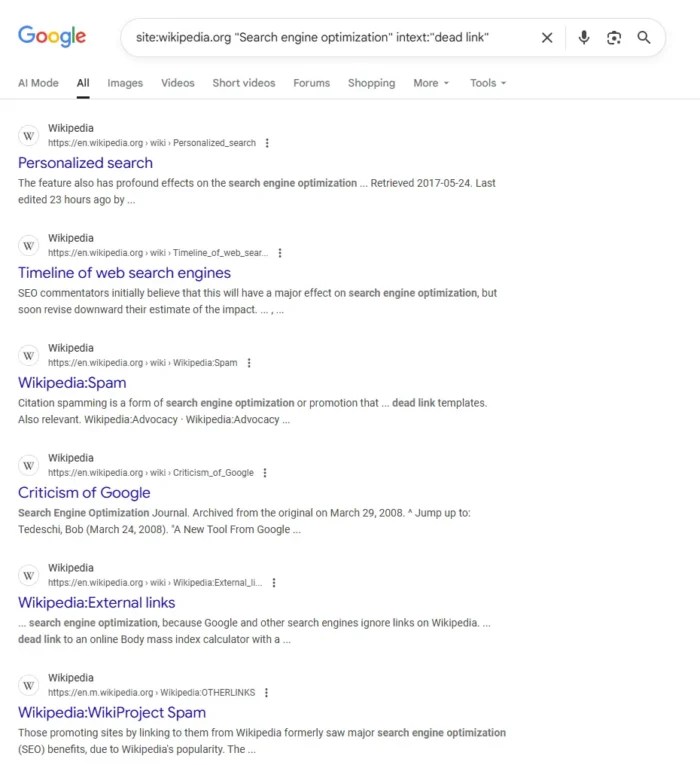
Use a simple search like site:wikipedia.org [your topic] “dead link” to find relevant articles. Scroll down to references and look for those marked as inactive. Check the original content using the Wayback Machine to see what it covered. If you have something that covers the same topic (although more updated or in-depth), you might try to submit it as a replacement.
Wikipedia links are nofollow, so they can’t pass SEO authority directly. But the value comes from visibility and second-tier links. When other sites reference Wikipedia, they may follow your citation. But don’t just rush in and start dropping links. Credibility is important, and you can build it by making non-promotional edits. Quality counts, and it’s better to play the long game.
Using Guest Content to Replace Broken Links
Sometimes it’s tough to convince site owners to link directly to your site. Guest content can help. Instead of asking them to link to your blog, create an article (a guest post) on a respected third-party site that covers the same topic as the dead resource. Once it’s live, you can suggest that article as the replacement.
Let’s say you find dozens of links pointing to a now-defunct “Beginner’s Guide to Content Marketing.” Instead of pitching your own blog post, you can write a fresh guide for a trusted publisher like Entrepreneur or HubSpot. When you reach out to webmasters still linking to the broken page, you point them to your new article as a reliable alternative. But because it’s already on an existing third-party site, it feels better to them.
This approach works because it’s often less promotional and it gives the site master a credible replacement. At the same time, you benefit from the visibility and authority of the site hosting your guest content.
Using Expired Domains To Find Opportunities
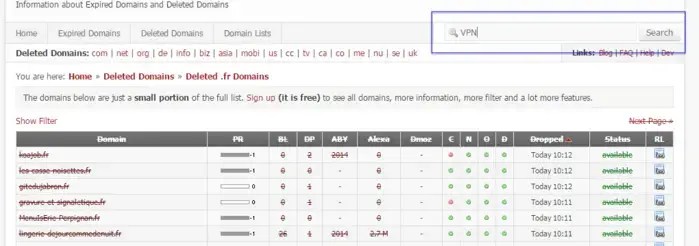
When a site goes offline or a domain expires, links pointing to it don’t disappear. They break. That’s where opportunity lives. Find expired domains in your niche that once hosted valuable content and pitch your own work as a replacement. Use a tool like ExpiredDomains.net to search for specific keywords and filter for those with strong backlink profiles. Analyze which pages had the most links using the tools listed above. If they still exist but point to dead content, you now have a target list.
Reach out to sites still linking and offer your content as a replacement, especially if you have statistics. It’s a great fit when the original resource was widely referenced or lived on a highly trusted site. Just make sure your content delivers comparable or better value, because no one wants to swap in a low-effort piece for something readers once relied on.
Create Replacement Content
Sometimes link opportunities exist, but your content doesn’t. Start by reviewing a broken page using the Wayback Machine. What was the topic, and what made it valuable? Seek signs that it offered original data or research that earned its authority or trust in its time.
Once you know what it delivered, consider how to improve it. Your goal isn’t to copy, but to provide updated details or a more modern take. Even improving the UX can help replace the original.
The best replacement content emphasizes clarity and usefulness, such as comprehensive guides or data-driven posts accompanied by visual resources. Things that help solve problems are great, too. When you’re ready to reach out, you’ll have a pitch-ready link that genuinely benefits the site owner and their audience.
Refining Your Broken Link Building Outreach
Outreach is where most broken link building efforts fall apart. You’ve done the research and found strong opportunities. But if your email reads like spam, you’re done.
Take time to identify the right person to contact. Use LinkedIn, the site’s “About” page, or email tools to find the editor, webmaster, or content manager. Don’t just send it to a generic inbox. Keep your message short and direct. Don’t bury the ask under fluff. Let them know you came across the article, noticed a broken link, and thought your content might be a good replacement.
Tone matters. Avoid sounding like a sales pitch. Be helpful, polite, and clear about what you’re offering. Mention the original content’s value and explain why your piece fits just as well (or better, if applicable).
If you don’t get a reply, wait a few days and send a short follow-up. No pressure, just a reminder. Most importantly, keep things human. The goal isn’t a backlink by itself, but a relationship that can pay off in the long term.
FAQs
How do you do broken link building?
Broken link building starts with finding links that point to dead pages. Once you have a list, you contact the site owners and suggest your content as a replacement. The key is making sure your content matches the intent of the original resource, whether that’s a guide, a statistic, or a tool. Done well, it helps the site fix a bad user experience while earning you a backlink.
How do I find broken links for link building?
Broken link building boosts SEO by fixing broken links, improving The simplest way is to use SEO tools. Platforms like Ubersuggest, Ahrefs, Semrush, or Screaming Frog can scan websites for 404 pages. You can run your own site to identify lost opportunities or analyze competitor domains to uncover broken backlinks that you could replace. Resource pages are another great place to look, since they often include multiple links; over time, some will go bad.
What is broken link building in SEO?
Broken link building is an off-page SEO strategy where you recover or earn backlinks by replacing dead links with your own content. Search engines reward sites that earn quality backlinks, so turning broken links into live ones helps improve authority, trust, and rankings. It’s a win for both sides: the site owner fixes a broken resource, and you gain a link that strengthens your SEO.
Conclusion
Broken link building fixes errors on other sites, but the bigger picture is that it turns missed opportunities into lasting SEO gains, especially in a world of search everywhere optimization. When you find broken backlinks and create or repurpose valuable content to replace them, you can earn links that improve your rankings and credibility.
But the real power is that it scales. When you reclaim lost links on your site or uncover gaps in competitor content, each replacement adds authority to your brand. Combine it with smart digital PR strategies and thoughtful internal linking, and you can see compounding results over time.
Like any SEO strategy, it takes patience. But when done well, broken link building can become one of the most effective (and sustainable) ways to grow your SEO footprint.
http://dubadosolutions.com/wp-content/uploads/2017/05/dubado-logo-1.png00http://dubadosolutions.com/wp-content/uploads/2017/05/dubado-logo-1.png2025-10-08 19:00:002025-10-08 19:00:00Broken Link Building Strategies
Omnichannel marketing is a way to make your brand feel the same everywhere: website, email, ads, social, SMS, app, and in-store. People can start on their phone, switch to a laptop, and buy later without friction.
Why is this important?
Your customer doesn’t think in channels. They see one brand. If your ads, emails, site, app, and store don’t match, money slips through the cracks. Omnichannel marketing closes those gaps and moves more people to buy.
But how many more people are buying from omnichannel campaigns versus single-channel campaigns?
A lot, actually.
An Omnisend study found the purchase rate of omnichannel marketing campaigns to be 287% higher than single-channel campaigns.
Creating a seamless experience for your customers means better brand perception and higher revenue. It’s a real win-win.
This guide walks you through omnichannel marketing strategy benefits, best practices, and examples. By the end of it, you’ll understand what goes into creating an omnichannel campaign that drives results.
Key Takeaways
Omnichannel marketing creates a seamless customer experience across every touchpoint, including website, email, ads, SMS, social, app, and in-store.
Brands using an omnichannel strategy saw purchase rates 287 percent higher than single-channel campaigns in one study.
Unlike multichannel marketing, omnichannel connects your data and messaging across platforms so everything works together, not in silos.
Benefits include better customer experiences, stronger brand recognition, more personalization, higher loyalty, and increased revenue.
To get started, map your customer journey, centralize data, integrate your channels, and follow clear brand guidelines for a consistent feel.
What Is Omnichannel Marketing?
Omnichannel marketing is a marketing strategy that seamlessly integrates all of a business’s marketing channels to create a cohesive shopping experience for each customer.
As customers move through the sales funnel, an omnichannel strategy ensures all touchpoints seamlessly speak to each other so that no matter where a potential customer makes contact with your business, it feels like the same channel.
Here’s how it looks in practice.
A customer might check out a product on a brand’s website. They decide they’re not yet ready to make a purchase, but then they’re met with ads for that product across different social media channels. They can easily click through and buy the product, even though it’s not the same channel they initially used to shop.
This is what omnichannel looks like on a small scale. At enterprise scale, the same idea gets bigger. Your teams share a single customer profile, so service reps, store staff, and ads all see the same context. POS and ecommerce pull from the same inventory. Loyalty rewards apply online and in-store. Buy online, pick up in store just works.
That’s an omnichannel marketing strategy: connect data and creative across channels so customers move forward, and your revenue does too.
Omnichannel Marketing vs. Multichannel Marketing
Before we dive deeper into what omnichannel looks like, let’s talk about how it differs from a similar tactic called multichannel marketing. Both obviously occur across different channels. But they work slightly differently.
Omnichannel marketing uses multiple channels, but it ensures that all channels are integrated seamlessly, creating a connected experience. Meanwhile, multichannel marketing just occurs across different channels, treating them more as separate entities than trying to build an interconnected ecosystem.
Multichannel is useful for quick reach and simple campaigns. Think one-off promos, early tests, short cycles, or when tools and data are basic.
Omnichannel is best for cross-device shoppers, syncing online and in-store experiences, and longer, more complex customer journeys.
Bottom line: start with multichannel, then shift to an omnichannel marketing strategy when you’re ready to connect data and deliver one continuous experience.
Why Omnichannel Marketing Is Important
Your buyers don’t stick to one platform. They search on Google, watch a review on YouTube, see a Reel, ask ChatGPT for a product comparison, click an email, price-check on Amazon, and walk into a store. If you only optimize for organic search, you miss the moments that push customers to act.
Omnichannel marketing lets you show up at key points in the customer journey and connects those touchpoints so the experience feels cohesive. Your ad matches the email. The site matches the app. The cart follows the customer across devices. Service and store teams see the same history. That consistency builds trust and cuts friction, which leads to more sales.
An omnichannel marketing strategy also spreads risk. If one channel slows down, you still have paid social, SMS, marketplaces, and retail working together.
It improves measurement, too. Shared data tells you which mix drives first purchases, repeat orders, and higher order values.
People discover, compare, and buy across many platforms. Brands that coordinate messages and data across those platforms win more often. If you’re serious about growth in today’s digital world, build an omnichannel marketing strategy so your brand is clear, consistent, and present at every step.
Benefits of Omnichannel Marketing
Omnichannel marketing has a number of benefits. These advantages can provide your business with better results and happier customers.
Think of omnichannel marketing as the glue that holds your entire shopping experience together.
Improved Customer Experience
Omnichannel marketing focuses on creating an interconnected experience no matter where your customers are interacting with your business. Because of this, it creates a seamless customer experience that’s vastly better than if the different channels couldn’t speak to each other.
Here’s what that means for customers: progress carries over (carts, wish lists, support tickets), and context follows them from device to device. If they ask a question on chat, your email workflow resurfaces it. If they browse a size in the app, your site remembers.
Abandon cart emails are great examples of omnichannel marketing in action. A customer visits your website and adds an item to their cart. They leave your site without completing the purchase. That action is sent to and triggers an ‘Abandon cart’ workflow in your email marketing platform.
They receive an automated email with the item in their cart and some encouraging words and/or a discount to get them to complete the purchase.
An omnichannel marketing strategy reduces repeats, dead ends, and mixed messages so buyers feel understood and move forward faster.
Better Brand Awareness
Creating a consistent experience across platforms (including in-store) makes it easier for customers to recognize your brand. Plus, as more people have positive omnichannel experiences with your brand, they’re more likely to share it with their friends and family, boosting word-of-mouth referrals and awareness.
Consistency is a key component of a strong brand strategy. When people see the same appearance, messaging, and offers across channels, recall and trust in your brand grows. Pair that with targeted campaigns across search, social, and marketplaces, and your brand shows up more often for relevant terms with the same look and promise.
Personalization
When your marketing channels speak to each other, you’re presented with even more opportunities for gathering customer data that can be used to personalize experiences across all channels, and not just the ones they’ve used before. This personalization is just another way to improve the overall experience with your business, making it easier for customers to work with you.
Use customer actions, like product views, cart adds, and website searches to customize messaging. Recommend items that fit past behavior, pause promos after a purchase, and nudge at the right time (not just more often). Keep consent and preferences front and center.
Done well, omnichannel personalization feels like help, not hype.
Customer Loyalty
As customers discover how easy it is to work with your business, they’re more likely to stick around and continue to buy from you again and again. Why bother finding a competitor if your business has created such a seamless shopping experience?
Loyalty grows when every interaction feels smooth and familiar. Connect rewards across store and online, recognize returning customers, and close the loop on issues fast.
Use lifecycle triggers, like welcome, re-engagement, and win-back, to stay relevant without spamming. The easier you make repeat buying, the less tempted people are to price-shop elsewhere.
Competitive Advantage
Just like we mentioned, there’s no need for customers to shop around and test out your competitors if you’ve provided such a great shopping experience. Omnichannel marketing gives you a major competitive advantage, fueling more of your target audience to head straight to you rather than others in your industry.
Most teams still run channels in silos. You’ll move faster because your data, inventory, and messaging are already in sync. Creative can be reused, offers are consistent, and measurement is clearer. That speed compounds into lower costs and better customer outcomes, an edge that’s hard to copy without a true omnichannel strategy.
Higher Revenue and Conversion Rates
Naturally, if people are sharing their positive experiences, sticking around longer, and ultimately having a great relationship with your brand, you’re going to reap those benefits in the form of higher revenue and conversion rates. Which is the ultimate goal, right?
More relevance and less friction mean more adds to cart, more checkouts, and bigger orders. Omnichannel marketing also improves attribution, so you can double down on the mix that actually drives purchases and repeat business.
Over time, the flywheel kicks in: Better data leads to sharper targeting, which leads to stronger retention, which leads to higher revenue.
Best Practices for an Effective Omnichannel Marketing Strategy
Your goal is simple: build an omnichannel marketing strategy that feels consistent everywhere and moves people forward. Start with what customers do today, not what you wish they did. Then connect the channels and tools you already use, fill the gaps, and measure what actually changes behavior.
Follow along with these steps to learn more about creating an effective omnichannel marketing strategy that will boost your customer satisfaction.
Collect & Analyze Customer Data
Start by centralizing truth. Pull website analytics, email metrics, ad performance, POS data, support logs, and audience sentiment into one view so you can spot insights like:
The channels your customers prefer to use when interacting with businesses
Which devices your customers spend the most time on
The types of messaging that seem to resonate most with them
How your customers feel about your current shopping experience
Then, pick an attribution model that fits your business. Each model is tailored to different types of customer journeys and campaign goals.
For example, position-based tracking is better for businesses with longer sales cycles, like B2B and lead gen. And data-based attribution is great for omnichannel e–commerce strategies, marketplaces, subscription apps, and retailers with steady traffic.
Check out the graphic below for a full breakdown of attribution models you can use to measure the success of your omnichannel marketing efforts.
Map Out the Customer Journey
Your next step is to map out your current customer journey. Outline each step that a Your next step is to map out your current customer journey. Outline each step that a customer would have to take from first discovering your business all the way to becoming a repeat customer.
As Matthew Santos, SVP of Products and Strategy at NP Accel, explains, “Customer journey mapping involves visualizing a customer’s various touchpoints with your brand, from initial awareness to purchase and beyond. By understanding these touchpoints, you can identify which channels are most important at different stages of the journey.”
To create your map:
Identify your customers: Identify your customers’ names, addresses, and other demographic information. Look in your CRM or use a current buyer persona.
Understand their pain points: What drives your customers to make a purchase? What challenges do they want to solve?
Find out where they hang out: What platforms do your customers use during the purchase process?
Track the conversion path: How do most of your customers convert? Their path is unlikely to be straight. They might visit your website, view your Instagram reels, and then purchase in-person, in your store. Aim to define the most common paths.
In the end, your customer journey map might look something like this:
Now it’s time to identify and integrate your different sales and marketing channels, which could include:
Social media
SMS marketing
Email marketing
Your website and online store
A physical store
A mobile app
Make sure to include all channels that you’re currently using to reach your target audience plus any channels you’ve discovered your customers prefer.
For example, you might not have previously incorporated SMS messaging into your overarching marketing strategy, but your customer data analysis showed you that your target audience prefers that method of communication.
Once you’ve selected the different channels you’ll use to communicate, market, and sell to your customers, it’s time to get them to work together.
To properly integrate your marketing avenues and create a successful omnichannel strategy, you’ll need the right technology. Some tools to consider include:
CRM: A CRM can help you store customer information so that it’s accessible across channels. It can also help you segment out your audience to create even more tailored and personalized experiences. Omnisend is a great option for building out specific segmentations.
Marketing Automation Software: To build an effective omnichannel marketing strategy, you need marketing automation tools to engage more on social media, send scheduled emails, or move users through the conversion process. Many tools you already use, like email marketing, CRMs, and social media management, have built-in automation features. You can also use a tool like Zapier to build custom triggers.
Social Media Management Tools: This type of tool can make it easy to communicate with your audience across various platforms. Get access to a social inbox that puts all conversations across all platforms in one single messaging dashboard. Use auto-replies or canned responses that ensure communication is consistent across the board. Hootsuite and Sprout Social are both great options to consider for your social media management.
Customer Data Platforms (CDPs): A CDP pulls data from all your touchpoints—site, app, ads, email, POS—into a single customer profile. That unified view makes it easier to segment audiences, personalize campaigns, and keep experiences consistent across channels. Tools like Segment or mParticle help you clean, connect, and activate data without needing a dev team for every change.
Once you’ve set up the right tools and integrated all your channels, it’s time to make sure your teams are all on the same page. If your customer support team is using different messaging than your social media team, your overall strategy is going to feel disjointed.
By creating documented brand guidelines that cover how your customer-facing teams should be communicating with customers and talking about your products, you can ensure your channels feel connected.
Your brand guidelines should include things like:
Guidance for brand visuals, like logos, imagery, colors, and graphics
How to handle customer support issues or questions to create positive and consistent experiences
Tone and voice guidelines with “do’s and don’t’s” examples
Copy guidance with channel-specific examples (e.g. email subject lines vs. educational blog content)
Legal guidelines on what you can and cannot discuss, if applicable
Share your brand guidelines with your entire team and make sure everyone is familiar with them. Give constructive feedback when you see people straying.
Brand consistency is the glue that holds an omnichannel marketing strategy together.
Test & Measure Your Efforts
After sharing your brand guidelines across your company and implementing your omnichannel approach, it’s time to test everything out. Run through each of your marketing channels the way you might if you were a new customer to make sure the experience feels seamless from discovery to purchase.
Then, think about how you’ll measure success.
In omnichannel marketing, you need to consider metrics that touch every part of the funnel. For example:
Discovery: Impressions, educational blog traffic, mentions in the media
Consideration: Engagement on social media, product views, visits to company pages
Conversion: Orders, checkout rate, CPA
Loyalty: Repeat rate, time between orders, customer reviews
Use clean UTM rules, consistent naming, and dashboards that show both channel and journey views. Review the data weekly for anomalies, monthly for trends, and quarterly for bigger bets.
3 Examples of Omnichannel Marketing
Let’s look at a few examples of omnichannel marketing in practice so you can get an idea of what this could look like for your own business.
1. Sephora
Sephora offers an amazing omnichannel experience for its customers. First-time customers are able to sign up for a Sephora account using their phone number, and then keep track of all purchases there.
Customers can figure out what they’ve purchased before and when, which makes it easier for them to restock on the products they love. It also makes it easier for the marketing team to tailor messaging and special offers to each customer’s unique shopping preferences.
Sephora accounts also track customer rewards points, as well as when their birthday month is. Whether they make a purchase online or in the store, Sephora sends the customer a little sample-size product as a birthday gift.
This omnichannel strategy makes shopping with Sephora feel easy and personal, no matter where someone is making a purchase.
2. Starbucks
The Starbucks app makes for an amazing omnichannel experience that the coffee brand’s customers love. Not only can customers order through the app then pick up in a nearby store, they can also reload gift cards, pay in-store, earn and redeem rewards, and more.
The app also makes it extremely easy to find stores near you and personalizes its offerings based on the local weather. Starbucks is already a wildly popular coffee chain, but their omnichannel marketing strategy helps boost sales even more.
3. Target
Target is another great example of what omnichannel should look like. Again, customers can create an account and easily track past purchases so they can reorder products again and again with ease.
Target also has its own rewards program called Target Circle that allows users to rack up rewards they can put towards future purchases.
But one of the best things about Target’s omnichannel strategy is that customers can check online if a product is in stock at stores near them. And it’s wildly accurate, even during huge sales events like Black Friday.
The Future of Omnichannel
Omnichannel isn’t standing still. AI, automation, and privacy changes are reshaping how brands connect with customers. Search engines and social platforms now answer questions directly, sometimes before a click. In fact, nearly 60% of searches result in zero clicks.
So how does this apply to an omnichannel marketing strategy?
For marketers, it means two things.
First, you’ll need stronger first-party data—think email lists, purchase history, loyalty programs—to fuel your targeting as third-party cookies fade. Second, you’ll need systems that can use that data in real time, adjusting offers and content across every channel without manual work.
Expect channels themselves to keep expanding. Voice assistants, connected TV, chat apps, and even in-car systems are becoming part of the customer journey. The brands that win will be the ones that stay consistent across all of them.
The future of omnichannel marketing is smarter, faster, and more connected. Get your data house in order now so you can adapt as AI and new platforms evolve.
FAQs
What is omnichannel marketing?
Omnichannel marketing is the practice of connecting all your marketing and sales channels so customers get one seamless experience. Instead of each channel running in isolation, they work together. For example, a shopper might browse on mobile, add to cart on desktop, and finish in-store, with their data and offers synced across all steps. This consistency builds trust, reduces friction, and increases conversions by making every touchpoint feel like part of the same journey.
What is the difference between multichannel and omnichannel marketing?
Multichannel means using multiple platforms, but each runs separately. Omnichannel connects those platforms so the experience is unified, not siloed.
How to implement omnichannel marketing?
Start by collecting customer data, mapping the journey, and picking channels your audience uses most. Then integrate tools like CRM, automation, and analytics to sync messaging and measure results.
Create Your Omnichannel Marketing Strategy Today
Your customers want an omnichannel experience, so it’s your job to give it to them. Figure out how to make your channels work together so your customers get a personalized, consistent, and seamless experience every time they shop with your business.
Sounds like a lot, but if you follow the steps above, you can start to build a more cohesive journey for your customers. And if you’re looking for additional help, an omnichannel marketing agency like NP Digital can bring your strategy to life.
You’ve probably heard the term “topical authority” thrown around a lot in SEO circles lately. And for good reason.
If Google recognizes your site as a trusted source on a subject, your chances of ranking higher increase. It’s not just in organic search, but now in AI-powered answers too.
So what is topical authority? How does it work? And why should you care?
It’s simple. When you consistently create high-quality content around a specific topic, you prove to both users and search engines that you know your stuff. You’re not just tossing out a few blog posts. You’re building trust.
If you want to become the authority in your space, I’ll show you how. In this article, we’ll break down what topical authority means, why it matters, and the exact strategies you can use to build it.
Ready to increase your authority? Then let’s begin.
Key Takeaways
Topical authority is a signal to Google (and AI tools like ChatGPT and Perplexity) that your site is the trusted source on a subject.
You build topical authority by covering a topic in-depth, not just with one article but across a network of related content.
More topical authority means better rankings, stronger visibility in AI-powered answers, and more qualified traffic.
Internal links, backlinks, and consistent brand voice all play a role in reinforcing your authority in search.
There’s no single score for topical authority, but tools like Ahrefs, SEMrush, and Ubersuggest can help you track keyword coverage and content gaps.
Adding subject matter expert (SME) insights and publishing under real authors can boost your trustworthiness and increase your chances of LLM citation.
The Basics of Topical Authority
Topical authority tells search engines and AI tools whether your site is a credible expert on a subject. This goes beyond publishing one article to creating a library of content that covers every angle.
The more accurate, relevant, and well-organized your content is, the more trust you build. That trust leads to higher rankings, stronger visibility, and more traffic.
Let’s take this site as an example. Because I’ve built topical authority on SEO and digital marketing, my new content on related subjects often ranks faster and performs better than sites with less focus in this area.
You’re also more likely to get cited by AI tools that draw on expert sources. Take a look at the ChatGPT answer below, which cites a variety of different sites to answer a digital marketing question:
The History of Topical Authority
Google didn’t always care about how deep your content was. In the early days, ranking was mostly about keywords and backlinks. Then came Hummingbird in 2013, and that changed everything.
Hummingbird marked the shift from keyword matching to semantic search. Google started understanding meaning, not just strings of words. That shift laid the foundation for what we now call topical authority.
Since then, updates like RankBrain, BERT, and the Helpful Content System have continued pushing in the same direction. Google now evaluates how well you cover a subject, not just how often you mention it. You can see how these shifts connect with other critical Google ranking factors.
And with AI Overviews and tools like ChatGPT pulling content from trusted sources, topical authority isn’t just about search rankings, but being the kind of content AI is most likely to reference.
The bar keeps rising. If your content doesn’t go deep, connect across topics, and come from real expertise, you’ll lose visibility both in organic results and AI-driven answers.
Why Topical Authority is Important For SEO
Topical authority in SEO isn’t optional anymore. If Google doesn’t see your site as a trusted expert on a subject, your rankings will stall.
When you build topical authority the right way, you earn better rankings, attract more links, and increase your chances of being cited by AI tools that rely on trusted sources.
Achieving topical authority is great for your SEO, but it can also help you achieve broader marketing goals. Here’s what it can do for your website.
More Organic Traffic
One of the best things about having topical authority is that it ensures more potential customers head to your website instead of your competitors. That’s because better topical authority means higher Google rankings and higher rankings mean more traffic.
When your site covers a topic in full, including related subtopics and common user questions, you rank for more long-tail keywords and increase your chances of winning more SERP features. This also improves your chances of being cited in AI Overviews, which pull from trusted content to answer queries directly.
While AI keeps more users on the SERPs, the ones that do click through to your website are more intentional, engaged, and ultimately higher quality.
More Backlinks To Your Website
That visibility creates a feedback loop. The more backlinks you earn, the more authority you build.
It also signals to search engines and AI systems that your content is trustworthy, which boosts your chances of being featured in search results and AI Overviews.
Instead of chasing links, you start attracting them naturally just by owning the topic.
Increased Brand Reputation
Consumers trust experts. And if your website appears at the top of every search result related to a particular topic, you’re naturally going to be considered an expert.
Ranking at the top gives people a reason to trust your brand before they even click. You become the name people associate with credible advice, helpful insights, and solutions that actually work.
Over time, this trust turns into customer loyalty, word-of-mouth referrals, and bigger opportunities for your business.
Supporting E-E-A-T
E-E-A-Tstands for Experience, Expertise, Authoritativeness, and Trust — and it’s one of the ways Google evaluates content quality.
You can’t fake these signals. You earn them by consistently publishing content that reflects deep knowledge, solves real problems, and shows first-hand understanding of your topic.
That’s exactly what topical authority is built on. When your site covers a subject from every angle, connects related ideas, and links to reputable sources, you’re hitting the same benchmarks Google looks for with E-E-A-T.
Signs A Website Has Topical Authority
It’s not always obvious whether a website has strong topical authority. There’s no single score or tool that can tell you outright.
But there are clear signs Google and AI models look for, patterns that show you know your topic inside and out.
Let’s break down what they are.
A Strong, Authoritative Domain
Websites with strong topical authority usually have strong domain authority too. That’s because backlinks fuel both. The more high-quality links you earn, the more your domain gains trust in the eyes of Google, and that trust helps your content rank.
Metrics like Moz’s Domain Authority and Ahrefs’ Domain Rating are two reliable metrics you can use to track this. They aren’t perfect, but they give a useful snapshot of how authoritative your site looks from the outside.
A good example is MayoClinic.org. It ranks consistently for health-related terms because its content is accurate, comprehensive, and backed by years of trust signals like backlinks and citations.
When your site earns that kind of authority, your topical coverage becomes harder to compete with.
Robust Internal Link Profile
A strong internal link profile suggests that a website has a lot of pages about a similar topic. After all, you’d only link to another page on your website if it is related to the topic you’re currently writing about.
Internal linking also helps distribute authority across your site, making it easier for your pillar content to rank. Building a structure of relevant, topic-aligned pages linked together is one of the core tactics in effective internal linking.
One site that nails this is Healthline. Articles on conditions, symptoms, and treatments all connect cleanly through relevant anchor text. That structure helps readers and search engines navigate the topic more easily, and it boosts the site’s topical authority.
Number of Ranking Keywords
Generally speaking, the more keywords a website ranks for, the more topical authority the website will have. Each ranking keyword is another signal that Google trusts your content to answer a specific query.
It’s easy to see how many keywords a website is ranking for using Ubersuggest. Just run a Site Audit on your own or your competitor’s website, and organic keywords is one of the headline figures you see.
You can click on the tab to get a complete rundown of all the keywords that the site ranks for.
LLM Citations
Large language models like ChatGPT and Perplexity pull answers from high-authority websites and getting cited by them is a growing sign of topical authority.
These tools are designed to favor high-quality, well-structured content. That means the more consistent, well-organized, and trusted your content is, the more likely it is to be referenced in AI-generated responses.
Sites that rank well in search and demonstrate strong E-E-A-T signals tend to show up in these results. So do sites that use clean HTML structure, clear headings, and publish under real authors.
Citations in AI tools reflect what Google and LLMs are both looking for: consistent, trustworthy expertise.
Best Practices To Build Your Topical Authority
You don’t become a topical authority by accident. It takes a focused strategy, consistent publishing, and a deep understanding of what your audience actually cares about.
The good news? There are proven ways to get there, and they work across industries, niches, and business models.
Here’s how to start building real authority in your space.
Create an Awesome Content Strategy
A solid content strategy is the foundation of topical authority, but it needs to go beyond just publishing regularly. You need to identify content gaps, map out supporting subtopics, and prioritize the questions your audience is already searching for.
Start by auditing your existing content to see where you’re weak, then use tools like Ubersuggest or Ahrefs to find the topics your competitors are covering and you’re not.
Each piece you publish should serve a clear purpose: build depth, target a keyword cluster, or reinforce your site’s expertise.
Over time, that structure signals to search engines and AI models that your site isn’t just participating in the conversation, it’s establishing leadership and authority within it.
Build Topic Clusters
When selecting topics to write content about, focus specifically on a couple of key topics, and use them as pillars for your website, creating content clusters.
Make sure you create the very best piece of content about these core topics, then start branching out into other related topics, most of which will have a smaller search volume than your key topics.
When you write about these smaller, related topics, make sure you are linking back to the bigger topics and between all of the other smaller topics that are related to your key topic.
It will look something like the diagram below from HubSpot.
This structure helps search engines recognize your site as an expert on the subject, improving crawlability and reinforcing your topical authority.
Understand User Intent
Google ranks content that aligns with what users are really trying to accomplish, not just what they type.
Most content marketers will implement a plan surrounding user intent to improve their topical authority. It is no secret that Google’s search engine algorithm has become extremely good at understanding user intent.
If a user searches for information on a subject via a given fact or specific keywords, Google’s algorithm tries to establish the intent behind that particular search and deliver the most relevant result.
That means your content strategy must take into account the intent of the user searching for that keyword. If it’s informational, write a how-to article. If it’s transactional, consider targeting an e-commerce page. This varies based on your platform of choice, as the chart below shows:
You can go even further by reverse-engineering the search results. For instance, run a Google search yourself for a target keyword and see what kind of articles come up.
Below I’ve run a search for the term “Keyword research.” As you can see, the results are a mixture of how-to articles and tools.
This tells me that I can either market my keyword research tool, Ubersuggest, or create a how-to guide that includes my keyword tool and others like it. This satisfies the user intent and what Google thinks the user intent is.
That’s why I created a full breakdown of keyword research strategies, because the content format matches what users actually want.
Build High-Quality Links
One final strategy you should use to improve your website’s topical authority is to build high-quality backlinks with other authoritative websites.
The key is to get links from websites that have strong domain ratings and that are relevant to your industry. For example, if you have an SEO tool, getting a link from my blog would be a great link.
But it’s not just about volume, quality matters. The best backlinks come from sites with topical relevance, natural anchor text, and contextual placement within content.
Strategies like guest blogging, HARO outreach, and contextual mentions can all support high-quality backlink building when used the right way.
Strong links help boost your rankings and strengthen the authority signals search engines and AI tools rely on.
Define Your Brand Voice
A consistent brand voice makes your content more recognizable, trustworthy, and easier to connect across related topics.
If your tone, structure, and perspective shift from post to post, it’s harder for users and search engines may struggle to recognize your expertise.
That consistency becomes especially important when you’re building out topic clusters. Each piece should sound like it comes from the same point of view, even if multiple people contribute.
Clarity, tone, and editorial consistency are part of what makes your content feel authoritative, not just to readers, but to algorithms evaluating how well you cover a subject.
Add SME (Subject Matter Expert) Insight<h3>
One of the fastest ways to build topical authority is to bring real subject matter experts into your content. That could mean using named authors, pulling in expert quotes, or publishing under people who have actual experience in the field.
I love doing this on this blog. You hear a lot from me, but I like having other experts from my agency chime in when it comes to topics they have specific expertise on.
Users want to hear from people who’ve actually done the work. Adding expert input isn’t just for show, it’s what separates credible content from filler.
Topical Authority Metrics
While there’s no single topical authority score, these metrics show you’re building credibility:
Number of ranking keywords: Shows how well your site covers a topic at scale
Keyword depth: Measures how many related long-tail queries you rank for in a cluster
Content-to-topic ratio: Indicates whether your site goes deep or just scratches the surface
Internal linking coverage: Signals whether you’re connecting related ideas effectively
Growth in backlinks to topic-related pages: Suggests rising authority within that subject
LLM citations (like ChatGPT) offer indirect proof that your content is seen as trustworthy
Once you know what to look for, you can use tools like SEMrush and Ahrefs to track keyword clusters, compare topic coverage against competitors, and audit internal link paths.
Ubersuggest lets you monitor keyword growth over time, check traffic by page, and spot gaps in your content strategy.
And while no tool will hand you a “topical authority” badge, tracking the right metrics will show whether you’re moving in the right direction, and where to focus next.
Frequently Asked Questions
What is topical authority?
Topical authority is how search engines evaluate your site’s credibility on a specific subject. The more high-quality, in-depth content you create around a topic, and the better you organize, link, and structure it, the more likely Google is to trust your site to rank for related searches. It’s not about one post. It’s about building a library of connected, expert-level content that proves you know the space.
How do I build topical authority?
You build topical authority by going deep, not wide. Start with a few core topics, publish content that covers every angle, and connect everything with a strong internal structure. You also need to align with user intent, bring in subject matter expertise, and keep your content updated. That shows search engines and readers that you’re committed to covering the topic thoroughly.
Do backlinks play a role in establishing topical authority?
Yes. Backlinks matter. When trusted sites link to your content, it signals to Google that others see you as credible. But it’s not just about quantity. Relevance, context, and anchor text all affect how much a backlink supports your authority.
Conclusion
Topical authority is one of the most valuable assets in modern SEO. It helps you rank, earn trust, and get cited by AI tools looking for expert sources.
You won’t build it overnight, but if you commit to going deep on the topics that matter to your business, the results compound. Solid on-page SEO and forward-looking strategies like LLM seeding help position your content where it matters most.
If your content consistently delivers real value, Google will notice. Your audience will too.
http://dubadosolutions.com/wp-content/uploads/2017/05/dubado-logo-1.png00http://dubadosolutions.com/wp-content/uploads/2017/05/dubado-logo-1.png2025-10-03 19:00:002025-10-03 19:00:00Topical Authority: What Is It, & How Does It Work?
Most marketers treat SEO like a traffic tool. They get the clicks, but the brand still doesn’t stick.
Here’s what I see happening: Marketers chase clicks but forget about recognition. You get the visit, but not the return customer.
That’s a problem. If people can’t remember you, they won’t come back. If Google doesn’t see signals of your brand’s authority, you’ll lose visibility in search.
AI search is shifting how people find answers. Instead of 10 blue links, people now see answers. And those answers often include brands Google already trusts.
This makes brand SEO a must. You need to show up and stand out.
I’ve been tracking this shift for months: 1 out of every 3 search queries on Google is branded. That means you’re already behind if you’re not building brand recognition.
In this post, you’ll learn how to build a brand that ranks, earns clicks, and sticks in people’s minds. No gimmicks. Just smart, brand-first SEO.
Key Takeaways
Brand SEO helps you rank for branded searches and builds trust with users and Google.
Strong branding increases click-through rates (CTR), backlinks, and visibility in AI-driven results.
Brand mentions across trusted sites, combined with consistent content and E-E-A-T signals, reinforce your authority in search. Owning your branded search engine results page (SERP) is just as important as ranking for non-branded keywords.
AI summaries and featured answers pull from trustworthy brands. If your content feels human and credible, you’ll be in the mix.
What Is Brand SEO (and Why It Matters More Now)?
Brand SEO builds your reputation in search results. You want to control how you appear, not leave it to chance.
In newer AI features like AI Overviews (AIOs), I’m seeing trusted brands surface more often. If you’re not showing credibility, you’re not showing up.
Brand SEO closes that gap. It tells search engines and users who you are, why you matter, and why they should click.
You still need the foundations: SEO basics like page speed, keyword optimization, and mobile responsiveness.
But technical SEO alone won’t build your brand’s reputation. You also need signals like brand mentions, consistent content, and trust indicators, especially those tied to E-E-A-T.
Key brand SEO signals include:
Branded keyword visibility (e.g., company name, product names, founder name)
Clear authorship and real-world experience across pages
Brand SEO works across platforms. Google is no longer everyone’s go-to. Many now use TikTok, Reddit, YouTube, ChatGPT, and other platforms to search and discover brands.
That shift is why I call it search everywhere optimization. Your brand needs to be visible wherever your audience is searching.
How Branding Impacts SEO (and Vice Versa)
Google doesn’t just rank websites. It favors recognizable and trusted brands.
If your name is recognizable and trusted, people are more likely to click. If they stick around and engage, Google sees that as a signal you’re worth ranking higher.
Here’s something most people miss: Good branding actually improves your technical SEO metrics. It improves click-through rates. It builds trust. It earns backlinks and mentions without you having to ask.
And it works both ways. Showing up at the top of search results makes your brand look more credible, even to people who’ve never heard of you before.
This creates a growth loop. If your brand shows authority and credibility, you have a better shot at getting pulled into AI-generated summaries, carousels, and featured snippets.
Your brand strategy and SEO plan can‘t sit in separate silos. They have to work together.
Even unlinked brand mentions count as credibility signals. If someone references your business in a blog or Reddit thread, Google sees that as a sign your brand is real.
Strong brands get ranked. Ranked content strengthens the brand. That’s the loop. You want to be in it.
Strategies to Improve Your Brand SEO
A lot of brands don’t think about how they appear in search until there’s a problem. But by then, you’re already lagging.
People are going to find you in search anyway. Brand SEO decides whether they trust what they see or bounce.
The strategies below are designed to boost visibility and build credibility, helping your brand stand out where it matters most: directly in the search results.
1. Optimize for Branded Search Queries
When someone Googles your brand, what do they see? Your homepage? A competitor ad? A half-filled profile on a review site?
Not actively managing your branded search presence means giving up control of your first impression.
Go search your brand name right now.
You should see your site, social profiles, top content, third-party reviews, and, ideally, Google’s Knowledge Panel. If anything looks off, you’ve got work to do.
From there, tighten the basics.
Claim and optimize your listings on review platforms and business directories. Add schema markup to your site. Build out your brand’s presence on YouTube, LinkedIn, and other authoritative channels.
Don’t forget your core pages, either.
Use your home and About pages to clearly state who you are, what you do, and why people should trust you. These pages often show up first in branded searches.
These searchers already know your name. Now your job is to make sure you look like the obvious choice.
2. Build E-E-A-T with Your Brand
Google rewards brands that demonstrate real experience and clear expertise. Those are the exact qualities E-E-A-T is built to measure.
So, how do you show that in search?
Start by putting a face to your brand. Make it visible in search. How?
Add real authorship to your content.
Use bios with credentials.
Publish original data.
Share customer stories that prove you’ve done the work.
Your About page matters, too. It tells both users and search engines why you’re credible. That includes your track record, leadership team, certifications, and partnerships. These are all signals that support your SEO.
You can also strengthen E-E-A-T through off-site brand mentions. Even unlinked references from trusted sources help Google connect your brand to your niche.
If your brand is missing from expert conversations, you’re not getting full credit in search.
Google tracks brand mentions across the web, even when they aren’t linked. That includes product roundups, reviews, Reddit threads, and press coverage.
These mentions act as trust signals. They show Google that your brand exists, has a reputation, and is relevant in your space.
Start by identifying the sites, creators, or communities that already talk about your niche. Then pitch them stories, data, tools, or quotes that tie back to your brand. You don’t need a backlink to make the mention count.
You can also earn mentions through original research, expert commentary, or sponsoring newsletters and industry events.
Track your results with a tool like Brandwatch, Mention, or Google Alerts. When you see new mentions, screenshot them. Use them in pitches. Mention them in your About page. They build credibility fast.
4. Use Content to Reinforce Brand Values
Your brand strategy isn’t what you say about yourself. It’s what people remember after reading, watching, or hearing from you.
Every piece of content sends a signal. Blog posts, product pages, even your FAQs: Each shapes how people see your brand and how search engines define it.
If your blog is friendly but your homepage sounds like legal copy, that disconnect hurts both trust and SEO. You want a consistent voice, message, and point of view across all channels.
That’s how you build long-term recognition. And it’s also how Google learns what your brand actually stands for.
The fix starts with content that reflects your values. Are you positioning yourself as an educator? A disrupter? A resource for beginners? That should come through clearly in your headlines, body copy, and calls to action.
Take a look at NerdWallet’s homepage and recent blog.
NerdWallet leans hard into being a trusted guide. On the homepage, it’s all about making finance simple and approachable: “The Nerds can find your next financial product in minutes.”
In the article, it’s about being relatable and human, explaining a tough job market with plain language, real data (and even a touch of humor).
Brand stories aren’t marketing fluff. They’re how you show what your business does, who it helps, and why it matters.
Common Mistakes That Hurt Brand SEO
Brand SEO breaks down when your signals don’t align. These aren’t technical SEO errors. They’re brand gaps. Good news, though: They’re fixable.
Here’s what weakens your visibility and trust in search:
1. Mixed or Inconsistent Messaging
I see this constantly: brands that sound corporate on their homepage, casual on social, and educational in their blog. Pick a voice and stick with it.
People notice. Google picks up on those mixed signals too. You lose credibility if your voice, offer, or positioning shifts depending on the platform.
2. Neglected Branded SERPs
If you’re not ranking for your own name or product terms, someone else will fill that gap.
Check your branded queries regularly. Do your homepage, social profiles, and About page show up? Do review sites outrank you? Own your real estate by optimizing those pages and building out what’s missing.
3. No Authorship or Trust Signals
Google wants to know who’s behind the content.
If your blog posts have no author bios or credentials, they look like filler. Add real names, real expertise, and clear reasons to trust the advice. These are key SEO trust signals.
Here’s an example featuring NP Digital’s VP of SEO, Nikki Lam, who contributes thought leadership expertise to this blog:
Author pages like this help reinforce transparency and authority, making your content harder to dismiss.
4. Lack of Off-Site Brand Presence
If your brand never shows up outside your own website, it creates a credibility gap for both search engines and users.
This usually happens when all your energy goes into content on your blog, but no one else is referencing your brand. That might be because you haven’t done outreach, you’re not sharing anything unique, or you’re not part of the conversations happening in your industry.
The fix doesn’t have to be overwhelming.
Start small. You might share original insights or research on LinkedIn or pitch a quote to a roundup post. Or you could jump into relevant Reddit threads or sponsor a niche newsletter or event.
The goal is to get your brand name mentioned on trustworthy third-party sites, even if there’s no backlink.
FAQs
How do I improve brand awareness with SEO?
Start by creating helpful content that solves problems for your audience. Focus on long-tail keywords tied to your niche. From there, own your branded SERPs by optimizing your homepage, About page, and key product or service pages. And don’t stop with your own site: Build authority by earning mentions on trusted third-party sites, even without links.
How important is branding for SEO?
It’s bigger than most people realize. Google favors content from trusted, recognizable sources. A strong brand improves click-through rates, time on page, and off-site signals like mentions and reviews. All feed into your organic performance.
What is a brand mention for SEO?
A brand mention is any time your business is referenced online, even if there’s no hyperlink. This could be in a product roundup, blog post, news article, forum thread, or podcast transcript. Google can interpret these mentions as signals of authority and relevance.
Conclusion
SEO has evolved beyond traffic generation. It’s how your brand earns visibility, trust, and authority across search and AI-driven platforms.
If you’re not showing up as the trusted choice in branded queries, featured snippets, AI overviews, or other AI-generated answers, someone else will.
Brand SEO helps you fix that. It gives you control over how your business appears, what people say about it, and whether Google sees you as credible.
Doing this well goes beyond technical fixes. It’s about your content strategy, review signals, authorship, off-site presence, and everything in between. It’s not optional if you want to grow.
You don’t build a brand by hoping people recognize your logo. You build it by showing up everywhere they look and giving them a reason to trust you.
http://dubadosolutions.com/wp-content/uploads/2017/05/dubado-logo-1.png00http://dubadosolutions.com/wp-content/uploads/2017/05/dubado-logo-1.png2025-10-02 19:00:002025-10-02 19:00:00How to Use SEO to Build Your Brand
Turning paid ads into profit is a proven path to scalable, predictable growth.
When you nail it, paid media gives you a steady stream of customers, without depending on Google’s latest update or social media’s shifting algorithms. In fact, digital ad spend hit $259B in 2024 and is expected to keep growing.
But which channels are right for you? How can you weave them together into an effective strategy? And what’s the best way to measure your performance?
Here’s what you need to know.
Key Takeaways
Paid media is any form of advertising you pay to place on platforms you don’t own, like Google ads, Facebook posts, banner placements, or influencer partnerships.
The big three categories are display ads (banners and videos that stand out), native ads (sponsored posts that blend in), and traditional media (billboards, TV, radio).
Search ads and influencer partnerships are the most trusted paid channels because they catch people with intent or leverage existing relationships.
A winning campaign has seven steps: get your team aligned, set specific goals, budget for real costs (not just ad spend), know your audience, pick the right channels, create compelling ads, and optimize relentlessly.
Track five key metrics: return on ad spend (ROAS), overall return on investment (ROI), cost per click (CPC), impressions, and click-through rate (CTR). These tell you whether you’re making money or just spending it.
Paid Media Basics
Paid media is any kind of promotion that meets two criteria: it happens on a platform you don’t own, and you pay for it.
Banner ads are everywhere, like the ones shown in the Wired article below.
Paid media drives real revenue, whether you’re running a startup or managing a global brand.
In research from my team at NP Digital, we found that paid ads make up a meaningful chunk of revenue across businesses of all sizes.
Paid Media vs. Earned Media vs. Owned Media
Think of marketing like a three-legged stool. The three legs here are paid, earned, and owned media.
Understanding how they work and how they work together can help you build a strategy that covers your blind spots and scales over time.
As mentioned earlier, paid media is any promotional placement you pay for. Think search ads, social ads, banner placements, influencer partnerships, and more.
Earned media is unpaid publicity that your business receives from other people and websites. It’s what others say about your brand mentions in news articles, influencer shoutouts, customer reviews, backlinks, or viral social shares.
Owned media is the stuff you fully control. Your website, blogs, social media accounts, newsletters, and email list, fall into this category. You manage the content, the experience, and the message.
Here’s how they fit together:
Paid media helps you get visibility fast, especially when you’re just starting out or entering new markets
Owned media builds trust, it’s where your brand message lives
Earned media amplifies both. It kicks in when people start talking about what you’re already doing well
The best campaigns use all three. Paid gets attention. Owned keeps it. Earned multiplies it.
Categories and Examples: Paid Media in the Wild
Paid media is evolving fast. Search, social, video, and display are table stakes, but newer formats are gaining traction too, including ads inside large language models (LLMs) like ChatGPT and Gemini.
Even with all this growth, most formats fall into three core categories: display, native, and traditional. There’s often overlap between them, but these labels help keep things simple.
Display ads: These are visually distinct image, video, and text ads that appear alongside content on the web. Website banners, YouTube ads, and interstitial pop-ups are all examples.
Native ads: These are ads that fit within the flow of content and are often indistinguishable from it at first glance. Influencer recommendations, advertorials, and sponsorships are well-known forms of native advertising.
Traditional media: Commercials, billboards, and direct mail are examples of traditional media. You don’t get the same tracking or targeting you’d see with digital, but these channels still play a role in large-scale brand awareness.
Now that we’ve covered the broad categories, let’s break down some of the most common paid media channels, and where each one fits.
While Google Ads dominates the space, Bing Ads (now part of Microsoft Advertising) can offer lower CPCs (cost per click) and a different audience, especially for B2B brands. Amazon Ads also work well for product-heavy businesses.
We foundthat search ads across platforms drive some of the highest conversion rates in paid media, second only to channels like LinkedIn and influencer marketing.
Here’s what the advertising process looks like:
Open an account with the ad network (like Google or Bing)
Choose the keywords you want to appear for, such as “gardener in Arizona”
Set your maximum bid for those keywords (top bidders appear first)
Create your advertisement, which will be text-based
Launch your campaign and let Google serve your ad on relevant SERPs
The benefit of SEM is intent. You’re targeting users who are already searching for what you offer, which puts them closer to a buying decision.
And if you’re willing to bid competitively, your ad can appear above the organic result, even above your competitors.
Here’s an example of search engine ads for the keyword “paid media consultant.” Note the “Sponsored” label, which helps users distinguish paid ads from organic results.
Third-Party Banner Ads
Banner display ads are shown on a third-party online property, usually a website or app.
Most people think banner ads only appear at the top of pages. Not true. Inline banner ads also show in the flow of content. A banner ad is simply a square or rectangular display ad (an ad that is distinct from surrounding content).
NP Digital research shows that banner ads are the least trusted of all paid media formats, underperforming search and influencer ads significantly.
That said, banner ads are good at raising brand awareness. As customers see the same ad repeated across different websites, “brand memory” strengthens. The average person needs to see a brand at least seven times before they make a purchase.
Here’s an example of a fairly conspicuous banner ad on UK news site the Daily Mail:
The Google Display Network, the world’s biggest display network, consists of over two million websites and mobile apps that businesses can display their ads on—reaching 90 percent of web users worldwide. When someone clicks on an ad, Google Ads and whoever hosted it share the spoils.
Paid Social Media Advertising
Social media advertising is big business. The global market was worth an impressive $252.95 billion at the end of 2024, and this is set to grow in the future.
According to NP Digital research, Facebook generated over $100 billion in ad revenue last year, making it the top-performing social ad platform. Instagram followed at $70.9 billion.
Here’s an example of paid media advertising on Facebook. This sponsored post is by McDonald’s and appears in relevant customers’ newsfeeds, enticing them to try their $8 Chicken McNugget Meal. These ads blend into the feed but still offer clear calls to action.
And it’s not just for B2C. In the LinkedIn ad below,Microsoft targets professionals in banking with an ebook download offer.
Social ads work because they meet people where they’re already scrolling. Nearly 60 percent of the world’s population has at least one social media account.
Even better, social platforms give you advanced targeting tools. Most platforms let you target people by age, gender, and location, as well as their hobbies and other social media accounts they follow.
Video Advertising
Video content gets more engagement than static text or images. In fact, one NP Digital study found that short-form and long-form videos accounted for 31.38% and 15.51% of all engagement, respectively.
That kind of engagement makes video a powerful paid media tool, especially on platforms like YouTube, Facebook, TikTok, and Instagram.
Video ads show up before or during content users are already watching.
What makes video ads effective is how they combine storytelling with visual cues. Create a stylish, funny, or cool video, and people will naturally want to discover your brand. Like display ads, videos are great for capturing people’s attention on mobile as well.
In-App Ads
In-app ads are paid placements that show up inside mobile apps while someone is using them. These can be banner ads, video ads, interstitials (full-screen takeovers), or rewarded ads where users watch a video in exchange for in-app perks.
You’ve probably seen these in gaming apps, news apps, or streaming services. They appear between levels, in feed scrolls, or before content loads.
These ads work well if your audience spends a lot of time on mobile, and even better if you’re targeting users by behavior, interest, or location. App data gives you targeting options you won’t always get on the open web.
Performance varies by industry, but in-app ads tend to perform best for consumer apps, entertainment, retail, and local services.
Digital Out of Home (DOOH) Ads
DOOH ads are digital billboards, transit screens, and signage in public spaces. You’ve seen them in malls, airports, gas stations, elevators, and even gym treadmills.
Unlike traditional out-of-home ads, these use screens and software, which means you can update them in real time and target by location, time of day, or audience segment.
They’re a great fit for local campaigns, brand awareness pushes, or national advertisers who want visibility in high-traffic areas. You won’t get click data, but they can be effective for driving searches, visits, and offline conversions.
DOOH is especially useful when paired with mobile or geotargeted campaigns. Seeing a screen ad in a gym, then getting a related offer on your phone, is the kind of multi-touch experience that performs well.
Connected TV (CTV) and Over-the-Top (OTT) Advertising
Connected TV (CTV) and Over-the-Top (OTT) ads show up inside streaming content, on platforms like Hulu, Roku, YouTube TV, and Peacock. These are the ads you see while watching shows or movies on smart TVs, streaming boxes, or even mobile apps.
The big difference? CTV runs on television screens. OTT can run on any device.
These ad formats are great for reaching cord-cutters who’ve moved away from traditional cable. They’re also more trackable than old-school TV ads, with options for targeting by location, device, behavior, and even interests.
CTV and OTT ads are especially useful for brand awareness, product launches, and retargeting. You can run short video ads in high-attention environments—and often get better completion rates than on social.
Large Language Model (LLM) Ads
LLM ads are an emerging format of paid placements that appear in large language model tools like ChatGPT, Google Gemini, and Perplexity. These ad types are still in the early stages, but they’re gaining momentum as AI assistants become part of everyday search behavior.
Right now, some platforms are testing sponsored response blocks or product carousels within AI-generated answers. These typically appear when users ask for recommendations, product ideas, or service comparisons.
For marketers, LLM ads offer a new way to show up during early-stage research, especially in verticals like travel, consumer products, software, and education.
Unlike traditional search ads, these placements are more dependent on content quality and relevance than keyword bidding. That gives brands with helpful, trustworthy content an advantage.
This space is still evolving, but it’s one marketers should keep a close eye on. Testing early gives you a head start as AI search platforms build out their ad offerings.
Sponsorships and Advertorials
Sponsorships, advertorials (paid articles), and influencer marketing are the most prominent examples of paid native advertising.
These ads blend in with regular content.
Here’s an example: an article written by a company executive who’s part of Forbes Council, a paid program that entitles members to publish a set number of articles every year. It looks like editorial content, but it’s paid for, and the author gets guaranteed publishing rights.
Sponsored posts are everywhere, especially on social. The Instagram post below is clearly labeled as a “Paid partnership with Gymshark.” This post feels authentic because it comes from a trusted influencer, not a brand’s ad account.
Along with that, since the influencer has a loyal, engaged following—the post has over 140,000 likes—the ROI will likely be positive for the advertiser.
What makes these work? Trust. When the message comes from someone users already trust, it tends to land better, and perform better.
Benefits of Paid Media as a Marketing Channel
Here are some key benefits of paid media for marketers:
You have more control. As you pay to advertise, you get more say over your ad’s appearance. Conversely, if you submit a press release to a publication, they may edit it to suit their in-house tone of voice.
You get immediate visibility. Search engine optimization (SEO) costs less than paid media, but it can take three to 12 months to see optimal results. With paid media, if you’re happy to pay, you can appear in front of prospective customers immediately.
You can measure results. Paid ads platforms offer detailed analytics so you can see how your ads are doing. Some even provide a quality score so you know which campaigns you need to optimize.
You can tailor your ads. You can target your ads to specific groups of customers and even tailor content toward a location. This increases the chances of people responding positively to your advertisements. Similarly, you can advise who you don’t want your ad to show to.
You can implement automation. You can be as hands-on or hands-off with your advertising as you want. For example, Google Ads offers automated bidding where it automatically optimizes your bids to appeal to people more likely to help you achieve your goals.
Top 5 Paid Media Metrics for Paid Media
You could track dozens of metrics, but these five matter most.
There are lots of metrics you can use to track the success of your paid media campaigns. The risk is that you get lost in a sea of data.
I recommend a simplified approach. One that lets you hone in on channels with potential, drop those that aren’t working, and demonstrate a clear ROI throughout.
Here are my top five metrics for paid media:
These give you a clear picture of performance and help you decide where to optimize or pull back.
Return on ad spend (ROAS): ROAS tells you how much revenue you’re generating for every dollar spent on ads. It’s important to measure this separately because it’s the first thing you need to remedy if you’re not achieving a positive ROI overall. If your ROAS drops, you may need to adjust your targeting, creative, or offers.
Return on investment (ROI): This is the big one. If you’re generating more from your paid media campaigns than it costs to run them, you’re on the right track. Account for everything—creative costs, time managing ad accounts, A/B testing, etc.—and not just the ad platform fees. Paid media without ROI is just spend. Use this number to decide whether to scale or pause.
Cost per click (CPC): This is the average amount you pay whenever someone clicks on your ad. Ideally, this should be as low as possible. It’s a ripe area for optimization. CPC is most useful when viewed alongside CTR and conversion rate. A low CPC doesn’t help if nobody converts.
Impressions: This is the total number of times users see your ads. A high reach shows that you’ve chosen a channel that gives you exposure to a large audience, which is important for brand building. Low impression count? It might be time to evaluate the reach of your chosen channel. Impressions alone won’t drive results but they show whether your ads are getting visibility in the first place.
Click-through rate (CTR): This is the percentage of people who see and click on your ad. A high CTR shows that people find your ad interesting and valuable.
How to Create a High-ROI Paid Media Campaign: 7 Steps
Paid media can generate traffic, leads, and revenue, but only if you approach it with a clear plan. Skipping strategy and jumping into ad spend is one of the fastest ways to burn through your budget.
Because large amounts of money are involved, caution is your ally. Many businesses burn through cash before giving up on paid media, wondering what went wrong.
Your paid media strategy should clearly cover the following:
Which internal stakeholders you need to include
Goals you want to achieve
Characteristics of your audience
Platform-specific budgets
Viable paid media channels
Products and services you want to promote
Metrics for gauging success
The process doesn’t need to be complicated. These seven steps will help you build a campaign that’s focused, efficient, and ready to scale.
1. Obtain Internal Stakeholder Buy-In
Getting buy-in goes beyond simple approval. Your team needs to fully understand what’s happening, why it matters, and what role they play.
Start by identifying who needs to be involved. At a minimum, that usually includes:
Sales (if the campaign impacts lead gen or pipeline)
Don’t wait until after launch to bring these teams in. Paid media works best when everyone is aligned from day one.
Set up a short kickoff meeting to walk through the campaign plan. Cover what you’re promoting, who you’re targeting, what platforms you’re using, and how results will be reported.
It doesn’t have to be a big formal process. A shared doc, quick sync, or even a Slack thread can go a long way.
The goal is to eliminate surprises and make it easy for other teams to support the strategy.
2. Set clear goals and KPIs
You need to know exactly what you’re trying to accomplish. Metrics are important (we’ll come to those later), but goals lay the foundation.
If you don’t know what success looks like, it’s easy to waste money. That’s why clear goals are the first thing to lock in, before budgets, platforms, or creatives.
Start by asking one question: What do you need this campaign to accomplish?
This could include:
Lead generation
Product sales
Free trial signups
App installs
Event registrations
Traffic to a specific landing page
Brand awareness in a new market
Be specific, not general. “More leads” isn’t a goal. “Generate 250 demo requests this quarter at a CPL (cost per lead) under $80” is. Pass your goals through the SMART test: are they Specific, Measurable, Attainable, Relevant, and Timely? The more detailed you make the goals, the easier they will be to achieve.
After that, you can pick KPIs and metrics that match your objective, which we will be talking about in a little bit.
3. Determine budget
With paid media campaigns, it’s essential to set a budget and stick to it. Many paid media platforms let you set a definite upper limit for your ad campaigns. If you exceed this budget, the platform stops showing your ads.
Your budget isn’t just ad spend, but it fuels the entire campaign. Along with the baseline budget for your paid media ads, you must also consider additional costs. These include ad copywriting, graphic design, and videography. If you use an agency, you’ll have to cover ongoing account management fees.
Start by figuring out what success looks like. If your goal is to get 100 leads at $50 each, you’ll need to spend at least $5,000 in ad budget alone. That’s your baseline.
Then add in the supporting costs:
Ad creative (copy, graphics, video, landing pages)
Tracking and analytics setup
A/B testing budget to compare variants
Management costs if you’re outsourcing or using tools
Different platforms also have different minimums and cost expectations. Running paid social on Facebook or Instagram can be more flexible for smaller budgets. Search ads on Google or Bing often require more competitive bidding to see traction.
Don’t spread your budget too thin. It’s better to run fewer campaigns with enough spend to test and optimize properly, instead of trying to be everywhere with limited reach.
And whatever number you start with, keep a reserve. Paid campaigns almost always need tweaking in the first few weeks.
4. Know Your Audience
The more specific you get with your targeting, the less you waste on clicks that go nowhere. If you’re paying for media on a publication or newsletter, you can compare your ideal customer profile (ICP) to the audience specs.
Research all the following points for your ICP:
Industry or niche
Company size or household income
Job titles or demographics
Location
Pain points and goals
What platforms they use most
What influences their buying decisions
Here’s how your audience research translates into paid media results:
Ad platforms: Choose based on where your audience actually spends time
Creative: Match tone, visuals, and messaging to their mindset
Offers: Promote what solves their problem, not what you want to sell
Targeting settings: Use demographics, behaviors, and interests to narrow reach
Retargeting: Build separate campaigns for cold traffic vs. returning visitors
The goal is to reach the right people at the right stage and give them a reason to click.
5. Choose Channels
Not every platform fits every goal. The right channel depends on who you’re targeting, what you’re promoting, and how fast you need results.
Take the following into consideration when choosing where to advertise:
Use search ads (like Google or Bing) if you’re targeting high-intent keywords. People searching are already looking for solutions.
Use social ads (Facebook, Instagram, TikTok, LinkedIn) to create demand or raise awareness. These platforms are great for targeting by interest, behavior, or job title—even if people aren’t actively searching yet.
Use display or retargeting to stay in front of people after they’ve engaged. These can bring users back to your site to finish what they started.
You can also learn a lot by seeing where your competitors are advertising. Tools like Meta Ad Library, Google Ads Transparency Center, and manual Google searches will show you what channels they’re using and how often they show up. Look at their messaging, creative, and landing pages. If it’s working for them, it might work for you.
Budget matters, too. Some platforms are better suited to lower ad spend. Facebook, Instagram, and TikTok can give you meaningful reach on a modest budget. Search or YouTube may require more competitive bidding to see real traction.
For smaller budgets, focus on one or two channels where your audience is most active. Don’t try to be everywhere if you can’t afford to run meaningful tests.
And don’t lock yourself into one format. The best campaigns evolve. Start with the highest-potential channel, then expand once you’re confident in performance.
Don’t be afraid of being “loud”—you want an ad that customers stop and look at.
Keep your ad copy clear and concise.
User-generated content and testimonials show prospects why existing customers love your brand.
If you’re using search advertising like Google Ads, take advantage of assets that tell customers more about your business for no additional cost.
Run multiple variants of your ads from the get-go for some quick A/B test wins.
But good creative is more than just how your ad looks, it also covers what you say and how fast you get to the point. Lead with the benefit, keep the message tight, and match your CTA to the user’s intent.
Make sure your offer matches the awareness stage also. A discount works well for bottom-of-funnel buyers. But for top-of-funnel, try a quiz, guide, or video to build interest first.
Finally, try to avoid launching with just one ad. Rotate in multiple headlines, formats, and visuals early so you can learn what actually converts before you scale spend.
In addition, some paid media platforms have ad libraries where you can see examples of paid media ads from your competitors. Meta (Facebook and Instagram), TikTok, LinkedIn, and Google Ads all have libraries. They’re fantastic sources of inspiration.
7. Optimize Your Campaigns
Like all digital marketing campaigns, paid media is not something you can set and forget. When it comes to optimization, little and often wins the race.
I recommend checking your paid media accounts at least once a week, even once a day if you’re running a short-term campaign.
Paid media is excellent for running multivariate and A/B testing. You can create multiple ad versions with small differences—such as CTA texts or color schemes—and test them against statistically significant sample sizes.
But don’t stop at testing creative. Optimization includes your audiences, bidding strategy, landing pages, placements, and even campaign structure.
Here’s what to review regularly:
Which ads are getting clicks but not conversions? Pause or adjust those.
Which campaigns are spending without results? Reallocate that budget.
Are certain audiences or geos outperforming others? Double down where it counts.
Is your cost per result trending up or down? That’s your early warning system.
Document what you’re testing and why. Optimization doesn’t mean quickly reacting without thinking. Your team needs to learn over time and building a smarter strategy with every round.
Paid Media and AI: Trends You Need to Know
AI is already shaping how campaigns are built, optimized, and scaled. My team and I ran research looking at AI vs. human-generated ads, for example, and found that AI ads converted at 1.28%, less than half a percentage point below human ads, which converted at 1.54%. Yes, human ads performed better. But not by a huge margin.
I would urge digital marketers to keep the following four points in mind when it comes There are already a growing amount of applications for AI in the world of paid media:
Marketers are using AI to:
Write ad copy faster (especially for high-volume campaigns)
Build and test ad creative using AI image and video tools
Generate audiences automatically based on existing customer data
Optimize budgets in real time across channels
Predict what offers or creatives will perform best, before spending anything
These aren’t experimental use cases anymore. They’re being built directly into the tools marketers already use.But things are changing fast. Here’s some key points to keep in mind:
Paid media isn’t going anywhere: Most paid media channels will remain viable. People will continue to read their favorite publications, open newsletters, follow influencers on social media, listen to podcasts, and so on. Even if traditional SEO and search ads vanish, LLMs like ChatGPT will need to monetize at some point.
Revenue from ads provides stability: As AI changes the way people consume content online, revenue from ads can actually provide more stability. Unlike organic traffic, they’re not dependent on algorithms over which you have no control.
Paid media helps you build brand citations: Branding will be more important than ever in the age of AI. Citations around the web are one of the ways LLMs identify and measure the relevance of your business to a particular query. For example, if “NP Digital” appears often in AI training materials next to “advertising agency,” my brand is more likely to be referenced in response to related questions.
Now is the time to start experimenting with AI: As was shown in the research by me and my team, AI can perform nearly as well as humans. For a head start when AI is truly ready to assist with paid media campaigns, you should start experimenting and learning now.
That said, AI is a tool, not a strategy. You still need strong positioning, good creative, and clear goals. But if you’re not testing AI workflows now, you’re going to fall behind the brands that are.
Should You Focus on One or All Channels?
Most marketers think they need to be everywhere. That’s usually wrong.
To be clear, I’m a big proponent of omnichannel digital marketing.
When you’re everywhere, you reach more of your prospects. Yet you would be amazed at how many businesses fail to grasp this simple fact.
With that said, for paid, omnichannel may sound great, but isn’t always the right move.
With large amounts of money at risk, you need to do two things: research and test.
If you’re just getting started with paid media, stick to one or two platforms where your audience is most active. That gives you enough budget and data to learn what works without spreading yourself too thin.
Once you’ve found a winning message and offer, then it makes sense to expand. You can start repurposing creative, retargeting across platforms, and building a true full-funnel system.
Here’s the truth: omnichannel paid marketing only works when you have the team, budget, and systems to support it. Otherwise, it turns into a mess of disconnected campaigns.
Ask yourself:
Do you have the creative capacity to build for multiple formats?
Do you have enough budget to collect meaningful data across platforms?
Can you track performance in a way that ties everything together?
If the answer is yes, go for it. If not, focus and scale intentionally. The best paid media campaigns start small, then scale up.
FAQs
What is paid media?
Paid media refers to any marketing or advertising content a brand pays to place on a third-party platform. Common examples include search engine ads, social media ads, display banners, video ads, influencer sponsorships, and traditional placements like radio, print, or TV.
The key benefit of paid media is the ability to generate visibility and traffic quickly, often with precise targeting and measurable results. Brands typically use paid media to reach new audiences, promote offers, or support other marketing efforts. It works best when paired with earned and owned media in a broader strategy.
How often should you evaluate your paid media budget?
Most brands should evaluate their paid media budget weekly. This allows time to monitor spend, performance, and early signals on what’s working.
For short-term or high-investment campaigns, daily budget checks are recommended to catch issues before they impact results.
Monthly or quarterly reviews are useful for larger budget adjustments, channel planning, or reallocation based on return.
Consistent monitoring ensures your budget is supporting your goals and allows for real-time optimizations, rather than reactive fixes after performance dips.
How do you build a paid media strategy?
A strong paid media strategy starts with setting a clear objective, such as lead generation, product sales, or brand awareness.
From there, define your target audience and select platforms that align with where they spend time. Creative should match the platform and campaign goal, while KPIs like ROAS, CPC, or conversion rate help track progress.
Budget should be allocated based on priorities and expected return, with room for testing.
Successful strategies are built on iteration—launching, analyzing, and optimizing based on what the data shows.
What’s the difference between earned media and paid media?
Paid media includes advertising you pay for, such as social ads, search ads, sponsored content, and display banners. It gives you control over placement, timing, and messaging.
Earned media refers to organic exposure you don’t pay for—such as press coverage, backlinks, user reviews, or social shares.
While paid media drives immediate visibility, earned media builds trust and long-term authority. Most marketing strategies benefit from a mix of both, with paid media often used to accelerate early reach.
Conclusion
Most marketers treat paid media like throwing money at a wall and hoping something sticks. That’s expensive and frustrating.
The brands winning with paid media treat it like a system. They start with one platform, nail their message and targeting, then scale what works. They track the right metrics, test relentlessly, and aren’t afraid to kill campaigns that aren’t delivering.
If you’re just getting started, pick Google Ads or Facebook—whichever platform your audience uses most. Set a budget you can afford to lose while you learn. Create multiple ad variants from day one so you can see what resonates.
The app marketing space is hugely competitive, and at the same time, data privacy has become the defining challenge for marketers. From Apple’s App Tracking Transparency (ATT) to Google’s Privacy Sandbox, user-level tracking is harder than ever. To stay competitive, you need partners that give you visibility while keeping you compliant. Among these, one of your most important allies is your Mobile Measurement Partner (MMP). MMPS play a central role in any app’s marketing strategy, both for user acquisition and retention.
Key Takeaways
MMPs unify your data: They consolidate insights across paid, owned, and earned channels in one dashboard.
True performance visibility: Go beyond just installs by tracking cost per impression, click, install, and deeper engagement metrics.
Better budget allocation: Identify which channels deliver real value and optimise spend accordingly.
Unlock user insights: In-app event tracking shows not just where users come from, but what they do after downloading.
Essential for privacy-first marketing: MMPs help navigate iOS privacy changes and ensure accurate measurement.
Stay scalable: They simplify your tech stack, replacing multiple SDKs with a single, integrated solution.
What is an MMP?
App marketers typically run user acquisition (UA) campaigns across multiple platforms and channels, including:
Paid – Meta, Google, Snapchat, TikTok, Apple Search Ads, etc.
Owned – Website, blog, email
Earned – App reviews in independent magazines and review sites
Source: Apple Search Ads
All this activity should lead to people downloading and installing your app, all of which is great, but also meaningless if you can’t track which activity generated each download. And in today’s privacy-first ecosystem, that visibility is harder to achieve than ever. With Apple and Google limiting user-level tracking, attribution can feel like a black-box.
An MMP helps you cut through the complexity by attributing, collecting, and organizing app data in a privacy-first way, delivering a unified view of campaign performance across channels, media sources, and ad networks. It gives you this visibility of which channels are performing, and which aren’t.
For each channel, it will deliver metrics such as:
Cost per impression
Cost per click
Cost per install
Cost per acquisition
These insights enable you to optimise your marketing spend towards the best-performing channels so that you can scale up your UA activities most efficiently. This is particularly important when you consider that app user acquisition costs have increased by 60% in the last five years, reaching an average of $29 per user in 2024, according to research from SimplicityDX, reported by Business of Apps. Understanding where your budget delivers the best results is essential for staying competitive.
But it doesn’t stop at downloads. The data MMPs generate enables you to dig deeper into the value of each install by looking at what happens “down-funnel” by setting up in-app events.
Use In-App Events to Generate Valuable Insights from your MMP
In-app events allow you to track what users do in the app after installing it. Each event is a key conversion point in the user’s journey through the app. They will differ depending on the type of app, but will typically include things like:
User registration
Newsletter sign up
Clicks on a push notification
Makes a purchase
Join your loyalty program
You can set up the in-app events that are most relevant to your app and most useful in understanding the value of each user. Your MMP then enables you to track these back to where the install came from. This might reveal, for example, that Meta generates twice as many installs as Apple Search Ads, but that the users who install after clicking on an Apple Search Ads spend three times more in the app than those who came in via Meta.
Simplified Reporting in one Dashboard
An MMPdelivers all these insights in one unified dashboard, across all the platforms you use to find new users. It’s a far easier way to get a consolidated, real-time view of what’s happening. Even if you’re only active in one or two channels, the insights an MMP delivers into things like Customer Lifetime Value, churn, and conversion against the in-app events you set up far exceed what each platform will typically offer in terms of reporting.
The Benefits of Using an MMP
In summary, the key benefits of using an MMP are:
Unified reporting across all platforms in one dashboard
Granular insights into cost per impression/click/install, customer lifetime value, churn, conversion in in-app events
Insights that enable you to optimise your marketing spend and better allocate your budget.
Why Skipping an MMP is a Risky Move
Falling Behind in Privacy Compliance With iOS privacy updates transforming the landscape, MMPs are critical for adapting to new tracking systems and ensuring accurate data collection. They provide the agility needed to stay ahead in a rapidly changing privacy environment.
Misleading Performance Data Without an MMP, you’re forced to rely on self-attribution from platforms like Google, which often overinflate their numbers. We’ve seen examples of platforms over-reporting key metrics like installs, leading to inaccurate performance insights. This kind of misreporting can lead to budget misallocation and misguided strategy decisions.
Missing out on Critical Insights MMPs allow you to measure and optimise performance beyond just installs, providing a more comprehensive view of user behavior and value. Leveraging MMP data can reveal that a lower CPI doesn’t always translate to higher-quality users. By analyzing the relationship between CPI and downstream metrics like trial start rates, marketers can refine their bidding strategies to drive better results. Without an MMP, such nuanced insights, and the resulting optimizations, wouldn’t have been possible.
Overcomplicating your Tech Stack Skipping an MMP requires integrating multiple SDKs, such as Meta, which not only complicates the setup but also raises significant data and privacy concerns.
Setting up your MMP for Success: Best Practices
Most of the main MMP providers will have integrations across your tech stack, but this is a point worth checking with them when you are assessing providers. If the MMP is integrated across your tech stack, it will be easier to set everything up and gain the insights that will feed your app’s success. For example, if you have already set up in-app events in an in-app analytics tool such as Mixpanel, these can be carried across to the MMP platform to avoid duplicating effort.
1. Define the In-App Events to Optimize Towards
The first step to maximizing the investment in your MMP is to define the in-app events you want to track.The chosen events should reflect meaningful interactions that signal user engagement or progression toward higher-value actions. It’s vital to define these events, not only to monitor when and how frequently they occur, but also to optimise your user acquisition campaigns to align with each funnel stage. Once the user completes an event, i.e.., installs or registers, the point of optimization within the campaigns may change to encouraging conversion to purchase, for example.
2. How many In-App Events should I Track?
It’s not possible, or even desirable, to track everything that happens in your app. We normally recommend around 5-10 in-app events. These should be the key points you want users to convert against, and the ones you can optimise your campaigns towards. Events should describe an action a user takes and should be a combination of a verb and noun, for example:
Registration Completed
Watched Video
Product Page Viewed
Purchase Completed
Subscription Purchase Completed
Event names should be easy to read and not overly descriptive. Upper/lower casing is supported, and it is recommended that the verb should be in the past tense (see the example below).
Once you have defined the in-app events, create a tracking plan that details the naming convention for each event (e.g. subscription purchase completed); the point where it triggers (once a user selects the ‘confirm payment’ button on the billing page); and any parameters that provide more detail on that event (e.g., ‘monthly’, signaling that it is the monthly subscription they’ve purchased), then pass that onto your developers to in build as part of the SDK setup. Now you’re ready for testing.
3. Test Everything to Ensure Success
Testing is vital to ensure that your app behaves as it should and that the in-app events are triggered correctly. Once the in-app events are set up, set up an app testing account to simulate the potential user journey and ensure the events show within the MMP testing environment. Use this account to complete each in-app event, ensuring that:
The events are triggered at the appropriate points
The tracking is functioning properly
The data returned is accurate and reliable.
How to Choose the Right MMP to Boost your App’s Growth
Choosing the right MMP to work with is all about finding one that is best aligned with your needs and expectations. Choosing the best mobile attribution platform is a detailed process, but essentially this breaks down into four key areas:
Cost and scalability – When allocating your budget for an MMP, you need to look at the bigger picture. As you expand your marketing efforts using an MMP, the associated costs are likely to rise, not just from increased spending on channels but also due to the higher volume of reported conversions within the platform. Remember to evaluate these costs and ensure they remain within your budget as your campaigns grow.
Functionality – Ask yourself, does the MMP do everything you need it to do? For example, does it provide a holistic view across multiple traffic sources and in terms of the granularity of data you require to understand each channel’s performance? Or, can it show you how much it’s costing you to acquire a click and a conversion?
Support level provided – Are you looking/able to run everything on the MMP platform yourself, or do you need the support of a managed service? Consider the level of support the MMP offers, especially for troubleshooting setup challenges or addressing questions about the data displayed in the platform.
Tech stack integration – Consider what level of integration the MMP offers with your existing tech stack, including in-app analytics tools, CRM tools, and DMPs (Data Management Platforms), and any other tools that you rely on to market and sustain your app.
Final Word: Making the Smart Choice
Even the best app needs a constant influx of new users to replace those who churn and deeper engagement with loyal users. Your MMP is key to achieving this, offering a unified view of marketing performance across platforms. It reveals how many installs each platform drives, their cost, and long-term value. Without an MMP, you’re marketing blind as ASO’s future rapidly evolves.
http://dubadosolutions.com/wp-content/uploads/2017/05/dubado-logo-1.png00http://dubadosolutions.com/wp-content/uploads/2017/05/dubado-logo-1.png2025-09-30 19:00:002025-09-30 19:00:00Why A Mobile Measurement Partner (MMP) Is Crucial In A Privacy-First Mobile Ecosystem