GEO vs SEO: Understanding the Differences

If you have been working in digital marketing, you already know how much hinges on showing up in search. For years, SEO has been the way to get there. Now, GEO vs SEO is the conversation that matters, because generative AI has introduced a new way for people to get answers.

The rise of generative engine optimization (GEO) does not mean SEO is dead. It means you cannot treat them as the same thing. SEO is about earning visibility in search engine results pages. GEO is about making sure your content shows up inside AI-generated answers.

Marketers who get this right capture attention in both worlds. Everyone else is left wondering why traffic is slipping, even when rankings look fine.

Key Takeaways

  • GEO vs SEO is not either-or. SEO drives visibility in search engines, while GEO ensures your content appears in AI-generated answers.
  • Both GEO and SEO aim to satisfy user intent. High-quality, structured content is the foundation for success with both.
  • The differences matter. SEO measures success in rankings and traffic, while GEO focuses on citations inside AI-driven outputs.
  • E-E-A-T is critical for both. Strong signals of experience, expertise, authority, and trust help improve rankings and AI citations alike.
  • Optimization is ongoing. Neither GEO nor SEO is “set it and forget it.” Both require consistent updates as algorithms and AI models evolve.
  • You need both strategies. Together, they maximize reach across traditional search and generative platforms.

GEO and SEO explained

SEO, or search engine optimization, is the process of improving your site so it ranks higher in search results. It relies on content quality, site structure, backlinks, and technical performance to earn visibility in Google and other engines.

A Google Search for best restaurants in providence, Rhode Island.

GEO, or generative engine optimization, works differently. Instead of chasing rankings in a results page, GEO prepares your content so AI-driven platforms like ChatGPT, Perplexity, and Google’s AI Overviews can interpret and cite you in their responses.

A ChatGPT response asking for restaurants in Providence, Rhode Island.

Both share the same end goal: connect your expertise with the people searching for it. The difference is in delivery. SEO surfaces website links. GEO delivers answers.

GEO vs SEO: The Similarities

GEO and SEO share the same mission: get useful, credible content in front of the right audience. The mechanics differ, but the fundamentals overlap in important ways.

Both are built around user intent. You win by matching the question behind the query, not by chasing vague head terms. Clear problem-solution framing and direct answers perform well in search results and inside AI summaries.

Content quality drives outcomes. Original research, step‑by‑step guidance, current stats, and real examples increase usefulness, similar to the example below. Thin copy gets ignored by ranking systems and by generative engines.

Structure increases visibility. Descriptive headings, short paragraphs, ordered lists, and clear tables help crawlers understand content and make it easier for AI models to process and reuse Clean formatting reduces ambiguity and improves the chances your content is surfaced accurately.

E‑E‑A‑T signals matter. Named authors with credentials, transparent sourcing, solid About and Contact pages, and real brand mentions build confidence for search evaluators and increase the likelihood your content is surfaced in AI outputs.

Author profiles on the Neil Patel blog.

Keywords still count. You need the keywords your audience actually uses. Target natural variations, long‑tail questions, and entity terms. Avoid stuffing. Prioritize clarity.

Strong technical foundations help both. Fast load times, mobile readiness, logical internal linking, and clean URLs make content easier to discover and parse. Fix crawl issues before you expect traction anywhere.

Schema and metadata support extraction. FAQ, HowTo, Product, and other relevant types make meaning explicit.

 Clear titles and concise meta descriptions improve interpretation.

Multimedia boosts understanding. Diagrams, short videos, and annotated screenshots clarify complex steps. 

Ensure you include transcripts and alt text so systems can interpret non‑text assets.

Neither is set‑and‑forget. Algorithms and models change. Refresh outdated stats, expand sections that underperform, and retire content that no longer fits searcher needs.

Measurement principles overlap. Track engagement, clarity of answers, and query coverage. For both approaches, the consistent signal is simple: content that helps users is more likely to be surfaced. The good news here is that on the GEO side, we are seeing more tools emerge to track AI platform visibility, such as Profound.

Things to look for in AI tracking tools.

GEO vs SEO: The Differences

Although GEO and SEO share a foundation, the way they operate, and the way you measure success, is very different.

Focus of optimization. SEO is about ranking well in search engine results pages. GEO is about being increasing visibility in AI-generated answers, whether through citations or inclusion in responses. 

Output style. SEO aims to win clicks from a list of website links. GEO focuses on being included in summaries, snippets, or conversational responses in AI-driven platforms. With SEO, visibility is measured in ranking position. With GEO, it is measured in whether your content is referenced or surfaced.

Signals of value. Traditional SEO still leans heavily on backlinks as proof of authority. GEO shifts more weight to content clarity, structured formatting, and topical alignment. Clean HTML, schema markup, and well-labeled sections give AI systems clearer context, making your content easier to interpret and surface. 

Measurement of success. In SEO, key metrics include keyword rankings, organic traffic, and click-through rate. For GEO, success is measured by brand visibility in AI outputs, including citations, mentions in AI results like AI Overviews, and sustained brand presence across AI-driven platforms.

Best practices. SEO requires long-term link building, technical health, and evergreen content. GEO adds new priorities: question-based keyword targeting, multimedia elements that AI can parse, and wider distribution across platforms AI systems draw from for answers.

Think of it this way: SEO gets you discovered. GEO gets you included in the answer. You need both.

How Does GEO Impact SEO?

GEO does not replace SEO, but it is changing how SEO delivers results. Traditional search rankings still matter, yet more searches are ending in AI-driven answers that do not send clicks or traffic to websites.

High rankings used to mean visibility. Now, visibility also depends on whether AI engines surface you in their summaries. That forces your content to be structured in ways AI can easily reuse.

It also changes the kinds of sources search engines value. AI platforms pull heavily from community-driven sites like Reddit and Quora, along with news outlets and trusted publishers.

Reddit queries in Google results.

If your brand is only visible in your own blog, you risk being left out of those AI answers. Expanding into these other ecosystems helps both GEO and SEO.

The takeaway: SEO still builds the foundation. GEO makes sure the foundation carries into AI-driven search.

How To Make GEO and SEO Work Together

The best strategy is not choosing one. It is making them work together.

Start with a solid SEO foundation. Your site still needs clean technical performance, smart keyword targeting, and high-quality content that demonstrates topical authority. 

From there, layer on GEO tactics. Structure content around real questions. It’s no small surprise that when you type in “when should I buy a house?” the Google AI Overview citations align with actual questions.

An AI overview result for "When should I buy a house?"

Add schema where it fits. Include multimedia formats like charts, transcripts, or short videos so AI systems can interpret your work more effectively. 

Do not keep your content siloed, either. Expand your presence to forums, social platforms, and multimedia channels. 

That distribution helps your search everywhere optimization efforts, making sure that you’re appearing on platforms that your audience may be searching on outside of Google. This ties neatly into GEO because it gives AI engines more chances to surface your brand.

The overlap is clear: SEO helps your content get discovered, GEO helps it get included in answers. When you execute both together, you maximize visibility across traditional search and the new wave of AI-driven platforms.

FAQs

What is the difference between GEO and SEO?

SEO focuses on ranking in traditional search results, while GEO focuses on being cited in AI-generated answers from platforms like ChatGPT, Perplexity, and Google’s AI Overviews.

Do I need GEO if I already do SEO?

Yes. SEO ensures visibility in search results, but as more searches are now answered directly in AI summaries, GEO helps increase your chances of being included in those responses.

Does GEO replace SEO?

No. GEO builds on a strong SEO foundation. You still need SEO for rankings and discovery. GEO adds an extra layer to make your content usable in AI-driven outputs.

What metrics measure GEO success?

While SEO tracks rankings, organic traffic, and click-through rate, GEO success is measured by citations in AI responses, brand mentions, and visibility across AI-powered platforms.

How can businesses start with GEO?

Begin with your best-performing SEO content. Reformat it with clear headings, FAQ sections, schema markup, and question-based targeting to make it easier for AI engines to interpret and surface in their responses.

Conclusion

The GEO vs SEO debate is not about picking sides. It is about realizing they work together. SEO still drives discovery. GEO ensures your brand is part of the answer.

Ignore GEO, and your rankings may look fine while your traffic keeps sliding. Ignore SEO, and you will not have the authority or structure needed for AI engines to trust you. The opportunity is to combine both into a strategy that covers search engines and AI-driven platforms.

This shift is already showing up in user behavior. Nearly 60% of searches end without a click, a trend driven by zero-click searches and AI summaries. If your content is not built to be cited, you are invisible where people stop their journey.

It also reinforces the importance of semantic search. Both search engines and AI engines are getting better at understanding meaning, not just keywords. Content that clearly explains concepts, uses natural language, and ties ideas together stands a much better chance of being surfaced.

Start small. Update a handful of pages. Track where you appear in AI summaries and search results. Double down on what works.

The marketers who adapt early will not just keep their visibility. They will be the ones AI engines and search engines both continue to cite.

Read more at Read More

What Is Generative Engine Optimization (GEO)?

If you’ve noticed your organic traffic shrinking even though you’re ranking well, you’re not imagining it. AI-driven engines like ChatGPT, Perplexity, and Google’s AI Overviews are answering questions before people click any links.

Generative engine optimization is how you fix this. It’s the practice of shaping your content so these AI systems pull it into their responses. Instead of someone getting a generic AI answer, your brand becomes part of that answer.

I’ve watched too many marketers ignore this shift because their SEO dashboards still look decent. The real problem? Clicks are happening inside the answer box now. If you want to stay visible where decisions actually start, you need GEO working alongside your traditional SEO.

Key Takeaways

  • Generative engine optimization puts your brand in AI answers, making your content easier for AI platforms to find, understand, and cite.
  • Search is no longer just about website links. People are getting answers from AI summaries without ever clicking to a website.
  • Traditional SEO still matters, but it’s not enough. GEO works alongside SEO to keep you visible in both search results and AI-generated responses.
  • Early adopters win the visibility battle. The sooner you adapt, the better your chances of being a source AI engines trust.
  • GEO is a new skillset for marketers. GEO requires smart keyword usage, creating strong E-E-A-T signals, and producing content formats AI can process.

Generative Engine Optimization Definition

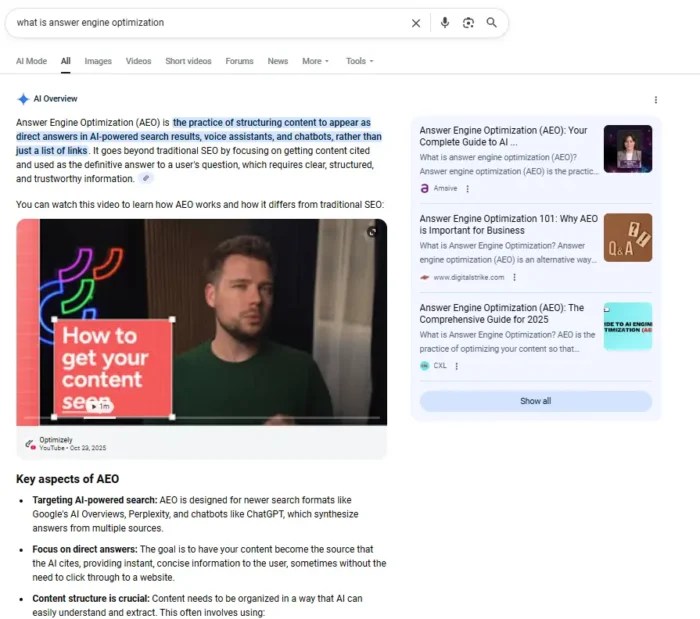
Generative Engine Optimization (GEO) is how you shape your content so AI-driven platforms can easily pull it into their answers. These platforms don’t work like Google’s ranking algorithm. They combine semantic search with large language models to generate responses, pulling from sources they trust. Instead of giving you a list of website links, they often just give you the answer.

A ChatGPT response for generative engine optimization.

That changes everything. You’re not just trying to rank high anymore. You need to be a source the AI engine chooses to include. GEO builds on SEO basics like clean site structure, strong topical authority, and keyword alignment, but adds a layer focused on how AI systems interpret and present your expertise.

Why Generative Engine Optimization Is Important

AI-driven results are now part of search. Google’s AI Overviews, Bing’s Copilot, and platforms like Perplexity deliver full answers right in the results. Users often don’t click anything.

Nearly 60% of U.S. and EU searches end without an external click, according to SparkToro’s 2024 zero-click study. For marketers, that means less traffic from rankings alone.

GEO gives you another path. Structure your content so AI platforms can cite it, and you still get visibility even if users never leave the results page. In a zero-click world, being part of the answer matters as much as being part of the rankings.

 A chart on GEO Traffic and Conversion Data.

How To Implement Generative Engine Optimization

GEO isn’t a single tactic. You’re better served treating it as a set of evolving practices that make your content easier for AI engines to find, interpret, and use in their answers. Like SEO, it combines strategic content creation, technical optimization, and authority building.

The next sections break down the core areas to focus on, starting with brand authority and moving through technical and content-based strategies.

Build Brand Authority

AI engines pull answers from sources they trust. If they don’t know you or can’t verify your expertise, you’re less likely to get cited.

Start by making your author profiles work harder. Put a name and face to your content, and back it up with credentials or proof you’ve done the work. Use examples from your own experience, share data you’ve collected, and show insights that are hard to fake.

Neil Patel's author box.

Don’t stay in your own bubble. Get your name and brand into respected publications in your industry. Offer quotes, share original stats, or write guest content for sites your audience already trusts. Our VP of SEO, Nikki Lam, for example, is a regular contributor to Search Engine Land.

A Search Engine Land article by Nikki Lam.

The more these connections appear online, the stronger your authority signal becomes, and the better your odds of showing up in AI-driven answers.

E-E-A-T Signals

Experience, Expertise, Authoritativeness, and Trustworthiness (E-E-A-T) are part of Google’s Search Quality Rater Guidelines, and AI engines pick up on many of the same signals. The stronger these are, the more likely your content will be seen as credible.

Show experience by sharing real examples, case studies, and first-hand insights. Make your expertise visible with clear author attribution, relevant credentials, and links to other respected work you have done. Build authority through backlinks from reputable sites in your field. Strengthen trust by being transparent with tactics like using HTTPS, list contact information, and publish accurate, well-sourced data.

Treat E-E-A-T as a checklist for every piece of content you publish. While not a direct ranking factor, it consistently improves your chances of performing well and increases your chances of showing up in tomorrow’s AI-generated results.

Reinforcing Your Site’s Technical SEO

If search engines cannot crawl, index, and understand your site, AI engines will not either. Technical SEO is the backbone that supports both.

Keep your site fast. Optimize images, reduce unused code, and use a content delivery network (CDN) if you have a global audience. Make sure your site works well on mobile and passes Core Web Vitals benchmarks. Use a logical URL structure and internal linking, so important pages are easy to find.

Regularly run site audits to catch broken links, duplicate content, or indexing issues before they hurt your visibility. Tools like Google Search Console, Screaming Frog, and Ubersuggest can make this part easier. The cleaner your technical setup, the better your chances of being surfaced in both search results and AI-generated answers.

Write Like People Talk

AI search engines handle queries differently from traditional search engines. People type full questions, not just keywords, into AI searches. To match that, your content needs to read like a direct answer.

Use long-tail, conversational phrases that mirror how someone would ask the question out loud. Include common “who,” “what,” “where,” “when,” and “how” formats in your headings and subheadings. Break down complex answers into short, scannable sections so AI can easily extract them.

Skip the keyword stuffing. Focus on clarity and context instead. Your content should sound like something a real person would say. That makes it more likely to align with how AI models interpret and deliver answers.

Moving Beyond Text

AI engines do not just pull from written articles. They can reference videos, podcasts, and visual content when it adds value to the answer. That means your expertise should show up in multiple formats. Certain types of videos are more likely to get citations, as you can see from the example below.

A graphic showing how YouTube is cited in AI overviews.

Add original images, charts, and infographics to explain complex points visually. Short videos or audio clips that summarize key takeaways from your content are valuable as well, but there’s some added nuance here. Right now, AI isn’t listening to podcasts or watching videos. It extracts info through optimizations like meta data, alt text, structured data, and captions. When all that’s done, host them on platforms like YouTube or as embedded media on your site so they are easy for AI search engines to find, like the example below..

An example of a YouTube video embedded into a blog.

Diversifying your formats helps you reach audiences who prefer to watch or listen, and it gives AI more ways to surface your content. If you are only publishing text, you are leaving potential visibility on the table.

Use Digital PR to Build Expertise

Digital PR is one of the fastest ways to build the kind of authority AI engines look for. When trusted publications, influencers, or industry sites talk about your brand, those mentions strengthen your credibility.

Pitch guest articles or expert quotes to sites your audience already reads. Share original research or unique data that journalists can cite. Monitor platforms like HARO or Qwoted for opportunities to contribute insights on relevant topics.

The goal is consistent, high-quality mentions across the web. Over time, this builds a visible footprint of credibility that tells AI models your expertise is recognized beyond your own website, making you a stronger candidate for citation in generated answers.

Vary Content Distribution

AI tools do not only pull from traditional websites. They scan public content on forums, Q&A platforms, and social channels. If your brand shows up in those spaces, you give the engines more opportunities to connect your name to your expertise.

Join relevant discussions on platforms like Reddit, Quora, and niche industry forums. Share insights, answer questions, and link to deeper resources when it adds value. Repurpose your blog posts into short LinkedIn updates or Twitter threads so your ideas travel beyond your own site.

A graphic showing the ROI of leveraging multiole marketing plaforms.

The more your expertise appears across different platforms, the more signals AI engines have to work with, and the more likely they are to surface your content in their answers.

GEO and Search Everywhere Optimization

Search is no longer confined to Google. People look for answers on social media, YouTube, forums via AI searches and more. Search Everywhere Optimization is about showing up in all of those places.

A graphic showing what LLMs are citing often.

Map out the platforms your audience uses most, then adapt your content for each one. That could mean shorter video explainers for social, structured Q&A formats for forums, and well-formatted long-form articles for web search. The more channels you optimize for, the more resilient your visibility becomes. GEO extends this strategy by making your content easy for AI systems to cite.

The Future of GEO

Search is changing fast, and GEO is going to change with it. Here are three shifts you cannot ignore if you want to stay in front of your audience.

Search trends being shaped by generative AI.

AI Mode in Google
Google is testing AI Mode that gives people a complete AI-written answer before they ever see a list of website links. If this approach becomes permanent, those AI boxes will be the first thing people read — and if your brand is not in them, your visibility will shrink dramatically. To compete, you need content that is structured, well-sourced, and easy for Google’s systems to pull into those summaries.

Google's AI mode.

Predictive and Multimodal Search
Search is evolving to work ahead of the query. Predictive tools deliver answers based on a user’s behavior, location, and history. Multimodal search lets people combine text, images, and video into one request. To show up here, your content has to work in every format: clear copy, keyword-rich image descriptions, transcripts for videos, and structured data that connects it all together.

Voice and Visual Search
More people are asking questions out loud to their phones or smart speakers. Others are pointing their camera at an object and letting a tool like Google Lens do the searching. To win here, you need natural, conversational answers for voice search and highly detailed, optimized, context-rich visuals for image search.

A graphic showing the most common tasks for voice search.

GEO is not standing still, and neither should you. Keep an eye on where people are searching, watch how AI answers are built, and adapt. The brands that move with the trend will keep showing up, no matter how search results evolve.

FAQs

What is generative engine optimization?

Generative engine optimization (GEO) is the process of creating and structuring content so AI-driven platforms, such as ChatGPT, Perplexity, and Google’s AI Overviews, can easily find, interpret, and cite it in their answers.

How is GEO different from SEO?

SEO focuses on improving rankings and visibility in traditional search results extends beyond that by targeting AI engines, ensuring your content appears in AI-generated answers. 

Do I need to change my existing SEO strategy for GEO?

Not entirely. GEO builds on a strong SEO foundation. If your technical SEO, site structure, and content quality are already solid, the next step is formatting and distributing content in ways that AI systems can process and trust.

What types of content work best for GEO?

Clear, well-structured, and factually accurate content that answers specific questions tends to work best. Adding supporting data, original research, and multimedia formats can increase your chances of being cited.

How can I track GEO performance?

Tools in this area are still emerging. Some companies, like Profound, have technology specifically to help brands measure performance in LLMs and AI search. Additionally, there are traditional SEO tools that are expanding their capabilities. For example, Semrush now reports on AI Overview rankings in addition to standard SERP results. 

Conclusion

GEO isn’t a “later” project. It’s already reshaping how people find information, and every month more searches are ending inside AI-generated answers. If your brand isn’t showing up there, you’re losing visibility you might not get back.

The shift is in how you present and distribute that expertise so AI engines can understand and trust it. That means stronger E-E-A-T signals, content in multiple formats, and a presence in the places your audience is asking questions.

You don’t have to overhaul everything at once. Start with your highest-value content, make it more AI-friendly, and track where it appears. 

Read more at Read More

Where Did My Traffic Go? Winning In The Age of AI Overviews

>

Is the number of clicks on your top-ranking content starting to slip? It’s time to find out where your traffic has gone and how to get it back.

AI Overviews are reshaping SERPs as we know them. Google now answers user queries directly in the SERP, and traditional blue links are getting pushed further down the page. You might still be ranking, but your visibility is shrinking.

This doesn’t mean SEO is dead. It just means the playbook has changed. To stay competitive, you need to understand how AI Overview optimization works and start building content designed to earn those coveted AI citations.

Key Takeaways

  • AI Overviews are rerouting traffic, not killing it. Your rankings may hold, but clicks drop because Google satisfies user intent directly in the SERP.
  • Answer-first content wins. Structuring pages with concise answers, logical headings, and clear formatting increases your chances of being cited in AI Overviews.
  • Authority signals matter more than backlinks. Brand mentions, topical trust, and consistent visibility across multiple platforms influence AI citations.
  • Owning your audience is your safety net. Diversifying channels and building first-party data ensures long-term visibility, even as search behavior evolves.

Why You’re Ranking But Still Losing Traffic

If your content still ranks in the top 10 SERP positions but traffic is slipping, there’s a good chance AI overviews are the culprit. Google’s AI-generated summaries dominate the top of the page, pushing organic listings below the fold. Users get the answer they want without ever clicking. In fact, almost 60% of Google searches end without users even making a single click.

An example of an AI Overview.

You can see from this screenshot that when your search results load, there’s no organic results in site. In fact, in this instance, AI overviews even push sponsored results below the fold. This is the new reality of zero-click searches. Impressions might look steady, but clicks drop because users can satisfy their intent without leaving Google.

The solution is to stop thinking only in terms of traffic volume. Start focusing on visible influence: appearing in AI Overviews and being recognized as an authority, even when users don’t click.

AI Overviews And How They Are Turning The Funnel Upside-Down

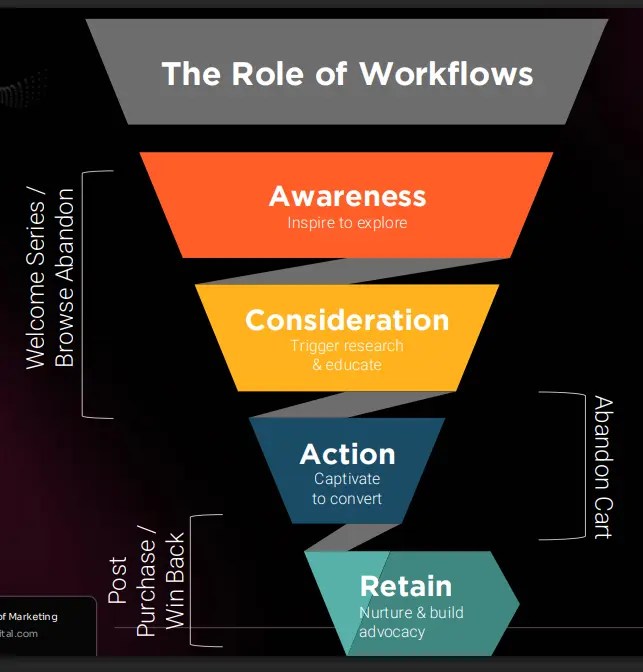
Traditional search funnels start with discovery, move to consideration, and end in conversion. AI Overviews flip that script.

Users can start—and sometimes finish—their journey right on Google. With features like AI-generated summaries and featured snippets, the need to click through is lower than ever. Voice search and even short-form video integrations accelerate this shift, creating an environment where Google does the explaining for you.

An AI Overview for "What is Zero-Click."

For marketers, this means clicks are no longer the whole story. Your content has to deliver more than just clicks. It needs to capture attention inside the SERP and give users a reason to engage when they do click through. Strong on-page structure, engaging CTAs, and retention strategies like scroll-depth optimization now matter just as much as ranking. This is the essence of Search Everywhere optimization, which focuses on meeting users wherever they’re consuming content, not just on your site.

How To Optimize For AI Overviews

If you want your content featured in AI Overviews, you need to create pages that are easy for Google to summarize and trust. Here’s how to give Google what it wants:

  • Lead with an answer-first layout: Open your page with a concise, 2–3 sentence answer to the core query. This immediately gives AI a clear takeaway, increasing the odds of being cited in an overview. Expand into supporting details afterward with a logical flow.
  • Use structured formatting: Break your content into clean H2s and short paragraphs so Google can scan and interpret it quickly. Bulleted and numbered lists help AI extract step-by-step processes or summaries.
A graphic detailing an AI-friendly content structure.

Source

  • Add schema and FAQs: Implement FAQ and How-To schema to highlight your key answers for AI. Include a short FAQ section at the end of your article to increase your odds of citation for question-based queries.
  • Target long-tail, conversational keywords: AI Overviews thrive on natural, question-based searches. Integrate these phrases into headings and early sentences to align with how users talk to search engines and voice assistants.
  • Publish fresh, authoritative content: Share unique insights, proprietary data, or first-hand expertise to meet E-E-A-T signals—experience, expertise, authority, and trustworthiness. AI favors credible, original content over generic summaries.
An E-E-A-T graphic.

Source

  • Support with media: Embed YouTube videos, charts, or screenshots to improve engagement and reinforce authority. Use descriptive alt text so search engines can understand and reference your visuals.

Combining structure, authority, and clarity makes it easy for AI to pull your content and keep your brand visible in the new SERP landscape.

YouTube and Video: Your Shortcut to Visibility

Video content—especially on YouTube—is one of the fastest ways to gain visibility in AI Overviews. Google and Gemini favor YouTube because it’s part of their ecosystem, and AI models naturally pull from sources they already trust.

Short, keyword-focused videos can surface in AI-generated results even if your text content isn’t cited. A 60–90 second explainer video that directly answers the search query gives AI a clean snippet to work with while also boosting your chances of appearing in video carousels.

The charts below show just how effective video is. They show the categories of YouTube videos that have shown up in AI overviews and how fast the trend of videos showing up in AI overviews has grown over time. 

Video presence in AIOs.

Source 1, Source 2

To maximize impact:

  • Create concise, educational videos tied to core keywords.
  • Embed them on relevant blog posts or landing pages to reinforce topical authority.
  • Add captions or transcripts so AI models can understand and summarize your video content.

Video can reclaim lost search visibility while building multi-surface authority across AI-driven and traditional search.

Off-Page Signals Matter More Than Backlinks

In the age of AI Overviews, Google and AI models are looking beyond traditional backlinks. They increasingly value off-page signals like brand mentions and expert quotes in reputable sources.

AI models evaluate whether your brand is recognized and trusted across the web. A mention in an industry publication, a quote in a news article, or a stat cited in a whitepaper can be as impactful as a link for AI visibility.

To strengthen your off-page signals:

  • Pursue public relations (PR) opportunities in industry-relevant media and blogs.
  • Share original data or research that journalists and peers want to reference.
  • Encourage brand discussions on platforms like LinkedIn, Reddit, and Quora, which AI crawlers frequently mine. Internally, we’ve seen tremendous growth for our client, TurboTax, by helping them launch a branded Reddit campaign—including discussions and engagement. 

The goal is to create a trustworthy footprint online. When AI sees your brand cited in multiple credible sources, you’re far more likely to be included in its summaries, even without a traditional backlink.

Build Topical Trust Across the Web

AI Overviews reward brands that show consistent authority on a topic, not just one-off content. Google and AI models look for a pattern: Are you producing relevant, high-quality content across multiple platforms that reinforces your expertise?

To build topical trust:

  • Publish blog posts, guides, and FAQs that cover your key themes in depth.
  • Share insights across social media and YouTube, giving AI more signals that your brand is active and authoritative.
  • Leverage user-generated content (UGC), like community discussions, testimonials, and real-world examples, to demonstrate authenticity.
  • Ensure your content aligns with E-E-A-T across every channel.

Maintaining a consistent and credible presence wherever your audience searches makes it easy for AI to recognize your brand as a reliable source. That recognition is what creates a trustworthy brand footprint that AI can work with.

You Need to Diversify Your Channels Now

Relying solely on Google for traffic is riskier than ever. The shrinking SERP visibility caused by AI overviews and zero-click searches means that even top-ranking content might not deliver the same ROI it once did.

To protect your brand, you need to diversify your traffic sources:

  • Combine SEO and paid search to maintain visibility and retarget your most valuable branded keywords.
  • Invest in social media, email, and YouTube to capture attention outside of Google.
  • Build a strategy that prioritizes owning your audience instead of depending on any single platform.

Diversifying channels doesn’t just protect your current visibility. It’s a great way to grow your online brand. A strong multi-channel approach captures leads you might otherwise miss, making you less vulnerable to Google’s constant evolution. Ultimately, the brands that thrive in the AI era are the ones that meet their audience everywhere, not just in search results.

Examples of channel diversification.

Source

First-Party Data Is the Safety Net

When AI Overviews dominate search, the brands that win are the ones creating proprietary insights that can’t be found anywhere else. AI models favor content that provides original data because it signals authority and adds value beyond generic summaries. Internal research is your secret weapon.

Instead of relying solely on public stats, collect your own:

  • Run audience surveys to uncover trends or opinions in your niche.
  • Conduct polls or quizzes to generate quick, shareable insights that can be repurposed into blogs and social posts.
  • Analyze internal data like customer behavior, conversion trends, or product usage to produce unique reports.
First party data collection techniques.

Source

Turn these findings into case studies and data-driven articles. Proprietary insights make your brand more likely to appear in AI Overviews and attract backlinks and press coverage, compounding your authority across the web.

FAQs

How do I optimize for AI Overviews?

Start with an answer-first structure: give a concise response in the first 2–3 sentences, then expand with supporting details. Use a clear structure with H2s and bulleted lists so Google can easily scan and summarize your content. Implement FAQ or how-to schema, and include a dedicated FAQ section to match AI’s preferred Q&A format. Fresh, authoritative content supported by brand mentions and backlinks will boost your chances of being cited.

How are AI Overviews changing the SERPs?

AI Overviews now dominate the top of Google results, pushing organic listings further down the page. This creates more zero-click searches, where users get answers without visiting your site. Even if your rankings haven’t changed, your visibility and clicks may decline. Making AI-friendly formatting and multi-channel strategies more important than ever.

Conclusion

There’s no need to panic. AI Overviews aren’t erasing traffic, they’re simply rerouting it. Your pages may still rank, but when Google’s summaries dominate the top of the SERP, visibility doesn’t always translate into clicks. The old playbook of relying on impressions and top rankings isn’t enough anymore.

To win in this era of search, your SEO strategy has to include AI overview optimization. Content needs to be structured for AI-first discovery, with clear answers and logical formatting that gains LLMs’ trust. Now, success is about building influence. When your brand appears in AI Overviews and consistently reinforces topical expertise, you maintain visibility even when users don’t land on your site.

The final step is ownership. Diversifying channels and leveraging Search Everywhere optimization gives your brand resilience, while first-party data ensures you can nurture and convert your audience on your own terms. If done right, AI can be your biggest opportunity, not just a threat.

Read more at Read More

The Future of ASO: Adapting to Intelligent Discovery

The rules of app store optimization (ASO) are changing. What was once a tactical discipline focused on rankings and keywords is rapidly evolving into a strategic lever for user acquisition, brand visibility, and sustained app growth. With advancements in AI, shifts in search behavior, and the rise of hyper-personalized discovery, ASO is entering a new era, one that is contextual, intelligent, and continuously adaptive.

In this article, we explore the forces shaping the future of ASO, from AI-driven metadata and personalized search to voice discovery and predictive app visibility. If you’re looking to stay competitive in an increasingly saturated app landscape, this is what you need to know next.

Key Takeaways

  • ASO is shifting from tactical to strategic. It’s no longer just about keyword stuffing or climbing the rankings. The future is intelligent, personalized, and performance-driven.
  • AI is rewriting how metadata works. Expect real-time, AI-powered updates that align with shifting user behavior, not quarterly refreshes based on guesswork.
  • Search is getting personal. Two users can type the same keyword and see different results. Your listings need to adapt to individual intent, not the average user.
  • Customized Product Pages (CPPs) are just the beginning. Soon, app store experiences will be dynamic, predictive, and unique to each user journey.
  • Voice and ambient discovery are rising. People are finding apps through voice assistants and predictive surfaces, not just typed search queries.
  • App Intents will drive next-gen visibility. Apps need to signal what they do, for whom, and when—so platforms can surface them at just the right moment.
  • Success depends on adaptability. ASO teams that test fast, personalize creatively, and embrace AI will outperform those still chasing static rankings.

Where App Discovery is Heading Next

App Store Optimization is no longer just about rankings. As mobile ecosystems evolve and user expectations shift, the future of ASO will be defined by personalisation, predictive relevance, and deeper integration with emerging technologies. 

We are entering an era where search is increasingly contextual, discovery is increasingly intelligent, and store listings behave more like adaptive marketing assets than static storefronts. 

This section explores the trends shaping the future of ASO. From AI-powered metadata and personalized search to voice discovery and App Intents, we will unpack what marketers need to prepare for now, and where the next growth opportunities lie. 

AI-Powered Metadata: From Static Copy to Intelligent, Performance-Driven Content

As AI becomes more embedded in the app ecosystem, metadata is evolving from something manually updated every quarter to a fluid, data-informed asset that adapts to audience trends, behaviour, and market shifts. 

Instead of relying solely on guesswork and human intuition, AI is enabling metadata to be: 

  • Continuously optimized based on live performance signals 
  • Automatically localised for language, phrasing, and cultural nuance 
  • Tailored dynamically for different cohorts and user segments 
AI-generated reviews on the App Store.

What This Means For Marketers

Metadata is no longer a static exercise in copywriting. AI allows marketers to test, learn, and iterate faster than ever before. With platforms like Apple and Google increasingly rewarding contextual relevance and behavioral alignment, brands will need to adopt: 

  • AI-assisted keyword selection that reflects shifting user intent 
  • Predictive copywriting that forecasts what combinations are likely to convert 
  • Automated content scoring to prioritise which changes to make first 

Strategic Implication

In the future of ASO, teams may move from monthly metadata refreshes to near-continuous optimization. Success will depend not just on creativity, but on how well marketers collaborate with AI tools to generate, score, and deploy high-performing content at scale. 

AI will not replace ASO specialists, but it will raise the bar for relevance, speed, and strategic experimentation. 

Personalized Search: The Shift From Relevance For All to Relevance For Me

In 2025, search is no longer a one-size-fits-all experience. Platforms are increasingly using on-device signals and behavioral patterns to tailor search results to individual users. This means that two users searching the same keyword may now see completely different apps.

A search result on the App Store.

Source

This change brings enormous potential for marketers. With personalization comes the ability to surface your app in more targeted, contextually relevant ways – if your metadata, creatives, and reviews align with the user’s specific needs.

What’s Driving It:

The rise of personalized search is being fueled by increasingly sophisticated data inputs. App stores now consider user history, download behavior, device-level preferences, and even time-of-day patterns when determining what results to show. Rather than relying solely on keyword matching, search algorithms are layering in contextual data like app usage, cross-app engagement, and location signals to surface the most relevant content to each user. 

What Approach Marketers Should Take:

  • Build out multiple value propositions and tailor your messaging for distinct segments 
  • Focus on creative variety – consider how different screenshots or CTAs might resonate differently 
  • Track shifts in keyword performance that may signal emerging personalized search patterns 
  • Localize not just for language, but for lifestyle and behavior trends in key markets 

Strategic Insight

In a world of personalized search, brands that maintain a single, static value proposition will lose ground. The winners will be those who treat the store listing like a modular experience, ready to adapt to any user, any context, at any time. 

The Future of Smarter Acquisition

As acquisition costs rise and attention spans shrink, smarter acquisition has become a brand imperative. What CPP(customized product pages) represent today, a personalized, intent-driven storefront, may soon evolve into real-time, AI-curated experiences that respond dynamically to user segments, behavioral signals, and even market trends. 

An app page.

Source

In the near future, we may see: 

  • App stores ranking pages not just by keywords, but predicted conversion likelihood 
  • Generative creative automation driving thousands of micro-variations of CPPs 
  • Increased interplay between web-to-app journeys and personalized store listings 

For now, success depends on smart targeting, creative alignment, and relentless iteration. The brands that win in this new era won’t just outspend competitors; they’ll outsmart them through relevance, efficiency, and a store presence engineered for performance. 

Voice Search and Ambient Discovery: Adapting ASO to a Screenless, Spoken Future

As voice assistants become more embedded in our everyday lives, from smart speakers to wearable devices, the way users discover and interact with apps is evolving. App discovery is no longer confined to a screen and a search bar. Instead, users are increasingly asking for solutions out loud: “Find me a meditation app” or “Book a table nearby.”

This trend toward ambient, voice-led search means apps need to be discoverable through spoken queries and understand natural language requests. It places a new emphasis on clarity, semantic relevance, and metadata that mirrors conversational phrasing.

Examples of voice search on the App Store.

Source

What This Means for ASO

  • App names and descriptions must reflect how people speak, not just how they type 
  • Metadata should include phrases that align with voice query patterns and real-world language 
  • Reviews and ratings (often read aloud by assistants) need to be clear, credible, and compelling 

Strategic Implication

The rise of voice doesn’t eliminate traditional ASO. It extends it. Brands must begin adapting their optimization strategy for a future where discoverability happens in a hands-free, multi-modal world, one where clarity, brevity, and natural phrasing win out over dense keyword stacking. 

App Intents and Predictive Surfaces

As operating systems become smarter and more anticipatory, app visibility is no longer confined to the app store itself. Platforms like iOS and Android are increasingly surfacing app functionality through features like Siri Suggestions, Spotlight Search, and predictive app actions. These are powered by App Intents – metadata and signals that help the system understand what your app can do and when it should be offered. 

In essence, your app can now be discovered without being explicitly searched for, if it fits the context of what a user needs at the right moment. 

Why This Matters 

App Intents allow apps to: 

  • Appear in Spotlight or voice search based on user behavior and context 
  • Trigger recommended actions like rebooking, ordering, or continuing where a user left off 
  • Surface key functionality (e.g., tracking, booking, paying) without opening the full app 

Strategic Opportunity

Optimizing for App Intents isn’t just about technical configuration; it’s about anticipating use cases. What are the moments where your app solves a problem quickly? How can you expose those actions to the OS? 

The future of discovery is ambient, predictive, and frictionless. Ensuring your app communicates its capabilities clearly and is structured to surface in those contexts will be a core part of ASO strategy going forward. 

What Comes Next

The evolution of App Store Optimization is not about abandoning the fundamentals, it’s about expanding what they mean. Keywords still matter. Visuals still matter. But context, intelligence, and adaptability now define who wins attention and who gets overlooked. 

As platforms get smarter, ASO must become more predictive. As user journeys get messier, store listings must become more modular. And as expectations rise, marketers will need to work faster, test more deeply, and collaborate more broadly across product, performance, and creative teams. 

If you need help with your ASO strategy, you can learn how our team can help you by contacting us here.

Read more at Read More

2025 Organic Search Engine Trends: How Search is Evolving for AI and LLMs

If you’re not paying attention to search trends, you’re already falling behind. And in 2025, falling behind means losing visibility, traffic, and revenue, often to the tune of thousands (or millions) of dollars.

Some marketing pros and SEOs still haven’t learned this lesson. Maybe they don’t have the budget to invest in video, or a specific algorithm update doesn’t move the needle enough to get their attention. 

And there are still CMOs who think AI doesn’t pose a big risk to their strategies, and other C-suite members continue to ignore the sunk cost fallacy.

Trends matter, though. Staying ahead of the curve matters. And right now, that curve is moving fast. Miss one core update or shift in user behavior, and you’re already behind. A single minute’s hesitation could set you back months. 

The SEOs who are proactive, not responsive, are the ones winning big.

Take AI Overviews and Search Everywhere Optimization, for example. These trends have taken off and will continue to define the future of search. Let’s look at these and other big trends dominating search.

Key Takeaways

  • AI search has spread beyond Google. ChatGPT, TikTok, and YouTube are now regular search platforms for users.
  • 44 percent of sites have seen flat or declining traffic since AIOs launched.
  • Zero-click will make featured snippets, AI Overviews, brand mentions, and conversational content key.
  • Brand mentions have serious SEO value. As much as 78 percent of marketers consider them a key visibility factor in 2025.
  • Winning in search now means adopting a Search Everywhere Optimization strategy that spans AI tools, video, social, and traditional search engines.
  • See the full report on the NP Digital website.

Our Methodology

We talked to two groups to better understand how AI and other trends impacted how people used search; in one survey, we spoke to 1,000 American adults with general questions. In addition, we reached out to 600 American full-time professionals who worked in marketing, market research, sales, and advertising.

AI Overviews Take Center Stage After Some Growing Pains

Google’s AI Overviews (AIOs) had a rocky start, but they’re not going anywhere.

After rolling out globally in May 2024, AIOs quickly took a spot in all kinds of search results, but not without hiccups; in our survey of general adults, users got answers faster, but they weren’t always better. Almost 25 percent of users reported major errors. Over 50 percent said their biggest issue was just flat-out inaccuracy, to the point of danger.

A screenshot of a social media post of an AI overview claiming that John Adams graduated from UW-Madison 21 times.

(Image Source

That said, most users (almost 75 percent) haven’t noticed major problems. And despite some early skepticism, AIOs are already shaping how people consume content in search, with some fears that web traffic will fall off as the search giant continues its efforts to keep users on the SERP instead of clicking through.

From a traffic perspective, our survey showed 44 percent of marketers reported decreased web traffic since AIOs launched. With that said, 48 percent saw a revenue boost from ads and affiliate links. It’s a strong signal that AIOs are about more than visibility changes; they are changing the rules of the game.

So, how do you get your content to show up in AIOs? The structure matters. No matter what you (or your content team) are writing, start by focusing on:

  • Clear, concise answers high on the page
  • Use of headings to mirror search queries
  • Schema markup that clarifies context
  • High E-E-A-T (experience, expertise, authoritativeness, and trustworthiness) signals
  • A conversational tone (yes, even in technical content)

And don’t forget freshness. AIOs pull recent, relevant content first.

Showing up in AI Overviews is more than just bragging rights. It’s taking up a valuable position in the new top-of-SERP real estate. Ignoring AI SEO and failing to optimize for it just gives visibility away.

How Marketers Can Work Around Zero-Click Search

AI Overviews are part of the growing wave of zero-click searches. In a zero-click world, users get their answers directly on the SERP; no further reading necessary. Featured snippets, local packs, people-also-ask boxes, and AIOs have all made organic traffic harder to win.

But that doesn’t mean you’re out of options.

Marketers are adaptable, and this development is no exception. Forty-three percent of marketers have changed their content strategies to respond to this shift. 

A graph showing how marketers are adapting to AI overviews.

Their focus now? Clear, scannable content that answers questions upfront. Structured data, brand mentions, and conversational formats are more important than ever.

The goal isn’t just to rank. It’s to show up in the spots users see first. 

Google’s New AI Mode Is Here

Google’s AI Mode officially rolled out to all U.S. users in May 2025, and it’s already changing how people interact with search.

AI Mode flips the switch on how Google displays search results. Instead of the classic link list, users now see AI-generated summaries by default, especially for complex or open-ended queries. 

According to Google, the goal is to “make search smarter and more helpful with generative AI.” Their idea is to offer a faster path to answers, context, and decision-making.

The reaction? Cautiously optimistic.

Our survey shows over 57 percent of marketers already knew about AI Mode’s debut. Of those, 74 percent believed it could improve the overall search experience, with nearly a third expecting “notable” usability improvements.

But user experience isn’t the only concern. It’s a signal to marketers, too. AI Mode will likely increase zero-click results and shift keyword targeting strategies. That will push creators to optimize for summaries, not just snippets.

According to Nikki Brandemarte, Sr. SEO Strategist at NP Digital, one of the best ways to optimize for AI Mode is to focus on tactics we’ve known work for a while, but even more.

Lock in on featured schema, prioritize context-rich introductions, and use conversational formatting. Freshness and clarity win the day, too, so regularly revisit your content and adjust it. Or write something new and authoritative. That’s especially important, since AI Mode can now source information published within the last 24 hours.

A screenshot of a Google AI mode result for the query "summarize the latest seo and ai news from the last 7 days.".

Brandemarte explains: “[AI Mode] is designed for users to ask more complex, multi-part questions that go beyond basic information provided by traditional AI overviews. These more comprehensive, better-structured answers expand on AIOs and overlap.”

The bar is higher. But if your content is clear, helpful, and well-structured, AI Mode can amplify your visibility (not erase it).

AI Search Is Spreading as a Concept

AI-powered search didn’t stop with Google, and it’s not going to, either. We’re now in a landscape where search is becoming a feature as opposed to a destination.

AI search is everywhere: ChatGPT, Microsoft Copilot, and even AI-driven tools built into apps you open every day, like Reddit, TikTok, or YouTube. Thirty percent of our surveyed general online users now turn to ChatGPT or SearchGPT at least 10 times a week. 

On the marketer side, 74 percent actively watch ChatGPT, and 41 percent track Microsoft Copilot.

A graphic showing AI-powered search platforms marketers are focusing on.

That shift is actively reshaping user behavior. AI summaries are now the first impression. Thirty-one percent of users trust AI summaries more than traditional search results. 

Regardless of your thoughts on AI search’s efficacy and accuracy, it’s a trend you can’t ignore.

How to Minimize Risk and Stay Visible

If your brand isn’t visible across multiple ecosystems, you’ll be left behind. That’s the ethos behind Search Everywhere Marketing, and we take it very seriously. 

Right now, only 51 percent of our surveyed marketers are actively tracking their brand visibility in AI search platforms. This is despite the fact that out of our surveyed marketers, brand visibility tracking was seen as the most popular way it would impact search strategy in the next year (45 percent). That means that there’s a shift many marketers know is coming, but aren’t prepared for.

A graphic showing methods on how users want to track AI search visibility.

What can you do if you’re in that group? Well, here’s how to catch up:

  • Monitor traffic shifts with Google Analytics and Search Console (GSC). They’re still your first red flags.
  • Set up trend logging to detect drops or spikes in branded queries.
  • Use social listening tools to track brand mentions in places like AI Overviews and conversational search results.
  • Build brand mentions through PR and content syndication. More than three-fourths of our surveyed marketers say brand mentions are vital for SEO, so this is no longer optional.
  • Lean into conversational content. Google and AI platforms favor content that answers naturally phrased questions.
  • Finally, invest in structured data and featured schema to improve your odds of being cited directly in AI results.

The bottom line is that visibility isn’t about blue links alone anymore. Your content has to be everywhere that people ask questions, even if they never click.

A screenshot of an AI mode summary for the query "are the blue links no longer relevant?"

Marketers Need to Find Ways to Start AI Visibility Tracking

If AI-driven search is the future, visibility tracking is how you future-proof your content.

Right now, most AI platforms don’t offer direct analytics. You won’t find a neat report in Google Search Console labeled “AIO Clicks.” Even though people have asked (repeatedly). 

That’s a problem. As AI summaries and chat-based search tools like ChatGPT take up more screen space, marketers are beholden to something like a vibes-based approach.

As we noted above, only 51 percent of marketers track brand visibility in AI search. The rest are either exploring tools (38 percent) or not tracking at all. That’s a big visibility gap, but it’s also where you can find a competitive advantage:

Until native tools catch up, marketers have a blend of tactics. You can try to monitor traffic shifts in GA and GSC for early signals and use social listening platforms to track branded mentions and snippets. 

Savvy users of platforms like Semrush can use it to help track AIO appearances, too. For priority keywords, log trends manually if necessary (even via screenshots). 

AI visibility isn’t going away. Don’t neglect it.

Screen shot detailing Semrush organic research data on the URL neilpatel.com/blog

Along with existing SEO tools and program suites, there are other products that are designed to meet the specific needs of the AI space. Profound is an AI search optimization tool designed to track important AI-related performance metrics like AI search such as sentiment, citation frequency, and AI share of voice.  

Source: (Image Source)

Finally, monitor referral traffic from LLMs like ChatGPT or Perplexity. Currently, 24 percent of marketers have seen consistent traffic from those sources. 

Google is still important (as our own VP of SEO Nikki Lam attests), but we’re entering a whole new world of attribution.

Google vs. LLM Referral Traffic: What’s Coming Out on Top?

For the first time in decades, Google isn’t the only game in town for search-driven traffic.

LLMs like ChatGPT, Perplexity, and Claude have started to chip away at Google’s dominance. Given that nearly a third of users say they use ChatGPT or SearchGPT per week, and how many marketers see consistent referral traffic, the shift is subtle, but it’s happening: It’s not just curiosity. It’s a behavior change.

Ready for something even more telling? As much as 34 percent of marketers believe AI tools will account for 25 to 50 percent of search activity within the next year. Some think the number could go even higher.

Keeping your brand discoverable as LLMs grow is absolutely vital, but it’s not as complex as you’d think. 

We’ve touched on many of the tactics already: Focus on meeting conversational queries with clear, fact-rich content. Monitor your referral traffic from known LLM browsers and tools. 

Most importantly, diversify your strategy. Think beyond “ranking” and more about being referenced.

Short-Form and Conversational Content Are at a Premium

In a world of AI summaries and zero-click search results, brevity is everything.

Short-form, conversational content is easier for AI models to parse, summarize, and cite. If your post or article buries the answer in paragraph five, you probably won’t be featured in AI Overviews (or any other generative snippets).

Tactics like including FAQs, key takeaways, and “too long, didn’t read (TL;DR)” sections are almost mandatory. AI tools seek out and prioritize structured, scannable, and intent-matching text blocks. 

Nearly 42 percent of marketers already optimize new content for conversational queries, and 58 percent are refreshing their existing content to meet these new standards.

But keep one thing in mind: This isn’t about “dumbing things down.” Instead, it focuses on getting to the point—fast—and in a way that mimics how users ask questions out loud.

What can you do to help? Use headers that sound like real questions. Keep your answers clear and focused. When possible, use schema markup to reinforce the content’s structure.

Our TL;DR? Keep it short, smart, and skimmable if you want to be quoted.

Key Takeaways from a recent Neil Patel blog demonstrate a TL;DR approach to sharing information
Our Key Takeaways from a recent blog demonstrate a TL;DR approach to sharing information.

Tailoring Your Content to Fit Preferred Platforms

Ranking alone isn’t enough. Your content also needs to fit where your audience is searching.

Depending on your brand and audience, that might look like long-form blog posts to show up in Google, or it could mean creating vertical videos for TikTok. Other solutions could include product explainers on YouTube or visuals to engage Instagram users.

Younger audiences have already begun to shift search behavior. Platforms like TikTok, YouTube, and Instagram are their go-to sources for product discovery, how-tos, and health information. Sixty-seven percent of Gen Z users prioritize Instagram for search, while 62 percent focus on TikTok. As a result, over 63 percent of marketers have already started to optimize or test content for these channels.

How can you keep up?

Start by adapting your message to the format. Use generative engine optimization (GEO) for AI search, vertical video for TikTok and Reels, and snackable visuals for platforms like Pinterest and Instagram.

An overarching strategy that uses different platforms to meet the same goal: Meet your users where they are and speak their language.

Backlinks vs. Brand Mentions: Where Should Marketers Focus?

Backlinks have long been a pillar of SEO and still matter a lot. But the AI-driven, zero-click environment emphasizes and incentivizes brand mentions, too. What’s the difference between them?

  • Backlinks are clickable URLs that pass SEO equity.
  • Brand mentions are unlinked references to your company or product. Think name-drops in articles, podcasts, and social posts.

Google has hinted for years that brand mentions influence trust and authority. With AI platforms pulling in content and citations differently, those mentions are more valuable than ever.

Seventy-eight percent of marketers in our survey say brand mentions are at least “moderately important” for visibility. Thirty-two percent call them “extremely important” signals. 

They’re so important that over 65 percent of marketers are already prioritizing mention-building with PR, guest posts, social campaigns, and influencer outreach.

So, which one should you focus on more? Mentions or links?

Both still matter, but the emphasis or split depends on your niche. E-commerce brands, for example, often see big returns from unlinked mentions in product roundups or reviews. B2B brands may still rely more heavily on authoritative backlinks. 

The balance lies in knowing which one to prioritize and when.

Search Engine Optimization Evolves to Search Everywhere Optimization

Let’s be real. Google isn’t the only place your audience is searching anymore. That means traditional SEO—a Google-focused effort—isn’t enough. As we’ve touched on above, what you need now is Search Everywhere Optimization.

The concept is simple, and it’s something many marketers have done for years, if not as a focus: Instead of optimizing for Google’s algorithm alone, make sure your content is discoverable wherever your audience hangs out online.

According to our survey, more than 60 percent of users regularly search on at least one non-Google platform (ChatGPT, Reddit, TikTok). 

Meanwhile, 55 percent of marketers say they’re investing in alternative traffic channels like paid social, email, or native ads to counterbalance any potential losses thanks to AI search.

What does this look like in practice?

  • Publishing educational content on YouTube and optimizing Shorts
  • Creating bite-sized, searchable videos for TikTok and Instagram Reels
  • Building credibility with appearances on podcasts and community platforms like Reddit
  • Getting cited in AI tools like ChatGPT
  • Using email and push notifications to bring users back to you
A screen shot detailing NP Digital's approach to Search Everywhere Optimization

Remember, we’re not abandoning SEO. We’re expanding our strategy.

Conclusion

AI has turned the world of search completely upside down, and there are still a lot of variables to account for. But that doesn’t mean you can’t proactively start taking steps to position your brand for success. 

Last year, we mentioned that content volume isn’t as important as content quality. That’s still true. Keep a regular cadence but focus on shorter, quality content that AI Overviews can pull from.

As more brands rely on AI to help produce content at scale, you can prioritize building your brand with consistent messaging across all channels; that’s Search Everywhere in motion.
If you’re not confident about leveraging these strategies or trends, why not partner with someone who can? Contact the NP Digital team today for a consultation.

Read more at Read More

July 2025 Digital Marketing Roundup: What Changed and What You Should Do About It

Another month, another avalanche of platform updates and game-changing industry developments. 

Not all the updates will move the needle for your business, but some absolutely will. That’s why I cut through the noise to bring you the changes that actually matter for marketers and agencies.

These 20 trends from July 2025 are reshaping how we think about visibility, attribution, and growth. Let’s take a closer look.

Key Takeaways

  • Search is evolving fast: AI citations favor high-traffic sites, while Google adds audio responses and Instagram posts show up in search results.
  • Attribution is getting better: Meta restores advanced mobile tracking, while Apple now indexes screenshot text for app store optimization (ASO).
  • Automation is winning: Manual campaigns are dying as platforms push AI-driven optimization.
  • Trust drives B2B: LinkedIn data shows 94 percent of marketers rank trust as the top driver of brand success.
  • Video dominates everywhere: From Instagram Trial Reels to connected TV partnerships, video content rules.
  • Download the full roundup report for July 2025 at the NP Digital website.

Search and AI Evolution

The search world is transforming faster than most marketers can keep up. Here’s what’s changing and why it matters.

High-Traffic Sites Get More AI Citations

What happened: Ahrefs analyzed mention share versus website traffic and found something crucial. Higher-traffic websites get cited more frequently in AI-generated responses. This creates a powerful feedback loop where traffic attracts more traffic through AI mentions.

Ahrefs' Brand Radar.

Why it matters: We’re seeing the birth of a new authority signal. AI platforms like ChatGPT, Perplexity, and Gemini are moving beyond content quality, favoring sources that already get traffic and engagement. If you’re not driving consistent traffic, you’re essentially invisible to AI systems that millions of people use daily.

What to do:

  • Prioritize strategies that grow traffic holistically across all channels.
  • Track brand mentions in AI platforms as a new key performance indicator (KPI) alongside traditional search rankings.
  • Repurpose your highest-traffic content across multiple formats and platforms.
  • Build out topic clusters around your most successful content themes.

Google Adds Audio Search Responses

What happened: Google launched “Audio Overviews”—AI-generated spoken responses that sound like podcast conversations between two voices. One explains the topic, while the other asks clarifying questions, making complex information more digestible.

Google's Audio Overviews.

Why it matters: Don’t confuse this with text-to-speech. It’s a fundamental shift toward conversational search experiences. Users can now get rich, contextual answers without reading a single word. For content creators, this means your content needs to work in multiple formats.

What to do:

  • Write with conversation in mind, using natural language and clear explanations.
  • Structure content with clear Q&A sections that can be easily extracted.
  • Optimize for featured snippets, as these often feed AI Overview systems.
  • Test how your key topics sound when read aloud, and adjust accordingly.

Instagram Posts Show Up in Google Search

What happened: Starting July 10, Instagram began allowing search engines to index public content from professional accounts. Your Instagram posts can now appear in Google search results, extending reach beyond Instagram’s internal algorithm.

Why it matters: Social media keeps developing as an SEO channel. This bridges the gap between social engagement and search visibility, giving brands a new way to rank for competitive keywords through social content.

What to do:

  • Audit your Instagram content strategy with SEO in mind.
  • Use keyword-rich captions that would make sense in search results.
  • Create carousel posts that provide substantial value and context.
  • Consider Instagram posts as part of your broader content distribution strategy.

Google’s Search Updates Continues

What happened: Google initiated its second core update of 2025 in June, with effects still rolling out. Early data suggests this update coincides with changes to Google’s Gemini AI models, affecting both traditional rankings and AI Overview visibility.

Why it matters: Core updates assess long-term content quality, and this one seems particularly focused on how content performs in AI-driven features. Sites optimized only for traditional search may see fluctuations.

What to do:

  • Monitor your AI Overview visibility alongside traditional rankings.
  • Focus on E-E-A-T principles: experience, expertise, authoritativeness, and trustworthiness.
  • Avoid making reactive changes to short-term ranking fluctuations.
  • Double down on creating genuinely helpful, user-centric content.

Link Building Gets Smarter in 2025

What happened: Search Engine Land outlined 12 critical link-building best practices for 2025, emphasizing that volume-based backlink strategies are deadweight. The new approach focuses on quality over quantity, contextual relevance, and unlinked brand mentions over raw domain authority.

Why it matters
: Link building used to be a numbers game. Now it’s about authority and authenticity. With AI search gaining popularity, the focus has shifted from “who links to you” to “why they link to you” and whether those links enhance your reputation across multiple discovery platforms.

What to do:

  • Shift from volume-based outreach to relationship-driven link building.
  • Focus on unlinked mention outreach to convert brand citations into backlinks.
  • Build editorial partnerships with industry-aligned publications and thought leaders.
  • Create content that naturally earns links through genuine value and shareability.
  • Treat link building as an ongoing authority-building strategy, not a one-time project.

Paid Advertising Evolution

Advertising is getting more sophisticated, with better attribution and expanded inventory. Here’s what’s changing.

Amazon and Roku Transform Connected TV

What happened: Amazon DSP now integrates Roku’s connected TV inventory, giving advertisers access to approximately 80 million U.S. households, over 80 percent of the connected TV (CTV) market. Early tests show a 40 percent increase in unique viewer reach and a 30 percent reduction in ad repetition.

Why it matters
: This partnership creates the largest CTV advertising platform in the U.S., combining Amazon’s rich consumer data with Roku’s massive reach. For the first time, brands can use actual shopping behavior to target audiences across major streaming platforms.

What to do:

  • Evaluate your current CTV strategy and consider expanding into this unified platform.
  • Use Amazon’s shopping signals to create more precise audience segments.
  • Develop creative specifically for the combined Prime Video and Roku audience.
  • Track unique reach metrics to optimize for audience expansion and not just frequency.

Meta Restores Advanced Mobile Measurement

What happened: Meta re-enabled Advanced Mobile Measurement (AMM), allowing opted-in advertisers to access device-level attribution data. Starting July 21, Meta’s “Engaged Views” count like clicks in attribution models, aligning with other advertising platforms.

Why it matters: Mobile marketers finally have the granular data they’ve been missing. With device-level attribution and better understanding of user journeys, campaign optimization becomes significantly more precise.

What to do:

  • Opt into Meta’s AMM by accepting the terms (requires admin access).
  • Integrate with your mobile measurement partner (MMP) for unified reporting.
  • Start optimizing for Engaged Views as meaningful conversion signals.
  • Use device-level data to identify highest-value user segments.

Meta Phases Out Manual Campaigns

What happened: Meta is rebranding Advantage+ Shopping to Advantage+ Sales, consolidating sales, app, and lead campaigns into one automated format. Manual campaign setup is being phased out, though some targeting controls remain.

Why it matters: This signals Meta’s complete shift toward AI-driven advertising. Manual bid management and granular targeting controls are becoming obsolete as they’re replaced by machine learning optimization.

What to do:

  • Transition existing manual campaigns to the Advantage+ format.
  • Focus optimization efforts on creative quality and audience signals rather than manual controls.
  • Use broad targeting to unlock the full benefits of Meta’s AI.
  • Monitor performance closely during the transition and adjust creative accordingly.

Amazon Prime Day Doubles Down

What happened: Prime Day 2025 extended to four days (July 8-11), doubling its usual length. New deals dropped every five minutes, giving brands more time to optimize but potentially diluting urgency.

Why it matters: If Amazon sticks with this four-day model, the extended window allows for real-time campaign optimization and better inventory management, but brands need to maintain momentum across four days instead of creating a two-day sprint.

What to do:

  • Implement hourly performance reviews and budget reallocation.
  • Prepare multiple creative assets to refresh messaging throughout the event.
  • Set different KPIs for each day to maintain focus and urgency.
  • Use the extended timeframe for better attribution analysis.

Social Media and Content Strategy

Social platforms are evolving into search engines, discovery platforms, and attribution tools rolled into one. Here’s how to adapt.

Sephora Succeeds With Experiential Marketing

What happened: Sephora launched its “Delivered to Beauty” campaign, offering $20 Lyft credits to bring customers to select stores during July 7-10. The initiative included in-store activations like giveaways and makeup demos, blending digital engagement with physical experiences.

An example of Sephora's Delivered to Beauty campaign.

Why it matters: This shows how experiential marketing can bridge online buzz and in-store traffic. Strategic brand partnerships can unlock new audiences and create unexpected touchpoints in the customer journey, but only when supported by solid digital infrastructure.

What to do:

  • Plan experiential campaigns with digital amplification in mind from day one.
  • Create optimized landing pages and campaign-aligned content for every activation.
  • Use local SEO tactics to capture search traffic during events.
  • Measure both foot traffic and digital engagement to calculate true ROI.

Instagram Trial Reels Show Results

What happened: Instagram’s Trial Reels feature lets creators test content with non-followers before posting to their main feed. Data shows 40 percent of creators using Trial Reels post more frequently, with 80 percent seeing increased reach among non-followers.

Examples of Instagram Reels.

Why it matters: This is like A/B testing but for social algorithms. Instead of guessing what will perform, creators can get real feedback from fresh audiences within 24 hours.

What to do:

  • Use up to 20 Trial Reels daily to test different content formats and topics.
  • Track engagement patterns to identify what drives reach beyond your existing audience.
  • Convert successful trials into regular posts and build content calendars around proven winners.
  • Include Trial Reel performance in your social media reporting.

Pinterest Boosts Visual Search

What happened: Pinterest released new guidance for brands to align their content with AI-powered visual search trends. Key recommendations include updated catalogs, lifestyle imagery, and Performance+ targeting for broader reach.

An example of Pinterest Visual Search.

Why it matters: With 570 million monthly active users, Pinterest remains an underutilized search channel for many brands. These updates make it easier to appear in visual searches without manual keyword optimization.

What to do:

  • Audit existing Pinterest catalogs for accuracy and completeness.
  • Test lifestyle imagery alongside product shots to increase discovery.
  • Enable Performance+ targeting to expand reach beyond manual audience selection.
  • Treat Pinterest as part of your omnichannel search strategy (not just social media).

LinkedIn Emphasizes Business Influencers

What happened: LinkedIn released a 22-page guide highlighting the power of B2B creators and influencer partnerships. It shows that B2B buyers actively seek out creator content as trusted resources throughout their purchasing journey.

Why it matters: B2B influence goes beyond follower counts to credibility and industry expertise. Decision-makers trust individual voices more than brand messaging in complex B2B purchases.

What to do:

  • Identify industry-specific creators who resonate with your target audience.
  • Focus on value-driven content that addresses real buyer needs and challenges.
  • Use video and thought leadership formats to amplify reach and engagement.
  • Measure influence through pipeline impact, not just engagement metrics.

Platforms and Technical Updates

Behind-the-scenes changes are set to affect how your content gets discovered and measured.

Apple Indexes Screenshot Copy

What happened: Apple now uses visible text in App Store screenshot captions as searchable metadata. This means your visual assets directly impact search rankings and app discovery.

Examples of visible text in App Store screenshot captions.

Why it matters: Screenshot captions were previously just conversion tools. Now, they’re discovery tools. Apps can rank for keywords included in their visual content, expanding ASO beyond traditional metadata fields.

What to do:

  • Add relevant keywords to screenshot captions while maintaining conversion focus.
  • Avoid duplicating keywords across metadata fields, but strategically repeat key terms.
  • Use captions to reinforce core product benefits and use cases.
  • Track keyword performance changes after implementing caption optimization.

Cloudflare Blocks AI Crawlers by Default

What happened: New Cloudflare users (representing about 20 percent of the internet) must now explicitly opt in to allow AI crawlers to access their websites for content scraping and model training.

Why it matters: Millions of websites could be excluded from AI search results and language model training unless they take action. This creates a potential visibility gap for brands that don’t adjust their settings.

What to do:

  • Review your Cloudflare settings and enable AI crawler access if you want AI visibility.
  • Consider the trade-offs between content protection and AI platform inclusion.
  • Monitor AI citation tracking (like Ubersuggest’s upcoming feature) to measure impact.
  • Treat this like submitting sitemaps to search engines. You’re telling AI platforms what to crawl.

B2B and Trust Building

B2B marketing is shifting toward relationship-building and credibility over pure lead generation.

LinkedIn Data: Trust Drives B2B Success

What happened: LinkedIn’s latest research shows 93.7 percent of B2B marketers say trust is the top factor for brand success. Customer recommendations outrank product features as purchase drivers.

B2B research from LinkedIn.
A close-up of a survey

AI-generated content may be incorrect.

Why it matters: With AI-generated content and automated outreach rising in popularity, authentic human validation becomes the ultimate differentiator. Trust has gone from a “nice to have” to a competitive necessity.

What to do:

  • Prioritize collecting and amplifying authentic customer testimonials.
  • Integrate social proof into every stage of your content funnel.
  • Use customer success stories in sales presentations vs. just in marketing materials.
  • Evaluate your brand messaging to ensure it conveys credibility at every touchpoint.

Ubersuggest Gets AI Search Optimization

What happened: Ubersuggest is rolling out AI Search Optimization reporting in beta, tracking brand mentions and citations across ChatGPT, Perplexity, Gemini, and other AI platforms. The tool monitors visibility, sentiment, and competitive positioning in AI-generated responses.

Why it matters: This addresses a massive blind spot for marketers. You can optimize for Google rankings all day, but if you’re invisible in AI platforms handling billions of queries, you’re missing huge opportunities. This is the first major tool to treat AI visibility as a measurable, trackable metric.

What to do:

  • Audit your current brand mentions across AI platforms manually until the tool launches.
  • Start optimizing content for AI Overview inclusion using structured data and clear answers.
  • Track competitors’ AI citations to identify content gaps and opportunities.

Looking Ahead: What This Means for Marketers

These updates share a common thread: The marketing world is becoming more sophisticated, more automated, and more focused on authentic value.

  • The search-everywhere reality is here. Your content needs to perform across Google, Instagram, AI platforms, and voice interfaces. SEO now means search everywhere optimization.
  • Attribution is getting better, but complexity is increasing. With Meta’s restored mobile measurement and Apple’s expanded ASO signals, you have more data, but you need better systems to make sense of it.
  • AI is becoming the default. From Meta’s automated campaigns to Google’s audio responses, machine learning is handling more of the heavy lifting. Your job is shifting from manual optimization to strategic input.
  • Trust and relationships matter more than ever. With automated content and AI-generated responses on the rise, human credibility becomes the ultimate competitive advantage.

The brands that win in this environment won’t be the ones with the biggest budgets or the most sophisticated tools. They’ll be the ones that adapt quickly, test constantly, and focus on creating genuine value across every platform that matters. 

Ready to put these insights to work? Let’s talk about how we can help you navigate these changes.

Read more at Read More

Reddit SEO Guide to Increasing Brand Visibility in Google in 2025

Have you noticed Reddit showing up more and more in search results lately?

You’re not imagining it.

Reddit has quietly become a major player in Google’s search ecosystem and will only grow. As of 2024, Google rolled out multiple search engine results page (SERP) features prioritizing Reddit content, including “Discussions and forums” and “What people are saying” panels. 

Plus, Reddit struck a licensing deal with Google to train AI models using its content. That means Reddit insights are now baked into how Google’s AI Overviews are shaped.

So, what does that mean for you?

It means your SEO strategy needs to account for Reddit. Whether you’re trying to show up on Reddit or rank because of Reddit, this platform can unlock a surprising amount of visibility. If you know how to work it, that is.

In this guide, we’ll break down how to use Reddit SEO to connect with real users and earn space in today’s evolving SERPs.

Key Takeaways 

  • Reddit threads increasingly appear in Google features like “Discussions and forums” and AI Overviews, making Reddit a key player in search visibility.
  • Strategic participation in relevant subreddits can boost brand authority, uncover content gaps, and influence what ranks for your target keywords.
  • SERP analysis helps identify high-ranking threads to engage with, or keyword opportunities where new threads have a chance of appearing.
  • A phased strategy (Crawl → Walk → Run) helps brands build trust before scaling Reddit engagement across profiles and subreddits.
  • NP Digital achieved real-world results for TurboTax, proving that Reddit SEO can drive SERP wins when paired with link building and blog optimization.

What Is Reddit SEO?

Reddit SEO refers to optimizing for two interconnected opportunities:

  • On-platform SEO: How your content appears and performs within Reddit’s search and subreddit ecosystems.
  • Off-platform SEO: How Reddit content ranks and contributes to visibility in Google’s SERPs, especially in features like “Discussions and forums,” “What people are saying,” and even traditional organic listings.

Reddit itself functions like a mini search engine. Users search subreddits for recommendations, reviews, and answers to specific problems. Search engine optimization for Reddit posts, comments, and titles using relevant keywords (without sounding spammy) helps them show up in internal search results and gain more upvotes, which helps with visibility.

But that’s just one side of it.

The bigger opportunity right now is off-platform SEO. Google is increasingly pulling Reddit content into its results because of its authenticity and community-driven value. Threads with genuine discussions or useful information often rank alongside blog posts and product pages, especially when the query is intent-driven or phrased like a question.

Ultimately, Reddit SEO is less about manipulating the algorithm and more about participating in conversations that matter, adding real value, and positioning your content so both Reddit users and search engines can find it.

A search for "Best Tax Software Reddit."
Reddit search results for "Crypto Tax Tips."

Why Reddit Is More Important Than Ever for Digital Marketing

As an online forum, Reddit mirrors how real people research, evaluate, and decide. That’s why it matters so much for digital marketers in 2025. It gives us something that’s becoming harder to find in traditional SEO: authentic intent signals.

People aren’t searching on Reddit for fluff. They’re looking for real experiences, firsthand reviews, product feedback, or deep-dive discussions. And that kind of raw, unfiltered demand is gold for modern content and SEO teams.

But Reddit also feeds the broader shift we’re seeing in how search works. We’re no longer optimizing for one destination (Google). We’re optimizing for a network of discovery channels, including Reddit. This plays into an important concept known as search everywhere optimization: getting found in the places where people ask questions and search for answers they can trust.

Ignore Reddit SEO, and you overlook where real buying conversations happen. Embrace it, and you tap into a platform that builds trust, informs content creation, and amplifies search visibility—without the traditional gatekeepers.

Reddit visibility in the "Discussions and forums" tab in Google.

What Makes Reddit and SEO a Unique Combo

Reddit and SEO work together, but not in the way most marketers are used to. In short, Reddit rewards what Google is increasingly prioritizing: helpful, experience-driven content.

Unlike platforms built for brands and publishers, Reddit is built for communities. That means the usual SEO tactics (link building or keyword integration) fall flat here. In fact, they’ll probably backfire. Reddit’s user base is naturally skeptical and vocal about anything that feels inauthentic.

But that’s exactly what makes it powerful.

When done right, Reddit SEO isn’t about broadcasting or promotion; it’s about earning trust. Threads that genuinely answer questions or share insights have a much higher chance of engagement within Reddit, and even get featured in Google search results.

A Reddit post example.

Reddit also functions as a real-time SEO feedback loop. What users upvote (or ignore) can help you validate keyword intent, content angles, and topic resonance before investing in a full-blown content campaign. 

How to Use Reddit for SEO

We’ve discussed how using Reddit for SEO strategy can boost your visibility and improve your rankings. But how, exactly?

Below are the core Reddit SEO tips you can use to get the most out of the platform:

Brand Visibility in Google SERPs

Since Reddit threads and comments increasingly appear in organic search results and SERP features, your Reddit content can rank in Google, even if your site doesn’t.

Whether you’re answering questions or sharing original insights, helpful content on Reddit can land in top positions for highly specific, intent-driven keywords.

Target your Reddit content to answer question-based phrases and long-tail keywords. These tend to trigger SERP features that pull in Reddit threads. Using the pre-populated options in the Google search bar or a platform like AnswerThePublic.com is a great way to research and uncover these types of search terms. 

Appear in AI-Generated Search Results

Thanks to Reddit’s licensing deal with Google, Google’s AI Overviews (and other LLM-powered results) are being trained on Reddit data. As generative search becomes more mainstream, the odds of your Reddit content being cited in these answers increase. Focusing on creating content that’s genuinely useful, experience-based, and conversational gives you a better chance of being surfaced, especially for product queries, comparisons, or niche how-tos.

Build Topical Authority and Trust

Reddit allows you to engage with users in a way that builds brand trust and positions you as an expert. The best way to leverage this direct contact with your audience is to participate consistently and establish credibility. Whether you’re answering a technical question or offering a thoughtful opinion, you’ll build a solid digital footprint over time that both Google and your audience recognize.

It’s also a great hedge against negative chatter. Owning your narrative through proactive engagement can reduce reputational risk and save you from frustrating hurdles or shadow banning.

Get Customer and Content Insights

Think of Reddit as a real-time content lab. It’s where users ask questions that don’t always appear in keyword tools—yet. Search relevant subreddits for your industry and see what your audience is talking about. You’ll start to uncover content gaps like audience pain points and phrasing you may have overlooked.

Fuel Keyword Research and Topic Ideation

Reddit is a keyword opportunity goldmine, especially long-tail, low-competition keyword ideas that may not even register in traditional tools until the trend explodes. When you’re browsing subreddits, look for:

  • Questions with multiple upvotes or engagement
  • Recurring themes or product mentions
  • Specific phrasing that reflects how your audience thinks (not how marketers write)

This intel is especially helpful when building keyword or topic clusters or aiming to dominate topical authority around a niche subject. Couple this Reddit SEO strategy with our SERP Analysis Guide to supercharge your overall SEO performance. 

You can also validate ideas by seeing what gets traction (and what doesn’t) before investing in full-scale production. Tools like Ubersuggest, Google Trends, AnswerThePublic, and Reddit’s own search bar can help spot growing or redundant trends and help inform your content topics and strategy. 

Building Your Reddit SEO Strategy

Successfully using Reddit for SEO doesn’t happen overnight. It’s a long game that requires consistency and a plan that evolves with your investment level. That’s why we recommend thinking of your Reddit SEO strategy in phases.

The best approach is to start small and learn the landscape. Get familiar with the structure of communities and how users behave in them. Once you get the hang of it and develop an eye for what works, you can scale your efforts over time.

We call this strategy “Crawl → Walk → Run.” Each phase builds on the last. The goal is to move from passive listening to full-scale community engagement, ending in a lasting, high-visibility Reddit presence.

Crawl

Reddit isn’t the place for hard sells. Coming in too strong can backfire fast, which is why the Crawl phase is all about listening first. It’s where observation and subtle engagement take center stage.

Start by identifying subreddits where your audience hangs out. Pay attention to tone, post formats, and what kinds of answers get upvoted. Use a few branded profiles to upvote and comment occasionally to build familiarity without promoting anything.

You’ll also want to analyze SERPs. Use tools like Ubersuggest or a simple “site:reddit.com” Google search to find Reddit threads ranking for your target keywords. Engaging in these threads boosts visibility both on Reddit and in search. You can also pull information from Google’s “Discussions and forums” and “What people are saying” features. 

A Reddit site search for tax preparation.
Reddit Discussions and Forums results in Google with "What happens if you file taxes late."

At this stage, your goal isn’t to go viral. It’s to learn the landscape and get your brand’s foot in the door.

Walk

In the Walk phase, you begin starting threads and offering expert commentary. Focus on subreddits where your audience is most engaged. Share genuine insights and respond to user pain points. This develops a foundation for content pillars around topics that align with your brand but still feel native to Reddit.

Using SERP analysis proactively also helps at this stage. Look for target keywords and SERPs where Reddit threads currently rank. If a competitor’s blog shows up and Reddit is pulled into SERP features, that’s your chance to start a new thread and own that discussion. Aim for question-based titles and intent-matching content. If no Reddit threads currently rank in the SERP, there’s less of a chance for ranking on Reddit for that search since Google doesn’t find Reddit valuable for said search.

You’ll need more profiles and daily management here. But the goal remains the same: Build trust and start shaping the narrative in spaces your audience already values to improve your brand visibility.

Run

In the Run phase, you’re starting to lead conversations within the Reddit forums. That means launching your own branded subreddit. You’ll be investing time responding in real time across high-priority threads and maintaining visibility in multiple subreddits tied to your niche.

At this level, Reddit becomes a content and community engine. You’re scaling engagement, managing 10 to 40 (or more) branded profiles, and integrating SEO, content, and customer service teams to create a unified presence.

You’re also building authority that flows off Reddit. High-quality threads are more likely to provide SEO results through backlinks and appearances in Google features, like AI Overviews and “What people are saying.”

Google results for Quarterly tax deadlines.

Converting these positive signals to traffic from Reddit SEO requires consistency and credibility. By owning the space, you position your brand as a go-to source, both for search engines and the community itself.

The Impact of Reddit SEO: A Case Study

Recently, NP Digital ran a Reddit campaign for TurboTax. Their case study is a strong example of what the Crawl phase can achieve when executed with intention and paired with SEO.

From January to April 2025, TurboTax-branded Reddit profiles engaged in relevant subreddits, contributing 159 comments and launching strategic threads. A few appeared in Google’s “What people are saying” feature for the keywords “quarterly tax deadlines” and “turbotax early refund.” Another comment was cited in AI-generated Reddit answers within days of posting.

Reddit mentions hit 5,404 (an increase of 10 percent year over year (YoY)), and while sentiment was still mixed (59 percent negative; 6 percent positive), positive mentions increased 2 percent  YoY, even amid brand-sensitive issues like early refunds and pricing.

The team also saw success combining Reddit engagement with targeted SEO tactics. A refreshed blog post, Ways to File for Free, secured the featured snippet for “is Turbotax free” (14,800 monthly search volume (MSV)) within weeks, helping to outrank negative Reddit content.

The takeaway is that Reddit SEO drives real results. When done right, it drives visibility in SERPs and gives brands more control over their search narrative.

FAQs

How to use Reddit for SEO?

Reddit can support your SEO strategy in a few powerful ways. First, Reddit threads often appear in Google’s SERPs, especially in features like “Discussions and forums.” By starting or contributing to high-value threads, your content can gain direct visibility in search results. Second, Reddit helps with content discovery. You can analyze subreddits to find trending topics, language patterns, and user intent that can inform your broader SEO and content strategies.

You can also use SERP analysis to find keyword gaps where Reddit threads are being pulled into SERP features and create new threads to increase visibility in those spaces. Just remember: Value and authenticity win. Spam won’t get you anywhere.

Is Reddit a search engine?

Not in the traditional sense, but it functions like one.

Reddit has a robust internal search engine that allows users to find content across thousands of subreddits. People use it to get advice, vet products, read reviews, and solve problems phrased as long-tail queries that mirror Google searches. In fact, younger audiences usually search Reddit directly for information instead of using Google.

While Reddit doesn’t index the open web, it absolutely influences the way people search and make decisions. That’s why optimizing for Reddit search and contributing to high-performing threads can give you a dual benefit: Visibility within Reddit and in Google SERPs.

Does Reddit help with SEO?

Yes, Reddit can be a powerful SEO enhancer when you use it strategically.

High-value Reddit threads often rank in Google’s organic results and featured SERP modules. Creating or contributing to those threads increases your chances of gaining real estate in search results, even for competitive terms. Reddit is also a great place to uncover keyword and content opportunities before they trend.

It doesn’t directly boost domain authority like backlinks might, but it shapes user perception, generates traffic, and helps Google associate your brand with helpful, trustworthy content. As Google’s AI-driven search continues to evolve, Reddit’s role in shaping what gets surfaced will likely grow.

Conclusion

Reddit SEO gives you something traditional channels can’t: direct access to how people think, search, and talk in real time.

It’s a space where trust matters more than tactics. And that’s exactly why it’s showing up more in Google’s SERPs, AI Overviews, and user journeys. When you treat Reddit as a community to engage with (and not just another traffic source), you open the door to brand visibility you can’t buy or fake.

Success on Reddit takes three simple steps. Start with authentic participation, back it with smart SEO, and grow into a presence that earns results both on and off the platform. 

It’s not easy, but it is simple. Stick to the plan, and your consistency will pay off before you know it. 

Read more at Read More

What Is Content Decay? How to Identify and Fix Declining Content

Have you ever noticed a blog post that used to drive tons of traffic to your site suddenly isn’t performing like it used to?

Maybe it ranked on the first page of Google for a few months and brought in steady leads, and then…poof! Nothing. The traffic just disappeared, and you’re left wondering what happened.

If that sounds familiar, you’re dealing with content decay. Trust me, you’re not alone. Content decay happens when once-successful content loses its search rankings, traffic, and effectiveness over time. It’s frustrating, especially when you put so much work into creating it in the first place.

The good news is content decay isn’t an automatic death sentence for your copy. Let’s dive into what content decay actually is, how to spot it before it becomes a bigger problem, and how to fix it so your content can start performing again. Because let’s be honest: nobody has time to constantly recreate content from scratch when a little maintenance can bring it back to life.

Key Takeaways

  • Content decay is about declining user interest, not just old content. When user behavior shifts or new competitors emerge, previously successful content can lose rankings and traffic even if it’s still technically accurate. 
  • Monitor your content regularly using free and paid SEO tools. Google Search Console, Ubersuggest, and SEMrush can help you identify declining traffic and rankings before content decay becomes a bigger problem. 
  • You have multiple strategies to fix declining content. Quick wins include adding videos, tables of contents, and FAQ schema, while more comprehensive approaches involve expanding, consolidating, or pruning your existing content. 
  • Fixing content decay is more cost-effective than starting from scratch. Since your declining content already proved it could rank and drive traffic, strategic updates often deliver better ROI than creating entirely new content. 
  • Early detection is crucial for successful content recovery. Set up regular monitoring and alerts so you can address content decay before your rankings completely disappear from search results.

What is content decay?

Let’s get specific about what we’re dealing with here. Content decay is a gradual decline in your content’s performance over time. We’re talking about drops in organic traffic, search rankings, engagement rates, and conversions. It’s not just a bad month or a seasonal dip; it’s a consistent downward trend that shows you’re losing your grip on your audience.

But here’s the important part: content decay isn’t just about your content getting “old.” It’s actually a symptom of declining user interest, a much bigger issue. Think about it this way. When you first published that blog post, it hit all the right notes for E-E-A-T. It was timely, relevant, and answered questions people actively searched for. But as time goes on, user behavior changes, new competitors enter the space, and search algorithms evolve. Suddenly, once valuable content starts to feel stale or outdated.

Content decay happens because your audience’s needs and interests are constantly shifting. What they cared about six months ago might not be what they focus on today. They’ve moved on to more advanced topics, or perhaps new trends have emerged that make your content feel less relevant.

Ultimately, when users stop engaging with your content — by clicking away quickly, not sharing it, or not converting — search engines take notice and start pushing it down in the rankings.

How declining user interest happens

User interest decline isn’t a new concept. Think about how search queries for digital cameras completely plummeted after the iPhone was released. People didn’t suddenly stop taking photos. Instead, their interest shifted to a better solution that combined their phone and camera needs.

The same thing happens with your content. There are several reasons why user interest might drop over time. Sometimes people lose interest in a topic altogether (like how fewer people search for “how to burn CDs” these days). Other times, Google introduces new navigation features or rich results that answer users’ questions directly in the search results, leading to zero-click searches. A big disruptor in the search space, AI Overviews and now AI Mode, reduce the clicks necessary to get answers.

While personalizing content can be a great way to reach your audience, it can sometimes work against you. It might only rank for certain demographics or geographic areas now, limiting your reach. Algorithm updates can change what Google thinks is relevant, and increased competition means more players fight for the same audience attention. Even seasonality plays a role; your summer suncare content won’t get much love in December.

But fear not. The key in recognizing content decay often reflects broader shifts in user behavior rather than problems with the content itself. That’s why updating content strategically can bring it back to life.

How to recognize content decay when it happens

A tricky thing about content decay is that it can sneak up on you. One day, your content is performing well. The next thing you know, it’s barely getting traffic. There are some warning signs you can see before the decay completely tanks performance.

First, take a hard look at whether the content is outdated or irrelevant. This is especially true if you write about timely topics or include survey data. Content age does matter. A blog post from 2019 about “social media trends” will feel pretty stale by now, for example. If your content references old statistics, outdated tools, or strategies that aren’t effective anymore, users will bounce quickly.

Next, do some competitive research. Is your competitor’s content simply better than yours? Maybe they’ve updated posts with fresh data, better formatting, or a deeper dive into the topic. If you’re still writing short blog posts while your competitors have published 2,000-word comprehensive guides with videos and infographics, it can be a big red flag.

Take a minute to check for other URLs on your site covering the same topics. Content decay can sometimes happen because you’ve accidentally created competing pages that cannibalize each other’s traffic. 

The most obvious signs of content decay are performance metrics: declining organic traffic, higher bounce rates, lower time on page, and fewer conversions. Pay attention to how this content performs during algorithm updates or new feature rollouts. If your traffic drops significantly after an update, your content might no longer align with what Google considers valuable or relevant. Or, in the case of AI Mode, it might no longer meet the benchmarks that Google uses to serve that information up to customers as part of zero-click search. In cases like this, it can make sense to approach the user’s search priorities from a Search Everywhere perspective.

A graphic showing causes of content decay.

Use SEO tools to find decayed content

You can look for signs of content decay on your own, but SEO tools make it much easier to identify. Trying to track this information down in spreadsheets gets overwhelming, especially if you have a lot of content.

Google Search Console is a typical option for many people because it’s free and pretty robust. Checking the Performance report and filtering by specific pages or queries can show you consistent traffic declines over the past six months to a year. You can also look for the “Average position” column to see if rankings have dropped for key terms. If a page used to rank in spots 1-5 and now sits at position 15, it’s content decay in action.

Ubersuggest is another great tool for tracking content decay. The Site Audit feature can identify pages with declining organic traffic, and the Keyword Tracking tool can monitor how your target keywords perform over time. You can even set up alerts to notify you when rankings drop significantly.

Finally, there’s SEMRush. This platform takes it a step further with a Position Tracking tool that allows you to see exactly how your rankings change over time. The “Cannibalization” report is especially helpful when identifying multiple pages on your site that compete for the same keywords, a common cause of content decay.

The key to this is setting up regular monitoring to catch content decay as early as possible. Content repurposing becomes much easier when declining content is identified before it completely disappears from search results.

Content decay solutions

Now, for the good news: content decay isn’t permanent. Once you’ve identified which pieces of content are declining, you have several strategies to bring them back to life. The beauty of fixing content decay is that you’re working with content that already had some success, not starting from scratch. The key is choosing the right approach based on what’s caused the decay in the first place.

Embed a video

Adding a relevant video to your existing content can help boost engagement and time on page, two factors that often signal to Google that your content is valuable. A quick explainer video or a detailed walkthrough can help your content feel fresh and current. You can post these videos elsewhere (like YouTube or TikTok) for additional “Search Everywhere” relevance.

Optimize content for SEO

Sometimes, content decay happens because SEO best practices have evolved since you first published. Update your title tags, meta descriptions, headers, and internal linking structure to align with current SEO standards. You might also need to adjust keyword density or improve the content’s semantic relevance.

Add FAQ Schema markup

FAQ schema can help your content appear in rich snippets and AI Overviews, which gives you more real estate in search results. If your content answers common questions, adding this markup can help it regain visibility and attract more clicks.

Add a table of contents

Another organizational element that can help improve your content (and user experience)? A table of contents. This helps make your content more scannable, which is especially important for longer pieces that might experience high bounce rates.

Prune content

Sometimes, less is more. If sections of your content are outdated or no longer relevant, removing them can actually improve performance. Focus on keeping the most valuable, accurate information.

Re-promote

Your declining content might just need a visibility boost. Share it again on social media, include it in email newsletters, or mention it with internal links in newer blog posts to drive fresh traffic and engagement signals.

Add expertise

Enhance your content’s authority by adding expert quotes, case studies, or more detailed analysis. If your content feels surface-level compared to your competitors, deeper expertise can help it regain rankings.

Expand

Pruning is a great way to refresh content, but sometimes you may need to add something to improve it. If user intent has shifted toward more comprehensive coverage, you should expand content to better match what searchers want. That might look like turning a 1,000-word post into a 2,500-word guide.

Consolidate

If multiple pages compete for the same keywords, you could consolidate them into one stronger piece to eliminate cannibalization and concentrate ranking power. Updating content strategically often delivers better ROI than creating brand new content from scratch.

What is content decay?

Content decay is when a blog post or page that used to get solid traffic and rankings slowly starts losing visibility over time. Along with age, it happens when user interest shifts, competitors publish stronger content, or Google updates its algorithm. The result? Less traffic, fewer conversions, and lost opportunities. The fix: update, expand, or optimize the content to bring it back to life instead of letting it fade away.

Conclusion

Content decay isn’t the end of your hard work. By understanding it’s about declining user interest rather than aging content, you can strategically bring your best-performing pieces back to life.

The key to catching decay early is to regularly monitor it with the tools you have to work with, like GSC, Ubersuggest, and SEMRush. Once you know what’s in decline, you have options to remedy it: quick wins like videos and adding tables of content to comprehensive expansion or consolidation.

Fixing content decay is more cost-effective than creating brand-new content, especially when you know these pieces can succeed. They just need strategic updates.

Feeling overwhelmed by the process of identifying and fixing content decay? Don’t tackle it alone. Reach out to NP Digital for expert guidance on content strategy or check out an Ubersuggest demo to see how our tools can streamline your content decay monitoring and help prioritize which pieces need love first.

Read more at Read More

SMS Marketing: What It Is + Top Tips & Tools

SMS marketing is an effective way to meet your target audience exactly where they are—their smartphones. With short snippets of text messages, SMS marketing can be a great way to engage customers and boost sales.

Throughout this article, we’re going to dive deeper into what a successful SMS marketing strategy looks like, plus some top tips and tools for making it work for your business.

Key Takeaways

  • SMS marketing is a great method for communicating directly and effectively with your audience.
  • With SMS marketing, you’re getting access to a faster, higher engaging, and less saturated form of marketing.
  • To maximize results, be sure to require opt-ins, send short and sweet messages, identify your company with each communication, and optimize your timing.

What Is SMS Marketing?

SMS marketing is a promotional strategy that uses text messaging to communicate with current and potential customers. Due to the nature of texting, SMS marketing tends to focus more on short promotional messages like discounts, sales, product launches, and low stock alerts.

Benefits of SMS Marketing

SMS marketing is a newer strategy so it comes with a lot of benefits that not many companies are taking advantage of yet. If you’re considering creating an SMS marketing strategy, these perks might be just the thing to sway you.

It’s Less Saturated

Of all the types of digital marketing—social media, content, email, etc.—SMS marketing is one of the lesser used tactics. This can give you an edge because customers aren’t inundated with marketing texts the way they are with marketing emails or social media posts.

So if someone in your target audience opts in for SMS communication, you can be sure that they’re probably actually reading your text, and not just sending it to the trash because their inbox is overflowing with messages from brands.

You Have Faster Open Rates

People tend to open text messages they receive faster than new emails. In fact, 90% of people open new texts within the first three minutes. This means you can watch your results come in much more quickly with SMS messages than with emails, getting a sense of how your texts are performing almost instantly.

Get Better Engagement

Not only do you see faster results, but you see better results. Text messages have a 98% open rate, 5x the open rate of marketing emails. Most businesses see an SMS click-through rate between 21-35%, meaning people are also interacting with their texts.

Plus, the opt-out rate is just 1-2%, meaning people tend to stick around with text message marketing more than via other channels.

Create an Omnichannel Strategy

SMS marketing can be a huge part of a successful omnichannel marketing strategy. Let people hear from your business in their preferred channels, and make it easy for them to shop via mobile by sending promotional messages straight to their smartphones.

Personalize Your Communication

Texting is a much more personal form of communication. But more than that, you can make it even more personal by using their name, segmenting people based on their behavior with your business, and bringing a really personalized approach to your strategy.

It’s Cost-Effective

SMS marketing is a cost-effective way to promote your business and its products or services. You just need an SMS marketing platform and some copy—no need for additional visuals or assets, making this a quick and easy strategy to get up and running.

Top SMS Marketing Tips & Best Practices

To make the most out of your SMS marketing strategy, you need to implement some best practices. These tips can boost your results and help your SMS communications perform even better.

Only Send Messages to Customers Who Opt In

Just like with email marketing, you must receive an actual opt-in or consent from a customer to start sending them text message communication. Your business must comply with the Telephone Consumer Protection Act (TCPA) if you or your customers are in the United States, or whatever SMS regulations are available in your audience’s country/ies.

This doesn’t have to be a complicated process. Ask for people to opt into your text message communications the same way you would ask them to sign up to receive your email newsletter.

Take a look at this example from Crate and Barrel’s website to see what we mean:

A Crate and Barrel SMS ad.

Source

Entice People to Opt In

Want to boost your SMS subscribers? Give them an offer they can’t refuse. Many businesses use pop-ups on their website to ask people to opt-in to their email and/or text communications by offering a discount code.

Here’s an example from soda brand Poppi:

A Poppi ad.

Source

A 15% off discount isn’t a bad deal for simply handing over your email address and phone number. And it’s just on the customer’s first order. So you’re likely generating a new customer at the same time you’re getting them to opt into marketing communications. Win-win, right?

Send Short Text Messages

The maximum character count for SMS messages is 160 characters, so your texts need to be short and sweet, conveying your message in just a quick sentence or two. But more than that, people don’t want to open a text message to a wall of content—unless they’re getting the latest gossip from their friends.

Take a page out of beauty brand NaturAll’s book. Each of their marketing texts is straight to the point, letting customers know exactly what they’re promoting, whether it’s a $9.99 sale or a new product:

A NaturAll ad.

Identify Your Company in Your Texts

Not everyone who opts into your SMS messages is going to save your company’s contact information. This means it’s important to identify yourself in each message you send.

Here’s an example from mattress company Casper. The brand includes its company name at the start of every text it sends—a common way for brands to identify themselves right from the jump:

A Casper SMS ad.

Optimize Your Message Timing

Text message timing is a bit more sensitive than email timing. Most people don’t receive email notifications straight to their phone, whereas texts alert them every time. This means you need to ensure you’re sending your text communication during times you won’t be interrupting your customers.

Many regulations even have parameters in place to ensure companies can’t bother consumers during inopportune times. For example, according to the TCPA, companies cannot send text messages between the hours of 9PM and 8AM in their local time zones.

So you need to keep timing in mind so you’re not sending messages during the wrong time frame. But you also want to optimize your timing to improve the chances that your customers will take action after reading your messages.

If you look back at our example from Casper, you can see that the brand sends its text messages at 12:01PM like clockwork. Try to find a time between 10AM and 5-6PM that seems to work for your brand.

Don’t Text Too Often

If you send too many text messages, you’re going to have an extremely high opt-out rate. Analysis from SMS marketing platform Attentive shows that sending more than 10-15 messages per month can make your opt-out rate skyrocket.

This is different from email marketing, where some industries send daily emails. Instead, you want to max out at 1-2 text messages per week, sometimes going as infrequent as 2-4 texts per month.

Send More Than Just Promotional Messages

Many brands use their SMS strategies just to send out discount/sale alerts, product launches, low stock reminders, and more. However, you should expand your strategy and send out more than just promotional messages.

You can use your SMS marketing communications for:

  • Promoting events
  • Sharing details about your loyalty program
  • Sending people to educational content on your website

Look at this example from baby formula brand Enfamil. The company sends out plenty of promotional messages, while balancing out their communication with educational content, too:

An Emfamil SMS ad.

Finish With a Call to Action

What action do you want your text recipients to take? Make it clear by ending your messages with a call to action (CTA). This can be a simple “Shop now,” or “Learn more.”

Take a look at how organic baby brand Snuggle Me adds a call to action at the end of each of its messages, making it easy for the recipient to take the exact desired action:

A Snuggle Me SMS ad.

Ensure Your Website is Mobile-Friendly

If you’re using SMS marketing to send people to your website, they’re almost always going to be clicking to your site using their mobile device. If your website isn’t mobile -friendly, you’re essentially losing customers as soon as they click, making your SMS efforts completely obsolete.

If you’re going to use SMS marketing, your website needs to be mobile friendly so customers can click your links, shop around, and check out all via their mobile devices.

Make it Easy to Opt Out

Just like with email, you don’t want your customers to have to jump through hoops to unsubscribe. They’ll get frustrated if they can’t easily figure out how to opt out from receiving texts from your brand.

Take a look back at our example from Snuggle Me. Every single text ends with “Text stop to stop.” Enfamil ends theirs with “Text STOP to cancel.”

Use a similar strategy to make sure your recipients know exactly what to do if they decide they’re not interested in hearing from your business anymore.

7 Easy-to-Use SMS Marketing Tools

If you want to launch your own SMS marketing strategy, you need the right tool to help. These SMS marketing tools are perfect for creating, sending, and analyzing your text campaigns.

Textedly

The Textedly homepage.

Textedly is a great SMS marketing platform for businesses looking to send out mass marketing messages, as well as have 1:1 conversations with their customers. Send out your marketing texts while also reaching customers directly to send appointment reminders, ask for reviews, and more.

Pricing: Free for your first 50 text messages. Paid plans start at $26/month for up to 600 monthly messages.

Attentive

The Attentive homepage.

Attentive is a great tool for businesses looking to combine their SMS and email strategies as you can send both types of communication using this platform. It also offers RCS messaging, which is a more modern version of messaging that incorporates additional features from platforms like iMessage and WhatsApp.

Pricing: Request a demo to get pricing information.

Twilio

The Twilio homepage.

Twilio is a customer engagement software that makes it possible for businesses to connect with their audience via platforms like SMS messaging, email communication, voice chat, and video. This is a great way for your brand to build an omnichannel experience seamlessly through just a single tool.

Pricing: Pricing varies based on the types of communication you want to send out.

SimpleTexting

The SimpleTexting homepage.

SimpleTexting is an SMS marketing service that lets you send out mass marketing messages or communicate one-on-one with your customers. If you want to offer text message customer service so your audience can reach you directly via their mobile phones, this is the perfect platform to get started with.

Pricing: Plans start at $39/month for 500 messages/month.

Textmagic

TextMagic's homepage.

Textmagic is another platform that makes it easy to send both SMS and email communication from one seamless dashboard. Create interconnected campaigns to promote your business and analyze your results in the Textmagic interface.

Pricing: Plans vary based on your usage. For example, for just 500 texts and 500 emails/month, you’ll pay just $37.50/month. It’ll go up from there, based on how many messages you’re sending so you’re never paying for messages you don’t need.

SlickText

SlickText's hompeage.

SlickText makes it easy to send comprehensive SMS marketing campaigns, letting you put together one-off messages, create automated workflows based on how customers respond to your promotions, and segment out your audience to personalize your messaging.

Pricing: Plans start at $29/month for up to 500 monthly messages.

EZ Texting

EZTexting's homepage.

EZ Texting is another great SMS marketing platform that enables brands to send mass marketing messages, hold one-on-one conversations, create text automations, and more. With EZ Texting, you can even get access to AI tools that help you compose texts so your brainstorming and content creation process is jumpstarted for you.

Pricing: Plans start at $20/month for up to 500 contacts.

FAQs

What is SMS marketing?

SMS, or short messaging services, refers to using text messages to communicate with leads or customers. Brands can share promotions, news, shipping updates, and more.

Does SMS marketing annoy customers?

If you don’t use them correctly, SMS marketing can definitely backfire and annoy your customers. Make sure to ask permission, make it easy for consumers to opt-out, and only send specific or time-sensitive messages — such as a sale.

Is SMS marketing expensive?

No, it’s often much cheaper than other types of marketing like paid ads because each message usually only costs a few cents each to send.

Why should I use SMS marketing?

SMS marketing is cost-effective, easy to deploy, and incredibly effective because messages are delivered directly to users’ phones.

Is SMS marketing effective?

Yes, when it’s done right. People open texts faster than emails, and they’re way more likely to read them. SMS has higher engagement, lower competition, and quicker results. If your list is opted-in and your timing’s smart, SMS can drive real revenue.

Get Started With SMS Marketing

SMS marketing is a key strategy for communicating with your customers in a quick and easy way. Share sales, discounts, launches, educational content, and more in a digestible format that your audience will receive almost instantly. If you want to implement even more great ways to reach your audience, I’ve also created a full guide to email marketing you won’t want to miss.

Read more at Read More

The Real Cost of Customer Acquisition (And How to Cut It)

If you don’t know how much it costs to acquire a customer, you’re flying blind. And if you do know, but you’re paying too much, you’re in trouble.

The simple fact is, scaling a business without understanding your customer acquisition cost (CAC) is like trying to fill a leaky bucket.

This post will break down what CAC is, how to calculate it the right way, and how to reduce CAC without killing your growth.

Key Takeaways

  • Customer acquisition cost should account for so much more than ad spend. When you’re only tracking ad spend, you’re missing the bigger picture of what it truly costs to win a customer.
  • A healthy CAC marketing strategy balances cost efficiency with long-term value. Alongside CAC, you should also consider LTV and payback period. These combined will tell you more about your success than CAC alone.
  • An increasing CAC isn’t always a bad sign. Use this time to evaluate your funnel, but also consider that this increased cost may contribute to increased value. 
  • You don’t need to kill growth to reduce CAC. Start with what’s already working: optimize your website, lean into organic, and automatic where possible. 
  • Your happiest customers are your best way of reducing CAC. Invest in keeping them because their LTV will not only reduce your CAC but it may bring in additional leads.

What is Customer Acquisition Cost (CAC)?

Customer acquisition cost (CAC) refers to the total expense incurred in acquiring a new customer. 

Here’s the basic formula:

CAC = (Total Sales and Marketing Costs) / Number of New Customers Acquired

Sounds simple, but here’s where most people mess it up: they only include ad spend. 

You also need to include expenses such as:

  • Ad spend
  • Content creation (blog writers, video editors)
  • Marketing tools and software
  • Team salaries
  • Free trials, discounts, onboarding costs
  • Sales commissions and tools
  • Sales travel and events

Example: You spend $25,000 and land 500 customers. That’s a CAC of $50. 

Why CAC Matters More Than You Think

If you don’t have a handle on your CAC, you’re probably wasting money. Even worse? You might think you’re profitable when you’re not.

It’s not just about how much you spend, but whether you’re spending it efficiently.

The straight CAC calculation above isn’t the only one that matters, though. You should also consider the following metrics as part of your overall marketing strategy:

  • Lifetime Value (LTV) to Customer Acquisition Cost (CAC) ratio: You want at least a 3:1. That means for every $1 you spend, you make $3.
  • CAC payback period: How long until you break even on a customer? The shorter, the better.
  • Channel-specific CAC: Know your per-channel numbers. SEO CAC might be $20, but paid social CAC could be $100. 

What’s a Good CAC? A Look at Industry Benchmarks

A “good” CAC depends heavily on your industry, pricing model, and the length of time your customers stay. But having ballpark figures can help you understand how your acquisition costs stack up. 

Here’s what CAC looks like across industries: 

  • Startups (Seed to Series C): $400 to $900, depending on vertical and funding stage
  • Ecommerce: $86 average, with ranges between $45 to $150 depending on AOV and product type
  • B2B:
    • Legal: $1,245
    • IT/Managed Services: $1,180
    • SaaS: $702
    • Financial Services: $1,067

More important than how you compare to others in your industry is how you compare to yourself. 

A low CAC doesn’t always mean you’re doing great, but one that is steadily decreasing while other metrics grow or remain steady (like revenue, orders, etc) is a step in the right direction.

How to Calculate Your Real CAC

You can’t fix what you can’t measure. And most businesses underestimate their CAC because they forget to include the full picture.

Here’s what you need to add up:

  • Ad spend (across all channels)
  • Content creation and creatives (even for organic content)
  • Marketing and sales tools
  • Team salaries (and commissions) and benefits
  • Discounts and returns
  • Agency fees or freelancers
  • Any customer onboarding or support costs

Example: If the above costs $80,000 and you receive 1,000 new customers, your CAC is $80.

A graphic showing how CAC works.

Now, what if you have a subscription model?

In subscription-based businesses like SaaS, CAC should be spread over the average customer lifetime. For example, if your CAC is $300 and your average customer stays for 15 months, you’re paying $20 per month for each customer.

This helps align acquisition costs with the recurring revenue they generate and gives you a clearer view of profitability over time. 

Top Mistakes That Drive CAC Through the Roof

Here’s what I see killing CAC marketing strategy time and time again:

  1. Ignoring team and tool costs: Your tools and salaries count.
  2. Living off paid ads: Paid channels get expensive fast. Branch out into organic marketing.
  3. Chasing volume over quality: If customers churn fast, your CAC increases.
  4. No attribution strategy: Without solid tracking, you over-invest in what looks good but doesn’t convert.
  5. Short-term promotions: They boost conversions but often attract low-LTV customers.

Fix these, and your CAC will drop. Fast.

Multi-Touch Attribution for Smarter CAC Tracking

While I mentioned attribution strategy above, it deserves its own section. Why? The attribution model you use can make or break your CAC tracking. 

Modern buyers interact with multiple touchpoints before making a purchase. If you rely on first-click or last-click attribution, you’re missing out on valuable information.

That’s why multi-touch attribution is the best approach.

With multi-touch attribution, you distribute credit across every interaction. 

For example, imagine a customer who first clicked on a Google ad, then read your blog, and finally converted via an email promo.

With first-touch, you’re giving all the credit to Google, which can result in costly increases to your ad budget. With last-touch, you’re giving all the credit to email, which can result in a failure to support other avenues (like your blog). 

Multi-touch attribution enables you to assign a portion of the CAC to each of those channels, providing a clearer understanding of what’s truly effective.

Here’s how it helps reduce CAC:

  • Allocating spend intelligently. See which touchpoints drive conversions (so you can invest more) and which are merely noise (so you can reduce spend).
  • Forecasting smarter. Use historical multi-touch data to estimate the true cost of new customer acquisition.
  • Aligning teams. When sales and marketing see that both of their teams contributed to a conversion, it improves alignment and resource sharing.

Multi-touch attribution makes for more accurate CAC, which makes for smarter decisions.

How to Lower Customer Acquisition Cost Without Killing Growth

Let’s talk solutions. Here’s how to lower your CAC and still scale like a champ.

Dial in Your Website and Funnel

Your website is your best salesperson, so make sure it’s optimized to convert.

Consider the following changes that can have a big impact:

  • A/B test headlines, calls to action, images, and offers
  • Improve site speed
  • Remove friction from the checkout or sign-up flow
  • Minimize form fields and unnecessary steps

Also consider incorporating referrals and similar customer acquisition strategies into your funnel.

Dropbox is a notable example of this, achieving a 3,900% growth rate in just 15 months. 

Their “give and get storage” model rewarded current users and their invitees with 500MB each of additional storage. Referral links were integrated directly into onboarding, and the system provided transparent tracking so users saw their progress.

This virtually zero marketing cost strategy made this campaign all the more successful and led to decreased CAC while driving explosive growth.

Go Big on Organic

If you focus only on paid channels, you could be unnecessarily bloating your CAC. Organic marketing can naturally decrease CAC by driving more customers will significantly less cost than paid channels.

How?

  • Create SEO-driven blog content that solves your customers’ problems
  • Repurpose blog content into videos and short-form social posts
  • Stay active on platforms where your audience actually hangs out
  • Lean into user-generated content (UGC) and word-of-mouth marketing

Don’t forget email, too. Automated drip campaigns keep leads warm and buyers engaged long after the first click.

Retention as an Acquisition Strategy

Keeping customers is often more cost-effective than acquiring new ones.

Take Glossier as an example. In a 2018 interview, the founder stated that repeat purchasers drove over 50% of revenue. That, combined with their customer-led growth strategy, has turned Glossier into the cosmetic powerhouse it is today.

If you want to lower your CAC by nurturing existing relationships, focus on:

  • Onboarding experience: Drive early wins and product adoption with an exemplary onboarding experience.
  • Referral programs: Reward your customers for sharing your product/service and generating warm leads.
  • Loyalty perks: Identify which loyalty perks your customers appreciate (such as discount codes or free products) and use them to encourage repeat business.

Remember, happy customers are your best marketers. This retention approach won’t only lower CAC, but it will also boost LTV.

Get Smart With Paid Ads

Organic marketing is important, but paid ads aren’t the enemy. A bad ad strategy is, though. Here’s how to tighten up your strategy for improved CAC: 

  • Refine targeting and use lookalike audiences built from high-value customers
  • Optimize for return on ad spend (ROAS), not just impressions
  • Test lower-lost platforms (like Pinterested and Reddit)
  • A/B test your campaigns, including headlines and creative

The greatest tip of all: be ruthless with underperforming campaigns. Pause, tweak, or cut them fast so your ad campaign doesn’t quickly devolve into a money pit.

Automate and Streamline

How much time and money are you spending on manual processes? Automate as much as you can to lower CAC and reduce friction. 

Here’s how:

  • Automate onboarding emails and customer education series
  • Use AI to personalize offers and predict behavior
  • Align sales and marketing teams with shared CRM workflows

Efficiency means a lower CAC. It’s that simple.

Tools to Help You Track and Optimize CAC

You don’t have to do this alone. There are various tools available to support your CAC optimization journey.

Monitor User Journeys: GA4

A Google Analytics landing page.

GA4 helps you understand exactly how users move through your site.

From first click to conversion, you can identify drop-off points and optimize touchpoints that matter most.

Track Attribution: Northbeam

Northbeam.io home page

Northbeam provides multi-touch attribution, showing which channels and campaigns drive conversions.

No more guessing which ad gets the credit.

Make Smarter SEO Decisions: Ubersuggest

Ubersuggest home page

Lowering your CAC starts with attracting the right traffic. That’s where Ubersuggest comes in.

Ubersuggest can help you identify high-intent, low-competition keywords your ideal customers are already searching for. By targeting those terms, you can drive more organic traffic without paying for every click.

With Ubersuggest, you can spend less time on acquisition and get more qualified leads in the door.

Automate CRM: HubSpot

HubSpot CRM landing page

HubSpot streamlines customer management with automated workflows, lead nurturing, and pipeline tracking. 

Automate Email Sequences: Klaviyo

Klaviyo home page

Klaviyo makes email marketing smarter with data-driven automations that respond to customer behavior. These keep engagement high and CAC low.

Visualize Customer Drop-Off: Crazy Egg

Crazy Egg homepage

Crazy Egg shows you where users click, scroll, and drop off on your site. Use heatmaps and session recordings to quickly resolve friction. 

FAQs

What is customer acquisition cost?

CAC is the cost of convincing a potential customer to buy a product or service. It includes everything you do to attract a new customer, like your advertising, the staff you employ, and your tools.

How do I calculate customer acquisition cost?

Take your total expenses spent on acquiring customers over a specific time and divide it by the number of customers you gained in that same time.

How do you lower customer acquisition cost?

Start by fixing your funnel. If your site’s clunky or confusing, you’re paying to lose people. Then, build out organic channels like SEO, email, and referrals, which scale without burning cash. Use multi-touch attribution to track what’s actually working, and cut what’s not. Automate where it saves time, and keep your best customers happy so they’ll do your marketing for you.

Conclusion

Customer acquisition cost is a reflection of how well your business turns effort into growth. 

If it’s too high, don’t panic. Instead, get curious.

Where’s the waste? Where’s the friction? Start small: optimize your funnel, test organic channels, and automate what you can. 

The goal isn’t to spend less, but to spend smarter. So measure often, adjust quickly, and remember that your best customers often bring the next ones with them.

Read more at Read More