Today, we’re excited to welcome Yoast AI Summarize to our growing family of AI features. Just like our other AI tools, this new feature is designed to make your publishing process faster and easier by putting powerful, practical AI right where you work, in the WordPress Block Editor.
Yoast AI Summarize is perfect for bloggers, content teams, agencies, and publishers who want to give readers instant value while also making sure their posts clearly communicate the intended message.
What does Yoast AI Summarize do?
You’ve finished drafting your post, great! But before you hit “Publish,” wouldn’t it be helpful to instantly see the core points your content is actually conveying? That’s exactly what Yoast AI Summarize does.
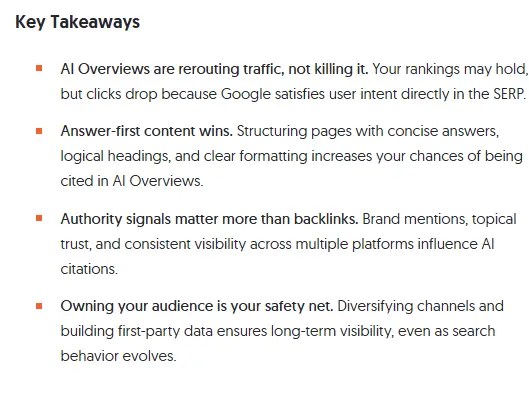
With one click, you can insert a Key Takeaways block into your content. Yoast AI Summarize scans your post’s main body and creates a short, bullet-point summary, giving your readers a quick, scannable snapshot, and giving you a chance to check if your post is truly saying what you want it to.
How you can access the new feature
Yoast AI Summarize is automatically available to all Yoast SEO Premium customers. Just make sure you’ve updated to the latest version and granted consent to use AI.
Once enabled, simply:
Open your post in the WordPress Block Editor.
Add the new block from the “Yoast AI Blocks” section
Click to generate summary, and watch your Key Takeaways section appear in seconds.
Where you can use Yoast AI Summarize
Right now, Yoast AI Summarize works in the WordPress Block Editor on posts and pages. The block is fully editable, you can change the title, rewrite bullet points, or move it anywhere in your content flow.
Pricing and usage
There are no hidden costs for Yoast AI Summarize, it’s included in Yoast SEO Premium. Like our other AI features, it uses our spark counter to track usage.
A spark is a single click on an AI feature.
Generating one summary = one spark.
Your spark counter resets at the start of each month.
There’s currently no hard limit, so you can experiment freely.
Limitations
Yoast AI Summarize is currently in beta. That means you may notice a few restrictions:
Only available in the WordPress Block Editor.
Summaries are excluded from Yoast SEO and Readability Analysis to protect your scores.
Currently works only on published or drafted content within supported blocks.
For very long posts, it may take a few seconds for the summary to generate.
Try out Yoast AI Summarize today
Upgrade to Yoast SEO Premium to unlock this and all our AI features, including the award-nominated Yoast AI Generate and the powerful Yoast AI Optimize. With Yoast AI Summarize, you can work faster, keep your content aligned with your intent, and give your readers instant value with clear, scannable takeaways.
Update to the latest version and try it out today!
http://dubadosolutions.com/wp-content/uploads/2017/05/dubado-logo-1.png00http://dubadosolutions.com/wp-content/uploads/2017/05/dubado-logo-1.png2025-09-09 09:09:432025-09-09 09:09:43New: From longform to key takeaways, in seconds. Meet Yoast AI Summarize
If these tools don’t reference your content, you’re missing out on a growing share of visibility. That’s where LLM seeding comes in.
LLM seeding involves publishing content in places and formats that LLMs are more likely to crawl, understand, and cite. It’s not a traditional SEO strategy or “prompt engineering.” Instead, you’ll use this strategy to get your content to appear in AI-generated answers, even if no one clicks.
We’ll cover what LLM seeding is, how it works, and the steps you can take to start showing up in AI responses before your competitors get there first.
Key Takeaways
LLM seeding involves publishing content where large language models are most likely to access, summarize, and cite.
Unlike SEO, you’re not optimizing for clicks. Instead, you’re working toward citations and visibility in AI responses.
Formats like listicles, FAQs, comparison tables, and authentic reviews increase your chances of being cited.
Placement matters. Publish on third-party platforms, industry sites, forums, and review hubs.
Track results and monitor brand mentions in AI tools, referral traffic from citations, and branded search growth from unlinked citations across the web.
What is LLM Seeding?
LLM seeding is publishing content in formats and locations that LLMs like ChatGPT, Gemini, and Perplexity can access, understand, and cite.
Instead of trying to rank #1 in Google search results, you want to be the source behind AI-generated answers your audience sees. The goal is to show up in summaries, recommendations, or citations without needing a click. The fundamentals overlap with SEO best practices, but the platform you’re optimizing for has changed.
Let’s say you run a productivity software company. Your content marketing team writes a detailed comparison post about the “Best Project Management Tools for Remote Teams.” A month later, someone asks ChatGPT that exact question, and your brand name shows up in the response, even though you don’t rank on page one in Google.
How did the LLM find your information? Here’s what it looks like behind the scenes.
LLMs have been trained on massive datasets pulled from the public web, including blogs, forums, news sites, social platforms, and more. Some also use retrieval systems (like Bing or Google Search) to pull in fresh information. When someone asks a question, the model generates a response based on what it has learned and in some cases, what it retrieves in real time.
Well-structured content, clearly written, and hosted in the right places, is more likely to be referenced in the response: an LLM citation. It’s a huge shift because instead of optimizing almost exclusively for Google’s algorithm, you’re now engineering content for AI-visibility and citations.
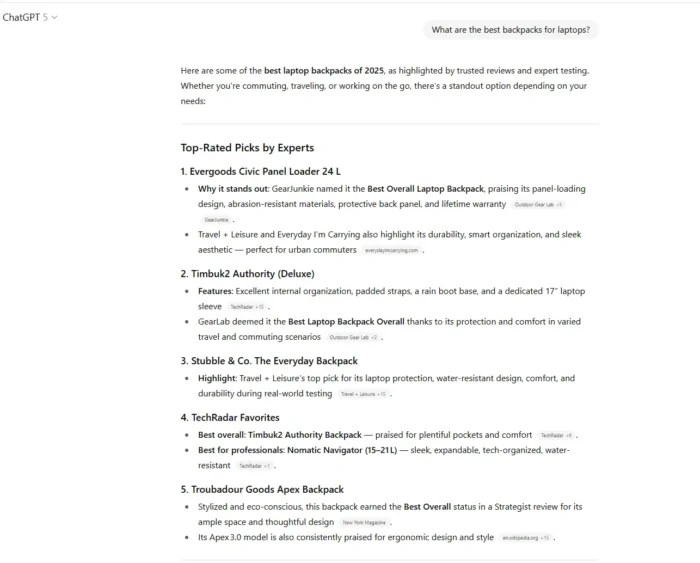
Asking ChatGPT for a list of the best laptop backpacks provides several citations and options.
LLM Seeding vs. Traditional SEO
Traditional SEO focuses on ranking high on Google to earn clicks. You optimize for keywords, build backlinks, and improve page speed to attract traffic to your site.
LLM seeding flips that on its head.
You don’t chase rankings. You build content for LLMs to reference, even if your page never breaks into the top 10. The focus shifts from traffic to trust signals: clear formatting, semantic structure, and authoritative insights. You provide unique insights and publish in places AI models scan frequently, like Reddit, Medium, or niche blogs, which increases your chances of being surfaced in AI results.
SEO asks, “How do I get more people to click to my website?”
LLM seeding asks, “How do I become the answer, even if there’s no click?”
The thing is, it’s not an either/or proposition. You still want to do both. But you’re invisible to a constantly growing audience if you’re not thinking about how AI tools interpret and cite your content.
Benefits of LLM Seeding
LLM seeding goes beyond vanity metrics to the visibility that actually sticks, even when clicks don’t happen. It can be a real game-changer because it lets you do the following:
Stay visible in AI search: Astools like ChatGPT, Gemini, and Perplexity replace traditional searches for quick answers, content needs to appear inside those responses, not just in the search results below them.
Earn brand mentions without needing the click: LLMs don’t always link back, but mentions can still be wins. They keep your brand top of mind and build familiarity, and they nudge users to search for you by name later.
Build authority at scale: When LLMs start citing your brand alongside major players, it’s like being quoted in the New York Times of AI. You earn topical authority and credibility by association.
Bypass the ranking fight: You don’t need to beat everyone to position one. You just need the best answer. From what we know right now, good focus areas are building around clarity, structure and trust signals.
Get ahead while others sleep on it: LLM seeding is still an “under-the-radar” strategy. Right now, you’ve got a first-mover advantage. Don’t wait until your competitors are already showing up in AI responses.
Best Practices For LLM Seeding
If you want LLMs to surface and cite your content, you need to make it easy to find, read, and worth referencing. Here’s how to do that:
Create “Best of Listicles”
LLMs prioritize ranking-style articles and listicles, especially when they match user intent, such as “best tools for freelancers” or “top CRM platforms for startups.” Adding transparent criteria boosts trust.
Use Semantic Chunking
Semantic chunking breaks your content into clear, focused sections that use subheadings, bullet points, and short paragraphs to make it easier for people to read. This structure also helps LLMs understand and accurately extract details. If you’re having trouble thinking about where to start, think about FAQs, summary boxes, and consistent formatting throughout your content.
Write First-Hand Product Reviews
LLMs tend to favor authentic, detailed reviews that include pros, cons, and personal takeaways. Explain your testing process or experience to build credibility. Websites like Tom’s Guide and Wirecutter do an excellent job of this.
Wirecutter’s table of contents breaks down why they choose the items they choose and why you, the reader, should trust them.
Add Comparison Tables
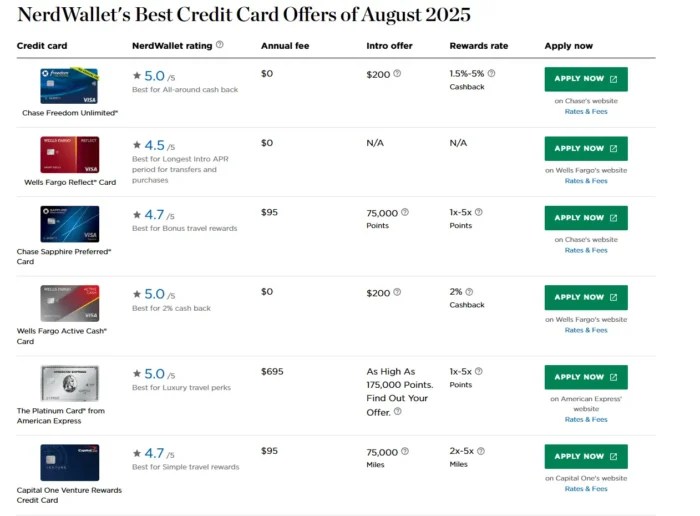
Side-by-side product or service comparisons (especially Brand A vs. Brand B) are gold to LLMs. You’re more likely to be highlighted if you include verdicts like “Best for Enterprise” or “Best Budget Pick.” An example of a brand that does comparison tables particularly well is Nerdwallet.
Include FAQ Sections
Format your FAQs with the question as a subheading and a direct, short answer underneath. LLMs are trained on large amounts of Q&A-style text, so this structure makes it easier for them to parse and reuse your content. FAQ schema is also fundamental to placement in zero-click search elements like featured snippets. The structured format makes your content easier for AI systems to parse and reference.
Almost every article we publish on our site features FAQs that have been properly formatted.
Offer Original Opinions
Hot takes, predictions, or contrarian views can stand out in LLM answers, especially when they’re presented clearly and backed by credible expertise. Structure them clearly and provide obvious takeaways.
Demonstrate Authority
Use author bios, cite sources, and speak from experience. LLMs use the cues to gauge trust and credibility. If you’ve been focusing on meeting E-E-A-T guidelines, much of your content will already have this baked in.
Layer in Multimedia
While ChatGPT may not show users photos inside the chat window, screenshots, graphs, and visuals with descriptive captions and alt text help LLMs (and users who do click through) better understand context. It also breaks up walls of text.
Build Useful Tools
Free calculators, checklists, and templates are highly shareable and are easy for AI systems to parse and extract. Make sure the title and description explain each item’s value upfront.
It’s telling that many of the best practices for traditional SEO often work well for LLM seeding. At their core, both priorities involve giving people the best possible answers to their questions in a highly readable and simple way to digest. In fact, creating content that works well for all avenues is a cornerstone of search everywhere optimization.
Ideal Platforms for LLM Seeding Placement
Publishing on your site isn’t enough to excel with LLM seeding. AI models pull from a wide mix of sources across the web. The more places your content shows up, the more likely it is to influence or be cited in AI-generated answers.
1. Third-Party Platforms
LLMs tend to surface structured, public content hubs. Medium, Substack, and LinkedIn articles get crawled often and carry extra weight because of their clean formatting and tied-to-real-author profiles. These sites publish large volumes of content and are widely trusted, so your content benefits from their visibility and is more likely to be surfaced in AI-generated answers.
2. Industry Publications & Guest Posts
Contributing to trusted outlets, such as trade blogs, marketing publications, and niche news sites, offers your brand credibility and increases the odds of your content being surfaced or cited in AI-generated answers.
3. Expert Quotations
Offering quotes to journalists or bloggers through services like HARO or Featured can land you in articles LLMs surface and cite repeatedly.
4. Product Roundups and Comparison Sites
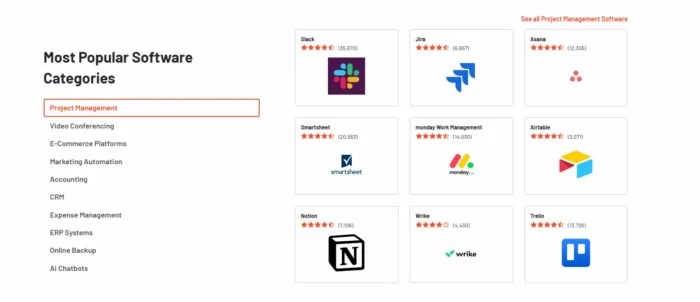
Sites like G2, Capterra, or niche review sites are LLM goldmines. Get your customers to leave detailed reviews and provide quotable explanations about why your product or service stands out.
5. Forums and Communities
Reddit and Quora are two of the most frequently surfaced sources in AI answers. Niche forums and communities (such as AVS Forum or Contractor Talk) also carry weight because they’re packed with authentic, experience-driven insights. Consider creating a public-facing profile to answer questions about your product or service. In addition, they’re excellent spaces to source user-generated content (UGC) that can provide additional context and support.
6. Editorial Microsites
Small, research-driven microsites can carry more authority than heavily branded pages. Because they are often well-structured, focused, and treated as independent resources, they are more likely to be picked up by LLMs when generating answers.
7. Social Media
Platforms like LinkedIn, YouTube, and even Reddit threads can double as searchable databases for LLMs. Use structured language, captions, and context in every post.
Here’s the bottom line: LLM seeding works best when your content is everywhere AI looks, not just on your blog.
How To Track LLM Seeding
Tracking LLM seeding is different from tracking SEO performance. You won’t always see clicks or referral traffic, but you can measure impact if you know where to look. These KPIs matter the most:
1. Brand Mentions in AI Tools
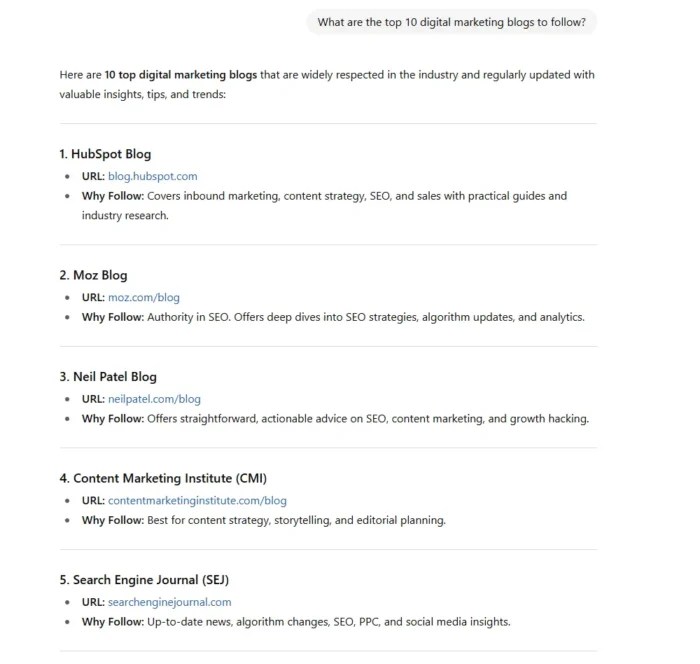
Manual testing: Tryrunning audience-style prompts in ChatGPT, Gemini, Claude, and Perplexity in incognito mode so past queries don’t bias results. As a note here, results can vary from instance to instance, so test multiple times to see consistent patterns.
We’re in pretty good company among the top five resources.
Tracking tools: Perplexity Pro lets you see citation sources, while ChatGPT Advanced Data Analysis can sometimes surface cited domains. Even enterprise tools like Semrush AIO have started to track brand mentions across AI models. There are also dedicated tools like Profound that specifically focus on AI visibility.
2. Referral Traffic Growth
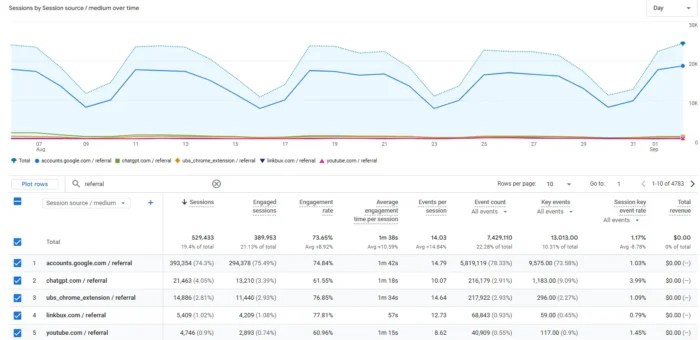
Using tools like GA4 can help you determine LLM seeding’s effectiveness, but not via traditional metrics.
With GA4, you’ll want to navigate through Reports > Acquisition > Traffic Acquisition and then filter for your chosen form of traffic. Be sure to review the source/medium dimension for more details about specific LLM platforms. Referral traffic may come from LLMs if they include a clickable link to your website. By contrast, brand mentions without links are more likely to drive users to search for you after using an LLM, which GA4 usually classifies under organic search.
This isn’t super-likely by comparison. Since this is less common, it’s best to look at referral traffic alongside LLM visibility metrics for the full picture of performance.
3. Unlinked Mentions
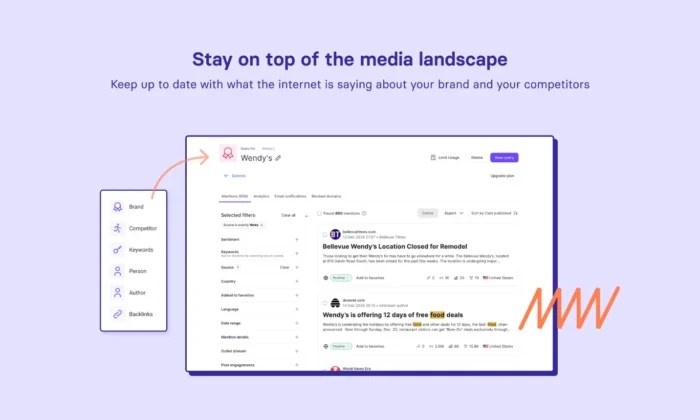
You have several options for seeking out unlinked mentions. Set up Google Alerts for brand name or product mentions; that can help you surface when your brand is mentioned in the news or other platforms. For example, Semrush’s Brand Monitoring tool lets you look for citations without backlinks.
Semrush touts its brand monitoring tool as one of the best in the business.
4. Overall LLM Visibility
No matter which tools you use, building a log to track your monthly tests across AI platforms can provide insights. Document the tool(s) used, prompt asked, and the exact phrasing of the mention. You’ll also want to track your brand sentiment; is your brand being talked about in a positive, neutral, or negative light?
Companies like Serpstat, Similarweb, and Profound have begun to offer AI visibility reporting, and those options will mature fast.
There’s currently no silver bullet to track LLM seeding comprehensively. It’s partly manual work, partly analytics, and partly new tools still in beta. You can create an AI Visibility Dashboard that combines GA4, brand monitoring, and a spreadsheet of monthly AI prompts to get a head start.
FAQs
What is LLM seeding?
LLM seeding is publishing content in formats and locations that large language models (LLMs) are more likely to surface and cite. Instead of optimizing only for search rankings, you’re optimizing for visibility in AI-generated answers.
What are LLM citations?
An LLM citation happens when an AI platform like ChatGPT, Gemini, or Perplexity references your content with a source link in its response.
What is an LLM mention?
An LLM mention is when an AI platform references your content but doesn’t provide a clickable source link.
How do I know if my brand is being cited?
Run audience-style prompts in AI tools (like “best project management software for startups”) and see if your brand shows up. Also, track referral traffic trends in GA4.
Conclusion
Search looks different today because users no longer rely exclusively on Google. Your audience asks questions in ChatGPT, Gemini, and other AI tools. They’re now the ones who decide which brands get mentioned.
LLM seeding matters. You can stay visible even when clicks don’t come and earn credibility by showing up in AI responses. This futureproofs your marketing against zero-click trends and keeps you agile and top of mind.
To win this new landscape, start small: publish in formats LLMs love like listicles, FAQs, and comparisons), seed content across third-party platforms, and track whether your brand shows up in AI outputs.
The companies that adapt today will own the conversation tomorrow.
http://dubadosolutions.com/wp-content/uploads/2017/05/dubado-logo-1.png00http://dubadosolutions.com/wp-content/uploads/2017/05/dubado-logo-1.png2025-09-05 19:00:002025-09-05 19:00:00Getting Cited in LLMs: A Guide to LLM Seeding
Google is no longer the only place people search. Millions now bypass search engines entirely and turn to large language models (LLMs) like ChatGPT, Gemini, and Perplexity for answers.
This creates a massive opportunity. LLM SEO is how you get your content in front of those systems. The idea is to make your content so clear and credible that a model has no choice but to pull from it.
That means writing in a way machines can process, and people still want to read. Do it right, and you’ll show up where the traffic is already shifting.
This isn’t a future concern. It’s happening now. If you don’t adapt, readers will still get answers—just not from you. You’ll lose the click before you even get the chance to earn it.
Key Takeaways
LLM SEO makes your content visible to large language models like ChatGPT, Gemini, and Perplexity.
Unlike traditional SEO, visibility in LLMs means being cited in AI-generated answers vs. just ranking in search results.
Clarity, structure, and credibility are important factors that increase the likelihood LLMs will surface your content.
LLM SEO builds on traditional SEO. You still need a strong technical and content foundation.
Embracing LLM SEO now gives you a leg up on the competition. Most marketers aren’t yet focused on how LLMs deliver answers.
Citations, mentions, and brand visibility inside AI tools are emerging markers of success with SEO for LLMs. You can’t measure performance just by clicks or keyword rankings.
What Is LLM SEO?
LLM SEO is the process of optimizing your content so that large language models can understand, interpret and surface is in their responses. Think of it as preparing your content for systems like ChatGPT, Gemini, and Perplexity just as you prepare content for Google.
Instead of focusing only on rankings, LLM SEO targets being recognized as a credible source. That means:
Writing in a clear, direct style that reflects how people naturally ask questions.
Structuring content with headings, FAQs, and lists so models can easily pull useful snippets.
Building authority through transparent sourcing, strong E-E-A-T signals, and unique insights.
Publishing content in multiple formats, like text, video, and visuals, which increases the chances that models can understand and incorporate your content.
LLM and traditional SEO share the same goal: to connect your expertise with what people are looking for. What’s changing is where and how those answers show up.
LLM SEO specifically targets making your content easy for large language models to parse and cite, often in search engine-related contexts. This includes optimizing for Google’s AI Overviews (AIOs) and ensuring your content is structured so it’s more likely to be surfaced by AI-driven platforms like ChatGPT or Gemini.
LLMO goes further. It’s about increasing your brand’s overall visibility in AI-generated answers across platforms like ChatGPT, Perplexity, Gemini, and Claude. That reach isn’t limited to search. It also means:
Ensuring your content is easy to find in sources LLMs actively use, like crawlable websites and public databases.
Using structured data, schema, and multi-format content so LLMs can interpret your information cleanly.
Building authority and mentions across the web to build trust in your brand so it’s cited and not just ranked.
In short, LLM SEO helps you show up in AI answers connected to search. LLMO ensures your brand is present across any context where large language models generate responses.
LLM SEO vs. Traditional SEO
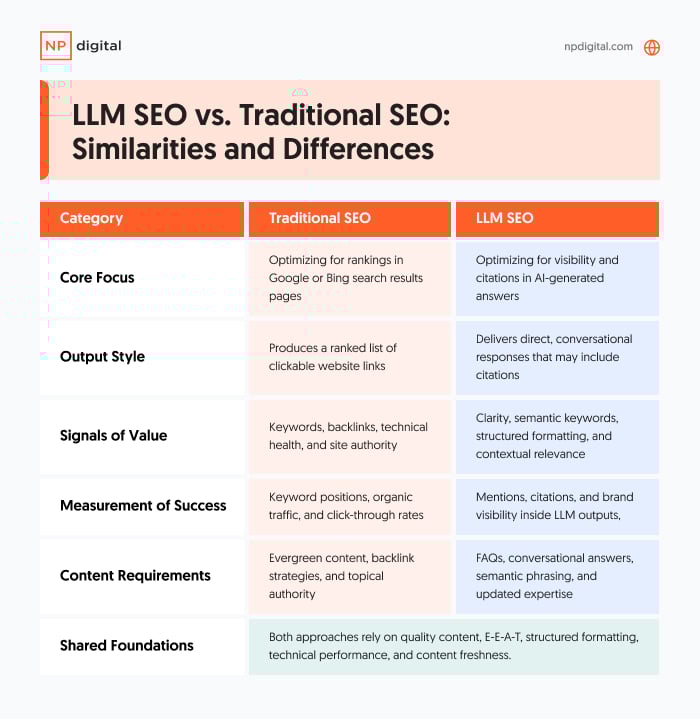
LLM SEO builds on the foundation of traditional SEO but shifts the focus to how large language models process and deliver information.
Traditional SEO is about rankings. You optimize for Google or Bing so your content climbs the results page. Success is measured in keyword positions, clicks, and traffic.
LLM SEO is about citations. Instead of fighting for position one, you make your content easy for LLMs to read, trust, and include in their responses. Success is measured in mentions and visibility inside tools like ChatGPT or Gemini, even if the user doesn’t click through.
The overlap is important. Both require:
High-quality, well-structured content.
Strong signals of expertise, authority, and trust (E-E-A-T).
Technical performance, like fast load times and mobile readiness.
The differences matter. Traditional SEO leans on backlinks and click-through optimization. LLM SEO rewards clear language, structured formats like FAQs and lists, and transparent sourcing. Whereas SEO optimizes for crawlers, LLM SEO optimizes for language models.
Marketers who stop at traditional SEO risk losing visibility as more searches end inside AI answers.
Instead of clicking through search results, people ask AI tools like ChatGPT direct questions and get immediate answers. That shift is changing brand discovery.
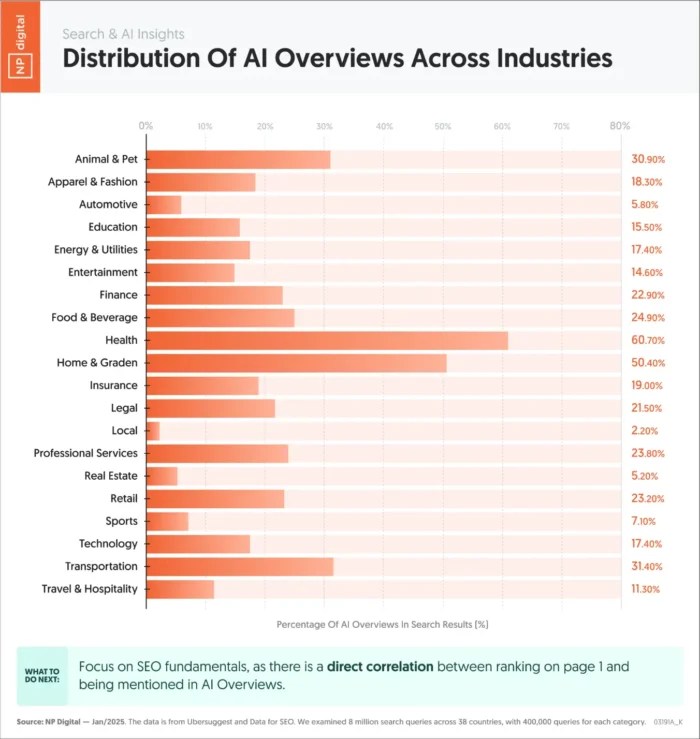
You can already see this shift playing out, with some industries showing up in AI Overviews far more often than others.
For businesses, the risk is obvious. If your content isn’t structured for LLMs, your expertise may never surface, even if you rank well in Google. That means losing visibility to competitors optimizing for both.
There’s also the matter of trust. LLMs lean heavily on authoritative, clearly written content with well-cited sources. If your brand is not putting out content that signals credibility, you’re less likely to be included in the answers users see.
Finally, this shift is accelerating. More platforms are rolling out AI-driven responses, and users are adopting them quickly because they save time.
Every month you wait is a month of lost visibility. LLM SEO puts your brand where attention is headed, not where it’s fading.
Best Practices for LLM SEO
Visibility in large language models isn’t about hacks. It comes down to making your content easier for these systems to understand, trust, and reuse. The following practices build on what already works in SEO but adapt it for how LLMs process and deliver information.
Write Conversational and Contextual Content
Large language models are built to handle natural conversation. Content that reads conversationally and adapts to context is more likely to be included in generated answers. Drop the keyword stuffing and rigid phrasing. Instead, write the way people actually ask (and follow up on) questions.
Implement FAQs and Key Takeaways
LLMs thrive on clarity. Adding FAQ sections and concise takeaways gives them ready-made snippets they can use to build answers. It helps readers, too, breaking content into scannable, useful chunks while giving AI systems obvious entry points into your page.
Use Semantic and Natural Language Keywords
Traditional SEO often leaned on exact-match keywords. LLM SEO works better with semantic and contextual phrasing, language that reflects how people naturally ask questions. Build around related terms and long-tail queries so models can recognize intent and surface your content more often.
Maintain Brand Presence and Consistency
LLMs look for signals of authority and consistency across multiple platforms. A brand that regularly publishes on its own blog, contributes to third-party sites, and maintains a strong profile across social channels is more likely to be trusted. Consistency reinforces your credibility.
Share Original Data, Insights, and Expertise
Original insights stand out. Publishing unique research, case studies, or proprietary data makes your content more valuable to LLMs. These models are designed to identify and prioritize information not easily found elsewhere. For example, graphics like the piece below showcase data points that my team sourced on its own.
Monitor and Query LLM Outputs
Optimization does not stop at publishing. Regularly test how your brand appears in ChatGPT, Gemini, or Perplexity. Query these platforms with the same questions your audience might ask. Monitoring performance helps you identify where your content is being cited and where you need to adjust. In the example below, you can see how a brand can be portrayed in AI tools based on different sources. We’ll cover later on how you can go about doing this.
Keep Content Fresh and Updated
Stale content gets overlooked. Updating old posts with new statistics, recent examples, or revised insights signals that your brand is current.
Practice Search Everywhere Optimization
LLMs draw from a variety of different sources, and this is where Search Everywhere Optimization comes in. LLMs pull from forums, video transcripts, and social media. The more places your brand shows up, the more likely it is to be discovered and cited by AI.
This is the essence of search everywhere optimization: making sure your expertise is visible wherever people (and AI models) go looking for answers.
Measuring LLM SEO Results
Measuring success in LLM SEO is not as straightforward as checking keyword rankings, but there are now tools and methods that make it possible.
Specialized platforms like Profound are built to track how often brands and websites appear in AI-generated answers across platforms. See below for a look at the Profound interface and how it helps showcase AI visibility.
Established SEO platforms, including Semrush, have also rolled out features that measure AI visibility alongside traditional search metrics. In the screenshot below, you can see how Semrush showcases AIO presence for a given page.
These tools give you a clearer picture of whether your content is surfacing where people are asking questions.
In addition to platforms, hands-on monitoring still matters. Query the models directly using the same questions your audience would ask. Document when your content is cited and watch for changes over time. This kind of manual testing tracks progress beyond what analytics alone can show.
You should also monitor referral traffic. Some AI tools now include links to sources, and those clicks show up in analytics as traffic. Another thing to keep an eye out for is brand mentions. Even if an AI result doesn’t give a link, brand mentions inside AI outputs are valuable, as they reinforce awareness and authority.
Finally, fold LLM SEO tracking into your broader SEO reporting. Look at engagement signals like time on page, repeat visits, and social shares for optimized content. If people find your content more useful, LLMs are more likely to treat it as a trusted source.
The bottom line is that measurement is evolving. You now have tools, data, and direct testing methods that show whether your LLM SEO efforts are paying off.
FAQs
What is LLM SEO?
LLM SEO is the process of optimizing content so large language models such as ChatGPT, Gemini, and Perplexity can understand, interpret, and surface it in their responses.
How is LLM SEO different from traditional SEO?
Traditional SEO focuses on ranking in search engine results. LLM SEO focuses on being cited inside AI-generated answers. Both rely on quality content, authority, and structure, but the measurement of success is different.
Is LLM SEO the same as LLMO?
No. LLM SEO is a subset of LLM optimization (LLMO). LLM SEO focuses on search-related visibility in LLM outputs, while LLMO covers the broader goal of increasing brand presence across all AI-generated answers.
How do you measure LLM SEO results?
Tracking visibility in LLMs involves querying the models directly, monitoring referral traffic from AI tools in places like GA4, and using platforms such as Profound or Semrush that offer AI visibility tracking.
Why does LLM SEO matter now?
Adoption of LLMs is growing rapidly. Users are increasingly asking questions on these platforms instead of traditional search engines. Brands that optimize early gain visibility where attention is shifting, while others risk losing ground.
Conclusion
Large language models are already changing how people search and discover brands. More users are asking questions in ChatGPT, Gemini, and Perplexity instead of clicking through a list of Google results. That shift is real, and it’s growing.
LLM SEO is how to meet that change head-on. The same fundamentals still matter: quality content, structure, and authority. But they need to be applied in ways LLMs can understand and reuse. That means writing conversationally, answering questions directly, and keeping your content current and credible.
This shift also fits into the bigger picture of search. The rise of zero-click searches shows how often users get the information they need without visiting a website at all. At the same time, semantic search highlights how engines and now LLMs look at meaning and context instead of just exact keywords.
If you want a practical first step, update one or two of your top-performing pages. Add FAQs, refresh the data, and shape answers around the questions your audience is actually asking. Then watch how often those pages begin showing up in both search engines and AI outputs.
http://dubadosolutions.com/wp-content/uploads/2017/05/dubado-logo-1.png00http://dubadosolutions.com/wp-content/uploads/2017/05/dubado-logo-1.png2025-09-04 19:00:002025-09-04 19:00:00Large Language Model SEO (LLM SEO)
Product variations are more than just an ecommerce feature. They give your customers choices, whether it’s size, color, style, or material, while helping your store stand out in competitive search results. When optimized correctly, product variations do more than display available options. They improve the customer experience by making shopping easier. At the same time, they boost conversions by catering to diverse needs and support your SEO strategy by targeting more keywords.
This guide will explain the best practices for product variations and show you how to optimize them for search engines and customers so your ecommerce site can grow in traffic, rankings, and sales.
What are product variations in ecommerce?
Product variations or product variants are different versions of the same product designed to give customers options. These variations can be based on attributes like size, color, material, style, or capacity. Instead of creating multiple product listings, variations group all options under a single product, making it easier for customers to browse and purchase.
For example, when you search for an iPhone on Amazon, you’ll see options for different colors and storage capacities, all available on a single page. This setup lets customers explore multiple choices without leaving the main product page.
Example of product variants
Managing product variations depends on the platform you use:
In WooCommerce, product variations are created using attributes such as size or color, and then assigning values to those attributes. Store owners can upload unique images, set prices, and adjust stock for each variation
In Shopify, variations are managed under the ‘Variants’ section of a product. You can add options like size, color, or material, and then assign values. Each variant can have its own price, SKU, and image, making it simple to customize how the variations appear in your store
Okay, now let’s see why you need product variants and not upload each option as a completely separate product. Think of it this way: customers don’t want to scroll through endless listings just to compare a black t-shirt with a white one or a 64GB phone with a 128GB version. Variations keep everything in one place, making shopping smoother and more intuitive.
Here’s why product variations are so important for your customers:
Improved shopping experience: Variants reduce unnecessary clicks and allow customers to compare options side by side within a single product page. This saves time and makes decision-making easier
Higher conversions and lower bounce rates: When customers find their preferred size, color, or feature right away, they are more likely to complete a purchase instead of leaving your store
Reduced purchase anxiety: Variants ensure customers do not feel limited by stock. Seeing multiple choices available decreases the chance of cart abandonment
Personalization and satisfaction: Offering customers options empowers them to choose a product that feels tailor-made for them, improving overall satisfaction
Indirect SEO benefits: A better shopping experience often leads to longer session durations, fewer bounces, and more engagement. These signals may indirectly support stronger SEO performance, as they align with positive user experience metrics
How do product variations support your ecommerce SEO strategies?
Product variations are not just about creating a better shopping experience; they also bring direct ecommerce SEO benefits that can help your store attract more qualified traffic. When optimized correctly, variants can make your product pages richer, more discoverable, and more engaging.
Increase in keyword targeting
Variants allow you to target a wider range of long-tail keywords that reflect real customer search behavior. For example, instead of only competing for ‘men’s wallet,’ you can rank for ‘men’s black leather wallet’ or ‘slim men’s brown wallet.’ These specific keywords usually carry higher purchase intent and face less competition
Levi’s product page for jeans uses long-tail keywords in the product description for keyword targeting
Richer content for search engines and AI engines
Each variation allows you to add unique attributes, descriptions, and specifications. This creates a more detailed and content-rich product page that search engines and AI-driven engines (like ChatGPT or Google’s AI Overviews) value when surfacing answers and shaping brand perception.
ChatGPT showing product options for a t-shirt
Improved user engagement and longer sessions
A well-structured page that clearly displays variations keeps users from bouncing to competitor sites when they don’t immediately find their preferred option. Instead, they spend more time exploring, comparing, and interacting with your store, which indirectly supports SEO through stronger engagement signals.
Better structured data for enhanced search results
When product variants are properly marked up with structured data, search engines can display rich snippets that include price ranges, availability, color options, and reviews. This not only makes your listings stand out but also boosts click-through rates (CTRs) from search results.
Yoast SEO’s Structure data feature describes your product content as a single interconnected schema graph that search engines can easily understand. This helps them interpret your product variations more accurately and increases your chances of getting rich results, from product details to FAQs.
In short, optimized product variants make your product pages more keyword-diverse, content-rich, and engaging while also improving how your store is presented in search results and generative AI chat replies.
Blueprint for optimizing your product variations
Here’s the part you’ve been waiting for: how to optimize your product variations for SEO, conversions, and user experience. In this section, we’ll cover the right technical implementation, smart SEO tactics, and the common mistakes you’ll want to avoid.
Technical implementation of product variations
Getting the technical setup right is the foundation for optimizing your product variations for both ecommerce SEO and user experience. Poor implementation can lead to crawl inefficiencies, duplicate content, and a confusing buyer journey.
Here’s how to approach it effectively:
Handling variations in URLs
One of the biggest decisions you’ll make is how to structure URLs for your product variations:
Parameters (e.g., ?color=red&size=12): Good for filtering and faceted navigation, but they can create crawl bloat if not managed properly. Always define URL parameters in Google Search Console and use canonical tags to consolidate signals
Separate pages for each variation (e.g., /red-dress-size-12): This can be useful when specific variations have significant search demand (like ‘iPhone 15 Pro Max 512GB Blue’). However, it requires careful duplication management and unique, optimized content for each page
Single product page with dropdowns or swatches: The most common approach for ecommerce stores, as it consolidates SEO signals into one canonical page while providing users with all available variations in one place
Takeaway: Use a hybrid approach. Keep a single master product page, but only create dedicated variation URLs for high-demand search queries (with unique descriptions, images, and structured data).
Note: only create dedicated variation URLs if you can add unique value (content/images), otherwise, it risks duplication
Internal linking best practices
Internal linking is crucial in helping search engines understand the relationships between your main product page and its variations.
Always link back to the parent product page from any variation-specific pages
Ensure your category pages link to the main product page, not every single variation (to prevent diluting crawl equity)
Use descriptive anchor text when linking internally, e.g., ‘men’s black leather wallet’ rather than just ‘wallet’
The Internal linking suggestions feature in Yoast SEO Premium is a real time-saver. As you write, it recommends relevant pages and posts so you can easily connect variations, parent products, and related content. This not only strengthens your site structure and boosts SEO but also ensures visitors enjoy a seamless browsing experience.
A smarter analysis in Yoast SEO Premium
Yoast SEO Premium has a smart content analysis that helps you take your content to the next level!
Takeaway: Build a clean hierarchy where category pages → main product pages → variations, ensuring both users and crawlers can navigate easily.
Managing faceted navigation and filters
Filters (like size, color, brand, or price) enhance user experience but can create SEO challenges if every filter combination generates a new crawlable URL.
Use <nofollow or noindex for low-value filter pages (like ‘price under $20’ if it doesn’t add SEO value)
Block irrelevant filter parameters in robots.txt to prevent crawl bloat
For valuable filters (e.g., ‘red running shoes’), allow them to be indexed and optimize the content
Takeaway: Conduct a filter audit in Google Search Console. Identify which filtered URLs actually drive impressions and clicks, and only allow those to be indexable.
Media content optimization for ecommerce product variations
When it comes to product variations, visuals and supporting media play a critical role in both SEO and conversions. Shoppers often make purchase decisions based on how well they can visualize a specific variation. In fact, 75% of online shoppers rely on product images when making purchasing decisions.
Here’s how you can optimize media content for ecommerce product variations:
Use unique images for each variation
Avoid using the same generic image across all variations. Display each color, size, material, or feature with its own high-quality image set. For example, if you sell a t-shirt in six colors, show each color separately to help customers make confident choices.
Unique product images for each variant
Leverage 360° views and videos
Showcase variations with interactive media like 360° spins or short product videos. For example, a ‘black leather recliner’ video demonstrates texture and function more effectively than a static image, leading to higher engagement and conversions.
Use videos and 360-degree media to portray your products
Optimize alt text, file names, and metadata
Every image should have descriptive, keyword-rich alt text that specifies the variation. Instead of writing ‘red shoe,’ use ‘women’s red running shoe size 8.’ File names (e.g., womens-red-running-shoe-size8.webp) and captions should also reinforce the variation for better indexing.
Implement structured data for media
Use the Product schema to explicitly define images and videos for each variation. Including structured data ensures that Google and AI-driven engines like ChatGPT can clearly interpret your variation visuals and display them in rich results or AI summaries.
For instance, assigning images to specific SKUs (via image markup) makes it easier for search engines to show the correct variation in shopping results.
SEO tips for product variations
Optimizing product variations for SEO requires more than attractive visuals and solid descriptions. You need to apply some proven SEO techniques to ensure search engines correctly interpret your product pages and users get the best possible experience.
Here are a few key practices every ecommerce store owner should follow:
Use canonical tags to avoid duplicate content issues
Product variations often generate multiple URLs, which can cause duplicate content problems. Canonical tags help solve this by pointing to the primary version of a page, consolidating ranking signals, and avoiding internal competition.
Yoast simplifies this process by automatically inserting canonical URL tags on your product pages. This ensures search engines know which version to prioritize, prevents diluted link equity, and even consolidates social shares under the original page. For store owners, this means less technical overhead and stronger, cleaner rankings.
Apply global product identifiers (GTIN, MPN, ISBN) where relevant
Global product identifiers like GTINs, MPNs, and ISBNs act as unique fingerprints for your products. They help Google and other search engines correctly match your items in their vast index, which improves the accuracy of search listings and reduces confusion with similar products. They also add credibility, since customers can cross-check these identifiers before purchase.
With Yoast WooCommerce SEO, adding these identifiers becomes much easier. The plugin reminds you to fill in missing SKUs, GTINs, or EANs for each product variation and automatically outputs them in structured data. This not only helps your products qualify for rich results but also ensures that no variant is left incomplete from an SEO standpoint.
Buy WooCommerce SEO now!
Unlock powerful features and much more for your online store with Yoast WooCommerce SEO!
Regularly audit Google Search Console data to track performance
Google Search Console is a goldmine for understanding how product variations are performing. By monitoring which variant pages are driving impressions, clicks, and conversions, you can refine your SEO strategy.
For example, if certain variants attract little traffic but consume crawl budget, it might be better to consolidate them under canonical tags.
Regular audits also help you detect indexing issues, thin content problems, or underperforming structured data. This keeps your product catalogue lean, crawl-efficient, and focused on driving meaningful organic traffic.
Common product variation ecommerce errors to avoid
Even if you’ve implemented the right technical setup, added structured data, and optimized your media content, a few small mistakes can undo all that effort. To make sure your product variations support SEO and conversions instead of hurting them, here are some common pitfalls to avoid:
Duplicate content: Creating separate standalone pages for each variation (like size or color) without consolidation leads to content duplication. This confuses search engines and dilutes rankings across multiple weak pages
Poor user experience: If your variation options are hidden, unclear, or slow to load, users struggle to make choices. This friction reduces conversions and increases bounce rates
Incorrect structured data: Applying schema inaccurately can cause search engines to display the wrong product details in search results, damaging credibility and visibility
Thin content: Not providing unique descriptions, images, or metadata for each variation leaves the page with little value. Search engines tend to down-rank such content, reducing discoverability
Crawl bloat: Generating too many low-value variation URLs (like separate pages for every minor option) wastes crawl budget and prevents high-priority pages from being indexed efficiently. Additionally, it could dilute internal link equity
By keeping these errors in check, you’ll ensure your product variation strategy strengthens your SEO and user experience instead of working against them.
Ready to unfold all variations?
Product variations are not just small details hidden in your catalogue. They play a major role in how both search engines and shoppers experience your store. When done right, they prevent duplicate content issues, improve crawl efficiency, deliver richer search results, and create a seamless journey for your customers.
The key is to treat product variations as part of your overall SEO strategy, not as an afterthought. Every unique image, structured snippet, and clear variation option makes your store more visible, more reliable, and more profitable.
This is where Yoast SEO becomes a game-changer. With automatic structured data, smart handling of canonical URLs, and advanced content optimization tools, Yoast helps you get product variations right the first time.
http://dubadosolutions.com/wp-content/uploads/2017/05/dubado-logo-1.png00http://dubadosolutions.com/wp-content/uploads/2017/05/dubado-logo-1.png2025-09-04 17:05:512025-09-04 17:05:51A detailed guide to optimizing ecommerce product variations for SEO and conversions
Google has a new subtle but powerful feature in the Google Ads advertiser console to help you manage your campaigns. New checkboxes are available to let you select the campaigns you want and filter the view to only show those campaigns.
Previously, you were only able to select one campaign at a time, but now you can select multiple campaigns.
What it looks like. Here is the full screenshot from Thomas Eccel who posted the screenshot on LinkedIn:
Why we care. This new checkbox allows you to manually filter by more than one campaign at a time, allowing you to apply and manage your campaigns more efficiently. You can compare multiple campaign performance at the same time and save a huge amount of time when reporting, comparing, or managing these campaigns.
https://i0.wp.com/dubadosolutions.com/wp-content/uploads/2025/09/google-ads-checkboxes-selector-1756644140-nAiyUV.jpg?fit=800%2C800&ssl=1800800http://dubadosolutions.com/wp-content/uploads/2017/05/dubado-logo-1.png2025-09-02 13:52:382025-09-02 13:52:38Google Ads enhances campaign filters with new checkboxes
Take a few minutes to think about your website. Have you noticed your traffic dropping even though rankings haven’t really changed?
You’re not alone.
The rise of zero-click searches on Google and other search engines is upending what we consider SEO success and changing the game. AI Overviews, featured snippets, answer boxes…these give users what they need without clicking through to your website. And for the most part, users have been somewhat satisfied. Almost 44 percent of marketers have seen decreased web traffic since AIOs launched, while 48 percent have seen revenue boosts from ads and affiliate links.
So, how do you stay relevant when Google keeps more traffic for itself? That’s what we’ve been trying to figure out for a while now, and it’s what we’ll share with you here. We’ll break down the zero-click future and give you real, actionable ways to grow your visibility and prove your value to build a thriving brand, even when clicks are scarce.
Key Takeaways
Zero-click searches are reshaping SEO success metrics. Traditional traffic-focused strategies need updating as Google and AI tools answer queries directly in search results, reducing site visits even when rankings remain stable.
Multi-platform visibility beats single-channel dependence. Success requires optimizing for AI citations, featured snippets, and expanding presence across TikTok, YouTube, Reddit, and other search destinations where your audience seeks answers.
Authority and original content drive AI citations. Brands that invest in proprietary research, expert commentary, and structured data are more likely to be quoted by AI tools and featured in zero-click results.
First-party data becomes your competitive advantage. Building direct relationships through email lists, CDPs, and owned media channels protects against algorithm changes and platform dependency.
New success metrics matter more than clicks. Track impressions, brand mentions, AI visibility, and social engagement rather than relying solely on last-click attribution to measure zero-click performance.
What Are Zero-Click Searches?
A zero-click search gives users the answer directly in the search results. Featured snippets, AI Overviews, local packs, and “People Also Ask” boxes are all examples of zero-click search results.
These features are (mostly) great for users because they meet their needs immediately. That improves user satisfaction. Marketers can benefit, too; a zero-click result has the upside of brand visibility in prime real estate. The downside is fewer site visits and opportunities to convert visitors.
If you’re a marketer, understanding this shift is critical. Knowing how zero-click search features work can help you shape your content for inclusion and maintain your relevance, even if traffic declines.
Why Zero-Click Is Taking Over
Platforms like Google, Bing, and AI-driven tools want to keep users within their ecosystem. By providing instant answers, they reduce the need for users to click through. Social media platforms have also become search destinations; TikTok, Instagram, and YouTube answer queries in-app.
Why are these companies doing this? To serve ads, mainly. Meta and Google can continuously serve you ads based on your search history and behavior by keeping you on their platforms. The longer you’re there, the better the chance that you’ll click an ad and give them revenue.
The downside of the trend is that it pushes brands to compete for attention across multiple discovery channels. You can no longer rely on just paid search or earned media alone. Adapting to this new reality isn’t optional, either. You have to understand where your audience searches and tailor content for those environments.
The Cost of Ignoring Zero-Click
Ignoring zero-click can quietly erode your digital presence until the impacts become impossible to reverse. The most obvious loss is website traffic, but there are other consequences:
Reduced brand visibility: When your content fails to appear in AI overviews, knowledge panels, or other SERP features, someone has to fill that space: your competitors. That can shift user perception and recognition, leaving you wondering where everyone went.
Lower engagement throughout the funnel: Without TOFU (top of funnel) visibility, your middle- and bottom-of-funnel efforts can struggle. Fewer people enter your ecosystem, which makes it harder to build relationships or drive conversions.
Weakened authority signals: AI models and search algorithms favor content that’s already been featured or cited. You risk being left out of future citations if you’re not part of that pool. That can start a spiral that reduces your credibility in the eyes of both machines and users.
Missed data and audience insights: When users find answers elsewhere, you lose the behavioral data from on-site engagement. That limits your ability to refine messaging, test offers, and personalize experiences.
Potential revenue decline: Reduced visibility and engagement inevitably lead to fewer leads, sales, or ad impressions. The financial impact compounds over time.
Failure to adapt to zero-click realities means you give up control over how and where your brand appears in the search experience.
How to Actually Win in a Zero-Click World
We know you should ignore zero-click searches at your own peril. But how do you actually win in this environment? You can succeed by shifting focus from chasing clicks to ownership of the answers that matter to your audience.
Optimize For AI & Snippets
Marketers benefit from higher visibility, and users benefit from faster, clearer answers. Structured content makes it easier for AI and search engines to feature you.
For example, a travel website creates a “Top 10 Things to Do in Milwaukee, WI” guide with schema markup for attractions, ensuring Google can pull quick answers for users who ask for “things to do in Milwaukee.” That gives the user an instant list while showing your brand as a trusted source. In practice, that looks like:
Applying schema markup for FAQs, how-tos, and reviews.
Creating content hubs with strong internal linking.
Adding concise summaries to the start of articles.
Using descriptive headers for each section.
Be Worth Quoting
AI summaries and featured snippets favor credible, unique content that adds value. Marketers gain authority while users get richer information they can trust.
Let’s say a leading SaaS company publishes a report with proprietary industry data. AI pulls statistics from the report to answer users’ questions, associating your brand with expertise. To get started, consider:
Conducting original research and sharing the results.
Adding expert commentary from internal or external subject matter experts.
Including case studies with measurable results.
Using side-by-side comparisons to simplify decision-making.
Double Down On Brand Authority
Being a recognized authority helps you get cited by AI tools and SERPs. Marketers benefit from constant exposure, and users gain confidence in your answers. Pitch newsworthy stories to journalists at reputable top-tier or hyper-relevant industry publications to reap the best benefits. If your brand strategy isn’t taking advantage of considerable outreach, you’re leaving money (and recognition) on the table.
For example, a health clinic might contribute expert articles to high-profile medical sites. As AI tools look for health-related information, your clinic’s name is seen as a trusted source. But how do you act on this? Take steps to:
Build digital PR efforts to secure mentions on authoritative websites.
Get Wikipedia references where appropriate.
Encourage positive user reviews.
Earn high-quality backlinks.
Maintain consistent branding across all content.
Create Click-Worthy Content
Even in a zero-click environment, some users want more detail. Marketers benefit by attracting those motivated visitors, while users gain access to in-depth resources. The trick? Thinking outside the traditional “blog” mindset. Imagine a marketing blog that offers an interactive ROI calculator in an article about ad spend. The snippet could show basic tips, but the tool requires visiting the site. That encourages deeper engagement. To help build said engagement, start by:
Offering exclusive tools, downloads, or templates.
Add visuals, charts, and examples that don’t appear in SERPs.
Think Beyond Google To New Search Frontiers
Search is everywhere. Your audience is looking for answers in places like TikTok, Reddit, YouTube, Instagram, and AI assistants. Expanding your reach to touch those places involves being proactive. Repurpose existing blog content into short videos. Answer niche questions in online communities or forums. Optimize for video search on YouTube. Format all content for AI readability.
Diversifying your search presence ensures you don’t depend on a single platform’s algorithm. Users benefit from getting answers in the format and channel they prefer. Think of cooking brands that post recipe videos on TikTok for quick inspiration but provide detailed video instructions on YouTube and long-form written directions on their blog for those who want step-by-step guidance.
Need platform-specific tips? Try implementing the following:
TikTok: 3-second hook + trending hashtag + text overlays with key terms
Reddit: Target 10K+ member subreddits, provide 150+ word helpful responses
YouTube: Add timestamps, chapter markers, and upload transcript files
How To Track And Measure Zero-Click Success
Measuring success in a zero-click world requires a shift from last-click attribution to metrics reflecting visibility and influence.
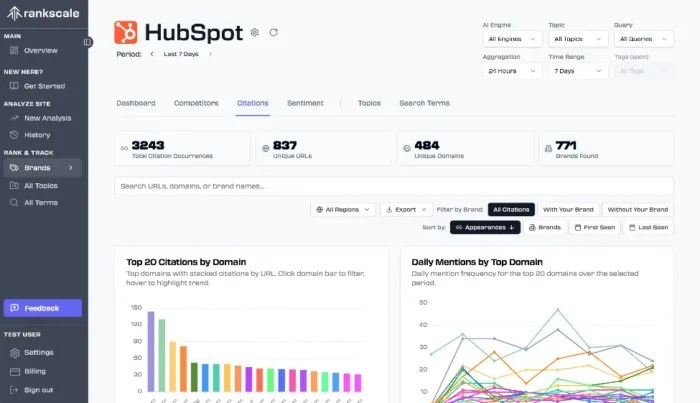
Start with impressions in Google Search Console to see how often your content appears in SERPs. Monitor AI visibility with tools like RankScale or BrightEdge to identify when your content is cited in AI Overviews or snippets. You can also use social listening tools to track brand mentions across the web and social platforms. Pay attention to referral traffic from AI tools as a sign of indirect engagement.
Adding social engagement to reporting helps measure how often others share or discuss your answers. For NP Digital clients, we often combine these data points into a custom dashboard to track both traditional and emerging search performance. This helps identify which tactics keep your brand visible, even when others aren’t clicking through.
Looking for a place to start? Set up the following:
GSC alerts for 20 percent impression drops on top keywords
Monthly scorecard: 1 point per featured snippet, 2 points per AI citation
Baseline metrics: Track impressions, average position, brand mentions
First-Party Data: Your Secret Lifeline
First-party data is one of the most valuable assets you can own, especially in the zero-click era. When platforms control visibility, having a direct line to your audience lets you reach them without depending on changing algorithms or SERP features.
Building this database often starts with gated content like whitepapers, templates, or exclusive tools to encourage email and SMS opt-ins. Every sign-up gives you an owned channel to nurture.
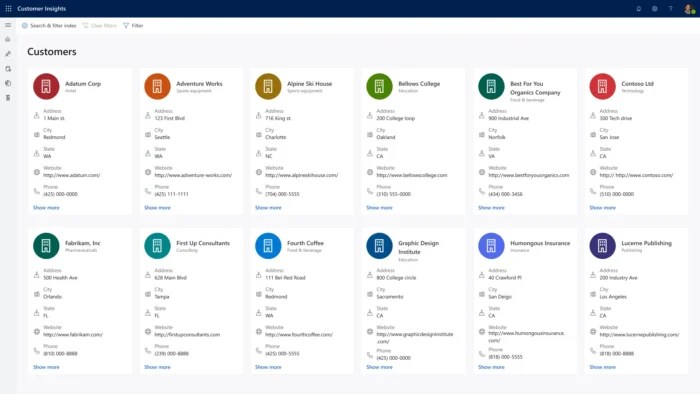
A Customer Data Platform (CDP) can unify insights across those touchpoints (email, purchase history, webinar attendance) into one profile. This makes it easier to segment audiences and send targeted, relevant content.
Microsoft’s Customer Data Platform allows companies to deliver a personalized B2B experience.
Interactive content like quizzes and surveys can help boost sign-ups while providing valuable insights into user preferences and intent. Pair this with regular, high-value email communication that delivers tips or updates to hit what your audience actually cares about. Of course, none of that matters if you’re not tracking what works. As you implement, consider the following implementation checklist:
Exit-intent popups on your top 10 pages with topic-specific lead magnets
A/B test opt-in placement: sidebar vs. mid-content vs. bottom
Progressive profiling: Collect 2-3 data points per interaction
Target: 2-3 percent email signup rate from organic traffic
Why does all this matter?
Marketers reduce vulnerability to external platform changes while users get more personalized, useful content based on their real interests and behaviors. Over time, this will strengthen loyalty, improve conversions, and create a direct relationship that no search update can ever take away.
FAQs
What are zero-click searches?
They are searches where users get their answers directly in the results without visiting a website. They can include structured snippets, AI Overviews, FAQs, and more.
Is zero-click traffic increasing?
Yes. Search engines and AI features are designed to give answers faster, reducing the need for clicks. In addition, companies are prioritizing search results that keep users on their platforms instead of going off-site for answers.
How do I get value from zero-click searches?
Prioritize visibility, authority, and multi-channel presence. Structured data and unique, authoritative content can help provide this kind of value to your audience.
Conclusion
Thriving in a zero-click future means focusing on being seen and trusted wherever the answers are delivered. Publish content that earns citations and create experiences worth engaging with. Developing a content strategy that meets your customers everywhere they search is only half the battle. To create lasting impacts, you’ll need to track the metrics that reflect real visibility and do everything you can to capitalize on those numbers.
http://dubadosolutions.com/wp-content/uploads/2017/05/dubado-logo-1.png00http://dubadosolutions.com/wp-content/uploads/2017/05/dubado-logo-1.png2025-09-01 19:00:002025-09-01 19:00:00The Zero-Click Future: Winning In A World Where Google Doesn’t Send Traffic
Product pages. Ads. Emails. Headlines. Every word you publish either builds momentum or loses it. Great ecommerce copy does more than describe a product. It earns trust, sparks emotion, and clears doubt. Most importantly, it helps someone say yes with confidence. This guide includes 20 practical, proven tips to sharpen your copy across strategy, product pages, persuasion, and retention. They’re not theory. Just tested techniques from brands that convert.
And there’s more: Want the full 40? Get the 20 bonus tips straight to your inbox by signing up here.
How to choose the right copywriting framework and emotional trigger
Before you write, choose two things:
A framework to guide structure
An emotional trigger to shape tone and persuasion
These decisions will shape every line of your copy.
Copywriting frameworks
1. AIDA: Attention, Interest, Desire, Action
AIDA is the foundational copywriting framework that guides prospects through a systematic journey from awareness to conversion.
Best for: Landing pages, ads, hero sections.
Why it works: It grabs attention quickly, builds curiosity, then shifts momentum toward a clear action.
Example: Selling a portable espresso maker
Attention: “Brew perfect espresso anywhere.”
Interest: “No plugs, no bulky machines, just fresh coffee in your backpack.”
Desire: “Get café-level crema in 90 seconds flat.”
Action: “Order now and take 20% off your first brew.”
2. PAS: Problem, Agitation, Solution
PAS is the emotional powerhouse that transforms pain points into urgent buying decisions by first identifying problems and discomfort and presenting a solution.
Best for: Pain-point-driven products or comparison pages.
Why it works: It starts by naming the problem and digging into the frustration, then offers your product as the fix.
Example: Selling an anti-theft travel backpack
Problem: “Worried about pickpockets on your next trip?”
Agitation: “One stolen wallet can ruin your entire vacation and most zippers do not stand a chance.”
Solution: “Our backpack has cut-proof fabric, hidden zippers, and lockable compartments to keep you safe on the move.”
3. BAB: Before, After, Bridge
BAB leverages aspirational storytelling to showcase transformation, painting a vivid picture of life improvement before positioning your solution as the bridge to that better future.
Best for: Lifestyle or transformation-focused products.
Why it works: It shows life before and after the product, then connects the dots with your offer.
Example: Selling a fitness app
Before: “You used to skip workouts, feel sluggish, and waste time guessing what to do at the gym.”
After: “Now your workouts are short, focused, and actually fun to stick with.”
Bridge: “All it took was our guided 20-minute training plans built for real people and real schedules.”
Emotional triggers
Pathos: Emotion
Best for: Beauty, lifestyle, wellness, identity-driven products.
Why it works: It speaks to how people want to feel or who they want to become.
Example: Selling sustainable clothing
“You are not just buying a shirt. You are choosing to show up for the planet and look good doing it.”
Logos: Logic
Best for: Tech, tools, performance-based products.
Why it works: It appeals to rational decision-making, like saving time, money, or hassle.
Example: Selling noise-canceling headphones
“Blocks 95% of background noise so you can focus faster and work smarter, backed by lab testing and a 2-year warranty.”
Ethos: Trust and credibility
Best for: Financial, health, professional, or safety-related products.
Why it works: People rely on authority or reputation to reduce risk.
Example: Selling skincare
“Developed by dermatologists and trusted by over 1 million users worldwide because your skin deserves expert care.”
Strategies for clearer copy
Strategic copywriting transforms scattered messaging into focused communication that guides prospects smoothly through their buying journey.
Let structure guide flow: AIDA, PAS, BAB. Pick one and follow it through. Good copy is linear, not scattered.
Tone should match buyer intent: New visitor? Use clarity and reassurance. Returning shopper? Bring speed and confidence.
Give each section one job: Trying to explain, reassure, and upsell in a single block? Nothing will land. Break it up.
Answer doubts before they form: If shipping time, fit, or returns are common questions, surface them early in the copy.
Use a mix of logic, emotion, and visuals: Show how the product works, how it feels, and how it fits their life.
Product copywriting prioritizes outcome-driven messaging that shows customers exactly how their lives improve. It moves beyond features to paint vivid pictures of real-world usage scenarios.
Lead with the outcome: Start with what changes for the customer. Then explain how.
Put the product in a real moment: Don’t say “compact.” Say, “Fits in your jacket pocket on a rainy commute.”
Use bullets to speed up decisions: List what is included, what it is made of, and who it is for. Keep it snappy.
Write purposeful alt text: Describe what the image shows and how it ties to the benefit. Example: “Man hiking with a 40L waterproof pack. Rain visible, straps tight.”
Flag missing alt text during content analysis: It helps keep accessibility and SEO aligned without extra efforts.
What most ecommerce copy gets wrong
A well-written text is polite. Descriptive. Sometimes clever. But it rarely decides or helps in conversion.
A Strong copy does not try to please everyone. It tells the right person, “This is for you.” It dares to be specific. It has an inviting glare and confidence to emphasize what matters and ignore what does not.
Copywriting hooks and earns attention. It says, “Here it is, look.” SEO attracts keen onlookers.
Good copy makes them stop and persuades them to be curious about more. The best ecommerce brands leverage both. Tools like Yoast SEO bridge the gap between conversion-driven copy and search visibility.
Persuasion tips that feel natural
Natural persuasion in copywriting focuses on building genuine connections through transparent communication rather than manipulative tactics.
Start strong: Put your main benefit above the fold. Do not hide the reason to care.
Use microcopy to ease tension: “No hidden fees” next to pricing. “We will never charge without asking” near the credit card field.
Only create urgency if it is real: “Only 3 left” works if it is true. False scarcity breaks trust.
Make subheads sell, not just organize: “Why 10,000 customers switched” says more than “Features.”
Precision beats cleverness: “Save 3 hours a week” converts better than “Boost productivity.
Strategy Retention tips to boost trust
Customer retention copywriting transforms one-time buyers into loyal advocates through strategic communication that demonstrates ongoing value and genuine care.
Make thank-you pages do more: Confirm next steps. Offer a bonus. Link to a useful guide. Do not waste attention.
Follow up with something useful: A setup guide, a pro tip, or a behind-the-scenes story is more valuable than a request for a review.
Treat onboarding like conversion 2.0: “You are 60 seconds away from setup” is better than “See instructions.”
Write policies with warmth and clarity: “If it does not fit, send it back. No stress.” Sounds like a human. That is the point.
Show loyalty some love: A personal thank-you after the third purchase can mean more than a 10 percent coupon.
Final thoughts
Forget clever. Go for clarity. Don’t be smart. Leverage curious questions. Think about what a customer wants.
Let them feel seen and heard. Forget perfection; strive for a connection. Keep your words simple. If your words help the right person say yes and the right searcher find your page, they have already done their job. That is where strong copy meets smart SEO.
Want 20 more copywriting techniques that drive conversions?
In Part 2, we’ll go deeper into:
Advanced copywriting funnel;
High-impact product formatting ideas;
Persuasive phrasing that feels personal to the reader;
Loyalty copy that turns onlookers into trusted comrades.
Get the full 40 ecommerce copywriting tips
Subscribe to our prepare for Black Friday newsletter to get an interactive checklist, ecommerce tips, and SEO guidance to help you through the seasonal rush!
We care about the protection of your data. Read our privacy policy.
Thinking about building a website? Whether you are a small business owner, a freelancer, or launching a side project, one of the first questions you will want answered is: how much does it cost to build a website? This is not just about curiosity, understanding your website costs early on can help you budget effectively and avoid any unpleasant surprises.
The truth is that the answer is rarely simple. Ask ten business owners about their website building costs and you will probably get ten completely different answers. That is because website costs can range from almost nothing to tens of thousands of euros. The variation comes down to what you need your website to do. A small brochure site with a few pages can be built on a modest budget, whereas an ecommerce store with thousands of products and secure payment facilities will always cost more. The good news is that once you understand where the costs lie, you can make better decisions. And while Yoast SEO will not directly reduce your build costs, it will help you avoid expensive SEO mistakes, improve site performance, and keep your long-term marketing budget under control.
What are you actually paying for when building a website?
Design and user experience: This sets the tone for how visitors feel about your site. Good design is more than colors and fonts, it is about navigation, site structure, and encouraging visitors to stay and explore. Read more about user experience.
Development: Turns your designs into a working website. A simple build will cost less, but advanced features or integrations push the price up.
Domain and hosting: These two are essential and unavoidable. Your domain name generally costs between €10 and €50 per year and hosting keeps your site live. Shared hosting is cheapest, but dedicated hosting provides better performance and enhanced security. As a recommendation, Bluehost is a great choice for both domain registration and hosting. On top of that, it also works extremely well with WordPress.
Content: A blank page isn’t going to keep visitors on your site for very long, so you’re going to need to have something to show them. You can of course do your own content, but professional content creators can be useful in getting more conversions.
SEO: This ensures your site gets found. You can do it yourself, but Yoast SEO helps simplify the process and can reduce costs by guiding you on how to optimize pages as you write.
Here’s a chart to explain the above in a quick-check guide:
Area
Description
Design
Custom visuals, layout, user interface (UI), mobile responsiveness
User experience (UX)
Navigation logic, site structure, call-to-action placement
Development
Code, content management system (CMS), plug-ins or features
Domain and hosting
Your website’s address and where it lives online
Content and SEO
Written pages, blog posts, metadata, and optimizations
Ongoing maintenance
Plugin updates, security, backups, fixes
Upfront costs:
Of course, none of this comes for free, unless there are some things you can do yourself like copywriting or photography. This will still cost you in terms of time though, so it may be worth considering hiring a professional if there are other areas of your business that you would rather focus on. With that in mind, let’s take a quick look at some upfront costs that you will only have to pay for once at the very start.
Obviously, once your website is up and running, that’s not the end of the story. You are presumably here for the long-term and that means there are going to be recurring costs. These cover things like hosting, so your site can stay live, maintenance, to keep everything secure and updated, and you’ll need to continually post new content to engage with your site’s visitors.
Most people spend their time focusing on the look and feel of their site and while that is important, it’s not the only thing to consider. It’s understandable that things like legal technicalities and CDNs are not front-of-mind when you’re excited about growing your business but it is necessary. That means you’ll need to complete these, often overlooked, tasks to make sure that you remain on track for growth and stay compliant.
Type of cost
Low estimate
High estimate
Marketing & ads
€100/month
€10,000+/month
Accessibility & legal compliance
€200
€5,000+
Scaling & performance upgrades (plugins, CDN, extra development work)
€100
€10,000+
Website building options
There are three main ways to build a site, and your choice here will have an impact on the final cost.
1. DIY builders (like Wix or Squarespace)
These platforms, as well as some others, will let you build a site from scratch without the need for any technical skills. They’re affordable, quick to set up and ideal for portfolio sites, hobby sites, or small businesses. If you are using these site builders for business, you might find them limiting when you need to scale or want more advanced SEO.
2. WordPress + Yoast
For most successful small and medium sized businesses, WordPress is an excellent solution as it’s flexible, scalable, and widely supported. What’s more, when you pair it with Yoast SEO for WooCommerce you can start publishing optimized content from day one, making your online store more visible instantly. This makes it more affordable in the long run as there’s no need for an agency, and you can add features as you grow rather than having to rebuild every time.
3. Custom-built website via an agency
For complex businesses like advanced ecommerce or security services, a custom-built site is their best option. It’s the most expensive option but gives you complete control, giving you everything you want without having to compromise on anything. However, you may find that tailored code and features will cost a lot more.
Watch out for these hidden costs
One common misconception is that the costs end when your site goes live. That’s just not true, in fact, some of the most expensive problems show up after launch. These can include:
Non-converting content: You can have the most beautiful website in the world but if it’s not pulling in paying customers, there’s a problem. Try investing in professional copywriting and SEO-friendly content that will ensure visitors take action.
Dropped traffic: Starting off with bad SEO can really hamper your traffic. Without help, it’s easy to make errors that could take months to fix. This is very much a case of prevention is better than cure.
Technical debt: Sites built on outdated technology or poorly coded templates may work at first but become costly to maintain or upgrade after a while.
Accessibility cost: It’s important that you make sure your site caters to all, especially those who may have visual or audio impairments.
Legal costs: There are certain legal requirements to take care of. These aren’t just there to protect the customer; they protect you too. So, don’t forget that you’ll need things like a cookie consent tool and a term of service policy.
How Yoast saves you money (over time)
Yoast isn’t about saving you money on upfront costs; what it does is prevent expensive mistakes. It will save you money over time though as you’ll benefit from reduced costs of ongoing SEO and content marketing.
To get more specific though, Yoast’s real-time SEO guidance helps you write better, optimized content without needing to hire a writer. In addition, the Readability analysis and Internal linking suggestions are two features that help to reduce bounce rates by making your content perform better, which literally translates into more conversions. On top of this, adding structured data manually is time consuming and costly. Yoast automates much of this, giving you rich search results without developer costs. And if that’s not enough to whet your appetite, there are free and premium options.
Feature
How it saves you money
Real-time SEO guidance
Write better content, faster, without hiring an SEO expert
Readability analysis
Engaged readers means more conversions
Schema & structured data
Get results without coding knowledge
Internal linking suggestions
Boost traffic to key pages without external help
Budgeting tips for small business owners
By spending smart, you can get big results for less. Here are a few things to keep in mind:
Start with clarity, not complexity: Fancy animations might look nice, but if they confuse your visitors, they’re not worth the price.
Spend more on content than code: Great content = better SEO = better ROI.
Invest in tools that scale with you: WordPress and Yoast both grow with your business.
Plan for the long game: Don’t treat launch as the finish line. Content updates and SEO tweaks are ongoing.
Ecommerce vs. general website: does it change the cost?
Yes, dramatically. Ecommerce sites need:
Payment gateways.
Product listings.
Inventory management.
Legal disclaimers.
Stronger performance and security.
Expect to pay more, sometimes a lotmore, for development, plugins, and maintenance. But again, tools like Yoast SEO help make your product pages more visible and your content more persuasive.
Platforms like WooCommerce give you a practical and flexible way to run your online store without having to reinvent the wheel. But the real key to success is visibility, after all, if people can’t find you, they can’t buy from you. And this is what Yoast SEO for WooCommerce does best.
Ultimately, what matters about your site most is what it does for your business. With WordPress and Yoast, you can create a professional site that looks great, enhances your online visibility, and grows with your business, without breaking the bank. One of the best things you can do to really set the wheels in motion now though is to go to this guide WordPress for beginners training course and learn how to put yourself and your company first.
Good SEO isn’t a luxury; it’s a smart investment, so start today. Good luck!
http://dubadosolutions.com/wp-content/uploads/2017/05/dubado-logo-1.png00http://dubadosolutions.com/wp-content/uploads/2017/05/dubado-logo-1.png2025-08-29 15:53:542025-08-29 15:53:54How much does it cost to build a website?
If you’re investing time and budget into SEO, you’ll want to know if it’s actually delivering results. That’s where SEO reporting tools come in. They take the guesswork out of your strategy by showing you what’s working, what isn’t, and where you should focus your efforts next. Without them, you’re left with assumptions, anecdotes, and gut feeling. That might work for a while, but it’s no way to grow a business.
Whether you need a free SEO report, a quick SEO report generator, or a professional-level dashboard for clients, the right tool will help you measure progress and make smarter business decisions. A solo blogger might just want to know which posts are attracting clicks, while a global agency might need to present polished reports to dozens of clients each month. The scale is different, but the principle is the same: reporting keeps you honest about what’s happening.
An SEO reporting tool collects data about your site’s search engine visibility and turns it into insights. Think of it as your SEO dashboard. At its simplest, it might show which keywords your pages are ranking for. At its most advanced, it can track backlinks, crawl your entire site for errors, and pull together complex competitor benchmarks.
These tools save time by pulling in data automatically, but they don’t replace critical thinking. You still need to interpret what the numbers mean and decide what action to take. A sudden dip in traffic, for instance, could be caused by a technical error, a Google algorithm update, or even seasonality in your industry. The tool will show you the dip; it’s your job to work out why.
Some tools focus on one particular task, like crawling your website, while others are built as all-in-one suites. Below, we’ll look at 10 of the best SEO reporting tools available today, covering free and paid options for every kind of user.
Summary: best SEO reporting tools at a glance
Tool
Best for
Pricing
Google Search Console
Beginners & site owners
Free
Yoast SEO Dashboard
WordPress users
Free
Google Analytics
Behavior & conversion tracking
Free
AgencyAnalytics
Agencies managing multiple clients
From $12/month per client
Semrush
All-in-one professional SEO
From $139.95/month
Ahrefs
Link building & competitive research
From $27/month
Moz Pro
Beginners & SMBs
From $49/month (30-day free trial)
Screaming Frog
Technical SEO & crawling
Free (500 URLs) or unlimited for £199/year
Mangools
Solo marketers & freelancers
From €19.90/month when billed annually
BrightLocal
Local SEO & GBP management
From $29/month
10 SEO reporting tools to choose from
1: Google Search Console (free)
Best for: Website owners who want a free, reliable way to track search performance and identify technical issues directly from Google.
Google Search Console is one of the most essential SEO reporting tools available, and it has the distinct advantage of being completely free. It tells you how your website performs in Google Search, showing impressions, clicks, and rankings for the queries that bring visitors to your site. It also alerts you to crawl errors, indexing problems, and mobile usability issues, so you can catch technical problems before they affect your rankings.
The data here is particularly valuable because it comes straight from Google. You’ll see which search terms trigger impressions, how often users click your site, and which pages are performing well. This makes it an excellent starting point for beginners, but it’s also a must-have for seasoned professionals. The drawback is that historical data is limited, and it doesn’t show you how competitors are performing. But for pure insight into your own search presence, it’s unmatched.
Key features: Direct performance data, coverage and indexing reports, Core Web Vitals.
Best for: WordPress users who want in-editor SEO guidance and ongoing optimization tracking.
Of course, we need to mention our own tool. And, yes, it’s right up at the top of the list but hey, we’re very proud of it. The Yoast SEO Dashboard sits right inside WordPress and gives you feedback as you write. It tracks readability, internal linking, and keyword optimization, helping you improve your content before you hit publish.
With the new Site Kit by Google integration, the dashboard becomes even more powerful. You can pull in data from Google Search Console and Google Analytics, meaning you don’t need to keep switching tabs to see how your content is performing. Instead, you get real-time feedback in the editor and clear reporting inside your WordPress dashboard.
This makes it especially useful for content teams who want SEO baked into their publishing process from the start. Rather than writing first and optimizing later, the Yoast SEO Dashboard guides you as you go, making it easier to publish content that performs.
Here’s why you’ll love this:
One view of GSC and GA metrics alongside Yoast SEO Dashboard and readability results.
Quickly spot content that needs work and act in context.
Lightweight workflow for both editors and SEO professionals alike.
Key features: Real-time SEO analysis, Google Site Kit integration, internal linking tools.
Pros: Easy to use, directly in WordPress, improves content before publishing.
Best for: Marketers and site owners who want to understand on-site user behavior and measure the impact of SEO on conversion.
Where Google Search Console shows how users arrive at your site, Google Analytics shows what they do once they’re there. It’s a natural partner to GSC and together they provide a complete picture of SEO performance. Analytics lets you track user behaviour, see how long visitors spend on your site, and measure conversions.
One of its biggest strengths is the ability to segment traffic. You can look specifically at organic users and see how they behave differently from paid or social visitors. You can also set up goals to track the actions that matter most, such as filling out a contact form or completing a purchase. This makes Google Analytics invaluable if you want to connect SEO efforts to business results.
The learning curve is steeper than with some other tools, particularly since the rollout of GA4, but once you master it, the insights are worth it. And of course, the price is unbeatable: it’s completely free.
Pros: Free, deep insights, connects SEO with results.
Cons: Steep learning curve.
Price: Free.
4: AgencyAnalytics (paid)
Best for: Agencies looking for automated, white-label reporting solutions for multiple clients.
AgencyAnalytics is designed with agencies in mind. If you manage SEO for multiple clients, you’ll know how much time is spent building and delivering reports. AgencyAnalytics takes away much of that pain by automating the process. You can integrate it with platforms like Google Search Console, Analytics, and even social media channels, then deliver white-label reports directly to clients.
The main appeal is the ability to customize dashboards and reports with your own branding. For agencies, that’s a big deal because it saves hours of manual work while still giving clients a polished experience. Reports can be scheduled to go out automatically, meaning your team can focus on strategy instead of spreadsheet wrangling.
This isn’t a tool for solo bloggers or small business owners, it would be overkill, but for agencies with a portfolio of clients, it can be transformative. The pricing is based on the number of clients, starting from around $12 per client per month, which makes it scalable as you grow.
Pros: Saves agencies time, professional client-ready reports, scalable.
Cons: Overkill for solo bloggers or small businesses.
Price: From $12 per client/month.
5: Semrush (free & paid)
Best for: Agencies and SEO professionals who need a comprehensive suite of tools for competitive analysis and reporting.
Semrush is one of the most widely used SEO platforms in the industry. It’s not just a reporting tool, it’s a full suite covering keyword research, competitor analysis, backlink audits, and site crawls. The reporting features are particularly strong, allowing you to track visibility trends, rankings, and content performance over time.
For agencies and professional SEOs, Semrush is a powerhouse. It provides granular detail about competitors, making it easier to benchmark your performance and identify gaps. Content audits help you spot underperforming pages, while backlink reports show you where your link-building strategy needs work. Semrush even integrates with Yoast SEO, offering a seamless workflow for WordPress users.
The free version is limited, so most businesses will need a paid plan to get full value. At $129.95 per month, it’s not cheap, but the breadth of functionality makes it a worthwhile investment for those serious about SEO.
Key features: Competitor benchmarking, keyword and backlink reports, site audits.
Pros: Huge dataset, strong competitor analysis, integrates with Yoast.
Best for: Businesses focused on link-building strategies and competitive research.
Ahrefs has built its reputation on having one of the largest and most accurate backlink indexes available. If link-building is part of your strategy, this is often the tool of choice. But Ahrefs does more than just backlinks. It also provides keyword research, site audits, and rank tracking, making it a comprehensive SEO platform.
The reports are particularly well-designed, making complex data easy to understand. This is useful when you need to share results with stakeholders who might not be familiar with SEO jargon. It’s also popular for competitor analysis, giving you a clear view of how others in your space are performing and where you might gain an advantage.
The main downside is cost. With plans starting at $99 per month and no free tier, it’s not the most accessible option for beginners. But for businesses that prioritize link-building and want robust competitive insights, it’s one of the best.
Pros: Accurate, user-friendly reports, powerful for link-building.
Cons: Costly, free tier is limited.
Price: Limited free tools, Starter plan $27/month.
7: Moz Pro (free trial & paid)
Best for: Beginners and small businesses who want straightforward reporting and keyword tracking.
Moz Pro offers a balance between beginner-friendly usability and professional-level features. It provides keyword tracking, site audits, and link analysis in an interface that’s easier to navigate than some of the heavier platforms. For small businesses and those new to SEO, this can be a big advantage.
One feature that stands out is the Keyword Explorer, which helps you understand not just search volume but also difficulty and potential click-through rates. This makes it easier to prioritize which keywords are worth targeting. Moz Pro also provides link metrics, though its index is smaller than Ahrefs or Semrush.
The company offers a 30-day free trial, which is generous compared to most competitors. After that, pricing starts at $99 per month. For many small to medium businesses, it hits the sweet spot of offering enough depth without overwhelming complexity.
Key features: Keyword Explorer, site audits, link metrics.
Best for: SEOs and developers who need to quickly identify technical issues and improve site structure.
Screaming Frog is a different kind of SEO reporting tool. Instead of dashboards and trend lines, it’s a desktop crawler that scans your site much like a search engine does. The result is a detailed breakdown of every URL, title tag, meta description, heading, and link.
For technical SEO audits, this tool is hard to beat. The free version lets you crawl up to 500 URLs, which is enough for many small sites. The paid version adds advanced features like JavaScript rendering, scheduled crawls, and integrations with Google Analytics and Search Console.
It’s not the most user-friendly option for beginners, but for SEO specialists and developers, it provides unparalleled insight into the technical health of a site. At £259 per year, it’s also one of the more affordable professional tools.
Key features: 500 free URL crawl, GA & GSC integration, advanced features in paid version.
Pros: Extremely detailed, industry standard for technical SEO.
Best for:Freelancers and small teams who want a low-learning-curve SEO toolset.
Mangools is aimed at marketers and freelancers who want powerful SEO tools without the steep learning curve. The suite includes keyword research, SERP analysis, rank tracking, and backlink monitoring, all presented in a clean, simple interface.
Reporting is straightforward, focusing on clarity rather than overwhelming detail. For solo marketers or small teams, this simplicity is a feature rather than a limitation. You don’t need to spend weeks learning the tool, you can start getting useful insights almost immediately.
While it doesn’t have the breadth of Semrush or Ahrefs, Mangools is much more affordable, starting at just under €30 per month. That makes it an attractive option for those who need solid SEO data without enterprise-level complexity.
Best for: Local businesses and agencies managing multiple Google Business Profiles.
BrightLocal is built specifically for local SEO. If your business relies on being found in a particular town, city, or neighborhood, this tool is tailor-made for you. It tracks local rankings, monitors reviews, checks citations, and even audits Google Business Profiles.
The reports are practical and easy to share, making them ideal for agencies managing multiple local clients. BrightLocal also provides tools for managing online reputation, which can be just as important as rankings in driving local business.
For businesses competing on a local level, it’s hard to find a better option. Prices start from $29 per month, making it relatively affordable compared to the big all-in-one suites.
Key features: Local rank tracking, citation checks, review monitoring.
Pros: Affordable, perfect for local businesses, practical reporting.
Before deciding on a tool, it’s worth asking yourself what you really need. If you’re a solo blogger, Google Search Console and Yoast SEO might be all you need to keep track of performance. If you’re running an agency, automation and client reporting might make AgencyAnalytics or Semrush a better fit.
Think about your budget too. Free tools go a long way, but paid tools offer depth and convenience that free tools often can’t match. Also consider how comfortable you are with data. Some platforms are designed to be beginner-friendly, while others assume a level of expertise.
The good news is that most paid platforms offer free trials. That gives you a chance to experiment and see which tool feels right before committing long-term.
Turn insights into action
SEO reporting tools do more than track performance, they shape your strategy. They tell you what’s working and highlight the areas that need attention. But tools don’t make the decisions, the real value comes from how you interpret the data and act on it. So whether you’re just getting started with Google Search Console, refining your content with Yoast SEO, or managing enterprise-scale campaigns in Semrush, the goal is the same: turn insights into action.
http://dubadosolutions.com/wp-content/uploads/2017/05/dubado-logo-1.png00http://dubadosolutions.com/wp-content/uploads/2017/05/dubado-logo-1.png2025-08-29 15:18:062025-08-29 15:18:0610 free and paid SEO reporting tools for 2025
Google’s AI Overviews and AI Mode and OpenAI’s ChatGPT often give consumers different brand recommendations – a potential warning sign for marketers chasing AI visibility – according to a new BrightEdge analysis.
The big picture. ChatGPT and Google’s AI Mode and AI Overviews disagreed on brand recommendations nearly two-thirds of the time (61.9%), according to BrightEdge’s analysis of tens of thousands of identical prompts.
By the numbers. Just 33.5% of queries included brands across all three platforms, and only 4.6% had no brands mentioned anywhere. Other key findings:
Google AI Overviews dominate: Google’s AI Overviews surfaced brands in 36.8% of queries, while ChatGPT led in just 3.9%.
Brand density: Google AI Overviews averaged 6.02 brands per query, more than 2.5x higher than ChatGPT’s 2.37 and far ahead of AI Mode’s 1.59.
Silence rates: ChatGPT offered no brand mentions in 43.4% of queries. Google AI Mode stayed silent 46.8% of the time, compared to just 9.1% for AIO.
The citation paradox. The study also uncovered stark differences in citation behavior:
ChatGPT mentions more than it cites, with 3.2x more brand mentions (2.37) than citations (0.73).
Google AI Overviews cites far more than it mentions (14.30 citations vs. 6.02 mentions).
Google AI Mode shows an even bigger gap — 6x more citations than mentions (9.49 vs. 1.59).
This data may suggest that ChatGPT’s responses lean heavily on its training patterns, while Google emphasizes visible source attribution.
Where platforms align. The rare moments of brand alignment depended on query intent:
Compare queries: 80% same-brand agreement.
Buy queries: 62%.
Where queries: 38%.
Best queries: 23%.
Industry breakdown. Disagreement rates also varied by sector:
Healthcare: 68.5%
Education: 62.1%
B2B Tech: 61.7%
Finance: 57.9%
Ecommerce: 57.1% (lowest)
Why we care. For brands, these findings highlight a volatile AI landscape where visibility is far from guaranteed – and often inconsistent. As BrightEdge notes, the fragmentation creates “massive untapped visibility opportunities” for companies optimizing for generative search.