We’re excited to announce the beta release of Yoast AI Brand Insights, available as part of the Yoast SEO AI+ package. This new tool helps you understand how your brand appears in AI-powered answers, and where you can improve your visibility. Ideal for bloggers, marketers, and brand managers, Yoast AI Brand Insights gives you an overview of your brand presence across tools like ChatGPT, Perplexity, and Gemini.
For years, Yoast has helped you get found in search engines. Recently though, search is changing. People aren’t just using Google anymore, they’re turning to AI tools like ChatGPT for answers. Those answers often mention brand names as recommendations. So here’s the big question: when AI tools answer questions in your niche, does your brand show up? Our new tool, Yoast AI Brand Insights (beta), helps you find out.
Yoast AI Brand Insights lets you see when and how your brand appears in AI-generated answers and helps you understand where you need to focus your effort to improve your visibility.
Why Yoast AI Brand Insights matters, now
AI-powered answers are shaping customer decisions faster than ever. Visitors from AI search are often more likely to convert than those from regular search. It’s no surprise, because asking an AI-powered chatbot can feel like getting a personal recommendation. Afterall, word of mouth remains one of the most powerful ways to build trust and spark interest.
Most analytics tools can’t tell you how your brand appears in AI answers, or if it’s mentioned at all. With more people turning to tools like ChatGPT, Perplexity, and Gemini for advice, that’s a big blind spot if you are trying to get your name out there.
Yoast AI Brand Insights aims to close that gap. You’ll see when and how your brand appears, what’s being said, and where the information comes from, so you can take action to ensure your brand is part of the conversation.
See how you stack up against other brands mentioned in your prompts
With just a few clicks, you can:
Check if your brand is mentioned in AI-generated answers for relevant search queries
Benchmark against competitors: see how often your brand comes up
Understand the sentiment connected to your brand: positive, neutral, or negative
Find the sources AI tools use when they mention you
Track your progress over time so you can respond to changes quickly
Pricing & getting started
Yoast SEO AI+ is priced at $29.90/month, billed annually ($358.80 plus VAT). The plan includes one automated brand analysis per week per brand, so you can track and compare how your brand is showing up in AI-powered search over time. With each purchase of Yoast SEO AI+ you recieve one extra brand.
With this package you also get the full value of Yoast WooCommerce SEO, which includes everything from Yoast SEO Premium, News SEO, Local SEO, and Video SEO, in addition to one free seat of the Yoast SEO Google Docs add-on.
For marketers, this means you no longer need to patch together separate solutions for on-page SEO, ecommerce optimization, content creation, or LLM visibility. Everything you need to analyze, optimize, and grow your brand presence is included in one complete package.
How to get started
Login with MyYoast: secure, single sign-on for all your Yoast tools and products.
Open Yoast AI Brand Insights: You can find it near the Yoast SEO Academy
Set up your brand: add your brand’s name and a short introduction to your business
Run your scan: we’ll find relevant AI search queries for you, you can use them or tweak them to your liking.
Review your results: see relevant mentions and their sources, your brand sentiment, and the AI Visibility Index in an easy-to-read dashboard
Yoast AI Brand Insights is now available in beta as part of Yoast SEO AI+. This is your chance to be among the first to explore how your brand shows up in AI-powered search. We’d love your thoughts as we refine the tool, your thoughts here.
http://dubadosolutions.com/wp-content/uploads/2017/05/dubado-logo-1.png00http://dubadosolutions.com/wp-content/uploads/2017/05/dubado-logo-1.png2025-10-01 10:07:322025-10-01 10:07:32Introducing a new AI-powered package: Track your brand in AI search
Content summarization isn’t a new idea. It goes back to the 1950s when Hans Peter Luhn at IBM introduced one of the first algorithms to summarize text. Back then, the goal was straightforward: identify the most important words in a piece of writing and create a shorter version. What began as a technical experiment has now evolved into a fundamental aspect of how we read, learn, and share information. Summarization allows us to cut through overwhelming amounts of text and focus on what really matters, shaping everything from research and education to marketing and SEO.
In this article, we’ll explore why summarizing is essential for modern content and how both humans and AI-driven tools are making information more accessible, trustworthy, and impactful.
What is content summarization?
Content summarization is the process of condensing a large piece of high-quality content into a shorter version while keeping the essential points intact. The aim is straightforward: to produce a clear and concise summary that accurately represents the meaning of the original text without overwhelming the reader.
Summarization makes information easier to process. Imagine reading a lengthy report or book but only needing the key takeaways for a meeting. It also helps individuals and businesses grasp the core message quickly, saving time and effort.
There are two main approaches to summarize moder content:
Manual or human-driven content summarization
Think back to the last time you turned a long article into a short brief for a colleague; that’s a perfect example and explanation of manual content summarization. In this approach, a human reads, weighs what matters, and rewrites the core points for easy digestion of information.
Manual content summarization requires critical thinking to spot what matters and language skills to explain important information clearly and concisely.
Clear advantages of human-driven content summarization are:
The ability to notice nuance and implied meaning
Flexibility to shape tone and level of detail for a specific audience
The creativity to link ideas or highlight unexpected relevance
Judgment to keep or discard details based on purpose
This human-led method complements content summarization AI, giving summaries a thoughtful, audience-aware edge.
AI-driven content summarization
The other approach is powered by technology. AI-driven content summarization utilizes natural language processing and machine learning to rapidly scan through text and generate summaries in seconds. It typically works in two ways:
Extractive summarization, where the AI selects the most important sentences directly from the content
Abstractive summarization, where the AI generates new sentences that capture the main ideas in a more natural way
The benefits are clear: speed, consistency, and scalability. AI can summarize website content, reports, or articles far faster than a human team. However, it has limits. Context can be missed, and nuances like sarcasm or cultural references may be overlooked. The quality also depends on the AI model and the original text.
Both manual and AI-driven summarization play a crucial role today. Humans bring nuance and creativity, while AI delivers efficiency and scale. Together, they make summarization an essential tool for modern communication.
What are some of the core benefits of content summarization?
Turning lengthy information into clear takeaways is more than convenient. It makes content meaningful, easier to use, and far more effective in learning and communication. Whether done manually or supported by AI tools, summarization offers key benefits:
Enhances learning and study preparation
Summarizing strengthens comprehension and critical thinking by distilling main ideas and separating them from supporting details. Students and professionals can also rely on concise notes that save time when revising or preparing presentations.
Improves focus and communication
Condensing text sharpens concentration on what matters most. It also trains you to express ideas in a precise and structured way, which enhances both writing and verbal skills.
Saves time and scales with AI tools
Summaries allow readers to absorb essential points without having to read hours of content. With AI tools, this process scales further, reducing large volumes of text into clear insights within minutes.
Boosts accessibility and approachability
Summarization makes complex or lengthy content approachable and accessible for diverse audiences. Multilingual AI tools extend this further, breaking down language barriers and ensuring knowledge reaches a global audience.
Why summarization matters in the modern content landscape?
We live in an age of too much information and too little time. Every day, there is more content than anyone can read, which means people make split-second choices about what to open, skim, or ignore. This makes it more important that your content presents clear takeaways upfront before readers move on. Content summarization is how you win that first, critical moment of attention.
Information overload
Digital work and life produce an enormous flood of text, messages, reports, and notifications. This makes it challenging for readers to find the right signal in the noise. Therefore, text summaries act as a filter, surfacing the most relevant facts so readers and teams can act faster and with less cognitive friction.
People scan and skim, so clarity wins
Web reading behavior has been stable for years: most users scan pages rather than read every word. Good summaries present the core idea in a scannable form, increasing the chance your content is understood and used. That scannability also improves the odds of search engines and AI LLM comprehension surfacing your content as a quick response to user queries.
Trust and clarity for readers and systems
A clear and crisp text summary signals that the author understands their topic and values the reader’s time. That builds trust. On the search side, concise and well-structured summaries are what engines and AI systems prefer when generating featured snippets or AI overviews. Being chosen for a snippet or overview can boost visibility and credibility in search results.
Faster decision-making
When stakeholders, readers, or customers need to act quickly, summaries provide the necessary context to make informed decisions. Whether it is an executive skimming a report or a user checking if an article answers their question, summaries reduce the time to relevance and accelerate outcomes. This is also why structured summaries can increase the chance of being surfaced by search features that prioritize immediate answers.
Prominent use cases of content summarization
Content summarization is not a nice-to-have. It is one of the main reasons modern content continues to work for busy humans and businesses. Below are the most practical and high-impact ways in which the summarization of modern content is currently being used.
Business reports
Executives and teams rely on concise summaries to make informed decisions quickly and effectively. Executive summaries and one-page briefs transform dense reports into actionable insights, enabling stakeholders to determine what requires attention and what can be deferred. Effective summaries reduce meeting time, expedite approvals, and enhance alignment across teams.
Educational content
Students and educators use summaries to focus on core concepts and to prepare study notes. AI-driven summarization tools can generate revision guides, extract exam-relevant points, and turn long lectures or papers into study-friendly formats. These tools can support personalized learning and speed up content creation for instructors.
Marketing strategies and reporting
Marketers rely on summaries to present campaign performance, highlight key KPIs, and share learnings without overwhelming stakeholders. Condensed campaign briefs and executive summaries enable teams to iterate faster, align on priorities, and uncover insights for strategic changes. Summaries also make it easier to compare campaigns and track trends over time.
Readers and listeners increasingly prefer bite-sized overviews. Newsrooms use short summaries and AI-powered digests to connect busy audiences with high-quality reporting. Podcasts and newsletters pair episode or article summaries with timestamps and highlights to improve discoverability and retention. Summaries help users decide what to read, listen to, or save for later.
Content Summarization & SEO: Does it Benefit in Boosting Organic Visibility?
Did you know that content summarization can help your SEO strategy? Search engines prioritize clarity, relevance, and user engagement, and concise summaries play a role in meeting those criteria. They not only shape a smoother user experience but also help search engines quickly grasp the core themes of your content.
Boosting click-through rates
Summaries also support higher CTRs in search results. A clear and compelling meta description written as a summary can serve as a strong preview of the page. For example, a blog on “10 Healthy Recipes” with a summary that highlights “quick breakfasts, vegetarian lunches, and easy weeknight dinners” is more likely to attract clicks than a generic description.
Improving indexing and relevance
From a technical standpoint, summarization helps search engines with indexing and relevance. Algorithms rely on context and keywords, and well-written summaries bring focus to the essence of your content. This is especially important for long-form blogs, case studies, or reports where the main ideas may otherwise get buried.
Winning featured snippets
Another growing benefit is visibility in featured snippets and People Also Ask sections. Summaries that clearly answer a query or highlight structured takeaways increase the chances of being pulled into these high-visibility SERP features, directly boosting organic reach.
Extending multi-channel visibility
Content summarization also creates multi-channel opportunities. The same summaries can be repurposed as social media captions, newsletter highlights, or even adapted for voice search, where users want concise and direct answers.
Supporting AI and LLMs
Lastly, in the age of AI, summaries provide context for LLMs (large language models). Clean, structured summaries make it easier for AI to process and reference your content, which extends your reach beyond search engines into how content is surfaced across AI-powered tools.
How to write SEO-friendly content summaries with Yoast?
The basics of an effective summary are simple: keep it clear, concise, and focused on the main points while signalling relevance to both readers and search engines.
This is exactly where Yoast can make your life easier. With AI Summarize, you can generate instant, editable bullet-point takeaways that boost scannability for readers and improve how search engines interpret your content.
Want to take it further? Yoast SEO Premium unlocks extended AI features, smarter keyword optimization, and advanced SEO tools that save you time while improving your visibility in search.
A smarter analysis in Yoast SEO Premium
Yoast SEO Premium has a smart content analysis that helps you take your content to the next level!
AI text summarization uses artificial intelligence to condense text, audio, or video content into shorter, more digestible content. Rather than just cutting words, it preserves key ideas and context, making information easier to absorb.
Today, summarization relies on large language models (LLMs), which not only extract sentences but also interpret nuance and generate concise, natural-sounding summaries.
How does AI text summarization work?
AI text summarization relies on a combination of sophisticated systems that help a large-language model deeply understand the content, decipher patterns, and generate content summaries without losing any important facts.
Here’s a brief overview of the process of AI-powered content summarization:
Understanding context: AI models analyze entire documents, identifying relationships, sentiment, and flow rather than just looking at keywords, allowing the AI models to understand at a deeper level
Generating abstractive summaries: Unlike extractive methods, which simply copy existing sentences, abstractive summarization paraphrases or rephrases content to convey the essence in fresh, coherent language
Fine-tuning for accuracy: LLMs can be trained on specific domains such as news, legal, or scientific content, so the summaries reflect the right tone, terminology, and level of detail
Benefits of AI text summarization
The true power of AI summarization lies in the value it creates. By blending scale with accuracy, it turns information overload into actionable knowledge.
Scales content summarization: Handles hundreds of pages or documents in minutes, which would otherwise require hours of manual effort
Ensures consistency: Produces summaries in a uniform style and structure, making information easier to compare and use
Saves time and costs: Frees up teams, researchers, and analysts to focus on insights instead of spending time reading
Improves accessibility: Makes complex content digestible for wider audiences, including those unfamiliar with technical details
Supports accuracy with human oversight: Editors can refine summaries quickly while still benefiting from automation
Practical use cases of AI summarization
AI summarization is not just theoretical. It has already become part of how businesses, teams, and individuals manage daily information flow. Here are some of the common applications of AI summarization which have become a part of our live:
Meetings: Automatically captures key points, decisions, and action items in real time
Onboarding: Condenses company or project documentation so new team members can understand essentials quickly
Daily recaps: Summarizes Slack, Teams, or email threads into clear, concise updates
Surfacing information: Extracts relevant context from long reports, technical documents, or customer feedback, ensuring that critical insights are never overlooked
In fact, AI agents are already being used in professional settings to summarize key provisions in documents, with 38% of professionals relying on these tools to expedite the review process. This demonstrates that AI summarization is not just a future possibility, but an integral part of how modern teams manage complex information.
In summary, don’t skip the summary!
Summarization is no longer a sidekick in your content strategy; it is the main character. It fuels faster human learning, strengthens SEO by making your pages clearer to search engines, and ensures AI systems don’t misrepresent your brand. When your content is easy to scan, you reduce bounce rates, improve trust, and increase visibility across platforms where attention spans are short.
This is exactly where a tool like Yoast SEO Premium becomes invaluable. With features like AI Summarize, you can instantly generate key takeaways that work for readers, search engines, and AI overviews alike. Instead of manually condensing every piece of content, you achieve clarity at scale while maintaining editorial control. Summarization is not just about making content shorter; it is about making it smarter, and Yoast helps you do it with ease.
So, to summarize the summary: invest in doing this right, because the future of content depends on it.
http://dubadosolutions.com/wp-content/uploads/2017/05/dubado-logo-1.png00http://dubadosolutions.com/wp-content/uploads/2017/05/dubado-logo-1.png2025-10-01 08:55:342025-10-01 08:55:34Why is summarizing essential for modern content?
The app marketing space is hugely competitive, and at the same time, data privacy has become the defining challenge for marketers. From Apple’s App Tracking Transparency (ATT) to Google’s Privacy Sandbox, user-level tracking is harder than ever. To stay competitive, you need partners that give you visibility while keeping you compliant. Among these, one of your most important allies is your Mobile Measurement Partner (MMP). MMPS play a central role in any app’s marketing strategy, both for user acquisition and retention.
Key Takeaways
MMPs unify your data: They consolidate insights across paid, owned, and earned channels in one dashboard.
True performance visibility: Go beyond just installs by tracking cost per impression, click, install, and deeper engagement metrics.
Better budget allocation: Identify which channels deliver real value and optimise spend accordingly.
Unlock user insights: In-app event tracking shows not just where users come from, but what they do after downloading.
Essential for privacy-first marketing: MMPs help navigate iOS privacy changes and ensure accurate measurement.
Stay scalable: They simplify your tech stack, replacing multiple SDKs with a single, integrated solution.
What is an MMP?
App marketers typically run user acquisition (UA) campaigns across multiple platforms and channels, including:
Paid – Meta, Google, Snapchat, TikTok, Apple Search Ads, etc.
Owned – Website, blog, email
Earned – App reviews in independent magazines and review sites
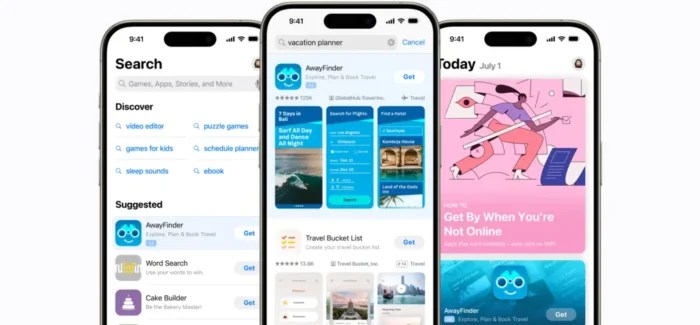
Source: Apple Search Ads
All this activity should lead to people downloading and installing your app, all of which is great, but also meaningless if you can’t track which activity generated each download. And in today’s privacy-first ecosystem, that visibility is harder to achieve than ever. With Apple and Google limiting user-level tracking, attribution can feel like a black-box.
An MMP helps you cut through the complexity by attributing, collecting, and organizing app data in a privacy-first way, delivering a unified view of campaign performance across channels, media sources, and ad networks. It gives you this visibility of which channels are performing, and which aren’t.
For each channel, it will deliver metrics such as:
Cost per impression
Cost per click
Cost per install
Cost per acquisition
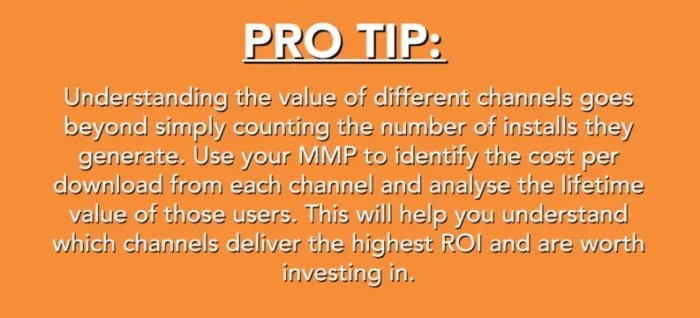
These insights enable you to optimise your marketing spend towards the best-performing channels so that you can scale up your UA activities most efficiently. This is particularly important when you consider that app user acquisition costs have increased by 60% in the last five years, reaching an average of $29 per user in 2024, according to research from SimplicityDX, reported by Business of Apps. Understanding where your budget delivers the best results is essential for staying competitive.
But it doesn’t stop at downloads. The data MMPs generate enables you to dig deeper into the value of each install by looking at what happens “down-funnel” by setting up in-app events.
Use In-App Events to Generate Valuable Insights from your MMP
In-app events allow you to track what users do in the app after installing it. Each event is a key conversion point in the user’s journey through the app. They will differ depending on the type of app, but will typically include things like:
User registration
Newsletter sign up
Clicks on a push notification
Makes a purchase
Join your loyalty program
You can set up the in-app events that are most relevant to your app and most useful in understanding the value of each user. Your MMP then enables you to track these back to where the install came from. This might reveal, for example, that Meta generates twice as many installs as Apple Search Ads, but that the users who install after clicking on an Apple Search Ads spend three times more in the app than those who came in via Meta.
Simplified Reporting in one Dashboard
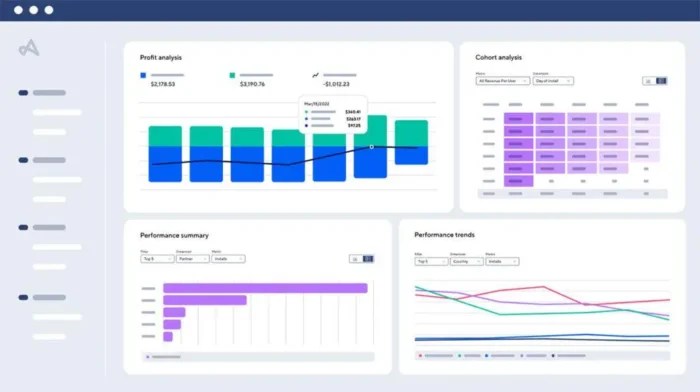
An MMPdelivers all these insights in one unified dashboard, across all the platforms you use to find new users. It’s a far easier way to get a consolidated, real-time view of what’s happening. Even if you’re only active in one or two channels, the insights an MMP delivers into things like Customer Lifetime Value, churn, and conversion against the in-app events you set up far exceed what each platform will typically offer in terms of reporting.
The Benefits of Using an MMP
In summary, the key benefits of using an MMP are:
Unified reporting across all platforms in one dashboard
Granular insights into cost per impression/click/install, customer lifetime value, churn, conversion in in-app events
Insights that enable you to optimise your marketing spend and better allocate your budget.
Why Skipping an MMP is a Risky Move
Falling Behind in Privacy Compliance With iOS privacy updates transforming the landscape, MMPs are critical for adapting to new tracking systems and ensuring accurate data collection. They provide the agility needed to stay ahead in a rapidly changing privacy environment.
Misleading Performance Data Without an MMP, you’re forced to rely on self-attribution from platforms like Google, which often overinflate their numbers. We’ve seen examples of platforms over-reporting key metrics like installs, leading to inaccurate performance insights. This kind of misreporting can lead to budget misallocation and misguided strategy decisions.
Missing out on Critical Insights MMPs allow you to measure and optimise performance beyond just installs, providing a more comprehensive view of user behavior and value. Leveraging MMP data can reveal that a lower CPI doesn’t always translate to higher-quality users. By analyzing the relationship between CPI and downstream metrics like trial start rates, marketers can refine their bidding strategies to drive better results. Without an MMP, such nuanced insights, and the resulting optimizations, wouldn’t have been possible.
Overcomplicating your Tech Stack Skipping an MMP requires integrating multiple SDKs, such as Meta, which not only complicates the setup but also raises significant data and privacy concerns.
Setting up your MMP for Success: Best Practices
Most of the main MMP providers will have integrations across your tech stack, but this is a point worth checking with them when you are assessing providers. If the MMP is integrated across your tech stack, it will be easier to set everything up and gain the insights that will feed your app’s success. For example, if you have already set up in-app events in an in-app analytics tool such as Mixpanel, these can be carried across to the MMP platform to avoid duplicating effort.
1. Define the In-App Events to Optimize Towards
The first step to maximizing the investment in your MMP is to define the in-app events you want to track.The chosen events should reflect meaningful interactions that signal user engagement or progression toward higher-value actions. It’s vital to define these events, not only to monitor when and how frequently they occur, but also to optimise your user acquisition campaigns to align with each funnel stage. Once the user completes an event, i.e.., installs or registers, the point of optimization within the campaigns may change to encouraging conversion to purchase, for example.
2. How many In-App Events should I Track?
It’s not possible, or even desirable, to track everything that happens in your app. We normally recommend around 5-10 in-app events. These should be the key points you want users to convert against, and the ones you can optimise your campaigns towards. Events should describe an action a user takes and should be a combination of a verb and noun, for example:
Registration Completed
Watched Video
Product Page Viewed
Purchase Completed
Subscription Purchase Completed
Event names should be easy to read and not overly descriptive. Upper/lower casing is supported, and it is recommended that the verb should be in the past tense (see the example below).
Once you have defined the in-app events, create a tracking plan that details the naming convention for each event (e.g. subscription purchase completed); the point where it triggers (once a user selects the ‘confirm payment’ button on the billing page); and any parameters that provide more detail on that event (e.g., ‘monthly’, signaling that it is the monthly subscription they’ve purchased), then pass that onto your developers to in build as part of the SDK setup. Now you’re ready for testing.
3. Test Everything to Ensure Success
Testing is vital to ensure that your app behaves as it should and that the in-app events are triggered correctly. Once the in-app events are set up, set up an app testing account to simulate the potential user journey and ensure the events show within the MMP testing environment. Use this account to complete each in-app event, ensuring that:
The events are triggered at the appropriate points
The tracking is functioning properly
The data returned is accurate and reliable.
How to Choose the Right MMP to Boost your App’s Growth
Choosing the right MMP to work with is all about finding one that is best aligned with your needs and expectations. Choosing the best mobile attribution platform is a detailed process, but essentially this breaks down into four key areas:
Cost and scalability – When allocating your budget for an MMP, you need to look at the bigger picture. As you expand your marketing efforts using an MMP, the associated costs are likely to rise, not just from increased spending on channels but also due to the higher volume of reported conversions within the platform. Remember to evaluate these costs and ensure they remain within your budget as your campaigns grow.
Functionality – Ask yourself, does the MMP do everything you need it to do? For example, does it provide a holistic view across multiple traffic sources and in terms of the granularity of data you require to understand each channel’s performance? Or, can it show you how much it’s costing you to acquire a click and a conversion?
Support level provided – Are you looking/able to run everything on the MMP platform yourself, or do you need the support of a managed service? Consider the level of support the MMP offers, especially for troubleshooting setup challenges or addressing questions about the data displayed in the platform.
Tech stack integration – Consider what level of integration the MMP offers with your existing tech stack, including in-app analytics tools, CRM tools, and DMPs (Data Management Platforms), and any other tools that you rely on to market and sustain your app.
Final Word: Making the Smart Choice
Even the best app needs a constant influx of new users to replace those who churn and deeper engagement with loyal users. Your MMP is key to achieving this, offering a unified view of marketing performance across platforms. It reveals how many installs each platform drives, their cost, and long-term value. Without an MMP, you’re marketing blind as ASO’s future rapidly evolves.
http://dubadosolutions.com/wp-content/uploads/2017/05/dubado-logo-1.png00http://dubadosolutions.com/wp-content/uploads/2017/05/dubado-logo-1.png2025-09-30 19:00:002025-09-30 19:00:00Why A Mobile Measurement Partner (MMP) Is Crucial In A Privacy-First Mobile Ecosystem
Google is enhancing Meridian, its open-source Marketing Mix Model (MMM), to help marketers make smarter, more precise budget decisions.
Why we care. Understanding ROI across channels is increasingly critical. These new Meridian updates allow for a more precise understanding of what drives sales, factoring in both media spend and non-media variables like pricing and promotions.
The big picture. Here’s what’s new:
Non-media variables: Marketers can now include pricing, promotions, and other business levers to measure their impact on sales more accurately.
Channel-level contribution priors: New features let you guide the MMM with your own business knowledge, improving the relevance of insights.
Longer-term effects: Enhanced binomial adstock decay functions track how upper-funnel media influences purchases weeks later.
Optimized spending: Marginal ROI (mROI) priors help pinpoint where the next dollar delivers the highest return, using past campaign performance.
Support and community. Meridian now has 30 certified global partners and an active Discord community, offering guidance to deploy the tool effectively and translate insights into business growth.
The bottom line: These updates aim to transform Meridian from a measurement tool to a strategic partner for budget allocation. This means Meridian can help marketers optimize spend across immediate conversions and longer-term brand impact.
https://i0.wp.com/dubadosolutions.com/wp-content/uploads/2025/09/google-chart-decline-1920-1-vHdqlf.jpg?fit=1920%2C1097&ssl=110971920http://dubadosolutions.com/wp-content/uploads/2017/05/dubado-logo-1.png2025-09-30 16:00:002025-09-30 16:00:00Google adds ROI insights to Meridian marketing mix model
The history of search offers clues about where we’re headed in the AI era – but there’s more to learn and more to do to move forward with practical steps.
AI changes the way people search. Instead of short queries that once required digging through blended results, users can now ask complex questions and get direct answers.
Much of the work to optimize for AI, though, overlaps with what SEO professionals have been doing for years. Our community is already adapting and well-positioned to take on this shift.
This article outlines practical steps to navigate the evolving landscape.
SEO, AEO, GEO: Defining the new terms
Before diving in, it’s worth addressing the terminology. It’s still new, and no single label has fully crystallized for this AI layer on top of SEO.
Two terms have gained traction:
AEO (answer engine optimization), which focuses on optimizing content so it’s chosen as the answer in AI-driven results like Google’s AI Overviews.
GEO (generative engine optimization), which describes a broader approach across generative AI platforms.
Neither feels perfect. AEO is a bit clunky, and GEO risks confusion with geography and local search.
Still, these are the terms currently in use. For simplicity, I’ll use GEO in this article.
While tools like ChatGPT are undoubtedly cool – and early adopters, myself included, are spending a lot of time tinkering – the broader story is different.
For most people, AI will matter less as a standalone tool and more through its integration into phones, web browsers, and search engines.
GEO is a new layer that sits above SEO.
Often, tools like ChatGPT will search and compile information.
These tools provide a layer of abstraction and do much of the grunt work.
They still scan the digital world and then collate that information to simplify things for the user, while search engines like Google continue to provide the best overall digital map of the world.
If traditional SEO was about matching keywords, AEO is about being the best answer – and the easiest to integrate into an AI response.
GEO: Strategic foundations
There’s no firm consensus on GEO tactics, but most of what’s recommended is simply good SEO.
That said, tactics that lost ground in the zero-click landscape may regain utility in AI Mode, where the AI does the deep dive and collates information for users.
Here are some basic strategic foundations to put in place to set yourself up for visibility in AI tools.
1. Focus on your customers
I’ve long championed bringing traditional marketing thinking into SEO, and GEO is the natural evolution of that approach.
Know your audience. Create personas, gather feedback, and define their goals, pain points, and the jobs they rely on your product or service to support.
Customer insight is key to building a customer-first strategy that helps you stand out in the age of AI.
2. Real expertise wins
The web is full of derivative content that does little to stand out. This creates a problem for AI.
Model collapse happens when AI keeps training on AI-generated content without new signals, leading to increasingly stale and inaccurate results.
The solution is what humans are still best at – fresh insights from:
Interviews.
Original research.
Proprietary data
These provide AI with something new – and worth citing.
That’s an opportunity. Have a voice, and bring something original to the table.
AI is helping people research and make purchase decisions. Your role is to be part of the discussion.
Modern SEOs are in good shape – much of what AI requires builds on the strategic SEO work we already do.
Add in some PR, social media, and content creation (which often sit under the SEO umbrella), and you’re well on your way to a functional GEO strategy.
Getting started is crucial. To stay ahead:
Create content worth quoting: Write the piece an AI (or a human journalist) would want to reference. That means clear answers, evidence, original insights, and a point of view – not filler.
Anticipate the full conversation: Don’t just answer the first question – answer the follow-ups, too. If someone asks, “How does AI change SEO?” they’ll also want to know, “What should I do about it?” Build that into your content.
Structure for machines and humans: Use headings, lists, FAQs, and concise summaries to help AI parse your work. But don’t forget the narrative depth that keeps people reading.
Diversify your discovery footprint: Don’t rely on Google alone. Research your audience, understand their hangouts, and publish in the formats and places where they ask questions today: LinkedIn, YouTube, podcasts,and industry forums. AI tools crawl all of it.
Focus on authority signals: Show the human behind the content. Add author bios, cite sources, and link to your work elsewhere. AI engines, like search engines before them, lean on trust and authority.
Experiment, measure, refine: Try different formats, test and measure how your content shows up in AI summaries, track brand mentions, and adapt. SEO has always been iterative – this new era is no different.
The opportunity in the chaos
As SEO evolves into GEO – or whatever it may end up being called – this really is the best approach.
There’s no doubt a lot of change is happening.
But much of it is part of the same gradual evolution we’ve seen before, where clicks declined and Google started answering questions directly.
AI now makes it even easier for customers to find the information they’re looking for.
They may not read it on your site – at least not initially – but the AI will, and that’s the point.
Another strength we have as SEOs is that change is constant.
If you’ve been in SEO for any length of time, you’ve lived through Panda, Penguin, Mobilegeddon, BERT, helpful content updates – the list is long (and may cause PTSD for many of us).
The key is to treat this as the next evolution. AI is being integrated into search, and it will likely become the way the masses adopt the technology.
Don’t see this as the death of SEO.
Instead, view SEO and AI (or GEO/AEO, etc.) as close, contributing partners, and evolve your plan to match the changing landscape.
Your job as a marketer is to feed these tools the information they need to point customers to you and your clients.
This shift will likely mean fewer short-term manipulations and tactical opportunities – but better results for businesses that do the basics well.
At its core, good SEO/GEO is just good marketing: understanding your customers, meeting their needs, and communicating clearly.
Amid the chaos lies opportunity. For those willing to embrace the challenge, experiment with new tools, and keep going.
That’s what we’ve always done as SEOs, which is why we’re best positioned to embrace this new world.
https://i0.wp.com/dubadosolutions.com/wp-content/uploads/2025/09/Thriving-in-AI-search-starts-with-SEO-fundamentals-4nKDbJ.jpg?fit=1920%2C1080&ssl=110801920http://dubadosolutions.com/wp-content/uploads/2017/05/dubado-logo-1.png2025-09-30 15:00:002025-09-30 15:00:00Thriving in AI search starts with SEO fundamentals
Before this, figuring out what AI Max was doing felt like looking into a black box.
Now, we can finally see the data and make smarter decisions.
Evaluating AI Max: Metrics that matter
When you’re looking at AI Max performance, start with the basics.
Open your search term tab and look for the Search terms and landing pages from AI Max option.
This lets you see AI Max results separately from your exact match, phrase match, and broad match keywords.
Compare conversion share and budget share
The first thing to check is how many conversions come from AI Max versus your regular keywords.
If AI Max is bringing in 30% of your conversions but eating up 60% of your budget, you know something needs attention.
Look at the cost per conversion, too.
AI Max might cost more at first, but that’s normal while Google learns what works for your business.
Look beyond cost – focus on conversion rates
Don’t just focus on the cost. Pay attention to conversion rates.
AI Max often finds people who are ready to buy but use different words than you expected. These new search terms can be gold mines if you spot the patterns.
One of AI Max’s biggest benefits is finding search terms you never thought to target.
Look at your search terms report and filter for AI Max queries. You’ll probably see some surprises.
Let’s say you sell running shoes and target “best running shoes.” AI Max might show your ads for “comfortable jogging sneakers” or “shoes for morning runs.”
These are people who want the same thing but use different words. The smart move is to add these high-performing terms to your regular keyword lists.
Identify irrelevant traffic
If you’re getting clicks from people searching for “cheap shoes” when you sell premium products, add “cheap” as a negative keyword.
AI Max respects negative keywords, so use them to guide the system toward higher-quality queries.
Every AI system needs time to learn, and AI Max is no different.
Plan for a learning phase
The first few weeks often look expensive because Google is still figuring out what works. Don’t panic if your costs jump initially.
Track your performance daily during the first month
As AI Max learns your patterns, you should see costs stabilize and conversion rates improve. If things keep getting worse after three weeks, then it’s time to make changes.
Keep an eye on the types of search terms AI Max finds over time
Early on, you might see lots of random queries. As the system learns, the terms should become more relevant to your business goals.
The biggest mistake people make is changing too much, too fast.
AI Max needs data to work properly, and constantly adjusting things prevents the system from learning.
That said, some problems need quick fixes.
If AI Max is spending money on completely irrelevant searches, add negative keywords immediately.
If the AI creates ads that violate your brand guidelines, remove those assets right away.
Watch your overall account performance, not just AI Max numbers.
Sometimes, AI Max might look expensive on its own, but it actually helps your other campaigns perform better by capturing different types of traffic.
Planning for the future
AI Max is still evolving, and Google keeps adding new features.
To adapt:
Build reporting systems that can grow with these changes.
Set up automated reports for the metrics that matter most to your business.
Don’t try to control everything.
The businesses seeing the best results from AI Max are the ones that:
Set clear goals.
Provide good data.
Let the system do its job.
Your role shifts from managing keywords to managing strategy.
Start testing AI Max on a small scale if you’re nervous about it. For example:
Create one campaign with AI Max enabled and compare it to your existing campaigns.
Run an AI Max for Search campaign experiment and let Google evaluate if the experiment is statistically valid.
Once you see how it works for your specific business, you can decide whether to expand.
Case studies: AI Max in action
These are early results from a limited data set and shouldn’t be viewed as statistically significant.
I’m sharing them to illustrate what I’ve seen so far – but the sample size is small and the timeframe short. Take these numbers with caution.
Case 1: Tourism and travel
This advertiser already had a solid search setup and was seeing good results.
Growth, however, was difficult because of heavy competition and the fact that strong keywords were already in play within a modern search structure.
Match type
Avg. CPC (€)
CVR (%)
AI Max
€0.11
1.47%
Broad match
€0.09
3.79%
Exact match
€0.53
9.00%
Exact match (close variant)
€0.22
7.11%
Phrase match
€0.16
6.25%
Phrase match (close variant)
€0.11
3.27%
AI Max generated additional conversions, but relative to the existing setup the impact was limited.
The conversion rate was much lower than other match types.
Because the average CPC was low, there was no cost spike, but performance still lagged.
Broad match – also known for surfacing broader, newer queries – had an even lower CPC (€0.09) and a conversion rate more than twice that of AI Max.
In this account, AI Max’s contribution was minor.
Search term overlap analysis showed AI Max had a 22.5% overlap rate, meaning 77.5% of queries were new to the campaign.
That’s a fairly good sign in terms of query discovery.
Case 2: Fashion ecommerce
This account focused on women’s clothing and already had a well-optimized campaign.
The goal was to expand reach during the competitive holiday season, when exact match keywords became increasingly expensive.
Match type
Avg. CPC (€)
CVR (%)
AI Max
€0.08
2.15%
Broad match
€0.12
2.89%
Exact match
€0.67
8.45%
Exact match (close variant)
€0.28
6.78%
Phrase match
€0.19
5.92%
Phrase match (close variant)
€0.14
4.11%
AI Max performed well here, delivering the lowest CPC at €0.08 and a respectable 2.15% conversion rate.
Although conversion rates were lower than exact and phrase match, the cheaper clicks kept cost per acquisition competitive.
AI Max also captured fashion-related long-tail searches and seasonal queries that the existing keyword set had missed.
Notably, AI Max outperformed broad match with both lower costs and better conversion rates.
This suggests its ability to better understand product context and user intent – especially important in fashion, where search terminology is diverse.
Search term overlap analysis showed only an 18.7% overlap rate, meaning 81.3% of queries were completely new.
That level of query discovery was valuable for extending reach in a highly competitive market.
Case 3: B2B SaaS
This account promoted project management software and had a mature strategy focused on high-intent keywords.
Conversion tracking was strong, measuring both MQLs and SQLs.
The client wanted to test AI Max for additional lead generation opportunities.
Match type
Avg. CPC (€)
CVR (%)
AI Max
€0.89
0.76%
Broad match
€0.72
1.23%
Exact match
€1.84
4.67%
Exact match (close variant)
€1.22
3.91%
Phrase match
€1.05
3.44%
Phrase match (close variant)
€0.94
2.88%
In this case, AI Max struggled. Despite a reasonable CPC of €0.89, the conversion rate was just 0.76%.
That pushed CPA well above the client’s target, making AI Max the worst-performing match type in the account.
It tended to capture too many informational searches from users not yet ready to convert.
Even broad match, typically associated with lower-intent traffic, outperformed AI Max with a 1.23% conversion rate at a lower CPC.
The complexity of the B2B buying cycle favored exact and phrase match keywords over AI Max’s broader interpretation.
Search term overlap analysis showed a 31.4% overlap rate, leaving 68.6% of queries as new.
However, these were mostly low-intent informational searches that didn’t align with SQL goals – underscoring the importance of high-quality conversion tracking when evaluating AI Max.
Wider industry sentiment
Advertiser feedback so far mirrors these mixed results.
In a recent poll by Adriaan Dekker, more than 50% of respondents reported neutral outcomes from AI Max, while 16% saw good results and 28% reported poor performance.
Tips to analyze AI Max search terms
You can analyze AI Max queries in Google Sheets using a few simple formulas. If your search term report has the term in column A and match type in column B:
To check whether a search term appears in both AI Max and another match type:
To count how many match types trigger a given term:
=COUNTIFS($A:$A;A2) can be used to count how many match types trigger on that search term.
To measure query length with an n-gram analysis:
=(LEN(A1)-LEN(SUBSTITUTE(A1," ","")))+1
These checks show whether AI Max is surfacing unique queries, overlapping with existing match types, or favoring short-tail vs. long-tail terms.
Because AI Max is still in early stages, it’s hard to draw firm conclusions.
Performance may improve as the system learns from more data, or remain flat if your setup already covers most transactional queries.
That’s the question advertisers will answer in the coming months as more tests and learnings emerge.
So far, results can be positive, neutral, or negative.
In my experience, neutral to negative outcomes are more common – especially in accounts with strong existing setups, where AI Max has fewer opportunities to add value.
A Google Ads script to uncover AI Max insights
To make analyzing AI Max performance easier, I created a Google Ads script that automatically pulls data into Google Sheets for deeper analysis.
It saves hours of manual work and includes the exact formulas mentioned earlier in this article, so you can immediately spot overlap rates and query patterns without manual setup.
The script creates two tabs in your Sheet:
AI Max: Performance Max search term data with headlines, landing pages, and performance metrics.
Search term analysis: A full comparison of all match types, including AI Max, with automated formulas.
The analysis covers:
Overlap detection between AI Max and other match types.
Query length analysis (short-tail vs. long-tail).
Match type frequency counts to identify competitive terms.
Automatic cost conversion from Google’s micro format into readable currency.
How to use it:
Create a new Google Sheet and copy the URL.
In Google Ads, go to Tools > Scripts.
Paste the script code and update the SHEET_URL variable.
Run the script to automatically populate your analysis.
With this setup, you can quickly calculate the same metrics I used in the case studies – like the 22.5% overlap rate in the tourism account or the 81.3% new query discovery in fashion.
The automated workflow makes it easier to see whether AI Max is surfacing genuine new opportunities or simply redistributing existing traffic.
https://i0.wp.com/dubadosolutions.com/wp-content/uploads/2025/09/LinkedIn-poll-AI-Max-performance-sT75AQ.png?fit=545%2C393&ssl=1393545http://dubadosolutions.com/wp-content/uploads/2017/05/dubado-logo-1.png2025-09-30 14:00:002025-09-30 14:00:00AI Max in action: What early case studies and a new analysis script reveal
Engineering teams usually have a quality assurance (QA) process.
Without it, they risk releasing work that hurts the user experience and creates unforeseen technical issues – including major SEO problems.
That’s where SEO QA comes in. Adding SEO-specific checks to existing QA protocols helps teams catch and fix issues before they go live.
But this step is less common than you’d think. Too often, it’s overlooked.
This article outlines what it takes to build an effective SEO QA discipline and provides a checklist SEOs and QA engineers can use to cover their bases.
Why SEO QA gets overlooked
Unless SEO is fully integrated with engineering, SEO-specific QA often gets overlooked.
As a result, SEOs may not flag problems until a tech audit – or worse, when they show up as organic KPI declines.
This is especially common when SEO teams sit under marketing instead of product or engineering, since they’re excluded from regular milestones and lifecycle meetings.
That makes it harder to communicate SEO’s importance, win buy-in, and establish it as part of everyday development.
Having a QA team within engineering is also no longer a given.
In agile environments, some teams prioritize speed over fully clean rollouts.
Others rely on AI tools to automate QA or monitor for technical issues, instead of employing dedicated QA engineers.
In short, there are plenty of reasons many teams lack a well-developed SEO QA practice.
What are the benefits of SEO QA?
For SEOs to be able to proactively find and resolve issues before they go out into the world, they need two things on a regular basis:
Opportunities to view upcoming engineering tickets and flag any that may have potential SEO impact. (A great reason for an SEO representative to be a part of sprint planning meetings.)
A chance to QA any of the flagged tickets before they hit production.
This has a few key benefits for the business:
Minimize the chances of deploying code that hurts SEO.
Catch and correct errors that hit production before they register with search engines.
Capitalize on SEO opportunities related to engineering work that’s already slotted for development.
The last bullet is just as much of a reason to implement SEO QA as the first two.
It’s not just about catching bugs, it’s about maximizing value while minimizing resources.
When SEOs have a chance to see what’s coming up, it allows them to connect the dots between SEO roadmap items and upcoming engineering initiatives to find potential areas of overlap.
In turn, the business reaps the SEO benefits of work that’s already in motion, rather than spending additional resources to achieve the same goal later.
Best practices: The 4 Ws of SEO QA
Alright, now that we’ve established why brands need SEO QA, let’s get into the logistics.
Structured data: Is it crawlable, parsable, accurate, and reflecting visible information on the page? (Note: Google’s Schema Markup Testing Tool won’t work on staging URLs since crawlers are (hopefully!) blocked.)
You can see CSS issues because they visually impact the page.
For JavaScript issues, you’ll need tools to understand whether crawlers can access critical content.
Unless you’re already running a sitewide crawl with JavaScript enabled, test one or two pages from the affected template (i.e., blog, listing, product detail) using a tool like Rendering Difference Engine.
Page elements applicable to the template are available and functioning as intended, including pop-outs, filtering, sort function, and pagination.
Even worse, until it’s fixed, that’s historical data that you won’t get back.
Before launch on staging, check if:
All pages and templates have tracking code available.
The day after launch, verify that:
Internal analytics platform doesn’t show significant declines in KPIs or discrepancies with external reporting tools (e.g., GSC).
Optional: A/B testing
Not all A/B testing tools distinguish the control and variant for crawlers.
They’re usually served one or the other version of the page randomly, which means your variant could impact SEO.
Aside from the variable, the pages should be identical to a crawler.
Refine over time
With every round of QA, engineers and SEOs will learn nuances and find new connections.
You’ll discover that certain types of updates are more likely to cause certain types of SEO issues, certain plugins are linked to certain types of problems, etc.
Your SEO QA checklist is a living, breathing document and a place to document all of this to make SEO QA more effective – and avoid repeating mistakes – no matter who’s carrying it out.
Start with the list below and make it your own over time.
https://i0.wp.com/dubadosolutions.com/wp-content/uploads/2025/09/00_issue-categories-SviBnJ.webp?fit=1200%2C1102&ssl=111021200http://dubadosolutions.com/wp-content/uploads/2017/05/dubado-logo-1.png2025-09-30 12:00:002025-09-30 12:00:00A checklist for effective SEO QA
We know that most readers skim. We also know that search engines prefer clear and easy-to-understand content. Luckily, a good summary can help with both. A summary gives your reader the core ideas quickly, while also helping your chances of ranking your content. Learning how to write a summary helps you give your content the love it needs.
A summary provides a concise overview of your content, helping readers and boosting SEO.
Effective summaries improve readability and help readers quickly determine content value.
To write a strong summary, identify key points, use clear language, and integrate keywords naturally.
Summaries differ from titles, introductions, and conclusions as they target readers already engaged with the content.
AI can assist in generating summaries, but always review and refine to ensure clarity and accuracy.
What is a summary?
If we are looking for the definition, we can say a summary is a short and focused overview of your content’s main points. A good summary answers three questions:
What is this text about?
Why should I care about it?
What will I learn from reading it?
Keep in mind, a summary is not a sales pitch or something in-depth. You need to strip it down and offer just the essentials for readers to understand in seconds.
Expert insights
Agnieszka Szuba: Yoast developer and researcher on summaries
“Summaries can provide a lot of value to both human readers and bots. And with the help of AI features like Yoast AI Summarize, they can be created very easily. So adding a summary can be a quick way to boost the readability and engagement of your content.”
Why are summaries important?
Now that we know what summaries are, let’s answer the question of why they are so important. There are many answers to that question, but we’ll answer that here.
Improves readability
One of the main aspects of a good text is its readability, but it’s hard to judge a book by its cover. Before readers decide to invest their precious time in reading your content, they need to know if it is worth it. A well-written summary helps them understand the value of your content in seconds. They’ll also get an idea of how your writing is.
Helps readers decide fast
As we mentioned, the time aspect is very important today. Everyone is busy, and people need to know whether your content is worth their time. So busy visitors want to know: “Is this worth my time?” A clear summary can help speed up that decision process.
Enhances SEO
Not only readers but also search engines are looking to understand your content. Search engines see if content matches user intent, and a good summary can help them figure that out.
A well-written summary mentions your target keywords naturally. Good ones increase the chance of your content appearing in highlighted search results like featured snippets. In addition, summaries may help reduce bounce rate because they can manage and set expectations for readers.
How to write an effective summary
Now that you know why summaries can be so helpful, let’s find out how to write effective ones.
Identify the main points
The most important thing is to identify the main points of the content that need to feature in the summary. To help you do this, ask yourself the following questions:
What’s the primary message of the content?
What are the two or three key takeaways?
What does the reader need to know?
Remember, keep it clean and simple. Avoid using examples, anecdotes, or secondary details that muddy the point you are trying to make.
Be concise and clear
Your summary needs to be as easy to understand as possible. Try to aim for three to five sentences (or 50 to 100 words). Cut filler words. Here’s an example:
Wrong:“In this article, we’re going to be talking about some of the most important aspects of writing summaries, which can really make a big difference.”
Right:“This guide covers three key rules for writing summaries: clarity, brevity, and keyword placement.”
Use simple, direct language
We’ve always been big fans of writing as clearly and simply as possible. One of those things to consider is jargon. Whenever you can, try to avoid using jargon. Write like you’re explaining it to a colleague over coffee.
Integrate keywords naturally
Your summary should include the main keywords of your article. For a summary of the article you’re reading now, the focus keyphrase would be “how to write a summary”. Also, try to fit in one or two related terms, but don’t force them. Always prioritize readability.
Match your content’s tone
The next thing to think about is making sure that the summary’s tone matches the content’s tone. For instance, a summary for a technical guide should be precise, while one for a lifestyle blog can be more conversational. Keep it consistent.
Dos and don’ts of writing summaries
For this article, we’ve created a helpful table that quickly outlines the main rules of writing summaries. Remember these!
Do
Don’t
Focus on key takeaways only
Add extra details or tangents
Keep it short and scannable
Write dense paragraphs
Use keywords naturally
Stuff keywords awkwardly
Match the tone of your content
Switch to a different style
Test if it stands alone
Assume readers know the context
Examples of weak vs. strong summaries
We’ve shown you the theory of good and bad summaries, but now let’s review a couple of examples to see it in practice.
A blog post (how-to guide)
Topic:“How to Start a Podcast in 2025”
Weak:“Starting a podcast can be hard, but this post gives you some tips on equipment, topics, and editing to help you get going.”
Strong:“Launch your podcast in 5 steps: Choose a niche, pick budget-friendly gear (under $200), record like a pro, edit with free tools, and grow your audience. Avoid rookie mistakes with our checklist.”
Why it works:
Numbers (“5 steps”) set clear expectations
Specifics (“budget-friendly gear,” “free tools”) add value
Actionable (“avoid rookie mistakes”) hints at practical advice
A product page (e-commerce)
Product:“Ergonomic Office Chair – Model X200”
Weak:“The Model X200 is a great chair for people who sit a lot. It has features that make it comfortable and good for your back.”
Strong: “Reduce back pain with the Model X200: Adjustable lumbar support, breathable mesh, and 360° armrests. Rated #1 for home offices under $300. Free shipping + 30-day trial.”
Why it works:
Highlights benefits (not just features)
Includes social proof (“Rated #1”)
Adds urgency (“30-day trial”)
A research report (B2B)
Topic:“2025 Digital Marketing Trends: AI and Automation”
Weak:“This report looks at how AI is changing marketing. It covers trends and stats that businesses should know about.”
Strong:“78% of marketers now use AI for content creation (up from 42% in 2023). This report breaks down:
Top AI tools for ROI in 2025
How automation cuts campaign costs by 30%
Case studies from brands like Nike and HubSpot.”
Why it works:
Leads with a stat to grab attention
Bullet points improve scannability
Names brands for credibility
News article
Topic:“New Study Links Screen Time to Sleep Disorders in Teens”
Weak:“A new study shows that teens who use screens before bed might have trouble sleeping. Researchers say this is a growing problem.”
Strong:“Teens with 3+ hours of nightly screen time are 5x more likely to develop insomnia, per a Harvard Medical School study. Key findings:
Blue light delays melatonin by 90 minutes.
Social media (not gaming) is the worst offender.
Solutions: ‘Screen curfews’ and orange-light filters.”
Why it works:
Quantifies risk (“5x more likely”)
Debunks myths (“social media vs. gaming”)
Offers solutions (not just problems)
Case study
Topic:“How Company Z Increased Sales by 200% with Email Marketing”
Weak:“Company Z used email marketing to grow their sales. This case study explains what they did and the results they got.”
Strong:“Company Z turned $5K/month into $15K/month in 6 months using:
Segmented lists (3x higher open rates)
Abandoned-cart emails (recovered 12% of lost sales)
Start with the most valuable info (stats, results, or a bold claim).
Use numbers (steps, percentages, time) to add credibility.
Match the format to the content type (bullets for reports, emojis for social media).
Avoid vague language (“some tips” → “3 proven strategies”).
Here’s a pro tip for you: Test your summary by asking yourself if it would make you click/read more. Does it work even if you skip the full content?
Summaries vs. intros, conclusions, titles, and meta descriptions
There are other options to help readers and search engines quickly understand your content. What’s the difference between these? Titles and meta descriptions are for getting people to click from the SERP, while summaries are for readers already on your content.
Element
Purpose
Length
Audience
Example
Title
Grabs attention; tells readers (and search engines) what the content is about.
50-60 chars (SEO ideal)
Searchers + readers
“How to Write a Summary in 5 Steps (With Examples)”
Introduction
Hooks the reader; sets up the topic and why it matters.
1-3 paragraphs
Readers (and search engines)
“Struggling to keep readers engaged? A strong summary can double your content’s impact—here’s how to write one.”
Summary
Condenses main points for quick understanding.
3-5 sentences
Readers who skim
“Learn the 5 rules for summaries: cut fluff, lead with key points, use keywords, and match your content’s tone.”
Conclusion
Wraps up; often includes a CTA or final thought.
1 paragraph
Readers who finish the piece
“Now that you know how to summarize effectively, try rewriting an old post’s summary and track the difference in engagement.”
Meta desc.
Encourages clicks from search results.
~150-160 chars
Search engines + potential visitors
“Master the art of writing summaries with this step-by-step guide. Improve readability, SEO, and reader retention in minutes.”
Benefits and pitfalls of using AI for summaries
One of the best ways of using AI in your work is to use it to summarize content. It’s almost what it was designed to do. AI tools like Yoast AI Summarize can draft summaries in seconds. Of course, you need to keep an eye on the outcome and adjust where needed.
Benefits
There are many benefits to using AI to generate summaries.
The AI is fast: AI can generate a summary almost instantly
It’s consistent: The AI works very consistently based on your rules
It’s an additional content check: If it stumbles, your content’s points are not clear
Pitfalls
Using AI has a lot of benefits, but also risks.
Results might lack nuance or miss a certain emphasis or humor
It can also come out sounding very robotic or boring
It might focus on the wrong things, so it could highlight minor points instead of critical ones
Best practices for using AI to generate summaries
Always use AI as a starting point, then compare the AI summary to your key messages. If it needs adjusting, edit the summary for accuracy, tone, and flow. Then test it to learn if it makes sense alone.
In the real world, this would mean installing an AI plugin on your WordPress site or using Yoast SEO’s AI Summarize feature. Open an article on your site and add the Yoast AI Summary block. Have it generate a summary based on your article. Check the outcome and refine it to sound human and align with your goals.
Key takeaways generated by Yoast AI Summarize
Conclusion
A strong summary aims to please two different consumers: first, the readers who want quick answers and search engines that reward clarity and readability. Writing a good summary is all about keeping it short, direct, and keyword aware. Avoid fluff and focus on the key takeaways.
Today, it’s fine to use AI to help you with summaries, but always check them. If you are not happy, edit them.
Here’s a nice exercise: Find an old post, write a new summary based on these learnings, and see if engagement picks up. Often, it’s the small tweaks that have the biggest impact.
http://dubadosolutions.com/wp-content/uploads/2017/05/dubado-logo-1.png00http://dubadosolutions.com/wp-content/uploads/2017/05/dubado-logo-1.png2025-09-30 11:27:562025-09-30 11:27:56How to write an effective summary for your content
Wondering why your site’s not ranking or showing up in large language model (LLM) results, even though your content is solid?
The answer might be backlinks. Specifically, the lack of high-quality ones.
Tools like ChatGPT and Google’s AI Overviews are starting to summarize answers without always linking to a source. That means fewer clicks, more brand mentions, and a big shift in how SEOs need to think about authority.
It’s important to remember, though, quality backlinks are still one of the strongest signals of trust and relevance even as search evolves. They play a key role in how Google evaluates which brands earn visibility and can increase the chances of a source being cited or surfaced in AI-generated answers.
If you want to show up in AI Overviews, earn brand mentions, or rank higher in organic search, you need a solid backlink strategy: one that’s built on quality, not shortcuts.
Let’s break down what that looks like in 2025, and exactly how to do it.
Key Takeaways
High-quality backlinks still matter, even in an AI-driven search world.
One link from a trusted, relevant source beats 100 weak ones.
Quantity and quality both have a place in your strategy, but quality should lead.
You can earn strong links through content, partnerships, and digital PR.
Smart SEO means earning links by adding value, not tricking Google.
Why Building Backlinks Is Important
Backlinks are votes of confidence for your site. Each tells Google, “Hey, this content’s worth checking out!”
Sites with more (and better) backlinks tend to rank higher. In fact, a study from last year noted that over 96% of websites ranking in Google’s top 10 positions had more than 1,000 backlinks from unique domains.
But—and this is a big one—not all backlinks are created equal.
Low-quality links from shady sites can hurt your content more than help. What you want are editorial, relevant, and trusted backlinks that align with your content and brand. These quality links can:
With that in mind, how do you know the difference between a high-quality backlink and a poor one?
What Makes A Quality Backlink?
High-quality backlinks check three boxes:
Relevance: The linking site is topically related to yours. Backlinks from respected tech blogs to your AI tool are good as gold.
Authority: The linking domain has strong credibility and trust. Think of industry publications, .edu sites, or even top-ranking competitors.
Natural placement: You’ve earned this link editorially. No one paid for it or jammed it into a comment thread.
As Alex Horowitz, Digital PR Specialist at NP Digital, explains: “A good backlink comes from a site with solid domain authority (DA 35+), consistent organic traffic of at least 1,000 visitors a month, and content that’s trustworthy and relevant to the client. A poor backlink opportunity usually is on sites with little to no traffic, low authority, or content that feels spammy or off-topic. If the link won’t add value for readers or align naturally with the brand, it’s likely not worth pursuing.”
There are other bonus factors to consider, too. Keyword-rich anchor text, used sparingly, can help. So does placement high in the page’s content. The signals are even better if the page linking to you has strong traffic or links.
Getting these links takes work, but the payoff lasts for a long time.
The Quality vs Quantity Backlink Debate
How many backlinks do you need? This is a common question, and the answer is every SEO’s favorite:
“It depends.”
Do you need hundreds of backlinks? Not really.
Would you like to earn hundreds of great backlinks? Absolutely.
Quality and quantity both matter, but quality always wins. Quantity helps build a diverse link profile, especially from mid-tier, niche, or enthusiast sites. Quality delivers the real authority, trust, and rankings boost.
The problem is when people and marketers chase quantity for the sake of it by buying links, trading links, or spamming blog comments. That behavior isn’t just unsustainable, it’s unwelcome. It’ll tank your reputation among those sites you want cachet from and won’t help your rankings long-term.
Tips to Build Quality Backlinks
We know backlinks matter. We know good backlinks matter. How do we get them?
Never fear. These 14 tried-and-true strategies can help you earn high-quality backlinks in 2025 and beyond.
1. Emphasize What Benefits the Site Gets
Asking specific sites to link to you can work, but it requires being strategic. When reaching out, make it about them, not you. Instead of asking, “Can you link to my blog post?” you might try a message like,
“Your readers might find this guide helpful. It includes a breakdown that expands on your section about [topic].”
Show them the value their audience will get. If it plugs into content already performing well for them, even better.
2. Write Relevant and Competitive Content
People don’t link to average content. They link to the best. That means standing out among the crowded pack. What does that look like?
Go deep. Cover the topic more thoroughly than your competitors.
Add visuals, statistics, and original research.
Include expert quotes or insights.
Match search intent. Don’t write a blog post when searchers want a product comparison.
No matter what you create, ensure your content reflects E-E-A-T: experience, expertise, authority, and trustworthiness.
You should be able to find several ways to make your content stand apart from the existing results, whether that’s creating a more in-depth and actionable article or citing research no one else has.
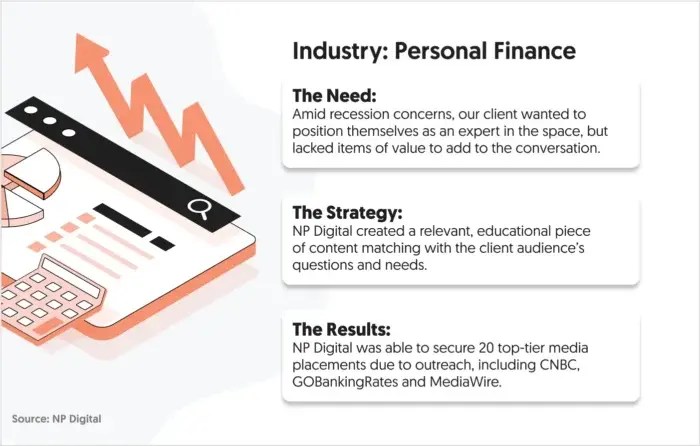
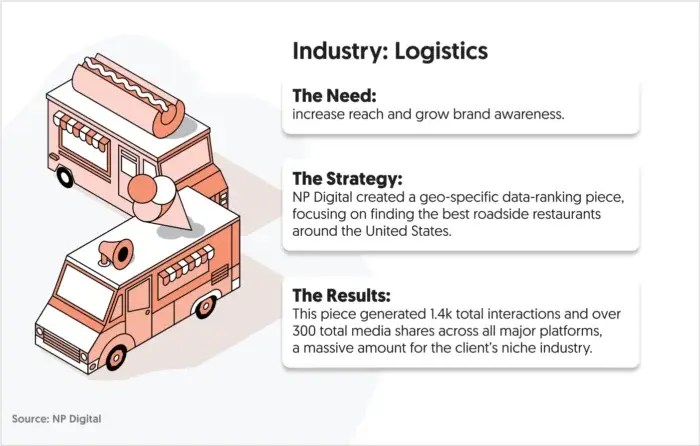
That’s the exact approach my digital marketing agency used to get 20 top-tier media links like CNBC and Retail Wire for one of our clients in the personal finance industry.
We created a data-driven asset that resonated with a large audience and was different from anything else out there. This allowed us to pitch to dozens of relevant media outlets that were more than happy to give us a link in return for a good story.
3. Prove Your Site Is Legitimate
Getting links is a lot easier if your website positions you as a professional, trustworthy, and legitimate organization.
There are several elements that signify trust, and I recommend including as many of them as possible:
HTTPS certification (as well as other certificates)
A branded domain
High-quality web design
Links to your social profiles
Contact information, including the address of your company
E-E-A-T signals like an about page, editorial standards, and author bios.
You can see I’ve got almost all of these elements in place in my website’s footer:
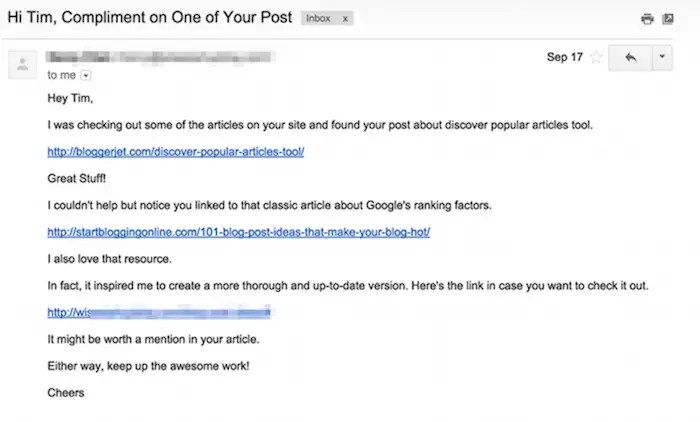
4. Make Your Pitches Short
Want to increase the response rate of your pitches? Practice brevity to make it easy for recipients to understand your pitch.
There are many single lines, and it’s easy to find and click on the links. The email is to the point, and there’s no question what it’s about.
Here’s my advice for making your pitches concise and clear:
Keep paragraphs to two sentences or fewer
Write no more than five sentences
Use bullet points and bold font to make it easy for readers to spot the key points
State what you are asking for clearly
5. Leverage Digital PR
Digital PR (DPR) may initially feel like a focus on building a personal brand, but that’s not the real focus. Instead, consider creating newsworthy stories for journalists, bloggers, and industry outlets to cover and link to.
This matters because PR campaigns can often land backlinks from the highest-authority sites; places like Forbes, TechCrunch, or industry trade publications are significant wins. Those links carry way more weight than dozens of smaller blogs.
Here’s how to use it:
Data-driven stories: Package up survey results or industry insights. Journalists love citing fresh numbers.
Expert commentary: Offer quick takes on trending news. Tools like HARO or Qwoted connect you with reporters in real time.
Unique hooks: Tie your brand to bigger conversations. For example, a fintech startup might publish a “State of Student Debt in 2025” report.
High-quality backlinks come when your story provides genuine value to readers and publishers. A strong DPR campaign earns more than mentions. You get citations that boost rankings.
6. Do an Original Study
Original research is often a backlink magnet. Why? Because everyone needs data to support their content, and they’d rather cite your study than come up with their own.
You don’t need to be a research firm to pull this off, though. Here’s how:
Run a survey with your customers or audience.
Use public datasets and analyze them in a new way.
Combine anonymized data from your own tools (if applicable).
For example, look at my agency’s route when building links for a logistics client. We used multiple, varying datasets to see how different roadside restaurants in America compared to one another for truck drivers and roadtrippers.
The trick is to tell a compelling story with your data, the kind journalists will want to write about. In our case, every driver wants to know the best place to stop, and the geo-specific nature of the report meant local news outlets could report on truck stops in their state.
As a result, we garnered over 1,400 shares, likes, and comments across social media, a massive amount for such a niche industry. We also won a host of new rankings like “best truck stop food”.
7. Create an Infographic or Original Image
Infographics aren’t dead. They’re just evolved. In 2025, they’re bite-sized knowledge hubs that provide real value to readers.
These visuals are often easier to share, embed, and link to than walls of text. A great infographic travels across social media and blogs and can even get picked up by news outlets.
Here’s how to do it right:
Use tools like Canva or Venngage to create professional designs.
Focus on one core statistic, process, or concept. Don’t cram everything in.
Include embed codes so other sites can easily share and link back.
Look at this infographic example from Venngage that talks about the psychological impact of font choices on audiences. It’s a pretty robust dive into the typography of several popular Netflix shows and how title choices can play with mood and genre:
This one’s simple, but it works. Companies love showcasing happy customers. When they feature your testimonial on their site, they usually link back to you. Here’s how to make it happen:
Reach out to SaaS tools, agencies, or vendors you use.
Offer a detailed testimonial that highlights specific results.
Make sure to include your full name, role, and website.
See examples below from MarketHire:
These links aren’t just filler. They come from trusted, established brands that want to show off real customer success. That credibility makes them high-value backlinks, and all you did was share your experience.
9. Link Externally and Then Reach Out
Linking out to other sites doesn’t mean you’re giving away visibility. The trick is to follow through. Here’s how this works:
Write a blog post and naturally link to a relevant site, tool, or expert.
Reach out to the site or personality and tell them they’ve been included.
Start a conversation. Eventually, they may return the favor with a backlink.
You can strengthen this strategy with your own internal linking. Google sees that your page is well-connected both internally and externally, boosting your crawlability and authority.
This is not an overnight backlink hack. Instead, it’s a trust-building move that snowballs into collaborations, mentions, and citations from quality sites.
10. Comment on Other Relevant Blog and Social Posts
Comments on blogs and social media posts are a great way to build relationships with people in your industry and occasionally snag yourself a backlink.
But before you start passionately commenting on posts and throwing out backlinks everywhere, let me explain something.
You might occasionally have an opportunity to include a backlink in your comment. However, the comment should primarily focus on building a mutual relationship with the author:
If you don’t know what to say, make the author’s day.
If you want to share a bit more, you can add some meaningful insight into the topic at hand.
If you want to craft a comment that merits a response from the author and helps build the relationship, add your own commentary to the discussion.
Here’s an example from Leanne Wong on how a comment can start a conversation that might lead to a backlink:
Whatever you do, add value with your comment. The more value you can add, the stronger your relationship will become— and that’s a recipe for a future backlink if ever I saw one.
11. Align Social Signals
If you’re serious about building out your link building strategy and rising through the ranks, then aligning social signals is a must.
Social signals communicate to search engines how active and updated your website is. The more active your website, the better your rankings. You’ll notice I link to all of my social profiles in the footer of this website and keep them all updated:
You may not have the time to leverage every single social platform. In that case, choose one or two that you can keep up with, and post at least once a day on the platforms you’ve chosen.
Check that all of the information on your social profiles matches the information on your website. The company name, address, and phone number need to be aligned to communicate to search engines that your website is up to date.
This is a simple but effective way to build your rankings with very little extra work.
12. Find What’s Newsworthy
Timing is everything. If you can tie your content to breaking stories or trends, you can increase your odds of earning backlinks from journalists and bloggers covering it. Seek out opportunities in the following spots:
Picture this: Google rolls out a major algorithm update, and an SEO agency could publish a quick analysis within 24 hours. Journalists writing about the update may cite that content, earning authoritative backlinks.
Prefer a real life example?
My agency used this tactic to get backlinks from sites like The New York Times and The Atlantic for our client in the entertainment industry. Competitor research told us that a rival website had a lot of high authority backlinks to a page where fans could watch a trending television show from our client. But the link sent users to a broken page.
Our strategy was simple. We contacted every linking publisher and asked them to swap the broken link for our client’s, letting fans actually watch the show.
13. Find Brand Mentions
People may already be talking about your brand but not linking to it. That’s low-hanging fruit.
“Hey [Name], thanks for mentioning us in your piece on [Topic]. Would you mind adding a link so readers can easily find the resource?”
These links are easy wins. The writer already trusts you enough to mention your brand—now you’re just helping readers (and your SEO) with a clickable source.
14. Look At Competitor Backlink Profiles
Your competitors’ backlinks are a roadmap for your strategy. If it’s working for them, it could work for you. But how do you start and what should you look for?
Use Ubersuggest, Ahrefs, or Semrush to pull competitor backlink reports.
Examine their homepage links, most-linked blogs, and referral domains.
Identify patterns: Are they earning links from industry directories? Guest posts? Data-driven reports?
Once you know what they’re doing, ask the big question:
Can I create something better?
If your competitor earned a link for “2024 Social media Trends,” why not publish a deeper “2025 Social media Playbook?” Provide more value. Pitch it to the same sites.
Competitor backlinks are more than insights. Use them as valuable opportunities for growth and wins.
Writing the Pitch to Get Your Backlink
Your content or idea may be strong, but the pitch determines whether you actually earn that backlink.
Today’s editors, journalists, and site owners are bombarded with outreach. Generic templates don’t cut it. A valuable pitch is:
Short and personal: Under 100 words, customized for the recipient.
Value-driven: Show how your resource improves their article or helps their readers.
Clear: Include the exact link and context—don’t make them dig.
Credible: Reference your expertise, unique data, or why you’re a trusted source.
Timely: Tie your pitch to something current—like a trending topic or recent update.
Here’s an example of a pitch that works in 2025:
Hi [Name], I really enjoyed your recent piece on [Topic]. I noticed you mentioned [related stat], and we just released a new study with fresh data on this in 2025. I thought it might add value for your readers. Here’s the link: [URL]. Would you consider including it?
This kind of outreach blends relevance, authority, and timeliness: the same qualities that make backlinks valuable in the first place.
FAQs
How to get quality backlinks?
Use digital PR, original studies, expert content, and smart outreach strategies. Focus on building real relationships and offering value, not tricks.
How many high quality backlinks do I need?
For those in competitive spaces like finance or software, more high-quality backlinks will help you stand out. But it’s not just about the overall total. A good benchmark for many key pages is 20-30 strong backlinks. This number can make a real difference. Even five to 10 backlinks from top-tier domains can beat out hundreds from low-authority sources.
What is a high quality backlink?
It’s a link from a trusted, authoritative site relevant to your content and placed editorially.
How can I leverage social media to build backlinks?
Promote your content, join conversations, and tag influencers. When people see and share your content, backlinks tend to follow.
Is it okay to pay for backlinks?
Technically, it’s against Google’s guidelines. Tread carefully and focus on sponsored content, not spammy link buys.
How do I approach website owners to request backlinks ethically?
Be personal, brief, and helpful. Show them why linking to your resource benefits their readers.
How can I identify websites that are relevant and authoritative for link building?
Look for sites in your niche with real traffic, strong content, and domain authority (DA). Tools like Ubersuggest or Ahrefs help.
Conclusion on How to Get Backlinks
If you focus on creating content worth linking to and getting it in front of the right people, you’ll earn links that matter. These links improve rankings, boost traffic, and build long-term authority.
http://dubadosolutions.com/wp-content/uploads/2017/05/dubado-logo-1.png00http://dubadosolutions.com/wp-content/uploads/2017/05/dubado-logo-1.png2025-09-29 19:00:002025-09-29 19:00:00How to Build High Quality Backlinks (2025)
In episode 325 of PPC Live The Podcast, I sat down with Inderpaul “Indi” Rai, group account director at WeDiscover, to explore the lessons learned from mistakes, team dynamics, and the evolving role of automation and AI in paid search.
Indi, a veteran with over a decade of experience in AdTech, MarTech, SEO, analytics, and multilingual paid search, shared candid insights on how errors can shape careers and client relationships.
Embracing mistakes to grow
Indi opened up about one of the most significant mistakes in his career: an automated budget feature in Search Ads 360 went unchecked during his holiday, resulting in the U.S. account overspending by a substantial amount.
Despite the magnitude of the error, the client’s response was surprisingly supportive – they recognized it as an honest mistake and collaborated to mitigate the impact.
Key takeaway. Mistakes are inevitable, but transparency, a calm response, and collaborative problem-solving can turn potential disasters into learning opportunities. Indi emphasizes that experiencing and managing errors is essential for personal and professional growth.
The importance of team communication and handover
Indi reflected on how the overspend could have been avoided with better team preparation:
Ensuring critical information isn’t solely in the manager’s head.
Documenting handovers thoroughly and leaving room for junior team members to step in effectively.
Establishing multiple layers of oversight to prevent single points of failure.
He stressed that team members should feel empowered to act and communicate when issues arise, even if the manager is unavailable. In his experience, the junior team caught the overspend themselves and waited for Indi’s return rather than panicking – a testament to clear communication and a supportive team culture.
Lesson for managers: Maintain composure during crises, focus on solutions over blame, and ensure your team knows their role in resolving issues.
Automation and AI: Tools, not crutches
The discussion turned to automation and AI, where Indi shared practical advice:
Treat AI as an assistant, not a replacement. Blind reliance on AI can lead to errors, especially if users don’t understand the subject matter.
Always validate outputs and run rigorous testing before implementing AI-driven changes. He cited an example from his past work rewriting product descriptions: AI produced repetitive, generic content that wasn’t an improvement over the original, highlighting the need for careful oversight.
Automation can enhance efficiency but requires clear rules, regular checks, and accountability to prevent mistakes like unmonitored budget overspend.
Insight. Automation amplifies efficiency but cannot replace thoughtful human oversight and strategic decision-making.
Client relationships matter
A recurring theme in Indi’s story was the importance of cultivating strong client relationships. The supportive response of a previously “difficult” client revealed that mutual respect, trust, and proven value can turn challenging situations into opportunities for stronger partnerships.
Lessons in leadership and mindset
Indi also shared broader reflections applicable beyond PPC:
Resilience matters: he likened his career journey to Rocky, emphasizing that success isn’t about avoiding hits but about how you respond and keep moving forward.
Learning through experience: setbacks are essential; they teach you to handle pressure, improve processes, and grow professionally.
Balanced guidance: leaders should manage crises calmly, focus on facts, and support their teams without panicking.
From mistakes to momentum
The conversation underscores that mistakes are not the end – they are a catalyst for learning, collaboration, and improvement.
From automation missteps to client communication, Indi’s insights provide a roadmap for PPC professionals aiming to thrive in a fast-evolving industry.
Whether refining handovers, managing automation, or responsibly leveraging AI, the core lesson remains the same: anticipate errors, respond calmly, communicate clearly, and use each experience to build stronger teams and smarter processes.
https://i0.wp.com/dubadosolutions.com/wp-content/uploads/2025/09/PLTP-IntroOutro-WNpnyZ.webp?fit=1600%2C900&ssl=19001600http://dubadosolutions.com/wp-content/uploads/2017/05/dubado-logo-1.png2025-09-29 16:37:272025-09-29 16:37:27‘Mistakes make you stronger’: PPC lessons from Inderpaul Rai