http://dubadosolutions.com/wp-content/uploads/2017/05/dubado-logo-1.png00http://dubadosolutions.com/wp-content/uploads/2017/05/dubado-logo-1.png2025-07-15 13:32:572025-07-15 13:32:57How Brian Dean Would Launch Backlinko in 2025
Midway through the year is a good time to see how your SEO is holding up. Search habits shift, rankings change, and AI is reshaping how people find information. A mid-year SEO checkup isn’t about starting over. It’s a check-in to spot what’s working, what’s not, and what to adjust going forward.
Traffic and rankings: What’s changed since January?
Start your mid-year SEO review by checking how your site is performing, not just on the surface level, but deeper down. Look beyond overall traffic and into individual pages and search queries. What’s still working? What’s losing visibility? The goal is to spot slow shifts early, before they turn into bigger problems.
Organic traffic trends
Start with a traffic check in GA4. Compare your organic numbers from January to now, then narrow in on which landing pages have gained or lost ground. After that, use Search Console to see how impressions and clicks line up with the shifts. Look across different devices and locations, as you might notice mobile traffic dropping while desktop stays level.
As you review, think about what’s changed. Are certain types of content sliding? Is the homepage steady while deeper articles get less visibility? Has something in the layout or search results changed how people interact with your site? These patterns will help you figure out where to adjust.
Keyword movement and SERP features
GA4 won’t show you how keywords are doing. For that, use Search Console or Semrush, if you want a more detailed view. It gives you a clearer view of how your top queries are performing and whether their positions are trending up or down. Focus on terms sitting somewhere between positions five and fifteen. These are close to the edge and can shift either way with the smallest change.
Keep an eye out for new queries your site is now appearing for. Also, check if your content is showing up in features like video carousels, People Also Ask, or AI Overviews. These placements affect clicks, even if rankings stay flat.
If CTR is dropping, it might be because the answer’s already visible in the search result. That’s common with broad questions or terms that Google can answer directly with a snippet or summary. Some of these shifts started with recent algorithm updates. If you saw a change around that time, that might explain it.
Being on page one isn’t always enough now. What matters more is how your page shows up and whether it stands out next to everything else.
Where’s the gap?
Ranking alone doesn’t mean a page is performing well. Some are still showing up in search but aren’t pulling their weight anymore. Take a look at your top pages from Q1 and compare them to what’s performing now. If something dropped, check for changes. Did the URL structure shift? Was the copy updated? Did anything break during a migration or redesign?
Segmenting traffic helps spot patterns during your mid-year SEO checkup. Blog content might be holding steady while product pages quietly slip. Or maybe a location page that once performed well is now buried. Sorting traffic this way makes it easier to see where things are improving and where they’ve gone quiet.
And don’t ignore branded versus non-branded search. If branded terms are down, it may reflect lower awareness. If non-branded terms fell off, that usually points to stronger competition or a shift in search demand. Either way, those are signs to act on, not ignore.
What to do next in your mid-year SEO review
As you review performance, note content that’s lost traffic and look at how it aligns with current keyword trends. Some pages may need updates, while others might be better merged or repurposed. If certain pages are still ranking but getting few clicks, flag those, too, as there may be issues with title tags, metadata, or how the content is framed.
Also, look for signs of new search interest or shifts in consumer behavior that are driving unexpected traffic. Those insights can help guide your Q3 and Q4 planning. A detailed mid-year SEO checkup now helps prevent bigger issues later. Small drops or mismatches in intent can add up over time, especially if you miss the early signs. Use your data to make informed decisions, not just to complete a report.
Audit and refresh your content
Not all content holds its value over time. Some pages stop performing due to outdated content, and others never performed well to begin with. A mid-year SEO audit helps you figure out what’s worth updating, combining, or removing altogether.
Focus first on content that’s lost traffic or rankings. Use Google Search Console to spot declines in impressions and clicks, then compare that with GA4 engagement metrics. If a page ranks but no longer drives real value, or doesn’t match what users are looking for, it likely needs attention.
Google wants people-first content. So if your site relies on thin tutorials, vaguely rewritten definitions, or pages written more for search engines than real users, those pages may be dragging down your overall SEO performance.
When refreshing content, lead with clarity. Remove fluff, update stats, and make sure your answer matches the search intent. Don’t just rewrite, make the page genuinely better. In some cases, the fix might be cutting it entirely. If a page hasn’t contributed value or activity recently, rethink why it’s there.
Diversify and focus on video
Search results are more visual than they used to be. Video clips now show up in carousels, featured snippets, and AI responses. If your site is still relying on just blog posts, you’re missing opportunities to be seen.
Short videos, especially how-tos, demos, and explainers, can increase visibility on Google, YouTube, and Discover. They also help with engagement, keeping visitors on your site longer.
Start by turning high-performing articles into videos. Post them to YouTube, embed them on your site, and add basic schema markup. Just a few clear, well-structured videos can increase your presence in search results and help reach users who don’t want to read through long text.
Video doesn’t need to be expensive or overly produced. What matters is that it’s useful, focused, and easy to watch. During your mid-year SEO checkup, you might need to improve your video strategy.
Adapting to AI and zero-click searches
More users are getting answers directly on Google, without clicking anything. With AI Overviews becoming more common across search results, especially for question-based queries, your content needs to work even when there’s no obvious incentive to visit your page.
That means clear structure, clean markup, and highly readable content that makes it easy for Google to understand the core answer quickly. Place key information high on the page and use a strong title, meta description, and subheadings. Organize your content with scannable sections so it’s more likely to appear in featured results.
Don’t ignore FAQ or how-to formats, as these can still help Google identify your page’s purpose. Structured data reinforces clarity for both traditional search and AI-generated summaries.
Zero-click doesn’t mean zero opportunity. Content that’s referenced in AI answers or shown in SERP features can strengthen brand visibility, build trust, and lead to familiar users returning via other channels later.
What AI Mode means for search visibility
In addition to AI Overviews, Google is adding a feature called AI Mode. This is a new search experience built for more complex, multi-part queries. It pulls information from several sources and delivers a conversational response with helpful links.
Instead of listing links, AI Mode breaks down the query, runs multiple related searches, and returns one detailed answer. There’s less space for traditional rankings, but a chance for useful, well-structured content to be included. If your impressions are rising but clicks aren’t, your content may already appear in these summaries.
While AI Mode is still rolling out, it shows where search is likely headed. And it’s not just Google, as tools like ChatGPT (Search) and Perplexity show that AI-powered discovery is already expanding. As this grows, you might have to rethink how you see content. Learn how to optimize for LLMs using Yoast SEO’s tools.
Refresh your keyword strategy
Midway through the year is a good time to check if your keyword strategy still aligns with how people are searching. Start with Search Console and any SEO tools you use, and look for shifts in rankings, drops in CTR, or signs that user intent has changed. Some keywords may still rank but deliver less value, while others may be gaining traction.
Take another look at the SERPs. Are AI Overviews, snippets, or video results pushing your links down? If your content no longer fits the query, it may need a rewrite or a new format.
Also consider what’s surfaced since Q1. Seasonal queries, comparison searches, and longer questions might now be worth targeting. Even if they bring less volume, they often convert better. Use what you find to adjust your focus for the second half of the year.
Technical SEO clean up
Great content alone isn’t enough if your site’s technical side is holding it back. A mid-year SEO checkup is a good time to inspect the foundation. See how your site loads, how it’s crawled, and whether pages are being properly indexed.
Start with speed. Use Google’s Core Web Vitals tools to review page load performance. Fix common issues like oversized images, unnecessary scripts, or layout shifts that hurt usability. These things don’t just impact rankings; they also affect how users experience your site, especially on mobile.
Look at crawlability. Search Console can show you which pages aren’t being indexed, where crawl issues are popping up, or if valid content is being skipped. If strong content still isn’t performing, this could be why.
In your mid-year SEO checkup, you should also see your internal linking. Important pages should be easy to reach. If key articles or landing pages are buried under layers of clicks or orphaned entirely, Google’s crawlers (and readers) may never find them.
Finally, check out your structured data. Schema still gives your content a better chance of being understood by search engines.
A light technical review every few months helps keep things healthy. You don’t need to fix everything at once, but leaving small issues unsolved can turn into long-term performance headaches.
Monitor competitors and trends
Search isn’t static, and neither are your competitors. Even if your strategy hasn’t changed much since Q1, theirs might have. A mid-year SEO checkup is a smart idea to see who’s gaining ground, what kind of content is outperforming yours, and what shifts are happening in your space as a whole.
Start by checking who’s around you in the search results, especially for your highest-value keywords. Are the same domains showing up? Has a competitor overtaken you with fresher content, a better format, or a new angle? Sometimes it’s less about Google’s algorithm and more about someone else simply doing it better.
Use ranking and backlink tools to identify newer content that’s climbing. What’s different? Is it shorter, clearer, or more visual? Has it earned links or been widely shared? These observations can shape not just what you publish next, but how you structure and present it.
Whether you’re in an aggressive or stable position, awareness is part of strategy. Without reviewing what others are doing, you don’t have a clear view of what winning looks like right now or how quickly that picture is changing.
Set clear goals for the rest of the year
After reviewing performance, updating content, tightening technical issues, and refreshing keywords, the next step in your mid-year SEO checkup is setting focused goals for the rest of the year.
Keep them specific. A goal like “get more traffic” is too vague to drive clear action. Use what you’ve learned, whether that’s from rankings, audit results, or crawl reports, to define outcomes that are tied to your time, resources, and business needs.
Look for low-effort wins and long-term improvements. Fix pages that rank but don’t get clicks. Update content that dropped after an algorithm change. Strengthen internal links to help strong posts on the edge of page one move up. These small changes can improve results with less time than starting from scratch.
If AI features are reducing your traffic on top queries, consider focusing more on visibility than clicks. That might mean leaning into content formats that stand out in summaries, like FAQs or short-form video.
You can also set process goals: publish more consistently (maybe using workflow improvements from Yoast SEO’s Google Docs add-on), clean up old content, reduce crawl waste, or make reporting easier. These are just as important as traffic-focused targets, and they’re often easier to maintain over time.
Your goals don’t need to be dramatic. Often, refining what already exists brings more gains than chasing something new. Revisit your targets regularly and track your progress without overthinking it. Most importantly, stay flexible heading into Q4, when search activity and competition both tend to spike.
Workflow improvements also help, for instance, by integrating Google Docs and Yoast SEO
Do your mid-year SEO checkup
Search has changed a lot since January, and it’s not slowing down. A mid-year SEO strategy review gives you the chance to course-correct, refocus your efforts, and keep momentum going into the back half of the year.
You don’t need to overhaul everything. Just fix what’s broken, improve what matters, and make better decisions with what you know now. Stay consistent, track what shifts, and keep building.
An ecommerce SEO audit is a 360-degree review of your website’s SEO performance in terms of technical setup, on-page optimization, site structure, backlink profile, and more.
Think of it like a routine check-up for your online store.
Instead of waiting for traffic to drop or sales to slow down, you can proactively find and fix problems before they spiral into revenue leaks.
Done right, an SEO audit helps you:
Identify ways to improve rankings and user experience
Detect issues affecting your organic performance
Protect and sustain long-term growth
More importantly, this audit creates an SEO strategy grounded in data, not guesswork.
In this guide, I’ll break down a 4-stage process for conducting an ecommerce SEO audit.
I’ve also prepared a free audit workbook to help you document findings, prioritize fixes, and drive measurable results.
Download our free ecommerce SEO audit workbook to follow along with our 4-stage approach and resolve issues effortlessly. You’ll also get a troubleshooting guide with fixes for the most common SEO issues.
Core Components of an Ecommerce SEO Audit
Unlike a traditional website audit, a well-rounded SEO audit for ecommerce focuses on five key components.
Key difference: A website audit focuses on improving website performance and user experience. On the flip side, an SEO audit targets issues and opportunities to level up your site’s organic visibility and traffic.
1. Technical SEO
Technical SEO ensures search engines can find, crawl, and index your website.
Follow the steps in this guide to configure and customize your Site Audit project before running the crawl.
When you’re ready, hit “Start audit.”
Once the results are in, navigate to the “HTTPS” part of the audit overview.
Here, you’ll see any issues with HTTPS status codes and how to fix them.
You can also go to the “Crawled Pages” section in your report and filter data based on status codes.
For example, I applied the “Issue Status” filter to find pages with broken or blocked status codes.
Here are the filtered results showing all the pages meeting this criteria:
Review all the pages showing errors and plan ways to fix each type of error.
For example, if a page showing the 404 error is outdated and no longer needed, you can remove it from your sitemap.
Next steps: Check out our detailed guide on fixing broken links to improve your site’s SEO health.
Use Canonical Tags to Avoid Duplicate Content
Ecommerce sites often struggle with duplicate content due to multiple product variants or filtering options.
This can confuse search engines and affect your rankings.
That’s why canonical tags are important to tell search engines your
preferred version of a page.
For example, the athleisure brand Alo Yoga uses canonical tags for color variants, such as:
Steel grey: airlift-intrigue-bra-steel-grey
Anthracite: airlift-intrigue-bra-anthracite
To prevent search engines from seeing these pages as duplicate content, each product variant includes a canonical tag pointing to a single, main product URL.
Use free canonical checker tools like Detailed to check whether all product variants are canonicalized to the main URL.
Stage 2: Do People Discover and Visit My Pages?
Goal: Attract more clicks from organic search
Tools to use: Semrush Site Audit, Google’s Rich Results Test, Google Search Console
Your next step is optimizing your pages to rank well and appeal to searchers.
Focus on improving how your listings appear in search engine results pages (SERPs) and matching them to the right search intent.
This optimization can boost impressions, traffic, and, ultimately, revenue.
Here’s what to check in this stage:
Optimize Titles and Meta Descriptions for Clicks
Title tags and meta descriptions are often the first thing searchers see.
Are yours compelling enough to earn the click?
For example, when I search for “healthy soda,” I find this page by Zevia Soda.
The title tag emphasizes its main value proposition: Zero Sugar Natural Flavored Soda.
And the meta description doubles down on this, highlighting zero calories and the variety of flavors.
The bottom line: Write clear, convincing copy for these tags within the ideal word count. Write 60 characters for title tags and 100-120 for meta descriptions to ensure they display well on mobile.
Design plays a crucial role in instilling confidence among potential customers.
When you deliver a frictionless user experience with good design elements like CTAs, trust badges, and accessible navigation, users stick around for longer.
This sends powerful signals to search engines and improves SEO metrics like dwell time, page views, bounce rate, and more.
In fact, our ranking factors study reveals that pages with a higher “time on site” tend to rank higher in Google.
Get it right: Check out our best practices for SEO-friendly web design to create an intuitive user experience for your store.
Fix Pages Targeting the Same Keyword
Ecommerce sites often have multiple pages targeting the same keyword, like category filters or similar products.
As a result, many pages compete against each other for a keyword.
Since search engines can’t decide which page to rank higher, your rankings are diluted.
Refer to your Site Audit report to find errors pointing to duplicate content and identify:
Near-identical pages competing for the same keywords
Variants (color, size) are published as separate URLs
Pro tip: Use canonical tags, merge similar pages, or differentiate your content to fix cannibalization issues. Explore these solutions in our guide on keyword cannibalization.
Add Internal Links to Boost Relevance
Strategic internal links create logical paths between pages, keep users engaged longer, and distribute authority.
So, even if searchers land on one of your blog posts, they can find their way to a relevant product page and make a purchase.
Here’s how Tonal, a fitness equipment brand, does this in its articles:
Stage 4: Where Am I Behind My Competitors?
Goal: Identify and close SEO gaps to outperform competitors
Tools to use: Semrush SEO Toolkit, Moz Link Explorer, SimilarWeb
In the final stage of your ecommerce SEO site audit, broaden the scope and look at the competition.
If a competitor ranks above you for key terms or earns better backlinks, they’re claiming traffic that could be yours.
So, understand your competitive landscape to identify missed opportunities for your SEO efforts.
http://dubadosolutions.com/wp-content/uploads/2017/05/dubado-logo-1.png00http://dubadosolutions.com/wp-content/uploads/2017/05/dubado-logo-1.png2025-07-10 14:42:332025-07-10 14:42:33Run An Ecommerce SEO Audit in 4 Stages [+ Free Workbook]
First impressions stick, especially in UX. When we saw that new users of our Yoast SEO for Shopify app were skipping key steps or dropping off early, we knew our onboarding wasn’t working. Using journey mapping and service blueprints, we redesigned the experience to be faster, clearer, and more supportive from the start. Here’s how small, well-timed changes made a big difference.
We recently launched a redesigned onboarding experience to help Shopify merchants set up for success. Behind that update is a bigger story: how thoughtful UX decisions, team-wide alignment, and service design methods reshaped the user experience. And we mean that in the broadest sense, from discovery to giving users the feeling that the app is working for them and helping them succeed.
In this interview, we spoke with our UX designer, Tom Ottjes, who led the project to unpack that process. His answers will offer a closer look at the problems we needed to solve, the tools he used to communicate across teams, and the omnichannel changes that made the biggest difference.
Before you start reading, here’s a quick animation showing the various parts of the service blueprint we worked on. Of course, there’s much more, but we cannot show you everything.
From patterns to priorities
Before redesigning a single screen, the team needed a way to understand and communicate what wasn’t working. They needed to uncover what had to change to fix the experience for people in a way that also helped us achieve our company goals. That’s where service design tools, particularly customer journey maps and service blueprints, came in.
Customer journey mapping helped visualize what users were experiencing from discovery through installation and first use. It highlights not only the steps customers take but also where they become confused, hesitant, or drop off. Based on support conversations, surveys, and analytics, the journey map revealed several issues. One of those issues was a lack of early guidance, which led to missed configuration steps, among other things.
Before we moved on to action, we wanted to define success by determining KPIs. This is an essential step. It will help shape the direction of the service and experience you will be designing. Instead of viewing onboarding as just a UI problem, the service blueprint mapped every user action alongside the systems, processes, and people behind them. This included content, customer support, notifications, and working within Shopify’s own platform constraints.
Because it connects what’s visible to the user with what happens behind the scenes, a service blueprint became central to the project. It gave every team, from UX to development, support, and marketing, a shared reference point. By mapping each phase as its own blueprint, the team could prioritize quick wins while keeping an eye on a longer-term onboarding vision.
It turned a complex, cross-functional issue into something everyone could contribute to. The blueprint helped make improvements easier to design, build, and test in smaller, clearer parts.
A real example: Turning uncertainty into reassurance for larger stores
One of the more surprising and important insights from our service blueprinting process was about scale. We discovered that while the app felt fast and responsive for smaller Shopify stores, larger ones had a very different experience. For shops with tens of thousands of products and pages, the initial processing and indexing step could take anywhere from several minutes to a few hours.
The problem? We weren’t telling users that. Small stores would see their data reflected almost instantly. Large stores would land on a blank dashboard, with no indication that the system was still working in the background. From the user’s perspective, it looked like nothing was happening.
We addressed this with a series of small but intentional changes. First, we introduced a proper loading state with messaging acknowledging what was happening. Then, we added an email field to that screen, giving users the option to be notified when setup was complete. When they enter their email, they receive a confirmation message once everything is ready.
It’s a small detail, but one that shifts how the experience feels. Instead of confusion or doubt, users now get feedback, a sense of transparency, and a way to re-engage later. And for us, it’s a concrete example of why aligning the front-end and back-end through service design actually matters.
Meet the designer
Meet the UX designer: Tom Ottjes
This interview is with Tom Ottjes, one of Yoast’s UX designers. He led the onboarding redesign for our Shopify app and was co-responsible for designing the Yoast AI features. With several years of experience working across product and marketing, his approach centers on translating user behavior into actionable design. Much of his work focuses on simplifying complex flows, improving user guidance, and helping teams understand the customer journey.
Tom, what problem were you seeing that made this project a priority?
With our Yoast SEO for Shopify app, we strive to deliver real, tangible value to our users. That starts with understanding their experience from the moment they install the app. Through a combination of user surveys, interviews, support request analysis, and product analytics, we began to see clear patterns emerge.
There were three main friction points we kept hearing and seeing:
A lack of guidance: Many users simply didn’t know how to use the app effectively. They installed it but weren’t sure what to do next to optimize their store.
Unclear value delivery: We noticed that crucial steps, like completing the ‘Site representation’ settings, which unlock immediate SEO benefits, were often skipped. That told us users weren’t seeing the connection between setup actions and real results.
Hesitation to engage with the free trial: Users were wary of testing the app, unsure of what the trial included or whether it was truly risk-free.
All of these insights pointed to one thing: the onboarding experience wasn’t doing its job. It wasn’t guiding, reassuring, or demonstrating value early enough. We visualized all these issues in a detailed customer journey map, helping us to zoom out and see broader patterns. We found different user types, where they dropped off, and what confused them. That map became a key alignment tool and helped us frame the onboarding redesign as a top-priority project.
What would success look like for you from the user’s perspective?
From the user’s point of view, success meant feeling confident and supported from the very first interaction with our app. We wanted users to land in the onboarding flow and immediately understand two things: how the app can help them improve their Shopify store’s SEO, and what steps to take first to see results.
That meant offering a smoother, more intuitive experience. An experience that clearly communicated value upfront, provided improved guidance around initial setup steps, and highlighted key features. It should also assure users that trying the app was safe and worthwhile.
First, we wanted to help users quickly understand the full value of the app. In addition, we wanted users to complete key onboarding actions such as filling out their ‘Site representation’ settings and exploring core features relevant to their store. Emotionally, we aimed for a sense of clarity, trust, and motivation to continue.
Ultimately, if a user could say, ‘I know exactly what this app does, what I need to do, and I can already see it working for me,’ then we knew we were on the right track.
The new onboarding helps introduce the app and guides the user through the set up
Can you explain your service design process and how it helped the teams?
After mapping the current onboarding journey and identifying the key pain points, we knew we didn’t just need a better UI. We needed a more holistic service experience. That’s where service blueprinting came in.
We started by defining clear KPIs to measure the impact of our changes, such as completion rates for critical onboarding steps, time to value, and feature discovery. These metrics gave us a shared definition of success and helped shape the direction of the user experience.
Then we used the service blueprinting method to reimagine onboarding as a complete service. A service blueprint maps the relationships between people, processes, and touchpoints tied to a customer journey. It helped us visualize both what the user sees and everything happening behind the scenes to support that experience, from content strategy to customer support workflows to engineering requirements.
This systems-level view was essential in aligning multiple teams, like UX, development, marketing, and support. Everyone could see how their work connected to the user’s experience and where coordination was needed. It also helped us identify internal gaps, inefficiencies, or dependencies early, so we could design around them.
To move quickly and deliver value incrementally, we broke the optimized onboarding journey into phases, prioritizing what would have the most immediate impact for users. That approach lets us ship improvements faster while staying grounded in a long-term vision for the onboarding experience.
We approached the whole effort using a service design mindset. We zoomed out to understand the system users interact with, not just the screens they see. Service blueprinting helped us take what users were experiencing (empathy and insight), identify internal blockers, and structure releases around clear hypotheses. It wasn’t just about delivering onboarding, but about improving the service behind it.
How are you tracking whether it’s helping users get started faster?
From the start, we knew that redesigning onboarding wasn’t just about launching something new. We wanted to prove it made a difference. So, we defined clear KPIs to measure the impact of our changes. To make this measurable, we built the tracking infrastructure needed to monitor user behavior at each step.
But we didn’t stop at numbers. We also incorporated qualitative customer listening tools, things like in-app feedback, support conversations, and interviews. As we wanted to understand how users feel as they move through onboarding.
Are there still improvements to make?
Absolutely, because onboarding is never truly ‘finished.’ It’s an evolving experience, and we see it as a continuous opportunity to better support our users.
The next phase of our optimized onboarding journey will focus on deepening the guidance we provide, helping users go beyond setup and start making more meaningful improvements to their store. We’re looking at how we can better surface insights, suggest next steps based on context, and empower users to unlock even more value with confidence.
While I can’t share all the details just yet, I can say this: we’re not stopping at getting users through the door. We’re focused on helping them thrive once they’re inside.
Good things are coming. As always, we’re listening closely to our users to make sure what we build truly meets their needs.
Pro tips for getting started with service blueprinting
Thinking of using service blueprinting in your own work? Here are a few things that helped us:
Start with a real journey: Mapping is most useful when it’s grounded in actual user behavior. Use support data, interviews, and analytics to anchor the blueprint in real problems.
Define what “success” means upfront: Before mapping, align your team on what outcomes you’re working toward (e.g., faster time to value, fewer drop-offs).
Map front-end + back-end: Don’t just track what users see. Include internal systems, support workflows, engineering dependencies, and anything that influences the experience.
Keep roles visible: Show which team is responsible for which process. It keeps conversations focused and collaboration smoother.
Don’t overcomplicate: A blueprint doesn’t need to be a polished artifact. Start simple. The value is in getting teams aligned, not in how it looks.
Blueprinting doesn’t replace good UX research or design, but it’s a powerful way to connect them to the broader experience. If you’re working on anything cross-functional, it’s absolutely worth trying.
A shared understanding drives real change
This project wasn’t just about shipping a new flow. We wanted to design with a clear, shared understanding of our users and the processes that support them.
Our service blueprint turned out to be a great tool to align teams around a single goal: helping users quickly see the value of the Yoast SEO for Shopify app. Along the way, we uncovered friction, mapped dependencies, and built toward something more consistent, supportive, and effective.
Thoughtful onboarding is the start of everything that follows. By making those early minutes feel clear, calm, and grounded in real outcomes, we’ve not only improved setup times and reached our KPIs but also changed how we work, design, and listen together.
The work continues, focusing on feature onboarding, improved guidance, and even future WordPress experiences. Together, we’ll apply these lessons from now on. We’ll design by putting users first, build teamwork on transparency, and create experiences that guide, not just onboard.
http://dubadosolutions.com/wp-content/uploads/2017/05/dubado-logo-1.png00http://dubadosolutions.com/wp-content/uploads/2017/05/dubado-logo-1.png2025-07-10 13:20:112025-07-10 13:20:11Redesigning onboarding for impact: A service design approach
Today we’ve launched a redesigned onboarding experience for Yoast SEO for Shopify, built to guide, support, and empower every user from the moment they install. Customer-centric marketers and designers know, first impressions matter, and thoughtful onboarding is the first step to long-term success.
A new onboarding, designed with care
We’ve simplified the setup process, removed unnecessary steps, and introduced a guided, narrative-style welcome experience that makes it easier to get started and harder to get stuck.
Whether you’re new to SEO or scaling a large store, our goal is the same: help you feel confident from the first click.
“We wanted users to land in the onboarding flow and immediately understand two things: how the app can help them improve their Shopify store’s SEO, and what steps to take first to see results.” Tom Ottjes, UX Designer at Yoast
Behind the scenes: Service design in action
This onboarding redesign isn’t just a UI refresh, it’s the result of a service design approach that included:
Journey mapping based on real user behavior
Cross-functional collaboration across UX, development, support and marketing using service blueprints
Strategic improvements to both front-end and back-end processes
Want to learn how a single blueprint helped align our teams and reshape the onboarding experience?
We’re already working on the next phase of improvements designed to improve our customers’ experience, including smarter in-app guidance and contextual feature onboarding.
Thanks to everyone who shared feedback along the way. Keep it coming, we’re listening, learning, and building better together.
Generative Engine Optimization (GEO) is quickly becoming one of the most important new topics in search.
As large language models (LLMs) change how users discover brands and make decisions, GEO helps ensure your content and brand show up in AI-generated answers — not just in traditional search results.
But GEO is just one part of a bigger shift.
We’re entering the era of Search Everywhere (in fact, we’re already in it).
Discovery is no longer confined to Google search results pages.
It’s happening everywhere users seek trusted information and recommendations.
And new data shows just how fast this shift is accelerating.
New research from Semrush predicts that LLM traffic will overtake traditional Google search by the end of 2027.
And our own data suggests that’s likely to be true.
In just the past three months, we’ve seen an 800% year-over-year increase in referrals from LLMs.
We’re seeing tens of millions of additional impressions in Google Search Console as AI Overviews reshape how Google displays answers.
If your brand isn’t adapting, you could soon be invisible online.
In this guide, I’ll explain:
What GEO is and how it’s different from SEO
Why you shouldn’t throw away everything you’ve already learned
The top techniques that will help you optimize your content for generative engines (and drive results for your business in the process)
What Is GEO and Why Does It Matter?
Generative Engine Optimization (GEO) is the practice of creating and optimizing content so that it appears in AI-generated answers on platforms like Google AI Overviews and AI Mode, ChatGPT, and Perplexity.
But GEO goes beyond content optimization. It’s a holistic approach that includes:
Publishing content in the right places where AI tools are most likely to discover it
Earning positive brand mentions across the web, even without direct links
Ensuring technical accessibility so AI crawlers can easily access and understand your content
Instead of focusing only on traditional rankings, you’re making sure your brand becomes part of what AI tools say when users ask questions.
These tools “generate” responses to queries in conversational language. While they can include links, the goal is to give the searcher what they need within the response.
So in GEO, your content needs to shape the conversation, not just try to win a click.
Why GEO Matters Now
Traditional Google search still dominates.
It’ll likely continue to drive most of your traffic in the near term.
But the way people discover information is changing — fast.
Success used to mean ranking at the top of the SERP.
Looking forward, there may not even be a “top spot.”
Instead, you need to become the top recommendation — the solution AI tools choose to recommend in their answers.
The data tells the story:
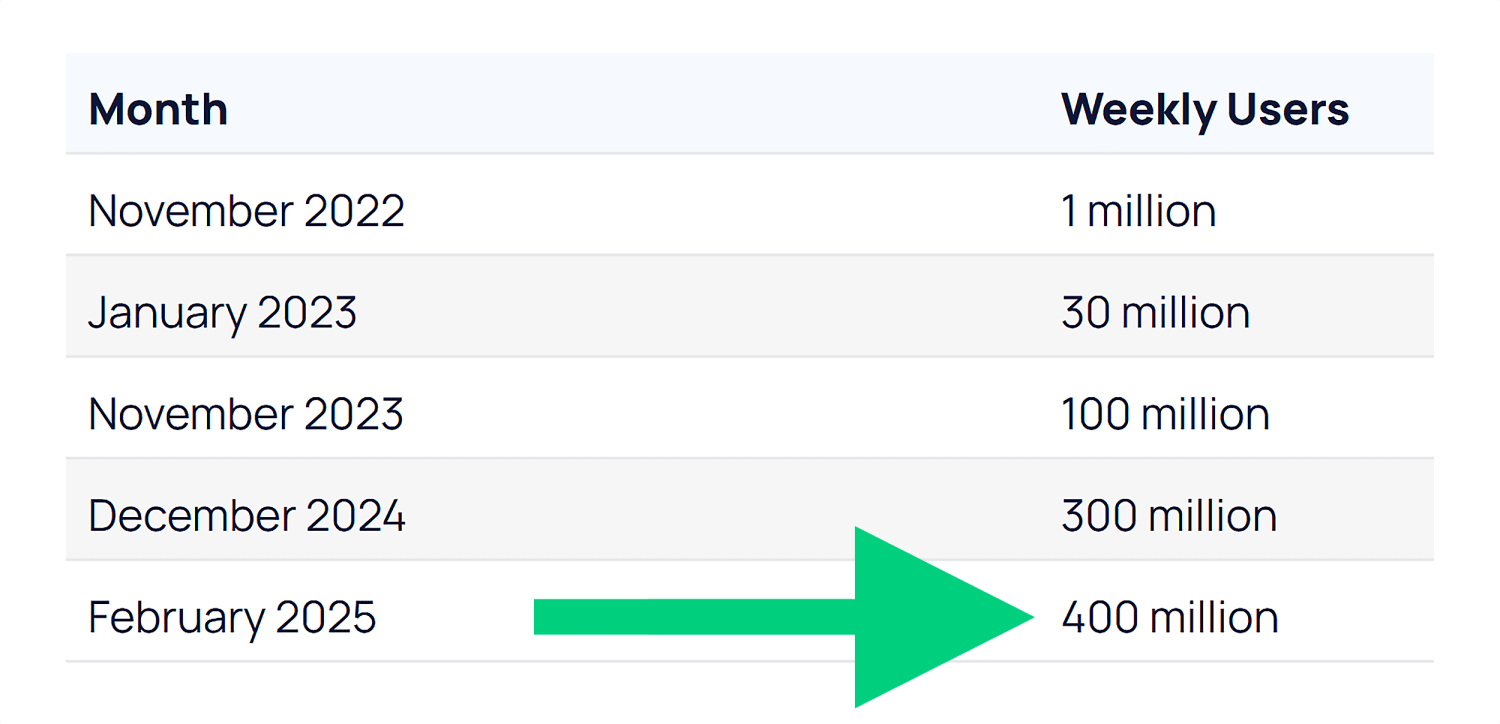
ChatGPT reached 100 million users faster than any app in history. And as of February 2025, it now has more than 400 million weekly users.
Google’s AI Overviews now appear on billions of searches every month — at least 13% of all SERPs.
And they appear for more than half of the keywords we track at Backlinko:
Generative engines are influencing YOUR audience too. So it makes sense to start optimizing for them now.
How GEO and SEO Work Together
Before we go any further, let’s get one thing straight:
You might look at this guide and think,
“Isn’t this just SEO with a different name?”
And honestly?
In many ways, it is. But there’s a reason everyone’s talking about it.
Terms like GEO, AEO (Answer Engine Optimization), and AIO (AI Optimization) have exploded in interest — because they reflect a real shift.
And with all the acronyms flying around, it can be tough to know who to listen to.
We’re not saying GEO replaces SEO.
But it does help reframe your strategy for how discovery works now — across AI tools, social platforms, and new surfaces beyond traditional search.
From Traditional SEO to Search Everywhere
Evolving From
Evolving To
SEO = Google Search
SEO = multi-surface visibility (Search, AI/LLMs, social)
Success = ranking for keywords
Success = being found across Search + Chat
SEO is a siloed function
SEO is cross-functional + connected to product, brand, PR, and social
Keyword-first content planning
Intent and entity-driven topic planning with semantic structure
Backlinks to pass PageRank
Traditional backlinks plus more focus on brand mentions and co-citations
Traffic as a core KPI
Visibility, influence, and conversions across touchpoints as core KPIs
Technical SEO as the foundation
Technical SEO as the foundation (with additional focus on JavaScript compatibility)
That means there’s good news:
If you’ve invested in good SEO, you’re already a lot of the way there.
GEO builds on the foundation of great SEO:
Creating high-quality content for your specific audience
Making it easy for search engines to access and understand
Earning credible mentions across the web
These same elements help AI engines decide which brands to reference.
But here’s the difference:
AI engines don’t work exactly like Google.
That means some of your tactics (and what you track) need to evolve.
So let’s walk through how to do that.
7-Step GEO Action Plan
We’re still in the early days of understanding exactly how AI engines pull and prioritize content.
But one thing is clear:
You need to adapt or reprioritize some traditional SEO tactics for Generative Engine Optimization.
The first three steps below cover overarching best practices for GEO.
Steps 4-7 cover optimizing content for generative engines specifically (and how to track your results).
Step 1. Nail the Basics of SEO
As I said earlier, good GEO is also generally good SEO. But not everything you do as part of your wider SEO strategy is as important for generative engine optimization.
Let’s focus on what really matters for generative engines.
Make Your Site Easy to Read (for Bots)
Crawlable and indexable: If AI tools can’t access your pages, you won’t show up in answers
Fast and mobile-friendly: Slow, clunky sites hurt UX — and your chances of getting cited
Secure (HTTPS): This is now table stakes, and it builds trust with users and AI systems
Server-side rendering: Some AI crawlers still struggle with JavaScript, so use server-side rendering as opposed to client-side rendering where you can
Show You’re Worth Trusting (E-E-A-T)
AI wants trustworthy sources. That means showing E-E-A-T:
Experience: Share real results, personal use, or firsthand knowledge
Expertise: Stick to topics you truly know — and go deep
Authority: Get quoted, guest post, or contribute to well-known sites
Trust: Use real author bios, cite sources, and include reviews or testimonials
Note: We’re not suggesting these AI tools have any sort of “system” built into them that aligns with what we call E-E-A-T. But it makes sense that they’ll prefer to cite content from reputable sources with expertise. This provides a better user experience and makes the AI tools themselves more reliable. Also, download our Free Template: E-E-A-T Evaluation Guide: 46-Point Audit
Step 2. Build Mentions and Co-Citations
AI systems don’t just look at backlinks to understand your authority. They pay attention to every mention of your brand across the web, even when those mentions don’t include a clickable link.
Backlinks are still important. But this changes how you should think about building your wider online presence.
Audit Your Current Mentions
Start by auditing where you’re currently mentioned. Search for your brand name, product names, and key team members across Google, social media, and industry forums.
Take note of what people are saying and where those conversations are happening.
You’ll probably find mentions you didn’t know existed. Some will be positive, others neutral, and a few might need your attention.
Also run your brand name and related terms through the AI tools themselves.
Does Google’s AI Mode cite your brand as a source for relevant terms?
Does ChatGPT know who your team members are?
What kind of sentiment do the answers have when you just plainly ask the tools about your brand?
It’ll let you track your LLM visibility (a by-product of good GEO) in top tools compared to your rivals:
The tool compares your brand to your rivals in terms of AI visibility, market share, and sentiment:
And it’ll show you where your brand strengths are and where you can improve:
Want to track your brand’s AI visibility? Get a free interactive demo of Semrush’s AI Toolkit to see how you can compare to competitors across ChatGPT, Claude, and other AI platforms.
Keep Building Quality Backlinks
Just because mentions are more important than before with GEO, it doesn’t mean you should abandon traditional link building. Backlinks still matter for SEO, and they often lead to the kind of authoritative mentions that AI systems value.
There are a few different definitions out there of co-citation and co-occurence.
I’ll be honest: the definitions don’t matter as much as the implications. I’ve seen one source define co-citations as the exact thing another source calls co-occurence. So for this section, I’m just going to talk about what these are and why they matter, without getting bogged down in definitions.
The first important way to think of co-citations/co-occurences is simply the mention of one thing alongside another.
In the case of GEO, we’re usually talking about your brand or website being mentioned alongside a different website or topic/concept on another website.
For example, if your brand is Monday.com, you’ll pick up co-citations involving:
Your competitors (ClickUp, Asana etc.)
Key terms or categories associated with your business (like “project management software”)
Specific concepts or questions related to what you do (e.g., “kanban boards” and “how to automate workflows”)
In Monday’s case, there are hundreds of pages out there that mention it alongside ClickUp and Asana in the context of “project management tools”:
This suggests to Google and other generative AI tools that Monday and ClickUp are both related to the term “project management tools” and are both popular providers of this kind of software.
The other common way to think about co-citations is mentions of your brand across different, often unrelated websites. For example, Monday being mentioned on Forbes and Zapier would be a co-citation involving them.
To sum it up:
If two (or more) brands/websites are often mentioned alongside each other, AI tools will assume they are related (i.e., they’re competitors)
If a brand is often mentioned in the context of a particular topic, concept, or industry, AI tools will assume the brand is related to those things (i.e., what you offer)
If lots of different websites mention a particular brand, the AI tools will assume that brand is worth talking about (i.e., probably trustworthy)
Obviously, there’s a lot more to it, but this is a fairly basic overview of what’s going on.
How to Put This into Action
To build citations, co-citations, and co-occurences:
Look for opportunities to get mentioned alongside your competitors. When publications write comparison articles or industry roundups, you want your name in that list. These co-citations help AI systems understand where you fit in your market.
Participate in industry surveys and research studies. When analysts publish reports about your sector, being included gives you credibility (and any backlinks are a bonus).
Get involved in relevant online communities. Answer questions on Reddit, contribute to LinkedIn discussions, and join industry-specific forums. These interactions create mentions in places where AI systems often look for authentic, community-driven insights.
The goal is to become a recognized voice in your space. The more often your brand appears in relevant contexts across the web, the more likely AI systems are to include you in their responses.
Step 3. Go Multi-Platform
Going beyond Google is something top SEOs have been telling us to do for a long time. But AI has made this an absolute must.
Platforms like Reddit, YouTube, and other user-generated content sites appear frequently in AI outputs.
So, a strong brand presence on these platforms could help you show up more often.
The benefits here are (at least) three-fold:
Being active on multiple platforms lets you reach your audience where they are. This helps you boost engagement, brand awareness, and, of course, drive more conversions.
AI tools don’t just look at Google search results. They pull from forums, social media, YouTube, and lots of other places beyond traditional SERPs.
Being active on multiple platforms means you’re less exposed to one particular algorithm or audience. Diversification is just good practice for a business.
Brian Dean did an excellent job of this when he was running Backlinko. That’s why you’ll see his videos appear in Google SERPs for ultra-competitive keywords like “how to do SEO”:
We’re taking our own advice here. In fact, it’s a big part of why we launched the Backlinko YouTube channel:
Here’s some quick-fire guidance for putting this into practice:
People go to YouTube to learn how to do things, research products, and find solutions to their problems. This makes product reviews, tool comparisons, and in-depth tutorials great candidates for YouTube content.
Podcast content and transcripts are beginning to surface in AI results (especially in Gemini). Building a presence here is a great opportunity to grab some AI visibility.
TikTok and Instagram Reels reach younger audiences who increasingly use these apps for search. Short-form videos that answer common questions in your industry can drive discovery, and AI tools can also cite these in their responses to user questions.
AI tools LOVE to cite Reddit as a source of user-generated answers (especially Google’s AI Overviews and AI Mode). To grow your presence on the platform, find subreddits where your target audience hangs out and share genuinely helpful advice when people ask questions related to your expertise. Don’t promote your business directly — focus on being useful first.
LinkedIn works similarly to Reddit for B2B topics. Publish thoughtful posts and engage in relevant discussions to help establish your voice in professional circles. These interactions can then get picked up by AI systems looking for expert perspectives.
Step 4. Find Out What AI Platforms Are Citing for Your Niche
What’s a powerful way to understand both what to create and what topics to target?
To simply learn what AI tools are likely to include in their responses to questions that are relevant to your business.
Start by directly testing whether/how your content appears in AI tools right now. Go to ChatGPT, Claude, or Perplexity and ask questions that your content should answer.
In the example below, Backlinko is mentioned (great), but there’s also a YouTube video front and center. And forums are appearing too. These are places we might want to consider creating content or engaging with conversations.
As you do this for your brand, pay attention to the sources they cite:
Are they commonly mentioning your competitors?
What platforms do they tend to cite? (Reddit, YouTube etc.)
What’s the sentiment of mentions of both your brand and your competitors?
As you do this, try different variations of the same question.
For example, you could ask “What’s the best email marketing software?”
Then try “Which email marketing tool should I use for my small business?”
Notice how the answers change and which sources get mentioned consistently.
In the example above, the first prompt mentioned MailerLite, which was absent in the list for small businesses. But the second prompt pushed Mailchimp to the top and mentioned three new options (Constant Contact, Brevo, and ActiveCampaign).
If you were MailerLite and trying to reach small businesses, you’d want to understand why you’re not being cited for that particular prompt.
Pro tip: Try it with different tools as well. They each have their own preferences when it comes to citing sources, so it’s a good idea to test a couple of them.
You can automate this process with tools like Profound or Peec AI. These platforms run prompts at scale, helping you understand how and where your brand appears. But they can be pricey.
That’s why I recommend you spend some time running these prompts manually at first.
By the way:
This isn’t just important for “big brands” or those selling products. You can (and should) do this if you run a blog, local business website, or even a personal portfolio.
For example, consultants and freelancers will find these tools often cite marketplaces like Upwork and Dribbble. If you don’t have a profile on there, you’ll likely struggle to get much AI visibility.
And if you’re a local business owner, you’ll often find specific service and location pages appear in AI responses:
This is useful for understanding the types of content you should be focusing on for GEO. Now it’s time to decide what topics to focus on in your content.
Step 5. Answer Your Audience’s Questions
The way people search with AI tools is fundamentally different from how we use traditional Google search. This changes how you should plan your content.
Traditional SEO taught you to target specific keywords. You’d create a page optimized for “healthy meal prep ideas” and try to rank for that phrase.
But what happens when people are instead searching for “what to cook for dinner when I’m trying to lose weight”?
The answer might involve healthy meal prep as a solution, but it’s a completely different prompt (not a search) that gets to that answer (not a SERP).
When you run these queries through Google’s AI Mode, you see two totally different sets of sources and content types.
For the “healthy meal prep ideas” query (which is a perfectly valid and searchable term), the focus is listicles, single recipes, and YouTube videos. And the format is categories (bowls, wraps, and sandwiches etc.) with specific recipes:
But for “what to cook for dinner when I’m trying to lose weight,” the sources are primarily lists, forum results, or articles specifically around weight loss.
In this case, the format of the answer is largely broad tips for cooking healthily and then some general cooking styles or meal types, rather than specific recipes:
As more users realize they can use conversational language to make their searches, longer queries will become more common. This makes this kind of intent analysis critical.
These longer, more specific queries represent huge opportunities. Most companies aren’t creating content that answers these detailed questions.
The more specific the question, the more likely you are to show up when AI systems look for authoritative answers. You want to own the long-tail queries that relate directly to your product or expertise.
But:
You obviously can’t reasonably expect to create content for every single long-tail query out there. So how do you approach this in an efficient way?
How to Choose the Questions to Answer
Start by listening to the actual questions your customers ask.
Check your customer support tickets, sales calls, and user feedback. These real questions from real people often make the best content topics — because they’re the same kinds of questions people will ask these AI tools.
Don’t have any customers? No problem.
Use community platforms to find these conversational queries. Reddit, Quora, and industry forums are goldmines for discovering how people actually talk about problems in your space.
Step 6. Structure Your Content for Generative Engines
AI systems process information differently than humans do. They break content into chunks and analyze how those pieces relate to each other.
Think of it like featured snippets but more granular, and for much more than just direct questions.
This means the way you structure your content directly impacts whether AI systems can understand and cite it effectively.
Note: A lot of what I say below is just good writing practice. So while this stuff isn’t necessarily “revolutionary,” these techniques are going to become more important as you focus on GEO.
One Idea per Paragraph
Keep your paragraphs short and focused on one main idea.
When you stuff multiple concepts into a single paragraph, you make it harder for AI systems to extract the specific information they need.
Also avoid burying important information in the middle of long sentences or paragraphs. Front-load your key points so they’re easy to find and extract.
And guess what?
It also makes it easier for your human readers to understand too. So it’s a win-win.
Use Clear Headings
Use clear headings and subheadings to organize your content logically.
Think of these as signposts that help both readers and LLMs navigate your information. And make sure your content immediately under the headings logically ties to the heading itself.
For example, look at the headings in this section. Then read the first sentence under each one.
Notice how they’re all clearly linked?
This is a common technique when trying to rank for featured snippets. You’d have an H2 with some content that immediately answers the question…
…and this would rank for the featured snippet for that query:
This is still a valid strategy for traditional search. But for GEO, you need to have this mindset throughout your content.
Don’t make every H2 be a question (this will quickly end up looking over-optimized). But do make sure the content that follows your (logical) headings is clearly linked to the heading itself.
Break Up Complex Topics into Digestible Sections
If you’re explaining a complex or multi-step process, use numbered steps and clear transitions between each part.
This makes it easier for AI systems to pull out individual steps when someone asks for specific instructions. And it’ll make it much easier for your readers to follow.
Also write clear, concise summaries for complex topics. AI systems often look for these kinds of digestible explanations when they need to quickly convey information to users.
Include Quotes and Clear Statements
Include direct quotes and clear statements that AI systems can easily extract.
Why is this worth your time?
Because pages with quotes or statistics have been shown to have 30-40% higher visibility in AI answers.
So instead of saying “Email marketing could be an effective channel for your business,” write “Email marketing generates an average ROI of $42 for every dollar spent.”
Note: Don’t just flood your content with quotes and stats. Only include them when they actually add value to your content and are useful for your readers.
Use Schema Markup
Schema markup gives you another way to structure information for machines. This code helps systems understand what type of content you’re presenting.
For example, FAQ schema tells algorithms that you’re answering common questions. HowTo schema identifies step-by-step instructions.
You don’t need to be a developer to add schema markup. Many content management systems (like WordPress) have plugins that handle this automatically.
Make It Scannable
Use formatting like bold text to highlight important facts or conclusions and make it easier for readers to skim your content. This helps both human readers and AI systems identify the most important information quickly.
This has always been a big focus of content on Backlinko. We use lots of images to convey our most important points and add clarity through visualizations:
And we use clear headings to make our articles easy to follow:
The goal is to make your content as accessible as possible to both humans and machines. Well-structured content performs better across all types of search and discovery.
And if your content is enjoyable to engage with, it’s probably going to do a better job of converting users into customers as well.
Step 7. Track Your Visibility in LLMs
How often are tools like ChatGPT, Perplexity, or Gemini mentioning your brand?
If you’re not tracking this yet — you should be.
Tracking your visibility in AI-generated responses helps you understand what’s working and where you need to focus your efforts.
But where do you start? And what should you track?
Manual Testing as a Starting Point
Start with manual testing. This is the simplest way to see how you’re performing right now.
Ask the same questions across different AI platforms, like ChatGPT, Claude, Perplexity, and Google (both AI Mode and AI Overviews). Take screenshots of the responses and note which sources get cited.
Do this regularly, and you’ll start to see patterns in which types of content get mentioned and how your visibility changes over time.
Honestly though: you’re going to struggle to get a lot of meaningful data doing this manually. And it’s not scalable. Plus, so much of what an AI tool outputs to a user depends on the previous context, like:
Past conversations
Previous prompts within the same conversation
Project or chat settings
This makes it challenging to get truly accurate data by yourself. This is really more of a “feel” test that, in the absence of dedicated tools, can provide a very rough idea of how generative engines perceive your brand.
Use LLM Tracking Tools
For more comprehensive tracking, dedicated tools can automate this process.
Platforms like Semrush Enterprise AIO help you track your brand’s visibility across AI platforms like ChatGPT, Claude, and Google’s AI Overviews.
It shows you exactly where you stand against competitors and gives you actionable steps to improve.
Competitive Rankings is my favorite feature. Instead of guessing why competitors might rank better in AI responses, you get actual data showing mention frequency and context.
Another option is Ziptie.dev. It’s not the most polished tool yet, but they’re doing some really interesting work — especially around surfacing unlinked mentions across AI outputs.
If you already have Semrush, then the Organic Research report within the SEO Toolkit does provide some tracking for Google AI Overviews specifically.
You can track which keywords you (or your competitors) rank for that have an AI Overview on the SERP. If you don’t currently appear in the overview, that’s a keyword worth targeting.
Tracking the keywords you do rank for in these AIOs over time can help you gauge the performance of your GEO strategy.
Why Talk to Your Boss (or Clients) About GEO?
You’ve seen the steps. Now you need a story.
GEO isn’t just a tactical shift — it’s a way to explain what’s changing in search without resorting to hype.
GEO helps you frame those changes clearly:
Traditional SEO still works
Your past investments are still paying off
But the bar is higher now
Visibility means more than rankings
Your brand needs to be mentioned, cited, and trusted across every channel
GEO gives you the framework to explain what’s changing and how to stay ahead of it.
You Need to Start Now to Stay Visible
This space is evolving fast. New capabilities are rolling out monthly.
The key is to start tracking now so that you can benchmark where you are and spot new opportunities as AI search matures.
Grow your presence by adding a GEO approach on top of your SEO efforts:
Continue optimizing for strong rankings and authority (AI still leans on this)
But now, prioritize content and signals that AI engines are more likely to reference directly
Want to learn more about where the world of search is heading? Check out our video with Backlinko’s founder Brian Dean. We dive into how search habits are changing and how you can build a resilient, multi-channel brand.
http://dubadosolutions.com/wp-content/uploads/2017/05/dubado-logo-1.png00http://dubadosolutions.com/wp-content/uploads/2017/05/dubado-logo-1.png2025-07-09 11:21:542025-07-09 11:21:54Generative Engine Optimization (GEO): How to Win in AI Search
Get the best of link building! We decided to put together all link building techniques we could think of. We currently have more than 60! Your feedback and ideas…
https://i0.wp.com/dubadosolutions.com/wp-content/uploads/2025/07/link-building-techniques-1-uD2vtI.png?fit=960%2C517&ssl=1517960http://dubadosolutions.com/wp-content/uploads/2017/05/dubado-logo-1.png2025-07-07 10:40:152025-07-07 10:40:1560+ link building techniques checklist [2025]
Or, worse — they get skimmed, misunderstood, and ignored.
But knowing how to create an SEO report that demands attention can change everything.
It’s not just a performance recap.
It’s a strategic tool that helps you build trust with decision-makers. Win bigger budgets. And keep your SEO efforts on track.
In this article, you’ll learn how to:
Create SEO reports that people actually read (and act on)
Tie SEO performance to business goals
Highlight wins and uncover growth opportunities
Free resource: Download our SEO Report Template. It has ready-made sections for tracking key metrics, visualizing performance, and presenting clear next steps.
What Is an SEO Report and Why Is It Important?
An SEO report is a tool for measuring performance and shaping strategy.
It tracks key metrics like traffic, rankings, and conversions.
Then, connects them to business outcomes, opportunities, and priorities.
A strong SEO report helps answer:
What changed?
Why did it happen?
What should we do next?
For example, let’s say you run SEO for a workplace furniture ecommerce company.
You notice a spike in traffic and rankings for your category page on ergonomic office chairs.
Here’s how a useful SEO report would break that down:
It’s a clear, focused snapshot that distills the data into what improved, why it happened, and why it matters.
How to Create an SEO Report That Drives Results
Too many SEO reports dump data without insight.
Traffic, rankings, and top pages might look impressive — but they don’t tell the full story.
And without context, stakeholders are left guessing.
The best SEO reports connect the dots. They tie performance to business goals, spotlight what’s working, and make the next move obvious.
Here’s how to build one that actually drives results:
Step 1: Determine the Stakeholders
Before pulling data or building charts, get clear on who you’re reporting to.
Knowing your audience should shape your whole report, from the SEO stats you’re using to how you communicate them.
Ask yourself:
Who will read this?
What do they know about SEO?
Who will be making the decisions?
What decision do I want them to make?
And here’s one more that’s just as important:
Have I asked what metrics actually matter to them?
A quick conversation can surface priorities that no dashboard will show you.
From there, tailor the format, metrics, and language accordingly.
(This is where many SEO reports go sideways — too much data, not enough direction.)
Here’s a quick breakdown of how to match your audience to your data and format:
Stakeholder
What They Care About
What to Show
Format Tips
CMO / Exec
Revenue, ROI, brand authority
Conversions, organic-assisted revenue
Keep it short, visual, and business-focused
Marketing Team / Managers
Channel performance, goal tracking
Traffic trends, keyword growth, top pages
Include takeaways and next steps
Product Team
Feature discovery, UX gaps
Search query trends, on-page feedback
Highlight qualitative insights and opportunities
Small Business Client
Clear wins, reviews, local visibility
Local rankings, top queries
Use plain language and short summaries
For example, if your primary audience is a CEO or CMO, you probably wouldn’t lead with details about unindexed pages or on-page engagement time.
Likewise, a report for a small business owner with zero SEO background shouldn’t be packed with complex metrics or jargon.
They need simple wins, clear summaries, and next steps they can act on.
Pro tip: When your SEO report serves multiple audiences, prioritize what matters most to decision-makers — like ROI, growth, and performance. Then, layer in tailored insights for other teams (product, content, dev, etc.) in separate sections or an appendix.
How to Report to Non-SEO Audiences
Working with clients who don’t speak SEO?
You can help them level up their knowledge by translating industry terms into easy-to-understand language.
Add simple explanations to your reports and introduce new concepts one at a time.
Here are three ways you can do this in your SEO reports:
1. Include key takeaways to clarify complex points.
2. Add links to educational resources on SEO concepts.
3. Add short videos with explanations of the client’s data or performance.
Step 2: Decide Which Metrics Matter Most
Start with the key SEO metrics every report needs, no matter the audience.
Metric
Why It Matters
Conversions
Connects SEO to real business results. Key for proving SEO ROI.
Organic traffic + engagement (including click-through rates and average position)
Shows how well your pages attract and keep search visitors — great for spotting what’s working.
Organic impressions
Highlights search visibility and signals growth or dips in core topics
Keyword trends (rankings, top non-branded keywords)
Shows what’s gaining traction and where to focus next. Helps spot cannibalization or decay.
Backlink profile health
Keeps tabs on link trust and growth. Important for authority.
Technical health
Identifies site issues that hurt SEO. Vital for maintaining crawlability and indexability.
SERP features
Tracks special placements that boost visibility (e.g., featured snippets, video results, or shopping carousels)
LLM visibility
Shows brand mentions and citations in AI tools like ChatGPT, Gemini, and Perplexity — key for influence in AI-driven discovery.
You can find the majority of your must-have metrics in SEO tools like Google Search Console (GSC) or Semrush.
Add-On SEO Report Metrics
Once you’ve covered the essentials, you can layer in additional metrics depending on your team’s strategy and goals.
If you’re prioritizing:
Include metrics like:
User engagement
Scroll depth, bounce rates, dwell time, and GA4 engagement metrics
Topical authority
How well your content ranks for key themes
E-E-A-T signals
Mentions, expert authorship, branded searches, trust indicators (e.g., social shares)
Content library ranking efficiency
What % of your pages rank in the top 10 to guide pruning or reinvestment.
Further reading: Curious about some of these add-on metrics? Check out our guides on bounce rate and dwell time.
Step 3: Turn Raw Data Into Actionable Insights
Raw data doesn’t drive decisions — clear stories do.
Knowing how to create an SEO report means turning numbers into narratives.
It needs to clearly tell a story around these questions.
Is our SEO strategy working?
What changed?
Why did it change?
What should we do next?
One of the best ways to tell the story is through time-based comparisons.
Show how SEO performance has changed month-over-month (MoM), quarter-over-quarter (QoQ), or year-over-year (YoY).
Highlighting changes over time makes it easier for stakeholders to spot trends. And understand why they matter.
For most SEO teams, the challenge isn’t collecting data. It’s translating it into context stakeholders care about.
Raw numbers might make sense if you’re inside the tools every day.
But executives and cross-functional teams need more than charts. They need meaning.
The best reports go beyond what changed. They explain why —and connect the dots to business impact.
Like this:
Metric
Increase Might Mean
Decrease Might Mean
Organic traffic + engagement (CTR, avg. position)
Higher rankings or better-optimized content
Rankings drop or poor user experience (UX)
Organic impressions
More visibility in search
Lost rankings or SERP features
Keyword trends
New or improved keyword rankings
Declining rankings or outdated content
SERP features tracking
Gaining authority in SERPs
Dropped from features or lost relevance
Conversions
SEO traffic is converting better
Traffic mismatches or UX issues
Backlink profile health
More quality links or mentions
Lost links or declining authority
Translate percentages and numbers to what actually happened:
What new pages were published?
Did your development team ship technical fixes?
How many backlinks were earned?
Are algorithm changes or seasonal searches a factor?
Most importantly, link the SEO impact to business terms.
For example, let’s say your top product page jumped from position No. 9 to No. 3.
In the same month, inbound demo requests doubled.
That’s not just a ranking improvement. It’s a signal that higher visibility on the right terms is driving qualified traffic.
In this case, the takeaway isn’t just “rankings are up” — it’s that SEO is contributing directly to revenue growth.
Step 4: Showcase the Results
A great SEO report doesn’t overwhelm your reader — it guides them.
It frames wins. Flags issues. And makes the next move crystal clear.
Executive Summary
Start with a snapshot that shows where things stand.
The Executive Summary gives a high-level view of key metrics and overall performance trends.
So, stakeholders can get the big picture fast.
Keep it sharp and clear. Spotlight what’s working, what’s driving it, and where to go from here.
Performance Metrics
This section covers your core SEO performance data — like traffic, rankings, keywords, and backlinks.
Include context and key takeaways.
When showcasing trends, show the progress over time, not just one-off wins.
And use visuals as much as possible.
Charts, graphs, and annotated screenshots really can make your performance insights pop.
Next Steps
What needs to be tackled next?
Here’s your chance to include those thoughts for your stakeholders.
Include clear, actionable recommendations, like a fresh SEO audit or doubling down on high-performing content.
Appendix
This optional section includes deeper data for teams, stakeholders, and ongoing projects.
It helps keep the main report focused, while still delivering the context others may need.
Bonus move: Once your report is done, record a short walkthrough to present it. It’s a great way to highlight key takeaways, explain the big picture, and guide stakeholders through anything they might overlook.
Mistakes to Avoid in Your SEO Report
Even with the right data, your SEO report can still fall flat if it’s hard to interpret, misaligned with business goals, or missing a clear takeaway.
Here are some common mistakes to avoid — and how to fix them.
Reporting Data Without Context
Don’t just drop data into your report. Make it meaningful.
Show how it relates to business goals and your site’s overall SEO performance.
For every metric, briefly explain what it means, why it matters, and what action it might prompt your team or your client to take.
Surfacing Issues Without Providing Solutions
Reporting on every issue isn’t helpful unless it impacts your site’s SEO performance.
For example, say you note that a group of pages are experiencing index issues.
Include a hypothesis on why this is happening and how you might recommend fixing it.
Listing Every Keyword Ranking
A full list of keyword shifts (especially minor ones) can bury your most important wins.
Instead, spotlight high-impact keywords — non-branded terms driving traffic or tied to revenue pages.
Including Every. Single. Page.
Reporting on every page creates noise, not insight.
Focus on the top 10 pages for organic traffic, or spotlight the top page in each key topic cluster.
Ignoring Business Outcomes
Your report might show SEO progress. But, does it show business progress?
Tie your work to signups, revenue, pipeline, brand visibility — whatever matters to your decision-makers.
Telling, Not Showing
You shared the data. But did you explain the story?
Use visuals, comparisons (e.g., MoM or QoQ), and commentary to walk the reader through what changed, why, and what’s next.
Show the Impact. Earn the Buy-In.
SEO reporting isn’t just about checking a box.
It’s your opportunity to show impact, earn trust, and steer strategy.
Surface insights that get stakeholders aligned and excited about what’s possible.
http://dubadosolutions.com/wp-content/uploads/2017/05/dubado-logo-1.png00http://dubadosolutions.com/wp-content/uploads/2017/05/dubado-logo-1.png2025-07-01 15:16:092025-07-01 15:16:09How to Create an SEO Report That Wins Trust (and Budgets)
We’re excited to announce the launch of the new Search Console Insights report. The new report offers
even more insights and a deeper integration with Search Console’s Performance report.
With this change, we aim to streamline your workflow, make it easier to find opportunities to improve your
site’s performance, and provide more ways to explore specific areas of interest.
https://i0.wp.com/dubadosolutions.com/wp-content/uploads/2021/12/web-design-creative-services.jpg?fit=1500%2C600&ssl=16001500http://dubadosolutions.com/wp-content/uploads/2017/05/dubado-logo-1.png2025-06-30 05:00:002025-06-30 05:00:00The new Search Console Insights report is here
Content production seems quite simple, in principle. You develop an idea, write about it, do SEO checks, and click publish. Simple, right? It never turns out that way, especially when working with a team. Miscommunications, last-minute changes, and confusion about what needs to happen when. We’ve all been there! Try these ten tips to streamline your digital content workflow and eliminate much stress.
Before we start, remember that the ‘perfect’ content workflow probably doesn’t exist. After all, every piece of content is unique, so a one-size-fits-all process is unlikely to produce the highest quality results. If your high-quality, unique content is taking forever to finish, you might struggle to meet deadlines or keep to a schedule. If that sounds like you or your organization, take a look at our tips and see how you can improve.
1. Start the process with clear goals
Whether you’re working alone or as part of a bigger team, it’s important to have a clear idea of all the steps involved and how long each step might take. Not every digital content process is the same. For instance, social media posts don’t need to be optimized for search engines, while blog posts targeting organic traffic do. Regardless of your end goal, the first step is always to start with clear goals.
Want to cover all your bases? Try to answer as many of these questions as you can, as clearly as you can:
What topic are you focusing on? How in-depth will you go?
Who are you writing for? Who is your audience?
What are you trying to achieve? More website visits, increased sales, and more social shares?
How will people be able to find your content? Where will you share it, and when?
If you specify your ideas and plans clearly at the beginning, it can help you and your team align your plans. It also helps you to stay on track, which can save you a lot of back-and-forth later on!
If you’re working in a team, our next tip is as important as the first. Why? Even if you’re clear about your goals, does everyone involved agree with your action plan? That’s why you need to identify your essential contributors and key stakeholders.
Depending on how big your organization is and how well-developed your process is already, making a list of contributors and stakeholders could be a lot of hard work, or a total no-brainer. If you sometimes find that your digital content workflow reaches a bottleneck (or descends to total chaos) because blockers arise from unexpected sources, it could be a sign that you need to do more work in this area.
Once you’ve come up with your plan, it’s a good idea to share it with any essential colleagues who need to give approval in the end before you start doing the real work. If you can get these people to agree with your initial plan, you can refer back to this later to explain creative choices and decisions you might need to make. When you let key parties know what to expect, you can avoid a lot of “What is this? What were you thinking?” kind of conversations.
3. Visualize your content workflow
It can be beneficial to visualize your content workflow, even if it seems daunting. At a minimum, you should write out the basic steps. If you add boxes and arrows to link the steps together, this can help to make the journey through the steps clearer (especially if there are moments when you need to loop back and repeat an earlier step). You can create this however feels comfortable to you — you could choose basic office software like Microsoft Word or Google Docs (Yoast SEO has a handy Google Docs add-on), you could try more advanced software like Visio or Lucidchart, or you could sketch it out on paper. It’s up to you!
For instance, your workflow could look like the first example written out in steps, or like the image below if you use a visualization tool. If, like us, you’re working in WordPress or Google Docs with the Yoast SEO plugin enabled, you can incorporate the features that you use into your workflow too.
Use Yoast SEO in Google Docs
Optimize as you draft for SEO, inclusivity, and readability. The Yoast SEO Google Docs add-on lets you export content ready for WordPress, no reformatting required.
4. Assign activities and responsibilities to team members
Even if you have a solid content workflow on paper, it’s important to ensure that each time you go through it, everyone is clear about who is doing what. Not only that, but how and when will different team members communicate with each other to hand over tasks or ask questions? Clearing these kinds of things up in advance can save a lot of hassle for everyone involved.
If these tasks aren’t a regular part of your team’s working day, they’ll also need to manage their own schedule to accommodate the tasks. If so, make sure that they have time to work on your planned content. It’s also worth checking what other priorities your contributors are juggling, as these could prevent progress if they become too demanding. Maybe you have the authority to make your planned content a top priority. If that’s your intention, make sure everyone involved knows that this should be #1 on their to-do list!
5. Set sub-deadlines and contact moments
Naturally, you’ll want to set a deadline for when your content is going to be published. But if you think you can just send out an initial set of instructions, with one final deadline for all the tasks, and nothing concrete in between… Then things are quite likely to go wrong.
To achieve a much more reliable plan of action, you should include sub-deadlines and contact moments at key points in the content process. These help to keep everyone’s work aligned as the piece of content is developed, and can help you to avoid process bottlenecks by identifying issues early on. It’s also wise to schedule your own internal deadlines to have your content ready at least a week before you intend to publish it. That way, you can avoid last-minute changes (and all the mistakes that are likely to come with them). We’ll come back to this point later.
6. Agree on standards and priorities
So at this point, if you’ve followed all of our tips, you might be planning in sub-deadlines like ‘rough draft is ready’ or ‘final draft for approval’. Before you build all your hopes and dreams around these mini-deliverables, you’ll need to clarify how rough this rough draft can be! After all, you don’t want to end up disappointed because you only received a basic article outline and a few bullet point lists when you were expecting something almost finished.
If you’re using tools like Yoast SEO, you’ll also want to make it clear what results are acceptable to you: for instance, do you expect the readability analysis to always be green, but the SEO analysis doesn’t have to be when it’s not written for ranking purposes? Do you expect the internal linking suggestions to be added as a requirement, or are these just to be used as suggestions? Make sure everyone agrees about how you use your tools and what the end goal is.
7. Allow time for final checks and changes
If you have a regular content publishing schedule that you want to keep to, it’s a good idea to prepare your drafts with a decent amount of time to spare. That way, you can avoid stressing about deadlines and last-minute changes. Here are a few things that really ought to be on your pre-publication checklist, especially if they’re not already incorporated in your content development process:
Check the SEO of your post using the Yoast SEO analysis. Is it good enough?
Check the readability of your post using the readability analysis. Is it good enough?
Have you added internal links to and from other relevant pages on your site?
If you use tags/categories, have you selected all the right options?
Are comments enabled/disabled according to your preferences for this post?
Is the correct date/time set for your post?
Using Yoast SEO in Google Docs makes it much easier to work across teams
As you can see, there’s quite a lot to do even after a post is written, so don’t underestimate how long these checks will take.
Got a good basic content process, but still having issues? This is what to check:
8. Do you create unnecessary work?
Sometimes tasks become more complicated than they really need to be. Are there times when one small change causes a cascade of new issues to deal with? This can be a sign that you need to rethink the order of your steps and who is involved. Small changes should be easy, right?
Often, it’s obvious who should be doing what and how the process should continue. But it’s not always. For instance, if you have a graphic design team, do they need to make every change themselves? Can you make things easier by enabling your writing team to change text and background colors themselves, for instance?
Another type of problem can arise if you don’t have a clear decision-maker in place. Sure, there might be lots of people who should have a say about the content in the end. But who makes the final decisions? If it’s not clear who is responsible for which decisions, you might end up with all your best experts trying to reach an agreement about every little thing. That can be tricky, and it can waste loads of time! Make it easier by giving specific individuals ownership of specific aspects of the process.
9. Are things not going according to plan?
Sometimes things go wrong, in spite of your best efforts. But if things are often going wrong in your content production process, you should investigate the cause of your problems. It’s always a good idea to reach out to the people involved in the steps that are going wrong. What challenges are they facing? Does the existing process make things easier for them or more difficult? And very importantly, ask if they have any ideas to improve the process!
Don’t be afraid to try something new if what you’re doing isn’t working. Even if your new idea doesn’t work out any better, you can always learn from it and try something different next time! Or put it this way: trying anything is better than burying your head in the sand and continuing with a broken content development process.
10. Doing extra tasks that aren’t part of the plan?
Last but not least: are you making life harder by adding in ‘nice-to-have’ extras that weren’t part of the plan? It’s an easy mistake to make! After all, when you really care about the content you’re creating, your natural instinct is to keep improving and make it the best that it can be. Even though that means making a whole new infographic. Even though that infographic wasn’t a part of the original plan. Your team can make it happen, right? Or else you can just push the deadline back…
It’s great to aim high when it comes to making quality content. But if you’re ambitious, late-arriving ideas become a burden to the process, you might want to start categorizing them into “must-have” and “nice-to-have” content elements. That way, everyone knows which parts to prioritize and which parts can be left out if they’re too difficult to achieve within the original plan. And don’t forget that one of the biggest advantages of publishing digital content is that you can continue to improve it and share it again whenever you want!
Streamline your content workflow, but don’t let it rule you!
Those are our ten tips! It can be really worthwhile to streamline your content workflow, especially if you’re experiencing issues and bottlenecks in the process. Naturally, every situation is different, and each piece of content comes with its own opportunities and challenges, too. So you need to think about what works for you and what doesn’t in order to adapt your content process.
Try to keep a balance and avoid making a content process that’s too strict or inflexible. You don’t want to set up a rigid process that dictates your editorial decisions and rules your creative output. It’s a creative process, after all! So it’s always good to keep some room for flexibility, but just how much is up to you.
Remember: whatever your content workflow looks like, WordPress, Google Docs, and the Yoast SEO plugin can help you! From your main topic and focus keyphrase, through to the final touches you add just before publishing, the tools can form checkpoints to easily align your team and your goals.
http://dubadosolutions.com/wp-content/uploads/2017/05/dubado-logo-1.png00http://dubadosolutions.com/wp-content/uploads/2017/05/dubado-logo-1.png2025-06-27 11:00:212025-06-27 11:00:2110 tips to streamline your blog content workflow