2025 Organic Search Engine Trends: How Search is Evolving for AI and LLMs

If you’re not paying attention to search trends, you’re already falling behind. And in 2025, falling behind means losing visibility, traffic, and revenue, often to the tune of thousands (or millions) of dollars.

Some marketing pros and SEOs still haven’t learned this lesson. Maybe they don’t have the budget to invest in video, or a specific algorithm update doesn’t move the needle enough to get their attention. 

And there are still CMOs who think AI doesn’t pose a big risk to their strategies, and other C-suite members continue to ignore the sunk cost fallacy.

Trends matter, though. Staying ahead of the curve matters. And right now, that curve is moving fast. Miss one core update or shift in user behavior, and you’re already behind. A single minute’s hesitation could set you back months. 

The SEOs who are proactive, not responsive, are the ones winning big.

Take AI Overviews and Search Everywhere Optimization, for example. These trends have taken off and will continue to define the future of search. Let’s look at these and other big trends dominating search.

Key Takeaways

  • AI search has spread beyond Google. ChatGPT, TikTok, and YouTube are now regular search platforms for users.
  • 44 percent of sites have seen flat or declining traffic since AIOs launched.
  • Zero-click will make featured snippets, AI Overviews, brand mentions, and conversational content key.
  • Brand mentions have serious SEO value. As much as 78 percent of marketers consider them a key visibility factor in 2025.
  • Winning in search now means adopting a Search Everywhere Optimization strategy that spans AI tools, video, social, and traditional search engines.
  • See the full report on the NP Digital website.

Our Methodology

We talked to two groups to better understand how AI and other trends impacted how people used search; in one survey, we spoke to 1,000 American adults with general questions. In addition, we reached out to 600 American full-time professionals who worked in marketing, market research, sales, and advertising.

AI Overviews Take Center Stage After Some Growing Pains

Google’s AI Overviews (AIOs) had a rocky start, but they’re not going anywhere.

After rolling out globally in May 2024, AIOs quickly took a spot in all kinds of search results, but not without hiccups; in our survey of general adults, users got answers faster, but they weren’t always better. Almost 25 percent of users reported major errors. Over 50 percent said their biggest issue was just flat-out inaccuracy, to the point of danger.

A screenshot of a social media post of an AI overview claiming that John Adams graduated from UW-Madison 21 times.

(Image Source

That said, most users (almost 75 percent) haven’t noticed major problems. And despite some early skepticism, AIOs are already shaping how people consume content in search, with some fears that web traffic will fall off as the search giant continues its efforts to keep users on the SERP instead of clicking through.

From a traffic perspective, our survey showed 44 percent of marketers reported decreased web traffic since AIOs launched. With that said, 48 percent saw a revenue boost from ads and affiliate links. It’s a strong signal that AIOs are about more than visibility changes; they are changing the rules of the game.

So, how do you get your content to show up in AIOs? The structure matters. No matter what you (or your content team) are writing, start by focusing on:

  • Clear, concise answers high on the page
  • Use of headings to mirror search queries
  • Schema markup that clarifies context
  • High E-E-A-T (experience, expertise, authoritativeness, and trustworthiness) signals
  • A conversational tone (yes, even in technical content)

And don’t forget freshness. AIOs pull recent, relevant content first.

Showing up in AI Overviews is more than just bragging rights. It’s taking up a valuable position in the new top-of-SERP real estate. Ignoring AI SEO and failing to optimize for it just gives visibility away.

How Marketers Can Work Around Zero-Click Search

AI Overviews are part of the growing wave of zero-click searches. In a zero-click world, users get their answers directly on the SERP; no further reading necessary. Featured snippets, local packs, people-also-ask boxes, and AIOs have all made organic traffic harder to win.

But that doesn’t mean you’re out of options.

Marketers are adaptable, and this development is no exception. Forty-three percent of marketers have changed their content strategies to respond to this shift. 

A graph showing how marketers are adapting to AI overviews.

Their focus now? Clear, scannable content that answers questions upfront. Structured data, brand mentions, and conversational formats are more important than ever.

The goal isn’t just to rank. It’s to show up in the spots users see first. 

Google’s New AI Mode Is Here

Google’s AI Mode officially rolled out to all U.S. users in May 2025, and it’s already changing how people interact with search.

AI Mode flips the switch on how Google displays search results. Instead of the classic link list, users now see AI-generated summaries by default, especially for complex or open-ended queries. 

According to Google, the goal is to “make search smarter and more helpful with generative AI.” Their idea is to offer a faster path to answers, context, and decision-making.

The reaction? Cautiously optimistic.

Our survey shows over 57 percent of marketers already knew about AI Mode’s debut. Of those, 74 percent believed it could improve the overall search experience, with nearly a third expecting “notable” usability improvements.

But user experience isn’t the only concern. It’s a signal to marketers, too. AI Mode will likely increase zero-click results and shift keyword targeting strategies. That will push creators to optimize for summaries, not just snippets.

According to Nikki Brandemarte, Sr. SEO Strategist at NP Digital, one of the best ways to optimize for AI Mode is to focus on tactics we’ve known work for a while, but even more.

Lock in on featured schema, prioritize context-rich introductions, and use conversational formatting. Freshness and clarity win the day, too, so regularly revisit your content and adjust it. Or write something new and authoritative. That’s especially important, since AI Mode can now source information published within the last 24 hours.

A screenshot of a Google AI mode result for the query "summarize the latest seo and ai news from the last 7 days.".

Brandemarte explains: “[AI Mode] is designed for users to ask more complex, multi-part questions that go beyond basic information provided by traditional AI overviews. These more comprehensive, better-structured answers expand on AIOs and overlap.”

The bar is higher. But if your content is clear, helpful, and well-structured, AI Mode can amplify your visibility (not erase it).

AI Search Is Spreading as a Concept

AI-powered search didn’t stop with Google, and it’s not going to, either. We’re now in a landscape where search is becoming a feature as opposed to a destination.

AI search is everywhere: ChatGPT, Microsoft Copilot, and even AI-driven tools built into apps you open every day, like Reddit, TikTok, or YouTube. Thirty percent of our surveyed general online users now turn to ChatGPT or SearchGPT at least 10 times a week. 

On the marketer side, 74 percent actively watch ChatGPT, and 41 percent track Microsoft Copilot.

A graphic showing AI-powered search platforms marketers are focusing on.

That shift is actively reshaping user behavior. AI summaries are now the first impression. Thirty-one percent of users trust AI summaries more than traditional search results. 

Regardless of your thoughts on AI search’s efficacy and accuracy, it’s a trend you can’t ignore.

How to Minimize Risk and Stay Visible

If your brand isn’t visible across multiple ecosystems, you’ll be left behind. That’s the ethos behind Search Everywhere Marketing, and we take it very seriously. 

Right now, only 51 percent of our surveyed marketers are actively tracking their brand visibility in AI search platforms. This is despite the fact that out of our surveyed marketers, brand visibility tracking was seen as the most popular way it would impact search strategy in the next year (45 percent). That means that there’s a shift many marketers know is coming, but aren’t prepared for.

A graphic showing methods on how users want to track AI search visibility.

What can you do if you’re in that group? Well, here’s how to catch up:

  • Monitor traffic shifts with Google Analytics and Search Console (GSC). They’re still your first red flags.
  • Set up trend logging to detect drops or spikes in branded queries.
  • Use social listening tools to track brand mentions in places like AI Overviews and conversational search results.
  • Build brand mentions through PR and content syndication. More than three-fourths of our surveyed marketers say brand mentions are vital for SEO, so this is no longer optional.
  • Lean into conversational content. Google and AI platforms favor content that answers naturally phrased questions.
  • Finally, invest in structured data and featured schema to improve your odds of being cited directly in AI results.

The bottom line is that visibility isn’t about blue links alone anymore. Your content has to be everywhere that people ask questions, even if they never click.

A screenshot of an AI mode summary for the query "are the blue links no longer relevant?"

Marketers Need to Find Ways to Start AI Visibility Tracking

If AI-driven search is the future, visibility tracking is how you future-proof your content.

Right now, most AI platforms don’t offer direct analytics. You won’t find a neat report in Google Search Console labeled “AIO Clicks.” Even though people have asked (repeatedly). 

That’s a problem. As AI summaries and chat-based search tools like ChatGPT take up more screen space, marketers are beholden to something like a vibes-based approach.

As we noted above, only 51 percent of marketers track brand visibility in AI search. The rest are either exploring tools (38 percent) or not tracking at all. That’s a big visibility gap, but it’s also where you can find a competitive advantage:

Until native tools catch up, marketers have a blend of tactics. You can try to monitor traffic shifts in GA and GSC for early signals and use social listening platforms to track branded mentions and snippets. 

Savvy users of platforms like Semrush can use it to help track AIO appearances, too. For priority keywords, log trends manually if necessary (even via screenshots). 

AI visibility isn’t going away. Don’t neglect it.

Screen shot detailing Semrush organic research data on the URL neilpatel.com/blog

Along with existing SEO tools and program suites, there are other products that are designed to meet the specific needs of the AI space. Profound is an AI search optimization tool designed to track important AI-related performance metrics like AI search such as sentiment, citation frequency, and AI share of voice.  

Source: (Image Source)

Finally, monitor referral traffic from LLMs like ChatGPT or Perplexity. Currently, 24 percent of marketers have seen consistent traffic from those sources. 

Google is still important (as our own VP of SEO Nikki Lam attests), but we’re entering a whole new world of attribution.

Google vs. LLM Referral Traffic: What’s Coming Out on Top?

For the first time in decades, Google isn’t the only game in town for search-driven traffic.

LLMs like ChatGPT, Perplexity, and Claude have started to chip away at Google’s dominance. Given that nearly a third of users say they use ChatGPT or SearchGPT per week, and how many marketers see consistent referral traffic, the shift is subtle, but it’s happening: It’s not just curiosity. It’s a behavior change.

Ready for something even more telling? As much as 34 percent of marketers believe AI tools will account for 25 to 50 percent of search activity within the next year. Some think the number could go even higher.

Keeping your brand discoverable as LLMs grow is absolutely vital, but it’s not as complex as you’d think. 

We’ve touched on many of the tactics already: Focus on meeting conversational queries with clear, fact-rich content. Monitor your referral traffic from known LLM browsers and tools. 

Most importantly, diversify your strategy. Think beyond “ranking” and more about being referenced.

Short-Form and Conversational Content Are at a Premium

In a world of AI summaries and zero-click search results, brevity is everything.

Short-form, conversational content is easier for AI models to parse, summarize, and cite. If your post or article buries the answer in paragraph five, you probably won’t be featured in AI Overviews (or any other generative snippets).

Tactics like including FAQs, key takeaways, and “too long, didn’t read (TL;DR)” sections are almost mandatory. AI tools seek out and prioritize structured, scannable, and intent-matching text blocks. 

Nearly 42 percent of marketers already optimize new content for conversational queries, and 58 percent are refreshing their existing content to meet these new standards.

But keep one thing in mind: This isn’t about “dumbing things down.” Instead, it focuses on getting to the point—fast—and in a way that mimics how users ask questions out loud.

What can you do to help? Use headers that sound like real questions. Keep your answers clear and focused. When possible, use schema markup to reinforce the content’s structure.

Our TL;DR? Keep it short, smart, and skimmable if you want to be quoted.

Key Takeaways from a recent Neil Patel blog demonstrate a TL;DR approach to sharing information
Our Key Takeaways from a recent blog demonstrate a TL;DR approach to sharing information.

Tailoring Your Content to Fit Preferred Platforms

Ranking alone isn’t enough. Your content also needs to fit where your audience is searching.

Depending on your brand and audience, that might look like long-form blog posts to show up in Google, or it could mean creating vertical videos for TikTok. Other solutions could include product explainers on YouTube or visuals to engage Instagram users.

Younger audiences have already begun to shift search behavior. Platforms like TikTok, YouTube, and Instagram are their go-to sources for product discovery, how-tos, and health information. Sixty-seven percent of Gen Z users prioritize Instagram for search, while 62 percent focus on TikTok. As a result, over 63 percent of marketers have already started to optimize or test content for these channels.

How can you keep up?

Start by adapting your message to the format. Use generative engine optimization (GEO) for AI search, vertical video for TikTok and Reels, and snackable visuals for platforms like Pinterest and Instagram.

An overarching strategy that uses different platforms to meet the same goal: Meet your users where they are and speak their language.

Backlinks vs. Brand Mentions: Where Should Marketers Focus?

Backlinks have long been a pillar of SEO and still matter a lot. But the AI-driven, zero-click environment emphasizes and incentivizes brand mentions, too. What’s the difference between them?

  • Backlinks are clickable URLs that pass SEO equity.
  • Brand mentions are unlinked references to your company or product. Think name-drops in articles, podcasts, and social posts.

Google has hinted for years that brand mentions influence trust and authority. With AI platforms pulling in content and citations differently, those mentions are more valuable than ever.

Seventy-eight percent of marketers in our survey say brand mentions are at least “moderately important” for visibility. Thirty-two percent call them “extremely important” signals. 

They’re so important that over 65 percent of marketers are already prioritizing mention-building with PR, guest posts, social campaigns, and influencer outreach.

So, which one should you focus on more? Mentions or links?

Both still matter, but the emphasis or split depends on your niche. E-commerce brands, for example, often see big returns from unlinked mentions in product roundups or reviews. B2B brands may still rely more heavily on authoritative backlinks. 

The balance lies in knowing which one to prioritize and when.

Search Engine Optimization Evolves to Search Everywhere Optimization

Let’s be real. Google isn’t the only place your audience is searching anymore. That means traditional SEO—a Google-focused effort—isn’t enough. As we’ve touched on above, what you need now is Search Everywhere Optimization.

The concept is simple, and it’s something many marketers have done for years, if not as a focus: Instead of optimizing for Google’s algorithm alone, make sure your content is discoverable wherever your audience hangs out online.

According to our survey, more than 60 percent of users regularly search on at least one non-Google platform (ChatGPT, Reddit, TikTok). 

Meanwhile, 55 percent of marketers say they’re investing in alternative traffic channels like paid social, email, or native ads to counterbalance any potential losses thanks to AI search.

What does this look like in practice?

  • Publishing educational content on YouTube and optimizing Shorts
  • Creating bite-sized, searchable videos for TikTok and Instagram Reels
  • Building credibility with appearances on podcasts and community platforms like Reddit
  • Getting cited in AI tools like ChatGPT
  • Using email and push notifications to bring users back to you
A screen shot detailing NP Digital's approach to Search Everywhere Optimization

Remember, we’re not abandoning SEO. We’re expanding our strategy.

Conclusion

AI has turned the world of search completely upside down, and there are still a lot of variables to account for. But that doesn’t mean you can’t proactively start taking steps to position your brand for success. 

Last year, we mentioned that content volume isn’t as important as content quality. That’s still true. Keep a regular cadence but focus on shorter, quality content that AI Overviews can pull from.

As more brands rely on AI to help produce content at scale, you can prioritize building your brand with consistent messaging across all channels; that’s Search Everywhere in motion.
If you’re not confident about leveraging these strategies or trends, why not partner with someone who can? Contact the NP Digital team today for a consultation.

Read more at Read More

July 2025 Digital Marketing Roundup: What Changed and What You Should Do About It

Another month, another avalanche of platform updates and game-changing industry developments. 

Not all the updates will move the needle for your business, but some absolutely will. That’s why I cut through the noise to bring you the changes that actually matter for marketers and agencies.

These 20 trends from July 2025 are reshaping how we think about visibility, attribution, and growth. Let’s take a closer look.

Key Takeaways

  • Search is evolving fast: AI citations favor high-traffic sites, while Google adds audio responses and Instagram posts show up in search results.
  • Attribution is getting better: Meta restores advanced mobile tracking, while Apple now indexes screenshot text for app store optimization (ASO).
  • Automation is winning: Manual campaigns are dying as platforms push AI-driven optimization.
  • Trust drives B2B: LinkedIn data shows 94 percent of marketers rank trust as the top driver of brand success.
  • Video dominates everywhere: From Instagram Trial Reels to connected TV partnerships, video content rules.
  • Download the full roundup report for July 2025 at the NP Digital website.

Search and AI Evolution

The search world is transforming faster than most marketers can keep up. Here’s what’s changing and why it matters.

High-Traffic Sites Get More AI Citations

What happened: Ahrefs analyzed mention share versus website traffic and found something crucial. Higher-traffic websites get cited more frequently in AI-generated responses. This creates a powerful feedback loop where traffic attracts more traffic through AI mentions.

Ahrefs' Brand Radar.

Why it matters: We’re seeing the birth of a new authority signal. AI platforms like ChatGPT, Perplexity, and Gemini are moving beyond content quality, favoring sources that already get traffic and engagement. If you’re not driving consistent traffic, you’re essentially invisible to AI systems that millions of people use daily.

What to do:

  • Prioritize strategies that grow traffic holistically across all channels.
  • Track brand mentions in AI platforms as a new key performance indicator (KPI) alongside traditional search rankings.
  • Repurpose your highest-traffic content across multiple formats and platforms.
  • Build out topic clusters around your most successful content themes.

Google Adds Audio Search Responses

What happened: Google launched “Audio Overviews”—AI-generated spoken responses that sound like podcast conversations between two voices. One explains the topic, while the other asks clarifying questions, making complex information more digestible.

Google's Audio Overviews.

Why it matters: Don’t confuse this with text-to-speech. It’s a fundamental shift toward conversational search experiences. Users can now get rich, contextual answers without reading a single word. For content creators, this means your content needs to work in multiple formats.

What to do:

  • Write with conversation in mind, using natural language and clear explanations.
  • Structure content with clear Q&A sections that can be easily extracted.
  • Optimize for featured snippets, as these often feed AI Overview systems.
  • Test how your key topics sound when read aloud, and adjust accordingly.

Instagram Posts Show Up in Google Search

What happened: Starting July 10, Instagram began allowing search engines to index public content from professional accounts. Your Instagram posts can now appear in Google search results, extending reach beyond Instagram’s internal algorithm.

Why it matters: Social media keeps developing as an SEO channel. This bridges the gap between social engagement and search visibility, giving brands a new way to rank for competitive keywords through social content.

What to do:

  • Audit your Instagram content strategy with SEO in mind.
  • Use keyword-rich captions that would make sense in search results.
  • Create carousel posts that provide substantial value and context.
  • Consider Instagram posts as part of your broader content distribution strategy.

Google’s Search Updates Continues

What happened: Google initiated its second core update of 2025 in June, with effects still rolling out. Early data suggests this update coincides with changes to Google’s Gemini AI models, affecting both traditional rankings and AI Overview visibility.

Why it matters: Core updates assess long-term content quality, and this one seems particularly focused on how content performs in AI-driven features. Sites optimized only for traditional search may see fluctuations.

What to do:

  • Monitor your AI Overview visibility alongside traditional rankings.
  • Focus on E-E-A-T principles: experience, expertise, authoritativeness, and trustworthiness.
  • Avoid making reactive changes to short-term ranking fluctuations.
  • Double down on creating genuinely helpful, user-centric content.

Link Building Gets Smarter in 2025

What happened: Search Engine Land outlined 12 critical link-building best practices for 2025, emphasizing that volume-based backlink strategies are deadweight. The new approach focuses on quality over quantity, contextual relevance, and unlinked brand mentions over raw domain authority.

Why it matters
: Link building used to be a numbers game. Now it’s about authority and authenticity. With AI search gaining popularity, the focus has shifted from “who links to you” to “why they link to you” and whether those links enhance your reputation across multiple discovery platforms.

What to do:

  • Shift from volume-based outreach to relationship-driven link building.
  • Focus on unlinked mention outreach to convert brand citations into backlinks.
  • Build editorial partnerships with industry-aligned publications and thought leaders.
  • Create content that naturally earns links through genuine value and shareability.
  • Treat link building as an ongoing authority-building strategy, not a one-time project.

Paid Advertising Evolution

Advertising is getting more sophisticated, with better attribution and expanded inventory. Here’s what’s changing.

Amazon and Roku Transform Connected TV

What happened: Amazon DSP now integrates Roku’s connected TV inventory, giving advertisers access to approximately 80 million U.S. households, over 80 percent of the connected TV (CTV) market. Early tests show a 40 percent increase in unique viewer reach and a 30 percent reduction in ad repetition.

Why it matters
: This partnership creates the largest CTV advertising platform in the U.S., combining Amazon’s rich consumer data with Roku’s massive reach. For the first time, brands can use actual shopping behavior to target audiences across major streaming platforms.

What to do:

  • Evaluate your current CTV strategy and consider expanding into this unified platform.
  • Use Amazon’s shopping signals to create more precise audience segments.
  • Develop creative specifically for the combined Prime Video and Roku audience.
  • Track unique reach metrics to optimize for audience expansion and not just frequency.

Meta Restores Advanced Mobile Measurement

What happened: Meta re-enabled Advanced Mobile Measurement (AMM), allowing opted-in advertisers to access device-level attribution data. Starting July 21, Meta’s “Engaged Views” count like clicks in attribution models, aligning with other advertising platforms.

Why it matters: Mobile marketers finally have the granular data they’ve been missing. With device-level attribution and better understanding of user journeys, campaign optimization becomes significantly more precise.

What to do:

  • Opt into Meta’s AMM by accepting the terms (requires admin access).
  • Integrate with your mobile measurement partner (MMP) for unified reporting.
  • Start optimizing for Engaged Views as meaningful conversion signals.
  • Use device-level data to identify highest-value user segments.

Meta Phases Out Manual Campaigns

What happened: Meta is rebranding Advantage+ Shopping to Advantage+ Sales, consolidating sales, app, and lead campaigns into one automated format. Manual campaign setup is being phased out, though some targeting controls remain.

Why it matters: This signals Meta’s complete shift toward AI-driven advertising. Manual bid management and granular targeting controls are becoming obsolete as they’re replaced by machine learning optimization.

What to do:

  • Transition existing manual campaigns to the Advantage+ format.
  • Focus optimization efforts on creative quality and audience signals rather than manual controls.
  • Use broad targeting to unlock the full benefits of Meta’s AI.
  • Monitor performance closely during the transition and adjust creative accordingly.

Amazon Prime Day Doubles Down

What happened: Prime Day 2025 extended to four days (July 8-11), doubling its usual length. New deals dropped every five minutes, giving brands more time to optimize but potentially diluting urgency.

Why it matters: If Amazon sticks with this four-day model, the extended window allows for real-time campaign optimization and better inventory management, but brands need to maintain momentum across four days instead of creating a two-day sprint.

What to do:

  • Implement hourly performance reviews and budget reallocation.
  • Prepare multiple creative assets to refresh messaging throughout the event.
  • Set different KPIs for each day to maintain focus and urgency.
  • Use the extended timeframe for better attribution analysis.

Social Media and Content Strategy

Social platforms are evolving into search engines, discovery platforms, and attribution tools rolled into one. Here’s how to adapt.

Sephora Succeeds With Experiential Marketing

What happened: Sephora launched its “Delivered to Beauty” campaign, offering $20 Lyft credits to bring customers to select stores during July 7-10. The initiative included in-store activations like giveaways and makeup demos, blending digital engagement with physical experiences.

An example of Sephora's Delivered to Beauty campaign.

Why it matters: This shows how experiential marketing can bridge online buzz and in-store traffic. Strategic brand partnerships can unlock new audiences and create unexpected touchpoints in the customer journey, but only when supported by solid digital infrastructure.

What to do:

  • Plan experiential campaigns with digital amplification in mind from day one.
  • Create optimized landing pages and campaign-aligned content for every activation.
  • Use local SEO tactics to capture search traffic during events.
  • Measure both foot traffic and digital engagement to calculate true ROI.

Instagram Trial Reels Show Results

What happened: Instagram’s Trial Reels feature lets creators test content with non-followers before posting to their main feed. Data shows 40 percent of creators using Trial Reels post more frequently, with 80 percent seeing increased reach among non-followers.

Examples of Instagram Reels.

Why it matters: This is like A/B testing but for social algorithms. Instead of guessing what will perform, creators can get real feedback from fresh audiences within 24 hours.

What to do:

  • Use up to 20 Trial Reels daily to test different content formats and topics.
  • Track engagement patterns to identify what drives reach beyond your existing audience.
  • Convert successful trials into regular posts and build content calendars around proven winners.
  • Include Trial Reel performance in your social media reporting.

Pinterest Boosts Visual Search

What happened: Pinterest released new guidance for brands to align their content with AI-powered visual search trends. Key recommendations include updated catalogs, lifestyle imagery, and Performance+ targeting for broader reach.

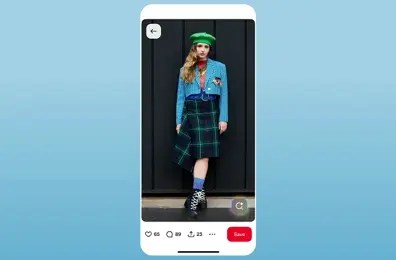
An example of Pinterest Visual Search.

Why it matters: With 570 million monthly active users, Pinterest remains an underutilized search channel for many brands. These updates make it easier to appear in visual searches without manual keyword optimization.

What to do:

  • Audit existing Pinterest catalogs for accuracy and completeness.
  • Test lifestyle imagery alongside product shots to increase discovery.
  • Enable Performance+ targeting to expand reach beyond manual audience selection.
  • Treat Pinterest as part of your omnichannel search strategy (not just social media).

LinkedIn Emphasizes Business Influencers

What happened: LinkedIn released a 22-page guide highlighting the power of B2B creators and influencer partnerships. It shows that B2B buyers actively seek out creator content as trusted resources throughout their purchasing journey.

Why it matters: B2B influence goes beyond follower counts to credibility and industry expertise. Decision-makers trust individual voices more than brand messaging in complex B2B purchases.

What to do:

  • Identify industry-specific creators who resonate with your target audience.
  • Focus on value-driven content that addresses real buyer needs and challenges.
  • Use video and thought leadership formats to amplify reach and engagement.
  • Measure influence through pipeline impact, not just engagement metrics.

Platforms and Technical Updates

Behind-the-scenes changes are set to affect how your content gets discovered and measured.

Apple Indexes Screenshot Copy

What happened: Apple now uses visible text in App Store screenshot captions as searchable metadata. This means your visual assets directly impact search rankings and app discovery.

Examples of visible text in App Store screenshot captions.

Why it matters: Screenshot captions were previously just conversion tools. Now, they’re discovery tools. Apps can rank for keywords included in their visual content, expanding ASO beyond traditional metadata fields.

What to do:

  • Add relevant keywords to screenshot captions while maintaining conversion focus.
  • Avoid duplicating keywords across metadata fields, but strategically repeat key terms.
  • Use captions to reinforce core product benefits and use cases.
  • Track keyword performance changes after implementing caption optimization.

Cloudflare Blocks AI Crawlers by Default

What happened: New Cloudflare users (representing about 20 percent of the internet) must now explicitly opt in to allow AI crawlers to access their websites for content scraping and model training.

Why it matters: Millions of websites could be excluded from AI search results and language model training unless they take action. This creates a potential visibility gap for brands that don’t adjust their settings.

What to do:

  • Review your Cloudflare settings and enable AI crawler access if you want AI visibility.
  • Consider the trade-offs between content protection and AI platform inclusion.
  • Monitor AI citation tracking (like Ubersuggest’s upcoming feature) to measure impact.
  • Treat this like submitting sitemaps to search engines. You’re telling AI platforms what to crawl.

B2B and Trust Building

B2B marketing is shifting toward relationship-building and credibility over pure lead generation.

LinkedIn Data: Trust Drives B2B Success

What happened: LinkedIn’s latest research shows 93.7 percent of B2B marketers say trust is the top factor for brand success. Customer recommendations outrank product features as purchase drivers.

B2B research from LinkedIn.
A close-up of a survey

AI-generated content may be incorrect.

Why it matters: With AI-generated content and automated outreach rising in popularity, authentic human validation becomes the ultimate differentiator. Trust has gone from a “nice to have” to a competitive necessity.

What to do:

  • Prioritize collecting and amplifying authentic customer testimonials.
  • Integrate social proof into every stage of your content funnel.
  • Use customer success stories in sales presentations vs. just in marketing materials.
  • Evaluate your brand messaging to ensure it conveys credibility at every touchpoint.

Ubersuggest Gets AI Search Optimization

What happened: Ubersuggest is rolling out AI Search Optimization reporting in beta, tracking brand mentions and citations across ChatGPT, Perplexity, Gemini, and other AI platforms. The tool monitors visibility, sentiment, and competitive positioning in AI-generated responses.

Why it matters: This addresses a massive blind spot for marketers. You can optimize for Google rankings all day, but if you’re invisible in AI platforms handling billions of queries, you’re missing huge opportunities. This is the first major tool to treat AI visibility as a measurable, trackable metric.

What to do:

  • Audit your current brand mentions across AI platforms manually until the tool launches.
  • Start optimizing content for AI Overview inclusion using structured data and clear answers.
  • Track competitors’ AI citations to identify content gaps and opportunities.

Looking Ahead: What This Means for Marketers

These updates share a common thread: The marketing world is becoming more sophisticated, more automated, and more focused on authentic value.

  • The search-everywhere reality is here. Your content needs to perform across Google, Instagram, AI platforms, and voice interfaces. SEO now means search everywhere optimization.
  • Attribution is getting better, but complexity is increasing. With Meta’s restored mobile measurement and Apple’s expanded ASO signals, you have more data, but you need better systems to make sense of it.
  • AI is becoming the default. From Meta’s automated campaigns to Google’s audio responses, machine learning is handling more of the heavy lifting. Your job is shifting from manual optimization to strategic input.
  • Trust and relationships matter more than ever. With automated content and AI-generated responses on the rise, human credibility becomes the ultimate competitive advantage.

The brands that win in this environment won’t be the ones with the biggest budgets or the most sophisticated tools. They’ll be the ones that adapt quickly, test constantly, and focus on creating genuine value across every platform that matters. 

Ready to put these insights to work? Let’s talk about how we can help you navigate these changes.

Read more at Read More

Reddit SEO Guide to Increasing Brand Visibility in Google in 2025

Have you noticed Reddit showing up more and more in search results lately?

You’re not imagining it.

Reddit has quietly become a major player in Google’s search ecosystem and will only grow. As of 2024, Google rolled out multiple search engine results page (SERP) features prioritizing Reddit content, including “Discussions and forums” and “What people are saying” panels. 

Plus, Reddit struck a licensing deal with Google to train AI models using its content. That means Reddit insights are now baked into how Google’s AI Overviews are shaped.

So, what does that mean for you?

It means your SEO strategy needs to account for Reddit. Whether you’re trying to show up on Reddit or rank because of Reddit, this platform can unlock a surprising amount of visibility. If you know how to work it, that is.

In this guide, we’ll break down how to use Reddit SEO to connect with real users and earn space in today’s evolving SERPs.

Key Takeaways 

  • Reddit threads increasingly appear in Google features like “Discussions and forums” and AI Overviews, making Reddit a key player in search visibility.
  • Strategic participation in relevant subreddits can boost brand authority, uncover content gaps, and influence what ranks for your target keywords.
  • SERP analysis helps identify high-ranking threads to engage with, or keyword opportunities where new threads have a chance of appearing.
  • A phased strategy (Crawl → Walk → Run) helps brands build trust before scaling Reddit engagement across profiles and subreddits.
  • NP Digital achieved real-world results for TurboTax, proving that Reddit SEO can drive SERP wins when paired with link building and blog optimization.

What Is Reddit SEO?

Reddit SEO refers to optimizing for two interconnected opportunities:

  • On-platform SEO: How your content appears and performs within Reddit’s search and subreddit ecosystems.
  • Off-platform SEO: How Reddit content ranks and contributes to visibility in Google’s SERPs, especially in features like “Discussions and forums,” “What people are saying,” and even traditional organic listings.

Reddit itself functions like a mini search engine. Users search subreddits for recommendations, reviews, and answers to specific problems. Search engine optimization for Reddit posts, comments, and titles using relevant keywords (without sounding spammy) helps them show up in internal search results and gain more upvotes, which helps with visibility.

But that’s just one side of it.

The bigger opportunity right now is off-platform SEO. Google is increasingly pulling Reddit content into its results because of its authenticity and community-driven value. Threads with genuine discussions or useful information often rank alongside blog posts and product pages, especially when the query is intent-driven or phrased like a question.

Ultimately, Reddit SEO is less about manipulating the algorithm and more about participating in conversations that matter, adding real value, and positioning your content so both Reddit users and search engines can find it.

A search for "Best Tax Software Reddit."
Reddit search results for "Crypto Tax Tips."

Why Reddit Is More Important Than Ever for Digital Marketing

As an online forum, Reddit mirrors how real people research, evaluate, and decide. That’s why it matters so much for digital marketers in 2025. It gives us something that’s becoming harder to find in traditional SEO: authentic intent signals.

People aren’t searching on Reddit for fluff. They’re looking for real experiences, firsthand reviews, product feedback, or deep-dive discussions. And that kind of raw, unfiltered demand is gold for modern content and SEO teams.

But Reddit also feeds the broader shift we’re seeing in how search works. We’re no longer optimizing for one destination (Google). We’re optimizing for a network of discovery channels, including Reddit. This plays into an important concept known as search everywhere optimization: getting found in the places where people ask questions and search for answers they can trust.

Ignore Reddit SEO, and you overlook where real buying conversations happen. Embrace it, and you tap into a platform that builds trust, informs content creation, and amplifies search visibility—without the traditional gatekeepers.

Reddit visibility in the "Discussions and forums" tab in Google.

What Makes Reddit and SEO a Unique Combo

Reddit and SEO work together, but not in the way most marketers are used to. In short, Reddit rewards what Google is increasingly prioritizing: helpful, experience-driven content.

Unlike platforms built for brands and publishers, Reddit is built for communities. That means the usual SEO tactics (link building or keyword integration) fall flat here. In fact, they’ll probably backfire. Reddit’s user base is naturally skeptical and vocal about anything that feels inauthentic.

But that’s exactly what makes it powerful.

When done right, Reddit SEO isn’t about broadcasting or promotion; it’s about earning trust. Threads that genuinely answer questions or share insights have a much higher chance of engagement within Reddit, and even get featured in Google search results.

A Reddit post example.

Reddit also functions as a real-time SEO feedback loop. What users upvote (or ignore) can help you validate keyword intent, content angles, and topic resonance before investing in a full-blown content campaign. 

How to Use Reddit for SEO

We’ve discussed how using Reddit for SEO strategy can boost your visibility and improve your rankings. But how, exactly?

Below are the core Reddit SEO tips you can use to get the most out of the platform:

Brand Visibility in Google SERPs

Since Reddit threads and comments increasingly appear in organic search results and SERP features, your Reddit content can rank in Google, even if your site doesn’t.

Whether you’re answering questions or sharing original insights, helpful content on Reddit can land in top positions for highly specific, intent-driven keywords.

Target your Reddit content to answer question-based phrases and long-tail keywords. These tend to trigger SERP features that pull in Reddit threads. Using the pre-populated options in the Google search bar or a platform like AnswerThePublic.com is a great way to research and uncover these types of search terms. 

Appear in AI-Generated Search Results

Thanks to Reddit’s licensing deal with Google, Google’s AI Overviews (and other LLM-powered results) are being trained on Reddit data. As generative search becomes more mainstream, the odds of your Reddit content being cited in these answers increase. Focusing on creating content that’s genuinely useful, experience-based, and conversational gives you a better chance of being surfaced, especially for product queries, comparisons, or niche how-tos.

Build Topical Authority and Trust

Reddit allows you to engage with users in a way that builds brand trust and positions you as an expert. The best way to leverage this direct contact with your audience is to participate consistently and establish credibility. Whether you’re answering a technical question or offering a thoughtful opinion, you’ll build a solid digital footprint over time that both Google and your audience recognize.

It’s also a great hedge against negative chatter. Owning your narrative through proactive engagement can reduce reputational risk and save you from frustrating hurdles or shadow banning.

Get Customer and Content Insights

Think of Reddit as a real-time content lab. It’s where users ask questions that don’t always appear in keyword tools—yet. Search relevant subreddits for your industry and see what your audience is talking about. You’ll start to uncover content gaps like audience pain points and phrasing you may have overlooked.

Fuel Keyword Research and Topic Ideation

Reddit is a keyword opportunity goldmine, especially long-tail, low-competition keyword ideas that may not even register in traditional tools until the trend explodes. When you’re browsing subreddits, look for:

  • Questions with multiple upvotes or engagement
  • Recurring themes or product mentions
  • Specific phrasing that reflects how your audience thinks (not how marketers write)

This intel is especially helpful when building keyword or topic clusters or aiming to dominate topical authority around a niche subject. Couple this Reddit SEO strategy with our SERP Analysis Guide to supercharge your overall SEO performance. 

You can also validate ideas by seeing what gets traction (and what doesn’t) before investing in full-scale production. Tools like Ubersuggest, Google Trends, AnswerThePublic, and Reddit’s own search bar can help spot growing or redundant trends and help inform your content topics and strategy. 

Building Your Reddit SEO Strategy

Successfully using Reddit for SEO doesn’t happen overnight. It’s a long game that requires consistency and a plan that evolves with your investment level. That’s why we recommend thinking of your Reddit SEO strategy in phases.

The best approach is to start small and learn the landscape. Get familiar with the structure of communities and how users behave in them. Once you get the hang of it and develop an eye for what works, you can scale your efforts over time.

We call this strategy “Crawl → Walk → Run.” Each phase builds on the last. The goal is to move from passive listening to full-scale community engagement, ending in a lasting, high-visibility Reddit presence.

Crawl

Reddit isn’t the place for hard sells. Coming in too strong can backfire fast, which is why the Crawl phase is all about listening first. It’s where observation and subtle engagement take center stage.

Start by identifying subreddits where your audience hangs out. Pay attention to tone, post formats, and what kinds of answers get upvoted. Use a few branded profiles to upvote and comment occasionally to build familiarity without promoting anything.

You’ll also want to analyze SERPs. Use tools like Ubersuggest or a simple “site:reddit.com” Google search to find Reddit threads ranking for your target keywords. Engaging in these threads boosts visibility both on Reddit and in search. You can also pull information from Google’s “Discussions and forums” and “What people are saying” features. 

A Reddit site search for tax preparation.
Reddit Discussions and Forums results in Google with "What happens if you file taxes late."

At this stage, your goal isn’t to go viral. It’s to learn the landscape and get your brand’s foot in the door.

Walk

In the Walk phase, you begin starting threads and offering expert commentary. Focus on subreddits where your audience is most engaged. Share genuine insights and respond to user pain points. This develops a foundation for content pillars around topics that align with your brand but still feel native to Reddit.

Using SERP analysis proactively also helps at this stage. Look for target keywords and SERPs where Reddit threads currently rank. If a competitor’s blog shows up and Reddit is pulled into SERP features, that’s your chance to start a new thread and own that discussion. Aim for question-based titles and intent-matching content. If no Reddit threads currently rank in the SERP, there’s less of a chance for ranking on Reddit for that search since Google doesn’t find Reddit valuable for said search.

You’ll need more profiles and daily management here. But the goal remains the same: Build trust and start shaping the narrative in spaces your audience already values to improve your brand visibility.

Run

In the Run phase, you’re starting to lead conversations within the Reddit forums. That means launching your own branded subreddit. You’ll be investing time responding in real time across high-priority threads and maintaining visibility in multiple subreddits tied to your niche.

At this level, Reddit becomes a content and community engine. You’re scaling engagement, managing 10 to 40 (or more) branded profiles, and integrating SEO, content, and customer service teams to create a unified presence.

You’re also building authority that flows off Reddit. High-quality threads are more likely to provide SEO results through backlinks and appearances in Google features, like AI Overviews and “What people are saying.”

Google results for Quarterly tax deadlines.

Converting these positive signals to traffic from Reddit SEO requires consistency and credibility. By owning the space, you position your brand as a go-to source, both for search engines and the community itself.

The Impact of Reddit SEO: A Case Study

Recently, NP Digital ran a Reddit campaign for TurboTax. Their case study is a strong example of what the Crawl phase can achieve when executed with intention and paired with SEO.

From January to April 2025, TurboTax-branded Reddit profiles engaged in relevant subreddits, contributing 159 comments and launching strategic threads. A few appeared in Google’s “What people are saying” feature for the keywords “quarterly tax deadlines” and “turbotax early refund.” Another comment was cited in AI-generated Reddit answers within days of posting.

Reddit mentions hit 5,404 (an increase of 10 percent year over year (YoY)), and while sentiment was still mixed (59 percent negative; 6 percent positive), positive mentions increased 2 percent  YoY, even amid brand-sensitive issues like early refunds and pricing.

The team also saw success combining Reddit engagement with targeted SEO tactics. A refreshed blog post, Ways to File for Free, secured the featured snippet for “is Turbotax free” (14,800 monthly search volume (MSV)) within weeks, helping to outrank negative Reddit content.

The takeaway is that Reddit SEO drives real results. When done right, it drives visibility in SERPs and gives brands more control over their search narrative.

FAQs

How to use Reddit for SEO?

Reddit can support your SEO strategy in a few powerful ways. First, Reddit threads often appear in Google’s SERPs, especially in features like “Discussions and forums.” By starting or contributing to high-value threads, your content can gain direct visibility in search results. Second, Reddit helps with content discovery. You can analyze subreddits to find trending topics, language patterns, and user intent that can inform your broader SEO and content strategies.

You can also use SERP analysis to find keyword gaps where Reddit threads are being pulled into SERP features and create new threads to increase visibility in those spaces. Just remember: Value and authenticity win. Spam won’t get you anywhere.

Is Reddit a search engine?

Not in the traditional sense, but it functions like one.

Reddit has a robust internal search engine that allows users to find content across thousands of subreddits. People use it to get advice, vet products, read reviews, and solve problems phrased as long-tail queries that mirror Google searches. In fact, younger audiences usually search Reddit directly for information instead of using Google.

While Reddit doesn’t index the open web, it absolutely influences the way people search and make decisions. That’s why optimizing for Reddit search and contributing to high-performing threads can give you a dual benefit: Visibility within Reddit and in Google SERPs.

Does Reddit help with SEO?

Yes, Reddit can be a powerful SEO enhancer when you use it strategically.

High-value Reddit threads often rank in Google’s organic results and featured SERP modules. Creating or contributing to those threads increases your chances of gaining real estate in search results, even for competitive terms. Reddit is also a great place to uncover keyword and content opportunities before they trend.

It doesn’t directly boost domain authority like backlinks might, but it shapes user perception, generates traffic, and helps Google associate your brand with helpful, trustworthy content. As Google’s AI-driven search continues to evolve, Reddit’s role in shaping what gets surfaced will likely grow.

Conclusion

Reddit SEO gives you something traditional channels can’t: direct access to how people think, search, and talk in real time.

It’s a space where trust matters more than tactics. And that’s exactly why it’s showing up more in Google’s SERPs, AI Overviews, and user journeys. When you treat Reddit as a community to engage with (and not just another traffic source), you open the door to brand visibility you can’t buy or fake.

Success on Reddit takes three simple steps. Start with authentic participation, back it with smart SEO, and grow into a presence that earns results both on and off the platform. 

It’s not easy, but it is simple. Stick to the plan, and your consistency will pay off before you know it. 

Read more at Read More

What Is Content Decay? How to Identify and Fix Declining Content

Have you ever noticed a blog post that used to drive tons of traffic to your site suddenly isn’t performing like it used to?

Maybe it ranked on the first page of Google for a few months and brought in steady leads, and then…poof! Nothing. The traffic just disappeared, and you’re left wondering what happened.

If that sounds familiar, you’re dealing with content decay. Trust me, you’re not alone. Content decay happens when once-successful content loses its search rankings, traffic, and effectiveness over time. It’s frustrating, especially when you put so much work into creating it in the first place.

The good news is content decay isn’t an automatic death sentence for your copy. Let’s dive into what content decay actually is, how to spot it before it becomes a bigger problem, and how to fix it so your content can start performing again. Because let’s be honest: nobody has time to constantly recreate content from scratch when a little maintenance can bring it back to life.

Key Takeaways

  • Content decay is about declining user interest, not just old content. When user behavior shifts or new competitors emerge, previously successful content can lose rankings and traffic even if it’s still technically accurate. 
  • Monitor your content regularly using free and paid SEO tools. Google Search Console, Ubersuggest, and SEMrush can help you identify declining traffic and rankings before content decay becomes a bigger problem. 
  • You have multiple strategies to fix declining content. Quick wins include adding videos, tables of contents, and FAQ schema, while more comprehensive approaches involve expanding, consolidating, or pruning your existing content. 
  • Fixing content decay is more cost-effective than starting from scratch. Since your declining content already proved it could rank and drive traffic, strategic updates often deliver better ROI than creating entirely new content. 
  • Early detection is crucial for successful content recovery. Set up regular monitoring and alerts so you can address content decay before your rankings completely disappear from search results.

What is content decay?

Let’s get specific about what we’re dealing with here. Content decay is a gradual decline in your content’s performance over time. We’re talking about drops in organic traffic, search rankings, engagement rates, and conversions. It’s not just a bad month or a seasonal dip; it’s a consistent downward trend that shows you’re losing your grip on your audience.

But here’s the important part: content decay isn’t just about your content getting “old.” It’s actually a symptom of declining user interest, a much bigger issue. Think about it this way. When you first published that blog post, it hit all the right notes for E-E-A-T. It was timely, relevant, and answered questions people actively searched for. But as time goes on, user behavior changes, new competitors enter the space, and search algorithms evolve. Suddenly, once valuable content starts to feel stale or outdated.

Content decay happens because your audience’s needs and interests are constantly shifting. What they cared about six months ago might not be what they focus on today. They’ve moved on to more advanced topics, or perhaps new trends have emerged that make your content feel less relevant.

Ultimately, when users stop engaging with your content — by clicking away quickly, not sharing it, or not converting — search engines take notice and start pushing it down in the rankings.

How declining user interest happens

User interest decline isn’t a new concept. Think about how search queries for digital cameras completely plummeted after the iPhone was released. People didn’t suddenly stop taking photos. Instead, their interest shifted to a better solution that combined their phone and camera needs.

The same thing happens with your content. There are several reasons why user interest might drop over time. Sometimes people lose interest in a topic altogether (like how fewer people search for “how to burn CDs” these days). Other times, Google introduces new navigation features or rich results that answer users’ questions directly in the search results, leading to zero-click searches. A big disruptor in the search space, AI Overviews and now AI Mode, reduce the clicks necessary to get answers.

While personalizing content can be a great way to reach your audience, it can sometimes work against you. It might only rank for certain demographics or geographic areas now, limiting your reach. Algorithm updates can change what Google thinks is relevant, and increased competition means more players fight for the same audience attention. Even seasonality plays a role; your summer suncare content won’t get much love in December.

But fear not. The key in recognizing content decay often reflects broader shifts in user behavior rather than problems with the content itself. That’s why updating content strategically can bring it back to life.

How to recognize content decay when it happens

A tricky thing about content decay is that it can sneak up on you. One day, your content is performing well. The next thing you know, it’s barely getting traffic. There are some warning signs you can see before the decay completely tanks performance.

First, take a hard look at whether the content is outdated or irrelevant. This is especially true if you write about timely topics or include survey data. Content age does matter. A blog post from 2019 about “social media trends” will feel pretty stale by now, for example. If your content references old statistics, outdated tools, or strategies that aren’t effective anymore, users will bounce quickly.

Next, do some competitive research. Is your competitor’s content simply better than yours? Maybe they’ve updated posts with fresh data, better formatting, or a deeper dive into the topic. If you’re still writing short blog posts while your competitors have published 2,000-word comprehensive guides with videos and infographics, it can be a big red flag.

Take a minute to check for other URLs on your site covering the same topics. Content decay can sometimes happen because you’ve accidentally created competing pages that cannibalize each other’s traffic. 

The most obvious signs of content decay are performance metrics: declining organic traffic, higher bounce rates, lower time on page, and fewer conversions. Pay attention to how this content performs during algorithm updates or new feature rollouts. If your traffic drops significantly after an update, your content might no longer align with what Google considers valuable or relevant. Or, in the case of AI Mode, it might no longer meet the benchmarks that Google uses to serve that information up to customers as part of zero-click search. In cases like this, it can make sense to approach the user’s search priorities from a Search Everywhere perspective.

A graphic showing causes of content decay.

Use SEO tools to find decayed content

You can look for signs of content decay on your own, but SEO tools make it much easier to identify. Trying to track this information down in spreadsheets gets overwhelming, especially if you have a lot of content.

Google Search Console is a typical option for many people because it’s free and pretty robust. Checking the Performance report and filtering by specific pages or queries can show you consistent traffic declines over the past six months to a year. You can also look for the “Average position” column to see if rankings have dropped for key terms. If a page used to rank in spots 1-5 and now sits at position 15, it’s content decay in action.

Ubersuggest is another great tool for tracking content decay. The Site Audit feature can identify pages with declining organic traffic, and the Keyword Tracking tool can monitor how your target keywords perform over time. You can even set up alerts to notify you when rankings drop significantly.

Finally, there’s SEMRush. This platform takes it a step further with a Position Tracking tool that allows you to see exactly how your rankings change over time. The “Cannibalization” report is especially helpful when identifying multiple pages on your site that compete for the same keywords, a common cause of content decay.

The key to this is setting up regular monitoring to catch content decay as early as possible. Content repurposing becomes much easier when declining content is identified before it completely disappears from search results.

Content decay solutions

Now, for the good news: content decay isn’t permanent. Once you’ve identified which pieces of content are declining, you have several strategies to bring them back to life. The beauty of fixing content decay is that you’re working with content that already had some success, not starting from scratch. The key is choosing the right approach based on what’s caused the decay in the first place.

Embed a video

Adding a relevant video to your existing content can help boost engagement and time on page, two factors that often signal to Google that your content is valuable. A quick explainer video or a detailed walkthrough can help your content feel fresh and current. You can post these videos elsewhere (like YouTube or TikTok) for additional “Search Everywhere” relevance.

Optimize content for SEO

Sometimes, content decay happens because SEO best practices have evolved since you first published. Update your title tags, meta descriptions, headers, and internal linking structure to align with current SEO standards. You might also need to adjust keyword density or improve the content’s semantic relevance.

Add FAQ Schema markup

FAQ schema can help your content appear in rich snippets and AI Overviews, which gives you more real estate in search results. If your content answers common questions, adding this markup can help it regain visibility and attract more clicks.

Add a table of contents

Another organizational element that can help improve your content (and user experience)? A table of contents. This helps make your content more scannable, which is especially important for longer pieces that might experience high bounce rates.

Prune content

Sometimes, less is more. If sections of your content are outdated or no longer relevant, removing them can actually improve performance. Focus on keeping the most valuable, accurate information.

Re-promote

Your declining content might just need a visibility boost. Share it again on social media, include it in email newsletters, or mention it with internal links in newer blog posts to drive fresh traffic and engagement signals.

Add expertise

Enhance your content’s authority by adding expert quotes, case studies, or more detailed analysis. If your content feels surface-level compared to your competitors, deeper expertise can help it regain rankings.

Expand

Pruning is a great way to refresh content, but sometimes you may need to add something to improve it. If user intent has shifted toward more comprehensive coverage, you should expand content to better match what searchers want. That might look like turning a 1,000-word post into a 2,500-word guide.

Consolidate

If multiple pages compete for the same keywords, you could consolidate them into one stronger piece to eliminate cannibalization and concentrate ranking power. Updating content strategically often delivers better ROI than creating brand new content from scratch.

What is content decay?

Content decay is when a blog post or page that used to get solid traffic and rankings slowly starts losing visibility over time. Along with age, it happens when user interest shifts, competitors publish stronger content, or Google updates its algorithm. The result? Less traffic, fewer conversions, and lost opportunities. The fix: update, expand, or optimize the content to bring it back to life instead of letting it fade away.

Conclusion

Content decay isn’t the end of your hard work. By understanding it’s about declining user interest rather than aging content, you can strategically bring your best-performing pieces back to life.

The key to catching decay early is to regularly monitor it with the tools you have to work with, like GSC, Ubersuggest, and SEMRush. Once you know what’s in decline, you have options to remedy it: quick wins like videos and adding tables of content to comprehensive expansion or consolidation.

Fixing content decay is more cost-effective than creating brand-new content, especially when you know these pieces can succeed. They just need strategic updates.

Feeling overwhelmed by the process of identifying and fixing content decay? Don’t tackle it alone. Reach out to NP Digital for expert guidance on content strategy or check out an Ubersuggest demo to see how our tools can streamline your content decay monitoring and help prioritize which pieces need love first.

Read more at Read More

SMS Marketing: What It Is + Top Tips & Tools

SMS marketing is an effective way to meet your target audience exactly where they are—their smartphones. With short snippets of text messages, SMS marketing can be a great way to engage customers and boost sales.

Throughout this article, we’re going to dive deeper into what a successful SMS marketing strategy looks like, plus some top tips and tools for making it work for your business.

Key Takeaways

  • SMS marketing is a great method for communicating directly and effectively with your audience.
  • With SMS marketing, you’re getting access to a faster, higher engaging, and less saturated form of marketing.
  • To maximize results, be sure to require opt-ins, send short and sweet messages, identify your company with each communication, and optimize your timing.

What Is SMS Marketing?

SMS marketing is a promotional strategy that uses text messaging to communicate with current and potential customers. Due to the nature of texting, SMS marketing tends to focus more on short promotional messages like discounts, sales, product launches, and low stock alerts.

Benefits of SMS Marketing

SMS marketing is a newer strategy so it comes with a lot of benefits that not many companies are taking advantage of yet. If you’re considering creating an SMS marketing strategy, these perks might be just the thing to sway you.

It’s Less Saturated

Of all the types of digital marketing—social media, content, email, etc.—SMS marketing is one of the lesser used tactics. This can give you an edge because customers aren’t inundated with marketing texts the way they are with marketing emails or social media posts.

So if someone in your target audience opts in for SMS communication, you can be sure that they’re probably actually reading your text, and not just sending it to the trash because their inbox is overflowing with messages from brands.

You Have Faster Open Rates

People tend to open text messages they receive faster than new emails. In fact, 90% of people open new texts within the first three minutes. This means you can watch your results come in much more quickly with SMS messages than with emails, getting a sense of how your texts are performing almost instantly.

Get Better Engagement

Not only do you see faster results, but you see better results. Text messages have a 98% open rate, 5x the open rate of marketing emails. Most businesses see an SMS click-through rate between 21-35%, meaning people are also interacting with their texts.

Plus, the opt-out rate is just 1-2%, meaning people tend to stick around with text message marketing more than via other channels.

Create an Omnichannel Strategy

SMS marketing can be a huge part of a successful omnichannel marketing strategy. Let people hear from your business in their preferred channels, and make it easy for them to shop via mobile by sending promotional messages straight to their smartphones.

Personalize Your Communication

Texting is a much more personal form of communication. But more than that, you can make it even more personal by using their name, segmenting people based on their behavior with your business, and bringing a really personalized approach to your strategy.

It’s Cost-Effective

SMS marketing is a cost-effective way to promote your business and its products or services. You just need an SMS marketing platform and some copy—no need for additional visuals or assets, making this a quick and easy strategy to get up and running.

Top SMS Marketing Tips & Best Practices

To make the most out of your SMS marketing strategy, you need to implement some best practices. These tips can boost your results and help your SMS communications perform even better.

Only Send Messages to Customers Who Opt In

Just like with email marketing, you must receive an actual opt-in or consent from a customer to start sending them text message communication. Your business must comply with the Telephone Consumer Protection Act (TCPA) if you or your customers are in the United States, or whatever SMS regulations are available in your audience’s country/ies.

This doesn’t have to be a complicated process. Ask for people to opt into your text message communications the same way you would ask them to sign up to receive your email newsletter.

Take a look at this example from Crate and Barrel’s website to see what we mean:

A Crate and Barrel SMS ad.

Source

Entice People to Opt In

Want to boost your SMS subscribers? Give them an offer they can’t refuse. Many businesses use pop-ups on their website to ask people to opt-in to their email and/or text communications by offering a discount code.

Here’s an example from soda brand Poppi:

A Poppi ad.

Source

A 15% off discount isn’t a bad deal for simply handing over your email address and phone number. And it’s just on the customer’s first order. So you’re likely generating a new customer at the same time you’re getting them to opt into marketing communications. Win-win, right?

Send Short Text Messages

The maximum character count for SMS messages is 160 characters, so your texts need to be short and sweet, conveying your message in just a quick sentence or two. But more than that, people don’t want to open a text message to a wall of content—unless they’re getting the latest gossip from their friends.

Take a page out of beauty brand NaturAll’s book. Each of their marketing texts is straight to the point, letting customers know exactly what they’re promoting, whether it’s a $9.99 sale or a new product:

A NaturAll ad.

Identify Your Company in Your Texts

Not everyone who opts into your SMS messages is going to save your company’s contact information. This means it’s important to identify yourself in each message you send.

Here’s an example from mattress company Casper. The brand includes its company name at the start of every text it sends—a common way for brands to identify themselves right from the jump:

A Casper SMS ad.

Optimize Your Message Timing

Text message timing is a bit more sensitive than email timing. Most people don’t receive email notifications straight to their phone, whereas texts alert them every time. This means you need to ensure you’re sending your text communication during times you won’t be interrupting your customers.

Many regulations even have parameters in place to ensure companies can’t bother consumers during inopportune times. For example, according to the TCPA, companies cannot send text messages between the hours of 9PM and 8AM in their local time zones.

So you need to keep timing in mind so you’re not sending messages during the wrong time frame. But you also want to optimize your timing to improve the chances that your customers will take action after reading your messages.

If you look back at our example from Casper, you can see that the brand sends its text messages at 12:01PM like clockwork. Try to find a time between 10AM and 5-6PM that seems to work for your brand.

Don’t Text Too Often

If you send too many text messages, you’re going to have an extremely high opt-out rate. Analysis from SMS marketing platform Attentive shows that sending more than 10-15 messages per month can make your opt-out rate skyrocket.

This is different from email marketing, where some industries send daily emails. Instead, you want to max out at 1-2 text messages per week, sometimes going as infrequent as 2-4 texts per month.

Send More Than Just Promotional Messages

Many brands use their SMS strategies just to send out discount/sale alerts, product launches, low stock reminders, and more. However, you should expand your strategy and send out more than just promotional messages.

You can use your SMS marketing communications for:

  • Promoting events
  • Sharing details about your loyalty program
  • Sending people to educational content on your website

Look at this example from baby formula brand Enfamil. The company sends out plenty of promotional messages, while balancing out their communication with educational content, too:

An Emfamil SMS ad.

Finish With a Call to Action

What action do you want your text recipients to take? Make it clear by ending your messages with a call to action (CTA). This can be a simple “Shop now,” or “Learn more.”

Take a look at how organic baby brand Snuggle Me adds a call to action at the end of each of its messages, making it easy for the recipient to take the exact desired action:

A Snuggle Me SMS ad.

Ensure Your Website is Mobile-Friendly

If you’re using SMS marketing to send people to your website, they’re almost always going to be clicking to your site using their mobile device. If your website isn’t mobile -friendly, you’re essentially losing customers as soon as they click, making your SMS efforts completely obsolete.

If you’re going to use SMS marketing, your website needs to be mobile friendly so customers can click your links, shop around, and check out all via their mobile devices.

Make it Easy to Opt Out

Just like with email, you don’t want your customers to have to jump through hoops to unsubscribe. They’ll get frustrated if they can’t easily figure out how to opt out from receiving texts from your brand.

Take a look back at our example from Snuggle Me. Every single text ends with “Text stop to stop.” Enfamil ends theirs with “Text STOP to cancel.”

Use a similar strategy to make sure your recipients know exactly what to do if they decide they’re not interested in hearing from your business anymore.

7 Easy-to-Use SMS Marketing Tools

If you want to launch your own SMS marketing strategy, you need the right tool to help. These SMS marketing tools are perfect for creating, sending, and analyzing your text campaigns.

Textedly

The Textedly homepage.

Textedly is a great SMS marketing platform for businesses looking to send out mass marketing messages, as well as have 1:1 conversations with their customers. Send out your marketing texts while also reaching customers directly to send appointment reminders, ask for reviews, and more.

Pricing: Free for your first 50 text messages. Paid plans start at $26/month for up to 600 monthly messages.

Attentive

The Attentive homepage.

Attentive is a great tool for businesses looking to combine their SMS and email strategies as you can send both types of communication using this platform. It also offers RCS messaging, which is a more modern version of messaging that incorporates additional features from platforms like iMessage and WhatsApp.

Pricing: Request a demo to get pricing information.

Twilio

The Twilio homepage.

Twilio is a customer engagement software that makes it possible for businesses to connect with their audience via platforms like SMS messaging, email communication, voice chat, and video. This is a great way for your brand to build an omnichannel experience seamlessly through just a single tool.

Pricing: Pricing varies based on the types of communication you want to send out.

SimpleTexting

The SimpleTexting homepage.

SimpleTexting is an SMS marketing service that lets you send out mass marketing messages or communicate one-on-one with your customers. If you want to offer text message customer service so your audience can reach you directly via their mobile phones, this is the perfect platform to get started with.

Pricing: Plans start at $39/month for 500 messages/month.

Textmagic

TextMagic's homepage.

Textmagic is another platform that makes it easy to send both SMS and email communication from one seamless dashboard. Create interconnected campaigns to promote your business and analyze your results in the Textmagic interface.

Pricing: Plans vary based on your usage. For example, for just 500 texts and 500 emails/month, you’ll pay just $37.50/month. It’ll go up from there, based on how many messages you’re sending so you’re never paying for messages you don’t need.

SlickText

SlickText's hompeage.

SlickText makes it easy to send comprehensive SMS marketing campaigns, letting you put together one-off messages, create automated workflows based on how customers respond to your promotions, and segment out your audience to personalize your messaging.

Pricing: Plans start at $29/month for up to 500 monthly messages.

EZ Texting

EZTexting's homepage.

EZ Texting is another great SMS marketing platform that enables brands to send mass marketing messages, hold one-on-one conversations, create text automations, and more. With EZ Texting, you can even get access to AI tools that help you compose texts so your brainstorming and content creation process is jumpstarted for you.

Pricing: Plans start at $20/month for up to 500 contacts.

FAQs

What is SMS marketing?

SMS, or short messaging services, refers to using text messages to communicate with leads or customers. Brands can share promotions, news, shipping updates, and more.

Does SMS marketing annoy customers?

If you don’t use them correctly, SMS marketing can definitely backfire and annoy your customers. Make sure to ask permission, make it easy for consumers to opt-out, and only send specific or time-sensitive messages — such as a sale.

Is SMS marketing expensive?

No, it’s often much cheaper than other types of marketing like paid ads because each message usually only costs a few cents each to send.

Why should I use SMS marketing?

SMS marketing is cost-effective, easy to deploy, and incredibly effective because messages are delivered directly to users’ phones.

Is SMS marketing effective?

Yes, when it’s done right. People open texts faster than emails, and they’re way more likely to read them. SMS has higher engagement, lower competition, and quicker results. If your list is opted-in and your timing’s smart, SMS can drive real revenue.

Get Started With SMS Marketing

SMS marketing is a key strategy for communicating with your customers in a quick and easy way. Share sales, discounts, launches, educational content, and more in a digestible format that your audience will receive almost instantly. If you want to implement even more great ways to reach your audience, I’ve also created a full guide to email marketing you won’t want to miss.

Read more at Read More

The Real Cost of Customer Acquisition (And How to Cut It)

If you don’t know how much it costs to acquire a customer, you’re flying blind. And if you do know, but you’re paying too much, you’re in trouble.

The simple fact is, scaling a business without understanding your customer acquisition cost (CAC) is like trying to fill a leaky bucket.

This post will break down what CAC is, how to calculate it the right way, and how to reduce CAC without killing your growth.

Key Takeaways

  • Customer acquisition cost should account for so much more than ad spend. When you’re only tracking ad spend, you’re missing the bigger picture of what it truly costs to win a customer.
  • A healthy CAC marketing strategy balances cost efficiency with long-term value. Alongside CAC, you should also consider LTV and payback period. These combined will tell you more about your success than CAC alone.
  • An increasing CAC isn’t always a bad sign. Use this time to evaluate your funnel, but also consider that this increased cost may contribute to increased value. 
  • You don’t need to kill growth to reduce CAC. Start with what’s already working: optimize your website, lean into organic, and automatic where possible. 
  • Your happiest customers are your best way of reducing CAC. Invest in keeping them because their LTV will not only reduce your CAC but it may bring in additional leads.

What is Customer Acquisition Cost (CAC)?

Customer acquisition cost (CAC) refers to the total expense incurred in acquiring a new customer. 

Here’s the basic formula:

CAC = (Total Sales and Marketing Costs) / Number of New Customers Acquired

Sounds simple, but here’s where most people mess it up: they only include ad spend. 

You also need to include expenses such as:

  • Ad spend
  • Content creation (blog writers, video editors)
  • Marketing tools and software
  • Team salaries
  • Free trials, discounts, onboarding costs
  • Sales commissions and tools
  • Sales travel and events

Example: You spend $25,000 and land 500 customers. That’s a CAC of $50. 

Why CAC Matters More Than You Think

If you don’t have a handle on your CAC, you’re probably wasting money. Even worse? You might think you’re profitable when you’re not.

It’s not just about how much you spend, but whether you’re spending it efficiently.

The straight CAC calculation above isn’t the only one that matters, though. You should also consider the following metrics as part of your overall marketing strategy:

  • Lifetime Value (LTV) to Customer Acquisition Cost (CAC) ratio: You want at least a 3:1. That means for every $1 you spend, you make $3.
  • CAC payback period: How long until you break even on a customer? The shorter, the better.
  • Channel-specific CAC: Know your per-channel numbers. SEO CAC might be $20, but paid social CAC could be $100. 

What’s a Good CAC? A Look at Industry Benchmarks

A “good” CAC depends heavily on your industry, pricing model, and the length of time your customers stay. But having ballpark figures can help you understand how your acquisition costs stack up. 

Here’s what CAC looks like across industries: 

  • Startups (Seed to Series C): $400 to $900, depending on vertical and funding stage
  • Ecommerce: $86 average, with ranges between $45 to $150 depending on AOV and product type
  • B2B:
    • Legal: $1,245
    • IT/Managed Services: $1,180
    • SaaS: $702
    • Financial Services: $1,067

More important than how you compare to others in your industry is how you compare to yourself. 

A low CAC doesn’t always mean you’re doing great, but one that is steadily decreasing while other metrics grow or remain steady (like revenue, orders, etc) is a step in the right direction.

How to Calculate Your Real CAC

You can’t fix what you can’t measure. And most businesses underestimate their CAC because they forget to include the full picture.

Here’s what you need to add up:

  • Ad spend (across all channels)
  • Content creation and creatives (even for organic content)
  • Marketing and sales tools
  • Team salaries (and commissions) and benefits
  • Discounts and returns
  • Agency fees or freelancers
  • Any customer onboarding or support costs

Example: If the above costs $80,000 and you receive 1,000 new customers, your CAC is $80.

A graphic showing how CAC works.

Now, what if you have a subscription model?

In subscription-based businesses like SaaS, CAC should be spread over the average customer lifetime. For example, if your CAC is $300 and your average customer stays for 15 months, you’re paying $20 per month for each customer.

This helps align acquisition costs with the recurring revenue they generate and gives you a clearer view of profitability over time. 

Top Mistakes That Drive CAC Through the Roof

Here’s what I see killing CAC marketing strategy time and time again:

  1. Ignoring team and tool costs: Your tools and salaries count.
  2. Living off paid ads: Paid channels get expensive fast. Branch out into organic marketing.
  3. Chasing volume over quality: If customers churn fast, your CAC increases.
  4. No attribution strategy: Without solid tracking, you over-invest in what looks good but doesn’t convert.
  5. Short-term promotions: They boost conversions but often attract low-LTV customers.

Fix these, and your CAC will drop. Fast.

Multi-Touch Attribution for Smarter CAC Tracking

While I mentioned attribution strategy above, it deserves its own section. Why? The attribution model you use can make or break your CAC tracking. 

Modern buyers interact with multiple touchpoints before making a purchase. If you rely on first-click or last-click attribution, you’re missing out on valuable information.

That’s why multi-touch attribution is the best approach.

With multi-touch attribution, you distribute credit across every interaction. 

For example, imagine a customer who first clicked on a Google ad, then read your blog, and finally converted via an email promo.

With first-touch, you’re giving all the credit to Google, which can result in costly increases to your ad budget. With last-touch, you’re giving all the credit to email, which can result in a failure to support other avenues (like your blog). 

Multi-touch attribution enables you to assign a portion of the CAC to each of those channels, providing a clearer understanding of what’s truly effective.

Here’s how it helps reduce CAC:

  • Allocating spend intelligently. See which touchpoints drive conversions (so you can invest more) and which are merely noise (so you can reduce spend).
  • Forecasting smarter. Use historical multi-touch data to estimate the true cost of new customer acquisition.
  • Aligning teams. When sales and marketing see that both of their teams contributed to a conversion, it improves alignment and resource sharing.

Multi-touch attribution makes for more accurate CAC, which makes for smarter decisions.

How to Lower Customer Acquisition Cost Without Killing Growth

Let’s talk solutions. Here’s how to lower your CAC and still scale like a champ.

Dial in Your Website and Funnel

Your website is your best salesperson, so make sure it’s optimized to convert.

Consider the following changes that can have a big impact:

  • A/B test headlines, calls to action, images, and offers
  • Improve site speed
  • Remove friction from the checkout or sign-up flow
  • Minimize form fields and unnecessary steps

Also consider incorporating referrals and similar customer acquisition strategies into your funnel.

Dropbox is a notable example of this, achieving a 3,900% growth rate in just 15 months. 

Their “give and get storage” model rewarded current users and their invitees with 500MB each of additional storage. Referral links were integrated directly into onboarding, and the system provided transparent tracking so users saw their progress.

This virtually zero marketing cost strategy made this campaign all the more successful and led to decreased CAC while driving explosive growth.

Go Big on Organic

If you focus only on paid channels, you could be unnecessarily bloating your CAC. Organic marketing can naturally decrease CAC by driving more customers will significantly less cost than paid channels.

How?

  • Create SEO-driven blog content that solves your customers’ problems
  • Repurpose blog content into videos and short-form social posts
  • Stay active on platforms where your audience actually hangs out
  • Lean into user-generated content (UGC) and word-of-mouth marketing

Don’t forget email, too. Automated drip campaigns keep leads warm and buyers engaged long after the first click.

Retention as an Acquisition Strategy

Keeping customers is often more cost-effective than acquiring new ones.

Take Glossier as an example. In a 2018 interview, the founder stated that repeat purchasers drove over 50% of revenue. That, combined with their customer-led growth strategy, has turned Glossier into the cosmetic powerhouse it is today.

If you want to lower your CAC by nurturing existing relationships, focus on:

  • Onboarding experience: Drive early wins and product adoption with an exemplary onboarding experience.
  • Referral programs: Reward your customers for sharing your product/service and generating warm leads.
  • Loyalty perks: Identify which loyalty perks your customers appreciate (such as discount codes or free products) and use them to encourage repeat business.

Remember, happy customers are your best marketers. This retention approach won’t only lower CAC, but it will also boost LTV.

Get Smart With Paid Ads

Organic marketing is important, but paid ads aren’t the enemy. A bad ad strategy is, though. Here’s how to tighten up your strategy for improved CAC: 

  • Refine targeting and use lookalike audiences built from high-value customers
  • Optimize for return on ad spend (ROAS), not just impressions
  • Test lower-lost platforms (like Pinterested and Reddit)
  • A/B test your campaigns, including headlines and creative

The greatest tip of all: be ruthless with underperforming campaigns. Pause, tweak, or cut them fast so your ad campaign doesn’t quickly devolve into a money pit.

Automate and Streamline

How much time and money are you spending on manual processes? Automate as much as you can to lower CAC and reduce friction. 

Here’s how:

  • Automate onboarding emails and customer education series
  • Use AI to personalize offers and predict behavior
  • Align sales and marketing teams with shared CRM workflows

Efficiency means a lower CAC. It’s that simple.

Tools to Help You Track and Optimize CAC

You don’t have to do this alone. There are various tools available to support your CAC optimization journey.

Monitor User Journeys: GA4

A Google Analytics landing page.

GA4 helps you understand exactly how users move through your site.

From first click to conversion, you can identify drop-off points and optimize touchpoints that matter most.

Track Attribution: Northbeam

Northbeam.io home page

Northbeam provides multi-touch attribution, showing which channels and campaigns drive conversions.

No more guessing which ad gets the credit.

Make Smarter SEO Decisions: Ubersuggest

Ubersuggest home page

Lowering your CAC starts with attracting the right traffic. That’s where Ubersuggest comes in.

Ubersuggest can help you identify high-intent, low-competition keywords your ideal customers are already searching for. By targeting those terms, you can drive more organic traffic without paying for every click.

With Ubersuggest, you can spend less time on acquisition and get more qualified leads in the door.

Automate CRM: HubSpot

HubSpot CRM landing page

HubSpot streamlines customer management with automated workflows, lead nurturing, and pipeline tracking. 

Automate Email Sequences: Klaviyo

Klaviyo home page

Klaviyo makes email marketing smarter with data-driven automations that respond to customer behavior. These keep engagement high and CAC low.

Visualize Customer Drop-Off: Crazy Egg

Crazy Egg homepage

Crazy Egg shows you where users click, scroll, and drop off on your site. Use heatmaps and session recordings to quickly resolve friction. 

FAQs

What is customer acquisition cost?

CAC is the cost of convincing a potential customer to buy a product or service. It includes everything you do to attract a new customer, like your advertising, the staff you employ, and your tools.

How do I calculate customer acquisition cost?

Take your total expenses spent on acquiring customers over a specific time and divide it by the number of customers you gained in that same time.

How do you lower customer acquisition cost?

Start by fixing your funnel. If your site’s clunky or confusing, you’re paying to lose people. Then, build out organic channels like SEO, email, and referrals, which scale without burning cash. Use multi-touch attribution to track what’s actually working, and cut what’s not. Automate where it saves time, and keep your best customers happy so they’ll do your marketing for you.

Conclusion

Customer acquisition cost is a reflection of how well your business turns effort into growth. 

If it’s too high, don’t panic. Instead, get curious.

Where’s the waste? Where’s the friction? Start small: optimize your funnel, test organic channels, and automate what you can. 

The goal isn’t to spend less, but to spend smarter. So measure often, adjust quickly, and remember that your best customers often bring the next ones with them.

Read more at Read More
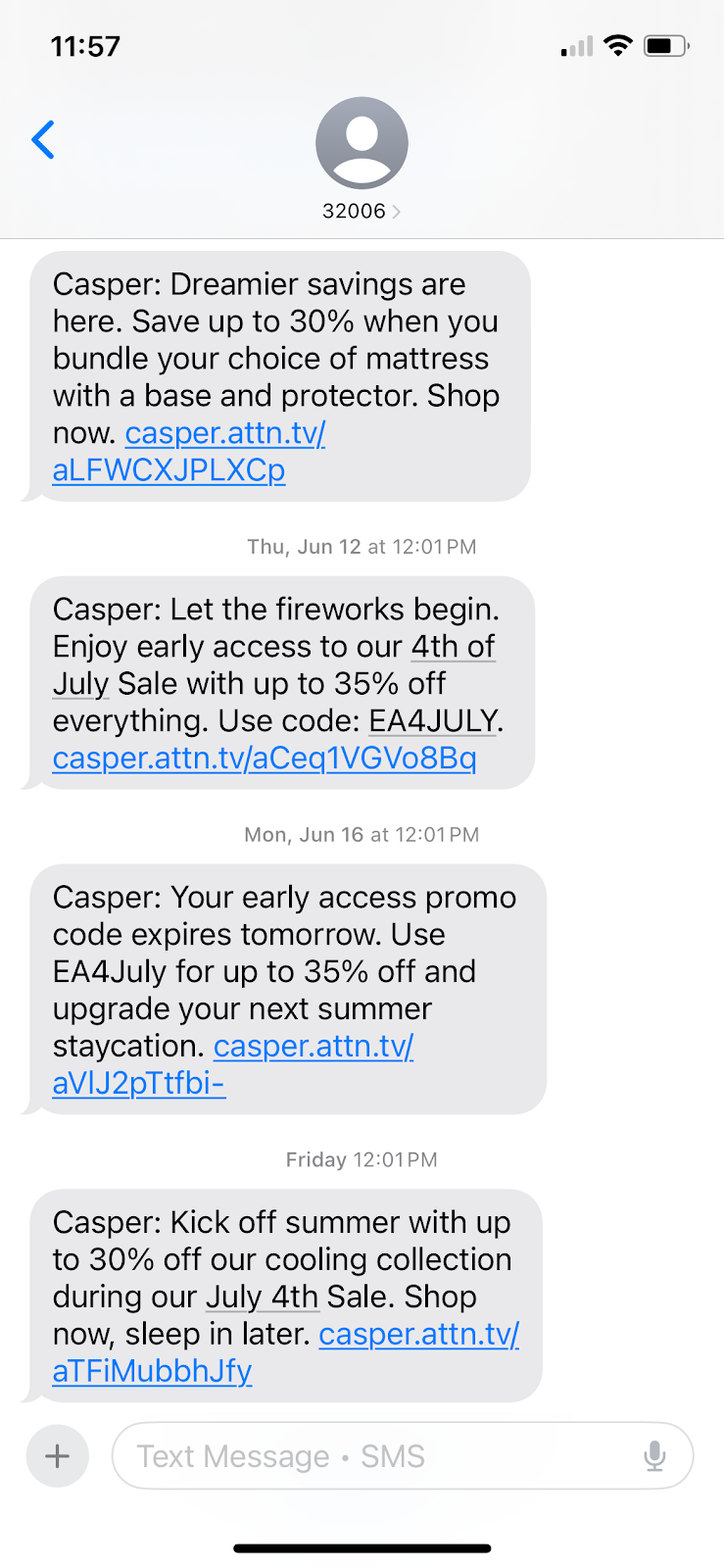
Meta Description 101: Definition, Importance & Tips

A meta description is a short text that tells the reader what’s on the page before they click. 

You’ve probably heard they’re important for SEO.

But are they really?

That’s what you will learn from the article. I will also share 11 actionable tips on how to write effective meta descriptions and answer a few common questions. 

Key takeaways

  • Meta descriptions don’t affect rankings directly but they can do it indirectly by improving click-through rates and user experience.
  • Google rewrites ≈70% of all meta descriptions, but it still recommends writing quality descriptions. 
  • Good meta descriptions concisely summarize the page, include target keywords, align with search intent, and encourage searcher clicks by showcasing page value. 

What is a Meta Description

Meta description is a short HTML tag that summarizes the page content. 

Here’s what it looks like for my blog:

Neil Patel's meta description.

Readers can’t see meta descriptions on the page without inspecting the code.

But they can see it in the snippet on the search engine results page, below the page URL and title.  

Neil Patel's meta description as it appears in Google.

Its job: to show readers what the page offers and persuade them to click. That’s why people often call it a page’s elevator pitch.  

Are meta descriptions still important for SEO?

The short answer: meta descriptions aren’t very important for SEO. 

Surprised? I bet you aren’t the only one. 

After all, writing meta descriptions has always been one of the core on-page SEO best practices.

Let’s unpack why. 

Meta descriptions aren’t a ranking factor for Google.

However, many SEO believe they improve rankings indirectly.  

This is based on the assumptions that:

  • Compelling meta descriptions improve click-through rates (CTRs).
  • CTRs are a user signal that Google considers when ranking pages. More people clicking on your page signal to Google it satisfies their search intent.
  • Well-written meta descriptions improve the user experience. They show readers what they can find on the page and help them decide if they want to visit on it or not. If they do, they’re less likely to bounce, and bounce rates are a quality signal for Google.

All sounds logical but no recent large-scale studies confirm the positive impact of meta descriptions on CTR or traffic

Experiments conducted by SEOTesting earlier this year indicated that optimizing meta descriptions barely affected traffic and a 2023 case studies by SearchPilot showed that removing them improve CTRs. 

A Linkedin post by Ryan Jones.

Google Rewrites Most Meta Descriptions

One reason why meta description optimization has limited impact is that Google replaces about 70% of them with content directly from the page.

Let me show you an example from one of our recent articles:

As you can see, the meta description tag reads “Discover what GPTBot is, how it works, and what its presence means for your website’s SEO, privacy, and AI data usage policies.”

Meta description code for the Neil Patel article: What is GPTbot?

However, if you search for “GPTBot,” that’s not what you find in the result snippet:

The What is GPTbot meta description as it appears in Google.

The snippet above was taken from the Key Takeaways section.

Key takeways for the What is GPTbot article.

The Verdict: You Should Still Write Meta Descriptions

If Google rewrites most meta descriptions and they don’t move traffic, why bother with them?

First, social media platforms like Facebook still display the original meta description when users share the page. So, by skipping it, you reduce its visibility and shareability. 

The What is GPTbot article as it appears on Facebook.

Secondly, Google itself still recommends it as means of “controlling the snippet.” Essentially, Google may use it in the SERP snippet if it answers the user query better than what Google finds on the page.

Google's guidance on controlling snippets.

So although adding meta descriptions isn’t critical for SEO, still do it. 

Yes, Google often replaces them. But you have a 30% chance that it doesn’t. If you skip the tag, you give up control of the first impression your page makes in SERPs without a fight. 

How to Write a Meta Description: 11 Top Tips.

With the theory out of the way, here are 11 tips for writing meta descriptions that searchers (and Google) will like. 

  1. Stay Under 156 Characters and Front-Load

To ensure readers can see your meta description, don’t go over 156 characters and put the most key info in the first 110 characters. 

Google cuts off the snippet based on pixel length: 960 pixels on desktop and 680 pixels on mobile. That’s roughly 145-155 and 110-130 characters, respectively.

Writing tools, like NeuronWriter below, feature snippet simulators, so you can preview it as you’re crafting your description, so you don’t overflow.

Neuronwriter's snippet simulator.
  1. Check Existing Snippets

Analyzing the snippets for your keyword helps understand what kinds of descriptions Google prefers.

For example, all the meta descriptions for “motorcycle helmet” feature words like collection, range, or selection, kinds of helmets (full face, open face, flip up, etc) and brand names. 

Mimick it when crafting your homepage or category page descriptions. 

A Mega Motorcycle Store meta description.
  1. Satisfy Search Intent

Your meta description must reflect the search intent. Or in other words, it spell out what need it satisfies or problem that it solves. 

For example, the article ranking #1 for ”keto diet’ has a definition of the diet and a brief explanation of how it works because the keyword has informational intent and that’s the kind of information users are after. 

A Healthline meta description.

In contrast, the meta description for the homepage of Next, the UK retailer, aligns with the transactional/navigational intent. Anyone looking for ‘Next’ is likely shopping, so “Shop the latest women’s, men’s and children’s fashion…” nails it. 

A Next Direct meta description.
  1. Highlight the Benefits

To win searchers’ clicks, show them what they will gain.

For a blog post or a guide, state what they will learn. 

Like the meta description for the guide to fitting kitchen worktops, which promises to show the reader how to install it themselves without hiring a professional fitter. 

A B&Q meta description.

For a product page, show potential customers its unique value proposition and how it will change their lives for better. 

Slack’s meta description is a perfect example. It explains what the product does (“is a new way to communicate with your team”) and shows its advantages over alternatives (“faster, better organized and more secure than email”).

Slack's meta description HTML.
  1. Use Active Verbs & Add a Compelling CTA

An effective meta description drives user action through a compelling CTA.

For a blog article, this could be “visit to learn”, for a software product page, “start free trial now”, and for a car, “Book a test drive today,” just like in the Toyota Yaris example. 

The Toyota meta description starts with an imperative “enrich” which is also a common tactic to prompt readers to act. 

A Toyota UK meta description.
  1. Clearly Describe the Page Content

Effective meta descriptions summarize the page content accurately to tell the potential readers what they can find in the article to help them decide if it’s relevant.

That’s what the meta description for the BBC Gardeners’ World Magazine article on how to build a garden pergola does.  It tells them what the article includes (advice, ideas) and how it’s structured (a list). 

A BBC Gardeners World Magazine Meta Description.

Inaccurate or misleading meta descriptions backfire: if the reader expects something else from the page, they bounce. This hurts the page rankings by signaling Google that the page isn’t relevant.  

  1. Include Primary Keywords Naturally

Including target keywords in your meta description is another way to signal relevance and help the meta description stand out.

How so?

Google boldens words and phrases related to user query in the snippet.

For example, when I searched for “climbing shoes,” it returned multiple results with the keyword boldened, including the one from Rock + Run product category page. 

A Rock + Run meta description.

But embed the keywords naturally. 

Keyword stuffing makes no sense because A) meta descriptions aren’t a ranking factor, B) Google considers it a spammy practice will most likely replace such descriptions.

And it will do it for your own benefit because it makes text hard to follow, negatively affecting the user experience, which may harm your brand perception. 

  1. Make Your Meta Descriptions Stand Out

Stand-out meta descriptions catch user attention and stop them from scrolling past.  

You can achieve this with:

  • Eye-catching phrases
  • Sensory descriptions
  • Rhythm and rhyme
  • Alliterations 
  • Witty puns, jokes and idioms (like “make a splash” in the M&S description).
A Marks & Spencer meta description.

Beware of clickbait — sensational wording, contrarian opinions, or half-truths. These might be fine for certain sectors, like celebrity news sites, but won’t cut it in ecommerce or SaaS.  

Likewise, spammy claims like “best in the world” don’t inspire confidence while misleading and overpromising can bite you back: users won’t get what they expect and will bounce. 

  1. Match Your Brand Voice

Whatever the vibe of your home or product pages, match it in the meta descriptions. If you nail, you will improve brand recognition. If you get it wrong, you will undermine visitor trust.

For example, Naked Coffee’s home page tag perfectly mirrors the tone of its site and social media content. 

A Naked Coffee meta description.
  1. Write Unique Descriptions for Every Page 

Google recommends writing unique meta descriptions to differentiate pages. 

An example of Google recommendations for meta descriptions.

Duplicate meta descriptions confuse readers and don’t help them choose the right page.

They also signal that you may not care much about the user experience (read “you’re lazy”).  

You can quickly identify meta description issues like duplicates by running the SEO Audit with Ubersuggest. 

Ubersuggest's SEO audit function.
  1. Be Consistent Across the Website

A consistent meta description format across your website provides a predictable user experience.

Mind you, it doesn’t mean ALL pages across the whole website should follow the same format.

But definitely pages of the same category. For example, all category pages and all product pages within the same category. 

How to Write Meta Descriptions At Scale

For large websites with hundreds or thousands of pages, writing meta descriptions manually isn’t always feasible. 

The solution?

Write them manually for the mission-critical pages, like your homepage, category pages, or top-converting product pages. 

And generate the rest automatically, using:

  • Programmatic SEO: Create content from templates using data from structured databases or spreadsheets. Setting it up requires a certain level of technical expertise but once done, you can generate thousands of meta descriptions within minutes. 
  • AI chatbots: Build a spreadsheet with all your pages, for example, by downloading it from the SEO tool, and prompt ChatGPT, Claude or Gemini to create the descriptions. Make sure to provide all the details, like the desired length and what it should include. The downside is that you still need to import these to your CMS. 
An AI-generated meta description prompt.
  • CMS plugins: Install a plugin like AI for SEO (WordPress) or Metagen (Shopfiy) to generate meta in bulk. You can do it either with AI or by inserting variables, like 

Whatever approach, always review and edit the descriptions manually to avoid embarrassing misfires. 

FAQs

To finish, let’s answer a few frequently asked questions about meta descriptions.

What is a meta description in SEO?

It’s a short summary that shows up under your page title in search results. It doesn’t help you rank directly, but it can boost clicks by telling people what they’ll get if they visit your page. Think of it as your page’s pitch, fast, clear, and built to earn the click.

How to write meta descriptions for SEO?

To write an effective meta description, consider including relevant keywords and phrases that accurately describe the content on your web page.
Additionally, ensure:
Your meta description is unique and compelling.
You use active language.
That you highlight the benefits or solutions visitors can find on your page. 
You include a call-to-action.

Do meta descriptions affect SEO?

While Google doesn’t count meta descriptions as a ranking factor, meta descriptions still play a vital role in your SEO. 
Why? The brief summary you provide in a meta description gives users an idea of what to expect. This entices viewers to engage as they can see that your content meets their needs.
Optimized meta descriptions can also enhance click-through rates.

How long should a meta description be for SEO?

The standard length for meta descriptions is 155 characters, but up to 160 is acceptable.  Don’t forget to check the pixel widths of your meta descriptions to avoid truncated results. For mobile aim for 680 pixels, and for desktop 960 pixels.

Conclusion

Meta descriptions aren’t very important because they aren’t a ranking factor and Google rewrites most of them. 

But if you don’t provide a meta description, you voluntarily surrender control over how users see your page in SERPs. This means missed opportunities to attract users and shape your brand image online. 

That’s why writing meta descriptions is still one of the core SEO best practices. 

Read more at Read More

How to Write Your LinkedIn Headline (+ 20 Examples)

LinkedIn is the best platform for building professional connections, finding B2B leads, and job hunting. But in order to make the most of the platform, you need a LinkedIn headline that’s going to stand out.

Below, we discuss what a LinkedIn headline is, how you can write a good one, plus showcase 20 amazing examples you can use for inspiration.

Key Takeaways

  • A LinkedIn headline is like a quick elevator pitch showcasing what you do professionally.
  • To write a good LinkedIn headline, you want to start by perusing different examples to get an understanding of what your headline should include.
  • Make sure to incorporate things like your current role, your biggest skills, industry keywords, and other important information in your own headline.

What Is a LinkedIn Headline?

A LinkedIn headline is a short description of who you are/what you do that sits at the top of your LinkedIn profile. As you can see below, my LinkedIn headline is “Co-Founder at Neil Patel Digital.” Short, sweet, and to the point.

Neil Patel's Linkedin profile.

There are a number of ways to write your LinkedIn headline. You can keep it simple like mine, share a bit more about what you do, or infuse some personality into it. Just make sure it matches your overall personal brand—more on that later.

How to Write a Good LinkedIn Headline

To craft a LinkedIn headline that grabs attention and really showcases who you are, there are a few key elements you want to include. Follow along with these steps to write a good headline that properly details who you are and what you do.

Look at Examples Before You Start

Before you even put a single word in your headline, look around the platform to see how others describe themselves. You can also scroll down just a bit to see 20 amazing LinkedIn headlines we’ve hand-picked to share with you.

Looking around at how other users have written their headlines can be a great way to get the creative juices flowing in your brain. Plus, you can figure out styles that don’t suit you, giving you some parameters to start with.

Include Your Current Role

Now let’s get down to business. It’s time to start writing your LinkedIn headline. And the first thing you want to do is write down your current role.

Keep it simple. Something like “VP of Marketing at Company” or “Dev Lead.” And if you’re currently unemployed and job hunting, you can share that, as well, by writing out something like “Searching for a role in the HR tech space.”

Add Your Skills and Expertise

Next, include any relevant skills and expertise you have that will help you stand out. This can be really simple and in list form, like “Content Strategy, Product-Led SEO.” Or you can be a bit wordier and write something like “I build landing pages that convert.”

Including your best skills and experience can help you stand out, especially if you’re job hunting, looking for new clients, or aiming to expand your professional network.

Incorporate Industry Keywords

One major component of LinkedIn is its search functionality. And to make sure you appear in search results when people are looking for someone with the type of experience you have is to incorporate the right keywords into your headline.

You don’t want to create a keyword-stuffed, jargon-filled LinkedIn headline. But you do want to incorporate enough keywords that they sound natural while still helping you boost your profile’s ranking in search results.

Promote Yourself

Don’t be afraid to show off a bit with your headline. You’re good at what you do. Let it be known. For example, you could include something like “Built a channel with 1M+ YouTube subscribers” or “Building a bootstrapped SaaS product.”

Or, you can talk about what you do for clients. Like, “I write high-converting website copy,” or “I create social media ad campaigns that get results.”

LinkedIn is a professional social networking platform. The goal is to increase your online network, whether that’s finding new clients, making new colleagues, or meeting new industry professionals. And one great way to do that is to really sell what you can do.

Let Your Personality Shine

Just because LinkedIn is a professional platform doesn’t mean you can’t still let your personality come through in your headline and in your content. Include a line that provides a bit more context into who you are as a person—and not just as a professional.

We’ve included a few examples below of how some users have chosen to showcase their personality, even while remaining professional.

Make It Short and Sweet

You only have 220 characters to sum up exactly what you do and who you are in your LinkedIn headline. It’s like the shortest elevator pitch ever. So you need to find the right words to introduce yourself to other LinkedIn users in a really short, concise way.

Another pro tip: Keep the most important part of your headline at the beginning. In both search results and the LinkedIn feed, people will only see the first several words of your headline. They have to click to your profile to see the entire thing.

Make your headline short and sweet, but also, make them want to click to see more about what you have to offer.

20 LinkedIn Headline Examples to Steal

If you want to create your own impactful LinkedIn headline, you first need to look around and see how others in your industry are composing there. Here are 20 different ideas you can steal for your headline to get you started.

1. Be Straightforward

Hailley Griffis's LinkedIn.

Source

Similar to my headline, you can choose to just be straightforward, sharing nothing but your existing role. Don’t worry about any added fluff—just include what you do and where you work so your new connections know exactly what to expect from you.

2. Showcase Your Personality

Kate Erwin's LinkeIn.

Source

Or, you can choose to have some fun with your LinkedIn headline. Infuse your personality into it, creating a headline that’s still relevant to what you do but also lets you showcase a bit of who you are. 

This example, “I live on LinkedIn for a living,” works because Kate is a LinkedIn content creator. So she’s able to put a bit of who she is into her headline while still remaining true to her professional work.

3. Include Your Portfolio

Brinda Gulati's Linkedin Page.

Source

In this example, we see the freelancer has included companies she’s worked with in the past right inside of her LinkedIn headline. This is a great way for potential clients to see if she’ll be a good fit right off the bat.

Consider incorporating some of your past or current clients within your own headline, especially if you only work with companies within a specific industry. It can help narrow down your incoming work requests to more relevant brands.

4. Let Connections Know What to Expect

Olly Meakings' Linkedin Profile.

Source

With this example, Olly has let his followers and connections know exactly what to expect from him and his content. He’s building in public, sharing his experience, and providing content that others in the same boat might be interested in.

5. Promote Yourself

Esha Shamim's Linkedin Profile.

Source

Use your LinkedIn headline as a sort of elevator pitch, promoting yourself and your product or services. In this example, Esha has written that she will write content for your brand that will keep people from scrolling past. 

For your own headline, come up with a quick one-liner that perfectly encapsulates what you do so you can use your LinkedIn profile as a way to bring in new work.

6. Write a List

Jacqueline Ledoux's Linkedin Profile.

Source

Another simple way to use your LinkedIn headline is by simply making a list. List out different roles you have, share a few things about yourself like we see in this example, or list out some of your different skills.

This is a great example because you can use it in any way. Use characters like the “|” or “-” to separate your list items in a visually appealing way that’s easy to follow.

7. Share What You Post About

Naomi Liddell's Linkedin Profile.

Source

Let new connections know what kind of content to expect from your LinkedIn posts. By sharing the topics you talk about, you can find like-minded connections and colleagues that are going to be much more likely to engage with you on the platform.

8. Explain What You Do

Rose Alkamisi's LinkedIn profile.

Source

Explain exactly what you do so that LinkedIn users understand if they want to connect with you or not. This is also a great way to find new work, by creating a one-two line overview of what you have to offer potential clients.

9. Match Your Voice or Personal Brand

Tamilore Oladipo's Linkedin Profile

Source

If you’ve been working on building up your personal brand, make sure your LinkedIn headline matches that voice or branding. In the above example, we can see this creator incorporates all lowercase letters into their overall voice and branding. So of course it makes sense for her to continue that right within her headline.

10. Share Your Accolades

Corporate Natalie's Linkedin Page.

Source

If you’ve won awards or other accolades that are relevant to your work, why not tout them within your LinkedIn headline? Include major accomplishments right inside your headline to further promote your expertise within your profession.

11. Create a Tagline

Sam Hindman's LinkedIn page.

Source

Again, your LinkedIn headline can be treated like a short and sweet elevator pitch. With that in mind, one great way to use it is by creating a tagline of sorts that shows off what you do within a catchy one-liner that can stick in potential clients’ minds.

12. Promote Your Product

Kirsty McConnell's Linkedin page.

Source

This example is great because not only does it share the user’s exact role, but she also added some additional product promotion. So instead of just seeing that Kirsty works at Chameleon, we now know exactly what type of company it is, and she’s included an adjective that helps sell it even further.

13. Include Your Value Proposition

Nathan Ojaokomo's Linkedin page.

Source

What do you have to offer potential clients, customers, or employers? Write out your value proposition and include it as part of your LinkedIn headline. This is another great way to try to promote your product or services and generate new work through the platform.

14. Be Funny

Liz Willits' Linkedin Page.

Source

Take a page out of Liz Willits’ book and just throw some humor into your headline. Just because LinkedIn is a professional platform doesn’t mean everyone’s headlines need to be formal and stuffy. This review from her mom showcases that Liz enjoys infusing humor into her work.

15. Use Buzzwords

Scott Frothingham's LinkedIn page.

Source

Incorporating buzzwords can be a great way to grab attention. It’s the perfect example in this instance as Scott is a copywriter, so throwing in these big, eye-catching buzzwords not only intrigues potential connections but also showcases a bit of what he can do.

16. Share Multiple Roles

Lee Densmer's Linkedin Page.

Source

If you have multiple roles you want to promote, include all of them within your headline. We see Lee doing this in the last line of her headline, listing out, “Business owner, author, teacher, and traveler.” 

17. Include Your Website

Wesley Fairman's Linkedin Page.

Source

You can include a link within your LinkedIn profile, but why not make it even easier for people to discover where they can learn more about you or your business by sharing a link right inside of your LinkedIn headline? It won’t be clickable, but viewers can easily copy and paste it into their browser bar.

18. Share Your Achievements

Ben Kazinik's Linkedin Page.

Source

Proud of your professional achievements? Show them off. We see Ben doing just this by sharing that he boosted monday.com’s monthly visitors from nothing up to 231k. Including tangible accomplishments like this can be a great way to showcase what you can do for potential clients and employers.

19. Share Your Mission

Tori Dunlap's Linkedin Page.

Source

Showcase your professional mission right inside your LinkedIn headline. In this example, we see Tori sharing that she wants to build five million women’s net-worth and self worth. Sharing this is important as it’s a main part of her overall business goals. It also helps her to stand out to her potential audience.

20. Include Relevant Personal Details

Maggie Gremminger's Linkedin Page.

Source

You don’t need to keep your professional and personal self separated. Feel free to include personal details in your LinkedIn headline—especially if they’re relevant to your professional role. In this instance, we see Maggie share that she’s a mom right inside her headline. This makes sense for her as she’s building a platform focused on transforming parental leave.

FAQs

What is a LinkedIn headline?

It’s the short line of text right under your name on your LinkedIn profile. Think of it like a quick intro. it tells people what you do and why they should care. It shows up in search results, connection requests, and posts, so it’s one of the first things people see.

What should you put in your LinkedIn headline?

Start with your role or title. Then add what you’re good at or what makes you different, including things like skills, results, industry keywords, or a short value proposition. Keep it tight, use natural language, and make sure it actually sounds like you. Bonus points if it sparks curiosity or shows some personality.

Create Your Own LinkedIn Headline

Write your own LinkedIn headline by taking advantage of the tips and examples we’ve included throughout this article. Your headline should showcase what you do professionally, the kinds of content you share, and what your skills are so your new connections know what to expect.To make the most out of your Linkedin presence, check out my guide on LinkedIn marketing next.

Read more at Read More

What Is Trendjacking & How to Do it for Your Brand

Do you remember the viral “Little Miss?” meme revival from 2022?

That’s a great example of trendjacking, or inserting your brand into viral online conversations.

It felt like every brand — from global airlines to your local coffee shop — jumped into labeling themselves. Some were hilariously on-point and others…well, not so. For every well-executed moment like a wellness brand that tailored their take to be timely, irreverent, and match their core voice, dozens more missed the mark. And like it or not, audiences can tell.

That’s the fine line with trendjacking. What was once a cheeky social media trick has become a high-stakes play for many modern social media marketers. To stand out and not alienate, brands need more than speed. They need emotional intelligence, audience awareness, and restraint to not jump on every viral moment.

How can you harness what’s trending without sounding tone-deaf or jumping the shark? Let’s break down the basics of effective trendjacking and how you can approach it in a smart way.

Key Takeaways

  • Trendjacking is the practice of inserting your brand into viral conversations in a way that feels timely, relevant, and authentic.
  • Success requires cultural awareness, audience alignment, and speed. Not every trend is right for every brand.
  • Smart brands use social listening tools and planned content workflows to catch trends before they peak.
  • Measuring trendjacking goes beyond likes. Look at sentiment shifts and meaningful engagement.
  • The future of trendjacking will likely be shaped by AI tools, new platforms, and the growing demand for authenticity.

What Is Trendjacking?

Trendjacking is the practice of injecting your brand into a popular or viral conversation to boost visibility, engagement, or relevance. Brands jump on trending topics like memes, social media challenges, or major pop culture moments to join the conversation in ways that are timely and clever.

Trendjacking really gained traction during the heyday of Twitter (now X), when brands like Oreo seized viral moments (the “You can still dunk in the dark” tweet during the 2013 Super Bowl blackout) and earned massive engagement for real-time creativity. That post was a signal to marketers that being culturally responsive could pay huge engagement dividends. 

An Oreo Cookie post on Twitter.

Trendjacking isn’t a completely new strategy, though. It has its roots in the older PR strategy of newsjacking. Popularized by David Meerman Scott, newsjacking focused on inserting brands’ perspectives into breaking news stories to get media coverage. Trendjacking is just an evolution of that strategy, tapping into a broader range of online moments. 

When you do it well, trendjacking can help your brand show personality, relevance, and humor. But it’s not a strategy without risks, especially if you do it without considering nuance or alignment to your brand’s values.

How to Pull off an Effective Trendjacking Campaign

Let’s say you’re ready to drive into trendjacking. How do you do it right? Like many effective social media strategies, the best trendjacking campaigns start long before a trend even surfaces. Success often hinges on preparation and cultural awareness, but the real secret is the agility to act fast without sacrificing your brand’s integrity.

Identify Potential Trends

Trendjacking starts with awareness. The earlier you spot a trend, the better your odds of leading the conversation rather than chasing it.

Start with traditional sources. Social listening tools such as AnswerThePublic, TikTok Creator Search Insights, or Sprout Social can surface what’s gaining traction across different platforms. The latter can help you keep an eye on places like X, Bluesky, TikTok’s trending page, Reddit threads, and even Google Trends to stay ahead of the curve. Using these tools doesn’t just tell you what’s trending. They help you catch the wave before it crests.

Effective trendjacking goes deeper than identifying meme formats or hashtags, though. Ask yourself these questions:

  • Why is this trending?
  • What emotion is it tapping into?
  • What cultural shift or behavioral insight is at play?

Take, for example, the “Girl Dinner” trend. It wasn’t just a meme. It was a commentary on autonomy, wellness fatigue, and the pushback against curated perfection.

In addition to staying on top of developing trends, think ahead. Certain events almost always spawn viral moments: award shows, the Met Gala, political debates, and major sporting events are excellent fodder for trends. Develop a calendar of these events and build a properly resourced team that can act when the internet lights up.

Assess the Trend’s Relevance

Before you jump into the trend, assess whether or not it’s right for you. Ask important, hard questions, like “Does this trend actually align with our brand?” and “Will our audience care?” Finally, will it feel authentic or forced?

Many brands falter here. Chasing a trend that’s off-brand does more than fall flat; it risks damaging your credibility. The Duolingo x Scrub Daddy “cursed collab” worked because both brands share a quirky, unfiltered tone. If a serious financial brand tried the same joke? Cue the confused and cringing followers.

Assess risk, too. Some trends carry baggage, like political undercurrents, social controversies, or rapidly shifting sentiment. Your internal team should include diverse perspectives to help flag possible missteps.

Beyond relevance, hopping on the trend should add to your brand’s story. If it doesn’t connect to your values or content pillars, it might be better to skip it. Not every viral moment is worth jumping into. Restraint is often what separates trend-chasers from trend leaders

Produce the Content—Quickly!

Once you’ve vetted a trend, it’s “go time.” Timing is everything in trendjacking. Wait too long, and you’re just adding noise to an already crowded feed.

In practice, your team needs a streamlined workflow to move from idea to pressing the publish button in hours, not days. Empower social managers with decision-making autonomy. Maintain a library of pre-approved assets like brand visuals, fonts, and tone examples so your team can capitalize on trends without needing to create a full-scale design from scratch.

Creating internal “trend kits” or rapid response playbooks can help your team execute quickly and safely. Remember: the most memorable trendjacks feel both spontaneous and strategically on-brand because they are.

Creating Impactful Trendjacking Content

Once you’ve identified the right trend and confirmed it makes sense for your brand to participate, the real magic begins: creating content to hit the sweet spot of relevance, creativity, and authenticity. Not every trendjacking post needs to be laugh-out-loud funny or ultra-slick, but it should always bring something fresh and on-brand to the table. Some tried-and-true strategies for creating trendjacking content that resonates include:

1. Customize by Platform

What works on TikTok might not work on LinkedIn, and vice versa. Tailor your content’s tone, format, and visuals to the platform you’re posting on. Wendy’s built their brand on X with snarky one-liners, but the food chain takes a more curated and visual approach on Instagram.

A Wendy's tweet series.
A Wendy's Instagram reel.

2. Embrace the Weird (Strategically)

Humor, absurdity, and left-field creativity often fuel viral trends. But you can’t force it. Duolingo’s TikTok presence leans fully into weirdness, but it’s consistent with their edgy, millennial-savvy voice.

Add Value. Don’t Just Copy

Don’t simply copy-paste a trending meme format. Add your brand’s POV, a clever twist, or insights that enhance the original. For example, Canva recently leveraged the app’s ability to create color schemes with the growing popularity of Labubu toys.

A Canva Labubu ad.

4. Prioritize Authenticity

Your audience can smell a cash grab a mile away. If the trend doesn’t align with your values or voice, skip it. If you really feel like you need to participate, subtly nod to the trend without trying to dominate it. Engage, like, or reply to accounts that have posted content in the trend without creating new assets on your own.

5. Keep the Content High-Quality

Even in a fast-moving trend cycle, visuals (and sound) matter. Low-res graphics or clunky text overlays can kill your momentum. Use templates or pre-approved brand assets to keep things polished under pressure.

r/funny - graphic design is my passion.

Trendjacking is not the time to let the copywriter have the keys to the Canva account.

When Trendjacking Goes Wrong…

Trendjacking is a real double-edged sword. When done right, it’s clever, memorable, and engaging. When done wrong, it’s also memorable, but for the wrong reasons; it’s tone-deaf, confusing, or even damaging to your brand. Avoid these common pitfalls.

Tone-deaf or Insensitive Posting

Some trends are tied to serious or sensitive events, and misjudging the tone can result in intense backlash. That’s what happened to Pepsi in 2017 for their ad that featured Kendall Jenner, which co-opted protest imagery to sell soda (and promptly got called out for trivializing real social movements).

Just because a topic is trending doesn’t mean it’s safe territory. Assign someone on your team to assess social sentiment and cultural context before engaging.

Jumping in Too Late

Timing is critical. A trend that peaked two days ago may already feel stale, especially if your post doesn’t add anything new. Joining late makes your brand look like it’s scrambling to stay relevant, not leading the conversation.

To avoid this, consider streamlining your approvals process and having brand-safe assets ready to go.

Misunderstanding the Trend

One of the fastest ways to make a brand look out of touch is to misinterpret the trend altogether. Imagine someone at your company wanted to tweet a meme that referenced “Netflix and chill,” without realizing its NSFW subtext. The internet might notice and not in a good way.

Before trendjacking, do a quick sentiment check. What does this trend actually mean to the people participating in it?

Forcing the Fit

If the trend doesn’t suit your brand voice, values, or audience, don’t force it. It’s painfully obvious when a B2B SaaS brand shoehorns itself into a Gen Z meme format meant for fashion or pop culture. This usually results in low engagement at best and audience cringe at worst.

Brands need a straightforward internal process for evaluating the risk of trendjacking campaigns. Who gets to greenlight? What criteria does the content meet? Building a lightweight risk assessment checklist or review board (creative + legal + DEI leads) can help you act quickly and responsibly.

Lack of Crisis Planning

Even with the best of intentions, things can go sideways fast. That’s why it’s smart to develop a basic crisis response protocol before engaging with fast-moving or culturally sensitive trends. Know who will respond, how quickly, and what steps to take if content sparks backlash. 

Measuring Success and Finding Learnings for the Future

With your trendjacking content out in the world, it’s time to answer the big question: Did it work?

Start by measuring the basics: likes, shares, reach, and impressions. These top-level metrics help assess immediate visibility and initial audience reaction.

Smart marketers go further, though. The most impactful trendjacking efforts don’t just rack up views. They strengthen brand equity and move the needle on meaningful outcomes. Ask yourself:

  • Was the engagement meaningful? Analyze the sentiment and depth of conversation in your engagement. Did people share it with thoughtful comments or tag their friends, or was the engagement just a flood of indifferent likes?
  • Did it shape perception or sentiment? Use social listening tools to see if brand sentiment improved during and after the campaign. Google Analytics and UTM parameters can help tie social moments back to web traffic and conversion goals.
  • Did it drive real behavior? Track clicks, sign-ups, or sales lifts during and after the campaign. This is another instance where Google Analytics and UTM parameters can help tie those moments back to web traffic and conversion goals.
  • Did it strengthen community? Great trendjacking does more than entertain. It builds a sense of belonging. If the post sparked DMs, follow-up content ideas, or user-generated content (UGC), that’s a sign your audience is invested.

Want to level up your campaign? Try aligning your trendjacking posts with keyword-focused content or campaign themes. This gives your SEO strategy a boost, especially in a world where Search Everywhere is the norm (and users can Google the trend and stumble onto your brand).

Upcoming Trendjacking Trends

The art and science of trendjacking will only evolve as the digital landscape shifts. Marketers who want to stay ahead of the curve will need to keep a pulse on what’s trending and how those trends take shape and spread. The future of trendjacking will evolve thanks to things like AI, new platforms, and the rise of “unpolished” realness.

1. AI-powered Content Creation

AI is creating massive shifts in real-time marketing as tools like ChatGPT, Midjourney, and Runway help brands generate reactive content faster than ever. From clever captions to custom visuals, the future of trendjacking likely includes AI-enhanced creativity. The big challenge for brands is to remain authentic in the face of automation.

A social chatbot interaction creating an Instagram ad for Labubu.

Could ChatGPT help brands jump on the enthusiasm for Labubu without spending the time to go out and source a doll? Possibly.

2. New and Niche Platforms

Instagram, TikTok, and X may reign supreme among platforms, but that won’t always be the case. Bluesky is becoming increasingly popular, and YouTube Shorts has challenged TikTok as a vehicle for short-form video content creation. Expect trendjacking to require more platform-specific fluency, understanding not just the content but the culture of each channel.

3. The Rise of “Unpolished” Realness

Consumers are tired of overproduced content. The next wave of trendjacking will favor brands that show up with honesty, humor, and heart. Even if that means posting something that feels more lo-fi than high-concept. Authenticity isn’t just a “nice to have” anymore. It’s a prerequisite for engagement.

A bobespizza Instagram ad.

Bobe’s Pizza may be a small Indiana brand, but they lean on authentic content that resonates with their core audience.

The bottom line is that the future of trendjacking isn’t about being fast. It’s about being fast, smart, and real while building systems to let your brand respond with agility and intention.

FAQs

What is the difference between trendjacking and newsjacking?

While both strategies involve jumping into timely conversations, the difference lies in what you’re responding to. Newsjacking is about inserting your brand into breaking news stories — typically through PR or expert commentary — while trendjacking taps into broader online trends, like memes, pop culture moments, or viral challenges. Trendjacking is more social and creative, whereas newsjacking is often more formal and media-facing.

What is an example of trendjacking?

A classic example is Oreo’s “You can still dunk in the dark” tweet during the 2013 Super Bowl blackout. The brand reacted in real time with a witty graphic and caption, and the internet loved it. More recently, brands like Ryanair and Duolingo have gone viral for trendjacking TikTok memes using their unique, offbeat brand voices. The key to successful trendjacking? Speed, creativity, and cultural fluency.

What is the trendjacking strategy?

When done well, trendjacking helps brands increase visibility, boost engagement, and connect with audiences in a culturally relevant way. It shows your brand has personality and a pulse. Beyond racking up likes, the real value comes from building brand affinity, sparking conversations, and staying top-of-mind in an increasingly noisy digital space.

Conclusion

Trendjacking is about moving fast and smart. When you do it right, it can drive massive visibility and deepen brand affinity. It takes planning, awareness, and a clear voice to avoid the pitfalls and stand out in the scroll. Whether it’s memes, moments, or movements, show up with purpose.

If you need help crafting an agile social strategy that’s authentic and audience-focused, contact NP Digital to help you lead the conversation, not just follow it.

Read more at Read More

AI in Marketing: How It Works + Examples

If you’re not using AI in marketing, you’re already falling behind. Artificial intelligence (AI) tools are becoming more and more prominent, and many have functions specifically designed to help marketers better promote their products and services.

Throughout this article, we’re going to dive deeper into what AI in marketing looks like, sharing the benefits of taking advantage of AI, how AI can be used in marketing, plus some AI marketing tools to get you started.

Key Takeaways

  • AI can provide a number of benefits for your marketing team, like speeding up tedious tasks, providing you with better insights, and boosting your overall results.
  • You can use AI as part of your content planning and creation process, to gather competitive insights, to improve your customer service, and more.
  • There are a number of AI tools that can help you automate processes and streamline your strategy.

Benefits of Using AI in Marketing

Why should you incorporate AI into your marketing strategy? There are so many benefits that these tools can bring to your team—if you use them right.

Speed Up Processes

AI can help marketers speed up processes and spend less time conducting certain tasks manually. According to HubSpot’s State of AI Report, 79% of marketers agree that AI helps them to spend less time on manual tasks, showing just how valuable these new tools can be.

Improve Personalization

AI can analyze customer data at scale, helping you to gather more insights and understand how to better personalize your content and segment your audience. Better personalization can provide your business with better results from your marketing campaigns.

Better Insights

Because AI can analyze data more effectively than humans can, you can get better insights. For example, AI analysis can help you identify trends earlier, forecast sales and customer behavior more efficiently, and help your marketing team make better decisions.

Cost Savings

Incorporating AI tools into your team’s daily processes can save time and resources, resulting in cost savings within your marketing budget. While AI shouldn’t replace core human workers, there are certain tasks that it can take off their plates, letting them focus on things that actually impact your business’s bottom line.

Higher ROI

Because AI tools can help your marketing team better understand customers, personalize campaigns, and ship better content, you’ll see a higher return on investment (ROI) as a result. Start using AI within your day-to-day marketing tasks to see how it can help improve your performance.

How AI Works With Marketing: 9 Use Cases

Because AI is a newer technology, you might not be sure how it works with marketing quite yet. However, there are a number of key use cases that AI can help with.

  • Content planning: AI chatbots can be a huge help in brainstorming content ideas. Tell the chatbot about your business and your overall content goals and ask for topics that you may not have covered yet. You can then run the ideas through an SEO tool to find top keywords to center your content around.
  • Content creation: While AI shouldn’t be handling the entire content creation process, it can still provide some assistance. Get help creating a comprehensive outline, get ideas for your introduction, or get AI to start with a summary that you can expand on.
  • Marketing automation: Incorporate AI tools into your marketing automation workflows to further your team’s productivity. AI tools can be used as a step within your workflows or they can help you set up new workflows, improving efficiency.
  • Customer service: AI can be a huge help within customer service. Use an AI-powered chatbot on your website to help answer basic customer questions while also escalating issues to a human service representative for larger issues. This can make sure your customer service team is only having to deal with major issues, with AI responding to all smaller queries.
  • Audience segmentation: AI tools can analyze large amounts of customer data, helping you to segment out your audience in a much more effective way than if your team were analyzing the information themselves. Segmentation can help you create more personalized campaigns and marketing efforts.
  • Social listening: Incorporate AI into your social listening strategy to more quickly analyze the data, understand overall sentiment, and generate a summary of overall customer conversations. This type of AI assistance can make your social listening strategy much more effective.
  • Competitive intelligence: Again, because AI is such a powerful tool when it comes to analyzing data, it can be a huge help when looking at competitive insights. Discover how your competitors are faring in comparison to your own performance, plus analyze market trends to see what you can expect in the future.
  • Predictive analytics: Similarly, AI can also be used to predict customer behavior, taking a look at past campaigns and forecasting future results based on historical data. This can be a huge help when creating new campaigns so that you can make them better than ever.
  • Administrative tasks: AI is also hugely helpful with basic administrative tasks like data entry, scheduling, pulling reports, and more. Use AI for the boring manual tasks to free up your team’s time for more important work.

3 Examples of AI in Marketing

Let’s look at some real life examples of businesses using AI in ways that market their products or make working with their business feel more appealing.

Spotify

Spotify is a music streaming service that recently launched its own AI product to help its users have a better listening experience. This AI product is called “DJ,” and it analyzes your top songs and plays music based on your past listening habits.

Spotify's AI DJ.

The DJ will play five songs that all come with a similar vibe, then come back onto the “mic” to share your next five songs. If there’s a set of songs that listeners aren’t interested in, they can tap the “DJ” icon to move onto the next set.

It’s a unique experience that really helps to set Spotify apart from other streaming platforms.

Curlsmith

Curlsmith is a beauty brand focused on curl care. It has a chatbot widget on its website to help customers find what they’re looking for.

Curlsmith's AI widget.

As you can see, the chatbot responses are all “Automated with AI.” Customers can use this chatbot to:

  • Find the right products for their curl type
  • Check in on a recent order
  • Ask questions about shopping with Curlsmith
  • Ask about discounts
  • Change an order

There are programmed responses, but if a user says that they need additional help, there’s a conversational AI chatbot implemented as well that will analyze a user’s response in order to provide them with the best customer service.

Heinz

Heinz put together a creative ad campaign a couple of years ago and used AI to help them build it. The ad told the story of how the Heinz team typed “ketchup” into an AI image generator, and the output was a ketchup bottle with a logo that looked eerily similar to the Heinz logo.

The campaign essentially said, “even AI knows ketchup is Heinz,” and showcased several other prompts the team ran through the AI image generator, all including the word “ketchup,” and the output they received.

This was a creative way to incorporate AI tools in a marketing campaign that also provided an extremely effective result.

AI Marketing Tools to Use

If you want to get started incorporating artificial intelligence into your marketing strategy, you need to find the right tools to use. Below, we introduce you to six different AI marketing tools, each with its own use case.

ChatGPT – AI Chatbot

The ChatGPT interface.

ChatGPT is an AI-powered chatbot that can provide answers to anything you type into the text box. It can help with things like:

  • Brainstorming
  • Outlining
  • Conducting research
  • Optimizing content
  • Analyzing your market

But ChatGPT can honestly help with nearly any request you might have for it. You can also upload Excel files and have it analyze historical data, helping you generate predictive analytics, forecast customer behavior, and gather competitive insights, even without tools that are more catered to those capabilities.

If you don’t use any other AI tool, you should at least have a ChatGPT account under your belt.

Pricing: Completely free for limited (but still extensive) use. To get access to more models and more capabilities, premium plans start at $20/month.

Jasper – Content Generation

Jasper's homepage.

If you’re looking for help with your content generation, Jasper is the perfect tool for you. The tool provides an intuitive workspace that makes it easy to generate content at scale, optimize content so it hits every mark, conduct research to fully flesh out your content, and more.

While Jasper is the ultimate content generation tool for marketers, it also offers AI agent capabilities. AI agents are tools that can operate autonomously, helping marketers get more done in less time.

Pricing: Plans start at $39/month/seat.

Midjourney – Image Generation

The Midjourney interface.

Midjourney is an AI-powered image generation platform. It was originally built through a Discord server (which still remains active), but now can be accessed through an easy-to-use web app. Users can input any text-based description, upload images for reference, and incorporate some of Midjourney’s built-in parameters to create images for any marketing needs.

Generate realistic images, animated images, surreal art, and more. Midjourney is also starting to delve into video generation, which can be a game changer for creating marketing video ads and commercials.

Pricing: Paid plans start at $8/month.

Hootsuite – Social Copy Generation

Hootsuite's homepage.

Hootsuite is a social media management platform, but it also offers a number of free AI-powered tools that can help marketers get ideas for their social copy and captions. Some of the available tools include:

  • Caption generator
  • Tweet generator
  • Video title generator
  • Video description generator
  • Hashtag generator
  • Username generator
  • Social media bio generator
  • Content ideas generator
  • Blog ideas generator

Take advantage of these completely free tools to help you brainstorm more ideas and captions for your social media content. These free tools are also their own example of AI in marketing, as they help promote Hootsuite alongside providing free value.

Pricing: The AI-powered generators are completely free to access. Hootsuite’s suite of social media management tools start at $99/user/month.

Zapier – Marketing Automation

Zapier's homepage.

Zapier is an AI-powered marketing automation platform that makes it easy for marketers to set up automated workflows. Zapier works via “zaps” that connect tools together to create an automation that wouldn’t otherwise be possible.

For example, automatically add leads to your CRM, automatically add your new blog posts to your social media content calendar, or automatically add new customers to a spreadsheet for tracking.

These are some basic zaps, though. Zapier also offers a number of extensive workflows that incorporate their AI capabilities, helping marketers to automate more complex tasks as well.

Pricing: Free for up to 100 tasks/month. For more usage, paid plans start at $19.99/month.

Tidio – Chatbot

Tidio's homepage.

Tidio is a chatbot software that enables businesses to create their own AI-powered chatbots for their customers to interact with. Users can get customer support from your AI bot, chat with your bot about product suggestions, and make appointments all through your Tidio chatbot.

Train the Lyro AI assistant with your business information so they can help customers out, while also escalating more serious concerns or more unique questions directly to a human customer service representative.

Pricing: Plans are flexible based on the number of conversations you expect to have per month. Get access to the tool for free for 50 conversations or less. Plans start at $24.17/month for 100 conversations and go up from there.

FAQs

What are some examples of AI in marketing today?

Chat bots, a form of artificial intelligence, are a common occurrence on business websites. Other examples within marketing include ad targeting, dynamic pricing, and ChatGPT.

How is AI changing the marketing industry?

The greatest impact that AI has had on the marketing industry is in the automation of repetitive tasks. This frees up times for digital marketers to focus on larger-scale projects and higher level strategy. 

How to use AI in digital marketing?

Use AI where it actually helps. Automate tedious tasks like reporting, scheduling, and customer service. Use it to speed up content planning and pull insights from your data faster. Let AI handle repetitive tasks so your team can focus on strategy and creative work.

Should you trust AI tools?

AI tools, in and of themselves, are nothing to be feared. There is nothing inherently bad about AI or AI tools. However, you do want to review any work that comes out of them to avoid concerns like plagiarism or inaccuracy.

AI Is the Future of Marketing

Artificial intelligence (AI) is a key part of marketing these days. You can use the tools to help generate content for your marketing campaigns, analyze results, predict upcoming trends, and so much more. To get even more ideas for how to use AI in your marketing efforts, check out our arsenal of AI tools.

Read more at Read More