Today we’ve launched a redesigned onboarding experience for Yoast SEO for Shopify, built to guide, support, and empower every user from the moment they install. Customer-centric marketers and designers know, first impressions matter, and thoughtful onboarding is the first step to long-term success.
A new onboarding, designed with care
We’ve simplified the setup process, removed unnecessary steps, and introduced a guided, narrative-style welcome experience that makes it easier to get started and harder to get stuck.
Whether you’re new to SEO or scaling a large store, our goal is the same: help you feel confident from the first click.
“We wanted users to land in the onboarding flow and immediately understand two things: how the app can help them improve their Shopify store’s SEO, and what steps to take first to see results.” Tom Ottjes, UX Designer at Yoast
Behind the scenes: Service design in action
This onboarding redesign isn’t just a UI refresh, it’s the result of a service design approach that included:
Journey mapping based on real user behavior
Cross-functional collaboration across UX, development, support and marketing using service blueprints
Strategic improvements to both front-end and back-end processes
Want to learn how a single blueprint helped align our teams and reshape the onboarding experience?
We’re already working on the next phase of improvements designed to improve our customers’ experience, including smarter in-app guidance and contextual feature onboarding.
Thanks to everyone who shared feedback along the way. Keep it coming, we’re listening, learning, and building better together.
Generative Engine Optimization (GEO) is quickly becoming one of the most important new topics in search.
As large language models (LLMs) change how users discover brands and make decisions, GEO helps ensure your content and brand show up in AI-generated answers — not just in traditional search results.
But GEO is just one part of a bigger shift.
We’re entering the era of Search Everywhere (in fact, we’re already in it).
Discovery is no longer confined to Google search results pages.
It’s happening everywhere users seek trusted information and recommendations.
And new data shows just how fast this shift is accelerating.
New research from Semrush predicts that LLM traffic will overtake traditional Google search by the end of 2027.
And our own data suggests that’s likely to be true.
In just the past three months, we’ve seen an 800% year-over-year increase in referrals from LLMs.
We’re seeing tens of millions of additional impressions in Google Search Console as AI Overviews reshape how Google displays answers.
If your brand isn’t adapting, you could soon be invisible online.
In this guide, I’ll explain:
What GEO is and how it’s different from SEO
Why you shouldn’t throw away everything you’ve already learned
The top techniques that will help you optimize your content for generative engines (and drive results for your business in the process)
What Is GEO and Why Does It Matter?
Generative Engine Optimization (GEO) is the practice of creating and optimizing content so that it appears in AI-generated answers on platforms like Google AI Overviews and AI Mode, ChatGPT, and Perplexity.
But GEO goes beyond content optimization. It’s a holistic approach that includes:
Publishing content in the right places where AI tools are most likely to discover it
Earning positive brand mentions across the web, even without direct links
Ensuring technical accessibility so AI crawlers can easily access and understand your content
Instead of focusing only on traditional rankings, you’re making sure your brand becomes part of what AI tools say when users ask questions.
These tools “generate” responses to queries in conversational language. While they can include links, the goal is to give the searcher what they need within the response.
So in GEO, your content needs to shape the conversation, not just try to win a click.
Why GEO Matters Now
Traditional Google search still dominates.
It’ll likely continue to drive most of your traffic in the near term.
But the way people discover information is changing — fast.
Success used to mean ranking at the top of the SERP.
Looking forward, there may not even be a “top spot.”
Instead, you need to become the top recommendation — the solution AI tools choose to recommend in their answers.
The data tells the story:
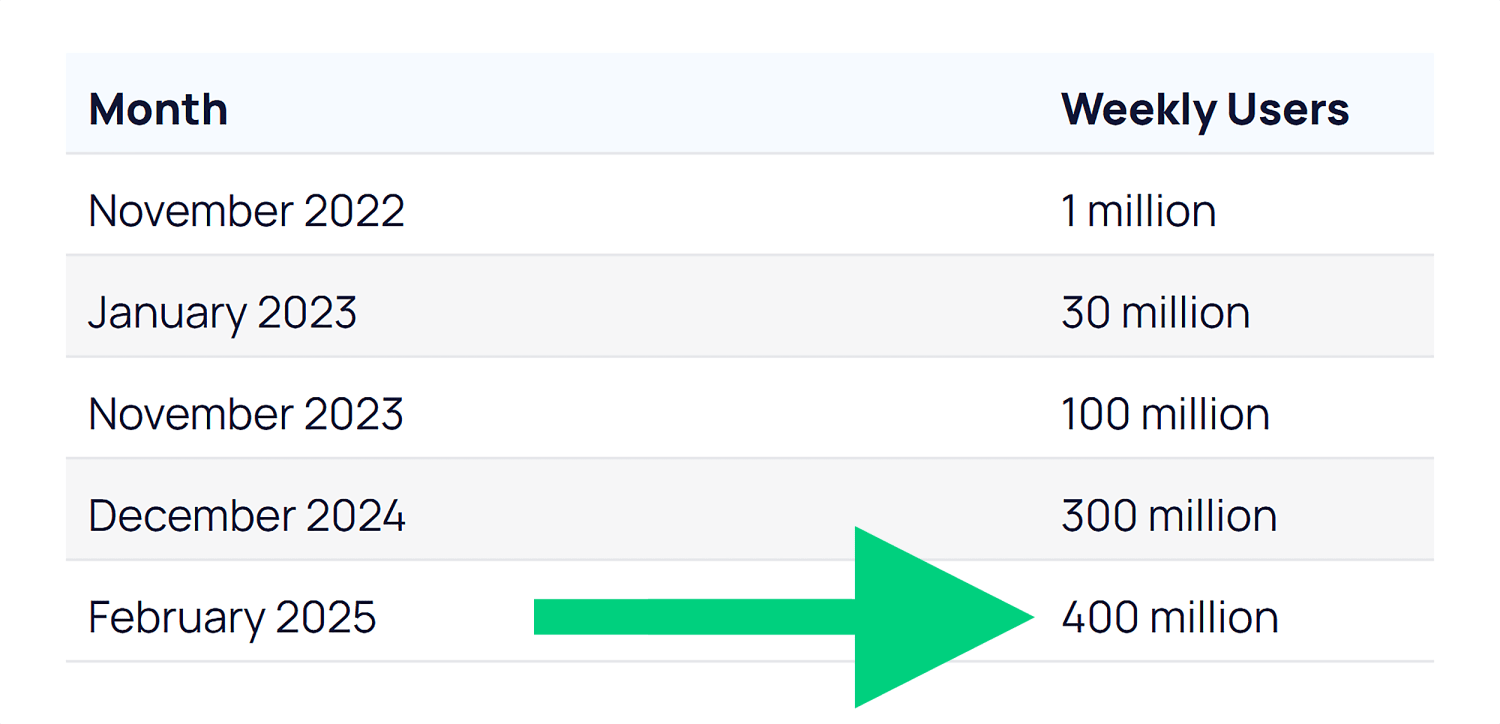
ChatGPT reached 100 million users faster than any app in history. And as of February 2025, it now has more than 400 million weekly users.
Google’s AI Overviews now appear on billions of searches every month — at least 13% of all SERPs.
And they appear for more than half of the keywords we track at Backlinko:
Generative engines are influencing YOUR audience too. So it makes sense to start optimizing for them now.
How GEO and SEO Work Together
Before we go any further, let’s get one thing straight:
You might look at this guide and think,
“Isn’t this just SEO with a different name?”
And honestly?
In many ways, it is. But there’s a reason everyone’s talking about it.
Terms like GEO, AEO (Answer Engine Optimization), and AIO (AI Optimization) have exploded in interest — because they reflect a real shift.
And with all the acronyms flying around, it can be tough to know who to listen to.
We’re not saying GEO replaces SEO.
But it does help reframe your strategy for how discovery works now — across AI tools, social platforms, and new surfaces beyond traditional search.
From Traditional SEO to Search Everywhere
Evolving From
Evolving To
SEO = Google Search
SEO = multi-surface visibility (Search, AI/LLMs, social)
Success = ranking for keywords
Success = being found across Search + Chat
SEO is a siloed function
SEO is cross-functional + connected to product, brand, PR, and social
Keyword-first content planning
Intent and entity-driven topic planning with semantic structure
Backlinks to pass PageRank
Traditional backlinks plus more focus on brand mentions and co-citations
Traffic as a core KPI
Visibility, influence, and conversions across touchpoints as core KPIs
Technical SEO as the foundation
Technical SEO as the foundation (with additional focus on JavaScript compatibility)
That means there’s good news:
If you’ve invested in good SEO, you’re already a lot of the way there.
GEO builds on the foundation of great SEO:
Creating high-quality content for your specific audience
Making it easy for search engines to access and understand
Earning credible mentions across the web
These same elements help AI engines decide which brands to reference.
But here’s the difference:
AI engines don’t work exactly like Google.
That means some of your tactics (and what you track) need to evolve.
So let’s walk through how to do that.
7-Step GEO Action Plan
We’re still in the early days of understanding exactly how AI engines pull and prioritize content.
But one thing is clear:
You need to adapt or reprioritize some traditional SEO tactics for Generative Engine Optimization.
The first three steps below cover overarching best practices for GEO.
Steps 4-7 cover optimizing content for generative engines specifically (and how to track your results).
Step 1. Nail the Basics of SEO
As I said earlier, good GEO is also generally good SEO. But not everything you do as part of your wider SEO strategy is as important for generative engine optimization.
Let’s focus on what really matters for generative engines.
Make Your Site Easy to Read (for Bots)
Crawlable and indexable: If AI tools can’t access your pages, you won’t show up in answers
Fast and mobile-friendly: Slow, clunky sites hurt UX — and your chances of getting cited
Secure (HTTPS): This is now table stakes, and it builds trust with users and AI systems
Server-side rendering: Some AI crawlers still struggle with JavaScript, so use server-side rendering as opposed to client-side rendering where you can
Show You’re Worth Trusting (E-E-A-T)
AI wants trustworthy sources. That means showing E-E-A-T:
Experience: Share real results, personal use, or firsthand knowledge
Expertise: Stick to topics you truly know — and go deep
Authority: Get quoted, guest post, or contribute to well-known sites
Trust: Use real author bios, cite sources, and include reviews or testimonials
Note: We’re not suggesting these AI tools have any sort of “system” built into them that aligns with what we call E-E-A-T. But it makes sense that they’ll prefer to cite content from reputable sources with expertise. This provides a better user experience and makes the AI tools themselves more reliable. Also, download our Free Template: E-E-A-T Evaluation Guide: 46-Point Audit
Step 2. Build Mentions and Co-Citations
AI systems don’t just look at backlinks to understand your authority. They pay attention to every mention of your brand across the web, even when those mentions don’t include a clickable link.
Backlinks are still important. But this changes how you should think about building your wider online presence.
Audit Your Current Mentions
Start by auditing where you’re currently mentioned. Search for your brand name, product names, and key team members across Google, social media, and industry forums.
Take note of what people are saying and where those conversations are happening.
You’ll probably find mentions you didn’t know existed. Some will be positive, others neutral, and a few might need your attention.
Also run your brand name and related terms through the AI tools themselves.
Does Google’s AI Mode cite your brand as a source for relevant terms?
Does ChatGPT know who your team members are?
What kind of sentiment do the answers have when you just plainly ask the tools about your brand?
It’ll let you track your LLM visibility (a by-product of good GEO) in top tools compared to your rivals:
The tool compares your brand to your rivals in terms of AI visibility, market share, and sentiment:
And it’ll show you where your brand strengths are and where you can improve:
Want to track your brand’s AI visibility? Get a free interactive demo of Semrush’s AI Toolkit to see how you can compare to competitors across ChatGPT, Claude, and other AI platforms.
Keep Building Quality Backlinks
Just because mentions are more important than before with GEO, it doesn’t mean you should abandon traditional link building. Backlinks still matter for SEO, and they often lead to the kind of authoritative mentions that AI systems value.
There are a few different definitions out there of co-citation and co-occurence.
I’ll be honest: the definitions don’t matter as much as the implications. I’ve seen one source define co-citations as the exact thing another source calls co-occurence. So for this section, I’m just going to talk about what these are and why they matter, without getting bogged down in definitions.
The first important way to think of co-citations/co-occurences is simply the mention of one thing alongside another.
In the case of GEO, we’re usually talking about your brand or website being mentioned alongside a different website or topic/concept on another website.
For example, if your brand is Monday.com, you’ll pick up co-citations involving:
Your competitors (ClickUp, Asana etc.)
Key terms or categories associated with your business (like “project management software”)
Specific concepts or questions related to what you do (e.g., “kanban boards” and “how to automate workflows”)
In Monday’s case, there are hundreds of pages out there that mention it alongside ClickUp and Asana in the context of “project management tools”:
This suggests to Google and other generative AI tools that Monday and ClickUp are both related to the term “project management tools” and are both popular providers of this kind of software.
The other common way to think about co-citations is mentions of your brand across different, often unrelated websites. For example, Monday being mentioned on Forbes and Zapier would be a co-citation involving them.
To sum it up:
If two (or more) brands/websites are often mentioned alongside each other, AI tools will assume they are related (i.e., they’re competitors)
If a brand is often mentioned in the context of a particular topic, concept, or industry, AI tools will assume the brand is related to those things (i.e., what you offer)
If lots of different websites mention a particular brand, the AI tools will assume that brand is worth talking about (i.e., probably trustworthy)
Obviously, there’s a lot more to it, but this is a fairly basic overview of what’s going on.
How to Put This into Action
To build citations, co-citations, and co-occurences:
Look for opportunities to get mentioned alongside your competitors. When publications write comparison articles or industry roundups, you want your name in that list. These co-citations help AI systems understand where you fit in your market.
Participate in industry surveys and research studies. When analysts publish reports about your sector, being included gives you credibility (and any backlinks are a bonus).
Get involved in relevant online communities. Answer questions on Reddit, contribute to LinkedIn discussions, and join industry-specific forums. These interactions create mentions in places where AI systems often look for authentic, community-driven insights.
The goal is to become a recognized voice in your space. The more often your brand appears in relevant contexts across the web, the more likely AI systems are to include you in their responses.
Step 3. Go Multi-Platform
Going beyond Google is something top SEOs have been telling us to do for a long time. But AI has made this an absolute must.
Platforms like Reddit, YouTube, and other user-generated content sites appear frequently in AI outputs.
So, a strong brand presence on these platforms could help you show up more often.
The benefits here are (at least) three-fold:
Being active on multiple platforms lets you reach your audience where they are. This helps you boost engagement, brand awareness, and, of course, drive more conversions.
AI tools don’t just look at Google search results. They pull from forums, social media, YouTube, and lots of other places beyond traditional SERPs.
Being active on multiple platforms means you’re less exposed to one particular algorithm or audience. Diversification is just good practice for a business.
Brian Dean did an excellent job of this when he was running Backlinko. That’s why you’ll see his videos appear in Google SERPs for ultra-competitive keywords like “how to do SEO”:
We’re taking our own advice here. In fact, it’s a big part of why we launched the Backlinko YouTube channel:
Here’s some quick-fire guidance for putting this into practice:
People go to YouTube to learn how to do things, research products, and find solutions to their problems. This makes product reviews, tool comparisons, and in-depth tutorials great candidates for YouTube content.
Podcast content and transcripts are beginning to surface in AI results (especially in Gemini). Building a presence here is a great opportunity to grab some AI visibility.
TikTok and Instagram Reels reach younger audiences who increasingly use these apps for search. Short-form videos that answer common questions in your industry can drive discovery, and AI tools can also cite these in their responses to user questions.
AI tools LOVE to cite Reddit as a source of user-generated answers (especially Google’s AI Overviews and AI Mode). To grow your presence on the platform, find subreddits where your target audience hangs out and share genuinely helpful advice when people ask questions related to your expertise. Don’t promote your business directly — focus on being useful first.
LinkedIn works similarly to Reddit for B2B topics. Publish thoughtful posts and engage in relevant discussions to help establish your voice in professional circles. These interactions can then get picked up by AI systems looking for expert perspectives.
Step 4. Find Out What AI Platforms Are Citing for Your Niche
What’s a powerful way to understand both what to create and what topics to target?
To simply learn what AI tools are likely to include in their responses to questions that are relevant to your business.
Start by directly testing whether/how your content appears in AI tools right now. Go to ChatGPT, Claude, or Perplexity and ask questions that your content should answer.
In the example below, Backlinko is mentioned (great), but there’s also a YouTube video front and center. And forums are appearing too. These are places we might want to consider creating content or engaging with conversations.
As you do this for your brand, pay attention to the sources they cite:
Are they commonly mentioning your competitors?
What platforms do they tend to cite? (Reddit, YouTube etc.)
What’s the sentiment of mentions of both your brand and your competitors?
As you do this, try different variations of the same question.
For example, you could ask “What’s the best email marketing software?”
Then try “Which email marketing tool should I use for my small business?”
Notice how the answers change and which sources get mentioned consistently.
In the example above, the first prompt mentioned MailerLite, which was absent in the list for small businesses. But the second prompt pushed Mailchimp to the top and mentioned three new options (Constant Contact, Brevo, and ActiveCampaign).
If you were MailerLite and trying to reach small businesses, you’d want to understand why you’re not being cited for that particular prompt.
Pro tip: Try it with different tools as well. They each have their own preferences when it comes to citing sources, so it’s a good idea to test a couple of them.
You can automate this process with tools like Profound or Peec AI. These platforms run prompts at scale, helping you understand how and where your brand appears. But they can be pricey.
That’s why I recommend you spend some time running these prompts manually at first.
By the way:
This isn’t just important for “big brands” or those selling products. You can (and should) do this if you run a blog, local business website, or even a personal portfolio.
For example, consultants and freelancers will find these tools often cite marketplaces like Upwork and Dribbble. If you don’t have a profile on there, you’ll likely struggle to get much AI visibility.
And if you’re a local business owner, you’ll often find specific service and location pages appear in AI responses:
This is useful for understanding the types of content you should be focusing on for GEO. Now it’s time to decide what topics to focus on in your content.
Step 5. Answer Your Audience’s Questions
The way people search with AI tools is fundamentally different from how we use traditional Google search. This changes how you should plan your content.
Traditional SEO taught you to target specific keywords. You’d create a page optimized for “healthy meal prep ideas” and try to rank for that phrase.
But what happens when people are instead searching for “what to cook for dinner when I’m trying to lose weight”?
The answer might involve healthy meal prep as a solution, but it’s a completely different prompt (not a search) that gets to that answer (not a SERP).
When you run these queries through Google’s AI Mode, you see two totally different sets of sources and content types.
For the “healthy meal prep ideas” query (which is a perfectly valid and searchable term), the focus is listicles, single recipes, and YouTube videos. And the format is categories (bowls, wraps, and sandwiches etc.) with specific recipes:
But for “what to cook for dinner when I’m trying to lose weight,” the sources are primarily lists, forum results, or articles specifically around weight loss.
In this case, the format of the answer is largely broad tips for cooking healthily and then some general cooking styles or meal types, rather than specific recipes:
As more users realize they can use conversational language to make their searches, longer queries will become more common. This makes this kind of intent analysis critical.
These longer, more specific queries represent huge opportunities. Most companies aren’t creating content that answers these detailed questions.
The more specific the question, the more likely you are to show up when AI systems look for authoritative answers. You want to own the long-tail queries that relate directly to your product or expertise.
But:
You obviously can’t reasonably expect to create content for every single long-tail query out there. So how do you approach this in an efficient way?
How to Choose the Questions to Answer
Start by listening to the actual questions your customers ask.
Check your customer support tickets, sales calls, and user feedback. These real questions from real people often make the best content topics — because they’re the same kinds of questions people will ask these AI tools.
Don’t have any customers? No problem.
Use community platforms to find these conversational queries. Reddit, Quora, and industry forums are goldmines for discovering how people actually talk about problems in your space.
Step 6. Structure Your Content for Generative Engines
AI systems process information differently than humans do. They break content into chunks and analyze how those pieces relate to each other.
Think of it like featured snippets but more granular, and for much more than just direct questions.
This means the way you structure your content directly impacts whether AI systems can understand and cite it effectively.
Note: A lot of what I say below is just good writing practice. So while this stuff isn’t necessarily “revolutionary,” these techniques are going to become more important as you focus on GEO.
One Idea per Paragraph
Keep your paragraphs short and focused on one main idea.
When you stuff multiple concepts into a single paragraph, you make it harder for AI systems to extract the specific information they need.
Also avoid burying important information in the middle of long sentences or paragraphs. Front-load your key points so they’re easy to find and extract.
And guess what?
It also makes it easier for your human readers to understand too. So it’s a win-win.
Use Clear Headings
Use clear headings and subheadings to organize your content logically.
Think of these as signposts that help both readers and LLMs navigate your information. And make sure your content immediately under the headings logically ties to the heading itself.
For example, look at the headings in this section. Then read the first sentence under each one.
Notice how they’re all clearly linked?
This is a common technique when trying to rank for featured snippets. You’d have an H2 with some content that immediately answers the question…
…and this would rank for the featured snippet for that query:
This is still a valid strategy for traditional search. But for GEO, you need to have this mindset throughout your content.
Don’t make every H2 be a question (this will quickly end up looking over-optimized). But do make sure the content that follows your (logical) headings is clearly linked to the heading itself.
Break Up Complex Topics into Digestible Sections
If you’re explaining a complex or multi-step process, use numbered steps and clear transitions between each part.
This makes it easier for AI systems to pull out individual steps when someone asks for specific instructions. And it’ll make it much easier for your readers to follow.
Also write clear, concise summaries for complex topics. AI systems often look for these kinds of digestible explanations when they need to quickly convey information to users.
Include Quotes and Clear Statements
Include direct quotes and clear statements that AI systems can easily extract.
Why is this worth your time?
Because pages with quotes or statistics have been shown to have 30-40% higher visibility in AI answers.
So instead of saying “Email marketing could be an effective channel for your business,” write “Email marketing generates an average ROI of $42 for every dollar spent.”
Note: Don’t just flood your content with quotes and stats. Only include them when they actually add value to your content and are useful for your readers.
Use Schema Markup
Schema markup gives you another way to structure information for machines. This code helps systems understand what type of content you’re presenting.
For example, FAQ schema tells algorithms that you’re answering common questions. HowTo schema identifies step-by-step instructions.
You don’t need to be a developer to add schema markup. Many content management systems (like WordPress) have plugins that handle this automatically.
Make It Scannable
Use formatting like bold text to highlight important facts or conclusions and make it easier for readers to skim your content. This helps both human readers and AI systems identify the most important information quickly.
This has always been a big focus of content on Backlinko. We use lots of images to convey our most important points and add clarity through visualizations:
And we use clear headings to make our articles easy to follow:
The goal is to make your content as accessible as possible to both humans and machines. Well-structured content performs better across all types of search and discovery.
And if your content is enjoyable to engage with, it’s probably going to do a better job of converting users into customers as well.
Step 7. Track Your Visibility in LLMs
How often are tools like ChatGPT, Perplexity, or Gemini mentioning your brand?
If you’re not tracking this yet — you should be.
Tracking your visibility in AI-generated responses helps you understand what’s working and where you need to focus your efforts.
But where do you start? And what should you track?
Manual Testing as a Starting Point
Start with manual testing. This is the simplest way to see how you’re performing right now.
Ask the same questions across different AI platforms, like ChatGPT, Claude, Perplexity, and Google (both AI Mode and AI Overviews). Take screenshots of the responses and note which sources get cited.
Do this regularly, and you’ll start to see patterns in which types of content get mentioned and how your visibility changes over time.
Honestly though: you’re going to struggle to get a lot of meaningful data doing this manually. And it’s not scalable. Plus, so much of what an AI tool outputs to a user depends on the previous context, like:
Past conversations
Previous prompts within the same conversation
Project or chat settings
This makes it challenging to get truly accurate data by yourself. This is really more of a “feel” test that, in the absence of dedicated tools, can provide a very rough idea of how generative engines perceive your brand.
Use LLM Tracking Tools
For more comprehensive tracking, dedicated tools can automate this process.
Platforms like Semrush Enterprise AIO help you track your brand’s visibility across AI platforms like ChatGPT, Claude, and Google’s AI Overviews.
It shows you exactly where you stand against competitors and gives you actionable steps to improve.
Competitive Rankings is my favorite feature. Instead of guessing why competitors might rank better in AI responses, you get actual data showing mention frequency and context.
Another option is Ziptie.dev. It’s not the most polished tool yet, but they’re doing some really interesting work — especially around surfacing unlinked mentions across AI outputs.
If you already have Semrush, then the Organic Research report within the SEO Toolkit does provide some tracking for Google AI Overviews specifically.
You can track which keywords you (or your competitors) rank for that have an AI Overview on the SERP. If you don’t currently appear in the overview, that’s a keyword worth targeting.
Tracking the keywords you do rank for in these AIOs over time can help you gauge the performance of your GEO strategy.
Why Talk to Your Boss (or Clients) About GEO?
You’ve seen the steps. Now you need a story.
GEO isn’t just a tactical shift — it’s a way to explain what’s changing in search without resorting to hype.
GEO helps you frame those changes clearly:
Traditional SEO still works
Your past investments are still paying off
But the bar is higher now
Visibility means more than rankings
Your brand needs to be mentioned, cited, and trusted across every channel
GEO gives you the framework to explain what’s changing and how to stay ahead of it.
You Need to Start Now to Stay Visible
This space is evolving fast. New capabilities are rolling out monthly.
The key is to start tracking now so that you can benchmark where you are and spot new opportunities as AI search matures.
Grow your presence by adding a GEO approach on top of your SEO efforts:
Continue optimizing for strong rankings and authority (AI still leans on this)
But now, prioritize content and signals that AI engines are more likely to reference directly
Want to learn more about where the world of search is heading? Check out our video with Backlinko’s founder Brian Dean. We dive into how search habits are changing and how you can build a resilient, multi-channel brand.
http://dubadosolutions.com/wp-content/uploads/2017/05/dubado-logo-1.png00http://dubadosolutions.com/wp-content/uploads/2017/05/dubado-logo-1.png2025-07-09 11:21:542025-07-09 11:21:54Generative Engine Optimization (GEO): How to Win in AI Search
Get the best of link building! We decided to put together all link building techniques we could think of. We currently have more than 60! Your feedback and ideas…
https://i0.wp.com/dubadosolutions.com/wp-content/uploads/2025/07/link-building-techniques-1-uD2vtI.png?fit=960%2C517&ssl=1517960http://dubadosolutions.com/wp-content/uploads/2017/05/dubado-logo-1.png2025-07-07 10:40:152025-07-07 10:40:1560+ link building techniques checklist [2025]
Or, worse — they get skimmed, misunderstood, and ignored.
But knowing how to create an SEO report that demands attention can change everything.
It’s not just a performance recap.
It’s a strategic tool that helps you build trust with decision-makers. Win bigger budgets. And keep your SEO efforts on track.
In this article, you’ll learn how to:
Create SEO reports that people actually read (and act on)
Tie SEO performance to business goals
Highlight wins and uncover growth opportunities
Free resource: Download our SEO Report Template. It has ready-made sections for tracking key metrics, visualizing performance, and presenting clear next steps.
What Is an SEO Report and Why Is It Important?
An SEO report is a tool for measuring performance and shaping strategy.
It tracks key metrics like traffic, rankings, and conversions.
Then, connects them to business outcomes, opportunities, and priorities.
A strong SEO report helps answer:
What changed?
Why did it happen?
What should we do next?
For example, let’s say you run SEO for a workplace furniture ecommerce company.
You notice a spike in traffic and rankings for your category page on ergonomic office chairs.
Here’s how a useful SEO report would break that down:
It’s a clear, focused snapshot that distills the data into what improved, why it happened, and why it matters.
How to Create an SEO Report That Drives Results
Too many SEO reports dump data without insight.
Traffic, rankings, and top pages might look impressive — but they don’t tell the full story.
And without context, stakeholders are left guessing.
The best SEO reports connect the dots. They tie performance to business goals, spotlight what’s working, and make the next move obvious.
Here’s how to build one that actually drives results:
Step 1: Determine the Stakeholders
Before pulling data or building charts, get clear on who you’re reporting to.
Knowing your audience should shape your whole report, from the SEO stats you’re using to how you communicate them.
Ask yourself:
Who will read this?
What do they know about SEO?
Who will be making the decisions?
What decision do I want them to make?
And here’s one more that’s just as important:
Have I asked what metrics actually matter to them?
A quick conversation can surface priorities that no dashboard will show you.
From there, tailor the format, metrics, and language accordingly.
(This is where many SEO reports go sideways — too much data, not enough direction.)
Here’s a quick breakdown of how to match your audience to your data and format:
Stakeholder
What They Care About
What to Show
Format Tips
CMO / Exec
Revenue, ROI, brand authority
Conversions, organic-assisted revenue
Keep it short, visual, and business-focused
Marketing Team / Managers
Channel performance, goal tracking
Traffic trends, keyword growth, top pages
Include takeaways and next steps
Product Team
Feature discovery, UX gaps
Search query trends, on-page feedback
Highlight qualitative insights and opportunities
Small Business Client
Clear wins, reviews, local visibility
Local rankings, top queries
Use plain language and short summaries
For example, if your primary audience is a CEO or CMO, you probably wouldn’t lead with details about unindexed pages or on-page engagement time.
Likewise, a report for a small business owner with zero SEO background shouldn’t be packed with complex metrics or jargon.
They need simple wins, clear summaries, and next steps they can act on.
Pro tip: When your SEO report serves multiple audiences, prioritize what matters most to decision-makers — like ROI, growth, and performance. Then, layer in tailored insights for other teams (product, content, dev, etc.) in separate sections or an appendix.
How to Report to Non-SEO Audiences
Working with clients who don’t speak SEO?
You can help them level up their knowledge by translating industry terms into easy-to-understand language.
Add simple explanations to your reports and introduce new concepts one at a time.
Here are three ways you can do this in your SEO reports:
1. Include key takeaways to clarify complex points.
2. Add links to educational resources on SEO concepts.
3. Add short videos with explanations of the client’s data or performance.
Step 2: Decide Which Metrics Matter Most
Start with the key SEO metrics every report needs, no matter the audience.
Metric
Why It Matters
Conversions
Connects SEO to real business results. Key for proving SEO ROI.
Organic traffic + engagement (including click-through rates and average position)
Shows how well your pages attract and keep search visitors — great for spotting what’s working.
Organic impressions
Highlights search visibility and signals growth or dips in core topics
Keyword trends (rankings, top non-branded keywords)
Shows what’s gaining traction and where to focus next. Helps spot cannibalization or decay.
Backlink profile health
Keeps tabs on link trust and growth. Important for authority.
Technical health
Identifies site issues that hurt SEO. Vital for maintaining crawlability and indexability.
SERP features
Tracks special placements that boost visibility (e.g., featured snippets, video results, or shopping carousels)
LLM visibility
Shows brand mentions and citations in AI tools like ChatGPT, Gemini, and Perplexity — key for influence in AI-driven discovery.
You can find the majority of your must-have metrics in SEO tools like Google Search Console (GSC) or Semrush.
Add-On SEO Report Metrics
Once you’ve covered the essentials, you can layer in additional metrics depending on your team’s strategy and goals.
If you’re prioritizing:
Include metrics like:
User engagement
Scroll depth, bounce rates, dwell time, and GA4 engagement metrics
Topical authority
How well your content ranks for key themes
E-E-A-T signals
Mentions, expert authorship, branded searches, trust indicators (e.g., social shares)
Content library ranking efficiency
What % of your pages rank in the top 10 to guide pruning or reinvestment.
Further reading: Curious about some of these add-on metrics? Check out our guides on bounce rate and dwell time.
Step 3: Turn Raw Data Into Actionable Insights
Raw data doesn’t drive decisions — clear stories do.
Knowing how to create an SEO report means turning numbers into narratives.
It needs to clearly tell a story around these questions.
Is our SEO strategy working?
What changed?
Why did it change?
What should we do next?
One of the best ways to tell the story is through time-based comparisons.
Show how SEO performance has changed month-over-month (MoM), quarter-over-quarter (QoQ), or year-over-year (YoY).
Highlighting changes over time makes it easier for stakeholders to spot trends. And understand why they matter.
For most SEO teams, the challenge isn’t collecting data. It’s translating it into context stakeholders care about.
Raw numbers might make sense if you’re inside the tools every day.
But executives and cross-functional teams need more than charts. They need meaning.
The best reports go beyond what changed. They explain why —and connect the dots to business impact.
Like this:
Metric
Increase Might Mean
Decrease Might Mean
Organic traffic + engagement (CTR, avg. position)
Higher rankings or better-optimized content
Rankings drop or poor user experience (UX)
Organic impressions
More visibility in search
Lost rankings or SERP features
Keyword trends
New or improved keyword rankings
Declining rankings or outdated content
SERP features tracking
Gaining authority in SERPs
Dropped from features or lost relevance
Conversions
SEO traffic is converting better
Traffic mismatches or UX issues
Backlink profile health
More quality links or mentions
Lost links or declining authority
Translate percentages and numbers to what actually happened:
What new pages were published?
Did your development team ship technical fixes?
How many backlinks were earned?
Are algorithm changes or seasonal searches a factor?
Most importantly, link the SEO impact to business terms.
For example, let’s say your top product page jumped from position No. 9 to No. 3.
In the same month, inbound demo requests doubled.
That’s not just a ranking improvement. It’s a signal that higher visibility on the right terms is driving qualified traffic.
In this case, the takeaway isn’t just “rankings are up” — it’s that SEO is contributing directly to revenue growth.
Step 4: Showcase the Results
A great SEO report doesn’t overwhelm your reader — it guides them.
It frames wins. Flags issues. And makes the next move crystal clear.
Executive Summary
Start with a snapshot that shows where things stand.
The Executive Summary gives a high-level view of key metrics and overall performance trends.
So, stakeholders can get the big picture fast.
Keep it sharp and clear. Spotlight what’s working, what’s driving it, and where to go from here.
Performance Metrics
This section covers your core SEO performance data — like traffic, rankings, keywords, and backlinks.
Include context and key takeaways.
When showcasing trends, show the progress over time, not just one-off wins.
And use visuals as much as possible.
Charts, graphs, and annotated screenshots really can make your performance insights pop.
Next Steps
What needs to be tackled next?
Here’s your chance to include those thoughts for your stakeholders.
Include clear, actionable recommendations, like a fresh SEO audit or doubling down on high-performing content.
Appendix
This optional section includes deeper data for teams, stakeholders, and ongoing projects.
It helps keep the main report focused, while still delivering the context others may need.
Bonus move: Once your report is done, record a short walkthrough to present it. It’s a great way to highlight key takeaways, explain the big picture, and guide stakeholders through anything they might overlook.
Mistakes to Avoid in Your SEO Report
Even with the right data, your SEO report can still fall flat if it’s hard to interpret, misaligned with business goals, or missing a clear takeaway.
Here are some common mistakes to avoid — and how to fix them.
Reporting Data Without Context
Don’t just drop data into your report. Make it meaningful.
Show how it relates to business goals and your site’s overall SEO performance.
For every metric, briefly explain what it means, why it matters, and what action it might prompt your team or your client to take.
Surfacing Issues Without Providing Solutions
Reporting on every issue isn’t helpful unless it impacts your site’s SEO performance.
For example, say you note that a group of pages are experiencing index issues.
Include a hypothesis on why this is happening and how you might recommend fixing it.
Listing Every Keyword Ranking
A full list of keyword shifts (especially minor ones) can bury your most important wins.
Instead, spotlight high-impact keywords — non-branded terms driving traffic or tied to revenue pages.
Including Every. Single. Page.
Reporting on every page creates noise, not insight.
Focus on the top 10 pages for organic traffic, or spotlight the top page in each key topic cluster.
Ignoring Business Outcomes
Your report might show SEO progress. But, does it show business progress?
Tie your work to signups, revenue, pipeline, brand visibility — whatever matters to your decision-makers.
Telling, Not Showing
You shared the data. But did you explain the story?
Use visuals, comparisons (e.g., MoM or QoQ), and commentary to walk the reader through what changed, why, and what’s next.
Show the Impact. Earn the Buy-In.
SEO reporting isn’t just about checking a box.
It’s your opportunity to show impact, earn trust, and steer strategy.
Surface insights that get stakeholders aligned and excited about what’s possible.
http://dubadosolutions.com/wp-content/uploads/2017/05/dubado-logo-1.png00http://dubadosolutions.com/wp-content/uploads/2017/05/dubado-logo-1.png2025-07-01 15:16:092025-07-01 15:16:09How to Create an SEO Report That Wins Trust (and Budgets)
We’re excited to announce the launch of the new Search Console Insights report. The new report offers
even more insights and a deeper integration with Search Console’s Performance report.
With this change, we aim to streamline your workflow, make it easier to find opportunities to improve your
site’s performance, and provide more ways to explore specific areas of interest.
https://i0.wp.com/dubadosolutions.com/wp-content/uploads/2021/12/web-design-creative-services.jpg?fit=1500%2C600&ssl=16001500http://dubadosolutions.com/wp-content/uploads/2017/05/dubado-logo-1.png2025-06-30 05:00:002025-06-30 05:00:00The new Search Console Insights report is here
Content production seems quite simple, in principle. You develop an idea, write about it, do SEO checks, and click publish. Simple, right? It never turns out that way, especially when working with a team. Miscommunications, last-minute changes, and confusion about what needs to happen when. We’ve all been there! Try these ten tips to streamline your digital content workflow and eliminate much stress.
Before we start, remember that the ‘perfect’ content workflow probably doesn’t exist. After all, every piece of content is unique, so a one-size-fits-all process is unlikely to produce the highest quality results. If your high-quality, unique content is taking forever to finish, you might struggle to meet deadlines or keep to a schedule. If that sounds like you or your organization, take a look at our tips and see how you can improve.
1. Start the process with clear goals
Whether you’re working alone or as part of a bigger team, it’s important to have a clear idea of all the steps involved and how long each step might take. Not every digital content process is the same. For instance, social media posts don’t need to be optimized for search engines, while blog posts targeting organic traffic do. Regardless of your end goal, the first step is always to start with clear goals.
Want to cover all your bases? Try to answer as many of these questions as you can, as clearly as you can:
What topic are you focusing on? How in-depth will you go?
Who are you writing for? Who is your audience?
What are you trying to achieve? More website visits, increased sales, and more social shares?
How will people be able to find your content? Where will you share it, and when?
If you specify your ideas and plans clearly at the beginning, it can help you and your team align your plans. It also helps you to stay on track, which can save you a lot of back-and-forth later on!
If you’re working in a team, our next tip is as important as the first. Why? Even if you’re clear about your goals, does everyone involved agree with your action plan? That’s why you need to identify your essential contributors and key stakeholders.
Depending on how big your organization is and how well-developed your process is already, making a list of contributors and stakeholders could be a lot of hard work, or a total no-brainer. If you sometimes find that your digital content workflow reaches a bottleneck (or descends to total chaos) because blockers arise from unexpected sources, it could be a sign that you need to do more work in this area.
Once you’ve come up with your plan, it’s a good idea to share it with any essential colleagues who need to give approval in the end before you start doing the real work. If you can get these people to agree with your initial plan, you can refer back to this later to explain creative choices and decisions you might need to make. When you let key parties know what to expect, you can avoid a lot of “What is this? What were you thinking?” kind of conversations.
3. Visualize your content workflow
It can be beneficial to visualize your content workflow, even if it seems daunting. At a minimum, you should write out the basic steps. If you add boxes and arrows to link the steps together, this can help to make the journey through the steps clearer (especially if there are moments when you need to loop back and repeat an earlier step). You can create this however feels comfortable to you — you could choose basic office software like Microsoft Word or Google Docs (Yoast SEO has a handy Google Docs add-on), you could try more advanced software like Visio or Lucidchart, or you could sketch it out on paper. It’s up to you!
For instance, your workflow could look like the first example written out in steps, or like the image below if you use a visualization tool. If, like us, you’re working in WordPress or Google Docs with the Yoast SEO plugin enabled, you can incorporate the features that you use into your workflow too.
Use Yoast SEO in Google Docs
Optimize as you draft for SEO, inclusivity, and readability. The Yoast SEO Google Docs add-on lets you export content ready for WordPress, no reformatting required.
4. Assign activities and responsibilities to team members
Even if you have a solid content workflow on paper, it’s important to ensure that each time you go through it, everyone is clear about who is doing what. Not only that, but how and when will different team members communicate with each other to hand over tasks or ask questions? Clearing these kinds of things up in advance can save a lot of hassle for everyone involved.
If these tasks aren’t a regular part of your team’s working day, they’ll also need to manage their own schedule to accommodate the tasks. If so, make sure that they have time to work on your planned content. It’s also worth checking what other priorities your contributors are juggling, as these could prevent progress if they become too demanding. Maybe you have the authority to make your planned content a top priority. If that’s your intention, make sure everyone involved knows that this should be #1 on their to-do list!
5. Set sub-deadlines and contact moments
Naturally, you’ll want to set a deadline for when your content is going to be published. But if you think you can just send out an initial set of instructions, with one final deadline for all the tasks, and nothing concrete in between… Then things are quite likely to go wrong.
To achieve a much more reliable plan of action, you should include sub-deadlines and contact moments at key points in the content process. These help to keep everyone’s work aligned as the piece of content is developed, and can help you to avoid process bottlenecks by identifying issues early on. It’s also wise to schedule your own internal deadlines to have your content ready at least a week before you intend to publish it. That way, you can avoid last-minute changes (and all the mistakes that are likely to come with them). We’ll come back to this point later.
6. Agree on standards and priorities
So at this point, if you’ve followed all of our tips, you might be planning in sub-deadlines like ‘rough draft is ready’ or ‘final draft for approval’. Before you build all your hopes and dreams around these mini-deliverables, you’ll need to clarify how rough this rough draft can be! After all, you don’t want to end up disappointed because you only received a basic article outline and a few bullet point lists when you were expecting something almost finished.
If you’re using tools like Yoast SEO, you’ll also want to make it clear what results are acceptable to you: for instance, do you expect the readability analysis to always be green, but the SEO analysis doesn’t have to be when it’s not written for ranking purposes? Do you expect the internal linking suggestions to be added as a requirement, or are these just to be used as suggestions? Make sure everyone agrees about how you use your tools and what the end goal is.
7. Allow time for final checks and changes
If you have a regular content publishing schedule that you want to keep to, it’s a good idea to prepare your drafts with a decent amount of time to spare. That way, you can avoid stressing about deadlines and last-minute changes. Here are a few things that really ought to be on your pre-publication checklist, especially if they’re not already incorporated in your content development process:
Check the SEO of your post using the Yoast SEO analysis. Is it good enough?
Check the readability of your post using the readability analysis. Is it good enough?
Have you added internal links to and from other relevant pages on your site?
If you use tags/categories, have you selected all the right options?
Are comments enabled/disabled according to your preferences for this post?
Is the correct date/time set for your post?
Using Yoast SEO in Google Docs makes it much easier to work across teams
As you can see, there’s quite a lot to do even after a post is written, so don’t underestimate how long these checks will take.
Got a good basic content process, but still having issues? This is what to check:
8. Do you create unnecessary work?
Sometimes tasks become more complicated than they really need to be. Are there times when one small change causes a cascade of new issues to deal with? This can be a sign that you need to rethink the order of your steps and who is involved. Small changes should be easy, right?
Often, it’s obvious who should be doing what and how the process should continue. But it’s not always. For instance, if you have a graphic design team, do they need to make every change themselves? Can you make things easier by enabling your writing team to change text and background colors themselves, for instance?
Another type of problem can arise if you don’t have a clear decision-maker in place. Sure, there might be lots of people who should have a say about the content in the end. But who makes the final decisions? If it’s not clear who is responsible for which decisions, you might end up with all your best experts trying to reach an agreement about every little thing. That can be tricky, and it can waste loads of time! Make it easier by giving specific individuals ownership of specific aspects of the process.
9. Are things not going according to plan?
Sometimes things go wrong, in spite of your best efforts. But if things are often going wrong in your content production process, you should investigate the cause of your problems. It’s always a good idea to reach out to the people involved in the steps that are going wrong. What challenges are they facing? Does the existing process make things easier for them or more difficult? And very importantly, ask if they have any ideas to improve the process!
Don’t be afraid to try something new if what you’re doing isn’t working. Even if your new idea doesn’t work out any better, you can always learn from it and try something different next time! Or put it this way: trying anything is better than burying your head in the sand and continuing with a broken content development process.
10. Doing extra tasks that aren’t part of the plan?
Last but not least: are you making life harder by adding in ‘nice-to-have’ extras that weren’t part of the plan? It’s an easy mistake to make! After all, when you really care about the content you’re creating, your natural instinct is to keep improving and make it the best that it can be. Even though that means making a whole new infographic. Even though that infographic wasn’t a part of the original plan. Your team can make it happen, right? Or else you can just push the deadline back…
It’s great to aim high when it comes to making quality content. But if you’re ambitious, late-arriving ideas become a burden to the process, you might want to start categorizing them into “must-have” and “nice-to-have” content elements. That way, everyone knows which parts to prioritize and which parts can be left out if they’re too difficult to achieve within the original plan. And don’t forget that one of the biggest advantages of publishing digital content is that you can continue to improve it and share it again whenever you want!
Streamline your content workflow, but don’t let it rule you!
Those are our ten tips! It can be really worthwhile to streamline your content workflow, especially if you’re experiencing issues and bottlenecks in the process. Naturally, every situation is different, and each piece of content comes with its own opportunities and challenges, too. So you need to think about what works for you and what doesn’t in order to adapt your content process.
Try to keep a balance and avoid making a content process that’s too strict or inflexible. You don’t want to set up a rigid process that dictates your editorial decisions and rules your creative output. It’s a creative process, after all! So it’s always good to keep some room for flexibility, but just how much is up to you.
Remember: whatever your content workflow looks like, WordPress, Google Docs, and the Yoast SEO plugin can help you! From your main topic and focus keyphrase, through to the final touches you add just before publishing, the tools can form checkpoints to easily align your team and your goals.
http://dubadosolutions.com/wp-content/uploads/2017/05/dubado-logo-1.png00http://dubadosolutions.com/wp-content/uploads/2017/05/dubado-logo-1.png2025-06-27 11:00:212025-06-27 11:00:2110 tips to streamline your blog content workflow
In the last few years, we have seen loads of exciting developments in AI. New tools are popping up left and right, helping with a wide range of tasks. AI is finding its place in every market, from writing to keyword research to fact-checking. The rise of this phenomenon is undeniable. Let’s explore a few AI tools that can support your SEO efforts.
We’ve listed 12 tools that can help you with your SEO in different ways. That said, it’s important to maintain a healthy balance between AI support and human input. AI can help us greatly, especially with getting started and saving time on easy tasks. Authenticity and trustworthiness still matter, both for your audience and SEO.
Don’t let AI take over entirely or erase your unique perspective.. Don’t underestimate your importance in this process and always stay critical of the output. Check the tone of voice and the facts, and rewrite anything that feels off. In the end, this human element will get you to the top of the search results.
1. ChatGPT (Plus)
Let’s start with a tool you’ve probably heard of: ChatGPT. This is a text-based AI model that interacts with you in a conversational way to answer any question you have. Or fulfill any content request you have. This means ChatGPT can assist with a broad range of tasks.
Another great feature is the ability to tweak your request as you go. So if you ask ChatGPT to write an introduction for a blog post on a specific topic and the answer it comes up with is too long, you can then ask it to shorten it and it will do so. If you’re not happy with the tone of voice, you can ask it to change that. Or if you don’t like it at all, you can ask ChatGPT to rewrite it altogether. You can also craft more specific prompts to get better results from the start. This allows you to keep tweaking the text until you’re satisfied with it.
Screenshot of ChatGPT and the model options showing
If you use ChatGPT plus, which is the paid version, you can also use the dropdown at the top left corner to select a model fitted to your needs. As you can see, these other models give you more options. But the free version of ChatGPT can still handle most basic content requests.
2. Yoast SEO & WooCommerce SEO
Yoast SEO comes with several AI features. The most recent one is Yoast AI Optimize, which helps you improve your content based on the feedback you get—inline, where you are working. Yoast AI Optimize highlights suggested changes for certain assessments in the Yoast SEO Analysis, allowing you to easily apply or dismiss them. This ensures that the final decision always remains in your hands.
Yoast AI Optimize gives you inline suggestions and a one-click solution to improve your content
The second AI feature generates SEO titles, meta descriptions, and social snippets for you. It looks at the content already there and gives you a few options with the click of a button. This saves you the hassle of doing it manually and provides you with relevant titles, meta descriptions, and social snippets to increase your click-through rates.
Screenshot of the AI meta description generator in Yoast SEO Premium
The AI features are part of our paid plugin, Yoast SEO Premium. This comes with a yearly subscription plan, but an affordable one. We want to make our features available to as many people as possible.
Unlock AI features in Yoast SEO Premium
Get this feature and much more for your WordPress site with the Yoast SEO Premium plugin!
We’ve also added this feature to Yoast WooCommerce SEO a short while back. This helps you make your products stand out on the search result page and get those clicks to your website. So if you have an online shop and are looking to optimize your product pages, it’s worth taking a look at that product as well.
3. Jasper
Another tool you can use to produce content is Jasper. But it is more focused on producing marketing content like blog posts, social posts, email and website copy. Where ChatGPT targets a wider audience, Jasper focuses on people working in marketing and entrepreneurs who do their marketing themselves. Utilizing the AI tool works pretty similarly, where you put in a request and Jasper provides you with content specifically created for a newsletter or post (or something else).
It also allows you to upload a style guide or examples of your content so that it can learn your preferred tone of voice. In addition, you can also give it information about your company like the products or services you provide, your audience and even a campaign brief. Jasper uses all of this to understand the goal of the content you’re requesting and to create content that is on-brand and detailed. What’s cool about this tool is that it also comes in the form of a browser extension. Allowing you to use it while you’re working on your content in WordPress, Gmail and other places.
Screenshot of Jasper browser extension being used in Gmail
It’s good to know that Jasper works with a monthly (or yearly) subscription plan, so this is a paid tool. They have a few options you can check out and a free trial if you want to give it a try before subscribing.
4. Keyword Insights
A vital but time-consuming part of SEO is keyword research. That’s why one of the AI tools we’ve picked is focused on that specifically. You can use Keyword Insights to find new keyword ideas and cluster them. By filling in a keyword it gives you loads of related keywords and their search volumes. Keyword Insights also helps you categorize keywords by clustering them properly and it allows you to upload other files to get those keywords in there as well. It gives you a nice overview of all your keywords per cluster and all the relevant data to figure out which ones you want to work on. The tool actually uses an algorithm to quickly show you which keyword is the best choice at the moment.
An overview of related keywords in Keyword Insights
After you’re done with that, you can actually use the writing assistant to get started with writing. What’s cool about this writing feature is that it gives you an overview of the top headings of other websites that rank high on that keyword. Or it can even generate an outline for you. Which can be great inspiration to get started with the structure of your text. It also helps you write the text by suggesting relevant content for the article you’re working on.
Keyword Insights is a paid tool, that has several pricing options depending on your needs. A few of those options also enable team sharing, which comes in handy when you have multiple people working on your SEO. It has loads of interesting features to do keyword research in an organized way. But a very important sidenote is that it can be tempting to let the tool also do all the writing for you. Which might result in content that is far from original and authentic and will not get you that top result in Google. As it will be mainly based on what’s already out there. So make sure to check out the keyword features, but be mindful of how you use the writing assistant.
5. Semrush SEO Writing Assistant
Another writing tool powered by AI is the SEO Writing Assistant you can find in Semrush. This tool analyzes your text in terms of SEO, readability, originality and tone of voice. It gives you suggestions based on this analysis and also comes with a few features to optimize your text, such as the Rephraser, Compose and Ask AI. What’s great about the Originality section is that this helps you create content that’s not like everyone else’s, something you risk when using AI in your content creation. This can help you figure out whether you need to change your angle and it also checks your content for plagiarism.
The SEO Writing Assistant in Semrush
Another reason we’re mentioning this tool is because Semrush in general is a great tool for SEO. So having this option in there is a great addition to their set of tools. The SEO Writing Assistant is part of Semrush’s Content Marketing Platform, which is included with two of their three subscription plans. You can also sign up for a free trial to give it a whirl.
6. MarketMuse
When looking at AI tools that can help you elevate your SEO, MarketMuse is another one we want to mention. In short, MarketMuse is content planning and optimization software that comes with loads of SEO and automization features. The idea is that it puts everything you need in one place and automates content audits for you. Helping suggest what to work on next instead of guessing or speculating what does or doesn’t work.
The Topic Navigator section in MarketMuse
It can help you do keyword research, plan your content and write. All based on personalized data, as they analyze your website and also look at competitors in your field. Which can save you loads of time and help you make informed decisions. Without having to switch between different tools and documents or sheets. It’s all in one place. As most AI tools discussed so far, MarketMuse works with a monthly subscription plan and gives you a few options to choose from.
7. Originality.ai
The name might already be an indicator of what this AI tool can do for you. Originality.ai helps you fact-check your text and also checks it for plagiarism. Being trustworthy is an important factor in SEO right now, and will probably remain important, so you need to get your facts straight. And make sure you’re not accidentally committing plagiarism, a growing risk in today’s AI-heavy landscapes.. Funnily enough, it also comes with an AI Content Detector which is pretty good in detecting content written by AI. Even if it has been paraphrased.
The fact checker in Originality.ai
Originality.ai comes with a monthly subscription option and a pay-as-you-go option which gives you a bunch of credits to get started. Unfortunately, there is no free trial, but if you go to their website you can find loads of information (and some examples) of how the features work. There’s also a demo of their fact checker if you want to give that a try!
8. Grammarly
Grammarly is a tool that’s quite popular with the writers here at Yoast. It shows you when you’ve made an error when it comes to spelling and grammar, and works on different platforms and in different places. Which is very helpful when you write a lot of online text. Now that Grammarly also comes with the power of AI, it can do even more for anyone who writes online content.
Grammarly now comes with a generative text feature, which allows you to give it a prompt and get a draft right away. It also includes a rewrite feature to adjust the tone of your content. You can also teach it what your personal tone of voice is, so that it can give you specific suggestions that fit your communication style. Lastly, it can help you with brainstorming and outlines by giving suggestions based on your task at hand. It’s a neat little AI tool that you can use on the go.
Screenshot of Grammarly functionality, showing some of its AI features
Grammarly has a free plan, which gives you access to their basic AI assistance and 100 AI prompts per month. They have a few paid monthly subscription plans if you need more and want access to more prompts and advanced features.
9. Gemini
Gemini is Google’s generative AI chatbot. It’s designed to handle a wide range of tasks including text generation, image analysis, coding, and data processing. Integrated into tools like Google Docs and Gmail, Gemini provides users with loads of options to improve their content on the spot. It also integrates with Google’s AI Studio for prototyping and testing.
Gemini is designed to serve both casual users and developers. Through the Gemini web app (formerly Bard), users can interact conversationally with the model, ask complex questions, or get help writing code and documents. This app also offers Gems, premade or custom prompts that can be saved for future use and help you with specific needs.
The Gem manager in Gemini
Gemini offers a free and paid subscription. The free version of the Gemini web app gives users access to Gemini Flash, a fast and cost-efficient model suitable for everyday tasks. For more advanced capabilities, Google offers Google AI Pro, which provides access to Gemini Pro, integrations in Google apps, and a few other more specific features.
10. Perplexity
Perplexity AI is a free AI-powered search and answer tool. It presents direct answers backed by real-time web sources, making it especially useful for research, current events, and factual information. It uses a conversational interface similar to a chatbot, allowing users to ask follow-up questions and refine their search naturally.
One of Perplexity’s standout features is its focus on citations and transparency. Each answer is accompanied by linked sources, allowing users to verify information or explore the topic further. This makes it a valuable tool for professionals, students, and writers who need trustworthy results quickly. The platform also includes features like “Research,” allowing deep research on any topic.
Example of answer provided by Perplexity, showing the sources at the top.
Perplexity offers a free option that provides access to fast and accurate answers using its standard models, along with web-sourced citations. For users who need more powerful tools, Perplexity offers different plans depending on your needs. Pro is aimed at individuals looking to use a more powerful and up-to-date version of the tool. Sonar API gives developers API access for any custom applications or automations they might want. Finally, Enterprise Pro is the choice recommended for organizations looking to use this tool within the team.
11. Claude
Claude is a conversational AI designed with a focus on safety and transparency. Named after Claude Shannon, the father of information theory, this model excels at tasks involving text comprehension, summarization, creative writing, and code generation. What sets Claude apart is its training method that aligns the model’s behavior with human values by using a set of ethical guidelines.
Users can interact with Claude through a chat-style interface. It also supports uploads of various file types (like PDFs or CSVs) for direct analysis, making it a powerful tool for research, document review, and data interpretation. Anthropic’s Claude includes three variants, Haiku, Sonnet, and Opus. Opus being the most advanced, particularly strong in reasoning and complex problem-solving tasks. Sonnet is also a great option for coding tasks.
Example of Claude being used to visualize data.
Claude comes with a free option and several paid options. The free version gives users access to Claude’s chat and allows them to generate code, create content and analyze text and images. When it comes to their paid plans, there are options for individuals looking to integrate Claude into their terminal or workspace. But also options for organizations or developers or businesses looking to get access to the API. I would recommend having a look at the options to see what would be a good fit for you.
12. NotebookLM
NotebookLM is an AI-powered note-taking and research tool developed by Google. It was designed to help users interact with their own documents using generative AI. It allows you to upload sources such as PDFs, Google Docs, YouTube-video’s or audio files, and then ask questions or generate summaries based on that content. Unlike other AI tools, NotebookLM uses the user’s uploaded material, which makes its responses more contextually accurate and personalized.
One of the standout features of NotebookLM is its ability to create structured summaries, highlight key themes, and generate helpful outlines based on the uploaded sources. You can interact with the model by asking detailed questions, getting explanations of terms, or generating content like FAQs or briefing docs. This productivity tool blends note-taking, research, and brainstorming in one interface.
The NotebookLM interface showing sources, the chat and other options.
As of now, Google offers NotebookLM for free. The tool is available to users in supported regions through their Google accounts and is still positioned as an experimental product.
http://dubadosolutions.com/wp-content/uploads/2017/05/dubado-logo-1.png00http://dubadosolutions.com/wp-content/uploads/2017/05/dubado-logo-1.png2025-06-24 11:13:092025-06-24 11:13:0912 AI tools that will elevate your SEO game
By feeding this information up front, the output becomes more relevant to the project goals.
But this isn’t copy-paste content writing right out of the gate. Every output still needs a human pass.
You’ll also likely need to refine your prompt multiple times to get the highest quality results from ChatGPT.
Pro tip: For some projects, I use the AI-first method. I start with a prompt to spark momentum. Then, it becomes a back-and-forth process. I add my expertise, and it refines my thinking. I shape the direction, and it suggests new angles. I lay out an idea, and it points out any flaws. It’s less AI writer. More collaborative partner.
Accelerate Customer Research
ChatGPT is a powerful support tool for customer research.
Use it to:
Write better survey questions
Analyze sentiment
Extract actionable insights from raw feedback
For example, voice of customer (VoC) research used to be my biggest time-sink for conversion optimization projects.
I’d spend weeks organizing data and tagging themes.
Now, I run the same process with ChatGPT in a fraction of the time.
I attach dozens of customer reviews from Google, TrustPilot, and internal surveys. Then, ask it to identify sentiments and motivations.
It takes care of the grunt work and identifies patterns fast.
(So, I can focus on finding valuable insights, not just sorting through data.)
This same process also gives me the exact language customers use to describe their challenges.
I then use that language to write copy that resonates and build experiences that address customer pain points.
Pros and Cons
Pros
Cons
Multi-purpose AI assistant that adapts to any marketing task
Customizable to your brand voice, tone, and messaging style
Answers are only as good as your prompting skills
Prone to hallucinations. Need subject-matter expertise to avoid generic or inaccurate content.
2. Semrush
Best for full-stack marketing with deep AI visibility
Price: $139.95+/month; AI Toolkit and Enterprise AIO require separate plans
Semrush is quickly becoming one of the most versatile AI-powered marketing platforms out there. It’s no longer just an SEO tool.
Whether you’re building an SEO strategy, planning content, launching paid campaigns, researching competitors, or tracking how your brand shows up in AI-generated answers — Semrush has a solution for it.
And unlike many startups racing into the AI space, Semrush brings something most don’t: infrastructure. It’s backed by more than a decade of data, crawling power, and product development.
Here’s how you can use Semrush to get ahead in the AI-powered marketing landscape:
Track Your Brand in AI Search
The most powerful thing Semrush offers in the AI space is visibility. Specifically: How is your brand showing up in AI-generated answers across LLMs?
It tracks your brand across ChatGPT, Gemini, Perplexity, Claude, and Google AI Overviews — measuring:
Brand, product, and concept mentions
Sentiment and quote-level context
Share of Voice compared to competitors
Citations and sources used in AI responses
Visibility trends by region, topic, or model
If you’re an enterprise or managing a well-known brand, this is the most advanced solution available.
See What AI Platforms Say About You
The Semrush AI Toolkit is built for SMBs, lean teams, and growing brands that want to understand how AI platforms talk about them — and where they can improve.
For $99/month per domain, you can:
Monitor your brand’s presence in ChatGPT, SearchGPT, Perplexity, Gemini, and more
Track Share of Voice and sentiment over time
Discover high-intent queries and emerging topics
Get recommendations on where to improve content and messaging
It’s not “lite” — it’s focused. And for many teams, it’s exactly what they need to stay visible in the AI-driven search landscape.
It even provides recommendations based on AI query data and sentiment trends.
This means you can quickly jump on emerging topics in your industry.
Or address user concerns before they become a problem.
For example, when I entered the domain warbyparker.com (an eyeglass company), the AI Toolkit revealed that users repeatedly asked about unclear payment and financing options.
The tool also made a helpful recommendation to solve this problem:
Clearly communicate financing details on the website and in the checkout flow.
That’s the real value here: The Semrush AI Toolkit doesn’t just give you data.
It also surfaces patterns from user queries. So you can identify pain points and fix them before they can hurt conversions.
Keep Social Content on Brand
The Semrush Social Media Toolkit uses AI to help you create and organize a social strategy.
It lets you easily create weeks of on-brand content in minutes. And schedule it across major platforms so your posting stays consistent.
Here’s how it works:
The AI-powered tool finds trending topics your audience cares about. (And updates daily.)
Select any topic, and the tool will auto-draft a post that aligns with your brand voice and campaign goals.
Customize it further with AI-generated hashtags, images, or scripted videos.
Finally, schedule and publish across Facebook, Instagram, X, LinkedIn, and more, with the click of a button.
Bada bing bada boom!
Pros and Cons
Pros
Cons
AI integration throughout the entire platform, including SEO, PPC, and social
Tracks how your brand shows up in AI answers so you can stay ahead as search behavior evolves
Some features (like the AI Toolkit and Enterprise AIO) cost extra beyond the base plan
May feel overwhelming at first for smaller teams or new users
3. Flick
Best for social media marketing on a budget
Price: $18+/month; 7-day free trial available
Want to look like you have a full content team without paying for one?
I wanted to create a promotional video for Semrush’s PPC Advertising Toolkit.
Synthesia’s AI assistant guided me through the process.
It prompted me to enter the URL and fill out key details: video length, audience, tone, objective, and speaker.
Synthesia then generated a video outline.
From there, I could:
Add or delete chapters
Change the avatar and voice
Tweak the script for each scene
Add music, transitions, or new slides
I made a few changes that included swapping out my avatar from dozens of options.
(You can also record yourself to create a personal avatar.)
Was the result flawless? Not quite.
The script needed a little polishing, and the AI avatar was… obviously AI.
But for an AI-generated video, with no filming, editing, or voiceover work, it was impressively functional.
Localize Videos
Synthesia’s AI recreates videos in over 140 languages and dialects.
This means global brands and organizations can create localized video content without hiring voice actors or re-recording footage.
For my test, I uploaded one of my TikTok videos and asked Synthesia to generate a version in French.
The result? Uncannily good.
Hearing “myself” speak in French was impressive, surreal, and erm…hilarious.
But it worked. And it worked fast.
Pros and Cons
Pros
Cons
More than 200 customizable AI avatars means you don’t have to appear on camera
Creates videos in 140 languages so you can quickly make versions for different markets
Avatars feel a bit robotic, with limited emotional tone
Video limits are tight: the Pro plan ($29/month) gives you only 10 minutes of video per month. For additional video time, you’ll have to upgrade to the next tier.
6. AdCreative.ai
Best for scaling high-performing ads
Price: $39+/month; free plan available (up to 10 downloads)
It builds complete ads (visuals + copy + CTAs) for every major platform in minutes. Including Meta, Google Ads, LinkedIn, and more.
The game-changer?
It’s trained on billions of high-performing ads, so every output is based on proven conversion patterns.
This means you’re not just getting random designs.
You’re getting pre-optimized ad creatives based on what’s already working in your niche.
Create Ads at Scale
Adcreative.ai keeps you on track when you’re working on multiple campaigns and drowning in last week’s ad copy rewrites.
Start by setting up a basic brand profile with your logo, colors, and short description.
Then, choose the type of asset you want to create: static, video, or text-based ads.
I tested this tool using one of my Backlinko articles.
First, I had it scan the site so it could understand the brand.
It automatically pulled in Backlinko’s brand details.
Then, I entered the article URL so it could scan for relevant content.
After that, I customized the ad including:
Choosing LinkedIn as the ad platform
Picking an ad format
Uploading a background image (optional)
I clicked “Generate” and within seconds, I had a full batch of ad variants ready for use.
Each ad came with a layout, copy, and a “Conversion Score” — AdCreative’s prediction on how well the ad will perform.
Pretty cool.
The results weren’t perfect — a few looked a little rough out of the gate.
But every element was editable in the Creative Studio, so with a few quick tweaks, they were publish-ready.
Side note: Notice a pattern here? AI marketing tools work best with detailed information and manual refinement. (For now, at least.)
Pros and Cons
Pros
Cons
Built-in “Conversion Score” helps you prioritize top-performing variants
The tool analyzes your brand assets and automatically learns your goals, ideal customer, and brand voice
Some default designs feel generic or visually cluttered
Ad downloads are capped monthly, which adds up quickly when running high-volume campaigns
7. HubSpot
Best for AI marketing automation
Price: $20+/month/seat; free tier available (basic CRM)
HubSpot integrates email, ads, content, automation, and customer tracking with your CRM.
Their AI (called Breeze) learns from your actual data, such as your:
CRM records
Campaign performance
Customer behavior
This means you get insights specific to your audience and your sales process.
Not generic AI advice based on everyone else’s data.
That makes it feel less like software and more like a teammate who gets your business.
Identify High-Intent Leads
HubSpot’s Breeze Intelligence identifies qualified leads from your website traffic.
It tracks how visitors interact with your site.
Like what they click, how long they stay, and which pages they’ve visited more than once.
Then it combines that behavior with public data sources (like reverse IP lookup) to identify which companies they likely work for.
For example, Breeze might find a visitor from a Fortune 500 company:
Checking out your pricing page (obvious buying signal)
Reading through case studies (evaluating your results)
Making repeated visits (consistent interest)
That’s someone interested in your product. In other words, the kind of leads your sales team should be talking to.
You can also personalize your outreach to what these prospects have already viewed.
That’s huge.
Say the right thing at the right time to the right person, and you don’t have to do the hard sell.
The momentum’s already there. You just help it along.
Side note: Breeze typically identifies companies rather than specific individuals (unless visitors fill out forms or self-identify), making it particularly useful for B2B businesses.
Pros and Cons
Pros
Cons
Comprehensive AI integration throughout marketing, sales, and customer service
Provides deep customer behavior insights for more targeted marketing
Full AI functionality (like Agents and Breeze Intelligence) is only available in paid accounts
Effectiveness is dependent on the quality of your existing data
3 AI Marketing Tool Runner-Ups
These AI tools for marketers didn’t make the top spots.
But they have standout features for specific marketing tasks that make them worth considering.
1. Hootsuite
Best for advanced social media analytics
Price: $149+ per user/per month
Hootsuite uses AI to streamline social media publishing on all your social channels.
Its OwlyWriter AI generates post ideas, repurposes top-performing content, and writes captions in your brand voice.
But what sets Hootsuite apart is its AI social listening model, Blue Silk AI.
It scans millions of conversations, on and off social, to detect brand mentions and analyze audience sentiment in real time.
Then, it:
Suggests the best times to post based on engagement patterns
Identifies organic content worth boosting with paid ads
Surface trending topics in your niche
These AI features let your social team move faster and make data-driven decisions.
But it’s more complex than beginner tools like Flick.
It also comes with a higher price tag. (It starts at $149 per user/month compared to Flick’s $18/month.)
Still, if you’re managing multiple brands on all major platforms and need AI to help you plan and optimize at scale, Hootsuite is tough to beat.
But it runs on a different framework called Constitutional AI, designed to make it more helpful, honest, and human in its responses.
In my experience, Claude is great at picking up on nuance, understanding intent clearly, and handling tone with consistency.
Many marketing writers I’ve talked to love it for long-form content.
Why?
Because Claude keeps voice and structure consistent across thousands of words.
That makes it ideal for things like sales pages, reports, and anything that requires flow and cohesion.
Side note: Unlike ChatGPT, Anthropic doesn’t use your chats to train its AI models. So if you’re handling sensitive data — or just don’t want your conversations used as training material — Claude’s a great option.
3. Zapier
Best AI marketing tool for plug-and-play automation
Price: $29.99/month; free plan available
Want powerful AI workflows without migrating to an all-in-one platform?
Unlike tools like Hubspot that require you to use their ecosystem, Zapier connects over 8,000 apps. Including Gmail, Mailchimp, Slack, and Salesforce.
This means you can create countless generative AI workflows that save you time.
Here’s an example:
A customer emails a question via Gmail
ChatGPT analyzes the message and drafts a personalized reply
This reply is sent and automatically logged in your CRM
A follow-up task is created in your project management tool
A summary is sent to Slack to keep your team in the loop
Set it up once in Zapier, and your entire workflow runs on autopilot.
Next Step: Get AI to Talk About Your Brand
AI marketing tools make creating assets faster and easier than ever before.
They also help you scale your business with less effort.
Your next step? Dominating Google’s AI Overviews.
Learn how to optimize your site for AI Overviews to improve (or regain) your organic visibility. Get ahead of the curve and turn AI search into your next growth engine.
http://dubadosolutions.com/wp-content/uploads/2017/05/dubado-logo-1.png00http://dubadosolutions.com/wp-content/uploads/2017/05/dubado-logo-1.png2025-06-23 14:50:082025-06-23 14:50:087 Powerful AI Marketing Tools You Need (Tested)
Here, you’ll find even more related topics to turn into content for your audience.
Such as “what is the definition of gaming” and “what does it mean when someone is gaming.”
Now, let’s see how this works on a social media search engine.
Pinterest
Pinterest autocomplete works great for almost any niche.
Plus, it often surfaces different ideas than Google or other platforms.
Type a topic in the search bar, and Pinterest will show you related searches.
For example, a search for “gaming” brings up ideas like:
Gaming setup
Gaming wallpapers
Gaming room ideas
Pinterest might even suggest some popular related accounts in its autocomplete feature.
File this information away for later. It can be helpful for identifying guest blogging opportunities, expert quote contributions, and influencer collaborations.
2. Keyword Research Tools
Keyword research tools can be a great source of related content.
But don’t confuse related content with related keywords.
They’re connected but different:
Related keywords are terms that are closely related to your main keyword (like “gaming headset” and “best gaming headset”)
Related content covers adjacent topics your audience cares about (like “ergonomic chairs” or “gaming glasses”) that expand your site’s topical and overall authority
(Including ones you’re not actively targeting with content.)
Here’s how to find these queries:
Open Google Search Console and follow this path:
“Performance” > “Search Results.”
Ensure “Queries” is selected on the menu and look through the results.
Focus on these specific types of queries:
Terms that get impressions and clicks, but you haven’t targeted before. These reveal related audience interests.
Searches with low monthly impressions. These often represent emerging topics or highly specific needs that can grow over time.
Question-based queries. Look for any new questions showing up in your data that you could answer with dedicated content.
This is a smart approach for a couple of reasons.
For one, you might discover related topics your audience is already searching for.
Like “game releases” and “indie games.”
But it can also reveal valuable business opportunities.
For example, if people search “gamertag generator,” you could create a free tool to capture that traffic. (And then convert them with a lead magnet.)
This turns a simple related query into a revenue stream.
6. Competitor Analysis
Your competitors have already done the hard work of testing what related content performs in your niche.
Why not learn from their successes?
While you can look through your competitors’ sites manually, Semrush’s Organic Research tool automates the process.
Here’s how to use it.
Add the URL of one of your competitors and click “Search.”
Toggle to “Topics” on the menu. This will show you your competitors’ highest-performing topics.
Take a look at the list and see what related topics you can target on your own site.
For example, you might discover that “gaming news” and “game release calendars” are major traffic drivers for competing gaming sites.
If they’re a direct competitor, it’s likely these topics would work well for you, too.
The goal isn’t to copy what competitors are doing.
It’s to understand what topics resonate with your shared audience. And find related content gaps you can fill with your unique perspective and expertise.
7. Forums and Niche Communities
Want to know what your audience really cares about? Go right to the source.
They’re already discussing their biggest challenges, interests, and questions in online communities.
You just need to know where to look.
Start by identifying where your audience gathers online:
Reddit: Subreddits for your niche and related topics
Facebook groups: Industry-specific groups and interest communities
Discord servers: Real-time conversations in niche communities
Industry forums: Established forums in your space
Public Slack communities: Professional groups and interest-based channels
Look for active communities where people have legit discussions about problems and interests.
Avoid forums that are overly promotional or full of link spam.
Once you’ve found the right communities, don’t just pop in once. Become a regular observer.
Spend time understanding the community dynamics and recurring themes.
As you go through posts, pay attention to:
Topics that generate the most engagement
Questions that appear repeatedly
Pain points mentioned in multiple threads
Controversies that spark discussion
For a gaming site, you might monitor communities like:
Reddit’s r/gaming for general gaming discussions
Reddit’s r/buildapc for hardware-related conversations
Discord servers for real-time discussions about trending games and player preferences
For example, if you notice multiple threads about the same topic, you’ve found a perfect related content opportunity.
You need to build out a new arm of your website. Do you use a subdomain or a subdirectory?
It’s an often painful decision that can impact your SEO performance and how people interact with your brand.
Despite many SEOs showing bias toward one approach or the other, there’s no one-size-fits-all answer.
But I’m about to help you make the best decision for your specific situation.
In this guide, you’ll get:
A simple decision-making LLM prompt to get a recommendation tailored to your business
An overview of how subdomains and subdirectories work (and why it matters) with real-world examples
Advice from SEO experts to help you make the smartest call for your site
Let’s get into it — starting with a subdirectory vs. subdomain comparison and what each one means for your site.
Useful resource: Check out our decision-making LLM prompt that uses AI-powered insights to help you decide between subdomains vs. subdirectories for your site.
What Is a Subdomain?
A subdomain is an extension of your main domain.
Added as a prefix to your website URL, a subdomain becomes a separate property within your domain.
So, if your main domain is example.com, a subdomain for your blog would be blog.example.com.
For example, Velasca, an apparel brand, uses subdomains for different markets:
eu.velasca.com for Europe
row.velasca.com for the rest of the world
uk.velasca.com for the United Kingdom
Subdomains offer a lot of flexibility, but they also come with trade-offs.
This is especially true when it comes to SEO and technical setup.
Here’s a quick look at the main pros and cons:
Subdomain Pros and Cons
Pros
Cons
Allows distinct branding/design for different sections
Provides clearer separation for content types and use cases
Can improve server performance by distributing content across different servers
Takes longer to gain SEO authority (treated like separate sites)
Requires additional SSL certificates and DNS management
More complex to implement and maintain than subdirectories
What Is a Subdirectory?
A subdirectory is a subfolder within your main website that categorizes different pages on your site into folders within the main domain.
A subdirectory for your blog would be example.com/blog.
For example, Backlinko uses subdirectories to organize different resources on its website:
Subdirectories are a popular choice for SEO-focused sites because they consolidate authority under one domain.
But they’re not always the right fit, depending on your needs.
Subdirectory Pros and Cons
Pros
Cons
Easier to maintain within the existing domain structure
Faster SEO results due to inherited domain authority
Clearer performance tracking under one property
Can create overly complex URL structures when deeply nested
Limited flexibility for different design/branding needs across sections
How Subdirectories and Subdomains Affect SEO
Subdomains and subdirectories can lead to major differences in how your site performs in search.
In this section, I’ll explain how these structures can help or harm your SEO efforts.
Link Equity and Website Authority
A big difference between these two URL structures is how they accumulate and distribute authority.
In a subdirectory, everything exists under one roof.
When a page earns a backlink, the link equity flows directly into your main domain.
In short: All the pages share the same website authority, building a stronger foundation for your website.
Subdomains work differently.
They don’t automatically pass ranking power to each other.
Why?
Because each subdomain is treated as a separate entity.
This means you have to build link equity for each subdomain individually, which can take a long time.
For example, Jakub Rudnik, managing director of SEO at GrowthX AI, saw firsthand how long it takes for Google to trust a new subdomain — even for a high-authority site.
At G2.com, we moved all of our blog content to a new learn.g2.com subdomain. It took months for Google to build trust in that subdomain despite it being on a DR 88 website that was already generating 750k+ traffic each month.
After the first 3-4 months, fresh backlinks, and a ton of new content sending Google signals, we picked up traction quickly. But the delay was significant. In my experience, that would not have been the same timeline if we had moved to a new subfolder.
Ranking Potential
For many SEOs and business owners, the decision boils down to which URL structure delivers better rankings.
Subdirectories have the advantage when it comes to search visibility.
But subdomains can still succeed with the right investment.
Leigh McKenzie, head of organic growth at Backlinko, says:
Subdirectories tend to rank faster because they inherit domain authority more directly. Subdomains can perform just as well over time. But they’re often treated by Google like a separate site, meaning they need to build authority from scratch. If speed to impact matters, subdirectories usually win.
Search Performance Analytics
Using subdomains means you have to set up separate properties in Google Search Console (GSC).
The result: Siloed data.
That said, this makes sense if you want to collect separate insights for each subdomain.
For instance, let’s say you have localized subdomains targeting different countries.
Separate analytics will help you understand market-specific performance and areas of improvement.
With subfolders, all your data lives in one property.
So, you have a 360-degree view of your website and can generate consolidated reports.
International SEO Considerations
For international SEO, the choice between subdomains and subdirectories carries more weight.
Subdomains are better for brands that need separate sites for different languages or markets.
This allows for more customization and flexibility.
Edward Bate, seasoned SEO consultant, offers a word of advice here:
While your website might perform really well in one market, simply creating another subdomain or subfolder for another market doesn’t guarantee ranking success. You’ll need locally relevant backlinks, brand awareness, and search demand in that market to secure better rankings.
Subdomains vs. Subdirectories: 5 Critical Factors to Consider
The choice between subdirectories and subdomains isn’t limited to SEO performance.
It impacts your entire business.
Assess these critical factors to make an informed decision.
Pro tip: As you go through these factors, fill out our decision-making LLM prompt. When you’re finished, drop the prompt in the AI assistant of your choice to get a recommendation tailored to your business.
1. Business Objectives
Your URL structure should align with your business setup and long-term growth plans.
When creating or updating your website, ask yourself:
Is this your core offering or a separate initiative?
Do you want this product/service to have its own identity in the future?
How closely should this offering or service be aligned with your main brand?
The choice ultimately comes down to how you want to position your brand.
Want to build content for your core business offering? Go with a subdirectory.
On the other hand, a subdomain is the better choice for creating distinct, separate content.
(While still associating it with your parent brand.)
2. Technical Setup
Your technical resources (CMS, server configuration, and SEO tools) also play into this decision.
Choose a structure that’s the most compatible with your technical stack.
The ideal structure should also support your long-term scalability needs.
Subdirectories work well when your CMS can efficiently handle multiple subfolders and pages within the primary domain
Subdomains are a good choice when you want technical flexibility for different sections of your business
You can operate each property as technically separate entities with different CMSs, servers, and more.
The team responsible for building and maintaining your URL structure (internal or external) has a big role to play.
So, your setup should help them manage the website without any disruptions and errors.
Have a single team managing all the content? Subdirectories give you a better setup to centralize content management and maintain uniformity.
In contrast, subdomains are ideal if you work with many departments or external agencies, each with their own workflows.
Pro tip: When working with external vendors, subdomains make it easier to sandbox their work without affecting your main site’s performance or CMS structure.
5. Scalability
Your URL structure should accommodate future growth plans.
Including:
Content volume
Website traffic
Functionality
Evolving business needs
Forecast your expected growth over the next two to three years.
Then, make a decision.
Go for subdirectories if your plan is to expand your setup and scale content within your existing business model.
Consider subdomains if you want to launch different offerings in the future.
And need more flexibility to scale each product/service.
With these decision factors in mind, let’s look at a few reasons when you should choose one structure over the other.
Common Reasons to Use Subdomains
Learning toward subdomains?
Here are a few use cases when they make the most sense.
International Websites
Global brands need localized content customized to different languages, cultures, and more.
The brand uses localized subdomains to deliver customized user experiences.
For example, its website copy is translated into German, Arabic, English, and other languages.
The brand also follows a targeted SEO strategy for each subdomain, focusing on buyer needs and behavior in each market.
Below you can see the variations in keywords for MyProtein’s U.S. and Australian subdomains.
Each subdomain acts like its own site.
This lets MyProtein optimize each domain for different languages and search habits without diluting its core brand.
Branded Properties
Many brands offer a suite of products, services, content, and more.
In a best-case scenario, different teams will manage each subdomain. This makes it easier to build authority and boost organic traffic for each property.
http://dubadosolutions.com/wp-content/uploads/2017/05/dubado-logo-1.png00http://dubadosolutions.com/wp-content/uploads/2017/05/dubado-logo-1.png2025-06-23 14:46:452025-06-23 14:46:45Subdomain or Subdirectory? What’s Best for Your Business