Posts

SEO vs. GEO, AEO, LLMO: What Marketers Need to Know

If you do any kind of marketing, you’ve probably come across at least one of these acronyms recently:

  • GEO: Generative Engine Optimization
  • AEO: Answer Engine Optimization
  • LLMO: Large Language Model Optimization
  • AIO: Artificial Intelligence Optimization

Here’s the truth:

They all mean essentially the same thing.

But they are subtly different from SEO (search engine optimization). This article will tell you where they’re similar, where they’re different, and what you need to know as a marketer.

SEO vs. Everything Else Explained

There might be shades of nuance between these acronyms, but the goal with all of them is the same. They all aim to optimize your (or your client’s) online presence to appear in more AI responses in tools like ChatGPT, Perplexity, and Google’s AI Mode.

Okay, so if they’re so similar: why the need for all these acronyms in the first place?

Why All the Acronyms?

The main reason we have so many acronyms like GEO, AIO, LLMO, and AEO is that AI optimization in general is still very new. This means people from all corners of marketing have been coming across new concepts, ideas, and techniques at the same time.

Naturally, people call things different names as they try to differentiate themselves from traditional SEO — and all the other new acronyms appearing on the scene.

Why do they do that?

Various reasons:

  • They want to appear to be at the forefront of digital marketing
  • Their bosses have told them they need to do it
  • They’re trying to offer new services in a volatile marketplace

There’s nothing wrong with any of these reasons. But it does make it confusing for the rest of us.

And it’s clear that a lot of people are searching for these new terms:

Semrush – Bulk Keyword Analysis – Acronyms

And the trends over time are clear too, as search demand for these new terms has skyrocketed in the past year:

Google Trends – Interest over time – GEO, AEO, LLM

One term in particular, “AI Optimization,” has really exploded:

Google Trends – Interest over time – GEO, AEO, LLM, AI

Are They Replacing SEO?

Short answer: no.

Can you guess which keyword I blurred out in the first screenshot above?

That’s right: search engine optimization.

Semrush – Bulk Keyword Analysis – Acronyms – Unblurred

More than 40K searches each month. And the acronym “SEO”?

Almost a quarter of a million searches each month in the US alone:

Keyword Overview – SEO – Volume

(The other acronyms aren’t “mainstream” enough to use as a data point here. For example, AEO is American Eagle Outfitters, and GEO can mean a hundred different things.)

Clearly, search volumes don’t tell the whole story, but SEO is definitely still the more popular term right now.

And the Google Trend graph is the final nail in the “Is SEO Dead?” coffin:

Google Trends – Interest over time – GEO, AEO, LLM, AI & SEO

That’s right, search demand for SEO has actually grown over the past year. But you’ll see here that “AI Optimization” is arguably “trendier” right now than SEO.

And that makes sense, because people and businesses are concerned about how to optimize for AI systems. There is a shift in the industry from pure SEO to some form of optimization for the likes of ChatGPT and AI Mode.

Businesses are even hiring for “GEO Experts”:

Google SERP – GEO Jobs

And agencies are pivoting to offer AI search services:

Google SERP – AI optimization services

So what these acronyms are all about is a very real thing. But it’s not a complete revolution when you compare it to search engine optimization.

Quick Summary of SEO vs. GEO/AEO/LLMO/AIO

Here’s what’s actually happening. There are really only two distinct approaches, SEO vs. the rest:

Aspect Classic SEO AI Optimization (GEO/AEO/LLMO/AIO) Insight
Goal Rank high in search results Get cited in AI-generated responses Both matter. Create content that ranks AND gets cited.
How Users Search Keywords and short phrases, like: “email marketing tools” Complete questions and context: “Which email marketing tool is best for a small nonprofit?” Research actual questions your audience asks. Don’t just rely on keywords with high search volume.
Success Metric Click-through traffic to your site Being quoted/referenced by AI Go beyond website visits and start tracking brand mentions across AI tools.
User Journey User clicks > visits your page > converts User gets answer > may never visit your site, may click through for details, or may visit directly later Make your brand memorable through a compelling product, service, or content — even in brief AI mentions.
Content Focus Optimize full pages (titles, headers, meta tags) Create clear, quotable passages that answer specific questions Write self-contained sections. Each paragraph should make sense on its own.
Main Platforms Google, Bing search results ChatGPT, Claude, Perplexity, Google AI Mode, AI Overviews You need visibility across all platforms where your audience seeks information.
Key Factors Links and overall authority Citations and brand sentiment Build authority through quality backlinks AND consistent messaging everywhere.
Where Content Lives Primarily on your website Websites, plus YouTube, forums, and social platforms One thoughtful Reddit comment might drive more AI citations than five blog posts.
Measurement Tools Google Analytics, Search Console Brand monitoring tools, AI citation tracking Set up tracking for both classic SEO and AI visibility.

Where They’re Actually the Same (Spoiler: Almost Everything)

Despite the different names, these approaches share most of the same features and tactics:

  • The goal is the same: While visibility is perhaps the word you’ll see associated with success in the AI era, the goal for businesses is still to get more customers and drive revenue. Whether that’s from search engines or ChatGPT, it’s still the bottom-line number that business owners care about.
  • Content quality is paramount: All of these optimization methods prioritize high-quality, authoritative content. Whether you’re targeting Google’s search results or ChatGPT’s responses, you need genuine expertise and accurate information.
  • Structure matters everywhere: Clear headings, logical flow, and well-organized information help both search engines and AI systems understand your content. A messy blog post won’t rank well anywhere.
  • Authority signals are universal: Backlinks, domain authority, and expertise signals matter across all platforms. AI systems often rely on the same trust signals that traditional search engines use (although citations, not just links, matter more for AI optimization).
  • User intent drives everything: Whether someone types a query into Google or asks ChatGPT a question, they want a useful answer. Content that genuinely helps people will generally perform well regardless of the platform.

Where They Actually Differ (The Few Real Distinctions)

The differences between these approaches are smaller than the marketing suggests:

  • Links vs. citations: In traditional SEO, a big driver of your authority and whether you’ll rank is the quality of your backlink profile. In AI optimization, where you’re cited across the web matters more than just the links you have.
  • Traffic vs. citations: The broader business goals are still the same (to get customers and make money). But SEO is clearly more focused on driving traffic while AI optimization is, at least on the surface, about getting cited in AI responses.
  • Response format: Keyword-optimized, long-form content was often the winning strategy for SEO. AI-optimized content focuses on direct, quotable answers to specific questions.
  • Measurement challenges: You can easily track your SEO performance with tools like Google Analytics. Measuring AI visibility requires newer tools and different metrics, and it’s not always possible to accurately map out the customer journey.

But here’s what’s important: you don’t choose between these approaches. A well-optimized piece of content will perform across all these platforms simultaneously.

What This Means for Your Business

Now you know where there is and isn’t overlap between SEO, GEO, AIO, and all the other acronyms.

But what do you actually do with this information?

Content Research Gets More Complex

You can’t just look at keyword search volume anymore. You need to understand what questions people are asking AI systems and what answers those systems are currently providing.

This means your content team needs to research across multiple platforms:

  • Google search results
  • ChatGPT responses
  • Perplexity citations
  • AI Mode and AI Overviews

You need to understand where you’re being cited and where you’re not. But you also need to understand why other sites are being mentioned. This way, you can create content that’s also more likely to get cited.

Writing Becomes Answer-First

Writers need to structure content so AI systems can easily extract quotable segments for their answers.

ChatGPT – Prompt – Backlinko as source

That means:

  • Descriptive subheadings
  • Clear transitions between sections
  • Direct answers early in each section
  • Simple language where possible
  • Short sentences and paragraphs

Editor’s Note: This is one that we feel quite strongly about at Backlinko. This is NOT new: it’s just good writing practice. But it is more important than ever, and if you weren’t already doing these things, you need to start now.


Content Investment Increases

Creating content that performs well across multiple search platforms requires more time and expertise. And you might even need to start creating content on different platforms too.

Why?

Because appearing in AI responses isn’t just about writing great blog posts. These tools love to reference user-generated content, forums like Reddit, and YouTube videos.

ChatGPT – Prompt – UGC from forums

This means you’ll need to consider creating content beyond your website.

New KPIs to Track

Website traffic is still important, but it’s not the only success metric. You need to start measuring:

  • Brand mention frequency in AI responses
  • Citation accuracy across AI platforms (i.e., are the tools saying the right things about your brand?)
  • Share of voice in AI-generated answers
  • Brand sentiment in AI outputs

A tool that does all four of these is Semrush’s AI SEO Toolkit.

It’ll show your brand’s overall visibility and share of voice in AI tools like ChatGPT, Google AI Mode, and Perplexity:

Semrush AI SEO – Visibility – Backlinko

You can also see how these tools perceive your brand versus your rivals:

Semrush AI SEO – Perception – Backlinko

The tool also shows you how often you’re cited compared to your competitors:

Semrush AI SEO – Citations – Backlinko

Finally, you can also find out the questions real users are asking about your industry:

Semrush AI SEO – Questions – Backlinko

You can use the AI SEO Toolkit’s insights to create and optimize your content for the questions users are asking. And you can optimize your overall visibility to ensure AI tools are saying the right things about your brand.

How to Explain It All to Your Boss/Stakeholders

Your boss and stakeholders in your business are going to hear about the likes of GEO and AIO and have questions for you. There’s no avoiding that.

This means you need to be able to explain the shift in plain business language — without the jargon and without triggering panic.

Here’s how to do it.

Lead with the Reality, Not the Acronym

Your CMO doesn’t care if it’s SEO, GEO, or AEO.

They care if your brand is visible when it matters.

Don’t start with “We need to do GEO now.” Start with “Our customers are getting answers from AI systems, and we need to make sure we’re part of those answers.”

This immediately connects to business outcomes instead of marketing tactics.

Be Honest About the Uncertainty

Don’t pretend you have a perfect read on how AI engines source answers. (Nobody does.)

Say:

“Some factors are proven — authority, relevance, clarity, and trust. Others are emerging, and we’re still testing things. Here’s what we know, and here’s what we’re learning.”

That honesty builds more trust than overconfidence.

Leadership teams have seen too many “revolutionary” marketing tactics fizzle out. Make it clear you’re being strategic, not just chasing trends.

Anchor to Business Impact

Shift the conversation from traffic to results that leadership cares about:

  • Revenue from organic sources
  • Pipeline influenced by organic visibility
  • Brand lift and share of voice
  • Cost per acquisition trends
  • Customer lifetime value from organic channels

Instead of saying “We need to optimize for ChatGPT,” say:

“We expect fewer casual visits but higher conversion rates from people who find us through these new channels.”

This frames the expected change as quality improvement, not traffic loss.

Highlight the Win-Win Investments

Lay out the actions that are worth investing in, no matter what:

  • Deeper audience research: Understanding exactly what questions your prospects ask (across all platforms) improves everything from product development to sales conversations
  • Answer-ready content: Content that directly addresses customer questions performs better everywhere: traditional search, social media, sales enablement, and AI systems
  • Brand and topic mentions in trusted sources: Getting coverage and citations from authoritative websites helps with traditional SEO, brand awareness, and AI visibility
  • Strong UX and review presence: Better website experience and more customer reviews can improve conversion rates, regardless of where the traffic comes from
  • Measuring what matters: Tracking brand mentions, share of voice, and conversion quality gives you better business intelligence for any marketing channel

These efforts are likely to work in SEO, GEO, or any other flavor of optimization. They’re just good marketing practices.

Highlighting these gives leadership confidence that you’re not betting everything on one unproven tactic. And it tells them that no matter what, these are things you should be doing anyway.

Position the Expansion as an Advantage

Make it clear this isn’t about more work for the same payoff.

It’s about capturing market share while competitors are still figuring things out:

“Most of our competitors are still focused only on traditional search. We have a 6-12 month window to establish authority in AI systems before they catch up.”

This positions your team as forward-thinking, not reactive.

Address the Obvious Concerns

You’re going to get questions, no doubt about it. Here’s how to answer the most common ones:

Question: “How much will this cost?”

Answer: “Most of the work builds on our existing content strategy. We’re expanding our definition of search optimization, not replacing it.”

Break down the investment:

  • Content creation (already budgeted)
  • New monitoring tools (modest monthly cost)
  • Team training (one-time investment)
  • Testing and optimization (part of ongoing marketing)

Question: “How do we measure success?”

Answer: “We’ll track traditional metrics plus brand visibility across AI platforms. Success means maintaining our current organic performance while building presence in emerging channels.”

Set up a dashboard that shows both traditional SEO metrics and AI citation tracking side by side. (Or use a tool like Semrush to do this for you.)

Question: “What if this is just a fad?”

Answer: “The underlying strategy — creating authoritative, helpful content and offering a great user experience — is the foundation of good marketing. We’re just making sure that our content performs well across more search platforms.”

Frame it as good marketing practices and risk mitigation, not trend-following.

Provide a Clear Timeline

Month 1-2 (Foundation):

  • Audit existing content to understand its AI optimization potential
  • Set up monitoring tools for AI citations
  • Train team on new optimization principles

Month 3-4 (Testing):

  • Optimize select pieces of content for AI systems
  • Measure performance across traditional and AI search platforms
  • Refine approach based on results

Month 5-6 (Scaling):

  • Apply learnings to broader content strategy
  • Expand monitoring and optimization efforts
  • Report on impact to organic performance overall

Scripts for Explaining What You Do

When your job involves optimizing for AI systems, explaining what you actually do can be tricky. Here are a few ready-to-use scripts for different situations.

For Your Boss/Senior Stakeholders

“I’m expanding our search optimization strategy to include AI-powered platforms. We’re making sure our brand shows up when people ask ChatGPT, Perplexity, or Google’s AI Mode about our industry. The same content quality that drives our current organic success will now work across multiple new discovery channels.”

For Family and Friends

“You know how people used to only Google things? Now they ask ChatGPT or voice assistants as well, or even instead. I make sure our company shows up in those AI answers when people ask about our industry. It’s like SEO but for AI. Instead of trying to rank #1 on Google, I’m trying to get our company mentioned when AI gives people recommendations.”

For Professional Profiles (LinkedIn, Resume, etc.)

“I help companies maintain and expand their organic visibility as search evolves beyond traditional engines to include AI-powered platforms like ChatGPT, Claude, and Google’s AI Mode.”

For Prospective Clients/Customers

“We help companies get found by customers regardless of how they search — whether that’s Google, ChatGPT, or any other AI tool. Our approach combines traditional SEO with optimization for AI systems that are increasingly answering customer questions.”

For Industry Peers/Conferences

“The fundamentals of search optimization haven’t changed — authority, relevance, and user value still matter. But we’re now optimizing for systems that synthesize information rather than just ranking it. A lot of the tactics are familiar, but the platforms we’re optimizing for are expanding.”

How to Thrive in the AI Era of Search

Whether you call it SEO, GEO, AIO, or LLMO, the fundamentals of optimization and creating great content don’t change.

The goals shift a little, and how you measure success will differ compared to pure SEO.

But how you win in the AI era of search just requires an evolution of how you were doing things before.

To stay ahead of the game, check out these resources for more information:

The post SEO vs. GEO, AEO, LLMO: What Marketers Need to Know appeared first on Backlinko.

Read more at Read More
What Is Generative Engine Optimization (GEO)?

If you’ve noticed your organic traffic shrinking even though you’re ranking well, you’re not imagining it. AI-driven engines like ChatGPT, Perplexity, and Google’s AI Overviews are answering questions before people click any links.

Generative engine optimization is how you fix this. It’s the practice of shaping your content so these AI systems pull it into their responses. Instead of someone getting a generic AI answer, your brand becomes part of that answer.

I’ve watched too many marketers ignore this shift because their SEO dashboards still look decent. The real problem? Clicks are happening inside the answer box now. If you want to stay visible where decisions actually start, you need GEO working alongside your traditional SEO.

Key Takeaways

  • Generative engine optimization puts your brand in AI answers, making your content easier for AI platforms to find, understand, and cite.
  • Search is no longer just about website links. People are getting answers from AI summaries without ever clicking to a website.
  • Traditional SEO still matters, but it’s not enough. GEO works alongside SEO to keep you visible in both search results and AI-generated responses.
  • Early adopters win the visibility battle. The sooner you adapt, the better your chances of being a source AI engines trust.
  • GEO is a new skillset for marketers. GEO requires smart keyword usage, creating strong E-E-A-T signals, and producing content formats AI can process.

Generative Engine Optimization Definition

Generative Engine Optimization (GEO) is how you shape your content so AI-driven platforms can easily pull it into their answers. These platforms don’t work like Google’s ranking algorithm. They combine semantic search with large language models to generate responses, pulling from sources they trust. Instead of giving you a list of website links, they often just give you the answer.

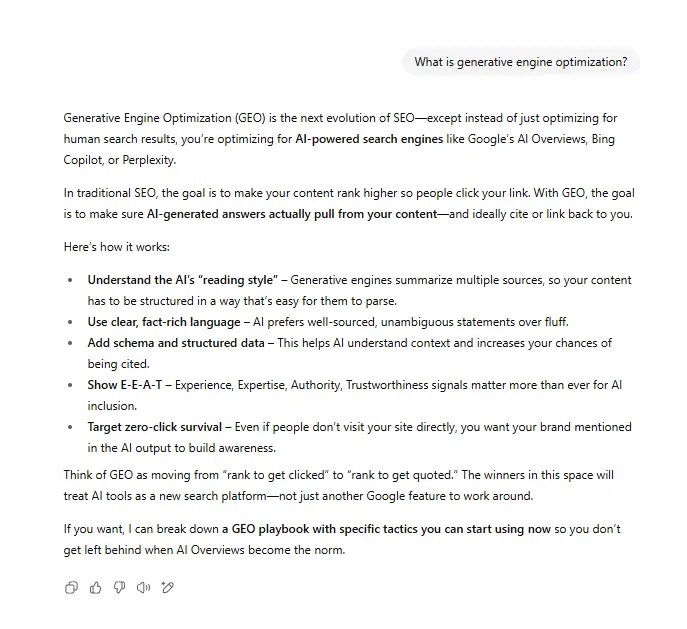
A ChatGPT response for generative engine optimization.

That changes everything. You’re not just trying to rank high anymore. You need to be a source the AI engine chooses to include. GEO builds on SEO basics like clean site structure, strong topical authority, and keyword alignment, but adds a layer focused on how AI systems interpret and present your expertise.

Why Generative Engine Optimization Is Important

AI-driven results are now part of search. Google’s AI Overviews, Bing’s Copilot, and platforms like Perplexity deliver full answers right in the results. Users often don’t click anything.

Nearly 60% of U.S. and EU searches end without an external click, according to SparkToro’s 2024 zero-click study. For marketers, that means less traffic from rankings alone.

GEO gives you another path. Structure your content so AI platforms can cite it, and you still get visibility even if users never leave the results page. In a zero-click world, being part of the answer matters as much as being part of the rankings.

 A chart on GEO Traffic and Conversion Data.

How To Implement Generative Engine Optimization

GEO isn’t a single tactic. You’re better served treating it as a set of evolving practices that make your content easier for AI engines to find, interpret, and use in their answers. Like SEO, it combines strategic content creation, technical optimization, and authority building.

The next sections break down the core areas to focus on, starting with brand authority and moving through technical and content-based strategies.

Build Brand Authority

AI engines pull answers from sources they trust. If they don’t know you or can’t verify your expertise, you’re less likely to get cited.

Start by making your author profiles work harder. Put a name and face to your content, and back it up with credentials or proof you’ve done the work. Use examples from your own experience, share data you’ve collected, and show insights that are hard to fake.

Neil Patel's author box.

Don’t stay in your own bubble. Get your name and brand into respected publications in your industry. Offer quotes, share original stats, or write guest content for sites your audience already trusts. Our VP of SEO, Nikki Lam, for example, is a regular contributor to Search Engine Land.

A Search Engine Land article by Nikki Lam.

The more these connections appear online, the stronger your authority signal becomes, and the better your odds of showing up in AI-driven answers.

E-E-A-T Signals

Experience, Expertise, Authoritativeness, and Trustworthiness (E-E-A-T) are part of Google’s Search Quality Rater Guidelines, and AI engines pick up on many of the same signals. The stronger these are, the more likely your content will be seen as credible.

Show experience by sharing real examples, case studies, and first-hand insights. Make your expertise visible with clear author attribution, relevant credentials, and links to other respected work you have done. Build authority through backlinks from reputable sites in your field. Strengthen trust by being transparent with tactics like using HTTPS, list contact information, and publish accurate, well-sourced data.

Treat E-E-A-T as a checklist for every piece of content you publish. While not a direct ranking factor, it consistently improves your chances of performing well and increases your chances of showing up in tomorrow’s AI-generated results.

Reinforcing Your Site’s Technical SEO

If search engines cannot crawl, index, and understand your site, AI engines will not either. Technical SEO is the backbone that supports both.

Keep your site fast. Optimize images, reduce unused code, and use a content delivery network (CDN) if you have a global audience. Make sure your site works well on mobile and passes Core Web Vitals benchmarks. Use a logical URL structure and internal linking, so important pages are easy to find.

Regularly run site audits to catch broken links, duplicate content, or indexing issues before they hurt your visibility. Tools like Google Search Console, Screaming Frog, and Ubersuggest can make this part easier. The cleaner your technical setup, the better your chances of being surfaced in both search results and AI-generated answers.

Write Like People Talk

AI search engines handle queries differently from traditional search engines. People type full questions, not just keywords, into AI searches. To match that, your content needs to read like a direct answer.

Use long-tail, conversational phrases that mirror how someone would ask the question out loud. Include common “who,” “what,” “where,” “when,” and “how” formats in your headings and subheadings. Break down complex answers into short, scannable sections so AI can easily extract them.

Skip the keyword stuffing. Focus on clarity and context instead. Your content should sound like something a real person would say. That makes it more likely to align with how AI models interpret and deliver answers.

Moving Beyond Text

AI engines do not just pull from written articles. They can reference videos, podcasts, and visual content when it adds value to the answer. That means your expertise should show up in multiple formats. Certain types of videos are more likely to get citations, as you can see from the example below.

A graphic showing how YouTube is cited in AI overviews.

Add original images, charts, and infographics to explain complex points visually. Short videos or audio clips that summarize key takeaways from your content are valuable as well, but there’s some added nuance here. Right now, AI isn’t listening to podcasts or watching videos. It extracts info through optimizations like meta data, alt text, structured data, and captions. When all that’s done, host them on platforms like YouTube or as embedded media on your site so they are easy for AI search engines to find, like the example below..

An example of a YouTube video embedded into a blog.

Diversifying your formats helps you reach audiences who prefer to watch or listen, and it gives AI more ways to surface your content. If you are only publishing text, you are leaving potential visibility on the table.

Use Digital PR to Build Expertise

Digital PR is one of the fastest ways to build the kind of authority AI engines look for. When trusted publications, influencers, or industry sites talk about your brand, those mentions strengthen your credibility.

Pitch guest articles or expert quotes to sites your audience already reads. Share original research or unique data that journalists can cite. Monitor platforms like HARO or Qwoted for opportunities to contribute insights on relevant topics.

The goal is consistent, high-quality mentions across the web. Over time, this builds a visible footprint of credibility that tells AI models your expertise is recognized beyond your own website, making you a stronger candidate for citation in generated answers.

Vary Content Distribution

AI tools do not only pull from traditional websites. They scan public content on forums, Q&A platforms, and social channels. If your brand shows up in those spaces, you give the engines more opportunities to connect your name to your expertise.

Join relevant discussions on platforms like Reddit, Quora, and niche industry forums. Share insights, answer questions, and link to deeper resources when it adds value. Repurpose your blog posts into short LinkedIn updates or Twitter threads so your ideas travel beyond your own site.

A graphic showing the ROI of leveraging multiole marketing plaforms.

The more your expertise appears across different platforms, the more signals AI engines have to work with, and the more likely they are to surface your content in their answers.

GEO and Search Everywhere Optimization

Search is no longer confined to Google. People look for answers on social media, YouTube, forums via AI searches and more. Search Everywhere Optimization is about showing up in all of those places.

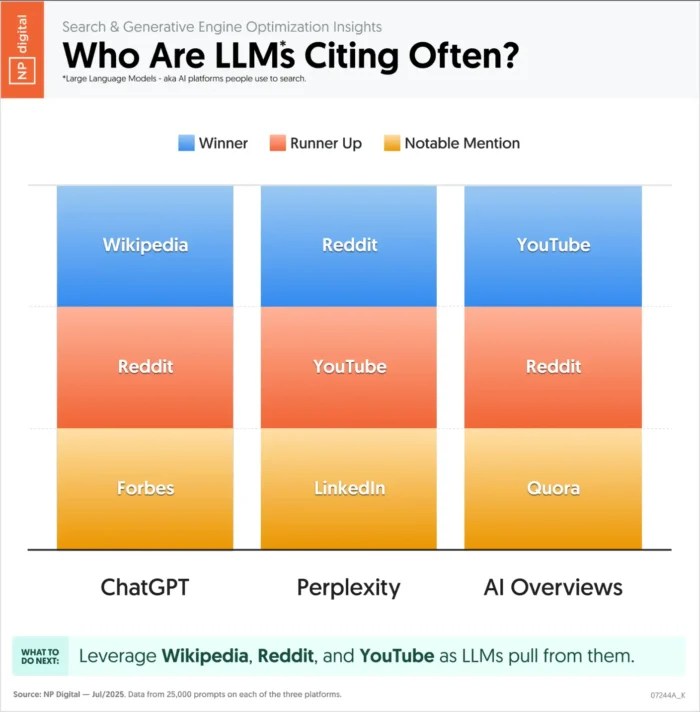
A graphic showing what LLMs are citing often.

Map out the platforms your audience uses most, then adapt your content for each one. That could mean shorter video explainers for social, structured Q&A formats for forums, and well-formatted long-form articles for web search. The more channels you optimize for, the more resilient your visibility becomes. GEO extends this strategy by making your content easy for AI systems to cite.

The Future of GEO

Search is changing fast, and GEO is going to change with it. Here are three shifts you cannot ignore if you want to stay in front of your audience.

Search trends being shaped by generative AI.

AI Mode in Google
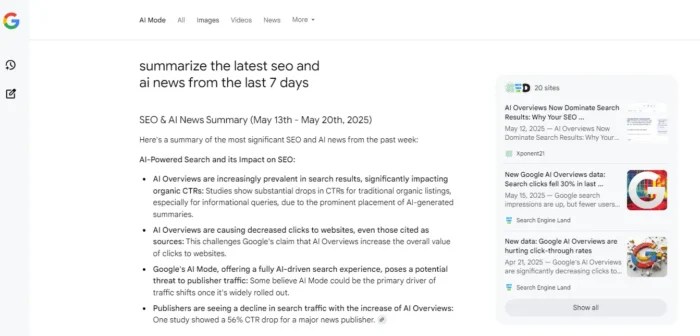
Google is testing AI Mode that gives people a complete AI-written answer before they ever see a list of website links. If this approach becomes permanent, those AI boxes will be the first thing people read — and if your brand is not in them, your visibility will shrink dramatically. To compete, you need content that is structured, well-sourced, and easy for Google’s systems to pull into those summaries.

Google's AI mode.

Predictive and Multimodal Search
Search is evolving to work ahead of the query. Predictive tools deliver answers based on a user’s behavior, location, and history. Multimodal search lets people combine text, images, and video into one request. To show up here, your content has to work in every format: clear copy, keyword-rich image descriptions, transcripts for videos, and structured data that connects it all together.

Voice and Visual Search
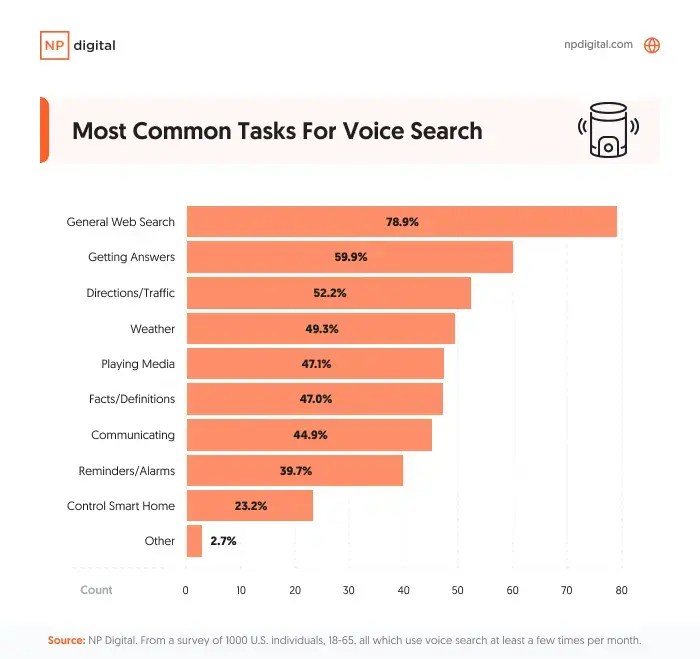
More people are asking questions out loud to their phones or smart speakers. Others are pointing their camera at an object and letting a tool like Google Lens do the searching. To win here, you need natural, conversational answers for voice search and highly detailed, optimized, context-rich visuals for image search.

A graphic showing the most common tasks for voice search.

GEO is not standing still, and neither should you. Keep an eye on where people are searching, watch how AI answers are built, and adapt. The brands that move with the trend will keep showing up, no matter how search results evolve.

FAQs

What is generative engine optimization?

Generative engine optimization (GEO) is the process of creating and structuring content so AI-driven platforms, such as ChatGPT, Perplexity, and Google’s AI Overviews, can easily find, interpret, and cite it in their answers.

How is GEO different from SEO?

SEO focuses on improving rankings and visibility in traditional search results extends beyond that by targeting AI engines, ensuring your content appears in AI-generated answers. 

Do I need to change my existing SEO strategy for GEO?

Not entirely. GEO builds on a strong SEO foundation. If your technical SEO, site structure, and content quality are already solid, the next step is formatting and distributing content in ways that AI systems can process and trust.

What types of content work best for GEO?

Clear, well-structured, and factually accurate content that answers specific questions tends to work best. Adding supporting data, original research, and multimedia formats can increase your chances of being cited.

How can I track GEO performance?

Tools in this area are still emerging. Some companies, like Profound, have technology specifically to help brands measure performance in LLMs and AI search. Additionally, there are traditional SEO tools that are expanding their capabilities. For example, Semrush now reports on AI Overview rankings in addition to standard SERP results. 

Conclusion

GEO isn’t a “later” project. It’s already reshaping how people find information, and every month more searches are ending inside AI-generated answers. If your brand isn’t showing up there, you’re losing visibility you might not get back.

The shift is in how you present and distribute that expertise so AI engines can understand and trust it. That means stronger E-E-A-T signals, content in multiple formats, and a presence in the places your audience is asking questions.

You don’t have to overhaul everything at once. Start with your highest-value content, make it more AI-friendly, and track where it appears. 

Read more at Read More

Journalist Outreach: How to Earn High-Authority Links in 9 Steps

Want backlinks from Forbes, HubSpot, or Insider? Without paying a cent?

Journalist outreach is how you do it.

And in 2025, it’s still one of the most effective ways to earn authority links that actually move the needle.

We also run Traffic Think Tank, and we used this tactic to 10x visibility and revenue in the past year.

Domain Overview – TTT – Organic Traffic & Keywords

And built our authority in the increasingly important AI / LLM ecosystem:

AI Strategic Insights – TTT

This guide was created with insights from the team at Jolly SEO — the pros behind thousands of earned media wins.

Plus, we’re including our free Journalist Outreach Toolkit to help you implement everything immediately.

In this post, you’ll learn how to:

  • Manage the overwhelming flow of media requests
  • Write pitches journalists actually use
  • Earn backlinks that boost rankings and trust
  • Track ROI and prove value to stakeholders

Let’s break it down.

Step 1: Define Your Goals

If you don’t know what success looks like, you’ll waste time chasing the wrong wins.

Before you write a single pitch, get clear on what your business needs from journalist outreach.

Are you after stronger SEO performance? Brand visibility? Long-term relationships with the media?

Your goals will shape everything — from the platforms you prioritize to how you evaluate results.

Goal What to Prioritize Why It Matters What to Do
SEO Results – Dofollow links
– DR 40+ sites (Domain Rating similar to Semrush’s Authority Score)
– Relevant anchor text
These links pass authority and help improve rankings — essential if organic growth is your focus. -Target niche queries on platforms like HARO or Qwoted
-Use keyword-aligned quotes
-Track DRs
Brand Visibility – Top-tier publication mentions
– Branded search lift
– Repurposable social proof
Coverage builds trust and legitimacy — even without links — and can drive branded search or leads. -Prioritize name-brand publications
-Craft quotable insights tied to your expertise
-Reshare wins
Relationships – Repeat contributions
– Off-platform journalist invites
– Helpful follow-ups
Trusted contributors get invited back and land bigger features faster. -Send thank-yous
-Offer value beyond the pitch
-Track warm journalist relationships in a simple CRM

For instance, let’s say you’re a B2B SaaS marketer trying to rank a key feature page.

Look for HARO or Qwoted queries where the topic aligns with the problem your product solves.

If you can offer a helpful, relevant perspective — one that happens to mention your company or approach — that’s a win. Even if the link doesn’t show up right away.

The bottom line?
When you know what wins you’re aiming for, you’re far more likely to hit them.

Greg Heilers, co-founder of Jolly SEO, puts it simply:

“Depending on your criteria, writing skill, and site/figurehead optimization, you can achieve a win as frequently as 1 in every 3 pitches.”


Step 2: Establish Realistic Expectations (This Will Save Your Sanity)

Most people give up on journalist outreach too soon.

Not because the tactic doesn’t work — but because their expectations are wildly off.

They expect quick wins, a high response rate, and instant SEO impact.

The reality is slower, less glamorous, and a lot more sustainable if you approach it with the right mindset.

Typical Success Rates (and What to Expect Over Time)

Even top-tier media outreach experts don’t land every pitch.

For beginners, a 3–5% response rate is normal. As you gain experience, that can climb to 8–12%, and with refined systems and strong positioning, 15–20% is achievable.

That means you might need to send 10–30 pitches just to earn one mention.

This isn’t failure — it’s the math behind consistent results.

So, what does that actually look like over time?

  • Month 1: You’re learning the workflow. Scanning opportunities, testing your messaging, and getting familiar with the process. Landing even one or two mentions is a meaningful start.
  • Month 3: You start to see patterns. Which types of queries are worth your time. Which angles tend to get picked up. You might even get quoted by the same journalist twice.
  • Month 6: You have momentum. Pitches get easier. You might even start getting inbound requests from writers who’ve seen your previous contributions.

The payoff builds slowly — but it compounds.

Beyond the byline: Search is evolving fast. Journalist quotes are now surfacing in tools like ChatGPT, Perplexity, and Claude. If you’re featured in a top-tier article, there’s a real chance your name, company, or insight will show up in AI-generated answers.


Why Most Pitches Fail (And It’s Not Your Fault)

The biggest myth in journalist outreach is that great writing is enough.

Spoiler: It’s not.

Journalists get dozens — sometimes hundreds — of pitches for a single request.

Many already have sources in mind.

Others are on tight deadlines and go with the first relevant response they see. If your pitch arrives an hour late, it might not get opened at all.

This doesn’t mean your pitch was bad. It means timing and fit beat polish more often than not.

Step 3: Set Up Your Inbox and Tracking

The fastest way to burn out in journalist outreach?

Drowning in irrelevant pitches, deadlines you’ll never meet, and inbox chaos.

Gmail – Inbox chaos

Here’s the good news: A few quick workflows can save you hours a week and help you stay consistent over time.

Make Your Emails Credible at a Glance

Journalists scan dozens of emails a day, and first impressions matter.

A polished inbox setup instantly signals trust and professionalism.

Include:

  • Branded email address: Avoid generic Gmail accounts when possible. Use a domain-linked email to show legitimacy.
  • Uploaded headshot: Many platforms now require it
  • Branded signature: Add your name, title, company, LinkedIn, and a link to your website. Make it easy for journalists to verify who you are.

    Branded Signature – Leigh

You don’t need a huge platform. You just need to look like someone worth quoting.

Build a Simple Filtering System

Start by organizing your inbox to reduce the cognitive load.

Create folders or labels by platform (e.g., “HARO Outreach”), and add filters to automatically route incoming queries.

Gmail – Create New label

Then, block off 15-minute review windows, no more than three times a day.

You don’t need to monitor your inbox all day — just be consistent.

Use the “5-second scan” rule: if it’s not clearly relevant within a few seconds, archive and move on.

Use Fast, Practical Qualification Criteria

Not every opportunity is worth your time — and trying to pitch everything will tank your efficiency.

For each request, ask:

  • Is this in my area of expertise? If not, don’t force a fit. Weak relevance leads to ignored pitches.
  • Do I meet the specific requirements? Many queries ask for certain job titles or credentials. Skip it if you’re not eligible.
  • Is the deadline realistic? If you can’t hit the cutoff, don’t let it clog your pipeline.
  • Is the publication worth your time? Not every outlet will align with your goals. Use your win criteria (from Step 1) to filter.

For instance, if you’re a freelance content strategist, a request asking for insights from “Fortune 500 CEOs” is a clear pass.

Save your effort for a request that matches your actual experience.

Step 4: Choose Your Platforms Strategically

Not all journalist outreach platforms are created equal.

Some are great for quick wins. Others shine when you’re targeting high-authority publications or niche audiences.

The key isn’t choosing the platform with the most opportunities — it’s choosing the one that aligns with your actual goals.

That means considering more than just volume.

You’ll want to look at average link quality, pitch-to-publication turnaround, cost, and whether the requests match your expertise.

Note: We’re gathering updated data on additional platforms like Qwoted and will expand this comparison in future updates.
Platform Best For Avg DR Cost Turnaround
Featured Easy wins, building confidence 70 Free/Paid 23 days
Help a B2B Writer B2B content, SaaS brands 73 Free 44 days
ProfNet Premium publications 79 Paid 39 days
HARO Broad topics 76 Free/Paid 37 days
Source of Sources Niche expertise 81 Free 35 days

Don’t feel like you need to master every platform out of the gate.

Start with one or two that align with your goals, get really good at using them, and expand once your workflow is dialed in.

How to Choose the Right Platform (Fast)

Not sure where to start? Think of this as your cheat sheet for getting started.

  • Just getting your reps in? Start with Featured — it’s simple, fast, and great for building confidence early.
  • Need high-authority links that actually move rankings? Go with Qwoted — it consistently surfaces high domain rating (DR) opportunities from recognizable media outlets.
  • Want placements in premium, name-brand publications? Choose ProfNet — fewer opportunities, but often higher caliber if you have the budget.
  • Targeting marketers, founders, or SaaS buyers? Help a B2B Writer delivers curated, niche-relevant requests in your exact lane.
  • Need a high volume of relevant opportunities to work with? Source of Sources gives you a steady stream of niche pitches — just be ready to filter.
  • Looking for general-topic visibility at scale? HARO still delivers breadth and quantity — just expect to dig for quality.

Looking for country-specific platforms?

Many regions have their own journalist request tools worth exploring. For example, SourceBottle is widely used in Australia, and ResponseSource is popular among PR pros and journalists in the U.K.

Just try a quick Google search like “journalist request platform [your country].”

You’ll usually uncover a few local options — no massive directory needed.

Google SERP – Journalist request platform Australia

Step 5: Write Pitches That Win (Without Taking Forever)

The best pitches don’t win because they’re long or clever.

They win because they’re skimmable, useful, and immediately quotable.

Your job isn’t to impress the journalist — it’s to make their job easier.

Establish Credibility in 8 Words or Less

Start with a strong subject line. Greg emphasizes combining relevance with instant credibility.

Use this structure:

Subject line formula: [Your credentials] + [specific value] + [topic]


Examples:

  • SaaS CEO’s Take on Fixing Churn
  • SEO Consultant’s Local Link Playbook
  • Copywriter’s Formula for High-Converting Headlines

Then, build your pitch. It should look something like this:

Pro tip: AI tools can help you brainstorm angles — but the final quotes should sound human, specific, and ready to publish. Use AI for speed, not substitution.


Make Your Quotes Instantly Usable

Journalists aren’t grading your writing.

They’re looking for clean, usable quotes they can drop straight into a draft.

As Greg puts it:

“Journalists want quotes they can immediately copy and paste into their articles, no changes needed.”


Here’s how to make that happen:

Pitch Like a Pro

Pro tip: For the full checklist — and why each step matters — use the Pitch Checklist tab in our journalist outreach toolkit.


Not all pitches are created equal.

Here’s what gets picked up — and what gets ignored.

❌ Bloated, vague, and completely unusable:

Email – Bloated & unusable

Clear, specific, and quote-ready:

Email – Clear & specific

Pitch Faster Without Losing Quality

Greg recommends prewriting as much as possible so you’re never starting your press outreach from scratch.

Have 3–4 versions of your bio ready to go, tailored for different beats (e.g., SaaS, marketing, AI).

Build a few quote templates for your most common talking points. And give yourself a hard limit: Aim to finish each pitch in 10 minutes or less.

The more reps you get, the easier this becomes.

Don’t forget your first line does heavy lifting. It shows up in inbox previews and often determines whether your pitch even gets opened. Make it count.

Caveat: Structure helps, but sameness kills. AI tools and mass pitching have flooded inboxes with lookalike answers. Don’t just fill in a template — say something only you would say. That’s what gets quoted.


Yes, You’re Qualified. Here’s Why.

One of the biggest blockers in journalist outreach? Thinking you’re not “qualified” to respond.

But here’s the truth: You don’t need a blue checkmark or a book deal to be helpful.

If you can help readers understand something better or offer a useful perspective, you’re already ahead.

Credibility doesn’t mean status. It means relevance.

That could be your job title, your years of experience, a client result, or just a smart way of framing the problem.

When in doubt, try this five-part framework to surface story ideas from your own work:

  • The situation: What were you working on?
  • The challenge: What made it tricky?
  • Your approach: What did you try or test?
  • The result: What changed? What worked?
  • The insight: What do you wish you’d known earlier?

The bottom line?

If you’ve solved what they’re writing about, you belong in their inbox.

Step 6: Master the Follow-Up (Without Being Annoying)

It’s tempting to send a pitch and move on.

But following up is one of the easiest ways to multiply the value of your efforts.

It’s low-effort, high-return, and totally underused.

The key is to keep it respectful, useful, and brief. Here’s how to do it without sounding pushy.

Turn Mentions Into Links

Let’s say you’ve been quoted but not linked.

Here’s a simple, polite ask that turns visibility into real SEO value:

Turn Replies Into Relationships

The journalists who quote you today could become recurring collaborators — if you give them a reason to remember you.

Done right, a follow-up turns one good pitch into long-term visibility, stronger links, and a journalist who might actually remember your name.

Step 7: Find Hidden Wins (Most People Miss These)

You might already be getting results — and not even know it.

At Jolly SEO, Greg sees it constantly.

“People message me and say, ‘I’ve sent dozens of pitches, but I can’t get any wins. What am I doing wrong?’

My first question is always: ‘Have you tried looking for them yet?’”


The good news?

You don’t need expensive tools or a manual content audit. A few smart searches and a weekly routine are all it takes.

Use Google Search Operators

Advanced search syntax lets you find live mentions with precision. Run these searches weekly to uncover wins:

  • “Your Name” + “Your Brand Name”
  • “CEO of [Brand]” site:targetpublication.com
  • “[Your unique quote]” site:[domain]

Use quotes to force exact matches and ”site:” to limit the search to specific outlets.

Set Up Google Alerts

Track new mentions passively by creating alerts for:

  • Your name + company
  • Your job title (e.g., “CMO of Backlinko”)
  • Distinctive quotes or phrasing you tend to use

Google Alerts – Leigh McKenzie Backlinko

This won’t catch everything, but it will help surface a steady stream of new wins.

Manual Checking Schedule

Most people stop after they hit “send.”

But Greg estimates you’ll never be told about 90% of your wins.

So if you don’t go looking, you’ll never even know they happened.

Build a simple check-in routine:

  • Weekly: Run your branded Google searches
  • Monthly: Review recent articles from journalists you’ve pitched
  • Quarterly: Use SEO tools (like Ahrefs or Semrush) to spot backlinks or citations

Google SERP – Leigh McKenzie Backlinko

Pro tip: Use the Win Finder (in the toolkit) to uncover hidden mentions.


Step 8: Build Your Journalist Network

Every pitch is more than a one-time shot at a link — it’s the start of a potential relationship.

If a journalist quotes you once, there’s a good chance they’ll want insights from you again.

But only if you make it easy, relevant, and respectful to stay in touch.

Track Relationships Like You Track Links

Use a simple CRM (even a spreadsheet works) to track journalist contacts the same way you’d track sales prospects:

  • Name + outlet
  • Contact info + beat
  • History (quoted, linked, mentioned)
  • Relationship stage (cold, warm, repeat, advocate)
  • Last contact date + next follow-up

Journalist Outreach Toolkit by Backlinko

If you’ve contributed to multiple stories or gotten links from the same writer, mark them as high-priority for future outreach. These are your warmest leads.

Build Trust Without Pitching

You don’t need a quote request to stay visible.

In fact, the best relationship-building moments often happen when you’re not asking for anything.

Promote their articles on social with a thoughtful comment — not just a tag. If you come across a story angle or source that fits their beat, send it their way.

If they mentioned a topic they’re covering next month, follow up. Even better: introduce them to another trusted source in your network.

These small, useful gestures build familiarity over time.

That’s how you become more than a random inbox name. You move from pitching to being pitched.

Pro tip: Use our Outreach CRM Tracker (in the toolkit) to start tracking pitches and wins instantly.


Step 9: Measure and Prove ROI

If you’re investing time, you need to show what it’s worth — to your team, your stakeholders, or your clients.

That means going beyond raw link counts and telling the full story of impact.

Track What Matters

Link counts are a starting point, but they’re not the whole picture.

Look at which platforms consistently deliver wins, how many hours go into each link, and which journalists become repeat collaborators.

Track your mentions, even when there’s no link.

Watch for traffic spikes after a story goes live, and pay attention to whether rankings improve on pages earning coverage.

For example, if a single article mention leads to a 12% lift in branded search and earns a backlink to your pricing page, that’s clear momentum.

When you combine reach, effort, and outcome, you start to see the full return.

Use a Simple ROI Framework

When you need to quantify results for stakeholders, use this basic formula to translate time and effort into value:

Link Value = (Average link cost in your industry) × (number of links)

Time Investment = (Hours spent) × (Your hourly rate)

ROI = (Total link value – Time investment) / Time investment × 100


For example:

You earned five links in a month — all from DR 70+ publications.

Let’s say the average market cost for that caliber of link is $800, and you assign a DR adjustment factor of 1 (used to reflect link quality; 1.0 = solid, relevant fit):

Link value: $800 (avg. link cost) x 5 links = $4,000

Time investment: 12 hours × $100/hr = $1,200

ROI: ($4,000 – $1,200) / $1,200 × 100 = 233%

Now compare that to sponsored content, digital PR retainers, or even PPC — and suddenly, this starts looking like a serious channel.

Build a Stakeholder-Ready Report

The final piece is packaging your results in a way that stakeholders understand and care about.

Keep it simple, visual, and focused on outcomes:

  • A summary of links earned by domain authority range
  • Growth in brand mentions across media and social
  • Traffic lift or ranking movement tied to earned placements
  • Estimated link value compared to paid alternatives
  • A standout example or case study from that month

When stakeholders can see the momentum — not just the metrics — they’re far more likely to stay bought in.

Start Earning Links That Actually Matter

You’ve got everything you need to get started. Now, it’s time to make your move.

Write a pitch today. Just one.

Don’t overthink it.

Grab the Journalist Outreach Toolkit, find a real query, and put your perspective to work.

Then, send it — and give yourself a shot at a win most people never even try for.

The post Journalist Outreach: How to Earn High-Authority Links in 9 Steps appeared first on Backlinko.

Read more at Read More

Google replaces Content API for Shopping with new Merchant API

Google Shopping Ads - Google Ads

Google announced it will shut down the Content API for Shopping on Aug. 18, 2026, officially making the Merchant API the new standard for managing Merchant Center accounts.

Why we care. For over a decade, advertisers and retailers have relied on the Content API to push product data into Google Shopping. The new Merchant API promises a simpler, more powerful way to control how products appear across both organic and ad surfaces – but it means developers and PPC teams need to start planning migrations now.

Details:

  • The Merchant API has been available in beta since May 2024, but is now generally available.
  • Google describes it as a “simplified interface” for scaling product feeds and gaining programmatic access to data, insights, and unique capabilities.
  • It will serve as the primary tool for product data management, spanning both paid and organic listings.

What’s next. The Content API remains available until August 2026, but Google urges advertisers to migrate sooner.

  • Help docs are live to guide developers through the transition.
  • Expect growing forum chatter as advertisers share migration challenges and best practices.

Bottom line. If your ecommerce business relies on the Content API, the clock is ticking. Moving to the Merchant API isn’t optional, and early adopters may gain a smoother path to scaling feeds and campaigns.

Read more at Read More

Where Did My Traffic Go? Winning In The Age of AI Overviews

>

Is the number of clicks on your top-ranking content starting to slip? It’s time to find out where your traffic has gone and how to get it back.

AI Overviews are reshaping SERPs as we know them. Google now answers user queries directly in the SERP, and traditional blue links are getting pushed further down the page. You might still be ranking, but your visibility is shrinking.

This doesn’t mean SEO is dead. It just means the playbook has changed. To stay competitive, you need to understand how AI Overview optimization works and start building content designed to earn those coveted AI citations.

Key Takeaways

  • AI Overviews are rerouting traffic, not killing it. Your rankings may hold, but clicks drop because Google satisfies user intent directly in the SERP.
  • Answer-first content wins. Structuring pages with concise answers, logical headings, and clear formatting increases your chances of being cited in AI Overviews.
  • Authority signals matter more than backlinks. Brand mentions, topical trust, and consistent visibility across multiple platforms influence AI citations.
  • Owning your audience is your safety net. Diversifying channels and building first-party data ensures long-term visibility, even as search behavior evolves.

Why You’re Ranking But Still Losing Traffic

If your content still ranks in the top 10 SERP positions but traffic is slipping, there’s a good chance AI overviews are the culprit. Google’s AI-generated summaries dominate the top of the page, pushing organic listings below the fold. Users get the answer they want without ever clicking. In fact, almost 60% of Google searches end without users even making a single click.

An example of an AI Overview.

You can see from this screenshot that when your search results load, there’s no organic results in site. In fact, in this instance, AI overviews even push sponsored results below the fold. This is the new reality of zero-click searches. Impressions might look steady, but clicks drop because users can satisfy their intent without leaving Google.

The solution is to stop thinking only in terms of traffic volume. Start focusing on visible influence: appearing in AI Overviews and being recognized as an authority, even when users don’t click.

AI Overviews And How They Are Turning The Funnel Upside-Down

Traditional search funnels start with discovery, move to consideration, and end in conversion. AI Overviews flip that script.

Users can start—and sometimes finish—their journey right on Google. With features like AI-generated summaries and featured snippets, the need to click through is lower than ever. Voice search and even short-form video integrations accelerate this shift, creating an environment where Google does the explaining for you.

An AI Overview for "What is Zero-Click."

For marketers, this means clicks are no longer the whole story. Your content has to deliver more than just clicks. It needs to capture attention inside the SERP and give users a reason to engage when they do click through. Strong on-page structure, engaging CTAs, and retention strategies like scroll-depth optimization now matter just as much as ranking. This is the essence of Search Everywhere optimization, which focuses on meeting users wherever they’re consuming content, not just on your site.

How To Optimize For AI Overviews

If you want your content featured in AI Overviews, you need to create pages that are easy for Google to summarize and trust. Here’s how to give Google what it wants:

  • Lead with an answer-first layout: Open your page with a concise, 2–3 sentence answer to the core query. This immediately gives AI a clear takeaway, increasing the odds of being cited in an overview. Expand into supporting details afterward with a logical flow.
  • Use structured formatting: Break your content into clean H2s and short paragraphs so Google can scan and interpret it quickly. Bulleted and numbered lists help AI extract step-by-step processes or summaries.
A graphic detailing an AI-friendly content structure.

Source

  • Add schema and FAQs: Implement FAQ and How-To schema to highlight your key answers for AI. Include a short FAQ section at the end of your article to increase your odds of citation for question-based queries.
  • Target long-tail, conversational keywords: AI Overviews thrive on natural, question-based searches. Integrate these phrases into headings and early sentences to align with how users talk to search engines and voice assistants.
  • Publish fresh, authoritative content: Share unique insights, proprietary data, or first-hand expertise to meet E-E-A-T signals—experience, expertise, authority, and trustworthiness. AI favors credible, original content over generic summaries.
An E-E-A-T graphic.

Source

  • Support with media: Embed YouTube videos, charts, or screenshots to improve engagement and reinforce authority. Use descriptive alt text so search engines can understand and reference your visuals.

Combining structure, authority, and clarity makes it easy for AI to pull your content and keep your brand visible in the new SERP landscape.

YouTube and Video: Your Shortcut to Visibility

Video content—especially on YouTube—is one of the fastest ways to gain visibility in AI Overviews. Google and Gemini favor YouTube because it’s part of their ecosystem, and AI models naturally pull from sources they already trust.

Short, keyword-focused videos can surface in AI-generated results even if your text content isn’t cited. A 60–90 second explainer video that directly answers the search query gives AI a clean snippet to work with while also boosting your chances of appearing in video carousels.

The charts below show just how effective video is. They show the categories of YouTube videos that have shown up in AI overviews and how fast the trend of videos showing up in AI overviews has grown over time. 

Video presence in AIOs.

Source 1, Source 2

To maximize impact:

  • Create concise, educational videos tied to core keywords.
  • Embed them on relevant blog posts or landing pages to reinforce topical authority.
  • Add captions or transcripts so AI models can understand and summarize your video content.

Video can reclaim lost search visibility while building multi-surface authority across AI-driven and traditional search.

Off-Page Signals Matter More Than Backlinks

In the age of AI Overviews, Google and AI models are looking beyond traditional backlinks. They increasingly value off-page signals like brand mentions and expert quotes in reputable sources.

AI models evaluate whether your brand is recognized and trusted across the web. A mention in an industry publication, a quote in a news article, or a stat cited in a whitepaper can be as impactful as a link for AI visibility.

To strengthen your off-page signals:

  • Pursue public relations (PR) opportunities in industry-relevant media and blogs.
  • Share original data or research that journalists and peers want to reference.
  • Encourage brand discussions on platforms like LinkedIn, Reddit, and Quora, which AI crawlers frequently mine. Internally, we’ve seen tremendous growth for our client, TurboTax, by helping them launch a branded Reddit campaign—including discussions and engagement. 

The goal is to create a trustworthy footprint online. When AI sees your brand cited in multiple credible sources, you’re far more likely to be included in its summaries, even without a traditional backlink.

Build Topical Trust Across the Web

AI Overviews reward brands that show consistent authority on a topic, not just one-off content. Google and AI models look for a pattern: Are you producing relevant, high-quality content across multiple platforms that reinforces your expertise?

To build topical trust:

  • Publish blog posts, guides, and FAQs that cover your key themes in depth.
  • Share insights across social media and YouTube, giving AI more signals that your brand is active and authoritative.
  • Leverage user-generated content (UGC), like community discussions, testimonials, and real-world examples, to demonstrate authenticity.
  • Ensure your content aligns with E-E-A-T across every channel.

Maintaining a consistent and credible presence wherever your audience searches makes it easy for AI to recognize your brand as a reliable source. That recognition is what creates a trustworthy brand footprint that AI can work with.

You Need to Diversify Your Channels Now

Relying solely on Google for traffic is riskier than ever. The shrinking SERP visibility caused by AI overviews and zero-click searches means that even top-ranking content might not deliver the same ROI it once did.

To protect your brand, you need to diversify your traffic sources:

  • Combine SEO and paid search to maintain visibility and retarget your most valuable branded keywords.
  • Invest in social media, email, and YouTube to capture attention outside of Google.
  • Build a strategy that prioritizes owning your audience instead of depending on any single platform.

Diversifying channels doesn’t just protect your current visibility. It’s a great way to grow your online brand. A strong multi-channel approach captures leads you might otherwise miss, making you less vulnerable to Google’s constant evolution. Ultimately, the brands that thrive in the AI era are the ones that meet their audience everywhere, not just in search results.

Examples of channel diversification.

Source

First-Party Data Is the Safety Net

When AI Overviews dominate search, the brands that win are the ones creating proprietary insights that can’t be found anywhere else. AI models favor content that provides original data because it signals authority and adds value beyond generic summaries. Internal research is your secret weapon.

Instead of relying solely on public stats, collect your own:

  • Run audience surveys to uncover trends or opinions in your niche.
  • Conduct polls or quizzes to generate quick, shareable insights that can be repurposed into blogs and social posts.
  • Analyze internal data like customer behavior, conversion trends, or product usage to produce unique reports.
First party data collection techniques.

Source

Turn these findings into case studies and data-driven articles. Proprietary insights make your brand more likely to appear in AI Overviews and attract backlinks and press coverage, compounding your authority across the web.

FAQs

How do I optimize for AI Overviews?

Start with an answer-first structure: give a concise response in the first 2–3 sentences, then expand with supporting details. Use a clear structure with H2s and bulleted lists so Google can easily scan and summarize your content. Implement FAQ or how-to schema, and include a dedicated FAQ section to match AI’s preferred Q&A format. Fresh, authoritative content supported by brand mentions and backlinks will boost your chances of being cited.

How are AI Overviews changing the SERPs?

AI Overviews now dominate the top of Google results, pushing organic listings further down the page. This creates more zero-click searches, where users get answers without visiting your site. Even if your rankings haven’t changed, your visibility and clicks may decline. Making AI-friendly formatting and multi-channel strategies more important than ever.

Conclusion

There’s no need to panic. AI Overviews aren’t erasing traffic, they’re simply rerouting it. Your pages may still rank, but when Google’s summaries dominate the top of the SERP, visibility doesn’t always translate into clicks. The old playbook of relying on impressions and top rankings isn’t enough anymore.

To win in this era of search, your SEO strategy has to include AI overview optimization. Content needs to be structured for AI-first discovery, with clear answers and logical formatting that gains LLMs’ trust. Now, success is about building influence. When your brand appears in AI Overviews and consistently reinforces topical expertise, you maintain visibility even when users don’t land on your site.

The final step is ownership. Diversifying channels and leveraging Search Everywhere optimization gives your brand resilience, while first-party data ensures you can nurture and convert your audience on your own terms. If done right, AI can be your biggest opportunity, not just a threat.

Read more at Read More

5 B2B content types AI search engines love

5 B2B content types AI search engines love

AI search is evolving fast, but early patterns are emerging. 

In our B2B client work, we’ve seen specific types of content consistently surface in LLM-driven results. 

These formats – when structured the right way – tend to get picked up, cited, and amplified by models like ChatGPT and Gemini.

This article breaks down five content types gaining notable AI search visibility, what makes them effective, and how to optimize them for LLM discovery:

  • Comparison pages.
  • Integration docs/open APIs.
  • Use case hubs.
  • Thought leadership on external platforms.
  • Product docs with schema.

1. Comparison pages

Our analysis shows that Gemini frequently surfaces “X vs. Y” content in AI Overviews and AI Mode – even when the query doesn’t ask explicitly for the comparison.

does carbon steel rust - AI Overview

What to include

  • Publish /vs/ pages with pros, cons, pricing, use case match, and schema. 
  • Do this for any competitors that bring in a decent volume of comparison queries, along with any comparisons that are easily related to your product or service.

2. Integration docs/open APIs

Our analysis has provided numerous instances of GPTs and Copilot citing SaaS APIs and dev docs in answers.

Example

  • A ChatGPT prompt for “setting up span metrics for backend services” cited a docs page from performance monitoring company Sentry in a list of best practices.
SaaS APIs and dev docs in AI answers

What to include

  • Maintain clear documentation + changelogs with versioning and schema.

Dig deeper: The future of B2B authority building in the AI search era

3. Use case hubs

We’ve seen clear indicators that AI Search prefers content that ties features to real business problems.

Example 

  • Vanta’s SOC 2 compliance resource appears prominently in a ChatGPT answer to “SOC 2 compliance automation for startups.”
SOC 2 compliance automation for startups - ChatGPT

What to include

  • Build intent-driven use case pages with testimonials and product mapping.

Get the newsletter search marketers rely on.


4. Thought leadership on external platforms

LLMs pick up posts from company experts, including founders, SMEs, and established thought leaders, on outlets like Medium and Dev.to for strategy-based questions.

Example

How to find the best OpenSearch provider for cerntalized logging?

What to include 

  • Syndicate posts from a company founder, SME, or brand ambassador with a unique POV, then include a canonical link back to the business website.

5. Product docs with schema

Gemini AI Mode lifts from product docs if they’re structured with FAQs, How-to sections, and/or breadcrumb structured data.

Example

Metal 3d printer - AI Mode
recommended cash flow analysis tools for doc processing - AI Mode

What to include 

  • Add FAQPage, HowTo, breadcrumb structured data, and SoftwareApplication schema types to product docs.

3 overarching recommendations

You should never veer from the E-E-A-T principles that have long underpinned traditional SEO. Those same tenets will serve you well for LLM discovery, too. 

Beyond them, however, there are a few LLM-specific steps to consider if your goal is to increase AI search visibility.

I’ll break down three key recommendations.

Optimize for multi-modal support

AI search systems are increasingly retrieving and synthesizing multimodal content (think: images, charts, tables, videos) to better answer user queries. 

Flex your content across multiple media types to provide more useful, scannable, and engaging answers for users. 

Specific recommendations:

  • Ensure images and videos remain crawlable for search and AI bots. 
  • Serve images via clean HTML and avoid lazy-loading with JavaScript-only rendering, since LLM-based scrapers may not render JavaScript-heavy elements. 
  • Images should use descriptive alt text that includes topic context. 
  • Add captions to images and videos with an explanation right below or beside the visual. 
  • Use <figure>, <table>, etc., with contextually correct markup to help parse tables, figures, and lists.
  • Avoid images of tables. Use HTML tables instead for a machine-readable format supporting tokenization and summarization.

Optimize for chunk-level retrieval

AI search engines don’t index or retrieve whole pages.

They break content into passages or “chunks” and retrieve the most relevant segments for synthesis. 

Optimize each section like a standalone snippet. 

Specific recommendations:

  • Don’t rely on needing the whole page for context. Each chunk should be independently understandable. 
  • Keep passages semantically tight and self-contained. 
  • Focus on one idea per section: keep each passage tightly focused on a single concept. 
  • Use structured, accessible, and well-formatted HTML with clear subheadings (H2/H3) for every subtopic.

Dig deeper: Chunk, cite, clarify, build: A content framework for AI search

Optimize for answer synthesis

AI search engines synthesize multiple chunks from different sources into a coherent response. 

Aim to make your content easy to extract and logically structured to fit into a multi-source answer.

Specific recommendations:

  • Summarize complex ideas clearly, then expand (A clearly structured “Summary” or “Key takeaways”).
  • Start answers with a direct, concise sentence.
  • Favor a factual, non-promotional tone. 
  • Use structured data to help AI models better classify and extract structured answers.
  • Use natural language Q&A format.

Create B2B content that wins in AI search

An added benefit of these five content types is that they span multiple intent stages – helping you attract prospects and guide them through the funnel. 

Just as important: make sure your AI search measurement systems are in place (we use Profound, GA, and qualitative research) so you can track impact over time. 

And stay tuned to reports and industry updates to keep pace with new developments. 

Read more at Read More

TikTok limits posts to five hashtags

TikTok SEO: The ultimate guide

TikTok is capping hashtags at five per post, a shift some users have recently noticed through in-app notifications.

Details. TikTok hasn’t formally announced the update. A Reddit user said a TikTok notification explained the change is aimed at:

  • Reducing hashtag clutter,
  • Discouraging spammy usage,
  • Improving discovery relevance.

TikTok is the latest social platform to sideline hashtags:

  • X dropped hashtags from ads.
  • Meta’s Threads limits posts to one topic tag, while Instagram is testing a five-hashtag cap.
  • LinkedIn has de-emphasized them.

Why we care. Hashtags have long been used to boost reach, but platforms are dialing them back as algorithms rely more on engagement signals – and as spammy, irrelevant tags clutter feeds. This could improve relevance and reduce spammy competition, but it also raises the stakes for picking the right hashtags to ensure campaigns still surface in discovery.

The big picture. For creators, the change means quality over quantity. Picking the most relevant hashtags matters more than piling on extras. TikTok’s Trends dashboard can help surface the tags most likely to drive discovery.

Read more at Read More

Want to win at local SEO? Focus on reviews and customer sentiment

Local SEO reviews sentiment

Search is changing fast. This year, we’ve seen more instances of search engine results sharing space with AI-powered features that are changing how people find information.

Along with the changes to how search engines display information, we’re also seeing users explore new methods to search for information. Google AI Mode, Gemini, ChatGPT, Perplexity – there are many large language models (LLMs) capturing users’ attention, providing new ways for users online to discover and make decisions about your brand. 

Customer sentiment, shown through reviews and ratings, is becoming a key part of both local and branded search.

For brands looking to stay ahead, focusing on sentiment, review ratings, and authority signals will be key. These are the items that not only affect rankings but also impact what shows up in search snippets and LLM responses.

LLMs like Google’s AI Mode are pulling together and highlighting customer sentiment within their responses when asked about specific brands or for geo-modified search queries, think “home repair near me”. 

For businesses, paying attention to their review strategy and reputation will be key to standing apart in local results, overall organic visibility, and showing up favorably in AI responses. However, even with these changes, many of the tried-and-true best practices that have helped brands succeed in local search in the past still apply. 

Searches with local intent: Google’s AI Mode

When it comes to local search, “near me” queries continue to be highly important. In traditional search, these typically trigger a Local Pack followed by organic blue links.

In Google’s AI Mode, the experience is similar. Users are shown a list of local businesses, often with short descriptions, star ratings, and review summaries.

The links cited are usually citation platforms like Yelp or TripAdvisor, business websites, or publications, and it’s common to find Google Business Profile place cards. Clicking these opens the familiar Google Business Profile interface, keeping users within the Google ecosystem.

Running store near me Google AI Mode

What does this mean for businesses aiming to capture visibility in AI-driven local search results? Many of the foundations of local SEO still apply.

  • NAP consistency: Ensure your business name, address, and phone number (NAP) are accurate and consistent across all listings.
  • Citations: Maintain listings on trusted third-party sites like Yelp, TripAdvisor, and local directories to help reinforce credibility.
  • Google Business Profile optimization: Fully complete and regularly update your profile with accurate info, photos, business hours, and relevant categories.
  • Reviews: Generate and respond to reviews to build trust and signal relevance to both users and search engines.

Branded search results for local businesses

When searching for a local business using branded terms in AI Mode, it’s common to see many of the same elements and data sources as traditional search. These business overviews often include a description of the company, the products or services offered, and customer sentiment.

Often, the customer sentiment section summarizes review data pulled from multiple sources, such as TripAdvisor, Yelp, industry-specific sites such as Apartments.com, and Google Business Profile.

Rachel's Ginger Beer Google AI Mode reviews

What’s unique about AI Mode is that it provides unbiased summaries of pros and cons about a business based directly on available customer reviews, which can come directly from Google Business Profile or be a mixed of review data from trusted online sources. These clear overviews include overall sentiment and often link to the business profiles.

AI Mode isn’t the first time Google has experimented with review summaries.

Some industries, like restaurants, already have “Review Summaries” in organic search results. These generative AI summaries highlight Google Business Profile review data, usually with a more positive tone, alongside the star rating and list of reviews.

Taziki's Mediterranean Cafe Google review summaries

The importance of reviews

Reviews shape how your brand appears online, whether they are displayed front and center on your Google Business Profile or surfaced as snippets in responses from LLMs. Google’s AI Mode, ChatGPT, and Perplexity all returned some information or mention of customer reviews when searching for local businesses, especially for branded queries. 

Von Elrod's Beer Garden Perplexity reviews

These responses emphasize how both positive and negative offline experiences can influence what is said about your brand online and the importance of customer perception, especially when those experiences get highlighted for customers who may be discovering your brand for the first time. 

West46 reviews and vibe ChatGPT

Businesses need to pay attention to reviews, if not across all platforms, then at least on Google Business Profile. Review data is being pulled into AI-driven results and also plays a role in local search visibility.

Google is placing more emphasis on reviews. In July, Google updated its documentation on local search rankings, with the most notable change found in the Prominence section:

“Prominence means how well-known a business is. Prominent places are more likely to show up in search results. This factor’s also based on info like how many websites link to your business and how many reviews you have. More reviews and positive ratings can help your business’s local ranking.”

How can businesses adapt?

By following the tactics local businesses should already be doing to succeed in local search:

  •  Focus on generating new, recent reviews.
  •  Respond to both positive and negative reviews.
  •  Read reviews to understand the strengths and weaknesses of your business. Seeing a trend in negative reviews? That could indicate it’s time to make some changes and address those weaknesses.
  • Monitor brand mentions not just for backlinks but also to understand what people are saying about your business online, including community forums, social media platforms, and online publications.

In addition to traditional review sites, platforms like Reddit, TikTok, and Quora are showing up more frequently in branded and local search results. These conversations are also being picked up and summarized in tools like Perplexity and ChatGPT. That means the things people are saying about your business in comment threads or short-form videos can influence how your brand is being represented across both organic and AI-powered results.

What else can be done:

  • Look closely at how your business is perceived online and do the same for your competitors.
  • Compare your review count and average star rating to those of businesses showing up alongside you in the Local Pack. How does your business stack up?
  • Check how AI tools like LLMs or Google’s AI Mode describe your competitors during branded searches and identify where they source that information.
  • Try asking AI tools to compare your business and a competitor. The way these tools summarize differences can give insight into strengths, weaknesses, and areas where you may need to improve to stay competitive in the market.

LLM data sources

LLMs pull from a range of online sources to build summaries about businesses. For local and branded search queries, much of the information they use closely mirrors what shows up in traditional organic search results. This includes data from:

  • Google Business Profiles.
  • Third-party review sites.
  • Official business websites.
  • Wikipedia.
  • Online directories and aggregators.
  • News articles.
  • Public conversations on forums or social media.

LLMs don’t use the same ranking algorithm as Google Search, but they rely on much of the same publicly available information.

Why this matters:

  • The efforts businesses make to improve local SEO, such as maintaining accurate listings, collecting reviews, and building authority, also help shape how their brand is represented in AI-generated search results.
  • Reinforces the importance of managing your presence across multiple platforms and staying aware of where your brand is mentioned.
  • Highlights trusted third-party sites where your business may be listed but not actively managed. These listings still influence visibility and should not be overlooked.
  • Identifies which platforms are trusted within your specific industry, revealing opportunities to strengthen your presence on niche or vertical-specific sites.

Managing reputation at scale for multi-location businesses

For multi-location and microbrand businesses, managing sentiment at the local level adds another layer of complexity. It is not just about how the overall brand is perceived, but how each location appears in search results. This is especially important for industries like senior living, apartment communities, and healthcare, where customer experience and trust are crucial in decision-making. 

A few negative reviews tied to a single location can shape perception across the board. That is why reputation strategies need to scale while still staying localized. Each location needs a clear plan to monitor feedback, respond to reviews, and build a strong presence in both traditional and AI-powered search results.

Core local SEO principles remain

Search is evolving fast, and we can expect more LLMs and AI-powered features to continue to shape how information is delivered to users.

Customer sentiment and brand perception are now more important in shaping how a business appears online, whether it’s in traditional organic search results or another platform.

Why?

Because perception matters, both online and in real life. Tools like Google’s AI Mode, Perplexity, Gemini, and ChatGPT are putting reviews, ratings, and sentiment summaries front and center, making customer feedback more visible than ever. 

Now is the time for brands to take a close look at how they appear in LLMs, understand the feedback being surfaced, and identify areas to improve. Doing this not only helps with visibility in AI-driven search but also strengthens your local market presence.

As part of a broader brand reputation and visibility strategy, it’s essential to regularly monitor how your business is showing up in both traditional and AI-powered search results. That includes checking branded SERP features like AI Overviews, People Also Ask, video carousels, and social content pull-ins. These elements shift often, and staying aware of what’s being surfaced helps inform both SEO and reputation efforts. 

You don’t need to reinvent the wheel. To keep up with the changing search landscape, you just need to focus your efforts in the right direction.

Read more at Read More

5 Best SEO Plugins for WordPress (Tried & Tested)

You don’t need an SEO plugin to help your website rank in Google.

In fact, you can do more harm than good if you don’t know what you’re doing with them.

But:

They can make optimizing your website a whole lot easier if you do use them correctly.

We’re talking:

  • Faster page speeds
  • Better optimized content
  • Fewer technical SEO issues

All without touching any code.

So how do you choose which plugin to use? Can you use more than one?

And the big one — should you use Yoast or Rank Math?

You’ll get the answers to these burning questions below.

But first, here’s the tl;dr on the best SEO plugins for WordPress:

Best for Pricing
Rank Math Beginners looking for an all-in-one solution Free version available; Pro plans start at $7.99/month, billed annually
Yoast SEO Anyone in need of guided SEO setup and writing support Free version available; Premium starts at $99/year
WP Rocket Improving site speed and Core Web Vitals $59/year for one site
The SEO Framework Handling essentials with minimalist features Free; paid versions for more sites from $7/month billed annually
Semrush SEO Writing Assistant Writing better SEO content Free; increased usage with a Semrush subscription

Note: We’ve stuck with plugins that can directly improve your SEO. You won’t see analytics plugins like Monster Insights or external keyword generators on this list. These are useful tools in their own right — but they’re not true SEO plugins.


1. Rank Math

Best all-in-one SEO plugin for new WordPress sites

Pricing: Free version available; Pro plans start at $7.99/month billed annually

Rank Math SEO – Dashboard

Rank Math has pretty much everything you need in an SEO plugin. If you’re new to SEO, it’ll handle all the important stuff for you, including:

  • Content optimization
  • Image SEO
  • Internal and external linking
  • Local SEO
  • Schema markup
  • Sitemaps
  • Redirects

And way more.

It’s actually the go-to recommendation from our own Head of SEO, Leigh McKenzie:

“Rank Math is my no. 1 choice across the board. For any site starting from scratch, I’d always recommend Rank Math first.”


Let’s go through some of the features behind his recommendation:

Manage Metadata and Social Previews

Starting with the basics, Rank Math lets you manage your page’s SEO title, meta description, and how it appears on social media — right within the post editor:

Rank Math SEO – TTT – Preview Snippet Editor

It also lets you preview what the post will look like when you share it on Facebook and X/Twitter:

Rank Math SEO – TTT – Preview Snippet Editor – Social

This gives you more control over how your content looks in SERPs and social feeds.

It’s a pretty rudimentary feature, and hardly one that separates it from the likes of Yoast below when taken in isolation.

But how your social content looks can have a big impact on the engagement your posts get — and how many people click through to read your content. So it’s a useful feature for those looking to share their content beyond their blog.

Get SEO Suggestions as You Write

Rank Math also gives you SEO guidance as you’re creating your content in the WordPress editor. Like having your own SEO assistant you can call on as you write.

Rank Math SEO – SEO Assistant

It’ll highlight things like missing focus keywords in your meta description, intro, and throughout your content.

But honestly? I never use this feature.

So why am I calling it out here?

Because when you’re just starting out creating SEO content, it’s actually super helpful for keeping you on track.

Sure, once you’re familiar with the basics of content optimization, you’ll do all of this naturally. But as a beginner, this gentle guidance can help you learn faster (and create better optimized content in the process).

Plus, you can click “Fix with AI” to generate a suggestion and save time on the small changes.

Rank Math SEO – Content AI – Snippet Editor

It’s not going to be perfect. But for a one-click, two-second job?

I’ll happily use this, because it speeds up optimization.

Plus, you can tweak or regenerate the output anyway, so it’s useful as a starting point.

Broken Links and Redirects

Rank Math flags broken links on your site using its built-in 404 Monitor.

Rank Math SEO – 404 Monitor

You can then set up a redirect right from the dashboard:

Rank Math SEO – Redirect from dashboard

This feature keeps your internal links working. It ensures you’re passing authority between your pages and that you’re offering a good user experience.

It also reduces plugin bloat as you don’t need a separate plugin to handle broken links.

The fact the free version of the plugin comes with built-in redirection capabilities is a massive win in my book.

I’ve personally leaned on this particular part of the plugin heavily multiple times.

Firstly, it’s great for just quickly setting up redirects when you change the URL of a post (it even does this automatically).

Rank Math SEO – SEO Notice

But you can also set it up to move entire categories of posts or pages through the filters.

Just choose “contains” and you’ll be able to move all your content from /old-path/page to /new-path/page without your users even noticing — and without any hassle on your end.

Rank Math SEO – Redirect contains

I don’t see enough people praising Rank Math for the redirect functionality. But honestly it’s a lifesaver.

Downsides But Not Dealbreakers

Rank Math clearly has a lot of features, which is great. But it can also feel overwhelming at first. That’s just the nature of any “all-in-one” style plugin.

However, once you know where things are and what you need, it’s fairly easy to navigate.

Also, on the content improvement side of things, readability feedback is pretty limited. It checks basic things like paragraph length and image use. But it won’t help you improve sentence structure or tone.

Rank Math SEO – Title & Content readabillity

(If you need more focus on that, check out the fifth plugin on this list.)

But overall, these drawbacks are pretty minor. Rank Math is still our number one recommendation if you need an SEO plugin.

2. Yoast SEO

Best for beginners who want step-by-step SEO guidance inside WordPress

Pricing: Free version available; Premium starts at $99/year

Yoast SEO – Dashboard

Yoast SEO is probably the first plugin you came across when you started looking into WordPress SEO. And for good reason — it’s installed on 10+ million sites and has around 26K five-star reviews.

It’s been around for so long and has such a clear purpose that its WordPress plugin directory URL path is literally just “/wordpress-seo/”:

Wordpress Plugin Directory URL

It’s the second of the “big two” WordPress SEO plugins alongside RankMath, and it’s worth addressing why we put it second before we get into the details of the plugin itself.

In summary: We usually recommend Rank Math for a first-time WordPress site owner. It’s packed with features, and its free version has the edge over Yoast in a few areas. These include redirects, multiple focus keywords per post, and more extensive schema markup options.

But Yoast is pretty evenly matched in a lot of ways. Especially if you opt for the paid version.

In fact, this is the specific SEO plugin we use for Backlinko.

Yoast SEO – Ste features

My personal recommendation is to try them both (separately) and see which one works best for you.

Note: Don’t use them both at the same time, as running multiple all-in-one SEO plugins on the same site can lead to compatibility issues.


Okay, now let’s go through what I like most about the Yoast SEO plugin:

Optimize Search and Social Previews

Like Rank Math, Yoast helps you optimize how your content appears both in search results and on social media.

You can easily update your SEO title, meta description, and URL slug for every page or post:

Yoast SEO – Optimize your content

You also get a live preview of how your content will appear in Google search results and on socials.

It’s very similar to Rank Math in this respect. But I wanted to call it out here anyway as it’s some fairly fundamental functionality for a WordPress SEO plugin.

Get Real-Time SEO and Readability Feedback

Yoast analyzes your SEO as you write, using a simple green/orange/red traffic light system.

Green means you’re following best practices, while orange suggests there’s room for improvement. Red highlights critical issues you should prioritize.

Yoast SEO – SEO Analysis section

Each suggestion is actionable, helping you easily optimize your pages, even if you’re new to SEO.

Yoast also gives you a detailed breakdown of your content’s readability.

You’ll see checks for things like passive voice, sentence length, and consecutive sentence starters. In this respect, it does offer a bit more than Rank Math.

Yoast SEO – Readability Analysis section

My advice: Don’t chase all the green lights thinking it’ll help you rank. Content quality and value for the reader matter far more than hitting a certain percentage or score.

However, Yoast’s feedback does help you spot common issues and make your writing clearer for both users and search engines.

Like I said in the Rank Math section, I don’t personally use these features. But beginner me found himself looking to them quite a lot for basic guidance.

Manage XML Sitemaps

Yoast creates a dynamic XML sitemap for your site and updates it as you publish new content.

Here’s what it looks like for Backlinko:

Yoast – Sitemap

This is a basic but very useful feature (Rank Math does this too).

Just make sure to submit your sitemap URL to Google Search Console. This helps Google discover and index your content.

Downsides But Not Dealbreakers

Yoast’s SEO scoring system can feel rigid. For example, you might get flagged for not using your main keyword in the first sentence even if it doesn’t fit there naturally.

And I’ll often see site owners that are new to SEO sticking too closely to these guidelines and creating pretty mediocre content as a result.

But if you treat the feedback as guidance, not strict rules, Yoast can still be a helpful way to catch easy-to-miss issues.

Further reading: Learn more about the plugin with our full Yoast SEO guide.


A word on a few alternatives before I move on:

The all-in-one SEO plugin market is dominated by Yoast and Rank Math. But another big player we can’t forget to mention is aptly named All in One SEO (AISEO).

AISEO – Homepage

It does a lot of the same stuff as the other two, but they just do it better. It’s missing key free features like redirects, and it can get pricey if you want to use it on several sites.

Like I said earlier though, you should try these plugins out for yourself if you’re struggling to choose. The free options are more than enough in most cases, and they’ll give you a taste of what to expect should you want to commit to a paid option.

FYI: I don’t personally pay for any SEO plugins besides WP Rocket (more on that next). But we do use Yoast Premium on Backlinko and Rank Math Pro on Traffic Think Tank.

3. WP Rocket

Best for improving your website speed without needing a developer

Pricing: $59/year for one website, $119/year for three websites

WP Rocket – Dashboard

WP Rocket is probably my favorite of all the plugins on this list, even if it’s not technically the best overall. It’s a performance plugin designed to speed up WordPress websites. That’s all it aims to do, and boy does it succeed.

I run a somewhat well optimized site, and here’s how it looks in PageSpeed Insights without WP Rocket installed:

PageSpeed Insights – Web with no WP Rocket installed

After installing the plugin and turning on the most important features, here’s how it looks:

PageSpeed Insights – Web with installed WP Rocket

Let’s just pause on those numbers for a second:

  • 20 point increase in overall performance score
  • 2.1 second improvement in first contentful paint
  • 30 ms to 0 ms total blocking time
  • 2.8 second improvement in largest contentful paint

Again, it’s a decent baseline to begin with. But WP Rocket improves my site performance in ways I otherwise can’t manage on a site that’s quite heavy on the Elementor elements.

That’s an important point in itself: you 100% can make your site run fast without SEO plugins like WP Rocket.

But you will need to make sacrifices unless you’re an experienced developer (which I am not).

So if you also want to improve your site speed without digging into the code or harming your UX, here’s why you should consider WP Rocket:

Caching Made Simple

WP Rocket makes performance optimization easy. For example, I didn’t have to touch a single setting for the caching features to kick in, and you can clear your cache at the touch of a button:

WP Rocket – Cache option

This is a feature some WordPress hosts and other plugins offer (my own web host does, for example). But I like WP Rocket’s because it’s easy to do within a dashboard that also does so much more.

For a non-developer like me, this kind of out-of-the-box performance boost is extremely useful.

File Optimization

You can also dig into advanced settings to minify your CSS and JavaScript, optimize images and fonts, and connect to a CDN.

WP Rocket – File Optimization

These tweaks can cut load time, reduce file sizes, and can even improve Core Web Vitals. In other words, they can have a major impact on your site speed.

(And as someone with no coding experience, there’s no way I could do any of this without a plugin.)

Now for the second and only other feature on this list that I’ll describe with the phrase “life saver”:

It comes with one-click exclusions for popular tools like Google Analytics, AdSense, and Stripe, along with other WordPress plugins, like Elementor:

WP Rocket – Delay JavaScript execution

That means you’re less likely to break your tracking, ads, payment processing, or UX while optimizing. Which, believe me, is easy (and frustrating) to do.

And you don’t need to dig through documentation to figure out what to exclude.

You can also create custom exclusions, and these are handy if you do know what’s causing issues.

Downsides But Not Dealbreakers

Some layout elements may break if you enable file optimization without adding exclusions. In my case, my Elementor post cards got distorted. But excluding the right files fixed it.

WP Rocket – Verify CSS files

(Finding the right files to exclude took me a lot of trial and error, but your mileage may vary.)

The settings can also feel pretty technical if you’re not a web developer. I had to Google a lot before knowing what to toggle.

However, WP Rocket’s help center docs were solid. And once everything was dialed in, my site’s performance improved significantly. (Again, see the screenshots at the start of this section.)

Free alternative: When I first started playing around with WordPress websites, I used Autoptimize for a lot of the things WP Rocket does.

WP Rocket – Autoptimize Settings

It’s not as extensive when you use the free version, but it’ll get you a meaningful chunk of the way there if site speed is a big concern for you.

Plus, I still run this on a few of my lower priority sites when I just want to tick the main performance boxes.

4. The SEO Framework

Best lightweight, minimalist SEO plugin

Pricing: Free; paid plans start at $7/month (paid yearly)

The SEO Framework – Settings

The SEO Framework is a free and lightweight plugin for WordPress that quietly handles the SEO essentials.

It’s no Rank Math or Yoast, but it will still do a lot of the most important things for you.

This plugin is popular among developers for a reason. It runs fast, doesn’t clutter your dashboard, and avoids the “all-in-one” bloat you get with other SEO plugins.

Here’s what you get with the SEO Framework plugin:

Get Instant SEO Feedback

One of the SEO Framework’s most helpful features is the plugin’s color-coded SEO bar. This gives you a quick visual of how well optimized your pages are.

The SEO Framework – Most helpful features

At first, the labels can look a bit cryptic.

But once you hover over them, they explain what’s working and what needs improvement.

For example, the plugin flagged my meta title as “far too short” and noted that it was automatically generated from the page title. (At least I assume that’s what the “TG” means.)

It explained that the title lacked information, which helped me understand I’d need to customize it to improve its SEO performance.

The SEO Framework – Title lack information

Honestly, I’d maybe like a little more specific detail here. It’s not clear what “more information” it means. But it does make it easy to do a high-level audit of your content optimization without opening each page.

If it flags your title or description, you can open the page editor and tweak the meta fields directly to optimize them:

The SEO Framework – SEO Description

The SEO Framework also shows each page’s indexing status. If a page is indexed, it appears in green. If there’s an indexing issue, it tells you exactly what’s wrong.

In my case, it showed that all my published pages were indexed correctly. And a few unpublished ones were flagged, as expected:

The SEO Framework – Invisible Page

Obviously it’s not going to be as in-depth as Google Search Console. But it’s a useful at-a-glance overview of your overall indexing status.

Automate SEO Title and Meta Description Generation

Once you find titles and meta descriptions to optimize, the SEO Framework automatically generates meta them based on your content.

The SEO Framework – Generated Title

But you can still tweak auto-generated meta elements to add more value as needed.

The SEO Framework – Tweak auto-generated meta elements

That’s it, that’s the feature.

It’s nothing fancy, and it’s not always perfect. But for a lightweight SEO plugin, this is a great timesaver.

You can also control how your page appears on social media. You can even add a custom image for Facebook or X:

The SEO Framework – Social

If you like this functionality of the likes of Yoast and Rank Math but don’t need all the extra features, the SEO Framework plugin could be all you need.

Simple Base Plugin with Room to Expand

The SEO Framework is intentionally minimal to be fast, lightweight, and free of unnecessary extras. That makes it a great choice if you’re looking for something that won’t slow your site down or overwhelm you with options.

And if you ever need additional features, like schema markup, third-party connections, or local SEO support, you can always install them as separate extensions.

The SEO Framework – Extensions

Downsides But Not Dealbreakers

The SEO Framework is lightweight, which means it’s also feature-light. It has the basics, but it won’t cover everything for you.

To get a bit pickier, I noticed that when I try to edit an automatically generated SEO title or meta description, the entire field clears as soon as I click it.

That means I can’t just tweak a few words. I have to retype the whole thing from scratch. It would be a smoother experience if I could simply edit the existing text in place.

But the fact this is such a small and specific issue is testament to just how good the plugin is.

5. Semrush SEO Writing Assistant

Best for optimizing your content for search right inside the WordPress editor

Pricing: Free, but you can optimize more content with an active Semrush subscription

Semrush SEO Writing Assistant

Semrush’s SEO Writing Assistant helps you optimize content as you write it inside the WordPress editor. It’s not an all-in-one solution, and is purely content-focused.

It works by pulling recommendations from your target keyword and analyzing your draft in real time for SEO, readability, tone of voice, and originality.

Let’s take a look at my favorite features of the plugin:

Optimize Your Readability

Semrush calls out exactly what you need to fix to improve your content’s readability, including:

  • Sentences that are hard to read
  • Suggestions to use active voice
  • Specific words to swap for simpler alternatives

Semrush SEO Writing Assistant – Optimize readability

This is super useful if you want to make your content easier to understand and more engaging.

Improve Your On-Page SEO

The plugin also provides clear on-page SEO recommendations based on your target keywords.

At the top of the panel, it shows whether you’ve used your main keywords effectively.

When I created the blog post in the example below, I entered two main keywords: “content marketing” and “content marketing for small businesses.”

Since I used both naturally throughout the article, Semrush marked them green:

Semrush SEO Writing Assistant – Marked main keywords

But below that, it suggests semantically related keywords based on content that’s already ranking well for these terms. As you include those terms, they turn green too:

Semrush SEO Writing Assistant – Recommended keywords

This is where the Semrush plugin goes a step further than the likes of Yoast. It leverages Semrush’s data to give you a helpful way to improve your topical depth based on what’s already ranking — which is a key part of building topical authority.

Why does this matter?

Because search engines like Google are good at recognizing when a piece of content truly covers the topic in depth — rather than just using the target keyword a bunch of times.

When you include related terms, you’re showing Google that your content is contextually relevant and comprehensive.

Analyze Your Tone of Voice

Wondering what your content actually sounds like from a reader’s perspective?

The Semrush SEO Writing Assistant shows whether your writing comes across as casual, formal, or somewhere in between. And whether your tone stays consistent throughout the post.

For example, it labeled my draft as “Neutral” with 95% tone consistency:

Semrush SEO Writing Assistant – Readers perspective

That’s a helpful signal that the post flows well without jumping between writing styles.

That said, don’t let the score alone inform your edits. Instead, use it as a signal to evaluate your writing with fresh eyes and ask:

“Does this sound like me/my brand?”

It also pointed out a few phrases that sounded slightly off-brand. It then suggested alternatives to smooth them out:

Semrush SEO Writing Assistant – Suggested alternatives

They’re not always perfect suggestions, but it’s useful if you’re writing for a specific brand voice and want to keep it consistent across all your articles.

Downsides But Not Dealbreakers

The Semrush SEO Writing Assistant is not a comprehensive SEO plugin. It focuses on optimizing content for search engines and doesn’t replace Yoast or Rank Math.

So, it’s best to use it in combination with other SEO plugins.

Note: Try this plugin along with more tools to improve your SEO with a 14-day trial on a Semrush Pro subscription.


Ready to Choose the Right SEO Plugin for Your Website?

The right SEO plugin can massively improve your WordPress website’s performance.

But it’s also important to set clear expectations.

These tools help you optimize. They don’t rank content for you.

To actually improve your visibility in search, you need to publish great content, improve your site’s performance, and cover the basics of SEO.

So, what should you do next?

Start with our complete SEO checklist to make sure your site is fully optimized for search.

The post 5 Best SEO Plugins for WordPress (Tried & Tested) appeared first on Backlinko.

Read more at Read More

Branded GEO: How to Control What AI Says About Your Brand

A few months back, one of my clients pinged me on Slack and said:

“We keep hearing on sales calls that ChatGPT says we don’t offer a feature we’ve had for years! How can we fix this?”


Sure enough, when prompted, ChatGPT confidently responded, “No, the platform does not have that feature, but this other competitor does!”.

For obvious reasons, this was worrying for the client.

Not only was ChatGPT spreading misinformation about their product, it was actively pitching an alternative solution.

The source of the misinformation: A single old blog post that hadn’t been updated in two years.

How many potential buyers decided not to book a sales call because of this?

How many had discovered a new competitor instead?

This issue signals a large shift in how bottom-of-funnel product research is done.

Before: Your website was the source of truth.

It was your “always on” salesperson. You kept your homepage and product pages fresh, and that was where buyers did their digging.

Now: Large language models (LLMs) are a product research assistant. A new touchpoint at a critical stage in the buying journey.

They’re the modern day gatekeepers, acting as the layer between you and your target audience, communicating on your behalf.

And their source of info? It’s often sources you’d forgotten even existed.

As marketers, it falls to us to make sure LLMs are communicating the right things in the right way about our products and services.

In this article, I’ll show you the 7-step playbook my team is developing to tackle this challenge — what we’re calling Branded Generative Engine Optimization (GEO).

Free resource: For step 6, we’ve created a handy spreadsheet to help you ideate common questions. Download it here.


What is Branded GEO?

Branded GEO is the process of making sure conversational AIs and LLMs give accurate, helpful, and up-to-date answers about your brand. It focuses on branded prompts and queries.

This targets a highly valuable audience segment, including those who are:

  • In the market to buy a solution or service like yours
  • Already know you are a viable option and are exploring your offer

This segment is showing the highest intent — they’re asking questions about your product, and they’re using your brand name in their prompts.

Like branded SEO, branded GEO is easier to influence. It’s more actionable than trying to optimize for broad industry queries. For that reason, it’s a fantastic starting point if you want to explore GEO.

Note: Generative engine optimization is the broader practice of optimizing for AI-powered search systems like ChatGPT, Claude, and Google’s AI Overviews. Branded GEO is a specific subset focused on branded queries.


For the following exercise, I’ll use ChatGPT as the LLM and the B2B SaaS product, Airtable, as an example.

Airtable has recently undergone some serious positioning and product pivots, so it illustrates the new challenges of branded GEO.

Let’s start with a quick setup.

Step 1: Set Up Your LLM

Head to ChatGPT and turn on temporary mode. This avoids any personalization skewing your results.

ChatGPT – Temporary Chat

Also turn on the “search” feature — this ensures ChatGPT is accessing information after June 2024 when it was last trained.

This is currently the data we can influence.

Step 2: Enter Your First Branded Prompt

Next, prompt ChatGPT with a simple question: “What is [your brand name]?”.

Here are the results for Airtable:

ChatGPT – What is Airtable

Step 3: Analyze the Response

Pay attention to how ChatGPT describes your product and company.

Is it accurate? Is it how you would describe your company?

Or do things need to change?

With Airtable, we see what must be a frustrating situation playing out.

Airtable pivoted in June 2025, shifting away from their “super powerful spreadsheet” positioning and relaunching as an:

“AI-native app platform, where the magic of vibe coding meets enterprise reliability and the scalability of AI agents”.


That’s quite the change. And ChatGPT hasn’t caught up yet.

Here’s how Airtable positions themselves versus how ChatGPT does:

How Airtable describes themselves How ChatGPT describes Airtable
Website: “Next gen app building platform” “cloud-based, no-code platform”
Website: “Deploy thousands of agents inside your apps” “simplicity of a spreadsheet with the power of a relational database”
Homepage meta title: “AI App Building for Enterprise” “hybrid spreadsheet‑database”
LinkedIn page: “AI-Native App Platform” Common use cases: “Project management”

Luckily, most readers are unlikely to see such a drastic mismatch.

But at the current rate of technological innovation, almost all companies are undergoing continuous reinvention, and so you are likely to find outdated features and positioning.

Step 4: Find the Source of Misinformation

In this step, we start to tackle the misinformation by looking for its source.

We usually find that ChatGPT has sourced its information from:

  • An outdated article
  • A LinkedIn page that hasn’t been updated in three years
  • A landing page that reflects the “old you”
  • A hallucination due to completely missing information on that topic

As a quick example, I was recently living in Melbourne, and ChatGPT picked that up from a LinkedIn post and stated that my agency, Spicy Margarita, was founded in Melbourne. (We’re based in the UK).

Despite my travel plans, I wasn’t keen to be positioned as an Australian company, so I quickly removed that mention of Melbourne, and ChatGPT’s response adapted.


To address the misinformation you find, visit the sources used and look for a match between the language used by ChatGPT and the words on the page.

See that it says you cost $1,000? Find the source that says that and update it. Fixing the issue is often this simple (unless there is hallucination, which we address in the next step).

To operationalize this process, collate all the sources driving misinformation into a spreadsheet and note down:

  • Whether that source should be deleted or updated
  • Specific text that needs to be changed
  • Specific text that needs to be added — for example, if a feature is missing, you can spell it out in the sources

Backlinko – GEO Questions Worksheet

For our Airtable example, we can see that a highly trusted source (Wikipedia) is currently out of date.

ChatGPT – Wikipedia source

If we worked for Airtable, we’d start with the Wikipedia article. They should note this down and edit this page with their new positioning as soon as possible.

As a major, trusted source of internet knowledge, updating Wikipedia is likely to help influence LLMs, but it may not fix the positioning issue in one fell swoop.

Step 5: Publish, Update, or Delete Sources

For smaller brands with a relatively small web footprint, we find this task is more straightforward.

Take your latest positioning, messaging, and features, and make sure they are represented in key sources LLMs are referencing. Ideally, refresh every source that mentions your brand — from social media accounts to on-site and off-site web pages.

Brands with a larger web presence will find this task more challenging.

If, like Airtable, you have outdated articles written about you across 100s of websites you don’t control, outreach may need to be operationalized to update or take down those sources. If you have no luck with that, we’d suggest running a new campaign that seeds LLMs with lots of new sources that contain your up-to-date information.

Given sources like Zapier and Airtable’s own starter guide (pictured below) still have their old positioning, there’s more work to do.

Airtable – Homepage

Here’s the branded GEO adjustment we would make for Wikipedia:

Airtable’s Wikipedia Before Airtable’s Wikipedia After
“Airtable is a spreadsheet-database hybrid, with the features of a database but applied to a spreadsheet. The fields in an Airtable table are similar to cells in a spreadsheet, but have types such as ‘checkbox’, ‘phone number’, and ‘drop-down list’, and can reference file attachments like images.” “As of June 2025, Airtable now operates as an AI-native app platform, enabling users to build, edit, and automate production-ready business apps through natural-language prompts via its AI assistant Omni and embedded Field Agents.”

You may also find that LLMs are hallucinating something entirely. This can’t be fixed by updating or removing a source. This often happens because they didn’t find an answer in any sources.

If LLMs are hallucinating an answer, you’ll want to try to influence the answer by creating a source that answers the question with the correct information.

Start building a content roadmap with new topics to cover, directly answering those key questions your target buyer has.

These can be hosted on your blog or help center, and serve dual purposes: for branded GEO and as helpful sales material.

Step 6: Expand Your Branded Question Prompts

So far, we’ve asked just one question about your brand.

But, prospective customers are likely asking many, many questions that you’ll want to monitor.

Unfortunately, exact data on those questions is still not available.

Prompts are unlike traditional keywords. They’re often longer and more personalized. However, that doesn’t mean we can’t optimize for the less long-tail prompts and hope that bleeds through.

We can make educated guesses at the topics LLM users are asking questions about using six methods:

1. Ask Your Inbound Leads

I ask every inbound lead who found me via ChatGPT what their prompts and journey were. One even pulled the conversation up and read the exact prompt back to me — it said “I want an SEO agency in the B2B space who is staying up-to-date with AI,” and our agency came up.

This kind of insight is gold dust.

It shows you how your audience prompts, what issues they face, and what content and GEO efforts of yours are already working.

A similar technique is to look in sales insights platforms like Gong for mentions of ChatGPT and to encourage your sales team to ask the question for you.

2. Start With Common Questions

Begin with general questions that people ask about brands. Then, tailor those questions to fit your specific situation.

We’ve made a spreadsheet template to help you find the questions people ask AI about your brand.

Backlinko – GEO Questions Worksheet – Source Tracking

3. Use a Keyword Research Tool

Head to your keyword research tool of choice and enter your brand name.

In Semrush’s Keyword Magic Tool, you can filter on “Questions” to pull a full list of the questions people are asking about your brand.

Keyword Magic Tool – Airtable – Questions

Find questions that someone considering your product might ask.

For example, these are a few I’d select for the Airtable before their pivot. Each question factors into the purchase decision.

 
Questions
is airtable free​
how much does airtable cost​
how much does airtable enterprise cost​
is airtable only for apple​
is airtable a crm​
does airtable have a desktop app​
can airtable send emails​
does airtable integrate with outlook​
can airtable be integrated into wordpress
can airtable be integrated with shopify​
does airtable have an api​

4. Use Google Autocomplete

Another helpful tool for finding audience questions is Google Autocomplete.

Google Search Suggest – Is Airtable b

You’ll find autocomplete is a part of normal Google Search. It anticipates and suggests search queries as you type, making predictions based on popular searches, your location, and your search history (so do this in incognito mode).

Enter these queries to see what people are asking:

  • Is [brand name]
  • How [brand name]
  • Does [brand name]
  • Where [brand name]
  • When [brand name]
  • What [brand name]

You can get more suggestions by adding each letter of the alphabet afterward, too. Like this:

Google Search Suggest – Is Airtable b

To speed things up, I recommend taking screenshots of each autocomplete and uploading them all to ChatGPT for extraction and grouping.

5. Use ChatGPT Autocomplete

If you’re lucky enough to be represented in ChatGPT autocomplete already (at the time of writing, only very large brands are), this is also a place to dig into.

ChatGPT – Search suggestion – Does Apple

6. Talk to Your Sales and Support Teams

When we do this exercise with clients, we run a Q&A session with both the sales team and customer support teams.

This first-party insight is invaluable for predicting the questions your target audience has.

Here are six top questions from our client questionnaire:

  • What common questions about your product do you get from prospects on sales calls?
  • What do prospects misunderstand or get wrong before speaking to you?
  • What common objections about your brand do you get from prospects?
  • Do prospects ever mention ChatGPT and what they found there?
  • What questions do people typically ask in your website chat about [brand name]?
  • What usually triggers prospects to book a call or sign up for [brand name] now?

Step 7: Repeat

Now you’ve gathered your questions, it’s time to see how LLMs answer them and fix up the answers.

To do this, repeat steps 1-5.

Tracking the Impact of Branded GEO Work

The impact of branded GEO is twofold:

  1. Relief: From knowing you’re being accurately represented by LLMs.
  2. Additional Conversions: From removing inaccuracies and misinformation, adequately filling content gaps in your lower sales funnel, and better informing buyers before they join sales calls.

To track the impact of this exercise, we recommend:

  1. Monitoring LLM output: Take your list of questions and compare the before and after. Monitor those regularly to confirm continued accuracy.
  2. Track conversion metrics: Compare key conversion rates (sign-ups, demo requests, sales) before and after your LLM content improvements. I suggest you add a “Where did you hear about us?” to your sales booking forms to closely monitor leads that started in LLMs.
  3. Sales team feedback: With the example in the introduction of this article, the sales team had been facing misinformation issues. If you’ve faced a similar issue, stay in close contact with them so get a pulse check on the impact.

The post Branded GEO: How to Control What AI Says About Your Brand appeared first on Backlinko.

Read more at Read More