Google is globally launching a new “Sponsored results” label across desktop and mobile, grouping text and Shopping ads under a clearer header.
The update marks one of Google’s most visible ad labeling changes in years. It allows users to hide groups of ads directly on the search results page.
How it works. Text ads will now appear under a larger Sponsored results header.
The same label will apply to other formats, like Shopping ads.
Users can choose to hide entire groups of sponsored results for a more personalized browsing experience.
Why we care. Clearer ad labeling and the option for users to hide sponsored results could influence ad visibility and click-through rates – meaning brands will need to focus even more on ad relevance and creative quality to attract engaged users who actively choose to view their content.
The big picture. The change aims to make ad placements easier to identify while streamlining navigation, part of Google’s ongoing effort to balance user trust and advertiser visibility in Search.
Bottom line. For advertisers, clearer labeling could mean higher-quality clicks from users who better understand when they’re engaging with paid results.
https://i0.wp.com/dubadosolutions.com/wp-content/uploads/2025/10/How-to-expand-from-paid-social-into-Google-Ads-MtHHWv.jpg?fit=1920%2C1080&ssl=110801920http://dubadosolutions.com/wp-content/uploads/2017/05/dubado-logo-1.png2025-10-13 16:00:002025-10-13 16:00:00Google rolls out new global ‘Sponsored results’ ad label
AI hasn’t replaced traditional search – it’s expanding it, according to Robby Stein, Google’s VP of Product for Search, speaking in a new interview on Lenny’s Podcast.
Google is seeing more searches than ever as people ask harder, more conversational, and more visual questions powered by AI, Stein said:
“People come to search for just ridiculously wide set of things. … They want specific phone number. They want a price for something. They want to get directions. They want to find a payment web page for their taxes. Like every possible thing you can imagine.
“I think the vastness of that is underappreciated by many people. And what we see is that … AI hasn’t really changed those foundational needs in many ways. What we’re finding is that AI is expansionary.
“There’s actually just more and more questions being asked and curiosity that can be fulfilled now with AI. That’s where you get the growth. The core Google search isn’t really changing in my opinion, we’re not seeing that. But you’re getting this expansion moment.”
Stein pointed to Google Lens as proof: a 70 percent year-over-year surge in visual searches. “Billions and billions and billions of searching this way,” he said.
AI Mode and the future of search. Stein essentially called AI Mode a new layer of Search that gives searchers a “consistent, simple product experience,” where they don’t have to think about where they are asking a question:
“[AI Mode] creates an end-to-end frontier search experience on state-of-the-art models to really truly let you ask anything of Google Search. You can go back and forth. You can have a conversation. And it taps into and is specially designed for search.
“It’s able to understand all of this incredibly rich information that’s within Google. So there’s 50 billion products in the Google Shopping Graph, for instance. They’re updated 2 billion times an hour by merchants with live prices. You have 250 million places and maps. You have all of the finance information. Not to mention you have the entire context of the web and how to connect to it so that you can get context but then go deeper.
“And you kind of like put all of that into this brain that is effectively this way to talk to Google and get at this knowledge. That’s really what you can do now. You can ask anything on your mind and it’ll use all of this information to hopefully give you super high-quality and informed information, as best as we can.
“It’s also been integrated into our core experiences. You can get to it really easily. You can ask follow-up questions of AI Overviews right into AI Mode now. Same for the Lens stuff – take a picture takes you to AI Mode, you can ask follow-up questions and go there too. So it’s increasingly an integrated experience into the core part of the product.”
GEO and content advice. Stein was asked about the rise of AEO (answer engine optimization) and GEO (generative engine optimization) and what it means. The rules of showing up in AI answers haven’t changed as much as people think, Stein said, noting that Google’s AI still searches – just a lot faster and smarter.
“When our AI constructs a response, [it] does something called query fan-out, where the model uses Google search as a tool to do other querying. So, maybe you’re asking about specific shoes. It’ll add and append all these other queries, like maybe dozens of queries, and start searching in the background. And it’ll make requests to our data back end, so if it needs real-time information, it’ll go do that.
“And so, actually something’s searching. It’s not a person. But there’s searches happening. And then each search is paired with content.
Stein referenced Google’s quality rater guidelines and seemed to indicate that SEO best practices still apply in the evolving era of GEO/AEO:
“Do you satisfy the user intent of what they’re trying to get? Do you have sources? Do you cite your information? Is it original, or is it repeating things that have been repeated 500 times? And there’s these best practices that I think still do largely apply because it’s going to ultimately come down to an AI is doing research and finding information.
“And a lot of the core signals – is this a good piece of information for the question? – they’re still valid. They’re still extremely valid and extremely useful. And that will produce a response where you’re more likely to show up in those experiences.”
Stein’s advice for publishers and creators:
“Think about what people are using AI for. I mentioned this is an expansionary moment, right? Like seems to be that people are asking a lot more questions now, particularly around things like advice or how to or more complex needs versus more simple things. If I were a creator, I would be thinking, what kind of content is someone using AI for? And then how could my content be the best for that given set of needs now? And I think that’s a really tangible way of thinking about it.”
How Google AI search differs from competitors. AI Mode isn’t a chatbot – it’s designed and specially created for informational needs (planning, learning, verification), not therapy, productivity, or creativity, Stein said.
“We’re really focused on what people use Google for and making an AI for that so that you can come to Google, ask whatever you want, and get effortless information about that, and context and links to then also verify, dig in, and go to the authoritative sources ultimately that people want.”
So perhaps we should call it IEO (information engine optimization) instead of AEO, GEO, etc.?
Bottom line. Google Search isn’t shrinking – it’s expanding due to multimodal searches, according to Stein. It’s being rebuilt to be “the best at informational needs.” That means answering natural language questions, not making searchers speak “keyword-ese.”
https://i0.wp.com/dubadosolutions.com/wp-content/uploads/2025/10/konsqqvbiey-DPZ5yd.jpg?fit=1280%2C720&ssl=17201280http://dubadosolutions.com/wp-content/uploads/2017/05/dubado-logo-1.png2025-10-13 15:39:172025-10-13 15:39:17Google’s Robby Stein on AI Mode, GEO, and the future of Search
Journalists have been using the inverted pyramid writing style for ages. Using it, you put your most important information upfront. Don’t hedge. Don’t bury your key point halfway down the third paragraph. And don’t hold back; tell the complete story in the first paragraph. Even online, this writing style holds up pretty well for some types of articles. It even comes in handy now that web content is increasingly used to answer every type of question a searcher might have. Find out how!
The inverted pyramid writing style places crucial information at the beginning to engage readers quickly and effectively.
Writers should structure articles with core sentences that introduce key concepts to aid comprehension and improve scanning.
This style enhances SEO by making content clearer and easier to understand for both human readers and search engines.
While effective for many types of articles, the inverted pyramid may not suit creative writing forms like poetry or complex fiction.
To implement the inverted pyramid, identify key points, structure your content, and revise for clarity and focus.
What is the inverted pyramid?
Most readers don’t have the time or desire to carefully read an article, so journalists put the critical pieces of a story in the first paragraph to inform and draw in a reader. This paragraph is the meat and potatoes of a story, so to speak. This way, every reader can read the first paragraph, or the lead, and get a complete notion of what the story is about. It gives away the traditional W’s instantly: who, what, when, where, why, and, of course, how.
The introductory paragraph is followed by paragraphs that contain important details. After that, follows general information and whatever background the writers deem supportive of the narrative. This has several advantages:
It supports all readers, even those who skim
It improves comprehension; everything you need to understand the article is in that first paragraph
You need less time to get to the point
It gives writers a full paragraph to draw readers in
Done well, it encourages readers to scroll and read the rest of the article
It gives writers full control over the structure
It makes it easier to edit articles
An example
Here’s an example of such an intro. We wrote an article about writing meta descriptions in Yoast SEO that answers exactly that question in an easy-to-understand way. We show what it is and why it’s important immediately, while also triggering people to read the rest of the article. Here’s the intro:
“A strong meta description boosts CTR and signals relevance to search engines. This post shows how to craft descriptions that work, with practical tips and ready-to-use templates. You’ll learn the traits of good meta descriptions, common mistakes, and how Yoast SEO can help you get it right. Using these templates and guidelines can boost CTR, align reader expectations, and improve optimization for both users and Google.”
The inverted pyramid is just one of many techniques for presenting and structuring content. Like us, you can use it to write powerful news articles, press releases, product pages, blog posts, or explanatory articles.
This style of writing, however, is not suited for every piece of content. Maybe you write poetry, or long essays with a complete story arc, or just a piece of complex fiction. Critics are quick to add that the inverted pyramid style cripples their creativity. But, even then, you can learn from the techniques of the inverted pyramid that help you to draw a reader in and figure out a good way to structure a story. And, as we all know, a solid structure is key to getting people and search engines to understand your content. We wrote about that in our article on setting up a clear text structure.
The inverted pyramid
The power of paragraphs
Well-written paragraphs are incredibly powerful. These paragraphs can stand on their own. I always try to write in a modular way. That’s because I’m regularly moving paragraphs around if I think they fit better somewhere else in the article. It makes editing and changing the structure of a story so much easier.
Good writers give every paragraph a stand-out first sentence; these are known as core sentences. These sentences raise one question or concept per paragraph. So, someone who scans the article by reading the first sentence of every paragraph will get the gist of it and can choose to read the rest of the paragraph or not. Of course, the rest of the paragraph is spent answering or supporting that question or concept.
The pyramid, SEO, and AI
Front-loading the main point helps SEO perform in an AI era. Lead with the core result to give readers a fast, clear understanding and to signal relevance to search algorithms. Focusing on that idea makes snippets more likely and improves relevance while making the rest of the piece easier to scan, summarize, and reuse across channels. In practice, the inverted pyramid anchors the article in intent, guiding humans and machines toward the same destination: the core answer.
Answering questions
Something else is going on: a lot of content out there is written specifically to answer questions based on user intent. Today, Google answers a lot of questions and answers right away in the search results. That’s why it makes a lot of sense to structure your questions and answers in such a way that is easy to digest for both readers and search engines. This also supports the inverted pyramid theory. So, if you want to answer a specific question, do that right beneath that question. Don’t obfuscate it. Keep it upfront. You can answer supporting questions or give a more elaborate answer further down the text. If you have data supporting your answer, please present it.
Summaries vs. the pyramid
Front-loading the main point highlights the core idea clearly to both readers and search engines. The inverted pyramid delivers that headline idea first, then adds context and support. A summary condenses the piece into its essential takeaways, handy for meta descriptions, snippets, or quick recaps. Yoast AI Summarize can generate tight summaries from your content, giving you ready-to-use openings and meta descriptions that align with the pyramid and improve SEO performance.
How to write with the inverted pyramid in mind
The inverted pyramid forces you to think about your story: what is it, and which parts are key to understanding everything? Even if you don’t follow the structure to the letter, focusing on the essential parts of your story and deleting the fluff is always a good thing. In his seminal work The Elements of Style, William Strunk famously wrote:
“Vigorous writing is concise. A sentence should contain no unnecessary words, a paragraph no unnecessary sentences, for the same reason that a drawing should have no unnecessary lines and a machine no unnecessary parts. This requires not that the writer make all his sentences short, or that he avoid all detail and treat his subjects only in outline, but that he make every word tell.”
In short, writing works like this:
Map it out: What are the most important points you want to make?
Filter: Which points are supportive, but not key?
Connect: How does everything fit together?
Structure: Use sub-headers to build an easy-to-understand structure for your article
Write: Start every paragraph with your core sentence and support/prove/disprove/etc in the coming sentences
Revise: Are the paragraphs in the correct order? Maybe you should move some around to enhance readability or understanding?
Edit: I.e., killing your darlings. Do you edit your own work, or can someone do it for you?
Publish: Add the article to WordPress and hit that Publish button
Like we said, not every type of content will benefit from the inverted pyramid. But the inverted pyramid has surely made its mark over the past century or more. Even now, as we mostly write content for the web, this type of thinking about a story or article makes us focus on the most important parts, and how we tell about those parts. It forces you to separate facts from fiction and fluff from real nuggets of content gold. So, try it out, and your next article might turn out to be the best yet.
http://dubadosolutions.com/wp-content/uploads/2017/05/dubado-logo-1.png00http://dubadosolutions.com/wp-content/uploads/2017/05/dubado-logo-1.png2025-10-13 13:33:552025-10-13 13:33:55First things first: writing content with the inverted pyramid style
But engine numbers aren’t always the “source of truth.”
Sometimes they’re only directionally accurate. Other times, they barely correlate with actual performance.
Here’s the risk when you don’t define that source upfront: you build and present a solid report, only to have it derailed by, “I don’t think these numbers are right.”
A client questions whether Google Ads is inflating conversions, or a CFO insists revenue must come from the CRM.
Suddenly, the discussion shifts from strategy to data defense.
When stakeholders don’t trust the numbers, your report loses its power. You can’t drive action on data that no one believes.
So before building a report, clarify the source of truth.
A quick litmus test: if you said, “We generated $1 million in PPC revenue yesterday,” what system would leadership check to verify it?
Whatever they name is your source of truth.
You may never reconcile every dataset perfectly, but alignment matters most.
Pull numbers from that trusted system where possible, call out known gaps – like offline conversions lagging in Google Ads or modeled data in GA4 – and always identify data sources clearly.
Without one, visitors don’t know what to do next – and conversions drop.
Reports work the same way, only without a button to click.
That’s why I developed a framework I call “invisible CTAs.”
An invisible CTA is the intended outcome for each section of your report – the “conversion” you want your audience to experience.
It doesn’t appear in the report itself, but it guides how you build every chart, annotation, and insight.
There are three types of invisible CTAs:
Do: The next step they should take based on the data – fix a landing page, approve budget reallocation, or adjust strategy to defend against a competitor.
Know: What happened and why, even when there’s no immediate action – a holiday promo drove a 15% spike that won’t sustain, Apple’s privacy updates reduced match rates, or a tracking glitch underreported conversions.
Feel: The emotional response that drives urgency or confidence – concern that a competitor is outspending you, encouragement that a new strategy is working, or worry that rankings are slipping.
Don’t shy away from negative emotions.
When we hide problems to keep reports “positive,” stakeholders won’t commit the resources needed to fix them.
Think of it this way: which battery icon motivates you to get off the couch and grab your charger?
Not the full one.
Before building any section, ask:
What’s the one takeaway I want my audience to leave with?
Then design everything – your charts, metrics, headlines, and comparisons – around that invisible CTA.
When each section has a clear intent, your audience knows exactly what to do next, even without clicking a button.
The purpose of PPC reporting is simple – to help your audience understand what happened and what to do next.
If your reports don’t accomplish that, you’re not just wasting time. You’re leaving your readers without the clarity they need to act.
When you design reports around your audience’s needs, anchor them to a trusted source of truth, build invisible CTAs, apply conversion principles, and show results in context, you turn reporting into a decision-making tool.
Follow these steps, and your PPC report will stop being a monthly time-sink and start becoming a high-value asset that earns trust, drives action, and strengthens retention.
https://i0.wp.com/dubadosolutions.com/wp-content/uploads/2025/10/Identify-interview-your-audience-VWlIgW.png?fit=1320%2C633&ssl=16331320http://dubadosolutions.com/wp-content/uploads/2017/05/dubado-logo-1.png2025-10-13 13:00:002025-10-13 13:00:005 ways to drive action with your PPC report
Yoast SEO is a free WordPress SEO plugin that helps your site perform better in search engines like Google. It also gives you the tools to bring your content to the highest SEO and overall readability standards. Here, we’ll explain how our plugin helps you build the best website possible!
Yoast SEO offers many tools and features to boost your SEO. Some of these features influence the SEO of your whole site, while others help you optimize individual posts and pages for search engines.
At Yoast, we believe in our mission, “SEO for everyone,” so you can access all the essential WordPress SEO tools in our free Yoast SEO plugin. But if you really want to boost your SEO, upgrade to Yoast SEO Premium. This upgrade gives you even more amazing SEO features, including great AI features like Yoast AI Optimize and AI Summarize! Keep reading to find out what Yoast SEO can do for your SEO!
SEO for your posts and pages
If you want your posts and pages to appear in the search results, you need to optimize them! So, when you use WordPress to create/edit posts, you’ll find a lot of Yoast SEO tools to help you draft and optimize great content. And if you think SEO optimization is all about keywords, think again. The tools and tips in our Yoast SEO plugins also focus on quality content and user experience. Trust us, because it will all help your rankings, directly or indirectly.
Here’s how the plugins will help you optimize your posts and pages:
Make sure you’re optimizing correctly (we’ll tell you if you aren’t)
After you’ve done your keyword research, you’ll have to start optimizing the pages and posts on your sites for the keywords and keyphrases you want to rank for. To do that, you can set a focus keyphrase for an article in Yoast SEO. Then, the plugin uses our content SEO analyses to determine how your content scores on different factors. It checks how many times you use your keyphrase, the length of your text, or whether you used any internal links.
The results of these analyses guide you in optimizing your post or page to rank with your chosen keyphrase. You’ll see red, orange, and green traffic lights to indicate how every factor scores. This gives you an overview of the overall score and what you can still tackle to increase your rankings!
We also give you tools to find out which keywords you can target successfully, and track how successful your content really is. For the keyword research part, we integrate with the leading online marketing platform, Semrush. For tracking the performance of your content in search, we integrate with the rank tracking platform Wincher.
The content SEO analysis tells you how to optimize your text for a certain keyword with the use of red, orange, and green traffic lights.
Guidance for writing high-quality content — in many languages!
Optimizing your content to rank with the right keyphrase is important, but don’t forget your reader! Even if you write amazing content for search engines, your audience won’t benefit from it if they don’t understand it. When a person doesn’t understand your content, the chance of them buying something from you is close to zero. The same is true for the odds of them sharing one of your articles with their friends. So, you must ensure your content is also easy to understand. And that’s where the readability features come in.
Our readability checks let you adopt the feedback in a way that suits you, without losing your personal touch. If you’re interested in all the factors that increase readability, you can read more about the Yoast SEO readability features. What’s more, you can optionally enable the inclusive language analysis alongside readability and SEO checks
The readability analysis tells you how to optimize your text to make it read easily using red, orange, and green traffic lights
All or most features are available in the following languages: English, German, Dutch, French, Spanish, Italian, Portuguese, Czech, Russian, Polish, Swedish, Hungarian, Indonesian, Arabic, Hebrew, Turkish, Norwegian, Japanese, Slovak, and Greek.* We support more languages at various levels. Check the overview for other languages.
* Unfortunately, it’s not possible to calculate the Flesch reading ease score for some of these languages. Check the overview below to see which languages.
Based on years of research
Yoast SEO’s readability features are well-researched analyses that give you feedback on how to optimize your writing. Now, this may sound strange, because the way you write can be very personal. Let us explain how it works.
The plugin uses an algorithm to check your content for factors that are proven to increase readability. We look at the use of transition words, the use of passive voice, sentence and paragraph lengths, word complexity, and more. However, we carefully crafted this algorithm to be as accurate as possible without being too strict.
Influence what Google shows in search results
Of course, you don’t just want your pages to appear in Google’s search results. You want your search results to look amazing, too! That’s why Yoast SEO has tools to let you plan and preview how each page will (probably) look when it appears on Google. This is probably something we can’t avoid here, as Google will occasionally decide it knows better and show something else instead. But by optimizing certain outputs on your page, you can indicate how Google should present your content to users. And that’s still something worth doing.
Titles and meta descriptions
With our plugin, you can specify an SEO title (the ‘headline’ of your search result) and a meta description (a short piece of text underneath your search headline, describing what users can find on your page) for each new page you publish. We’ll let you know if these are too long or if your keyword is missing. If you want to, you can also set defaults for all your pages.
The search appearance section of Yoast SEO shows how your content will look in the SERPs
You might have seen search results that contain extra parts beyond the usual headline-and-description format before. The example below contains recipes with extra information like reviews, cooking time, ingredients, and images, for instance. And that’s just one example. Extra information can be added for all kinds of results, including products!
A structured data-powered search result in Google for recipes
The way to get results like this is by using Schema structured data. We won’t lie: it’s complex, technical stuff. Luckily for you, you won’t need to know a thing about the tech wizardry behind it. Just having Yoast SEO installed means you’ll automatically have structured data output for your pages. All you need to do is select a few options to make sure it suits your needs.
Manage social outputs
Now, social media isn’t strictly a part of SEO. But when you make great content, you often want to share that content on your social feeds, too. That’s why Yoast SEO also comes with Facebook and X previews that you can adjust to make sure your content is always looking great, whoever is sharing it. You can set a specific title, description and OpenGraph image for each post. Again, if you prefer to set one standard structure for all posts, there’s an option to do that.
Technical SEO for your website
We’ve taken a look at what Yoast SEO can do for your posts and pages. But what can it do for your site overall? If technical SEO isn’t your strong suit, much of the following may not make sense to you. But don’t worry! Yoast SEOexists to make sure you don’t have to know all of these things.
Set up your site for SEO
The plugin settings are very sensible by default, and our first-time configuration also guides you through the steps to get your technical SEO settings right. Behind the scenes, our hidden features will also gear you up with an XML sitemap, a robots.txt file, site-level Schema structured data, and more.
The free version of Yoast SEO automatically generates XML sitemaps for your website, making it easier for search engines like Google to find and index your content. These sitemaps update on their own whenever you add or remove pages, so you don’t have to do any manual work. In addition, Yoast SEO gives you easy access to your site’s robots.txt file. From the plugin, you can view or edit this file to control which parts of your site search engines are allowed to crawl. Both features help search engines discover your content while giving you more control over your site’s visibility.
Thanks to Yoast SEO, you can now quickly and without additional cost add an llms.txt file to your site to guide AI systems toward your most valuable content. This simple text file helps AI tools identify and prioritize key pages efficiently, ensuring they focus on what matters most to your site.
Manage your content
As you write more and more content for your site, you’ll be looking for easy ways to manage it! The Yoast SEO plugin comes with a few features to help you manage your content well and avoid common SEO issues. For instance, when you make changes like deleting a page or changing a URL, if you don’t know what you’re doing, then things can get messy. And if you make a lot of similar pages, that can be a problem too, as Google doesn’t know which one it should direct users towards. To help you deal with SEO issues like these, Yoast SEO comes with two unmissable tools: canonical URL tags and the Redirects tool.
Canonical URLs
Canonical URLs are really helpful if you have a lot of similar content, such as a webshop with multiple variants of the same product, each having its own page. To make life easy for you, Yoast SEO automatically adds canonical tags to all content marked for indexing. All of the canonical tags will be taken care of in the background; in most cases, you won’t need to change a thing. If you do need to adjust your canonical URL tags, it’s easy to do so.
Managing redirects
Redirects are essential if you’re moving or removing content. The fact is, users will probably still find their way to the old URL, but the content they’re expecting won’t be there. That’s not only disappointing and frustrating for users, but it can also make it harder for Google to find and index your content, too. While advanced redirect management is part of Yoast SEO Premium, you can still handle basic changes using WordPress settings or other free plugins.
Managing redirects is easy with Yoast SEO Premium
Build your site structure and internal links
If you want findable content that really ranks, you need to take care of your site structure and internal linking. The Yoast SEO plugin comes with a few tools to help you manage how your content links together: there’s a text link counter, which will tell you how many incoming and outgoing internal links there are on a page, as well as an internal linking suggestions tool in Yoast SEO Premium (in the editor view), which can help you add more if necessary. These features help you build a strong site structure and make sure your important content is easy for visitors and search engines to find.
Even more technical features of Yoast SEO
By simply installing the plugin and following the steps in our configuration workout, you’re already fixing a lot of important technical SEO things for your site! We do these steps for you, so you don’t have to know about every little technical detail.
If you really want to know everything Yoast SEO can do for you, then take a look at the complete list of features. Additionally, if you are (a bit more) familiar with technical SEO, you might enjoy reading more about Yoast SEO’s hidden features that secretly level up your SEO!
Still need to learn about SEO? One of the biggest benefits of using the Yoast plugins is that they make it really easy to get started and learn as you go along! We’ll give you pointers to help you get everything right, as well as links to read more about how SEO works and how to do it.
If you want to keep learning about SEO, we also offer free training courses and resources in our Yoast SEO Academy and on our SEO blog. You can start with these basics to understand how SEO works and get more out of your website as you go.
A quick recap
In this article, we’ve shown you what Yoast SEO can do for your site. Our plugin helps you improve your content SEO by helping you set a keyphrase and telling you exactly how you can optimize your content to rank with this keyphrase. The plugin also helps you improve the readability of your content by providing feedback that you can easily incorporate into your own writing style. And last but not least, the Yoast plugin improves your technical SEO by taking care of a lot of technical things in the background.
Everything above is available in Yoast SEO’s free plugin, making it a great starting point for most WordPress users. If you ever want more advanced tools, you can always explore Yoast SEO Premium and its extra features.
http://dubadosolutions.com/wp-content/uploads/2017/05/dubado-logo-1.png00http://dubadosolutions.com/wp-content/uploads/2017/05/dubado-logo-1.png2025-10-10 12:00:002025-10-10 12:00:00What does Yoast SEO do?
Do you ever feel like you’re doing all the right things for SEO, but not seeing the organic traffic you deserve?
There’s a strategy out there you may not have considered. It flies under the radar but can still land you high-authority backlinks without creating brand new content: broken link building.
There are thousands of broken backlinks out there that point to dead pages. It’s wasted link equity waiting for someone to claim it. Why shouldn’t that be you?
In this guide, I’ll show you exactly where and how to find broken links, pitch your content as a replacement, and boost your rankings and domain authority with content you’ve already written or made. It’s a low-effort, high-upside link strategy worth your time.
Key Takeaways
Broken link building turns dead links into SEO wins. By replacing broken backlinks with your own content, you help site owners improve user experience while earning high-authority links for yourself.
Links go bad all the time. Pages get deleted, site structures change, URLs are mistyped, and entire domains shut down. Each of those creates an opportunity for you to step in with a better resource.
The best opportunities come from competitors and resource pages. Tools like Ubersuggest, Ahrefs, Semrush, and Screaming Frog make it easy to spot broken backlinks you can target.
Quality matters more than volume. Focus on authoritative, relevant domains and create content that matches or improves on the original resource. That’s what makes webmasters willing to update their links.
Outreach is the make-or-break step. Keep your communication short, helpful, and human. Finding the right contact and offering real value is what turns a cold email into a lasting relationship.
What Is Broken Link Building and Why Is It Useful?
Broken link building is finding dead links on other sites and suggesting your content as a replacement. It’s one of the smartest ways to build high-quality backlinks without creating content from scratch. You can reap the benefits by earning a link because you’re helping site owners fix their user experience issues.
Links can go bad for a variety of reasons. Maybe the original page was deleted, or a website changed its site structure. Sometimes, the URL might be wrong, or the domain ceases to exist completely. Whatever the cause, a broken link equals a poor user experience (and lost SEO value).
That’s where you come in.
Fixing these links by offering relevant, helpful content improves the referring site’s authority and boosts your rankings and traffic. It’s a win-win opportunity and a solid addition to any internal linking or domain authority growth strategy.
But how do you find these broken links, anyway? And what should you do to contact site owners about this problem?
How To Find Broken Links
There are two sides to finding a broken backlink opportunity:
Broken links on your site.
Broken links on other sites you can replace.
Before you look elsewhere, it’s worth checking your site for broken inbound or outbound backlinks. Tools like Ubersuggest, Screaming Frog, Ahrefs, and Semrush can scan for 404 errors across your site’s pages. Look for:
Inbound links pointed to deleted pages
Outbound links that lead to dead URLs
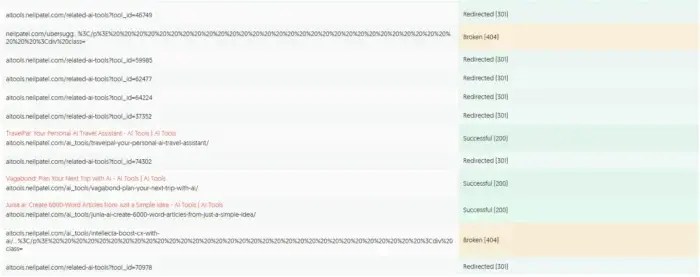
Ubersuggest’s Site Audit feature checks every link on your site. If one shows a 404 error, it will appear in the report.
Fixing existing 404 errors on your site is great, but the real link building begins when you look at other people’s broken backlinks.
Enter a competitor’s URL into tools like Ahrefs’s Site Explorer, filter by “404 not found,” and look at pages with links pointing to them. If you have relevant content (or can quickly create it), pitch it as a replacement.
This works especially well on resource pages, like blog posts or directories full of helpful tools, guides, or statistics. If they’re linking to a dead page, it’s a great opportunity to slide in with a recommended replacement. And while not every broken link will be worth your time, high-authority domains or pages with multiple backlinks can lead to serious SEO upside.
Broken Link Building Best Practices
Review Link Prospects
Not every broken link is worth chasing. You want links from high-authority, relevant domains; the kinds of pages that still get traffic and offer clear value to your niche. Before you do anything else, assess the referring page. Does it make sense for your content to be there, and does it align with your expertise? Use tools to get a snapshot of the page’s authority and backlink profile. If the referring domain is weak or spammy, move on.
Understand why the original content earned the link. Maybe it had a compelling statistic or offered a unique resource. Knowing what made it link-worthy helps you create something that meets the same need or improves on it. A good match makes your replacement more natural and incentivizes the site owner to update it.
Wikipedia Dead Link Technique
Wikipedia is a top-ranking site because it’s a great source of info about almost any topic, but it’s a goldmine for broken link building (if you do it ethically, focusing on where you can provide value versus spamming your links). Some pages can suffer from link rot, where pages lose citations because the links are dead. This is your opening, but you have to be careful about how you pitch it.
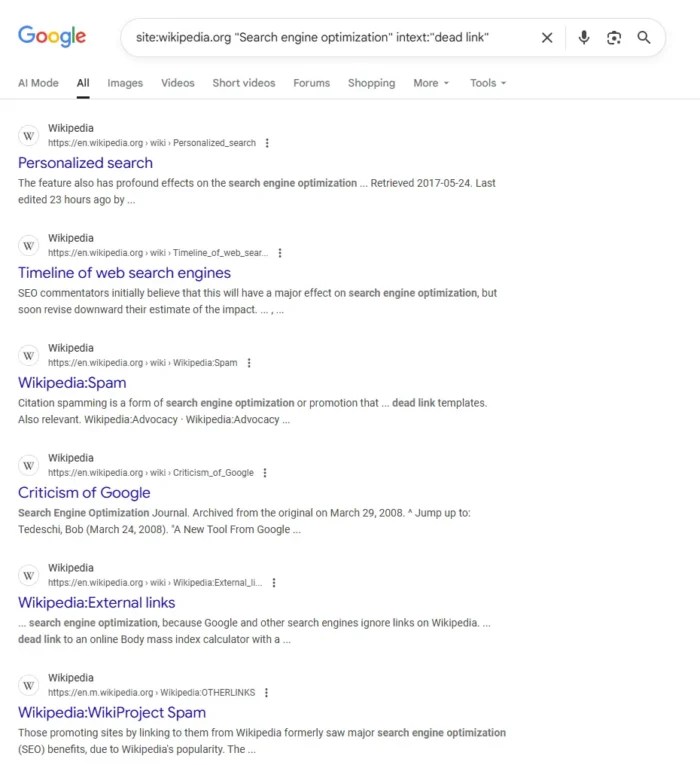
Use a simple search like site:wikipedia.org [your topic] “dead link” to find relevant articles. Scroll down to references and look for those marked as inactive. Check the original content using the Wayback Machine to see what it covered. If you have something that covers the same topic (although more updated or in-depth), you might try to submit it as a replacement.
Wikipedia links are nofollow, so they can’t pass SEO authority directly. But the value comes from visibility and second-tier links. When other sites reference Wikipedia, they may follow your citation. But don’t just rush in and start dropping links. Credibility is important, and you can build it by making non-promotional edits. Quality counts, and it’s better to play the long game.
Using Guest Content to Replace Broken Links
Sometimes it’s tough to convince site owners to link directly to your site. Guest content can help. Instead of asking them to link to your blog, create an article (a guest post) on a respected third-party site that covers the same topic as the dead resource. Once it’s live, you can suggest that article as the replacement.
Let’s say you find dozens of links pointing to a now-defunct “Beginner’s Guide to Content Marketing.” Instead of pitching your own blog post, you can write a fresh guide for a trusted publisher like Entrepreneur or HubSpot. When you reach out to webmasters still linking to the broken page, you point them to your new article as a reliable alternative. But because it’s already on an existing third-party site, it feels better to them.
This approach works because it’s often less promotional and it gives the site master a credible replacement. At the same time, you benefit from the visibility and authority of the site hosting your guest content.
Using Expired Domains To Find Opportunities
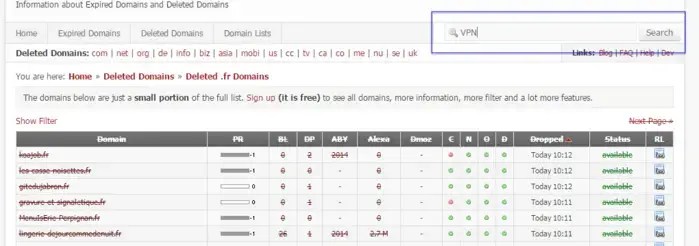
When a site goes offline or a domain expires, links pointing to it don’t disappear. They break. That’s where opportunity lives. Find expired domains in your niche that once hosted valuable content and pitch your own work as a replacement. Use a tool like ExpiredDomains.net to search for specific keywords and filter for those with strong backlink profiles. Analyze which pages had the most links using the tools listed above. If they still exist but point to dead content, you now have a target list.
Reach out to sites still linking and offer your content as a replacement, especially if you have statistics. It’s a great fit when the original resource was widely referenced or lived on a highly trusted site. Just make sure your content delivers comparable or better value, because no one wants to swap in a low-effort piece for something readers once relied on.
Create Replacement Content
Sometimes link opportunities exist, but your content doesn’t. Start by reviewing a broken page using the Wayback Machine. What was the topic, and what made it valuable? Seek signs that it offered original data or research that earned its authority or trust in its time.
Once you know what it delivered, consider how to improve it. Your goal isn’t to copy, but to provide updated details or a more modern take. Even improving the UX can help replace the original.
The best replacement content emphasizes clarity and usefulness, such as comprehensive guides or data-driven posts accompanied by visual resources. Things that help solve problems are great, too. When you’re ready to reach out, you’ll have a pitch-ready link that genuinely benefits the site owner and their audience.
Refining Your Broken Link Building Outreach
Outreach is where most broken link building efforts fall apart. You’ve done the research and found strong opportunities. But if your email reads like spam, you’re done.
Take time to identify the right person to contact. Use LinkedIn, the site’s “About” page, or email tools to find the editor, webmaster, or content manager. Don’t just send it to a generic inbox. Keep your message short and direct. Don’t bury the ask under fluff. Let them know you came across the article, noticed a broken link, and thought your content might be a good replacement.
Tone matters. Avoid sounding like a sales pitch. Be helpful, polite, and clear about what you’re offering. Mention the original content’s value and explain why your piece fits just as well (or better, if applicable).
If you don’t get a reply, wait a few days and send a short follow-up. No pressure, just a reminder. Most importantly, keep things human. The goal isn’t a backlink by itself, but a relationship that can pay off in the long term.
FAQs
How do you do broken link building?
Broken link building starts with finding links that point to dead pages. Once you have a list, you contact the site owners and suggest your content as a replacement. The key is making sure your content matches the intent of the original resource, whether that’s a guide, a statistic, or a tool. Done well, it helps the site fix a bad user experience while earning you a backlink.
How do I find broken links for link building?
Broken link building boosts SEO by fixing broken links, improving The simplest way is to use SEO tools. Platforms like Ubersuggest, Ahrefs, Semrush, or Screaming Frog can scan websites for 404 pages. You can run your own site to identify lost opportunities or analyze competitor domains to uncover broken backlinks that you could replace. Resource pages are another great place to look, since they often include multiple links; over time, some will go bad.
What is broken link building in SEO?
Broken link building is an off-page SEO strategy where you recover or earn backlinks by replacing dead links with your own content. Search engines reward sites that earn quality backlinks, so turning broken links into live ones helps improve authority, trust, and rankings. It’s a win for both sides: the site owner fixes a broken resource, and you gain a link that strengthens your SEO.
Conclusion
Broken link building fixes errors on other sites, but the bigger picture is that it turns missed opportunities into lasting SEO gains, especially in a world of search everywhere optimization. When you find broken backlinks and create or repurpose valuable content to replace them, you can earn links that improve your rankings and credibility.
But the real power is that it scales. When you reclaim lost links on your site or uncover gaps in competitor content, each replacement adds authority to your brand. Combine it with smart digital PR strategies and thoughtful internal linking, and you can see compounding results over time.
Like any SEO strategy, it takes patience. But when done well, broken link building can become one of the most effective (and sustainable) ways to grow your SEO footprint.
http://dubadosolutions.com/wp-content/uploads/2017/05/dubado-logo-1.png00http://dubadosolutions.com/wp-content/uploads/2017/05/dubado-logo-1.png2025-10-08 19:00:002025-10-08 19:00:00Broken Link Building Strategies
Instacart today became the first retail media network to integrate directly with TikTok Ads Manager. This will allow CPG advertisers to use Instacart’s first-party retail data to target audiences, measure conversions, and drive shoppable experiences – all without leaving TikTok’s platform.
The integration marks a major step in the convergence of retail media and social commerce. By embedding Instacart’s targeting and closed-loop measurement capabilities into TikTok, brands can connect with high-intent consumers at the exact moment of inspiration and track their impact through purchase.
Why we care. For CPG advertisers, this partnership removes a friction point – tying social engagement directly to grocery purchases. It enables smarter audience targeting, more personalized creative, and real-time performance insights within TikTok’s ecosystem, where over 180 million monthly U.S. users can discover products.
The details. Advertisers can now:
Target high-intent shoppers using Instacart audience segments.
Power shoppable TikTok ads with grocery selection data from Instacart.
Measure campaign performance daily through Instacart’s closed-loop conversion data.
Microsoft is officially winding down its DSP, Microsoft Invest, and naming Amazon DSP as its preferred transition partner – a move that deepens ties between the two tech giants and reshapes Microsoft’s advertising strategy.
Starting Feb. 28, 2026, Microsoft will sunset Microsoft Invest as it shifts focus to its core advertising products: Microsoft Advertising Platform, Monetize, and Curate. The company says the partnership with Amazon DSP will ensure advertisers experience a smooth transition and continue achieving performance goals.
Why we care. Microsoft’s move to sunset its DSP and align with Amazon DSP means advertisers who use Microsoft Invest, will need to migrate campaigns, data, and workflows – but in return, they’ll gain access to Amazon’s powerful audience insights, premium inventory, and stronger performance capabilities across both Amazon and Microsoft ecosystems.
The details. Microsoft Monetize will also join Amazon Ads’ Certified Supply Exchange program, enabling Amazon DSP advertisers to access premium Microsoft inventory and curated deals that combine Amazon shopping insights with Monetize’s supply. Publishers using Microsoft Monetize gain expanded access to high-quality demand and improved monetization efficiency.
What they’re saying. Microsoft emphasized its commitment to supporting customers through the transition, calling Amazon DSP a “natural fit” for advertisers seeking scale, performance, and transparency.
Bottom line. As Microsoft pivots toward conversational and AI-driven advertising, this collaboration offers advertisers a seamless bridge between the two platforms.
OpenAI is turning ChatGPT into more than a chatbot. The company’s latest update lets users access third-party apps (e.g., Spotify, Canva, Zillow, Expedia) directly inside conversations.
Why we care. This shift could make ChatGPT a high-intent marketing channel, reaching 800 million users where they’re already engaging – in chat.
How it works. Users can call apps by name (“Figma, turn this sketch into a diagram”) or ChatGPT can suggest them automatically based on context – like surfacing Booking.com when discussing travel.
Apps act like actions, not separate tools, within ChatGPT’s conversational flow.
OpenAI calls this a step toward a “conversational operating system” – one interface where users access software and services.
What they’re saying. Nick Turley, ChatGPT’s product lead, described the goal:
“If we can evolve ChatGPT the right way… maybe you’ll be spending a lot of time in ChatGPT. But it won’t feel like you’re in a chatbot.”
The marketing angle. This platform play could turn ChatGPT into a valuable discovery and conversion engine for brands. Some potential upsides for marketers:
Massive reach: 800 million users. Apps appear at the moment of intent.
Contextual discovery: Brands show up naturally as users describe needs — not through search.
Interactive experiences: The Apps SDK supports visuals and dynamic UIs. Zillow can show listings with maps; Canva can design in chat.
What’s next. More brand integrations are coming – including Target, Uber, Peloton, and Instacart. Developers can start building now; OpenAI plans an app store and publishing reviews later this year. Apps meeting high design and functionality standards will get higher visibility.
OpenAI also hinted at “agentic commerce” – one-click transactions powered by AI. It already tested in-chat Etsy shopping for U.S. users and is hiring for ad tech and attribution tools.
The big picture. This evolution opens new paths to brand interaction, contextual engagement and possibly commerce – all within a single, AI-mediated interface. This gives marketers a chance to meet consumers where they act, not just where they search.
http://dubadosolutions.com/wp-content/uploads/2017/05/dubado-logo-1.png00http://dubadosolutions.com/wp-content/uploads/2017/05/dubado-logo-1.png2025-10-07 17:13:142025-10-07 17:13:14ChatGPT becomes a platform for apps – and maybe marketing
If you have ever run your writing through a readability checker like Yoast SEO, you have probably come across the Flesch reading score. This metric was developed more than 70 years ago and is still one of the most widely used ways to measure how easy your text is to read. But what does it actually mean, and how does it affect your writing for the web?
In this guide, we will explain how the Flesch reading score works, why it became so prominent in publishing and SEO, and how you can use it effectively today. We will also show you where it fits into the Yoast SEO plugin and why we have introduced new readability checks alongside it.
Reminder: We made changes to our readability analysis in Yoast SEO 19.3. We replaced the Flesch Reading Ease Score with the word complexity and sentence length assessments. You can find the Flesch reading ease score in the Insight tab, but we won’t use this assessment in our readability analysis anymore.
What is the Flesch reading score?
The Flesch reading score, also called the Flesch reading ease test, was created by Rudolf Flesch in the 1940s. His goal was simple: to give writers a quick way of checking whether their text was easy to understand. The formula combines three basic elements: sentence length, word length, and syllable count. When these figures are combined into the formula, which I’ll explain in just a moment, they generate a score between 0 and 100.
The highest scores are reserved for the easiest text. For example, a score in the 90s suggests that a typical 11-year-old child should be able to read it without any difficulty. A score of around 60 is closer to plain English that a high school student would be expected to understand. Scores under 30 are considered very difficult and are only really found in academic or legal writing.
Here’s a quick overview of the ranges and what they mean:
Score range
Readability level
Who can understand it
90–100
Very easy
An average 11-year-old student
80–89
Easy
Middle school students
70–79
Fairly easy
Teenagers aged 13–15
60–69
Standard
High school students
50–59
Fairly difficult
College students
30–49
Difficult
University graduates
0–29
Very confusing
Specialists, academics, or experts
Just for fun: this article itself scores around 63 on the Flesch reading score, which puts it in the “standard” range.
How the Flesch reading score is calculated
The formula behind the score looks intimidating, but don’t worry, it is surprisingly straightforward. In fact, it’s only based on two things. The total number of words divided by the total number of sentences, which gives us the ASL or Average Sentence Length, and the total number of syllables divided by the total number of words to get the ASW or Average Syllables per Word. Once we have these figures, we enter them into this formula:
206.835 – (1.015 × ASL) – (84.6 × ASW)
This will give us a score between 0 and 100. The longer your sentences and the more complex your words, the lower your score will be.
Let’s take a quick example by looking at this short text below:
“The cat sat on the mat. The dog barked.”
This has very short words and sentences, so it would score in the 90s, which means it is very easy to read.
Now compare it with:
“The domesticated feline reclined languidly upon the woven floor covering, while the canine produced a resonant vocalization.”
This is essentially the same meaning, but longer words and clauses drop the score dramatically, likely into the 30s.
This example shows why the Flesch reading score works well as a proxy for readability. It rewards writing that is concise and simple with a high score and wags a finger at writing that is dense and complex, ultimately giving it a low score.
Why the Flesch reading score became important
The Flesch reading score spread beyond classrooms into business and publishing because it answered a universal question: Is my writing easy to understand?
By the 1970s, the U.S. Navy was using it to ensure that training manuals were clear for recruits. Later, several U.S. states made it part of their official requirements for insurance documents and consumer contracts. Healthcare organizations also began using it to ensure that patient information was accessible.
When personal computers became common, Microsoft Word added the Flesch reading ease test to its spelling and grammar tools. Suddenly, anyone writing a school essay or business report could get instant feedback on readability. That mainstreamed the score and kept it relevant well into the digital age.
In the world of web writing, readability became even more critical. Online readers scan rather than study text. Research shows they decide within seconds whether a page is worth their time or not. That makes clarity a competitive advantage. Tools that included the Flesch reading score gave web writers a way to benchmark themselves and improve user experience.
The Flesch reading score in Yoast SEO
When Yoast introduced readability checks to the plugin, the Flesch reading score was one of the first tools we built in. We popularized the use of tools to score your content. It gave writers using WordPress an instant way to measure whether their content was accessible to a broad audience. You can still find the Flesch reading ease score inside the plugin today, in the insights tab.
This has helped thousands of users discover that shorter sentences and simpler words often improve how people engage with their content. While the score does not guarantee better rankings, it does contribute to a positive reading experience, which in turn can influence user behavior and SEO outcomes.
The Insights tab contains a lot of information, including your Flesch reading ease score
Why Yoast moved beyond Flesch
The Flesch reading ease score is a useful tool, but it has its limitations. For one, it only looks at sentence and word length, ignoring context, tone, and audience. A medical blog, for example, might score poorly even if it’s perfectly suited to its readers.
There’s another issue: the Flesch score combines two factors, sentence length and word length, into one number. If your score is low, you won’t know which part needs fixing. That’s why we added separate checks for sentence length and word complexity. Word complexity doesn’t just measure length; it also takes into account a few other elements, like how common a word is. Based on all these factors, it assesses the difficulty of your vocabulary, giving you clearer feedback.
This way, you can still use the Flesch score as a quick guide, but with sharper insights to refine your writing.
Should you still care about the Flesch reading score?
The Flesch reading score remains a valuable guide for writers who want to make their content more approachable. If your text scores very low, it may be worth shortening sentences or replacing long words with simpler alternatives. But you do not need to obsess over getting a perfect score.
Readability is about more than numbers. Think about your audience, their expectations, and the purpose of your content. Combine the Flesch reading score with other readability signals to create a text that is clear, engaging, and optimized for both humans and search engines.
How to use the Flesch reading ease score to improve your writing
We’ve come to the essential question. How can you use the Flesch score to improve your writing? Well, you write for an audience and know your audience the best. Before writing or editing, consider what kind of texts fit your readers. Do you sell clothes or organize photography workshops? Or do you write for a mom blog or make step-by-step DIYs? Your content should be relatively easy to read in all these cases since you are targeting a broad audience.
However, remember that you do not have to chase a high Flesch reading score at all costs. For example, you may write about complex, specialist topics for a specific, more knowledgeable audience. Or, perhaps you are an academic blogging about your research? It makes sense if the Flesch test produces a lower score in those cases.
Still, whatever your situation is, your text always benefits from concise language. So, if you want to benefit from the feedback the Flesch reading ease score gives you, focus on two things:
1. Shorten your sentences
Too many long sentences make your text difficult to read, while short sentences keep the subject clear. When the sentences in your text are short, you allow your readers to absorb the information in your text. As a result, they don’t need to use all their attention to decipher what you want to say. That is why we advise you to break down long sentences; your text will be much easier to read.
And please, don’t think that by using short sentences, you will oversimplify your text. Let’s compare two short texts to show you what we mean. First, we have this sentence:
My favorite place to visit during weekends is my grandparents’ house near the lake, where we love to fish and swim, and we often take the boat out on the lake.
Did you find this sentence easy to read? Wasn’t it too lengthy, confusing, and difficult to process? Breaking it into two or more sentences can make it much clearer:
My favorite place to visit during weekends is my grandparents’ house. It’s near the lake, where we love to fish and swim. We also often take the boat out on the lake.
These few short sentences are much easier to read. Yet, you give the same information as in the long sentence, so there is no oversimplifying. Using short sentences keeps the subject clear and lets your readers absorb the information you’re presenting.
Shorten your sentences with Yoast SEO
The Yoast SEO Readability analysis helps identify long sentences with its sentence length assessment. You can also use Yoast AI Optimize for sentence length for quick, automated improvements.
2. Limit your use of difficult words
Words with four or more syllables are considered difficult to read, so try to avoid them where possible. Or try not to use them too much. For example, try words like small instead of minuscule, about instead of approximately, and use instead of utilize. We have the word complexity assessment in Yoast SEO Premium to help you with that.
If you want to reach a broad audience, you should also try to avoid using jargon. If you’re a medical expert, you’re probably familiar with terms like analgesic, intravenous, and oophorectomy. However, keep in mind that most people aren’t. When you can’t find a better alternative, make sure to explain it for users who might not know the word.
Conclusion
The Flesch reading score has been around for decades, and it is not going anywhere. It still offers a quick way to test whether your writing is easy to follow, and it continues to play a role in Yoast SEO. At the same time, readability isn’t just about scores. Readability is about meeting your goals. By breaking down the Flesch reading ease score into clearer checks (like sentence length and word complexity), you get actionable feedback to refine your writing. That way, your content stays readable and effective.
So next time you write a blog post, take a look at your Flesch reading score. Use it as a guide, not a rule. The result will be content that your readers and search engines will thank you for.
TLDR
You should care about your score, but do not chase perfection. Balance readability with your audience’s needs
The Flesch Reading Score measures how easy a text is to read, using sentence length and word length
Scores range from 0 to 100: higher is easier. For example, 90–100 is very easy, 60–69 is standard, and 0–29 is very confusing
It became popular in education, government, and publishing before being integrated into tools like Microsoft Word and SEO platforms
In Yoast SEO, the Flesch reading score still exists in the Insights tab, but we now also use word complexity to provide more accurate feedback
Go Premium and get free access to our SEO courses!
Learn how to write great content for SEO and unlock lots of features with Yoast SEO Premium:
http://dubadosolutions.com/wp-content/uploads/2017/05/dubado-logo-1.png00http://dubadosolutions.com/wp-content/uploads/2017/05/dubado-logo-1.png2025-10-06 09:21:252025-10-06 09:21:25The Flesch reading ease score: Why & how to use it