http://dubadosolutions.com/wp-content/uploads/2017/05/dubado-logo-1.png00Dubado Solutionshttp://dubadosolutions.com/wp-content/uploads/2017/05/dubado-logo-1.pngDubado Solutions2024-03-28 15:01:402024-03-28 15:01:40SGE (AI overviews): How Google Wants to Take Over Online Retail
http://dubadosolutions.com/wp-content/uploads/2017/05/dubado-logo-1.png00Dubado Solutionshttp://dubadosolutions.com/wp-content/uploads/2017/05/dubado-logo-1.pngDubado Solutions2024-03-11 11:48:292024-03-11 11:48:29What is INP and how does it work?
http://dubadosolutions.com/wp-content/uploads/2017/05/dubado-logo-1.png00Dubado Solutionshttp://dubadosolutions.com/wp-content/uploads/2017/05/dubado-logo-1.pngDubado Solutions2024-01-11 16:26:112024-01-11 16:26:1113 Must-Have SEO Audit Tools to Boost Your Rankings
If you want to learn how to use Semrush for keyword research, you’re in the right place.
In this tutorial, we’ll cover everything from topical and competitor keyword research, to gap analysis and topic clustering.
Semrush has a number of powerful keyword research tools – Keyword Manager, Keyword Magic Tool and Keyword Gap – that will enable you to do it all.
We’ll also cover working examples for each of the main keyword research use cases so you can immediately start implementing the training in your business.
If you don’t yet have a Semrush account, you can use this 14-day free trial link to get access to all the features covered in this guide so you can follow along step-by-step.
If you prefer video, I’ve put together a comprehensive over-the-shoulder tutorial below that walks through seven ways to do keyword research with Semrush:
Disclaimer: This article does contain affiliate links. If you purchase a tool through one of my links I will receive a small commission at no additional cost to you. Affiliate links are one of the ways I fund the blog. Thanks for the support!
Find Existing Keyword Opportunities With Semrush (Template Included)
The first way you can use Semrush for keyword research is to identify existing keyword opportunities.
Specifically, find all the keywords with search demand that your website is already ranking for in positions 4-15.
Here’s how to do it:
Open the Semrush SEO Toolkit and go to the Organic Research >> Positions report:
This will generate a report showing all the keywords your website is ranking for in the top 100 positions.
Next, you’ll need to apply some advanced filters. These will vary from business to business, but I’ll typically use Position, Volume and Keyword Difficulty (KD).
To illustrate, here are the filters I’d use for my website:
Position: 4-15
Volume: 100+
KD: 0-49
These filters will extract keywords that my website is already ranking for on page one or two, that have search demand, and aren’t ultra competitive.
Review the remaining keywords and add any that you’d like to target to a new list.
This is usually the best place to start when you’re working with a website that has an existing content footprint as you’ll be able to capture some quick organic traffic gains.
Note: I’ll typically segment keyword opportunities into two lists – Existing and New.
This will make it easy to see which keywords have already been added to a list inside Semrush.
Existing keyword research template
If you’d prefer to analyze keyword data outside of Semrush, I’ve created a template that you can use to automate a lot of the filtering and formatting.
Simply export all the keywords your site is ranking for in positions 4-15 and paste them into the template. The template will organize all the opportunities in descending search volume and add color coding so you can quickly spot the keywords that are already ranking the highest with the lowest SERP competition.
I put together a full video walk-through of the template below:
Semrush existing keyword research template.
Competitor Keyword Research With Semrush
One of the fastest ways to find new high-intent keywords is to analyze your competitors.
Semrush provides several different ways to perform competitor keyword research. We’ll walk through each one and look at some working examples.
Semrush Top Pages report:
For this example, let’s pretend we have a beard products ecommerce business and are looking for some new target keywords.
One of the competitors might be Beardbrand.
I’d enter that domain into the SEO Toolkit and go to the Organic Research >> Pages report:
The report shows which pages are driving the most organic traffic to their website. You can see what percentage of total organic traffic each page is generating, along with the total number of keywords the page is ranking for in the top 100 positions. You can also click through to view all of those keywords.
This is great insight, but let’s take it a step further.
Since this is an ecommerce website, we’d want to prioritize product-related keywords as these will present the best direct monetization opportunity.
One way to do this is apply a URL filter to only return product pages.
For example, we can see that Beardbrand houses all of its product pages under a /products subfolder:
As a result, I’d add a URL contains /products filter to the report.
Now I can see 22 product pages that are driving the most organic traffic to the website. This would be the best place to start the keyword analysis.
You can use competitor subfolder analysis for any type of business.
Let’s pretend that you’re a personal injury lawyer in Florida. One of the competitors might be Dolman Law Group. After reviewing their main navigation, I can see that all the services pages are nested under the /legal-services subfolder:
As a result, I’d apply a URL contains /legal-services filter in the Pages report, or just enter the subfolder into the main search bar, to see which services pages are driving the most organic traffic to their website and check to make sure our firm was also targeting those keywords.
But, what if your competitors don’t organize content into subfolders?
You can use keyword modifiers instead to uncover the highest intent opportunities.
For example:
If I was analyzing a competitor for my website I would apply the following filters:
These filters will return the best keyword opportunities for affiliate monetization.
Repeat this process for your top organic search competitors. You can find these by search for your main product or services keywords in Google, or look at the Competitors report in Semrush which shows the websites with the most keyword overlap:
If you want to learn more about performing competitor subfolder analysis with Semrush, check out the video tutorial below:
Find low competition long tail keywords with Semrush
You can use Semrush to extract low competition long tail keywords from your competitors.
Here’s how to do it:
Enter your competitor into the Semrush SEO Toolkit and navigate to the Organic Research >> Organic Positions report.
Apply the following filters:
Position: top 20
Volume: 100+
KD: 0-49
Word count: 4+
You’ll get a set of potential long tail keyword targets that have search demand and a low level of competition.
If you still have a large list of keywords to review, increase the minimum volume filters or add an additional URL filter to focus on a specific section of your competitor’s website.
For example, you could only analyze the /legal-services folder:
Keyword Gap analysis with Semrush
Semrush’ Keyword Gap tool makes it easy to find all the valuable keywords (both organic and paid) that one, or multiple competitors rank for, but you do not.
In Semrush:
Enter your root domain – e.g. robbierichards.com
Enter up to 5 competitor domains – e.g. http://marketingarsenal.io/
Click the green “Compare” button
First, you can view missing keywords to check all the keywords your competitor ranks for, but you don’t:
Next, you can check weak keywords to see all the keywords where you rank lower than your competitor(s):
These could be keywords that require content optimization or even a new dedicated piece of content to rank higher.
When performing keyword gap analysis inside Semrush, I’ll usually add some advanced filters to streamline the keyword set down to the most relevant opportunities that have search demand and aren’t ultra competitive. This makes the analysis faster, and helps narrow in on the most immediate opportunities.
For example, I’ll add the following filters:
Competitors in Top 10:
If I see a competitor with a comparable domain authority ranking in the top 10 positions it tells me that I also have a chance of ranking in the top 10 as long as I create quality content and any necessary backlinks.
Volume: 100+
I want to make sure there is enough search demand to warrant targeting a keyword.
KD: 0-29
I want to start with low competition keywords.
Similar to the previous section, you can also add keyword modifiers to trim the keyword set down further.
For example, I might also add a keyword containing “software” or “best” filter to surface the best affiliate monetization opportunities:
Scan down the list and add any new targets to your master keyword list.
Subfolder gap analysis with Semrush
Subfolder gap analysis is another way you can use Semrush to quickly identify high-value keyword opportunities for your business.
Let’s return to a couple of the previous working examples to illustrate.
Local business
Fellerman Law is a competitor of Dolman Law. If they wanted to quickly see all the service-related keywords that Dolman Law was ranking for, but they are not, they could analyze their /legal-services/ subfolder.
Enter your root domain – e.g. https://www.fellermanlaw.com/
Enter your competitor’s subfolder – e.g. https://www.dolmanlaw.com/legal-services/
Click the green “Compare” button
Add the Position, Volume and KD filters again to first focus on the quick-win opportunities.
Scroll down and we can see 163 Missing Keywords that Dolman is ranking for in the top 10, but Fellerman is not targeting.
Fellerman could now scan down the list and select relevant keywords to create new service pages for and start driving more qualified organic to their website.
This subfolder analysis process can be applied to any type of business.
For example:
Ecommerce businesses: analyze competitor /product or /category subfolders.
AdSense business: analyze competitor /blog or /category subfolders to find high volume, low competition keywords that you can rank for quickly and drive loads of eyeballs to ads.
The key to this strategy is to look for the subfolders that contain keywords that align directly with your website’s monetization model.
I have created a dedicated video tutorial for this strategy here.
PPC-organic gap analysis
Semrush’ keyword gap analysis tool is unique in that it enables you to analyze paid vs organic keyword gaps.
A couple use cases include:
Find all the keywords that your competitors are bidding on that you are not.
Find all the keywords you rank for outside the top 3 positions, but are not bidding on. These are areas where you may need to provide some paid aircover.
Find all the keywords that your competitors are bidding on that you are not targeting as part of your organic strategy. This will highlight higher-intent keyword gaps.
Provide paid aircover
Let’s pretend Semrush wanted to provide air cover for all the keywords that they were not yet ranking inside the top 3 positions.
Enter your paid root domain – e.g. https://www.semrush.com/
Enter your organic product subfolder – e.g. https://www.semrush.com/features/
Click the green “Compare” button
Next, they could add a Position and Intent filter:
Now, we can see a list of keywords that Semrush is ranking for outside the top 3 positions, and is not currently bidding on in paid search.
Semrush could scan down the list and select any high-priority keywords that they want to bid on until they rank in the top organic position.
Identify high-value keyword gaps
You can use Semrush to identify all the keywords that your competitors are bidding on that you don’t currently rank for in the organic search results. The idea here is that if a competitor is bidding on a keyword, chances are it’s going to have high-intent and the potential to drive conversions.
In the Semrush Keyword Gap tool:
Enter your root domain – e.g. https://www.copper.com/ – and select Organic keywords
Enter your competitor’sroot domain – e.g. https://www.pipedrive.com/ – and select Paid keywords
Click the green “Compare” button
Scroll down to the Missing Keywords report and select any high-intent keywords that you are not already targeting.
Note: because paid keywords will typically have higher intent, they will usually have a higher level of competition. As a result, you might also start with a maximum KD filter to trim the opportunities down to the most realistic targets.
Generate topical keyword Ideas with the Semrush Keyword Magic Tool
However, the real power of this tool lies in the advanced filtering options.
For instance:
My blog monetizes primarily through affiliate marketing. As a result, I want to rank for keywords that people are searching for during the consideration stage of the buyer journey where they are actively evaluating different types of solutions and/or deciding between specific products.
Since I write about SEO-related topics, I would enter relevant category keywords – keyword research, link building, rank tracking, etc. – with those consideration stage modifiers.
In the Keyword Magic Tool:
Enter an investigational intent modifier – e.g. “best”
Add an Any keywords filter containing core category keywords – e.g. “keyword research, link building, ranking tracking, technical SEO, on-page seo, content optimization, seo reporting, local seo, competitor analysis, seo audit” etc.
This will return a list of solid consideration stage keyword opportunities. But, I wouldn’t stop there.
Next, I would look for keywords that show a user is actively comparing the products that I promote against competitors.
Add 3 comparative keyword modifiers – e.g. “alternative, competitor, vs” – and select “Any keywords” in the Include Keywords filter:
From the results, we have 584 potential keyword targets. These mid-funnel terms include “Ahrefs vs Semrush, Moz vs Semrush, Serpstat vs Semrush, SpyFu vs Semrush etc”.
I can try to rank for these keywords and showcase why Semrush might be a better solution, and subsequently drive referral traffic that converts into commissions.
Note: The Keyword Magic tool also groups keywords by Popularity and search demand:
This is an extremely handy feature if you have a large keyword set to review and aren’t sure how to streamline it with the advanced keyword filters at the top of the table. Simply review the groupings and click into the one that appears most relevant to your business.
Find question-based keyword opportunities with Semrush
Scroll down the list and look for relevant product or service-related questions your ideal customer might be searching for at the top, middle and bottom of the funnel.
For example:
As I scroll down the list I can see people asking questions around like:
How to select a CRM system?
How to maintain a CRM database?
Most of these question keywords are relatively low-competition opportunities:
Tip: you can use Semrush’ Intent and Grouping filters to quickly surface the highest intent opportunities:
If you want to learn more about using Semrush to generate question-based keyword ideas, check out the video below:
Create Topical Keyword Clusters with Semrush
Note: I’ve included a video overview of the Semrush keyword cluster tool at the end of this section.
Semrush enables you to create keyword clusters from scratch, as well as cluster existing keyword lists.
To illustrate, let’s return to our personal injury lawyer example.
If I wanted to generate keyword clusters from scratch, I’d click Create List and then enter up to 5 seed keywords, along with a domain for added context:
The tool returns 50 clusters containing 900 keywords.
In the table you can see:
Intent
# of keywords in each cluster
KD %
Aggregate search volume across the keyword cluster
Semrush will flag “high ranking potential” keywords. These are terms with high volume and relatively low KD percentages.
Scrolling down the list we can see some interesting results that fall outside typical top-level service pages:
Click to open a cluster and you’ll see all the keywords along with their respective search intent, KD% and search volume metrics.
Tip: It’s important to review the Content references section because you want to understand if you need to optimize an existing page for this cluster, or create a new dedicated URL.
For example:
After hovering over the URLs in the reference section I can see that the competitors are ranking with dedicated pages for the “hit and run attorney” keywords.
As a result, I’d create new sub-service landing pages to target those high-intent clusters.
You can also use Semrush to cluster an existing keyword list.
From the Keyword Manager, select the second option to create a list:
Paste in your existing keyword set:
Semrush will automatically cluster all the keywords.
Here’s what it looks like after I uploaded 214 keywords that I’m interested in targeting:
I Like How Semrush Tools Are Integrated
One of the things I really like about Semrush is that its keyword research tools are all integrated.
Once you have finished building your target keyword list in Semrush, you can select keywords and send them to the Position Tracking tool to monitor rankings or transfer them to the SEO Writing Assistant for content production and on-page analysis.
These integrations make it easy to scale your content workflow and monitor performance over time, all without having to leave the platform or rely on other standalone SEO tools.
Level-Up Your Keyword Research With Semrush
You now know how to use Semrush to extract high-value keyword opportunities for any type of business.
http://dubadosolutions.com/wp-content/uploads/2017/05/dubado-logo-1.png00Dubado Solutionshttp://dubadosolutions.com/wp-content/uploads/2017/05/dubado-logo-1.pngDubado Solutions2023-07-02 06:44:362024-12-31 18:04:38How to Use Semrush for Keyword Research (Including Template and Examples)
Pretty much all rank checkers let you track multiple keywords across multiple locations, devices, and search engines. But only the top-performing tools allow you to track hundreds of keywords daily, or even better, refresh them on-demand.
Let’s face it: ranking positions change quickly.
And the only way to keep pace is by using the fastest daily rank tracker.
So, how do you choose the best daily rank tracking software?
In this post, we’ll examine the key features to consider and then examine the top 10 daily rank tracking tools. Take a minute to see which solution is right for your business. Each tool is
AccuRanker – best standalone daily rank tracker. Semrush – best daily rank tracker that is part of an all-in-one SEO platform. Nightwatch – accurate and affordable standalone daily rank tracker. Pro Rank Tracker – affordable solution with strong reporting capabilities. SERPWatcher – accurate and extremely intuitive daily rank tracking solution. Advanced Web Ranking – standalone tool with great white label reports. Wincher – simple and affordable solution for Google only. SE Ranking – affordable all-in-one platform with daily rank monitoring. Authority Labs – effective for automating daily updates and reporting. Ranktracker – all-in-one platform with a solid rank tracking feature. Search Console – free option.
Disclaimer: This article does contain some affiliate links. If you purchase a tool through one of my links I will receive a small commission at no additional cost to you. Affiliate links are followed by (aff) in this article. Thanks for the support!
Key considerations when choosing a daily rank tracking software
Let’s start by exploring the 7 key features you need to consider when choosing a daily rank tracker.
Accurate (on-demand) ranking data:
Accuracy plus frequency is critical to daily keyword rank tracking.
Ranking positions change rapidly, so you’ll need to choose rank tracking software that has accurate daily updates, plus the option to run an on-demand refresh as required.
For example, AccuRanker (aff) updates your ranking data daily, plus you can run an instant on-demand refresh when required:
(Image: Refreshing rank data on-demand inside AccuRanker.)
Scalability across keywords and users:
Next, you want to ensure the daily rank tracking software can accommodate the number of keywords and users your company needs. Also, consider how pricing changes as you increase the number of keywords and users. For instance, does each price plan scale in line with your requirements?
Location, device, and competitor tracking:
Keywords perform differently across locations and devices, so you’ll need a daily rank tracking tool that measures those variations. You’ll also want your daily rank tracker to run competitor comparisons so that you can benchmark your performance.
(Image: Filtering rankings by device and location in Semrush.)
Support for multiple search engines:
Google, Bing, Yahoo, Baidu (Chinese), Yandex (Russian), YouTube, Amazon – which search engine is most relevant for your business? When selecting your daily rank tracker, make sure it supports the right search engines for your business.
For example, AccuRanker (aff) lets you choose from multiple search engines:
(Image: Tracking keyword rankings across multiple search engines in AccuRanker.)
SERP feature monitoring:
SERP features such as snippets, images, videos, and local maps dominate search results.
If traffic suddenly increases or decreases, it could be due to gaining or losing a SERP feature on your keywords, so tracking them daily is crucial.
For example, AccuRanker’s Aggregated SERP Analysis tool (aff) lets you track the movement of 50+ different SERP features across all of your keywords, while the SERP Feature Ownership graph shows which keywords you rank for but don’t yet own the SERP feature:
(Image: Monitoring keyword SERP features in AccuRanker.)
Historical rank performance:
As keyword rankings fluctuate daily, you’ll want your software to show you the historical trending performance over different periods across different locations, devices, and search engines.
For example, Semrush’ Position Tracker (aff) provides the historical daily ranking performance for the last 60 days. After the 60 days, you can view weekly snapshots of historical rankings:
(Image: Historial ranking performance in Semrush.)
White label reporting:
Besides monitoring the latest on-demand ranking data, you’ll also want the option of generating progress reports for your colleagues or white label reports for your clients.
For example, ProRankTracker (aff) includes current rankings, progress, comparison, and benchmark reports:
(Image: Creating and scheduling custom reports in Pro Rank Tracker.)
AccuRanker (aff) includes built-in white-label reports, plus it integrates with third-party tools like Google Data Studio for enhanced visual reports:
(Image: Third-party reporting via AccuRanker and Google Data Studio.)
10 Best Daily Rank Trackers for 2023
Now it’s time to check the top daily rank tracking software.
Some of these tools are dedicated standalone rank trackers, while others are part of all-in-one SEO platforms.
But all of these daily rank trackers have most, if not all, of the features covered above.
Let’s dive in…
AccuRanker
AccuRanker (aff) is the world’s fastest and most accurate standalone daily rank tracker that lets you refresh keyword rankings whenever you need them. It’s trusted by more than 32,000 companies, including IKEA and Kinsta.
Key features:
Run instant on-demand updates of ranking data.
Select pricing plans based on keywords and unlimited users.
Track daily keyword rankings across multiple search engines, including Google, Bing, Baidu, Yandex, and YouTube.
Compare side-by-side keyword ranking with your competitors.
Monitor 50+ SERP features, including snippets, images, videos, and local map packs, for all of your keywords.
Add tags, notes and dates to easily filter and segment ranking data.
View the historical daily ranking performance of individual keywords.
Generate and schedule white-label rank tracking reports.
Create visual reports with Google Looker Studio integration.
Integrates with Google Search Console and Adobe Analytics.
Landing Pages report maps ranking data to Google Analytics data to show the correlation between rankings, traffic and revenue.
Pricing:AccuRanker starts at $116/month for 1,000 daily tracked keywords.
Semrush (aff) is an all-in-one SEO platform trusted by over 10 million marketing professionals and used by leading brands, including Tesla, Samsung, and IBM. Its Position Tracking Tool (aff) lets you track daily rankings at different locations on mobile and desktop, and compare them to your competitors. It also ranked highly in our expert poll of the best rank trackers.
Key features:
Collect accurate daily keyword ranking data.
Select pricing plans based on the number of keywords and users.
Track keyword rankings nationally, regionally, and locally on desktop or mobile.
Tag your keywords to allocate them into relevant segments.
Get notified of the crucial position changes.
Analyze daily SERP feature movements, such as snippets, images, videos, and carousels.
Nightwatch is one of the most accurate standalone daily rank trackers that lets you track your rankings on all leading search engines down to the ZIP code level. It’s trusted by companies of all sizes, including Shopify, Scotiabank, and Booking.com.
Pricing: Nightwatch starts at $32/month for 250 daily tracked keywords.
Pro Rank Tracker (aff) is a standalone daily rank tracker trusted by over 60,000 SEO agencies and brands worldwide, including Fuel Online, Just Internet Solutions, and GoGoPrint. Its state-of-the-art algorithm gives you fast, accurate, on-demand keyword ranking results.
Key features:
Get automatic daily ranking updates, plus on-demand refreshes.
Select pricing plans based on keywords and additional users.
Follow international and local rankings on desktop and mobile.
Track keyword rankings on Google, Yahoo, Bing, Amazon, and YouTube.
Monitor SERP feature movements, including local listings and map packs.
View historical ranking performance and competitor comparisons.
Generate multi-lingual, white-label “live link” reports with daily or on-demand updates.
Pricing: ProRankTracker starts at $13.50/month for 100 daily tracked keywords.
SERPWatcher (aff) is an easy-to-use daily keyword rank tracking tool. It’s part of the Mangoolsall-in-one SEO platform used by more than 25,000 customers and trusted by big brands, including Airbnb, Alexa, and Adidas.
Key features:
Get daily ranking updates.
Receive significant rank changes via email alerts.
Select pricing plans based on keywords and additional users.
Track keyword rankings at country, state, and local levels on desktop or mobile.
Share interactive reports using a link.
Pricing: SERPWatcher starts at $29.90/month for 200 daily tracked keywords.
Advanced Web Ranking provides fresh daily, weekly, or on-demand keyword rankings. Over 24,000 leading brands and agencies trust the standalone rank tracker, including Microsoft, Amazon, and MoneySupermarket.
Key features:
Get accurate keyword rankings daily or on-demand.
Track location-specific keyword rankings at a city, state, or country level on desktop or mobile.
Get granular local rank tracking down to the GPS coordinates.
Track daily rankings on multiple search engines, including Yandex, Baidu, DuckDuckGo, Amazon, and YouTube.
Monitor all types of Google SERP features and compare ranking with your competitors.
Build in-depth, white-label reports and share them via a URL link.
Integrate ranking data with third-party tools, such as Google Data Studio.
Pricing: Advanced Web Ranking starts at $99/month for tracking up to 7,000 keywords.
Wincher is a simple, flexible, and powerful standalone daily rank tracker. It’s used by thousands of people in almost 150 countries, including companies like Philips, SVT, and Bonnier.
Key features:
Get daily keyword rank tracking updates and refresh data on-demand.
Scale with pricing plans based on keywords and unlimited users.
Track your keyword rankings in a specific country, region, or city location.
View competitor rankings and get notified if they overtake you or vice versa.
Select from 130+ Google search engines and track which keywords have SERP features.
Evaluate up to 6 months of ranking history for any added keywords.
Generate on-demand white-label reports.
Create great-looking reports with the Google Date Studio integration.
Pricing: Wincher starts at $39/month for 500 daily tracked keywords.
SE Ranking (aff) is an all-in-one SEO platform with a 100% accurate keyword tracking tool. Leading brands like Zapier, Trustpilot, and Hunter Engineering Company use its daily rank tracker.
Key features:
Check your keyword rankings daily, every 3 days, or every week.
Scale your pricing plan based on the number and frequency of keywords to track and the subscription period.
Track your rankings by country, region, city, or zip code level.
Check Google, Yahoo, Bing, and YouTube rankings for all locations and devices.
Monitor keyword SERP features, including snippets, videos, maps, and Google Ads.
Compare up to 20 competitors’ keyword rankings.
Share white-label reports via a custom domain.
Pricing: SE Ranking has a scalable pricing structure starting at $39.20/month for 250 daily tracked keywords.
Authority Labs is a reliable and accurate standalone daily rank tracker that even lets you recover those “not provided” keywords. It’s trusted by marketers and industry leaders worldwide, including Mint, Jobing, and Symantec.
Key features:
React to changes with daily keyword rank tracking.
Scale with pricing plans based on keywords and unlimited users.
Rank Tracker is an all-in-one SEO platform that includes a daily rank tracker to keep track of your site’s rankings in real time. It’s used by marketers from leading companies, including Apple, Red Bull, and Adidas.
Key features:
Get daily email notifications for any significant ranking changes.
Track keyword ranking globally, nationally, and locally on desktop or mobile.
Compare ranking movements side-by-side with your competitors.
Track any language on Google, Yahoo, Bing, and Yandex search engines, plus GMB and local rankings.
Monitor your keyword SERP features like shopping previews, maps, or reviews.
Get an instant visual overview of your historical rank tracking progress.
Send daily, weekly, or monthly white-label reports.
Pricing: Ranktracker has subscription plans starting at $24/month for 100 daily tracked keywords.
Google Search Console is a free all-in-one platform with tools and reports to help you measure your overall search traffic and performance. While you can’t add specific keywords to track (like the premium daily rank tracking software above), you can monitor your daily rankings.
Key features:
Analyze daily keyword rank tracking updates.
Sort ranking data by keywords, pages, countries, devices, search appearance, and dates.
Export data to Google Sheets, Excel, or a CSV file.
Pricing: Google Search Console is free to use.
Which Daily Rank Tracker Are You Going to Try?
There are several things to consider when searching for a daily rank tracker. You want software that provides:
Accurate (on-demand) ranking data.
Scalability across keywords and users.
Location, device, and competitor tracking.
Support for multiple search engines.
SERP feature monitoring.
Historical rank performance.
White label reporting.
We looked at the best daily rank tracking software – 5 standalone rank trackers and 5 rank tracking tools from all-in-one SEO platforms.
That’s a lot of tools! But here are my recommendations:
If you’re looking for a robust standalone daily rank tracker, then AccuRanker (aff) is my top choice.
On the other hand, if you want a daily rank tracker that’s part of an all-in SEO platform, then the Semrush Position Tracker (aff) Position Tracking Tool is excellent.
Let us know in the comments which daily rank tracking software you’re using.
http://dubadosolutions.com/wp-content/uploads/2017/05/dubado-logo-1.png00Dubado Solutionshttp://dubadosolutions.com/wp-content/uploads/2017/05/dubado-logo-1.pngDubado Solutions2023-06-16 14:31:002024-12-31 18:04:3810 Best Daily Rank Tracking Software for SEO [2023 Edition]
Note: If you think that figure is low, bear in mind that’s 14.1% of 3.5 billion daily searches, which equals 490 million questions a day.
Furthermore, the most common types of question keywords were: “how” (8.07%) and “what” (3.4%):
But one thing that questions have in common is that they’re typically long-tail terms, most likely driven by the increase in voice search.
Whether it’s a quick question about how to grind coffee beans or an in-depth research question on the best ERP system to implement, people are searching for answers.
And that paves the way for you to step in and provide the best possible answers, and at the same time, introduce people to your product, service or affiliate offer.
But how do you know what questions people are asking? Well, that’s what this post is all about.
Because I’m going to show you four quick methods that I use to find loads of quality question-based keyword opportunities.
Let’s start!
Why Question-Based Keywords Can Be a Goldmine
Question-based keywords can be valuable for a couple of reasons:
1. High intent
The first reason is that question-based keywords often have a much higher degree of intent.
If you think about it, when people enter questions in the search bar, they’re often looking for a specific answer to a particular problem they have, and more importantly, they want it fast.
So it’s a great opportunity for you to insert your product or service into the conversation and showcase it as a solution to their problem.
2. Low competition
The second reason is that, in most cases, question-based keywords have a much lower degree of keyword competition. And, as a result, you don’t need to create long-form content or build any backlinks at all to rank on the first page for these terms.
4 Ways to Scale Question-Based Keyword Research
In this section, we’re going to look at 4 tactics that you can use to scale your question-based keyword research.
Editor’s note: I’ll be using Semrush for the tactics in this guide. If you’re interested in the platform, my readers can use this link (aff) to get an all-access free 14-day trial.
1. Question-based keyword reports
The first tactic we’re going to use is question-based keyword reports.
Most of the top SEO platforms, such as Semrush and Ahrefs, allow you to enter a seed topic and get a question-based keyword report for that term.
Now, in the report, you can see a comprehensive list of potential question-based topics that you could use to write an article or support page showing how your product or affiliate offer addresses a problem or answers a specific question.
At the top of the report, you can see plenty of the typical questions you might expect. For example:
Why is a CRM important?
What does CRM stand for?
What is CRM software?
But as you scroll down the page, you can see questions like:
Why use a CRM?
How does a CRM work?
So this is where you could maybe create a piece of content around the business case for using a CRM, as well as clarifying how a CRM works.
Then, as you scroll down further, you get even more specific questions like, “Can a CRM be integrated with an ERP?”
Here you could showcase how a CRM can be integrated with an ERP system and then show how your specific CRM integrates with ERP solutions.
Finally, if you scroll further down, you can see questions like:
How to select a CRM system?
How to maintain a CRM database?
At this stage, you could call out the different features that you might look for in a CRM and align them with your product. Similarly, you can explain how to use your product to complete important tasks, such as maintaining a CRM database.
Basically, the further you scroll down, you’ll often find lower competition, ultra-specific keyword opportunities to target.
Also note, you can see the keyword difficulty metrics, telling you whether each question is easy, possible, or difficult to rank for. And at the top of the report, you can see the specific breakdown of those metrics:
Very hard: 85-100%
Hard: 70-84%
Difficult: 50-69%
Possible: 30-49%
Easy: 15-29%
Very easy: 0-14%
And if you wish, you can filter your list for a custom threshold.
So, if you’re using Semrush or Ahrefs or similar tools, you can simply enter your main product or service category keywords and then start checking and cherry-picking the keywords that you like most directly inside the application.
Tip: you can use Semrush’ Intent and Grouping filters to quickly surface the highest intent question-based keyword opportunities:
2. Mine the People Also Ask Box
The second tactic that we’re going to use is mining the People Also Ask box.
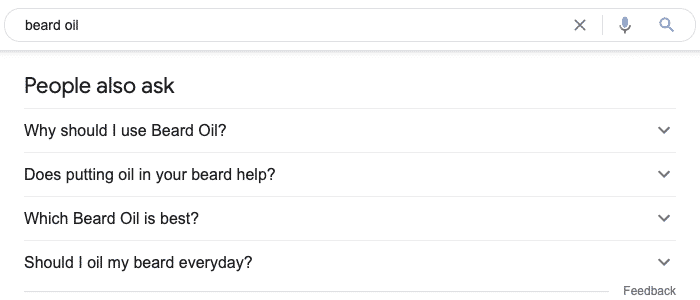
These days, if you enter a keyword into Google, more often than not, you’ll see these People Also Ask boxes:
These are literally the questions that people are entering into Google.
They can be great topics to write content around, especially if you’re looking for cluster content around some pillar pages, or even just standalone question-based topics to write about on your blog, or maybe a support page or something like that.
Now, you’ll notice if you click an answer, it expands the People Also Ask box, and gives your more results:
But if you’re searching multiple seed topics, you don’t want the hassle of researching, copying, and pasting keywords one by one. That would take forever, right?
So instead, you can use a nifty little tool, a free Chrome extension, called SEO Minion.
Editor’s note:
Quick shout out to Steve Toth over at the SEO Notebook. I first found out about this extension from his SEO Notebook email list. If you haven’t checked it out, I highly recommend it, as he shares some awesome, actionable content every week.
Once you’ve installed it, you’ll see this box at the top right of the SERPs:
Click the “All Organic Results” dropdown and then select how many records you want to export. For example, you could essentially export the top 100 or 200 results from the People Also Ask box.
Once you’ve selected that, click “Go” and wait for it to gather and download the data. You’ll see a CSV file that’ll look something like this with four columns – PPA Title, Text, URL, and URL Title:
Now, go to column A and copy all of these keywords.
Semrush will give you the search volume, plus the keyword difficulty percentage and a few other metrics:
You can now use this method to quickly gather search volume metrics and keyword difficulty for all of those questions that you just mined from the People Also Ask box.
Note: For every 100 results, you might only get one or two decent topics that are interesting. But if you use several seed keywords, you can come out with a nice handful of low competition, question-based topics to write about.
And that’s the second, really quick, easy way to scale your question-based keyword research process.
3. Mine Subreddits
The third tactic is mining subreddits.
There are a million and one subreddits for pretty much any topic, right? Just search for a topic related to your product, service, or affiliate offer. Or you could even search for your competitors or pain points for your persona.
The list goes on and on, so use your discretion here.
But let’s just say, for example, coming back to our CRM topic, if I enter in CRM, there’s a subreddit here with 5,600 subscribers to it, right?
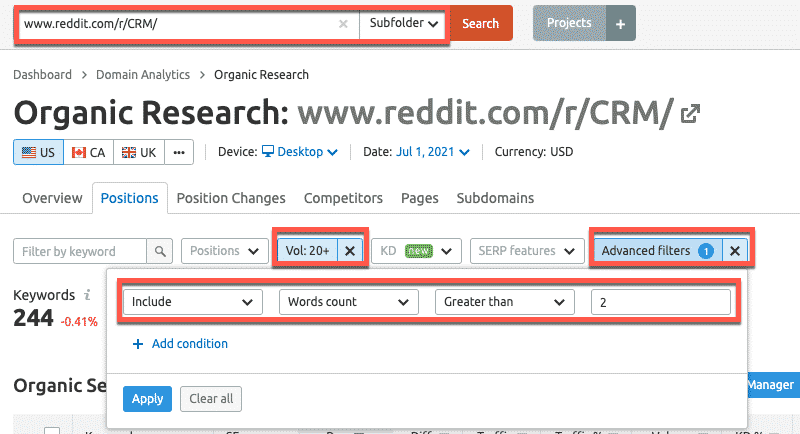
So then, all you do is just enter that specific subreddit into the Organic Research report in Semrush (aff). Make sure the subfolder is selected, and then you can layer on a bunch of advanced filters.
For example, I’ve selected volume 20 plus, and then I’ve added an advanced filter to include word count greater than two:
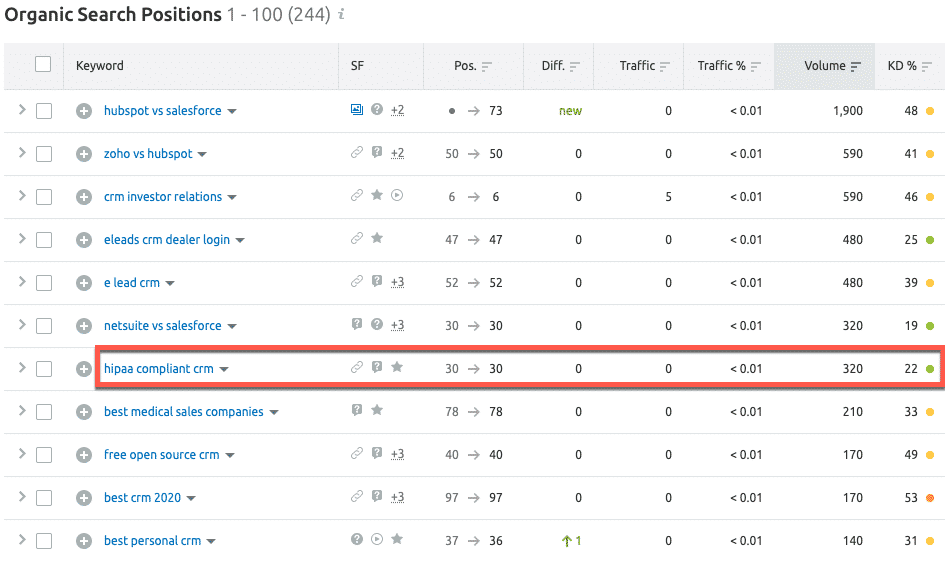
If you scroll down the results, you can start to see some potential topics. Again, just looking for green or light yellow KD scores because they’re lower competition, you can see lots of comparative topics.
For example, you can see typical keywords like “HubSpot vs Salesforce” and “best personal CRM”.
But here’s an interesting one, “HIPAA compliant CRM” with 320 searches and it’s considered an easy keyword.
So that could be a good topic for a listicle or “What to look for in a HIPAA compliant CRM?” or something along those lines.
As you scroll down, you’ll see some comparative topics like, “best CRM for gyms” and “best CRM for contractors”.
Or another example question, “Is HubSpot HIPAA compliant?”
I’m not sure if it is? But if it wasn’t and you’re a HubSpot competitor, then you could write a post saying HubSpot is not HIPAA compliant, but we are. And then show how you are HIPAA compliant.
That type of question-based keyword could be a good differentiator.
You can experiment by adding more filters, for example, to only search for keywords with specific modifiers like “best” or “top” so that you unearth different types of question-based keywords.
So, there’s plenty of subreddits to explore and mine more question-based keywords.
4. Mine high-traffic Quora threads
The final tactic is mining high-traffic Quora threads.
Quora is another forum that sometimes ranks really well for question-based keywords in its own right. So even if you just answer questions specifically in this forum, you can get good referral traffic that way.
But the way that we’re going to use it is to mine question-based topics.
So all you need to do is come over to the SemrushOrganic Research report again, then:
Enter the root domain – quora.com
Set your keyword difficulty threshold
Layer on some keyword modifiers
For example, for the question-based topic of beard oil, you might want to enter “beard oil” and “how” or “beard oil” and “best”:
As you scroll down the page, you can see plenty of low competition questions (with a green KD score) to target. For example:
How often do you use beard oil?
How often should you apply beard oil?
How long does it take for beard oil to work?
There are plenty of other interesting questions from Quora that you might not have seen before in your regular organic research.
Again, click the “+” icon next to any relevant question-based keywords to automatically add them to your master keyword list.
Next, export the master list, add to your content calendar, and start creating briefs and assigning to writers.
Final Thoughts
So those are four really quick ways that you can use to find a load of question-based keyword topics.
Furthermore, if you’re using a tool like Semrush to load the PAA, subreddit, or Quora questions, you can build out your keyword list directly inside the Semrush Keyword Manager. Then export all those topics to a spreadsheet and start building out content around those.
Let us know in the comments which tactic you’re using to scale your question-based keyword research.
Are you looking to get your hands on a free trial of Semrush?
You’re in the right place.
I’m guessing you already have an idea just how powerful the Semrush toolset can be for analyzing competitors and building profitable online marketing campaigns.
It’s the toolset I’ve been using for years at my SEO agency to produce consistent results for our clients.
But, until you actually take Semrush for a test drive, you really can’t appreciate how powerful it is.
In fact, Semrush (aff) is continually adding new Toolkits that provides its 6M+ users insane value.
It’s no longer just a leading competitive analysis tool. It truly is an all-in-one digital marketing platform that provides SEO, content marketing, competitor research, PPC and social media marketing capabilities.
And it’s the reason why it’s been voted the “Top Tool” by hundreds of SEOs and digital marketing professionals across numerous categories:
Not sure which free trial – Semrush Pro, Guru or Business – is right for you? Don’t sweat!
I’ll walk you through the different Semrush plans, introduce all the Toolkits, and show you how to get the most out of your free trial so you can determine if it’s the right tool for your business and/or clients.
I’ve partnered with the team at Semrush to give you exclusive access to extended free trials, so you can take your time exploring and testing all the functionality the platform provides.
Disclaimer: This article does contain affiliate links. If you purchase a tool through one of my links I will receive a small commission at no additional cost to you. This is how I fund the blog and its promotion. Thanks for the support.
Which Plan is Right for You? Semrush Pro vs. GURU Comparison:
Both of these plans come packed with tools and features to boost your online marketing. But which one is right for you?
If you’re a freelancer, blogger, or in-house marketer with a limited budget, then the Semrush Pro (aff) plan will likely be the best option.
You’ll have access to 28 advanced tools to manage your SEO, PPC and Social Media projects.
If you’re a professional SEO consultant or an agency that services numerous clients, then you’ll be best-suited to the Semrush Guru (aff) plan.
It has all the same tools and features as the Pro plan, plus you get access to Historical Data, Branded Reports, extended data limits, and the new Content Marketing toolkit.
For instance, you can track more projects, crawl more pages, track more keywords, and access more results per report – perfect when you’re working with clients that have larger data sets.
The table below highlights some of the key differences:
PRO
GURU
BUSINESS
Projects
5
15
40
Results per report
10,000
30,000
50,000
Page crawls per month
100,000
300,000
1,000,000
Keywords to track (daily position updates)
500
1,500
5,000
Scheduled PDF reports
5
20
50
Branded PDF
reports
Historical data
Looker Studio Integration
API Access
How to Activate Your Semrush Free Trial:
#1: Select your Semrush plan and click one of the buttons below to sign up for a free trial:
#2: Register with your email address and chosen password, and then click on the orange ‘Create your account’ button:
#3: You’ll see the Semrush billing page pre-populated with your Pro or Guru subscription details and zero charges showing in the “Today’s charges” field.
Go ahead and enter your billing information:
Note: Semrush will charge a nominal amount to your credit card to check its validity. Don’t worry – once confirmed, it will be refunded. Rest assured, you won’t be charged a penny until your Semrush trial period ends and you decide to continue as a customer.
#4: Now scroll down the page to make the most of your Semrush free trial.
Editor’s note: Already have a free account to upgrade? No problem. Just log into your account through this link (Pro) or this link (GURU) and activate the free trial of either plan.
How to Get the Most Out of Your Free Trial of Semrush (Toolkits and Use Cases)
Got your free trial activated? Excellent!
Now, you have 14 days to determine if it’s the right tool for you, so let’s get started.
Below we’ll walk through a few immediate action items to help you get the most value from the Semrush tool set from day one.
Remember, you’ve got full access to the entire Semrush tool set with your free trial. So we’re going to check some of the practical applications you can use in each major toolkit.
Note: I have also included some actionable video tutorials below.
Semrush SEO Toolkit
Analyze how your competitors are driving organic traffic at the subfolder, page, and individual keyword levels with the Organic Research reports, so you can quickly scale your organic traffic across each stage of the funnel.
Find stacks of long-tail keywords (with specific search intent) and expand the organic footprint on your pages with secondary keywords using the Keyword Magic Tool.
Semrush has the largest, and most accurate database, containing over 20B keywords.
Analyze competitor backlink profiles so you can find, check, and manage thousands of link building prospects in seconds with the Link Building Tool. In addition, the Backlink Audit Tool allows you to quickly find and analyze potentially toxic links.
Track keyword rankings at national, regional, and local search level across any device – mobile, tablet, and desktop – with the Position Tracking Tool. All users on all Semrush plans get access to daily ranking updates on all devices, which is one of the many features that sets it apart from competitors.
Run technical Site Audits and optimize your content with the On-page SEO Checker, so your pages soar in the SERPs.
Generate a list of URLs and their primary keyword targets, automatically or manually, with the On-Page SEO Checker. And then analyze the content quality, semantic and secondary keyword gaps, backlink opportunities/gaps, and on-page elements such as titles, heading tags, etc.
Manage local listings and track GMB rankings.
Use the SERP Analysis tool to evaluate the content types, page authority scores, and backlink counts for competing URLs in the SERPs and qualify keyword opportunities.
Perform Gap Analysis for both keywords (at the URL, subdomain and domain levels) and backlinks.
Get a top-level view of how much paid traffic your competitors get each month, the number or keywords they bid on, the estimated budget, and the historical trends with the Advertising Research reports.
Scrutinize the ad copy your competitors are using to win the click, so you can create winning ads with the Ad Builder.
Use the Ad History reports to find out which ads have been in rotation the longest and uncover which ad copy has a proven track record of success.
Analyze all the landing pages competitors are using to convert paid traffic and discover where they are targeting ads on the Display Advertising network.
Identify which display ad creatives – image, text and HTML – the competition is using, and which properties – websites, YouTube channels and videos – they are displaying ads on.
Use the PLA Research reports to unearth the pricing strategies of your competitors, so you can optimize your PLAs with better titles, descriptions, and pricing.
Use the PPC Keyword Tool to build and organize keyword lists into groups, and set negative keywords, etc. Then download everything to a CSV file and import into the Google Ads Editor.
Perform a Paid Keyword or PLA Gap Analysis to see which keywords or shopping ads your competitors are running, but you are missing. You can then add them to your PPC keyword list in Semrush, and even export them to the Google Ads editor.
Analyze and measure all aspects of your digital marketing with 12 reports – including site health, position changes, visibility trends and more – in one Projects dashboard, so you can spot at a high-level where the immediate weaknesses and opportunities exist in your digital marketing campaigns.
You can filter the ‘My Projects’ dashboard to show only projects you own or those that have been shared with you from different Semrush accounts.
Build professional branded campaign reports with pre-built reporting templates and the simple drag-and-drop Report Builder (aff) before sharing with colleagues or clients:
You can pull data from all the Toolkits – e.g. SEO, PPC, etc. – plus external data – e.g. Google Analytics, Search Console, and Google My Business – and then drop your logo on the report.
Editor’s note: With a Business subscription, you can also use the Semrush connector to add your data directly into custom Google Data Studio reports:
Image: Semrush data populating in a custom Google Data Studio SEO report.
Semrush Content Marketing Toolkit
Use the Content Audit tool to conduct a thorough audit of your website’s content so you can understand what content should be optimized, and what can be removed.
Implement actionable tips to create optimized content that’s loved by people and search engines, and based on the analysis of your Top 10 rivals in the SERPs with the SEO Content Template.
Analyze and measure your content performance – including guest posts and external articles – by tracking backlinks, rankings, and social shares in one place with the Post Tracking report.
Note: The Content Marketing Toolkit is only available with the GURU plan (aff).
Semrush Social Media Toolkit
Use the Social Media Poster to draft, schedule, and post content to different social platforms – Facebook, Instagram, Twitter, and Pinterest – without leaving Semrush.
Monitor the social media accounts of your competitors so you can compare their growth and engagement levels with your accounts using the Social Media Tracker.
Get social media audience insights such as demographics, location, when your audience is online, and on which days.
Check which competitor content is getting the most engagement, and on which channels.
Boost social media ads and create new ad campaigns on Facebook and Instagram, directly within Semrush.
Semrush Traffic Analytics
Combine the power of SimilarWeb and Google Analytics in one tool.
Analyze ALL the traffic sources – direct, referral, search, social, and paid – across all devices and geographies, and compare engagement levels – visit duration, bounce rate etc. – between you and the competition.
Analyze every aspect of your competitors’ online traffic strategy:
Discover which channels (direct, referral, search, social, and paid traffic) drive the most traffic.
Examine which external URLs drive the most referral traffic.
Track which subdomains or subfolders get the most visits.
Check which pages/posts pull in the most organic traffic.
Determine which individual keywords generate the most traffic.
Analyze your competitors’ on-site engagement:
Track the performance of your competitors’ articles across social networks.
Monitor session duration and bounce rates across devices and channels.
Analyze your main paid search competitors:
See how much they’re spending on paid traffic.
Check which keywords they’re bidding on.
Study the composition of their ad copy.
See which URLs they are using to convert paid traffic.
Identify where competitors publish YouTube and display ad creatives.
And, that’s just scratching the surface.
Grab a free Semrush trial today (PRO or GURU) and see first-hand why millions use Semrush to perform deep competitor analysis, and build successful SEO and digital marketing campaigns.
FAQs
Can I create both a Semrush Pro and Guru account?
Semrush only offers one free trial per user, so make sure you pick the right plan:
If you’re a freelancer or blogger, then Semrush Pro (aff) will be perfect.
If you’re an SEO specialist or agency, then go for Semrush Guru (aff). This is the plan I use at my agency.
Is there a coupon or discount code?
No, there’s no coupon or discount code. This is a Free Trial that you access via the links on this page for either the Pro or Guru plan.
Can I start a trial without a credit card?
No, you’ll need to enter your credit card details when registering for the free trial. Your card will be verified and used for future billing after the trial period ends.
Can I cancel my Semrush subscription before the trial period ends without incurring charges?
Yes, if you want to cancel your Semrush subscription, you’ll need to send a cancellation request email to mail@semrush.com.
If possible, try to send the cancellation email from the email address associated with your account. Semrush will cancel your account within one business day.
Can I continue using a free account after trial cancellation?
Yes, after canceling your trial subscription, you will still be able to access Semrush on a free account. But please note that with a free account, your limits and access to some tools and reports will be severely reduced.
Semrush also provides a 30-day grace period after your cancellation. During this period, your Projects data is saved, so it’s available should you change your mind and decide to renew your account.
How long is the Semrush free trial?
It depends on which plan you choose.
Semrush doesn’t promote free trials on their website, but I have some exclusive trial links for the different plans:
Pro: 14 days
Guru: 14 days
How does Semrush compare to Ahrefs?
Ahrefs is a fantastic SEO platform with a great UI/UX, and one that I use often. But it doesn’t have the breadth of insights that Semrush provides, especially around Traffic Analysis and Paid Ad insights. I wrote a dedicated post looking at Ahrefs vs Semrush here.
Can I continue using a free account after trial cancellation?
Absolutely! You can upgrade or downgrade to any plan that fits your requirements at any time.
Grab Your Semrush Free Trial Today
I’ve been using Semrush for years, and I can’t imagine trying to provide SEO services to my clients without it.
With so many toolkits, Semrush really is the all-in-one digital marketing platform that will give you a competitive advantage.
So what are you waiting for? Use one of the trial links below to get your free no-risk access to the entire toolset:
Semrush Free Trials: Test Drive Semrush PRO or GURU free for 14 Days
http://dubadosolutions.com/wp-content/uploads/2017/05/dubado-logo-1.png00Dubado Solutionshttp://dubadosolutions.com/wp-content/uploads/2017/05/dubado-logo-1.pngDubado Solutions2023-05-19 14:21:002024-12-31 18:04:38Semrush Free Trial: Test Drive Semrush Pro or Guru [Links Inside]