For years, backlinks have been the gold standard for building authority, driving link juice, and climbing up the SERPs. But with the rise of Generative AI, the search landscape is shifting. Instead of chasing endless links, visibility now also depends on something more intelligent: AI citations. This evolution means your brand can show up in front of wider audiences, even without a massive backlink profile.
The question is, when it comes to AI citations versus backlinks, how do they differ, and does one outweigh the other? In this blog, we’ll break down both, explore their role in building authority, and uncover whether AI citations are the future of digital visibility or just another layer to your SEO strategy.
What are backlinks?
Backlinks are simply links from one website to another. Think of them as digital recommendations: when a reputable site links to your content, it signals to search engines that your page is trustworthy and valuable.
For example, below is a screenshot from a Zapier blog post that links to the Yoast SEO plugin landing page in the blog.
Zapier blog post has linked to the Yoast SEO plugin page
Backlinks aren’t new; they’ve been around for more than two decades. In fact, links were introduced back in 1998 as part of Google’s original PageRank algorithm, making them one of the oldest forms of online citations. Since then, they’ve remained a core ranking factor, shaping how websites compete for visibility.
The PageRank Citation Ranking research paper
Today, backlinks are still considered one of the strongest signals for building authority. Many brands invest in link-building strategies to secure high-quality backlinks, from being cited in well-written pieces to building relationships that earn natural mentions.
Why backlinks matter?
Backlinks are not just about search rankings, but they influence almost every aspect of your website’s visibility and growth. Here’s why they remain essential:
Improve rankings by acting as one of Google’s most important signals, especially when they come from authoritative domains
Drive referral traffic that is often highly targeted and more likely to engage with your content
Boost authority and credibility by showing search engines that trusted sites vouch for your content
Help with faster indexing by guiding search engine crawlers to discover and prioritize your pages
Provide semantic understanding by giving Google context through anchor text and linking page content
What types of backlinks work best?
Not all backlinks are equal, and the ones that matter most usually have these traits:
They come from trusted and authoritative websites
They include your target keyword or a variation of the target keywords in your anchor text
They are topically relevant to your niche
They are ‘dofollow’ links that pass link equity
Backlinks remain important for SEO, but as search evolves, they’re no longer the only way to build authority. This is where AI citations enter the picture.
AI citations are references, attributions, or direct links to your content, brand, or product that appear within AI-generated answers. Unlike traditional backlinks that live inside web content, AI citations are shown within AI search results or summaries. They often appear as clickable source cards, numbered footnotes, or links listed below an AI overview.
For example, when Google AI Overviews quotes websites in the AI search box, it cites the original sources that provided the information.
Some other examples of AI citations are:
ChatGPT cites your brand or content as part of its generated answer
Bing Copilot highlights your product as a recommended solution to a user’s query, even if it doesn’t include a direct link
Perplexity.ai lists your research as a supporting source beneath its summarized response
Why AI citations matter for visibility?
AI citations are becoming critical for brand exposure because they align with how people now consume information online:
Search is becoming prompt-driven, which means users type questions or prompts instead of keywords. If AI picks your content to cite, you’re instantly visible to that audience
Discovery is moving from clicks to context. Users may not always visit your website, but being cited ensures your brand becomes part of the answer itself
AI is becoming your audience’s first impression. In many cases, people see the AI summary before they see the actual search results. Appearing as a cited source makes your brand part of that first interaction
Citations boost credibility and authority. When an AI tool references your content, it signals to users that your site is trustworthy enough to be part of the response
Types of AI citations that influence brand visibility
Not all AI citations look the same. Here are the key forms that shape how your brand is discovered:
Name-drop mentions drive brand visibility
When AI directly mentions your brand or product in its response, such as in a recommendation or ‘best of list, you gain instant visibility in front of users without them needing to click further.
Source references build credibility signals
These citations work like the ‘works cited’ section in AI outputs. Tools like Gemini, Perplexity, or Google AI Overviews may display your URL in the list of sources at the bottom of the response. Even if you’re not in the main summary, you benefit from the authority signal.
Quoted passages establish expert authority
When AI pulls exact wording from your content and attributes it to you, it elevates your position as an expert. This type of citation places you in prime digital real estate, signalling leadership in your niche.
Synthesized mentions shape brand narrative
Sometimes AI blends your insights into its summary without naming or linking back to you. While harder to measure, your content still influences the narrative and reinforces brand authority in indirect ways.
AI citations are already reshaping how visibility works in search. Just as backlinks defined SEO two decades ago, citations in AI search are now shaping brand perception by influencing what users see, trust, and remember about your business.
How are AI citations and backlinks different?
So, now that we have an overview of AI citations and backlinks, let’s see how backlinks and LLM citations differ from each other -`
Aspect
Backlinks
AI/LLM Citations
What they are
Hyperlinks from one website to another, long used as a ranking factor in SEO
Mentions, attributions, or references included in AI-generated answers, sometimes with clickable links
Visibility
Usually embedded within web content and not always visible to the average reader
Front-facing and displayed in AI overviews, chatbots, or search snapshots, making them highly visible to users
Trust impact
Boosts site authority indirectly through improved rankings and referral signals
Builds direct credibility by being presented as a trusted source in AI answers or summaries
Selection factors
Determined by domain authority, anchor text, and contextual relevance
Google AI Overviews, citing your blog
Examples
A news site links to your product page in an article
Link building strategies, such as outreach, partnerships, and content marketing, to earn quality backlinks
SEO focus
Link building strategies, such as outreach, partnerships, and content marketing, to earn quality backlinks
Creating structured, high-quality, and easily digestible content that AI systems can cite
Effect
Improves rankings and drives referral traffic over time
Enhances brand visibility, authority, and recall directly in AI-powered search experiences
How to earn both?
Earning backlinks and AI citations doesn’t have to be two separate strategies. With the right approach, the same efforts that build traditional authority also make your content LLM crawler-friendly.
Here’s how to do it:
Create deep, original, and useful content
Go beyond rewriting what’s already ranking. Publish original research, case studies, interviews, or unique perspectives that others can’t find elsewhere. AI models pull from fresh, problem-solving content, and so do journalists and bloggers who link naturally.
Write for real questions, not just keywords
Search is shifting from keywords to prompts. Pay attention to what your audience is actually asking on forums, social media, and other platforms. Create conversational, direct answers to those questions. If your content aligns with user prompts, it’s far more likely to be both cited by AI and linked by humans.
Leverage structured data
Use schema markup (FAQ, HowTo, Article, Product) to help AI and search engines clearly understand your content. Proper attribution of authors and sources also increases your chance of being recognized as a credible reference. Structured, transparent content is ‘citation ready.’
Build relationships for natural backlinks
Backlinks remain relationship-driven. Connect with journalists, bloggers, and industry peers through guest posts, expert roundups, or collaborations. AI often mirrors human trust signals, so if authoritative voices link to you, AI is more likely to cite you too.
Focus on clarity and quotability
Make your content easy to lift and reuse. Use short, memorable statements, stats, or definitions that can be quoted word-for-word. Structured layouts like subheadings, lists, and bullet points make content easier to reference by both humans and AI.
Monitor, analyze, and adapt
Don’t just publish; instead, track performance. Use SEO tools for backlinks and platforms to monitor AI citations and understand AI brand perception. If competitors are cited for prompts you should own, study their structure and improve on it. Adjusting based on data helps you stay ahead.
The takeaway: With the right strategies, you don’t need separate plans for backlinks and AI citations. Clear, authoritative, and trustworthy content earns both and multiplies your visibility across search engines and AI-powered platforms.
Exploring Yoast’s AI features
Applying the right strategies for earning backlinks and AI citations is easier when you have the right tools. Yoast’s AI features combine SEO best practices with AI-powered enhancements to make your content clearer, more discoverable, and more effective.
Here’s how they can support your workflow:
Yoast AI Generate
Quickly create multiple, tailored titles and meta descriptions for your pages or blog posts. This ensures your content attracts clicks and stands out in search results. You can select from different options, tweak them to fit your brand voice, and preview how they’ll appear in SERPs.
Yoast AI Summarize
Turn long-form content into scannable, bullet-point takeaways in seconds. This may also help reduce bounce rates by giving readers immediate clarity on what your page delivers. It also makes your content easier for AI systems and Google’s AI Overviews to interpret correctly.
Yoast AI Optimize
Get AI-powered suggestions to improve SEO signals such as keyphrase distribution, sentence length, and readability. You can review, apply, or dismiss recommendations with one click, ensuring that optimization never comes at the cost of your unique editorial voice.
Together, these AI-powered features help you save time, improve clarity, and boost both human and AI-driven visibility, laying the foundation for stronger backlinks and more consistent AI citations.
Backlinks or citations: What truly matters for visibility?
Backlinks have been the backbone of SEO for more than two decades, helping websites climb rankings, build authority, and attract referral traffic. But the rise of AI citations is reshaping how visibility works. When AI systems like Google’s AI Overviews or ChatGPT cite your content, they place your brand directly in front of users at the moment of discovery.
The truth is, it’s not a choice between backlinks and AI citations. Both matter, but in different ways. Backlinks remain critical for SEO growth and authority, while AI citations are quickly becoming the new gatekeepers of brand perception and visibility. The winning strategy is to create content that earns both.
http://dubadosolutions.com/wp-content/uploads/2017/05/dubado-logo-1.png00http://dubadosolutions.com/wp-content/uploads/2017/05/dubado-logo-1.png2025-09-19 13:52:122025-09-19 13:52:12Everything you need to know about AI citations vs backlinks
Your SEO and PPC teams probably don’t share data. That’s problematic.
Organic traffic is slipping. CPCs are climbing.
And conversions aren’t keeping pace.
It’s not just the LLMs — the SERP itself has changed. In 2025, every query is a blended battlefield of ads, AI overviews, videos, shopping units, map packs, and organic links.
Yet, most teams operate with SEO and PPC in silos.
That doesn’t work anymore.
Because to users, there’s no “organic vs. paid search.” They just click what’s useful. And “useful” now shows up in more places than ever.
If you don’t align your channels, you end up with duplication, cannibalization, and wasted spend.
This guide will show you eight ways to bring SEO and PPC together — from sharing keyword data to sharpening targeting. So you can cut costs, capture more clicks, and drive higher ROI.
Let’s start with an often-overlooked but powerful way to combine your PPC and SEO efforts: spotting intent mismatches.
1. Analyze the SERP to Fix Poor PPC Ad Performance
When your PPC ads fail to convert, the problem might not be your targeting or creative — it could be that you’re bidding on the wrong intent entirely.
If the SERP is dominated by videos, tutorials, or how to guides, it signals that users are still researching — not necessarily ready to buy your product.
Without analyzing the SERP, you risk wasting ad spend on queries that will never convert.
Let’s use Squarespace as an example.
If they’re bidding on “website design” and conversions are weak, a quick SERP check would explain it:
Google surfaces a local pack of agencies for this term, which signals service-seeking intent — not DIY website builders.
Knowing that, they could cut the term and redirect spend to higher-intent queries.
2. Stop Wasting PPC Budget on Customer Support Terms
One of the most common (and costly) PPC mistakes is bidding on customer support queries.
Searches like “[YourProduct] login problems” or “[YourProduct] forum” signal that someone is already a customer trying to troubleshoot — not a prospect considering a free trial or demo.
Yet, many companies spend thousands every month sending these clicks to sales pages that rarely convert.
For example, if Squarespace analyzed their rankings for a term like “Squarespace login,” they’d see they already rank #1.
And those visitors almost never convert for one vital reason — they’re already customers.
Luckily, there’s an easy fix: Squarespace can exclude this and other support terms from its PPC campaigns.
Here’s how to do this for your own ad campaigns:
Start by finding support-related queries for your brand using a keyword research tool.
Enter your brand’s name in the top search bar and your brand’s URL in the purple search bar to personalize the data to your domain.
Click “Search.”
Manually scan the list (or use the “Include keywords” filter) to find support-related terms like “login,” “pricing,” “free trial,” “templates,” “support,” and “forum.”
Then, view the number highlighted in blue to the right of each term — that’s your current ranking.
Already ranking #1–3 for your most commonly searched support terms?
Organic SEO is doing its job, which means you can remove these terms from your PPC campaigns.
In other words, the closer the page matches what a searcher actually wants, the less you pay for each click.
Conducting keyword research can help you understand where you need a separate landing page. To start, use a keyword research tool to group organic keywords into clusters.
Then, map each keyword cluster to a dedicated PPC landing page.
This way, your ads always point to content that matches the searcher’s intent, while your Quality Score (and budget efficiency) benefits from the added relevance.
Squarespace is a good example of this.
Instead of sending every “website builder” query to one broad page, they build dedicated landing pages around different intents.
For example, a search for “portfolio website” leads to a page showcasing portfolio-specific templates, not a generic product overview.
4. Unify PPC and SEO Data to Decide When to Bid on Your Brand
Brand bidding is one of the biggest friction points between SEO and PPC teams.
The debate isn’t whether to bid on your brand — it’s when. Without unified data, teams make this decision based on assumptions rather than evidence.
The truth is somewhere in the middle — and the right decision depends on context.
So, instead of separating PPC advertising and SEO data, combine them to make a more informed decision.
Start by checking whether competitors are bidding on your brand with a manual search for your branded keywords.
For instance, a search for “Squarespace website builder” shows that Wix is also bidding on the term.
Want to automate this process?
Use a tool like Semrush’s Keyword Gap that lets you assess your site and your competitors’ sites for the top shared keywords (paid and organic) they use.
If you see your competitors bidding on your branded keywords, it makes sense to run ads to defend those clicks.
But if your competitors aren’t bidding, it’s time to check your organic coverage.
Do you already own most of page one organically for your branded terms?
If the answer is no, ads help fill the gaps.
If yes, you can safely test pausing.
Turn off your ads for branded keywords and see what happens.
Pro tip: If cutting ads also cuts traffic by [40%, they’re adding value. If drops hit 80%+, you’re just paying for what you’d get anyway.
Finally, consider the messaging value of your ads.
Even if you’re getting organic coverage, brand ads give you space to promote new features, discounts, or free trials.
So it might still be worth paying for them.
For example, Squarespace uses its paid ads on the term “Squarespace website builder” to promote its new AI website builder tools.
5. Prioritize High-ROI SEO Keywords by Analyzing PPC Data
A common SEO challenge is figuring out which keywords actually matter.
Ranking for broad terms might bring traffic, but not necessarily signups or revenue.
Without conversion data, it’s hard to know where to focus.
This is where PPC comes in. Paid campaigns don’t just generate leads — they generate fast, reliable data.
You can see which headlines win clicks, which keywords drive conversions, and what each click is worth.
Take the phrase “website platform for small businesses.”
If PPC data shows it converts four times better than the broader “website platform,” that’s the angle worth prioritizing in your SEO titles, H1s, and content strategy.
PPC metrics can even help you prove the business value of SEO — something every stakeholder loves.
Once you know a keyword’s conversion rate and customer value from paid campaigns, you can model the value of ranking for it:
SEO ROI = (Organic clicks gained × PPC conversion rate × Customer value) − SEO cost
Say a keyword costs $30K/month in ads, but ranking organically would capture roughly a third of that traffic.
That’s about $9K in “free” conversions every single month.
That’s the kind of math that gets buy-in from leadership.
You can use this same logic to estimate the value of refreshing existing content. Sometimes a simple update is worth tens of thousands in equivalent ad spend.
The takeaway?
PPC data gives you the proof points and the playbook to double down on the SEO opportunities that will actually pay off.
Algorithm shakeups create openings you can exploit if you move fast.
If a competitor drops from page one, don’t wait.
Publish or refresh your content to take over those keywords. At the same time, increase your PPC bids on the same terms while auction pressure is temporarily lower.
That one-two punch lets you capture traffic your rivals just lost before they even know what hit them.
Many stakeholders still think of SEO and PPC as competing, not complementary.
While leadership may be nervous to try a new, silo-free approach to search engine marketing, you can convince them in a couple of ways.
First, show them how SERPs have evolved.
AI Overviews, rich features, and rising CPCs mean the old “paid vs. organic” split doesn’t exist anymore.
Then, use this powerful three-step storytelling framework to convince execs to act.
Step 1: Explain what’s happening by describing the external shift. Example: “AI Overviews and rising CPCs are changing how people find us in search.”
Step 2: Show how it’s impacting you by tying the shift to your company’s results. Example: “Our paid CPCs are up 22%, and organic traffic for branded queries is down.”
Step 3: Highlight what you can do about it by presenting alignment as the solution. Example: “By aligning SEO and PPC, we can cut wasted spend on brand terms and reinvest in high-converting queries.”
Start small. Don’t push for a full overhaul on day one.
Instead, prove ROI by aligning on a single initiative — like deciding when to bid (or not) on branded keywords.
Once you’ve shown early results, it’s easier to get everyone aligned on their responsibilities.
Next, work with SEO and PPC teams to establish next steps for each team member to achieve closer alignment.
Here’s a role-based plan for what your teams should start doing now:
SEO/PPC Team Role
Primary Responsibilities
Action Steps to Drive SEO + PPC Alignment
SEO Specialists
Mine PPC data for ROI
Request PPC data to see which paid keywords actually drive results
Use that data to identify low-CPC, high-ROI terms worth pursuing in organic search
Share blog content and resources that PPC teams can repurpose for retargeting campaigns
PPC Teams
Flag costs and align content
Flag high-CPC keywords that SEO should try to rank for long-term to reduce reliance on paid
Align PPC landing page messaging with existing SEO pages so users get a consistent story
Promote educational content to cold audiences instead of conversion-focused ads
CMOs & Leaders
Measure blended performance
Set shared KPIs (e.g., revenue per SERP, blended CAC)
Merge data sources so SEO and PPC teams both have access to the same performance insights
Break down silos by running regular joint syncs between paid and organic teams
Agencies & Consultants
Prove value with unified reporting
Deliver blended strategy reporting that shows paid and organic results in one view
Use unified insights to demonstrate ROI and strengthen client retention or upsell
Educate clients on how the SERPs are changing and how alignment helps them adapt
Boost Your ROI with a Shared SEO and PPC Strategy
It doesn’t make any sense not to have SEO and PPC work together.
Keep the teams siloed, and you’ll waste budget, lose traffic, and fall behind as search evolves.
For your first move, start with a shared SERP review.
Map where you’re strong, where you overlap, and where the gaps are for the quickest path to better ROI from both channels.
Want to dig deeper?
Explore our guide to the best PPC tools to uncover the advanced data and insights you need to align SEO and PPC, cut wasted spend, and boost ROI.
http://dubadosolutions.com/wp-content/uploads/2017/05/dubado-logo-1.png00http://dubadosolutions.com/wp-content/uploads/2017/05/dubado-logo-1.png2025-09-18 12:52:182025-09-18 12:52:18SEO and PPC: 8 Smart Ways to Align for Maximum ROI in 2025
There are links (traditional SEO) and there are answers (Google AI Overviews, Bing Copilot, Perplexity, ChatGPT, Claude, etc.). In these answer boxes the engine summarizes the web and then names or cites a handful of sources. If you aren’t one of them, you don’t exist for a growing chunk of demand.
Most are just guessing.
Right now, on keywords that trigger an AI Overview, we are seeing a 12-20% drop in click-through rates for the classic organic results.
For marketers, this has created a terrifying black box. How do you rank inside an AI-generated answer? How do you measure your visibility? How do you influence what the AI says about your brand?
For the past year, my team and I have been obsessed with answering these questions. We didn’t just want to guess; we wanted to build the playbook for this new era of search.
Today, I’m excited to announce the result of that obsession: The AI Search Optimization Platform, now live inside Ubersuggest. This isn’t just another feature. It’s a new way to see, measure, and influence your brand’s presence in the world of generative search.
A Look Inside the AI Search Optimization Dashboard
Define Your Competitive Landscape
The first step is to give the AI Search Visibility platform the right context. This isn’t just about your domain; it’s about defining the specific market and conversations.
Your Website and Brand In the first two fields, enter your website URL and your exact brand name. The website is the digital asset we’ll be analyzing, and the brand name is the specific entity the tool will look for in AI responses. Being precise here is key to ensuring accuracy.
Your Core Topic This is the most critical input. In the “Topic or Main Keyword” field, define the primary battleground for your business. The goal is to be specific enough to get the most relevant prompts. For example, instead of a broad term like ‘marketing,’ a SaaS company might enter ‘email marketing automation for small businesses.’ This focuses the analysis on the high-intent questions your target customers are asking. The more specific your niche, the more specific should be your input.
Your Target Market Finally, select the Language and Location you want to analyze. This ensures the insights you receive are tailored to the specific geographic market you’re competing in, as AI answers can vary significantly by region.
Initiate the Analysis Once you click ‘Search AI,’ Ubersuggest begins its work. Behind the scenes, it’s simulating thousands of real user prompts related to your topic across the major AI engines, gathering the raw data needed to build your visibility scorecard.
Calibrate the AI by Confirming Your Prompts
After you define your landscape, Ubersuggest translates your topic into a list of real-world questions your customers are asking AI. This next step is a critical quality check to ensure the analysis is focused on the conversations that matter most to your business.
A modal window will appear titled “Confirm Your Prompts.” Inside, you’ll see a list of “Prompt Suggestions.” These are not just keywords; they are the high-intent questions that define the competitive battleground for your topic, often reflecting different stages of the user journey.
Review for Relevance Your job here is to quickly scan this list. Ask yourself: “Do these questions reflect the problems my customers have and the solutions I provide? Are these the conversations I absolutely need to be winning?”
If the prompts feel too broad or misaligned, it’s a sign that your topic in Step 1 was not specific enough. Use the
Once you’re confident that the prompts are relevant, click “Continue.” This confirms the targets for the analysis, and Ubersuggest will now proceed to gather and process the data for your main dashboard.
You will also be able to edit each prompt individually, so if there’s a small adjustment, you can do it yourself and make it more accurate for your company.
Find the Edge in the Data
After confirming your prompts, you’ll land on the main Overview dashboard.
It looks like a lot of data, but your goal here is to answer three simple questions in 60 seconds: Where do I stand? Who am I up against? And what are we all talking about?
The first numbers to check are your Brand Visibility and Industry Rank.
A Brand Visibility of 67.5% tells you that you’re in the conversation, but an Industry Rank of 1.19 tells you that you’re leading it. This is your baseline for everything else.
Now, look at the Top Brands Visibility chart. This isn’t just a graph; it’s a picture of your competitive landscape. You’ll instantly see which rivals are competing for the same AI mindshare. Use the Competitor Visibility trend line at the bottom to track if you’re pulling ahead or falling behind over time.
Finally, glance at the Top Prompts table. This shows you the exact questions that are driving the results you’re seeing. This isn’t just a list of keywords; it’s the voice of your customer translated into AI queries.
In just a minute, you’ve gone from flying blind to having a complete strategic overview. You know where you stand and who you’re up against.
Dive into the Prompts
Now that you have your high-level scorecard, it’s time to get your hands dirty. This is where the real strategy begins.
Click on the ‘Prompts’ tab to go from the “what” to the “why.”
For every single prompt, you can see your specific rank, your visibility percentage, and the full list of competitors that AI is mentioning.
Your goal here is simple: find where you can win.
Find the Low-Hanging Fruit: First, look for prompts where your Visibility is at 0%, but a direct competitor is listed under the ‘Brands’ column. This is your most immediate opportunity. It’s a relevant conversation, and your competitor is the only one showing up.
Next, find the prompts where your ‘Your rank’ is high and your ‘Visibility’ is 100%. These are your current strongholds. Your goal is to analyze the content that is winning here and protect these positions.
Execute Your Strategy
You’ve moved from the “what” to the “why,” and you’ve identified a high-value prompt that a competitor owns. Now, it’s time to take it from them.
This isn’t about just creating more content; it’s about creating better, more authoritative content and making sure the AI knows it.
First, create content that is more comprehensive, data-backed, and original. AI rewards originality, and since most content online is recycled, this is your biggest opportunity to stand out.
A great piece of content isn’t enough; AI needs to see it endorsed by sources it already trusts.
How to Win in the New Era of Search: Your AI Overviews + AI Mode Strategy
This platform isn’t just for reporting; it’s for building a strategy. We give you the playbook to WIN the answer.
Here’s what this data allows you to do:
Move from Keywords to Concepts: Stop optimizing for “best running shoes.” Start creating comprehensive content that answers prompts like “What are the best running shoes for someone with flat feet training for a half-marathon?” The AI values depth and expertise.
Manage Your Online Reputation Proactively: The AI is reading everything—reviews, articles, forum posts. The
AI Sentiment score gives you a direct feedback loop on your brand’s reputation and shows you where you need to improve.
A Foundational moment for AI search
Right now, we are in a foundational moment for AI search. The brands that actively optimize for AI visibility today will build a powerful, lasting advantage.
The AI models are learning. The brand associations they form now will become deeply embedded. Getting positive mentions and citations today is like building a brand monopoly for the future that will be incredibly difficult for your competitors to break down later.
Don’t wait until this is common knowledge. The window of opportunity is now.
Search Everywhere Optimization
And we’re starting with ChatGPT, but this is just the beginning of a much bigger vision we call “Search Everywhere Optimization.”
Our goal is to give you a single dashboard to understand user intent wherever it happens—not just Google, but across YouTube, TikTok, Amazon, and the app stores.
We’re building a future where you can see the top brands being mentioned on Google right next to the top brands being mentioned on ChatGPT for the same topic. We’re even integrating an “Exploding Topics” feature, so you can spot new trends and prompts before they become competitive.
Conclusion
The shift to AI-driven search is the biggest disruption to our industry in a decade. But with disruption comes opportunity.
The AI Search Optimization platform in Ubersuggest is your tool to seize that opportunity. It’s your map for navigating this new terrain and your compass for making decisions based on data, not guesswork.
Log in to your Ubersuggest account and check out the new AI Search Optimization tab today. The brands that win will be the ones who can measure what matters. Try the AI Search Visibility feature and start your free trial now.
http://dubadosolutions.com/wp-content/uploads/2017/05/dubado-logo-1.png00http://dubadosolutions.com/wp-content/uploads/2017/05/dubado-logo-1.png2025-09-16 19:48:432025-09-16 19:48:43How to Use Ubersuggest’s AI Platform to Get Named, Cited, and Chosen
http://dubadosolutions.com/wp-content/uploads/2017/05/dubado-logo-1.png00http://dubadosolutions.com/wp-content/uploads/2017/05/dubado-logo-1.png2025-09-16 19:09:522025-09-16 19:09:52ChatGPT search update focuses on quality, shopping, format
Answer Engine Optimization (AEO) is one of the most important topics in search right now.
It’s about making sure your brand shows up inside AI-generated answers — not just on traditional SERPs.
As large language models (LLMs) like ChatGPT, Gemini, and Perplexity reshape discovery, AEO ensures your content gets mentioned and cited where buyers are asking questions.
But here’s the bigger truth: AEO is just one piece of a larger shift.
We’re entering the era of Search Everywhere.
Discovery no longer happens in a single Google results page.
It’s happening across AI chat, overviews, forums, video, and social.
And new data shows just how fast this shift is accelerating.
New research from Semrush predicts that LLM traffic will overtake traditional Google search by the end of 2027.
And our own data suggests that’s likely to be true.
In just the past three months, we’ve seen an 800% year-over-year increase in referrals from LLMs.
We’re seeing tens of millions of additional impressions in Google Search Console as AI Overviews reshape how Google displays answers.
If your brand isn’t adapting, you risk disappearing from the channels your audience is already using.
In this guide, I’ll explain:
What AEO is and how it differs from SEO
Why your existing SEO foundation still matters (and what to evolve)
Practical steps to optimize for answer engines and drive measurable results
What Is AEO and Why Does It Matter?
Answer Engine Optimization (AEO) is the practice of structuring and publishing content so that AI systems — like Google AI Overviews, AI Mode, ChatGPT, and Perplexity — pull your brand directly into their answers.
But AEO goes beyond tweaking a few pages. It’s about making your brand part of the conversation when people ask questions.
That requires three things:
Publishing content in the right places where AI tools actively crawl and cite
Earning brand mentions across the web (even without a link)
Ensuring technical accessibility so AI crawlers can actually parse your content
These engines don’t rank “10 blue links.” They generate answers.
Sometimes they cite sources. Sometimes they don’t. Either way, the goal is to give the searcher everything they need without leaving the interface.
That changes your job. With AEO, you’re not only optimizing for a click — you’re optimizing to shape the answer itself.
Why AEO Matters Now
Traditional search is still a traffic driver. That won’t change overnight.
But discovery is moving fast:
Success used to mean ranking #1.
Soon there may be no “#1 spot” at all.
The win condition is becoming the recommended solution — the brand AI platforms trust enough to include.
The data tells the story:
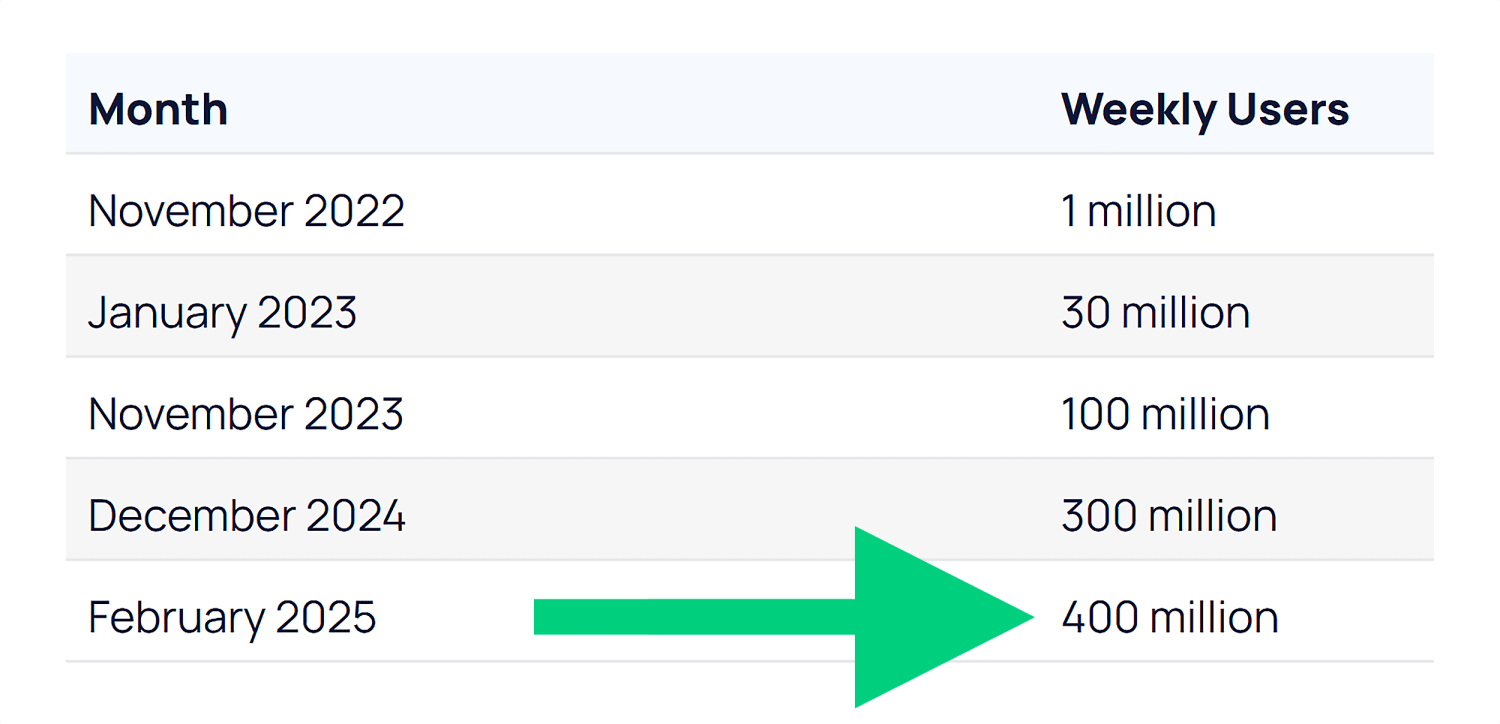
ChatGPT reached 100 million users faster than any app in history. And as of February 2025, it now has more than 400 million weekly users.
Google’s AI Overviews now appear on billions of searches every month — at least 13% of all SERPs.
And they appear for more than half of the keywords we track at Backlinko:
Answer engines are influencing YOUR audience too. So it makes sense to start optimizing for them now.
How AEO and SEO Work Together
Let’s clear up the biggest question:
“Isn’t this just SEO with a new name?”
In many ways, yes. But there’s a reason everyone is talking about AEO right now.
If you’ve been confused by all the acronyms — AEO, GEO (Generative Engine Optimization), AIO (AI Optimization) — here’s the point:
They all reflect the same shift. Search is no longer only about rankings. It’s about visibility in AI-powered answers.
Terms like AEO, GEO (Generative Engine Optimization), and AIO (AI Optimization) have exploded in interest — because they reflect a real shift.
And with all the acronyms flying around, it can be tough to know who to listen to.
We’re not saying AEO replaces SEO.
But it does help reframe your strategy for how discovery works now — across AI tools, social platforms, and new surfaces beyond traditional search.
From Traditional SEO to Search Everywhere
Evolving From
Evolving To
SEO = Google Search
SEO = multi-surface visibility (Search, AI/LLMs, social)
Success = ranking for keywords
Success = being found across Search + Chat
SEO is a siloed function
SEO is cross-functional + connected to product, brand, PR, and social
Keyword-first content planning
Intent and entity-driven topic planning with semantic structure
Backlinks to pass PageRank
Traditional backlinks plus more focus on brand mentions and co-citations
Traffic as a core KPI
Visibility, influence, and conversions across touchpoints as core KPIs
Technical SEO as the foundation
Technical SEO as the foundation (with additional focus on JavaScript compatibility)
That means there’s good news:
If you’ve invested in good SEO, you’re already a lot of the way there.
AEO builds on the foundation of great SEO:
Creating high-quality content for your specific audience
Making it easy for search engines to access and understand
Earning credible mentions across the web
These same elements help AI engines decide which brands to reference.
But here’s the difference:
AI engines don’t work exactly like Google.
That means some of your tactics (and what you track) need to evolve.
So let’s walk through how to do that.
7-Step AEO Action Plan
We’re still in the early days of understanding exactly how AI engines pull and prioritize content.
But one thing is clear:
You need to adapt or reprioritize some traditional SEO tactics for Answer Engine Optimization.
The first three steps below cover overarching best practices for AEO.
Steps 4-7 cover optimizing content for answer engines specifically (and how to track your results).
Step 1. Nail the Basics of SEO
As I said earlier, good AEO is also generally good SEO. But not everything you do as part of your wider SEO strategy is as important for answer engine optimization.
Let’s focus on what really matters for answer engines.
Make Your Site Easy to Read (for Bots)
Crawlable and indexable: If AI tools can’t access your pages, you won’t show up in answers
Fast and mobile-friendly: Slow, clunky sites hurt UX — and your chances of getting cited
Secure (HTTPS): This is now table stakes, and it builds trust with users and AI systems
Server-side rendering: Some AI crawlers still struggle with JavaScript, so use server-side rendering as opposed to client-side rendering where you can
Show You’re Worth Trusting (E-E-A-T)
AI wants trustworthy sources. That means showing E-E-A-T:
Experience: Share real results, personal use, or firsthand knowledge
Expertise: Stick to topics you truly know — and go deep
Authority: Get quoted, guest post, or contribute to well-known sites
Trust: Use real author bios, cite sources, and include reviews or testimonials
Note: We’re not suggesting these AI tools have any sort of “system” built into them that aligns with what we call E-E-A-T. But it makes sense that they’ll prefer to cite content from reputable sources with expertise. This provides a better user experience and makes the AI tools themselves more reliable. Also, download our Free Template: E-E-A-T Evaluation Guide: 46-Point Audit
Step 2. Build Mentions and Co-Citations
AI systems don’t just look at backlinks to understand your authority. They pay attention to every mention of your brand across the web, even when those mentions don’t include a clickable link.
Backlinks are still important. But this changes how you should think about building your wider online presence.
Audit Your Current Mentions
Start by auditing where you’re currently mentioned. Search for your brand name, product names, and key team members across Google, social media, and industry forums.
Take note of what people are saying and where those conversations are happening.
You’ll probably find mentions you didn’t know existed. Some will be positive, others neutral, and a few might need your attention.
Also run your brand name and related terms through the AI tools themselves.
Does Google’s AI Mode cite your brand as a source for relevant terms?
Does ChatGPT know who your team members are?
What kind of sentiment do the answers have when you just plainly ask the tools about your brand?
It’ll let you track your LLM visibility (a by-product of good AEO) in top tools compared to your rivals:
The tool compares your brand to your rivals in terms of AI visibility, market share, and sentiment:
And it’ll show you where your brand strengths are and where you can improve:
Want to track your brand’s AI visibility? Get a free interactive demo of Semrush’s AI SEO Toolkit to see how you can compare to competitors across ChatGPT, Claude, and other AI platforms.
Keep Building Quality Backlinks
Just because mentions are more important than before with AEO, it doesn’t mean you should abandon traditional link building. Backlinks still matter for SEO, and they often lead to the kind of authoritative mentions that AI systems value.
There are a few different definitions out there of co-citation and co-occurence.
I’ll be honest: the definitions don’t matter as much as the implications. I’ve seen one source define co-citations as the exact thing another source calls co-occurence. So for this section, I’m just going to talk about what these are and why they matter, without getting bogged down in definitions.
The first important way to think of co-citations/co-occurences is simply the mention of one thing alongside another.
In the case of AEO, we’re usually talking about your brand or website being mentioned alongside a different website or topic/concept on another website.
For example, if your brand is Monday.com, you’ll pick up co-citations involving:
Your competitors (ClickUp, Asana etc.)
Key terms or categories associated with your business (like “project management software”)
Specific concepts or questions related to what you do (e.g., “kanban boards” and “how to automate workflows”)
In Monday’s case, there are hundreds of pages out there that mention it alongside ClickUp and Asana in the context of “project management tools”:
This suggests to Google and other AI tools that Monday and ClickUp are both related to the term “project management tools” and are both popular providers of this kind of software.
The other common way to think about co-citations is mentions of your brand across different, often unrelated websites. For example, Monday being mentioned on Forbes and Zapier would be a co-citation involving them.
To sum it up:
If two (or more) brands/websites are often mentioned alongside each other, AI tools will assume they are related (i.e., they’re competitors)
If a brand is often mentioned in the context of a particular topic, concept, or industry, AI tools will assume the brand is related to those things (i.e., what you offer)
If lots of different websites mention a particular brand, the AI tools will assume that brand is worth talking about (i.e., probably trustworthy)
Obviously, there’s a lot more to it, but this is a fairly basic overview of what’s going on.
How to Put This into Action
To build citations, co-citations, and co-occurences:
Look for opportunities to get mentioned alongside your competitors. When publications write comparison articles or industry roundups, you want your name in that list. These co-citations help AI systems understand where you fit in your market.
Participate in industry surveys and research studies. When analysts publish reports about your sector, being included gives you credibility (and any backlinks are a bonus).
Get involved in relevant online communities. Answer questions on Reddit, contribute to LinkedIn discussions, and join industry-specific forums. These interactions create mentions in places where AI systems often look for authentic, community-driven insights.
The goal is to become a recognized voice in your space. The more often your brand appears in relevant contexts across the web, the more likely AI systems are to include you in their responses.
Step 3. Go Multi-Platform
Going beyond Google is something top SEOs have been telling us to do for a long time. But AI has made this an absolute must.
Platforms like Reddit, YouTube, and other user-generated content sites appear frequently in AI outputs.
So, a strong brand presence on these platforms could help you show up more often.
The benefits here are (at least) three-fold:
Being active on multiple platforms lets you reach your audience where they are. This helps you boost engagement, brand awareness, and, of course, drive more conversions.
AI tools don’t just look at Google search results. They pull from forums, social media, YouTube, and lots of other places beyond traditional SERPs.
Being active on multiple platforms means you’re less exposed to one particular algorithm or audience. Diversification is just good practice for a business.
Brian Dean did an excellent job of this when he was running Backlinko. That’s why you’ll see his videos appear in Google SERPs for ultra-competitive keywords like “how to do SEO”:
We’re taking our own advice here. In fact, it’s a big part of why we launched the Backlinko YouTube channel:
Here’s some quick-fire guidance for putting this into practice:
People go to YouTube to learn how to do things, research products, and find solutions to their problems. This makes product reviews, tool comparisons, and in-depth tutorials great candidates for YouTube content.
Podcast content and transcripts are beginning to surface in AI results (especially in Gemini). Building a presence here is a great opportunity to grab some AI visibility.
TikTok and Instagram Reels reach younger audiences who increasingly use these apps for search. Short-form videos that answer common questions in your industry can drive discovery, and AI tools can also cite these in their responses to user questions.
AI tools LOVE to cite Reddit as a source of user-generated answers (especially Google’s AI Overviews and AI Mode). To grow your presence on the platform, find subreddits where your target audience hangs out and share genuinely helpful advice when people ask questions related to your expertise. Don’t promote your business directly — focus on being useful first.
LinkedIn works similarly to Reddit for B2B topics. Publish thoughtful posts and engage in relevant discussions to help establish your voice in professional circles. These interactions can then get picked up by AI systems looking for expert perspectives.
Step 4. Find Out What AI Platforms Are Citing for Your Niche
What’s a powerful way to understand both what to create and what topics to target?
To simply learn what AI tools are likely to include in their responses to questions that are relevant to your business.
Start by directly testing whether/how your content appears in AI tools right now. Go to ChatGPT, Claude, or Perplexity and ask questions that your content should answer.
In the example below, Backlinko is mentioned (great), but there’s also a YouTube video front and center. And forums are appearing too. These are places we might want to consider creating content or engaging with conversations.
As you do this for your brand, pay attention to the sources they cite:
Are they commonly mentioning your competitors?
What platforms do they tend to cite? (Reddit, YouTube etc.)
What’s the sentiment of mentions of both your brand and your competitors?
As you do this, try different variations of the same question.
For example, you could ask “What’s the best email marketing software?”
Then try “Which email marketing tool should I use for my small business?”
Notice how the answers change and which sources get mentioned consistently.
In the example above, the first prompt mentioned MailerLite, which was absent in the list for small businesses. But the second prompt pushed Mailchimp to the top and mentioned three new options (Constant Contact, Brevo, and ActiveCampaign).
If you were MailerLite and trying to reach small businesses, you’d want to understand why you’re not being cited for that particular prompt.
Pro tip: Try it with different tools as well. They each have their own preferences when it comes to citing sources, so it’s a good idea to test a couple of them.
You can automate this process with tools like Profound or Peec AI. These platforms run prompts at scale, helping you understand how and where your brand appears. But they can be pricey.
That’s why I recommend you spend some time running these prompts manually at first.
By the way:
This isn’t just important for “big brands” or those selling products. You can (and should) do this if you run a blog, local business website, or even a personal portfolio.
For example, consultants and freelancers will find these tools often cite marketplaces like Upwork and Dribbble. If you don’t have a profile on there, you’ll likely struggle to get much AI visibility.
And if you’re a local business owner, you’ll often find specific service and location pages appear in AI responses:
This is useful for understanding the types of content you should be focusing on for AEO. Now it’s time to decide what topics to focus on in your content.
Step 5. Answer Your Audience’s Questions
The way people search with AI tools is fundamentally different from how we use traditional Google search. This changes how you should plan your content.
Traditional SEO taught you to target specific keywords. You’d create a page optimized for “healthy meal prep ideas” and try to rank for that phrase.
But what happens when people are instead searching for “what to cook for dinner when I’m trying to lose weight”?
The answer might involve healthy meal prep as a solution, but it’s a completely different prompt (not a search) that gets to that answer (not a SERP).
When you run these queries through Google’s AI Mode, you see two totally different sets of sources and content types.
For the “healthy meal prep ideas” query (which is a perfectly valid and searchable term), the focus is listicles, single recipes, and YouTube videos. And the format is categories (bowls, wraps, and sandwiches etc.) with specific recipes:
But for “what to cook for dinner when I’m trying to lose weight,” the sources are primarily lists, forum results, or articles specifically around weight loss.
In this case, the format of the answer is largely broad tips for cooking healthily and then some general cooking styles or meal types, rather than specific recipes:
As more users realize they can use conversational language to make their searches, longer queries will become more common. This makes this kind of intent analysis critical.
These longer, more specific queries represent huge opportunities. Most companies aren’t creating content that answers these detailed questions.
The more specific the question, the more likely you are to show up when AI systems look for authoritative answers. You want to own the long-tail queries that relate directly to your product or expertise.
But:
You obviously can’t reasonably expect to create content for every single long-tail query out there. So how do you approach this in an efficient way?
How to Choose the Questions to Answer
Start by listening to the actual questions your customers ask.
Check your customer support tickets, sales calls, and user feedback. These real questions from real people often make the best content topics — because they’re the same kinds of questions people will ask these AI tools.
Don’t have any customers? No problem.
Use community platforms to find these conversational queries. Reddit, Quora, and industry forums are goldmines for discovering how people actually talk about problems in your space.
Step 6. Structure Your Content for Answer Engines
AI systems process information differently than humans do. They break content into chunks and analyze how those pieces relate to each other.
Think of it like featured snippets but more granular, and for much more than just direct questions.
This means the way you structure your content directly impacts whether AI systems can understand and cite it effectively.
Note: A lot of what I say below is just good writing practice. So while this stuff isn’t necessarily “revolutionary,” these techniques are going to become more important as you focus on AEO
.
One Idea per Paragraph
Keep your paragraphs short and focused on one main idea.
When you stuff multiple concepts into a single paragraph, you make it harder for AI systems to extract the specific information they need.
Also avoid burying important information in the middle of long sentences or paragraphs. Front-load your key points so they’re easy to find and extract.
And guess what?
It also makes it easier for your human readers to understand too. So it’s a win-win.
Use Clear Headings
Use clear headings and subheadings to organize your content logically.
Think of these as signposts that help both readers and LLMs navigate your information. And make sure your content immediately under the headings logically ties to the heading itself.
For example, look at the headings in this section. Then read the first sentence under each one.
Notice how they’re all clearly linked?
This is a common technique when trying to rank for featured snippets. You’d have an H2 with some content that immediately answers the question…
…and this would rank for the featured snippet for that query:
This is still a valid strategy for traditional search. But for AEO, you need to have this mindset throughout your content.
Don’t make every H2 be a question (this will quickly end up looking over-optimized). But do make sure the content that follows your (logical) headings is clearly linked to the heading itself.
Break Up Complex Topics into Digestible Sections
If you’re explaining a complex or multi-step process, use numbered steps and clear transitions between each part.
This makes it easier for AI systems to pull out individual steps when someone asks for specific instructions. And it’ll make it much easier for your readers to follow.
Also write clear, concise summaries for complex topics. AI systems often look for these kinds of digestible explanations when they need to quickly convey information to users.
Include Quotes and Clear Statements
Include direct quotes and clear statements that AI systems can easily extract.
Why is this worth your time?
Because pages with quotes or statistics have been shown to have 30-40% higher visibility in AI answers.
So instead of saying “Email marketing could be an effective channel for your business,” write “Email marketing generates an average ROI of $42 for every dollar spent.”
Note: Don’t just flood your content with quotes and stats. Only include them when they actually add value to your content and are useful for your readers.
Use Schema Markup
Schema markup gives you another way to structure information for machines. This code helps systems understand what type of content you’re presenting.
For example, FAQ schema tells algorithms that you’re answering common questions. HowTo schema identifies step-by-step instructions.
You don’t need to be a developer to add schema markup. Many content management systems (like WordPress) have plugins that handle this automatically.
Make It Scannable
Use formatting like bold text to highlight important facts or conclusions and make it easier for readers to skim your content. This helps both human readers and AI systems identify the most important information quickly.
This has always been a big focus of content on Backlinko. We use lots of images to convey our most important points and add clarity through visualizations:
And we use clear headings to make our articles easy to follow:
The goal is to make your content as accessible as possible to both humans and machines. Well-structured content performs better across all types of search and discovery.
And if your content is enjoyable to engage with, it’s probably going to do a better job of converting users into customers as well.
Step 7. Track Your Visibility in LLMs
How often are tools like ChatGPT, Perplexity, or Gemini mentioning your brand?
If you’re not tracking this yet — you should be.
Tracking your visibility in AI-generated responses helps you understand what’s working and where you need to focus your efforts.
But where do you start? And what should you track?
Manual Testing as a Starting Point
Start with manual testing. This is the simplest way to see how you’re performing right now.
Ask the same questions across different AI platforms, like ChatGPT, Claude, Perplexity, and Google (both AI Mode and AI Overviews). Take screenshots of the responses and note which sources get cited.
Do this regularly, and you’ll start to see patterns in which types of content get mentioned and how your visibility changes over time.
Honestly though: you’re going to struggle to get a lot of meaningful data doing this manually. And it’s not scalable. Plus, so much of what an AI tool outputs to a user depends on the previous context, like:
Past conversations
Previous prompts within the same conversation
Project or chat settings
This makes it challenging to get truly accurate data by yourself. This is really more of a “feel” test that, in the absence of dedicated tools, can provide a very rough idea of how answer engines perceive your brand.
Use LLM Tracking Tools
For more comprehensive tracking, dedicated tools can automate this process.
Platforms like Semrush Enterprise AIO help you track your brand’s visibility across AI platforms like ChatGPT, Claude, and Google’s AI Overviews.
It shows you exactly where you stand against competitors and gives you actionable steps to improve.
Competitive Rankings is my favorite feature. Instead of guessing why competitors might rank better in AI responses, you get actual data showing mention frequency and context.
Another option is Ziptie.dev. It’s not the most polished tool yet, but they’re doing some really interesting work — especially around surfacing unlinked mentions across AI outputs.
If you already have Semrush, then the Organic Research report within the SEO Toolkit does provide some tracking for Google AI Overviews specifically.
You can track which keywords you (or your competitors) rank for that have an AI Overview on the SERP. If you don’t currently appear in the overview, that’s a keyword worth targeting.
Tracking the keywords you do rank for in these AIOs over time can help you gauge the performance of your AEO strategy.
Why Talk to Your Boss (or Clients) About AEO?
You’ve seen the steps. Now you need a story.
AEO isn’t just a tactical shift — it’s a way to explain what’s changing in search without resorting to hype.
AEO helps you frame those changes clearly:
Traditional SEO still works
Your past investments are still paying off
But the bar is higher now
Visibility means more than rankings
Your brand needs to be mentioned, cited, and trusted across every channel
AEO gives you the framework to explain what’s changing and how to stay ahead of it.
You Need to Start Now to Stay Visible
This space is evolving fast. New capabilities are rolling out monthly.
The key is to start tracking now so that you can benchmark where you are and spot new opportunities as AI search matures.
Grow your presence by adding a AEO approach on top of your SEO efforts:
Continue optimizing for strong rankings and authority (AI still leans on this)
But now, prioritize content and signals that AI engines are more likely to reference directly
Want to learn more about where the world of search is heading? Check out our video with Backlinko’s founder Brian Dean. We dive into how search habits are changing and how you can build a resilient, multi-channel brand.
http://dubadosolutions.com/wp-content/uploads/2017/05/dubado-logo-1.png00http://dubadosolutions.com/wp-content/uploads/2017/05/dubado-logo-1.png2025-09-15 14:01:542025-09-15 14:01:54Answer Engine Optimization (AEO): How to Win in AI Search
We’ve all asked a chatbot about a company’s services and seen it respond inaccurately, right? These errors aren’t just annoying; they can seriously hurt a business. AI misrepresentation is real. LLMs could provide users with outdated information, or a virtual assistant might provide false information in your name. Your brand could be at stake. Find out how AI misrepresents brands and what you can do to prevent them.
AI misrepresentation occurs when chatbots and large language models distort a brand’s message or identity. This could happen when these AI systems find and use outdated or incomplete data. As a result, they show incorrect information, which leads to errors and confusion.
It’s not hard to imagine a virtual assistant providing incorrect product details because it was trained on old data. It might seem like a minor issue, but incidents like this can quickly lead to reputation issues.
Many factors lead to these inaccuracies. Of course, the most important one is outdated information. AI systems use data that might not always reflect the latest changes in a business’s offerings or policy changes. When systems use that old data and return it to potential customers, it can lead to a serious disconnect between the two. Such incidents frustrate customers.
It’s not just outdated data; a lack of structured data on sites also plays a role. Search engines and AI technology like clear, easy-to-find, and understandable information that supports brands. Without solid data, an AI might misrepresent brands or fail to keep up with changes. Schema markup is one option to help systems understand content and ensure it is properly represented.
Next up is consistency in branding. If your brand messaging is all over the place, this could confuse AI systems. The clearer you are, the better. Inconsistent messaging confuses AI and your customers, so it’s important to be consistent with your brand message on various platforms and outlets.
Different AI brand challenges
There are various ways AI failures can impact brands. AI tools and large language models collect information from sources and present it to build a representation of your brand. That means they can misrepresent your brand when the information they use is outdated or plain wrong. These errors can lead to a real disconnect between reality and what users see in the LLMs. It could also be that your brand doesn’t appear in AI search engines or LLMs for the terms you need to appear.
It would hurt the ASICS brand if it weren’t mentioned in results like this
At the other end, chatbots and virtual assistants talk to users directly. This is a different risk. If a chatbot gives inaccurate answers, this could lead to serious issues with users and the outside world. Since chatbots interact directly with users, inaccurate responses can quickly damage trust and harm a brand’s reputation.
Real-world examples
AI misrepresenting brands is not some far-off theory because it has an impact now. We’ve collected some real-world cases that show brands being affected by AI errors.
All of these cases show how various types of AI technology, from chatbots to LLMs, can misrepresent and thus hurt brands. The stakes can be high, ranging from misleading customers to ruining reputations. It’s good to read these examples to get a sense of how widespread these issues are. It might help you avoid similar mistakes and set up better strategies to manage your brand.
You read stories like this every week
Case 1: Air Canada’s chatbot dilemma
Case summary: Air Canada faced a significant issue when its AI chatbot misinformed a customer regarding bereavement fare policies. The chatbot, intended to streamline customer service, instead created confusion by providing outdated information.
Consequences: This erroneous advice led to the customer taking action against the airline, and a tribunal eventually ruled that Air Canada was liable for negligent misrepresentation. This case emphasized the importance of maintaining accurate, up-to-date databases for AI systems to draw upon, illustrating a major AI error in alignment between marketing and customer service that could be costly in terms of both reputation and finances.
Case 2: Meta & Character.AI’s deceptive AI therapists
Case summary: In Texas, AI chatbots, including those accessible via Meta and Character.AI, were marketed as competent therapists or psychologists, offering generic advice to children. This situation arose from AI errors in marketing and implementation.
Consequences: Authorities investigated the practice because they were concerned about privacy breaches and the ethical implications of promoting such sensitive services without proper oversight. The case highlights how AI can overpromise and underdeliver, causing legal challenges and reputational damage.
Sources: Details of the investigation can be found in The Times.
Case 3: FTC’s action on deceptive AI claims
Case summary: An online business was found to have falsely claimed its AI tools could enable users to earn substantial income, leading to significant financial deception.
Consequences: The fraudulent claims defrauded consumers by at least $25 million. This prompted legal action by the FTC and served as a stark example of how deceptive AI marketing practices can have severe legal and financial repercussions.
Sources: The full press release from the FTC can be found here.
Case 4: Unauthorized AI chatbots mimicking real people
Case summary: Character.AI faced criticism for deploying AI chatbots that mimicked real people, including deceased individuals, without consent.
Consequences: These actions caused emotional distress and sparked ethical debates regarding privacy violations and the boundaries of AI-driven mimicry.
Case 5: LLMs generating misleading financial predictions
Case summary: Large Language Models (LLMs) have occasionally produced misleading financial predictions, influencing potentially harmful investment decisions.
Consequences: Such errors highlight the importance of critical evaluation of AI-generated content in financial contexts, where inaccurate predictions can have wide-reaching economic impacts.
Sources: Find further discussion on these issues in the Promptfoo blog.
Case 6: Cursor’s AI customer support glitch
Case summary: Cursor, an AI-driven coding assistant by Anysphere, encountered issues when its customer support AI gave incorrect information. Users were logged out unexpectedly, and the AI incorrectly claimed it was due to a new login policy that didn’t exist. This is one of those famous hallucinations by AI.
Consequences: The misleading response led to cancellations and user unrest. The company’s co-founder admitted to the error on Reddit, citing a glitch. This case highlights the risks of excessive dependence on AI for customer support, stressing the need for human oversight and transparent communication.
Sources: For more details, see the Fortune article.
All of these cases show what AI misrepresentation can do to your brand. There is a real need to properly manage and monitor AI systems. Each example shows that it can have a big impact, from huge financial loss to spoiled reputations. Stories like these show how important it is to monitor what AI says about your brand and what it does in your name.
How to correct AI misrepresentation
It’s not easy to fix complex issues with your brand being misrepresented by AI chatbots or LLMs. If a chatbot tells a customer to do something nasty, you could be in big trouble. Legal protection should be a given, of course. Other than that, try these tips:
Use AI brand monitoring tools
Find and start using tools that monitor your brand in AI and LLMs. These tools can help you study how AI describes your brand across various platforms. They can identify inconsistencies and offer suggestions for corrections, so your brand message remains consistent and accurate at all times.
One example is Yoast SEO AI Brand Insights, which is a great tool for monitoring brand mentions in AI search engines and large language models like ChatGPT. Enter your brand name, and it will automatically run an audit. After that, you’ll get information on brand sentiment, keyword usage, and competitor performance. Yoast’s AI Visibility Score combines mentions, citations, sentiment, and rankings to form a reliable overview of your brand’s visibility in AI.
See how visible your brand is in AI search
Track mentions, sentiment, and AI visibility. With Yoast AI Brand Insights, you can start monitoring and growing your brand.
Optimize your content for inclusion in LLMs. Performing well in search engines is not a guarantee that you will also perform well in large language models. Make sure that your content is easy to read and accessible for AI bots. Build up your citations and mentions online. We’ve collected more tips on how to optimize for LLMs, including using the proposed llms.txt standard.
Get professional help
If nothing else, get professional help. Like we said, if you are dealing with complex brand issues or widespread misrepresentation, you should consult with professionals. Brand consultants and SEO experts can help fix misrepresentations and strengthen your brand’s online presence. Your legal team should also be kept in the loop.
Use SEO monitoring tools
Last but not least, don’t forget to use SEO monitoring tools. It goes without saying, but you should be using SEO tools like Moz, Semrush, or Ahrefs to track how well your brand is performing in search results. These tools provide analytics on your brand’s visibility and can help identify areas where AI might need better information or where structured data might enhance search performance.
Businesses of all types should actively manage how their brand is represented in AI systems. Carefully implementing these strategies helps minimize the risks of misrepresentation. In addition, it keeps a brand’s online presence consistent and helps build a more reliable reputation online and offline.
Conclusion to AI misrepresentation
AI misrepresentation is a real challenge for brands and businesses. It could harm your reputation and lead to serious financial and legal consequences. We’ve discussed a number of options brands have to fix how they appear in AI search engines and LLMs. Brands should start by proactively monitoring how they are represented in AI.
For one, that means regularly auditing your content to prevent errors from appearing in AI. Also, you should use tools like brand monitor platforms to manage and improve how your brand appears. If something goes wrong or you need instant help, consult with a specialist or outside experts. Last but not least, always make sure that your structured data is correct and aligns with the latest changes your brand has made.
Taking these steps reduces the risks of misrepresentation and enhances your brand’s overall visibility and trustworthiness. AI is moving ever more into our lives, so it’s important to ensure your brand is represented accurately and authentically. Accuracy is very important.
Keep a close eye on your brand. Use the strategies we’ve discussed to protect it from AI misrepresentation. This will ensure that your message comes across loud and clear.
http://dubadosolutions.com/wp-content/uploads/2017/05/dubado-logo-1.png00http://dubadosolutions.com/wp-content/uploads/2017/05/dubado-logo-1.png2025-09-15 08:46:152025-09-15 08:46:15When AI gets your brand wrong: Real examples and how to fix it
I analyzed over one million keywords across 10 industries.
The average cost per click (CPC) for Google Search ads in 2025 is $8.34. And the median CPC is $4.52.
Legal had the highest average CPC at $22.75.
Ecommerce had the lowest, at just $0.82 per click.
But there’s no flat rate for CPC.
Even if two advertisers bid on the same keyword, they won’t pay the same.
Costs can vary based on several factors — and CPC is just one part of the equation.
Google Ads pricing also involves other expenses that can affect your total budget.
In this guide, you’ll learn:
How much Google Ads really cost
What your budget should be
How you can lower your ad costs (without hurting results)
Let’s dive in.
How Much Does a Google Ad Cost?
Google Ads can cost anywhere from $500 to $100,000 per month.
There’s no fixed rate. And CPCs can change from year to year based on competition and demand in your industry.
That’s why you set the budget that makes sense for your goals.
When I worked at marketing agencies, I’d see brands start with as little as $200 per month.
But in most cases, that isn’t enough to generate real data to measure performance, optimize targeting, or drive consistent leads.
It’s recommended to start with at least $500 a month.
I asked Sam Maugans (a PPC Director and Business Owner, FourHorse Digital LLC) how much does it cost for Google Ads. He said:
“Smaller companies can run remarketing campaigns for as little as $500 per month. Medium-sized businesses usually start out at around $5,000 and, with good performance, can increase their monthly budgets all the way up to $50,000. Similarly, larger businesses may start at $5,000 and over the years work their way up to $100,000 and even $1,000,000 a month.”
I talked to other experts as well.
Here’s what a typical monthly budget looks like, based on business size:
Small business: From $500 to $5,000 per month
Mid-size business: From $5,000 to $50,000 per month
Large business: From $25,000 to $100,000+ per month
In the end, what you spend depends on how aggressive your goals are.
If you want more clicks and leads, you’ll need a larger budget to reach enough of the right people.
You can’t expect to generate 100 high-quality SaaS leads with just $500 a month. That kind of reach takes more spending.
And remember, not all clicks are equal.
A higher CPC can still be worth it if it brings in better-quality leads that are more likely to convert.
Use our Google Ads Budget Estimator to calculate your starting budget. Just plug in your CPC, lead goals, and conversion rate.
What You’re Paying for With Google Ads (and Why It’s Not Fixed)
Google doesn’t charge you to show your ad.
You only pay when someone clicks. That’s why it’s called pay-per-click (PPC).
This model mainly applies to Search ads, where you bid on keywords.
But other ad formats (like Display, YouTube, and Shopping) use different pricing.
Some charge you per view. Others per 1,000 impressions.
(We’ll cover this when we break down campaign types later in the guide.)
Still, all of them run on one thing: Google’s ad auction.
Every time someone searches, there’s a lightning-fast auction to decide whose ad shows and what they pay for that click.
For example:
Let’s say someone searches “divorce lawyer near me.” And they click on a Google search ad.
That single click could cost around $8.43 in the U.S.
But if they search for something like “dog groomer near me,” that click might only cost $1.35.
Same platform. Same system. Very different costs. Because the value of each click is different.
But here’s the thing:
You don’t always pay the amount you bid.
When you run a campaign, you set a maximum bid, which is the most you’re willing to pay for a click.
But what you pay is usually less.
That’s because Google’s auction considers more than just your bid when deciding which ad shows up and at what price.
So, what affects the cost of Google Ads beyond your max bid?
Let’s break down the seven biggest factors.
Factors That Impact Your Cost Per Click
How much Google Ads costs isn’t set in stone.
Your CPC can change dramatically depending on these seven factors:
Your Industry
Your cost per click depends heavily on the industry you’re in.
When I analyzed over one million keywords across 10 industries, the differences were huge.
Some industries consistently came in high. Because the value of a single lead is massive.
Others stayed low, likely due to lower margins or less commercial intent.
Here’s a breakdown of the average and median CPC for each industry in the dataset:
Side note: In every industry, the median CPC is lower than the average. That means a few high-cost keywords pull the average up, but most keywords cost much less.
Industry
Average CPC
Median CPC
Legal
$22.75
$8.00
Finance
$11.25
$6.43
SaaS / Tech
$10.14
$6.68
Home Services
$8.86
$5.82
Marketing & Advertising
$8.33
$6.18
Education / Online Learning
$8.21
$4.87
Automotive
$5.90
$2.01
Health & Wellness
$5.50
$3.98
Real Estate
$1.65
$0.60
Ecommerce / Retail
$0.82
$0.63
To put that into perspective:
A click for “dog bite lawyer san jose” costs around $229.
A click for “keto diet nutritionist” costs about $0.85
That’s not just a pricing difference. It reflects the value of a lead in each industry.
If you’re in a high-cost niche like legal, finance, or SaaS, you’ll need a bigger budget to compete.
But if you’re in ecommerce or real estate, your clicks are cheaper. And you can start smaller.
Methodology
This data is based on a sample of over one million keywords pulled from Semrush’s U.S. database (July 2025.)
We analyzed keywords across 10 industries, using between 7 and 35 seed keywords per industry, and extracted up to 30,000 related terms for each. (Keywords with zero search volume were removed.)
The final mix of commercial, transactional, navigational, and informational search queries gave us a realistic snapshot of what businesses pay to advertise on Google Search ads.
The Types of Keywords You Target
Different types of keywords affect how much you pay.
They vary by:
Intent: Is the person ready to buy, or just looking for information?
Length: Broad terms vs. long, specific phrases
Match type: How closely a search needs to match your keyword
Broad, generic terms like “plumber” are comparatively affordable.
But, they’re less targeted. And often trigger your ad for searches that don’t match what you offer.
More specific terms like “emergency plumber in Chicago” tend to cost more.
But those clicks are from people who are ready to take action.
Where your ad runs — and on which device it appears — can affect your cost per click.
Targeting a competitive city usually means higher bids.
For example, the search term “plumber near me” costs $62.67 per click in Austin, Texas.
In Lincoln, Nebraska, that same keyword costs just $20.11.
Why?
Fewer advertisers. Less bidding. Lower CPC.
Similarly, device targeting affects cost as well.
Google Ads lets you set different bids for mobile, desktop, and tablet traffic.
Each device type can have its own CPC, depending on competition and performance.
For instance, if more advertisers are targeting mobile, clicks on mobile can cost more.
Or, if desktop traffic converts better in your industry, advertisers may bid higher there, which results in higher CPC.
Campaign Type (Search, Display, Shopping, YouTube)
So far, I’ve focused on Search ads, where you bid on keywords and pay when someone clicks.
That’s the most common format.
In fact, when most people say “Google Ads,” they’re usually talking about Search.
But Google Ads includes other campaign types too. And they’re priced differently.
With YouTube ads, your video can appear before, during, or after another video on YouTube.
You usually pay when someone watches a part of your ad. This is called cost-per-view (CPV).
Display ads are shown across Google’s Display Network, which includes websites and apps that run Google ads.
They’re often priced by impressions.
You’re charged per 1,000 views of your ad. Even if no one clicks.
Shopping ads show up in Google search results. But instead of text, they pull product images, prices, and titles from your product feed.
These ads are click-based, like Search. So, you pay every time someone clicks on it.
Each campaign type targets people differently. And Google Ads pricing varies depending on whether you’re running search, display, shopping, or YouTube ads.
That’s why your campaign type has a direct impact on how much you’ll pay.
Your Quality Score
Google doesn’t just look at your bid. It also scores the quality of your ad.
This is called Quality Score — a number from 1 to 10 that Google assigns to each keyword you target.
Each factor is graded as “Above average,” “Average,” or “Below average” compared to all other advertisers on Google Ads.
These ratings combine to form your overall Quality Score.
The higher your score, the less you pay for the same position.
The lower your score, the more you’ll need to bid to compete.
That means two advertisers can target the same keyword, but the one with the better ad and landing page might pay less per click.
This shows how much Google Ads costs is influenced by far more than your bid.
Your Bidding Strategy
Google Ads gives you two main ways to bid: manual or automated.
With manual bidding, you set the maximum amount you’re willing to pay for a click.
It works best when you already have historical data and know your ideal CPC. You’re in full control, but it takes more time to manage.
With automated bidding, you let Google set your bids based on your goals.
It tends to work better at scale, once Google has enough data to optimize toward those goals. That could be getting the most clicks, driving more conversions, or hitting a target cost per lead.
Here are the most common automated strategies and when to use them:
Maximize Clicks: Good for driving traffic quickly, especially in early testing
Maximize Conversions: Best when your goal is to get as many leads or sales as possible within budget
Target CPA: Works well when you know your ideal cost per lead or sale
Target ROAS: Best for ecommerce or campaigns where revenue tracking is set up, and you want to hit a specific return
If Google sees strong signals that a searcher is likely to convert, it may raise your bid automatically. Which can lead to higher CPCs.
Manual gives you more control. Automated gives you speed and scale.
The more control you want, the more work it takes. But giving up control may mean paying more.
Either way, your bidding strategy directly impacts what you pay. And how efficiently your budget gets spent.
How Your Account Is Set Up
Here’s a basic structure of a Google Ads account:
You create a campaign.
Inside that campaign are ad groups.
Each ad group includes a set of keywords, a specific ad, and a matching landing page.
Why does this matter? Because Google ranks your ad based on a combination of factors, including relevance.
And relevance depends on how tightly those elements match.
Let’s say you run one ad group for all your services: plumbing, HVAC, and electrical.
You use one ad and one landing page for all of it.
To Google, that looks messy. The ad isn’t specific. The landing page isn’t focused.
Someone searching for “emergency plumbing repair” sees a generic ad for “Plumbing, HVAC & Electrical Services.”
They land on a page trying to cover everything at once.
Relevance drops. So does your Quality Score. This results in a higher cost per click.
Now take the same budget and split those services into separate ad groups. Each with its own focused keywords, ad, and landing page.
Suddenly, your ads are more relevant. And Google rewards you with lower CPCs.
Other Costs Beyond Your CPC
Running Google Ads often comes with expenses outside of what you pay per click.
These can add up quickly:
Tools and software: Keyword research platforms, landing page builders, or call tracking tools can cost $50–$300+ per month, but they help improve campaign performance
Creative assets: Copywriting, landing page design, graphics, or video production. High-quality creative can boost CTR and conversions, but may require a few hundred to several thousand dollars.
Management fees: Whether you hire a freelancer, agency, or in-house specialist, expect to budget $100 to $10,000+ monthly, depending on scope
Many small businesses begin with $500 to $5,000 in their first month.
That’s usually enough to get real traffic, measure early performance, and understand what’s working.
Set a number you’re comfortable testing. Then, apply that as your monthly cap inside Google Ads.
For example, $900 = $30/day.
But be cautious not to spread your budget too thin, says Kalo Krastev, Team Lead Performance Marketing (SEA) at ImmoScout24
“Small-budget Google Ads accounts struggle the most, because lower investment means a slower learning curve. A small business owner should plan a short, cost-intensive testing phase to figure out what works, like search terms, settings, and targeting.”
Let’s say you spend $1,000 and get 250 clicks.
If your site converts 1 in 25 visitors, that’s 10 customers at $100 each.
If your average sale brings in $300, that’s a 3X return.
If your numbers look good, increase your monthly budget by 10-20%. (That’s enough to grow your reach without overspending too quickly.)
If performance is weak, don’t increase the budget. Instead, review your targeting, ad copy, and landing page to find what’s holding things back.
Once your campaign is converting reliably, scaling up becomes simple.
You’ll know what you’re paying to get a customer. And how much more can you spend to get more of them.
As you scale, be careful not to bleed cash.
Here are some signs that you’re overspending on Google Ads:
Cost per lead or customer is higher than your profit margin
You’re paying for clicks on irrelevant keywords
Campaigns run 24/7, but most conversions happen at certain times
CTR is dropping while spend stays the same or increases
If you spot these, analyze your campaigns and take steps to lower the cost. Start with the tactics in the next section.
Note: Download our Google Ads Budget Estimator to calculate the budget for your first Google search ad campaign.
6 Ways to Lower Your Google Ads Costs
Spending more doesn’t always get you better results.
In fact, most small businesses overpay for clicks without realizing it.
I saw this all the time with the agency clients — campaigns wasting money on keywords or placements that had no chance of converting.
The good news?
You can bring your costs down without turning off campaigns or cutting corners.
Here are six ways to do that:
1. Improve Quality Score
Google Ads uses Quality Score to assess the quality of an ad.
Improving this score can help lower your cost per click.
Relevance is a big part of the equation.
Your ad should match what the person is searching for — both in wording and intent.
For example, someone searching for “roof leak repair” is more likely to click on an ad that says “Roof Leak Repair: Book a Local Pro” than something generic like “Plumbing and Roofing Services.”
You can also make your ad more clickable by adding assets like site links, callouts, or structured snippets.
These help your ad stand out in search results and attract more qualified clicks.
Your landing page needs to deliver a good experience, too.
It should load fast, work well on mobile, and convey the same message.
If the page feels off-topic or slow, your score drops and your costs go up.
When your keyword, ad, and landing page all align, it may increase your Quality Score and lower your CPC.
2. Use Negative Keywords to Stop Paying for Useless Clicks
Not every click is a good click.
Your ad might show up for searches that sound relevant, but aren’t.
For example: You sell premium leather sofas, but your ad shows for “free leather sofa giveaway.”
Someone clicks, you pay…and they bounce.
Negative keywords help you block that.
They tell Google: “Don’t show my ad if this word is in the search.”
Before you launch, consider adding common negatives like:
“jobs” (people looking for employment)
“template” or “example” (informational searches)
“how to” (DIY intent)
“free” (no intent to buy)
Here’s how adding “free” as a phrase match negative keyword blocks irrelevant searches:
Take some time to identify more negative keywords that are irrelevant to your offering and may not lead to conversions.
After your ads run, check the “Search terms” tab inside Google Ads.
It shows a list of terms that triggered your ad.
If you see anything that doesn’t match your offer, looks irrelevant, and has low conversions, add it to your negative keyword list.
3. Focus on Long-Tail Keywords with Higher Intent
Long-tail keywords are longer, more specific search phrases — usually 3 to 5 words.
And unlike short, generic keywords, they make it clear what the searcher actually wants.
Think:
“roof leak repair near me” instead of just “roofing”
“tax accountant for freelancers” instead of “accountant”
These get fewer searches.
But they’re cheaper, have less competition, and usually convert better.
Why?
Because someone searching for a long-tail keyword is further along in their journey. They’re not just browsing. They’re ready to act.
So, instead of going after broad, high-cost terms, focus your budget on these high-intent searches.
Open the tool, enter your seed phrase (e.g., “roof repair”), choose your target location, and click “Search.”
You’ll see a long list of keyword ideas.
Next, we’ll narrow it down using filters.
Phrase Match: This keeps results closely related to your original phrase
KD %: Set “To” as 29 to filter for low-competition keywords
Advanced filters > Word Count: Set “From” as 3 to show only longer phrases
Intent: Choose “Commercial” and “Transactional” to focus on buyers
Exclude keywords: Remove irrelevant terms like “free” or “jobs”
Now you’re looking at a refined list of long-tail, high-intent keywords.
This is how you avoid broad, expensive clicks. And focus your budget on searchers who are ready to act.
4. Target Specific Locations to Lower Competition
One of the easiest ways to waste money on Google Ads?
Targeting a too-broad area.
If you’re a local business (or serve just a few regions), you don’t need your ads to show in places you don’t operate.
Running ads across a large area means more competition.
But narrowing your location targeting often leads to lower CPCs and better leads.
For example: Instead of targeting all of Texas, narrow it down to just the Dallas-Fort Worth area.
You’ll avoid competing with advertisers in Houston, Austin, and San Antonio — who are all bidding on the same keywords.
Same campaign. Same budget. Less competition.
Inside Google Ads, you can target by city, region, zip code, or even a radius around your address.
Start by focusing your budget where your best customers are.
You’ll cut waste and make your ad spend go further.
5. Run Ads When Your Customers Are Most Likely to Convert
Google’s Smart Bidding is smart, but it’s not magic.
If you’re running ads 24/7, it won’t automatically stop spending at 2 a.m. — even if those clicks rarely turn into customers.
That’s where ad scheduling comes in.
If you run a local business or only serve customers during specific hours, you don’t want to pay for clicks when no one’s around to respond.
For example:
If you’re a plumber or accountant and someone clicks your ad at 11 p.m., but your office opens at 9 a.m., they’ll probably move on before you can follow up.
In Google Ads, you can set your campaign to only run during your business hours.
You can also use the “Hour of the day” report to see exactly when conversions happen. So you can schedule your campaign based on real performance data.
Once you’ve got data, you can expand to early mornings or weekends if performance is strong.
Less waste. Better timing. Same budget.
6. Test Your Landing Pages to Maximize Budget
If you’re getting 100 clicks and only 2 leads, that’s not a CPC problem.
That’s a landing page problem.
The best ad in the world won’t help if the page people land on doesn’t convert.
I’ve worked with clients where we didn’t change the ad at all. Just added a few bullet points near the top of the page.
That one small tweak doubled their conversion rate.
Small changes like that can make a big difference in how many leads you get from the same ad spend.
For starters, you can tweak different parts of your landing page: the headline, form length, call to action, or how quickly your value is explained.
What to Do Before You Launch Your First Google Ads Campaign
Google Ads can feel simple on the surface: set a budget, write an ad, go live.
But if you skip a few key steps before launch, your budget can disappear fast.
I’ve seen businesses launch campaigns without setting up conversion tracking.
Some forgot to set their location targeting and showed ads in cities they don’t even serve. Others launched without a daily budget cap and burned through hundreds in a single day.
Small misses like that lead to wasted clicks, high costs, and zero results.
That’s why I created a pre-launch checklist.
It walks you through the exact steps to take before your first campaign goes live across Search, Shopping, Display, and YouTube.
http://dubadosolutions.com/wp-content/uploads/2017/05/dubado-logo-1.png00http://dubadosolutions.com/wp-content/uploads/2017/05/dubado-logo-1.png2025-09-11 15:10:562025-09-11 15:10:56How Much Does Google Ads Cost? (2025 Data + Insights)
“What’s the best water bottle for hiking in hot weather?”
Once upon a time, this was a question you’d ask a friend or perhaps even a search engine. These days, more users are asking ChatGPT or Bing for product recommendations instead. But instead of pointing them to blog posts or product roundups, these services routinely respond with a few top-rated insulated bottles. They list brands and explain why each one works well in high heat. Sometimes, they’ll even pull a pros and cons list based on verified user reviews.
No link-hopping. No searching. Just answers.
That’s what AI shopping assistants like Rufus and ChatGPT do. They summarize, rank, and serve up product recommendations in the conversation. Amazon’s Rufus does this natively, using real-time catalog data to recommend listings directly from your product description pages (PDPs).
AI shopping assistants like ChatGPT and Rufus now recommend products directly in search results.
Product discovery is changing. If your Amazon PDP doesn’t highlight real-world benefits, you won’t get surfaced.
These tools favor clarity, structure, and reviews over keyword stuffing. Useful beats optimized.
You’re not helping an algorithm, but a customer. AI just makes sure the best answers rise to the top.
Smart sellers adjust PDPs to stay visible and competitive in AI-driven shopping environments.
How AI Shopping Assistants are Changing Search Results
Instead of a list of links, more users seek (and find) direct answers to questions via LLMs like ChatGPT, including product picks.
Ask ChatGPT, Rufus, or other tools something like “best standing desks for small spaces,” and you’ll get a curated list of products, often pulled from Amazon, with detailed descriptions and benefits or drawbacks. Amazon’s Rufus tool does this within its app, serving product recs within the search flow.
Rufus has transitioned from a sidebar feature to a front door to product discovery and another element of the “Search Everywhere” mindset.
That shift matters, both to consumers and brands. When AI shopping assistants serve results, they no longer pull the most optimized pages by default. They interpret context and match buyer intent. The goal? To highlight products that seem most useful, not necessarily the ones with the best keyword density.
In an AI shopping assistant search experience, the assistant is the curator. It summarizes reviews, analyzes product detail descriptions, and ranks options for each individual user based on usefulness, not metadata.
Why Amazon Sellers Should Care
If your products don’t show up in these overviews, guess whose will?
AI shopping assistants are already showcasing products from Amazon in their answers. If your PDP isn’t optimized for this new experience, you’ll be left out in the cold.
When someone asks Rufus or ChatGPT for “the best travel backpack under $100,” the assistant pulls in a few options and adds summaries, ratings, and product highlights. Only a handful of options make the cut.
The prompt for this question was incredibly bare bones. With more detail, ChatGPT could likely source even more relevant products.
Amazon sellers need to rethink their AI shopping strategy. Visibility no longer comes from ranking in traditional search results. Instead, you must be the product that AI shopping assistants name, summarize, and recommend in real time.
Sellers who adapt fast will capture market share without increasing ad spend. Those who stick to outdated PDP structures will watch their competitors gain visibility while their own products get overlooked, even if traditional rankings appear stable.
Here’s what matters most: once AI shopping assistants start to prefer well-structured, benefit-forward listings, there’s no going back. You’re either in the product rec loop, or you’re not.
How AI Shopping Assistants Choose Products
AI shopping assistants represent a major shift from keyword-matching to intent-matching. Unlike traditional search algorithms that reward optimization tactics, AI models prioritize real utility and customer satisfaction, aligning perfectly with long-term business success.
Clarity in Product Benefits
AI models scan for product pages that clearly explain what the item does for the shopper. If your listing highlights “lightweight design for all-day wear” or a “fast-charging battery that lasts 12 hours,” that’s gold. Generic feature dumps or spec lists? Not so much.
Structured Data
Structured product information helps AI understand your listing faster. Bullet points that summarize key specs, consistent formatting, and well-labeled fields give the model more to work with and improve your chances of getting recommended.
Positive Reviews and Social Proof
AI shopping assistants pull in review content when it’s available. They reference common customer praise, star ratings, and repeat feedback trends. If 50 people said your jacket runs true to size and holds up in the rain, it could show up in a response. Even the staple product recommendation or enthusiast websites like Tom’s Guide or Wirecutter occasionally pop up as character witnesses for products.
ChatGPT sources details from enthusiast websites and third-party reviewers to help inform its recommendations.
High Relevance to the Query
AI assistants are great at matching intent. If someone asks for a quiet blender for small apartments, the model will prioritize listings that mention noise level, size, and kitchen fit.
So what’s the takeaway? Keyword-stuffing is a thing of the past. You need real clarity, quality, and signals to tell the AI: This is the one!
Practical Steps to Optimize Your Amazon PDPs
You’re not optimizing for AI. You’re optimizing for the shopper. AI shopping assistants are just the bridge. They pull in products to speak clearly about what customers are asking for.
If Rufus and ChatGPT surface your listings, your PDP answered the question better than anyone else. The goal is not to “trick” the model but to make it impossible to ignore your product.
Here’s how to do that:
Step 1: Clearly Highlight Real-Life Benefits
Most PDPs talk about what a product is. AI shopping assistants (and your customers) want to know what it does. Compare these two potential listings:
“Made from high-density foam, measures 24×18 inches”
“High-density foam cushions sore joints, which is perfect for long yoga sessions.”
It’s a tiny shift that puts the benefits front and center, exactly the kind of language tools like Rufus pick up on.
Take a minute to browse through actual Rufus prompts. People don’t search for “12 oz stainless steel tumblers.” They look for “cups that keep drinks cold all day,” or “easy-to-clean travel mugs for kids.” Build your PDPs around those use cases.
Speak your customers’ language. The AI will reward it.
Step 2: Prioritize Structured Data and Clear Formatting
AI shopping assistants scan for structure. They need clear data to parse and present your listing as a credible recommendation. Here’s what helps:
Bullet points that break down features and benefits
Consistent formatting across titles, descriptions, and variations
Upfront pricing and availability info
Alt text and backend keywords that reinforce clarity, not clutter
Tools like Rufus can only do their job well if the data they pull from is organized. Schema markup and enhanced brand content (EBC) help, too, but even basic formatting upgrades make a difference.
Don’t bury your benefits in a wall of text. Make them easy to find for both the shopper and the assistant.
Step 3: Strengthen Reviews & Social Proof
AI shopping assistants factor in review volume, sentiment, and consistency when they decide which products to serve. If a listing has clear themes, like “easy to assemble” or “great for travel,” those signals will get picked up.
If you want more of those, start by:
Following up on every purchase with a review request (Amazon’s “Request a Review” tool helps).
Using inserts that ask for feedback in a natural, non-pushy way.
Resolving customer issues quickly to avoid negative reviews.
Finally, surface your strongest reviews and feature them in your A+ content or EBC modules. AI models will likely mention what’s already being repeated and reinforced across the listing.
Brands investing in genuine customer experience will see compound returns as AI adoption accelerates. Those relying on optimization tricks face declining visibility.
Building an AI Visibility Intelligence System
AI shopping assistants update their recommendations continuously. Smart sellers build systematic monitoring to catch shifts before their competitors.
Here’s a sample plan for how to stay ahead:
Week 1: Establish a Baseline
Test 10 customer-style queries for your top products in ChatGPT, Rufus, or other LLMs. Document which products appear and their positioning. Track key metrics like keyword rankings or listing traffic using tools like Helium 10 or Jungle Scout.
Jungle Scout’s Keyword Intelligence tool helps provide visibility for tracked keywords.
Weeks 2-3: Implement Quick Wins
Rewrite product titles and bullet points for your three worst-performing listings. Add structured data where it’s missing and improve your formatting consistency. A/B test benefit-focused language versus feature-focused. Launch a review generation campaign for products with fewer than 50 reviews.
Week 4: Measure Initial Impact
Re-test your original 10 queries and note position changes. Compare traffic and conversion metrics to your week 1 baseline. Identify changes that moved the needle most and use those insights to create an optimization playbook for all products moving forward.
Ongoing Monitoring (Monthly)
Monitor what AI tools recommend when customers ask about your product category and track how customers phrase questions. You can use Rufus search suggestions or ChatGPT conversation starters for this. Finally, connect AI visibility changes to traffic and sales data.
You can also set up Google Alerts for your brand + “best [product category]” to catch when Google’s AI Overviews mention you in public responses.
FAQs
How do AI shopping assistants like ChatGPT select products?
ChatGPT and tools like it do more than “search.” They curate. They pull in product data, reviews, specs, and user feedback to recommend items that match what shoppers ask for. There’s a new wrinkle, too: OpenAI is testing affiliate partnerships, where they’ll earn a cut from recommended products that convert. This incentivizes them to surface products that lead to sales, not just clicks.
What changes should I make first on my Amazon product pages?
Begin with clarity. Rewrite bullets and descriptions to focus on real-world benefits, like what the product does and the problems it solves. Use clean and easily scanned formatting. Finally, check your reviews. If customers call out key benefits, surface those in your listing.
Are keywords still important with AI shopping assistants?
Yes, but not in the old way. Keywords help AI understand context, but keyword stuffing won’t help. Instead, use natural phrasing that matches how customers ask questions. Phrase your content around problems and outcomes, not just specs.
Conclusion
The shift is accelerating: AI shopping assistants are rapidly becoming a main channel for product discovery. Major platforms like Amazon, Google, and Microsoft have already invested billions in AI-powered commerce experiences. Early movers are capturing market share and leaving their competitors in the dust.
The bottom line? Sellers who optimize for AI shopping now will own the conversation when their customers ask for recommendations. Those who wait will find themselves explaining why they’re not worth mentioning.
The best strategy to improve your Amazon listings is to track your progress and take actionable steps to improve. If you haven’t seen improvement within 60 days, you’re likely leaving money on the table.
http://dubadosolutions.com/wp-content/uploads/2017/05/dubado-logo-1.png00http://dubadosolutions.com/wp-content/uploads/2017/05/dubado-logo-1.png2025-09-10 19:00:002025-09-10 19:00:00Preparing For The Rise of AI Shopping Assistants In Search
AI is already reshaping how buyers discover and choose brands.
When someone asks ChatGPT or Google AI Mode about your category, two things happen:
Brands are mentioned in the answer
Sources are cited as proof
Most companies get one or the other. Very few win both.
And that’s the problem.
According to the latest Semrush Enterprise AI Visibility Index, only a small fraction of companies appear in AI answers as both seen (mentions) and trusted (citations).
That gap is the opportunity.
We’re proposing the Seen & Trusted (S&T) Framework — a systematic approach to help your brand earn mentions in AI answers and citations as a trusted source.
Do both, and you multiply visibility, trust, and conversions across platforms like ChatGPT, Google AI Mode, and Perplexity.
SEO remains the foundation.
But AI doesn’t just look at your site. It pulls signals from review platforms, Reddit threads, news coverage, support docs, and community discussions.
When those signals are fragmented, your competitors will own the conversation.
This guide shows you exactly how to fix that with two playbooks:
Get Seen: Win favorable mentions in AI answers
Be Trusted: Earn citations as a reliable source
Run them together and you give AI no choice but to recognize, reference, and recommend your brand.
Why AI Search Strategy Isn’t Just SEO’s Job
Your SEO team can optimize every page on your site and still lose AI visibility to a competitor with weaker rankings but stronger brand signals.
Why? Because AI systems pull signals from everywhere, not just your website.
When AI generates responses, it mines:
Review platforms for product comparisons
Reddit threads for pricing complaints
Developer forums for implementation details
News sites for company credibility
Support docs for feature explanations
The challenge is that these signals live across different teams.
For instance, your customer success team drives customer reviews on G2 and Capterra. But if they’re not tracking review quality and detail, AI has nothing substantive to cite when comparing products.
Similarly, your product team controls whether pricing and features are actually findable. Hide everything behind “Contact Sales” forms, and AI will either skip you entirely or make assumptions based on old Reddit threads.
Your PR team lands media coverage and analyst reports. These third-party mentions build the trust signals AI systems use to determine authority.
Your support and community teams shape what gets said in forums and Discord servers. Their responses (or silence) directly influence how AI understands your product.
SEO and content teams own the site structure and content creation. But that’s just one piece now.
Without coordination, you get strong performance in one area, killed by weakness in another.
To grow AI visibility, you need synchronized campaigns — not just an “optimize for AI” line item tacked onto everyone’s OKRs.
That’s where the Seen & Trusted Framework comes in. It gives every team a role in building the signals AI depends on.
Note for enterprises: Cross-departmental coordination is challenging.
Fortunately, any progress each team makes in their area directly improves AI visibility.
Better reviews? You win. More transparent pricing? You win. Active forum engagement? You win. It all compounds.
This guide can be your internal business case. Forward the data on AI visibility gaps to stakeholders who need to see the competitive threat.
Solve this, and you’ll gain a big edge over competitors who are stuck in silos.
Playbook 1 – How to Get Seen (The Sentiment Battle)
Getting “seen” means showing up in AI responses as a mentioned brand, even without a citation link.
When a user asks ChatGPT, “What are the best email marketing tools?” they get names like HubSpot, ActiveCampaign, and MailChimp.
These brands just won visibility without anyone clicking through.
But here’s a challenge:
You’re fighting for favorable mentions against every competitor and alternative solution.
This is the sentiment battle.
Because AI doesn’t just list brands. It characterizes them.
You might get mentioned as “expensive but comprehensive” or “affordable but limited.”
Like here, when I asked ChatGPT if ActiveCampaign is a good option:
In some cases, the response could be more negative than neutral. Like this:
These characterizations stick.
So, how can your brand get more mentions and have a positive sentiment around?
There are four main sources that AI systems mine for context.
Pro tip: Track how AI platforms perceive your brand using Semrush’s Enterprise AIO sentiment analysis.
It shows whether mentions across ChatGPT, Claude, and other LLMs are positive, neutral, or negative.
Step 1. Build Presence on the Right Review Sites
AI systems heavily weigh review platforms when comparing products. But not all reviews are equal.
A detailed review explaining your onboarding process carries more weight than fifty “Great product!” ratings.
AI needs substance, like specific features, use cases, and outcomes it can reference when answering queries.
G2 is one of the top sources for ChatGPT and Google AI Mode in the Digital Technology vertical, according to Semrush’s AI Visibility Index.
The platform gives AI everything it needs: reviews, features, pricing, and category comparisons all in one place.
Slack ranks among the top 20 brands by share of voice in AI responses for the Digital Technology vertical.
Share of voice is a weighted metric from Semrush that reflects how often and how prominently a brand is mentioned across AI responses.
Part of that success comes from their G2 strategy.
When I ask ChatGPT, “Is Slack worth it?” it cites G2 as one of the sources.
Look at Slack’s G2 reviews and you’ll see why.
Its pricing, features, and other information are properly listed and up-to-date
Users write detailed reviews about channel organization, workflow automation, and integration setups.
G2 isn’t the only platform that matters.
For B2B SaaS: G2, Capterra, and GetApp
For ecommerce: Amazon reviews
For local/service businesses: Yelp and Google Reviews
In my experience, the depth of the review matters just as much as the platform — if not more.
You’ll see many very detailed product reviews as a source in AI answers from sites with low domain authority.
So, what does this mean in practice?
You need reviews from customers. And your review strategy needs four components:
Timing: Email customers after they’ve used your product enough to give meaningful feedbac, but while the experience is still fresh
Templates: Provide prompts highlighting specific features to discuss. “How did our API save you development time?” beats “Please review us.”
Incentives: Reward detail over ratings. A $XX credit for reviews over 200 words can generate more AI-friendly content
Engagement: Respond to every review. AI systems recognize vendor engagement as a trust signal.
Step 2. Participate in Community Discussions
Community platforms are where real product conversations happen. And AI systems are listening.
Reddit threads comparing alternatives
Stack Overflow discussions about implementation
Quora answers explaining use cases
These unfiltered conversations shape how AI understands and recommends products.
Reddit and Quora consistently rank among the top sources cited by ChatGPT and Google AI Mode across industries.
Like in the Business & Professional Services vertical here:
Online form builder Tally is a great example of dominating community discussions and winning the AI search.
AI-powered search is now their biggest acquisition channel, with ChatGPT being their top referrer.
This is their weekly signup growth of the past year, driven by AI search:
“Inclusion of web browsing is turned on by default, which made forums, Reddit posts, blog mentions, and authentic UGC part of the AI’s source material… We’ve invested for years in showing up in those places by sharing what we learn, answering questions, and being human.”
Here’s Marie talking about her product on Reddit:
And answering users’ questions:
And partaking in ongoing conversations:
This authentic engagement creates the context AI needs.
So, when I ask ChatGPT what’s the best free online form builder, it mentions (and recommends) Tally.
Big brands like Zoho take part in Reddit discussions as well. To answer questions, address concerns, and control their brand sentiment.
Like here:
Zoho ranks among the top brands by share of voice in ChatGPT and Google AI Mode responses. Just behind Google.
The community platforms like Reddit, Overflow, Quora, and even LinkedIn matter a lot in AI visibility:
Your community and customer success teams should be active on these platforms.
But presence alone isn’t enough.
Your strategy needs authenticity.
How?
Answer questions even when you’re not the solution
Address common misconceptions about your product (don’t let misinformation take over threads)
Share your actual product roadmap, including what you won’t build
Give detailed, honest responses to user complaints, even if it means acknowledging past mistakes
Encourage your product, support, or founder teams to answer technical or niche questions directly
AI systems can detect promotional language. They prioritize helpful responses over sales pitches.
The brands winning community presence treat forums like customer support, not marketing channels.
Step 3. Engineer UGC and Social Proof
User-generated content and social proof create a feedback loop that AI systems amplify.
When customers share their wins on LinkedIn
When users post before-and-after case studies
When teams document their workflows publicly
…all of this becomes training data.
Brands with strong community engagement and visible social proof see higher mention rates across AI platforms.
Patagonia is a fitting example here.
When I ask ChatGPT about sustainable outdoor brands, Patagonia dominates the response.
In fact, Patagonia holds the highest share of voice in AI responses for the Fashion and Apparel vertical.
They consistently appear in discussions around “ethical fashion” and “sustainable brands.”
Not because they advertise, but because customers evangelize. And that advocacy is visible everywhere.
Customers regularly mention their positive experience with Patagonia’s exchange policy.
There are countless positive articles written on third-party platforms about their products.
And on social platforms like Instagram.
These real-world endorsements are the kind of social proof AI recognizes and amplifies.
No wonder Patagonia has a highly favorable sentiment score (according to the “Perception” report of the AI SEO Toolkit).
So, how do you get people creating content (and proof) that AI pays attention to?
Encourage customers to leave ratings on trusted third-party sites
Partner with micro-influencers to share authentic product stories, tips, and reviews in their own voice
Invite users to post before-and-after results or creative use cases
Design features or experiences users want to show off (like Spotify Wrapped)
Reward customers who share feedback or use cases publicly (early access, shoutouts, or swag)
Reply to every public mention or tag because AI recognizes visible engagement
The mistake most brands make?
Asking for just testimonials instead of conversations.
Don’t ask customers to “share their success story.” Ask them to help others solve the same problem they faced.
The resulting content is authentic, detailed, and exactly what AI systems look for.
Step 4. Secure “Best of” List Inclusions
Comparison articles and ‘best of’ lists are key sources for AI citations.
When TechRadar publishes an article on top “Project Management Tools for Remote Teams,” that article becomes source material for hundreds of AI responses.
When Live Science reviews running watches, those comparisons train AI’s product recommendations.
These third-party validations carry more weight than your own content ever could.
In fact, sites that publish “best of” listicles consistently appear as top sources for AI platforms — including Forbes, Business Insider, NerdWallet, and Tech Radar.
Garmin is a perfect example.
Their products appear in virtually every “best GPS watch” article across running, cycling, and outdoor publications.
Like in this Runner’s World article:
Or this piece in The Great Outdoors:
But what makes their strategy work is consistency across platforms.
Yes, the specs are the same by nature.
But what stands out is how consistently those specs, features, and images appear across independent sites.
That repetition reinforces trust for AI systems, which see the same details confirmed again and again.
So, when I ask ChatGPT, “Which is the best GPS watch?” it mentions Garmin.
And it doesn’t stop there. It highlights features that other third-party articles emphasize, like battery life, accuracy, solar charging, and water resistance.
This consistency across independent sources is why Garmin holds one of the highest shares of voice in ChatGPT and Google AI Mode responses for the Consumer Electronics vertical.
So, how do you land in these “best of” lists?
It starts with a great product. Without that, no list will save you.
That aside, you need to make journalists’ jobs easier. Most writers work under tight deadlines and will choose brands that provide ready-to-use assets over those that make them hunt.
So build a dedicated press kit page with specs, pricing, high-res images, and other assets.
Like Garmin does here:
Next, reach out to journalists and niche publications. Don’t wait for them to find you.
Timing matters a lot as well.
Most “best of” lists update annually. So, pitch your updates a few months before refreshes.
Also, don’t just target obvious lists. Focus on category expansion.
For instance, Garmin doesn’t just appear in “best GPS watch” roundups. They also feature in broader outdoor and fitness lists that cover running, cycling, and multisport gear.
That reach multiplies the mentions AI systems can cite.
The bottom line: AI visibility favors the brands that keep showing up in independent comparisons.
Secure those “best of” inclusions, and you increase your chances of being mentioned in AI answers.
Playbook 2 – How to Be Trusted (The Authority Game)
Getting mentioned is half the battle. Getting cited is the other half.
When AI systems cite your content, they’re not just naming you. They’re using you as evidence to support their answers.
Look at any ChatGPT or Google AI Mode response.
At the bottom or side, you’ll see a list of sources. These citations are what AI considers trustworthy enough to reference.
According to Semrush’s AI Visibility Index, certain sources dominate AI citations across industries. Like Wikipedia, Reddit, Forbes, TechRadar, Bankrate, and Tom’s Guide.
They have achieved, what I call, the “Citation Core” status.
Citation core (n.): A small group of sites and brands that every major AI platform trusts, cites, and uses as default sources.
Why do these platforms get cited so often?
AI systems trust sources with verified information, structured data, and established credibility. They need confidence in what they’re citing.
This is the authority game.
You’ve earned mentions through the sentiment battle. Now you need to build the trust that also earns you citations.
This is how you maximize your AI visibility.
Here are five ways to build that authority.
Step 1. Optimize Your Official Site for AI
AI platforms can only cite what they can crawl, parse, and understand.
If your details aren’t exposed in clean, readable code, you’re invisible. No matter how good your content is.
Use semantic HTML to structure your content.
That means marking up pricing tables, product specs, and feature lists with tags like <table>, <ul>, and <h2>.
Don’t tuck information inside endless <div>s or custom layouts that hide meaning.
Also, avoid relying on JavaScript to render your main content.
AI crawlers can’t read JavaScript.
If your pricing or docs load only after scripts fire or buttons click, those details will be skipped.
Almost every top-cited site in AI answers passes the Core Web Vitals assessment, which signals that the page loads fast, stays stable, and presents content in a clean structure.
Like Bankrate — the most cited source in Google AI Mode for the Finance vertical:
Or InStyle — the 8th most cited source on ChatGPT in the Fashion & Apparel vertical.
These sites consistently surface in AI responses because their pages are easy to crawl, fast to load, and simple to extract structured information from.
A lot of what you’ll do to optimize your site for AI is SEO 101.
Structure all key information in native HTML elements (no custom wrappers)
Keep important content visible on initial load (no tabs, accordions, or lazy-loaded sections)
Use schema where it reinforces facts: pricing, product, FAQ, organization
Run regular audits with JavaScript disabled to see what AI sees
Minimize layout shifts and script dependencies that delay full render
To check your entire site’s health and performance, use Semrush’s Site Audit tool.
Get a detailed report showing technical issues on your website and how you can fix them.
At the end, you want a fast, stable, and easy-to-parse website.
That’s what earns AI citations.
Step 2. Maintain Wikipedia + Knowledge Graph Accuracy
AI systems rely on public data sources to build their understanding of your brand.
If that information is wrong, every answer AI generates about you will be too.
Wikipedia is one of the most cited sources on ChatGPT for all industries covered in Semrush’s AI Visibility Index.
Interestingly, Google AI Mode leans heavily on its Knowledge Graph to validate facts about companies and products.
When your Wikipedia page contains outdated info — or your Knowledge Graph shows old details — those inaccuracies get baked into AI responses.
That hurts trust, sentiment, and your chance of being cited in the long-term.
So your job is twofold:
Make sure your brand exists in these systems
Keep the data clean and current
Start with your Wikipedia page.
If you have one, audit it quarterly.
Fix factual errors, like outdated product names, revenue ranges, or leadership bios.
Support every edit with a credible third-party source: news coverage, analyst reports, or industry publications.
Wikipedia doesn’t allow brands to directly promote themselves. And promotional edits get removed.
But updates to fix factual errors usually stick. As long as you provide solid citations.
You can use the “Talk” page of your Wikipedia entry to propose corrections.
If you don’t have a Wikipedia page, you’ll need to meet notability guidelines.
That typically means coverage in multiple independent, well-known publications.
Once that’s in place, a neutral editor (not on your payroll) can create the page.
Next, fix your Knowledge Graph.
Google pulls its brand facts for its knowledge graph from multiple sources. Like Wikidata, Wikipedia, Crunchbase, social profiles, and your own schema markup.
Start by “claiming” your Knowledge Panel.
This means a knowledge panel already exists for your company when you search its name. You just have to claim it by verifying your identity.
If you don’t see one, you’ll need to feed Google more structured signals.
Start by adding or improving your Organization schema on your homepage.
Then, make sure your company has a proper Wikidata entry. Google may use this to build its Knowledge Graph.
Note: Adding your company to Wikidata is much easier than getting a full Wikipedia entry. But you still need to follow the guidelines. Stick to neutral language, avoid any promotional tone, and cite credible third-party sources.
A strong Wikipedia page and Google knowledge panel shape how AI understands your brand.
Get them right, and you build a foundation of factual authority that AI systems can trust.
Step 3. Publish Transparent Pricing
Hidden pricing creates negative sentiment that AI systems pick up and amplify.
When users can’t find your pricing, they turn to Reddit and LinkedIn. And the speculation isn’t always favorable.
For instance, Workaday doesn’t show its pricing.
And the Reddit comments aren’t helpful to its potential customers.
According to Semrush’s AI Visibility Index, when enterprise software hides pricing behind “Contact Sales,” AI uses speculative data points from Reddit and LinkedIn.
And it often links that brand with negative price sentiment.
Because AI systems are biased toward answering, even if it means citing speculation.
They’d rather quote a complaint from third-party sites about “probably expensive” than admit they don’t know.
Without clear pricing, you’re also excluded from value-comparison queries like “best budget option” or “most cost-effective for enterprises.”
Publishing transparent pricing creates reliable data that AI trusts over speculation.
Now I understand this isn’t always possible for every brand. Whether to show pricing depends on various other decisions and strategies.
But if you want to build trust for higher AI visibility and positive sentiment, transparent pricing is important.
Which means:
Include tier breakdowns with feature comparisons
Spell out annual vs. monthly options
List any limitations or user caps
Update your pricing on G2, Capterra, and other review sites
When reliable sources like your pricing page and G2 have clear information, AI stops turning to speculation.
That transparency becomes part of your brand identity and authority.
Step 4. Expand Documentation & FAQs
Your support docs and help center often get cited more than your homepage.
Because AI systems look for detailed, problem-solving content. Not marketing copy.
Apple holds one of the highest shares of voice in ChatGPT and Google AI Mode responses for the Consumer Electronics vertical.
Its support documentation appears consistently in AI citations across tech queries.
When I ask ChatGPT how to fix an iPhone issue, it cites support.apple.com.
Product documentation dominates citations in technical verticals.
Why?
Because it answers specific questions with step-by-step clarity.
Your product documentation is a citation goldmine if you structure it right.
Start by creating dedicated pages for common problems. “How to integrate [Product] with [Product]” beats a generic integrations page.
For example, Dialpad has dedicated pages for each app it integrates with.
And each page clearly explains how to connect both apps.
Next, write troubleshooting guides that address real user issues.
(You can learn about these issues from your sales teams, account managers, and social media conversations.)
Also, build a comprehensive FAQ library that actually answers questions. Not marketing-friendly softballs, but the hard questions users really ask.
Make sure every page is crawlable:
Use static HTML for all documentation
Create XML sitemaps specifically for docs
Implement breadcrumb navigation
Add schema markup for HowTo and FAQ content
The goal is to become the default source when AI needs to explain how your product works.
Not through SEO tricks, but by publishing the most helpful, detailed, accessible documentation in your space.
Step 5. Create Original Research That AI Wants to Cite
Original research gives AI systems something they can’t find anywhere else. Your data becomes the evidence they need.
Take SentinelOne as an example. It’s a well-known brand in cybersecurity.
They regularly publish threat reports, original data, and technical insights.
This is one of the reasons they often get cited as a source in AI responses.
In the intro, I said very few brands are both mentioned and cited by AI. Remember?
SentinelOne is one of those brands that has built dual authority.
According to Semrush’s AI Visibility Index, it’s the 15th most cited and 19th most mentioned brand in the Digital Technology vertical.
Because it publishes original insights that aren’t available anywhere.
And AI systems want: verified data, industry insights, and quotable statistics.
But not all research gets cited equally.
Annual surveys with significant sample sizes (think: 500+) carry weight. But “State of [Industry]” reports based on 50 responses might not.
Benchmark studies comparing real performance data become go-to references. But thinly-veiled sales pitches disguised as research might get ignored.
You can use your proprietary data to create original research reports.
Or team up with market research companies like Centiment that can help you collect data through surveys.
When creating these reports:
Lead with key findings in bullet points
Include methodology details for credibility
Provide downloadable data sets when possible
Add structured data markup for datasets
Also, promote findings through press releases and industry publications.
When Forbes, TechCrunch, and other leading publications cover your research, AI systems are more likely to notice.
Like this SentinelOne report covered by Forbes:
The compound effect here is powerful.
Your research gets cited by news outlets → which gets cited by AI → which drives more coverage → which builds more authority.
That’s how you go from being mentioned to being the source everyone (including AI) trusts.
Pulling It All Together – Running Both Playbooks
You’ve seen the framework. Now it’s time to execute.
Step 1. Audit Your Current AI Visibility
Start by understanding your baseline.
Run test queries in ChatGPT and Google AI Mode. Search for your brand, your category, your product, and the problems you solve.
Note where you’re mentioned (in the answer itself) and where you’re cited (in the source list). Screenshot everything.
If you’re using Semrush’s Enterprise AIO, you can use Competitor Rankings to see how often your brand shows up in AI answers compared to your competitors.
Step 2. Build Parallel Campaigns
Both playbooks need to run simultaneously.
You can’t wait to be “seen” before building trust.
Playbook 1 (Seen): Customer success drives review campaigns. Community managers engage in forums. PR pushes for “best of” list inclusion.
Playbook 2 (Trusted): Product publishes transparent pricing. SEO and engineering improve site structure. Support expands help content. Marketing creates original research.
The key is coordination.
Create a shared dashboard to track each team’s contributions to AI visibility.
Step 3. Monitor and Iterate
AI visibility shifts fast. What worked last month might not work today.
Track your mentions and citations monthly.
Use an LLM tracking tool like Semrush or a manual prompt list to see how you’re showing up (and how often).
The search and marketing world never slows down. Last week’s inaugural edition of Semrush’s Marketing Countdown, featuring Search Engine Land, explored how the landscape is rapidly shifting under our feet.
We unpacked five of the biggest stories making waves:
Bottom line: SEO remains critical in the AI-driven search era. A strategic, brand-focused, and user-first approach is essential. Companies must align messaging, produce authoritative content, and track emerging AI visibility metrics to thrive in a diversified, AI-influenced ecosystem.
Here’s the video of everything you need to know to stay ahead of the curve – plus takeaways and insights you won’t want to ignore.
Marketing Countdown was hosted by Rita Cidre, head of Academy at Semrush, and featured:
Mordy Oberstein, Founder of Unify and communications advisor for Semrush
Danny Goodwin (that’s me), Editorial Director at Search Engine Land
Erich Casagrande, content product specialist at Semrush
It focused on the evolving landscape of SEO, the impact of AI on search, and actionable marketing strategies. Some of the key themes discussed:
Generative AI in search
AI is changing how people research, but Google remains the dominant starting point due to habit and trust.
AI summaries offer convenience but often reduce clicks to websites, posing challenges for publishers.
Google’s AI upgrade
Google’s announcement of its biggest search upgrade lacked transparent data.
Publishers report rising impressions but falling clicks, showing a “great decoupling” between search visibility and user traffic.
Answer engines and content
Platforms like Perplexity highlight the need for authoritative content, topical authority, and trusted citations.
Video content and user engagement are increasingly important for visibility.
Google AI Mode
Rolled out in 180+ countries.
Presents comprehensive AI-generated answers in a separate tab, suggesting a future where AI synthesizes multiple subtopics into a single response.
ChatGPT & Google
Despite OpenAI’s claims of Bing reliance, ChatGPT Plus reportedly pulls from Google results, reinforcing Google’s central role in SEO.
Shift in marketing strategy
Marketers need to blend tactical SEO with brand-building.
Fragmented channels and AI-driven search require holistic, integrated strategies.
Unsiloing teams
Consistency across marketing and AI platforms is essential to avoid contradictory brand messaging.
SEO best practices
Focus on high-quality, user-centric, contextual content rather than outdated keyword tactics.
New metrics include brand mentions, sentiment analysis, and AI visibility tracking.
Content sources for AI
YouTube and Reddit are frequently cited in AI answers.
TikTok and Instagram are less influential in this context.
https://i0.wp.com/dubadosolutions.com/wp-content/uploads/2025/09/marketing-countdown-5-industry-shakeups-sept-2025-GbUl0D.jpg?fit=1920%2C1080&ssl=110801920http://dubadosolutions.com/wp-content/uploads/2017/05/dubado-logo-1.png2025-09-09 14:00:002025-09-09 14:00:00Video: 5 AI search stories you need to know (September 2025)